warning light MAZDA CX90 2024 Workshop Manual
[x] Cancel search | Manufacturer: MAZDA, Model Year: 2024, Model line: CX90, Model: MAZDA CX90 2024Pages: 687, PDF Size: 15.46 MB
Page 256 of 687

Always close the door and windows
when refueling. If a fire occurs with
the doors or windows open, the
flames may spread into cabin.
Do not spill fuel on the vehicle while
refueling. It may cause discoloration,
stains, or paint damage.
Do not use any non-genuine
fuel-filler cap. Use of a non-genuine
fuel-filler cap may lead to a
malfunction in the fuel system or
emission system.
(U.S.A. and Canada)
It may also cause the check engine
light in the instrument cluster to
illuminate.
When using an automatic car wash
or a high water pressure car wash,
make sure that the fuel lid is closed
and lock the doors. Otherwise, the
fuel lid may open unexpectedly and
become damaged.
(U.S.A. and Canada)
If the check fuel cap warning light
illuminates, the fuel-filler cap may
not be properly installed. If the
warning light illuminates, park your
vehicle safely off the right-of-way,
remove the fuel-filler cap and
reinstall it correctly. After the cap has
been correctly installed, the fuel cap
warning light may continue to
illuminate until a number of driving
cycles have been completed. A drive
cycle consists of starting the engine
(after four or more hours with the
engine off) and driving the vehicle on
city and highway roads. Continuing
to drive with the check fuel cap
warning light illuminated could cause
the check engine light to illuminate
as well.Refueling
1. Close all the doors, windows, and
the liftgate.
2. Switch the vehicle power OFF.
3. Press the fuel-filler lid opener switch.
“Preparing for Refuelling” is
displayed in the instrument cluster.
4. Make sure that the indication in the instrument cluster changes to
“Ready to Refuel”.
5. Unlock the driver's door.
6. Press the fuel-filler lid.
The fuel-filler lid opens.
Driving
Refueling
5-105
CX-90_8KG7-EA-22L_Edition1_new 2022-11-17 16:05:04
Page 262 of 687
Warnings and CautionsFor Charging
WARNING
For occupants who use any medical
device such as an implanted-type
heart pacer or defibrillator, ask a
doctor or manufacturer of the device
about how the medical device may be
affected by the charging operation.
Otherwise, the operation of the
medical device could be affected
resulting in an accident.
For occupants who use any medical
device such as an implanted-type
heart pacer or defibrillator, do not
enter the cabin including the luggage
compartment while charging.
Otherwise, the operation of the
medical device could be affected
resulting in an accident.
Do not disassemble or modify the
charge port and the charge cable.
Otherwise, it could lead to an
electrical shock resulting in an
accident.
Always heed the following when
charging.
Otherwise, it could lead to an
electrical shock resulting in an
accident.
Never allow children to charge the
battery.
Do not charge the battery while the
vehicle is covered with a car cover.
Always heed the following when
charging in the rain or snow.
Otherwise, it could lead to an
electrical shock resulting in an
accident.
Do not charge the battery outside if
there is the possibility of heavy rain,
strong winds, or lightning.
Remove water with a clean cloth if
the charge connector or charge plug
is wet.
Do not touch the charge port or
charge cable with wet hands.
If the outlet is covered with snow
while charging, turn
off the power
such as turning off the breaker,
remove the snow, and then remove
the charge plug.
Refer to the instruction manual
accompanying the charge cable and
use the charge cable correctly.
If you handle the charge cable
mistakenly, it could result in an
unexpected accident.
Do not use the charge cable if it has
any of the following malfunctions.
Otherwise, it could lead to an
electrical shock resulting in an
accident.
The charge connector is rusted or
corroded.
The charge connector is damaged or
foreign matter penetrates the charge
connector.
Always heed the following when
using the charge cable.
Otherwise, the charge cable could be
damaged resulting in an accident.
Do not pull out or bend the charge
cable excessively.
Do not step on the charge cable or
drag it on the ground.
Driving
Charging
5-111
CX-90_8KG7-EA-22L_Edition1_new 2022-11-17 16:05:04
Page 267 of 687
How to Perform Charging
It can be charged with a maximum of
7.2 kW of power.
When charging is started after the high
voltage battery warning indication/
warning light turns on, the time until
fully charged is as follows.
(7.2 kW normal charging)
About 2.5 hours
For charging, the charging timer
function can be used to charge
automatically from start to finish. For
details on use, refer to [Charging
Settings].
NOTE
Installation of charging equipment is
required for 7.2 kW normal charging.
Consult an Authorized Mazda Dealer
for details.
If a power outage occurs while
charging, remove the charge plug
and the charge connector and start
charging from the beginning again.
Make sure that no water has
accumulated in the charge connector
and the charging port before
charging. If any foreign matter enters
the charge connector or the charging
port, do not start charging and
consult an Authorized Mazda Dealer.
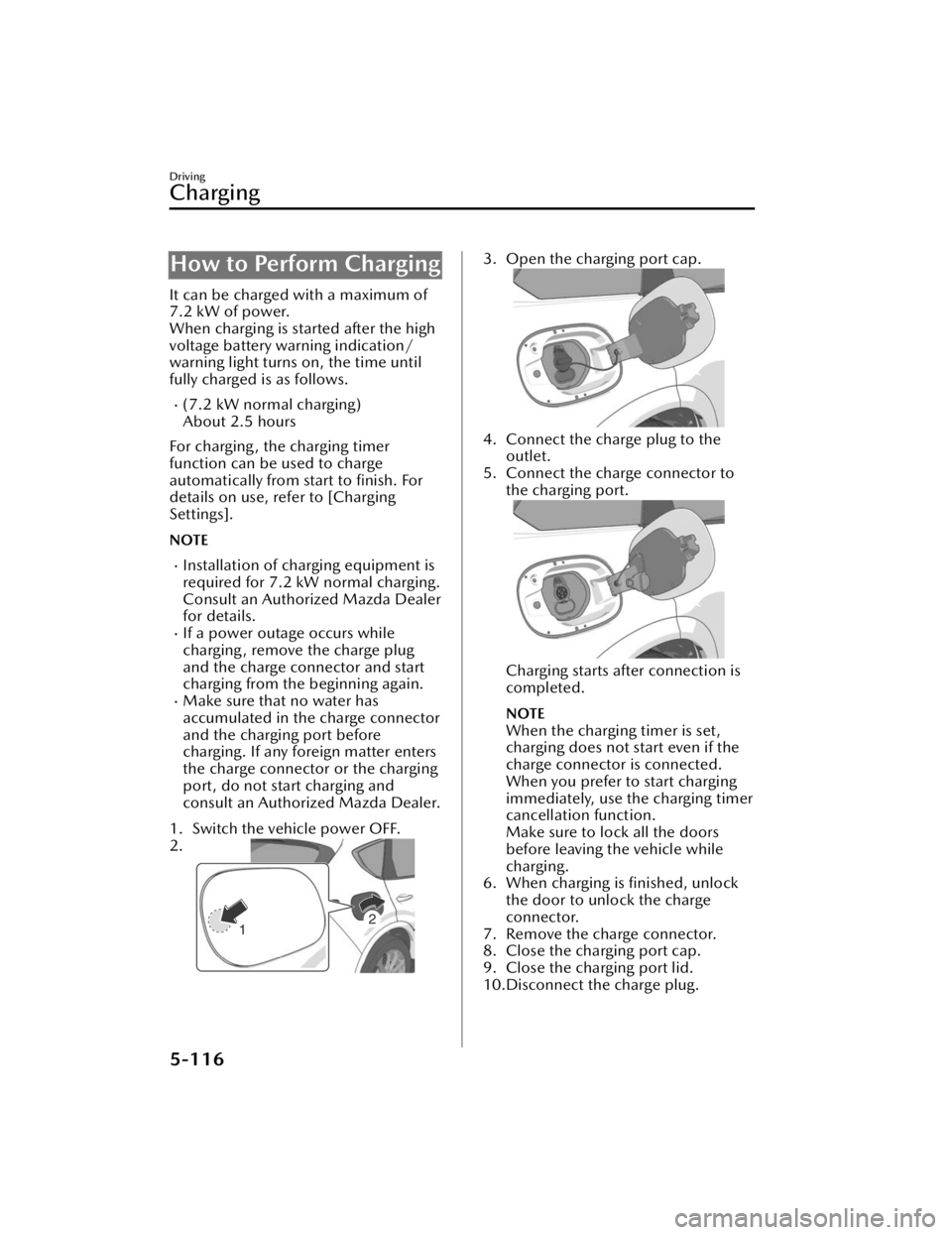
1. Switch the vehicle power OFF.
2.
3. Open the charging port cap.
4. Connect the charge plug to the outlet.
5. Connect the charge connector to the charging port.
Charging starts after connection is
completed.
NOTE
When the charging timer is set,
charging does not start even if the
charge connector is connected.
When you prefer to start charging
immediately, use the charging timer
cancellation function.
Make sure to lock all the doors
before leaving the vehicle while
charging.
6. When charging is finished, unlock the door to unlock the charge
connector.
7. Remove the charge connector.
8. Close the charging port cap.
9. Close the charging port lid.
10.Disconnect the charge plug.
Driving
Charging
5-116
CX-90_8KG7-EA-22L_Edition1_new 2022-11-17 16:05:04
Page 278 of 687

Forward Sensing Camera(FSC)
*
The Forward Sensing Camera (FSC)
determines the conditions ahead of
the vehicle and detects the white
(yellow) lines on the traffic lane.
1. Forward Sensing Camera (FSC)
The following systems utilize the
Forward Sensing Camera (FSC).
High Beam Control System (HBC)Lane Departure Warning System
(LDWS)
Traffic Sign Recognition System (TSR)Distance & Speed Alert (DSA)Driver Attention Alert (DAA)Mazda Radar Cruise Control
(MRCC)
Cruising & Traffic Support (CTS)Lane-keep Assist System (LAS)Emergency Lane Keeping (ELK)Smart Brake Support (SBS) forward
drive detection
WARNING
Do not modify the suspension:
If the vehicle height or inclination is
changed, the system will not be able to
correctly detect vehicles ahead. This
will result in the system not operating
normally or mistakenly operating,
which could cause a serious accident.
CAUTION
Heed the following cautions to operate
the system correctly.
Do not hit or apply strong force to
the Forward Sensing Camera (FSC)
or the area around it. If the Forward
Sensing Camera (FSC) received a
strong impact, stop using the
following systems and consult an
Authorized Mazda Dealer.
High Beam Control System (HBC)
Lane Departure Warning System
(LDWS)
Traffic Sign Recognition System
(TSR)
Distance & Speed Alert (DSA)
Driver Attention Alert (DAA)
Mazda Radar Cruise Control
(MRCC)
Cruising & Traffic Support (CTS)
Lane-keep Assist System (LAS)
Emergency Lane Keeping (ELK)
Smart Brake Support (SBS) forward
drive detection
Do not remove the Forward Sensing
Camera (FSC) cover.
Be careful not to scratch the Forward
Sensing Camera (FSC) lens or allow
it to get dirty. Also, do not take the
camera apart. Otherwise, it may
cause a malfunction or
mis-operation.
The direction of the Forward Sensing
Camera (FSC) has been
finely
adjusted, therefore do not change
the installation position or remove
the Forward Sensing Camera (FSC).
Otherwise, it may cause a
malfunction or mis-operation.
Consult an Authorized Mazda Dealer
regarding cleaning of the camera
lens.
Do not place objects on the
dashboard which
reflect light.
Driving
Forward Sensing Camera (FSC)
*Some models.5-127
CX-90_8KG7-EA-22L_Edition1_new
2022-11-17 16:05:04
Page 280 of 687

When the Forward Sensing Camera
(FSC) detects that the windshield is
dirty or foggy, the functions related
to the Forward Sensing Camera
(FSC) are temporarily stopped. In
this case, the following warning
indications turn on. However, this
does not indicate a problem.
Remove the dirt from the windshield
or press the windshield defroster
switch.
HBC warning indicationi-ACTIVSENSE warning indicationSBS OFF indication
Detection of pedestrians
The Forward Sensing Camera (FSC)
detects pedestrians when all of the
following conditions are met.
The height of a pedestrian is about 1
to 2 meters.
The outline of a pedestrian is
recognized such as the head, both
shoulders, or the feet.
The Forward Sensing Camera (FSC)
may not be able to detect pedestrians
when any of the following conditions is
met.
There are multiple pedestrians.A pedestrian is close to a separate
object.
A pedestrian is crouching , lying, or
slouching.
A pedestrian suddenly jumps into
the road.
A pedestrian is holding something
(such as an open umbrella or large
baggage).
A pedestrian blends into the
background (such as in a dark
location at night or by wearing
clothes matching the background
color).
Detection of objects
When any of the following conditions
is met, the Forward Sensing Camera
(FSC) may not be able to detect target
objects correctly, and each system may
not operate normally.
You are driving your vehicle at the
same speed as the vehicle ahead.
The headlights of your vehicle are not
turned on during the night or in a
tunnel.
The target object is in the blind spot
of the Forward Sensing Camera
(FSC).
A person or object bursts onto the
road from the shoulder or cuts right
in front of you.
The distance between your vehicle
and the target object is extremely
close or extremely far.
You change the course and approach
a target object.
The target object (vehicle ahead,
white line (yellow line), sign) is dirty
or worn.
A vehicle ahead has a special shape
(such as a vehicle carrier).
A vehicle ahead is a truck with a low
loading platform.
A vehicle ahead has an extremely
low or high profile.
A vehicle ahead is outside the
illumination range of the headlights.
The illumination area of the taillights
of the vehicle ahead is small.
The taillights of a vehicle ahead are
dim or turned off.
The headlights of an on-coming
vehicle are dim or turned off.
Under bad weather conditions (rain,
fog , and snow).
Front visibility is reduced (due to a
vehicle ahead casting off water,
snow, or sand).
Driving
Forward Sensing Camera (FSC)
5-129
CX-90_8KG7-EA-22L_Edition1_new 2022-11-17 16:05:04
Page 292 of 687

Warnings and Cautions
for Using the High Beam Control System (HBC)
CAUTION
Heed the following cautions so that
the HBC can operate normally.
Do not modify the suspensions.
Do not modify the headlight units.
Do not remove the Forward
Sensing Camera (FSC).
Do not rely completely on the system
and switch the headlights between
the high and low beams manually if
necessary.
Driving
High Beam Control System (HBC)
5-141
CX-90_8KG7-EA-22L_Edition1_new 2022-11-17 16:05:04
Page 297 of 687

Blind Spot Monitoring(BSM)
*
The BSM is a system that assists the
driver in checking for vehicles at your
rear when making a lane change.
When a vehicle approaching from the
rear is detected, various screen displays
and warning sounds no tify the driver of
the danger.
With Vehicle Exit Warning*
The vehicle exit warning is a system
that assists the driver in checking the
rear of the vehicle when exiting the
vehicle. When a vehicle or bicycle
approaching from the rear is detected,
various screen displays and warning
sounds notify the driver of the danger.
Warnings and Cautions
for Using the Blind Spot Monitoring (BSM)
WARNING
Always check the surrounding area
visually before making a lane change.
The BSM is a system to assist the driver
in checking the area to the rear of the
vehicle when making a lane change.
Due to certain limitations with the
operation of system, the BSM warning
lights may not flash or it might be
delayed even though a vehicle is in an
adjacent lane. Always make it your
responsibility as a driver to check the
rear.
Always check the surrounding area
visually when getting out of the
vehicle.
The vehicle exit warning is a system
that assists the driver in checking the
area to the rear of the vehicle when
exiting the vehicle. Due to certain
limitations with the operation of
system, the BSM warning lights may
not flash or it might be delayed even
though a vehicle is in the area around
your vehicle. Always make it your
responsibility as a driver to check the
rear.
Driving
Blind Spot Monitoring (BSM)
5-146*Some models.
CX-90_8KG7-EA-22L_Edition1_new 2022-11-17 16:05:04
Page 298 of 687

How to Use the Blind
Spot Monitoring (BSM)
When the BSM operates
The BSM operates when all of the
following conditions are met.
The vehicle speed is about 10 km/h
(6.2 mph) or faster.
The system detects an approaching
vehicle.
When the BSM operates, the driver is
notified of the presence of an
approaching vehicle using the BSM
warning lights and a screen display
(white)
*1.
BSM warning light
Instrument cluster
Active driving display
*1 The instrument cluster screen display (white)
is displayed only when the instrument
cluster is set to the i-ACTIVSENSE display.
When the turn signal lever is operated
in the direction in which an
approaching vehicle is detected, the
driver is notified of the danger by
flashing of the BSM warning lights, the
warning sound, and the warning
indication (amber).
BSM warning light
Instrument cluster
Driving
Blind Spot Monitoring (BSM)
5-147
CX-90_8KG7-EA-22L_Edition1_new 2022-11-17 16:05:04
Page 299 of 687

Active driving display
NOTE
The BSM may not operate normally if
any of the following conditions is
met.
The rear side radar sensors cannot
detect an object.
Refer to Radar Sensors on page
5-131.
The road is on a steep slope.The road is extremely wide.You make a lane change 2 lanes or
more.
The BSM may operate when turning
at intersections in urban areas or
with stationary objects on the road
or the roadside (such as guardrails,
sidewalls, and parked vehicles).
If a Mazda genuine trailer hitch is
used, the BSM is automatically
turned off when the trailer's
electrical connector is connected.
When pulling a trailer other than
with a Mazda genuine trailer hitch,
or while an accessory such as a
bicycle carrier is installed to the rear
of the vehicle, turn off the BSM.
Otherwise, the radar’s radio waves
will be blocked causing the BSM to
not operate normally.
The brightness of the BSM warning
lights is linked to the panel light
control.
Refer to Dashboard Illumination on
page 5-35.
When the Vehicle Exit Warning
operates*
The Vehicle Exit Warning operates
when all of the following conditions
are met.
The vehicle is stopped.Within 3 minutes after the vehicle
power is switched OFF or the vehicle
power is switched ON.
The system detects an approaching
vehicle.
When the Vehicle Exit Warning
operates, the driver is notified of the
presence of an approaching vehicle
using the warning lights and the
instrument cluster screen display
(white)
*1.
BSM warning light
Instrument cluster
*1 The instrument cluster screen display (white)
is displayed only when the instrument
cluster is set to the i-ACTIVSENSE display.
However, when the vehicle power is OFF,
Driving
Blind Spot Monitoring (BSM)
5-148*Some models.
CX-90_8KG7-EA-22L_Edition1_new 2022-11-17 16:05:04
Page 300 of 687

the instrument cluster screen display (white)
is not displayed.
In addition, when the door in the
direction in which an approaching
vehicle is detected is opened, the
driver is notified of the danger by
flashing of the warning lights, the
warning sound, and the instrument
cluster warning indication (amber).
BSM warning light
Instrument cluster
NOTE
The Vehicle Exit Warning may not
operate normally if any of the
following conditions is met.
The rear side radar sensors cannot
detect an object.
Refer to Radar Sensors on page
5-131.
There is a parked vehicle near your
vehicle.
Moving objects are slow.The Vehicle Exit Warning is not
automatically turned off even if a
Mazda genuine trailer hitch is used.
If a trailer is towed or a bicycle
carrier is attached to the rear of the
vehicle, the radar signal may be
blocked and the Vehicle Exit Warning
may not operate correctly.
The Vehicle Exit Warning may
operate with stationary objects on
the road or the roadside (such as
guardrails, sidewalls, and parked
vehicles).
The brightness of the BSM warning
lights is linked to the panel light
control.
Refer to Dashboard Illumination on
page 5-35.
Tu r n i n g off the BSM and the Vehicle
Exit Warning
There are 2 ways to turn off the BSM
and the Vehicle Exit Warning.
Tu r n
off the BSM and the Vehicle Exit
Warning using Mazda Connect.
Refer to the Settings section in the
Mazda Connect Owner's Manual.
Tu r n off the BSM and the Vehicle Exit
Warning using the i-ACTIVSENSE
OFF switch.
Refer to How to Use the
i-ACTIVSENSE OFF switch on page
5-126.
Driving
Blind Spot Monitoring (BSM)
5-149
CX-90_8KG7-EA-22L_Edition1_new 2022-11-17 16:05:04