radio MAZDA CX90 2024 Owners Manual
[x] Cancel search | Manufacturer: MAZDA, Model Year: 2024, Model line: CX90, Model: MAZDA CX90 2024Pages: 687, PDF Size: 15.46 MB
Page 111 of 687

Key
All doors, fuel-filler lid/charging port
lid, and the liftgate can be locked/
unlocked by pressing the key switch.
The key must be carried by the driver.
Key Code Number Plate
An auxiliary key can be ordered based
on the key code number printed on
the key code number plate at an
Authorized Mazda Dealer.
Store the key code number plate in a
safe place (not in the vehicle).
Do not divulge the key number to
others.
Warnings and Cautionsfor Using the Key
WARNING
Do not leave the key in your vehicle
with children and keep them in a
place where your children will not
find or play with them.
Leaving children in a vehicle with the
key is dangerous. This could result in
someone being badly injured or even
killed. Children may find these keys to
be an interesting toy to play with and
could cause the power windows or
other controls to operate, or even
make the vehicle move.
CAUTION
Radio equipment like this is
governed by laws in the United
States.
Changes or modifications not
expressly approved by the party
responsible for compliance could
void the user's authority to operate
the equipment.
Because the key (transmitter) uses
low-intensity radio waves, it may not
function correctly under the
following conditions:
The key (transmitter) is carried with
communication devices such as
cellular phones.
The key (transmitter) contacts or is
covered by a metal object.
The key (transmitter) is near
electronic devices such as personal
computers.
Non-Mazda genuine electronic
equipment is installed in the
vehicle.
Opening/closing
Key
4-4
CX-90_8KG7-EA-22L_Edition1_new 2022-11-17 16:05:04
Page 112 of 687
There is equipment which
discharges radio waves near the
vehicle.
The key (transmitter) may consume
battery power excessively if it
receives high-intensity radio waves.
Do not place the key (transmitter)
near electronic devices such as
televisions or personal computers.
To avoid damage to the key
(transmitter), DO NOT:
Drop the key (transmitter).
Get the key (transmitter) wet.
Disassemble the key (transmitter).
Expose the key (transmitter) to
high temperatures on places such
as the dashboard, under direct
sunlight.
Expose the key (transmitter) to any
kind of magnetic
field.
Place heavy objects on the key
(transmitter).
Put the key (transmitter) in an
ultrasonic cleaner.
Put any magnetized objects close
to the key (transmitter).How to Use the Key
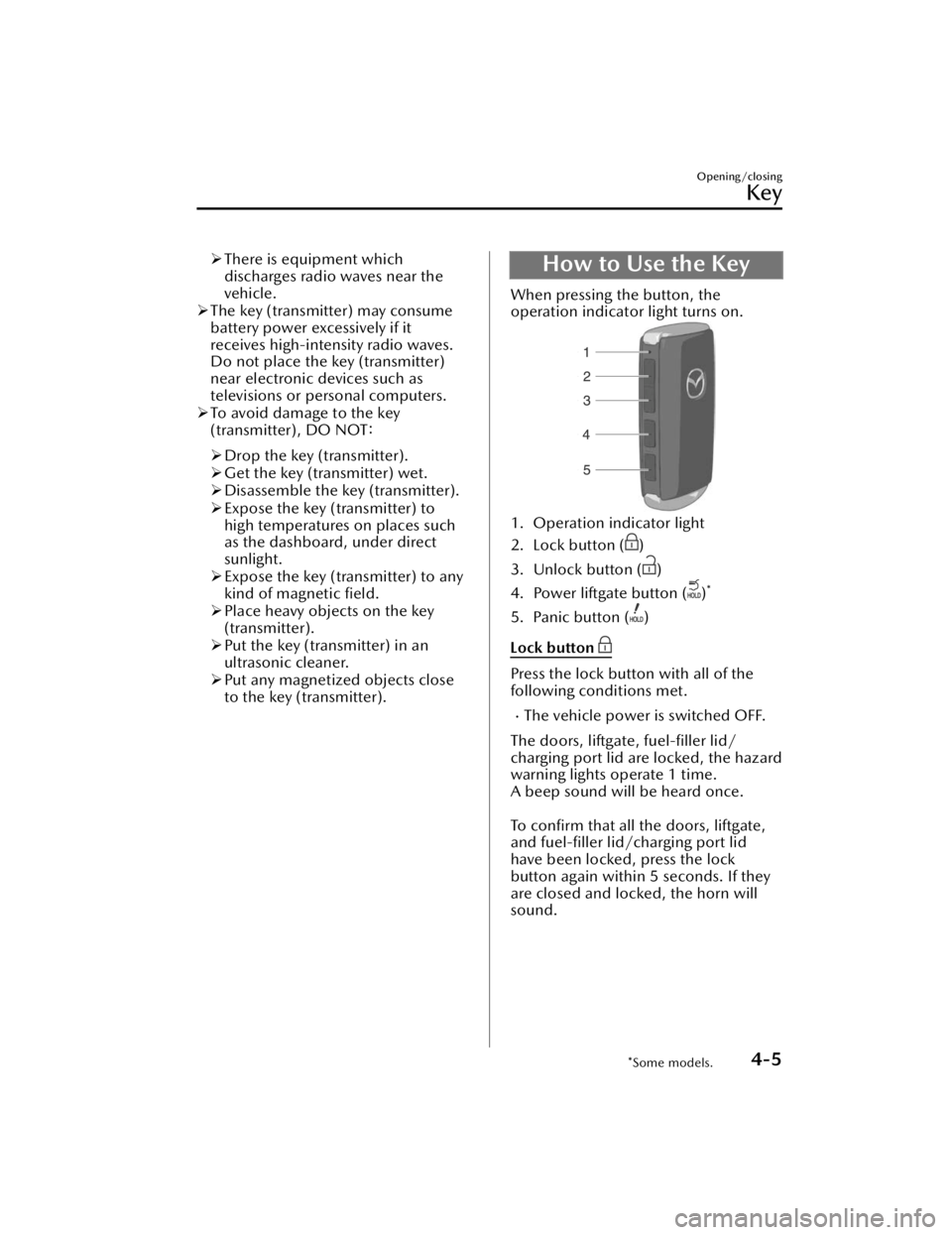
When pressing the button, the
operation indicator light turns on.
1. Operation indicator light
2. Lock button (
)
3. Unlock button (
)
4. Power liftgate button (
)*
5. Panic button ()
Lock button
Press the lock button with all of the
following conditions met.
The vehicle power is switched OFF.
The doors, liftgate, fuel-filler lid/
charging port lid are locked, the hazard
warning lights operate 1 time.
A beep sound will be heard once.
To confirm that all the doors, liftgate,
and fuel-filler lid/charging port lid
have been locked, press the lock
button again within 5 seconds. If they
are closed and locked, the horn will
sound.
Opening/closing
Key
*Some models.4-5
CX-90_8KG7-EA-22L_Edition1_new 2022-11-17 16:05:04
Page 116 of 687

Advanced Keyless EntrySystem
*
The advanced keyless function allows
you to lock/unlock the door, liftgate,
and fuel-filler lid/charging port lid, or
open the liftgate starting the hybrid
system while carrying the key.
Warnings and Cautions
for Using the Advanced
Keyless Entry System
WARNING
Radio waves from the key may affect
medical devices such as pacemakers.
Before using the key near people who
use medical devices, ask the medical
device manufacturer or your physician
if radio waves from the key will affect
the device.
Opening/closing
Advanced Keyless Entry System
*Some models.4-9
CX-90_8KG7-EA-22L_Edition1_new 2022-11-17 16:05:04
Page 117 of 687

How to Use the
Advanced Keyless Entry System
The system operates only when the
driver is in the vehicle or within
operational range while the key is
being carried (Except during power
saving function operation).
NOTE
The advanced keyless entry system
functions can be deactivated to
prevent any possible adverse effect
on a user wearing a pacemaker or
other medical device. If the system is
deactivated, you will be unable to
start the hybrid system by carrying
the key. Consult an Authorized
Mazda Dealer for details. If the
advanced keyless entry system has
been deactivated, you can start the
hybrid system by following the
procedure indicated when the key
battery goes dead.
Refer to Starting the hybrid system
with a dead key battery on page
8-9.
When the battery power is low, or in
places where there are high-intensity
radio waves or noise, the operational
range may become narrower or the
system may not operate.
Locking/Unlocking Using Touch
Sensor
1. Exterior antenna
2. 80 cm (31 in)
3. Operational range
NOTE
The system may not operate if you
are too close to the windows or door
handles, or liftgate.
If the key is left in the following areas
and you leave the vehicle, the doors
may be locked depending on the
radio wave conditions even if the key
is left in the vehicle.
Around the dashboardIn the storage compartments such
as the glove compartment or the
center console
Next to a communication device
such as a mobile phone
Locking Using Door-Lock Switch/
Unlocking Using Electric Liftgate
Opener
1. Exterior antenna
2. 80 cm (31 in)
3. Operational range
Opening/closing
Advanced Keyless Entry System
4-10
CX-90_8KG7-EA-22L_Edition1_new 2022-11-17 16:05:04
Page 131 of 687

Your foot remains placed within
the detection area.
You move your foot left and right
within the detection area.
The kicking motion is too fast or
too slow.
Your foot contacts the rear bumper
when doing the kicking motion.
You are wearing shoes such as
rubber boots which do not
conduct electricity well.
There is equipment emitting strong
radio waves near the vehicle.
The detection area of the
hands-free sensor is dirty.
When the detection area of the
hands-free sensor is dirty, wipe it off
with a clean cloth. Before cleaning
the sensor, place the key outside of
its operation range or turn off the
hands-free function using Mazda
Connect.
If the operation using the hands-free
sensor is not possible even though
the operation conditions are met,
consult an Authorized Mazda Dealer.
Hands-free function ON/OFF
switching
The hands-free function can be
switched on/off.
Refer to Mazda Connect Owner's
Manual or consult an Authorized
Mazda Dealer.
To prevent an unintended operation,
turn off the function.
Stopping the liftgate
If any of the following operations is
done, the automatic opening and
closing of the liftgate stops.
The liftgate open/close switch on the
key is pressed.
The power liftgate switch is pressed.The electric liftgate opener is
pressed.
The power liftgate close switch is
pressed.
The door-lock switch on the liftgate
is pressed.
The kicking motion is done.
NOTE
The liftgate cannot be stopped when it
is half open or lower. It moves in the
close direction by the load weight of
the liftgate itself.
The automatic opening/closing of the
liftgate can be stopped using the
kicking motion even if you do not have
the key.
Moving the liftgate again
If any of the following operations is
done, the liftgate moves in the
direction opposite to the direction it
was moving before it stopped.
The liftgate open/close switch on the
key is pressed for 1 second or longer.
The power liftgate switch is pressed
for about 1 second or longer.
The electric liftgate opener is
pressed.
The power liftgate close switch is
pressed.
When the door-lock switch on the
liftgate is pressed, the liftgate
automatically fully closes.
Opening/closing
Liftgate
4-24
CX-90_8KG7-EA-22L_Edition1_new 2022-11-17 16:05:04
Page 145 of 687

Immobilizer System
The immobilizer system allows the
hybrid system to start only with a key
the system recognizes.
NOTE
The keys carry a unique electronic
code. For this reason, and to assure
your safety, obtaining a replacement
key requires security validation, this
will add some delays in supplying a
replacement key. They are only
available through an Authorized
Mazda Dealer.
Always keep a spare key in case one
is lost. If a key is lost, consult an
Authorized Mazda Dealeras soon as
possible.
If you lose a key, an Authorized
Mazda Dealer will reset the
electronic codes of your remaining
keys and immobilizer system. Bring
all the remaining keys to an
Authorized Mazda Dealerto reset.
Warnings and Cautions
for Using the Immobilizer System
CAUTION
Radio equipment like this is
governed by laws in the United
States.
Changes or modifications not
expressly approved by the party
responsible for compliance could
void the user's authority to operate
the equipment.
To avoid damage to the key, do not:
Drop the key.
Get the key wet.
Expose the key to any kind of
magnetic field.
Expose the key to high
temperatures on places such as the
dashboard, under direct sunlight.
If the hybrid system does not start
with the correct key, and the security
indicator light keeps illuminating or
flashing , the system may have a
malfunction. Consult an Authorized
Mazda Dealer.
Opening/closing
Security System
4-38
CX-90_8KG7-EA-22L_Edition1_new 2022-11-17 16:05:04
Page 146 of 687

How to Use the
Immobilizer System
NOTE
The hybrid system may not start and
security indicator light may illuminate
or flash if the key is placed in an area
where it is difficult for the system to
detect the signal, such as on the
dashboard or in the glove
compartment. Move the key to a
location within the signal range,
switch the vehicle power off, and
then restart the hybrid system.
Signals from a TV or radio station, or
from a transceiver or mobile
telephone could interfere with your
immobilizer system. If you are using
the proper key and the hybrid system
fails to start, check the security
indicator light.
Arming
The system is armed when the vehicle
power is switched from ON to off.
The security indicator light
in the
instrument cluster flashes every 2
seconds until the system is disarmed.
Disarming
The system is disarmed when the
vehicle power is switched ON with the
correct programmed key. The security
indicator light
illuminates for
about 3 seconds and then turns off.
If the hybrid system does not start with
the correct key, and the security
indicator light remains illuminated or
flashing , try the following:
Make sure the key is within the
operat ional range for signal
transmission. Switch the vehicle power
off, and then restart the hybrid system.
If the hybrid system does not start after
3 or more tries, contact an Authorized
Mazda Dealer.
Opening/closing
Security System
4-39
CX-90_8KG7-EA-22L_Edition1_new 2022-11-17 16:05:04
Page 164 of 687

Powe r Sw i tc h
Press the power switch to start/stop
the hybrid system or to switch the
vehicle power position (OFF/ACC/
ON).
Vehicle power position
OFF
All electrical accessories cannot be
used.
ACC
Some electrical accessories such as
audio can be used.
ON
All electrical accessories can be used.
Warning and Cautions forUsing the Power Switch
WARNING
Before leaving the driver's seat,
always switch the vehicle power off,
set the parking brake, and make sure
the selector lever is in the P position.
Leaving the driver's seat without
switching the vehicle power off, setting
the parking brake, and shifting the
selector lever to the P position is
dangerous. Unexpected vehicle
movement could occur which could
result in an accident. In addition, if
your intention is to leave the vehicle for
even a short period, it is important to
switch the vehicle power position to
OFF, as leaving it in another position
will disable some of the vehicle's
security systems and run the lead-acid
battery down.
Radio waves from the key may affect
medical devices such as pacemakers.
Before using the key near people who
use medical devices, ask the medical
device manufacturer or your physician
if radio waves from the key will affect
the device.
Other than for an emergency
situation, do not attempt to stop the
hybrid system while driving the
vehicle.
If the hybrid system is stopped while
driving the vehicle, loss of brake power
and power steering functions could
occur, making it difficult to control the
vehicle which could result in an
accident.
Driving
Po we r Sw i tc h
5-13
CX-90_8KG7-EA-22L_Edition1_new 2022-11-17 16:05:04
Page 251 of 687

Tire Pressure MonitoringSystem (TPMS)
The TPMS monitors the air pressure of
each tire and informs the driver of a
decrease in the tire air pressure when it
becomes lower than the specified air
pressure.
For the TPMS, the air pressure data
sent from the tire pressure sensors
installed on each wheel via radio signal
is received by the receiver unit in the
vehicle to monitor the tire pressures.
1. Tire pressure sensor
Warning and Cautions forUsing the Tire Pressure Monitoring System
(TPMS)
WARNING
Do not drive the vehicle at high
speeds if the TPMS warning light
is
turned on or flashing.
Driving the vehicle at high speeds
while the TPMS warning light is turned
on or flashing is dangerous because
the brake performance and the
steering wheel operability will be
reduced. If the vehicle is driven at high
speeds or the brakes are suddenly
applied, it could lead to an accident.
Gradually apply the brake and reduce
the vehicle speed.
Do not ignore the TPMS warning light
when it is turned on or flashing.
Continuing to driv e the vehicle while
ignoring the illumi nation/flashing of
the TPMS warning light is dangerous
because a tire may burst which could
lead to an accident. Take appropriate
measures as soon as possible.
Driving
Tire Pressure Monitoring System (TPMS)
5-100
CX-90_8KG7-EA-22L_Edition1_new 2022-11-17 16:05:04
Page 282 of 687

Radar Sensors*
The radar sensor detects objects by
sending radio waves in a specific
direction and receiving the reflected
waves back.
Ve h i c l e f ro n t
1. Front radar sensor*
2. Front side radar sensors*
Ve h i c l e rea r
1. Rear side radar sensors*
CAUTION
Heed the following cautions so that
the radar sensors can function
normally.
Do not modify the suspensions.
Always use tires of the specified
size and the same manufacturer,
brand, and tread pattern on all 4
wheels. In addition, do not use
tires with significantly different
wear patterns or tire pressures on
the same vehicle (including
temporary spare tire).
Do not spray highly pressurized
water against the radar sensors or
rub them strongly.
Do not apply stickers on parts near
the radar sensors.
If foreign matter adheres to parts
near the radar sensors, remove it
and switch the vehicle power OFF.
The foreign matter detection status
is reset by switching the vehicle
power OFF.
Consult an Authorized Mazda
Dealer if you need to repair,
replace, or paint parts near the
radar sensors.
Do not install any parts that cover
the front of the radar sensors.
Do not replace the radiator grille
and emblem with anything other
than genuine products.
If strong force is applied to parts near
the radar sensors, the direction of
the radar sensor may become
deviated and each system may not
operate normally. Stop each system
immediately and have the vehicle
inspected by an Authorized Mazda
Dealer.
NOTE
The radar sensors include a function
for detecting abnormalities in the
sensor, soiling of the sensor’s front
surface, and informing the driver. If a
message appears on the screen that
can be addressed, follow the
directions of the message.
Front radar sensor
The following systems utilize the front
radar sensor.
Distance & Speed Alert (DSA)Mazda Radar Cruise Control
(MRCC)
Cruising & Traffic Support (CTS)
Driving
Radar Sensors
*Some models.5-131
CX-90_8KG7-EA-22L_Edition1_new 2022-11-17 16:05:04