Page 1 MAZDA MAZDA 2021 Service Manual
[x] Cancel search | Manufacturer: MAZDA, Model Year: 2021, Model line: MAZDA, Model: MAZDA MAZDA 2021Pages: 612, PDF Size: 11.91 MB
Page 93 of 612
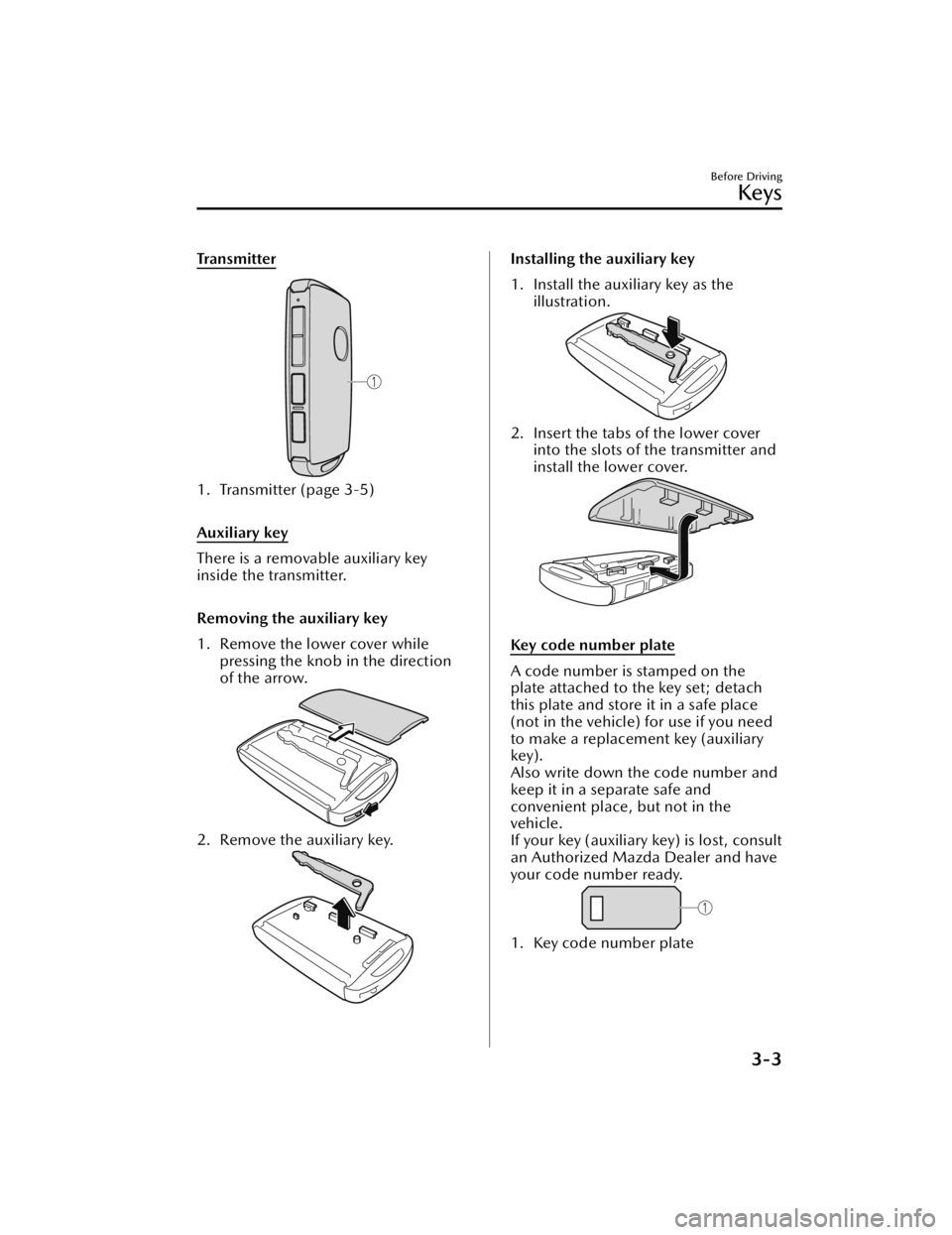
Tra n s m i t t e r
1. Transmitter (page 3-5)
Auxiliary key
There is a removable auxiliary key
inside the transmitter.
Removing the auxiliary key
1. Remove the lower cover whilepressing the knob in the direction
of the arrow.
2. Remove the auxiliary key.
Installing the auxiliary key
1. Install the auxiliary key as the
illustration.
2. Insert the tabs of the lower coverinto the slots of the transmitter and
install the lower cover.
Key code number plate
A code number is stamped on the
plate attached to the key set; detach
this plate and store it in a safe place
(not in the vehicle) for use if you need
to make a replacement key (auxiliary
key).
Also write down the code number and
keep it in a separate safe and
convenient place, but not in the
vehicle.
If your key (auxiliary key) is lost, consult
an Authorized Mazda Dealer and have
your code number ready.
1. Key code number plate
Before Driving
Keys
3-3
Mazda3_8JM2-EA-20H_Edition2_new 2020-8-19 13:13:07
Page 94 of 612

Keyless Entry System
▼Keyless Entry System
This system uses the key buttons to
remotely lock and unlock the doors,
liftgate, and fuel-filler lid, and opens
the trunk lid.
The system can start the engine
without having to take the key out of
your purse or pocket.
It can also help you signal for attention
or help.
Operating the theft-deterrent system is
also possible on theft-deterrent
system-equipped vehicles.
System malfunctions or warnings are
indicated by the following warning
lights or beeps.
Check the displayed message for more
information and, if necessary, have the
vehicle inspected at an Authorized
Mazda Dealer, according to the
indication.
KEY Warning Indication/Warning
Light (Red)
Refer to KEY Warning Indication/
Warning Light (Red) on page 7-33.
Ignition Not Switched Off (STOP)
Warning Beep
Refer to Ignition Not Switched
Off
(STOP) Warning Beep on page
7-43.
Key Removed from Vehicle Warning
Beep
Refer to Key Removed from Vehicle
Warning Beep on page 7-43.
If you have a problem with the key,
consult an Authorized Mazda Dealer.
If your key is lost or stolen, consult an
Authorized Mazda Dealer as soon as
possible for a replacement and to
make the lost or stolen key inoperative.
CAUTION
Radio equipment like this is governed
by laws in the United States.
Changes or modifications not expressly
approved by the party responsible for
compliance could void the user's
authority to operate the equipment.
NOTE
The keyless entry system operation
may vary due to local conditions.
The keyless entry system is fully
operational when the ignition is
switched off. The system does not
operate if the ignition is switched to
any position other than off.
If the key does not operate when
pressing a button or the operational
range becomes too small, the battery
may be weak. To install a new
battery, refer to Key Battery
Replacement (page 6-31).
Battery life is about 1 year. Replace
the battery with a new one if the
messages are displayed in the
instrument cluster. Replacing the
battery about once a year is
recommended because the KEY
warning indication may not display
depending on the rate of battery
depletion.
Additional keys can be obtained at
an Authorized Mazda Dealer. Up to
6 keys can be used with the keyless
functions per vehicle. Bring all keys
to an Authorized Mazda Dealer
when additional keys are required.
Before Driving
Keys
3-4
Mazda3_8JM2-EA-20H_Edition2_new 2020-8-19 13:13:07
Page 95 of 612
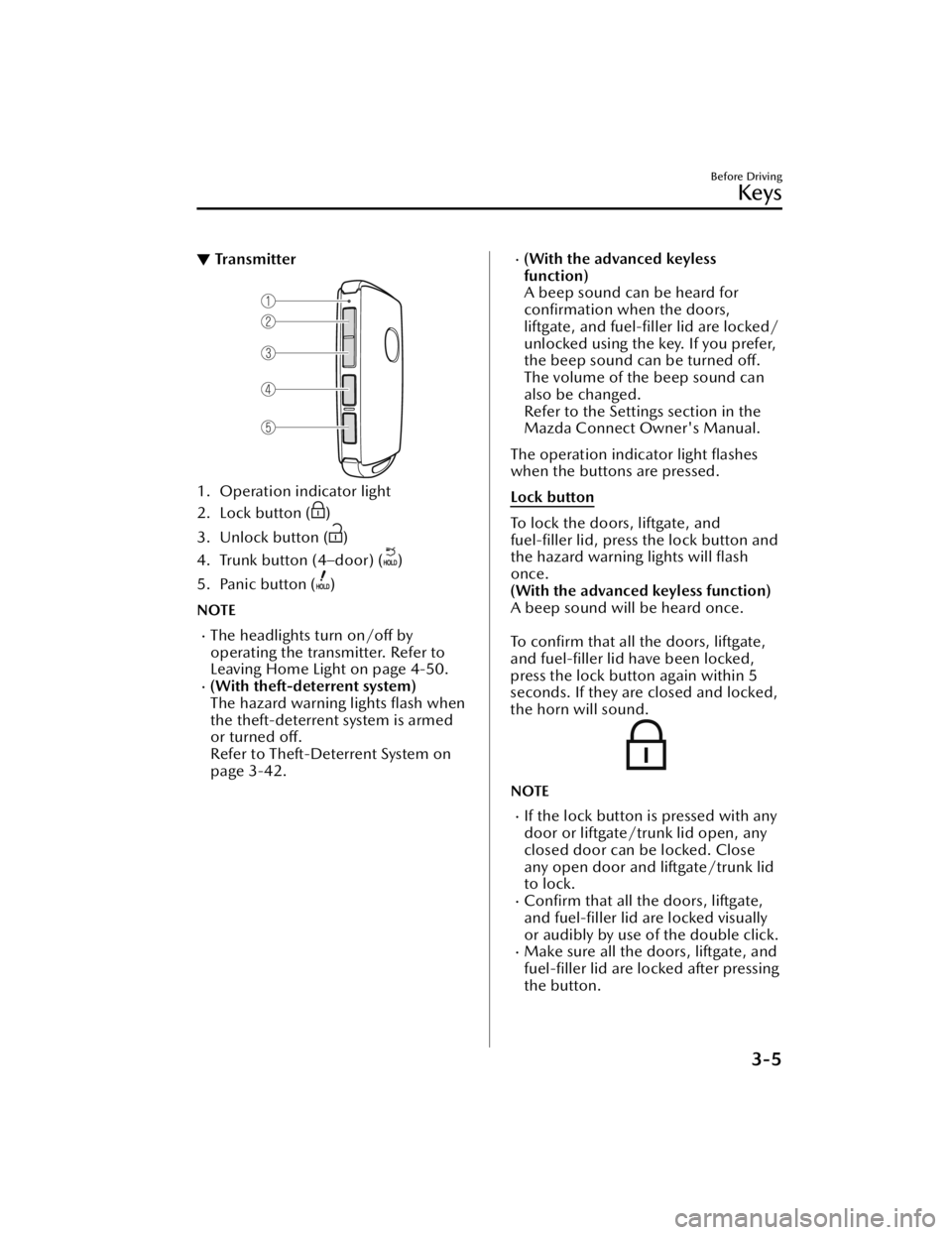
▼Transmitter
1. Operation indicator light
2. Lock button (
)
3. Unlock button (
)
4. Trunk button (4–door) (
)
5. Panic button (
)
NOTE
The headlights turn on/off by
operating the transmitter. Refer to
Leaving Home Light on page 4-50.
(With theft-deterrent system)
The hazard warning lights flash when
the theft-deterrent system is armed
or turned off.
Refer to Theft-Deterrent System on
page 3-42.
(With the advanced keyless
function)
A beep sound can be heard for
confirmation when the doors,
liftgate, and fuel-filler lid are locked/
unlocked using the key. If you prefer,
the beep sound can be turned off.
The volume of the beep sound can
also be changed.
Refer to the Settings section in the
Mazda Connect Owner's Manual.
The operation indicator light flashes
when the buttons are pressed.
Lock button
To lock the doors, liftgate, and
fuel-filler lid, press the lock button and
the hazard warning lights will flash
once.
(With the advanced keyless function)
A beep sound will be heard once.
To confirm that all the doors, liftgate,
and fuel-filler lid have been locked,
press the lock button again within 5
seconds. If they are closed and locked,
the horn will sound.
NOTE
If the lock button is pressed with any
door or liftgate/trunk lid open, any
closed door can be locked. Close
any open door and liftgate/trunk lid
to lock.
Confirm that all the doors, liftgate,
and fuel-filler lid are locked visually
or audibly by use of the double click.
Make sure all the doors, liftgate, and fuel-filler lid are locked after pressing
the button.
Before Driving
Keys
3-5
Mazda3_8JM2-EA-20H_Edition2_new 2020-8-19 13:13:07
Page 99 of 612

Advanced Keyless EntrySystem
*
▼Advanced Keyless Entry System
WARNING
Radio waves from the key may affect
medical devices such as pacemakers:
Before using the key near people who
use medical devices, ask the medical
device manufacturer or your physician
if radio waves from the key will affect
the device.
The advanced keyless function allows
you to lock/unlock the door, liftgate,
and fuel-filler lid, or open the liftgate/
trunk lid while carrying the key.
System malfunctions or warnings are
indicated by the following warning
beeps.
Touch Sensor Inoperable Warning
Beep
Refer to Touch Sensor Inoperable
Warning Beep (With the advanced
keyless function) on page 7-44.
Liftgate Door-lock Switch Inoperable
Warning Beep
Refer to Liftgate Door-lock Switch
Inoperable Warning Beep (With the
advanced keyless function) on page
7-44.
Key Left-in-luggage Compartment/
Trunk Warning Beep
Refer to Key Left-in-luggage
Compartment/Trunk Warning Beep
(With the advanced keyless function)
on page 7-44.
Key Left-in-vehicle Warning Beep
Refer to Key Left-in-vehicle Warning
Beep (With the advanced keyless
function) on page 7-44.
NOTE
The advanced keyless entry system
functions can be deactivated to
prevent any possible adverse effect on
a user wearing a pacemaker or other
medical device. If the system is
deactivated, you will be unable to start
the engine by carrying the key. Consult
an Authorized Mazda Dealer for
details. If the advanced keyless entry
system has been deactivated, you can
start the engine by following the
procedure indicated when the key
battery goes dead.
Refer to Engine Start Function When
Key Battery is Dead on page 4-8.
Before Driving
Advanced Keyless Entry System
*Some models.3-9
Mazda3_8JM2-EA-20H_Edition2_new
2020-8-19 13:13:07
Page 100 of 612

Operational Range
▼Operational Range
The system operates only when the
driver is in the vehicle or within
operational range while the key is
being carried.
NOTE
When the battery power is low, or in
places where there are high-intensity
radio waves or noise, the operational
range may become narrower or the
system may not operate. For
determining battery replacement,
Refer to Keyless Entry System on page
3-4.
▼Locking/Unlocking Using Touch
Sensor
1. Exterior antenna
2. 80 cm (31 in)
3. Operational range
NOTE
The system may not operate if you
are too close to the windows or door
handles.
If the key is left in the following areas
and you leave the vehicle, the doors
may be locked depending on the
radio wave conditions even if the key
is left in the vehicle.
Around the dashboardIn the storage compartments such
as the glove compartment or the
center console
On the rear parcel shelf (4–door)Next to a communication device
such as a mobile phone
▼
Locking Using Door-Lock Switch
(5–door)/Unlocking Using Electric
Opener
1. Exterior antenna
2. 80 cm (31 in)
3. Operational range
Before Driving
Advanced Keyless Entry System
3-10
Mazda3_8JM2-EA-20H_Edition2_new
2020-8-19 13:13:07
Page 103 of 612

▼Unlocking with Auxiliary Key
Only the driver's door can be unlocked
using the auxiliary key.
Refer to Keys on page 3-2.
Insert the auxiliary key while the
driver's door handle is pulled and turn
the key to the unlock side. Turn the
auxiliary key back to its original
position before removing it.
NOTE
If you attempt to open the driver’s
door using an unauthorized auxiliary
key, the key cylinder will spin around
but the door will not unlock.
▼Locking , Unlocking with Touch
Sensor, Door Handle (With the
advanced keyless function)
By touching the sensing area of the
touch sensor, various locking/
unlocking operations can be done
without taking the key out of a bag or
pocket.
There are two types of touch sensors
used for locking and unlocking, and
each sensor is built into the outer door
handle on the driver and front
passenger's doors.
1. Sensing area of door lock touch
sensor (Depression on outer side of
door handle)
2. Sensing area of door release touch
sensor (Inner side of door handle)
NOTE
When locking/unlocking with the
transmitter carried, securely touch
the sensing area of the touch sensor
as follows.
Locking
Unlocking
The system may not operate normally
under the following conditions.
You touch the sensing area of the
door lock touch sensor and the
sensing area of the door release
touch sensor at the same time.
You touch the sensing area of the
touch sensor whil e wearing gloves.
Foreign matter such as snow or dirt
is stuck on the sensing area of the
touch sensor.
Before Driving
Doors and Locks
3-13
Mazda3_8JM2-EA-20H_Edition2_new 2020-8-19 13:13:07
Page 105 of 612

A beep sound is heard for
confirmation when the doors,
fuel-filler lid, and liftgate are locked/
unlocked using the touch sensor. If
you prefer, the beep sound can be
turned off.
The volume of the beep sound can
also be changed. Refer to the
Settings section in the Mazda
Connect Owner's Manual.
(With theft-deterrent system)
The hazard warning lights flash when
the theft-deterrent system is armed
or turned off.
Refer to Theft-Deterrent System on
page 3-42.
The setting can be changed so that
the doors, fuel-filler lid, and liftgate
are locked automatically without
touching the sensing area of the
touch sensor.
Refer to the Settings section in the
Mazda Connect Owner's Manual.
(Walk-away auto lock function)
A beep sound is heard when all
doors and the liftgate/trunk lid are
closed while the transmitter is being
carried. All the doors, fuel-filler lid,
and liftgate are locked automatically
when the transmitter is out of the
operational range. Also, the hazard
warning lights flash once. (Even if the
driver is in the operational range, all
the doors, fuel-filler lid, and liftgate
are locked automatically after about
30 seconds.) If you are out of the
operational range before the doors
and the liftgate/trunk lid are
completely closed or another
transmitter is left in the vehicle, the
walk-away auto lock function will
not work. Always make sure that all
doors and the liftgate/trunk lid are
closed and locked before leaving the
vehicle. The walk-away auto lock
function does not close the power
windows.
Before Driving
Doors and Locks
3-15
Mazda3_8JM2-EA-20H_Edition2_new2020-8-19 13:13:07
Page 106 of 612
(Auto re-lock function)
After unlocking with the touch
sensor, all the doors , fuel-filler lid,
and liftgate will automatically lock if
any of the following operations are
not performed within about 60
seconds.
Opening a door or the liftgate/
trunk lid.
Switching the ignition to any
position other than off.
If your vehicle has a theft-deterrent
system, the hazard warning lights will flash for confirmation.
The time required for the doors to
lock automatically can be changed.
Refer to the Settings section in the
Mazda Connect Owner's Manual.
▼ Locking, Unlocking with
Tra n s m i t te r
The following locations can be locked/
unlocked by operating the keyless
entry system transmitter. Refer to
Keyless Entry System (page 3-4).
All doorsFuel-filler
lidLiftgate
▼Locking, Unlocking with
Door-Lock Switch
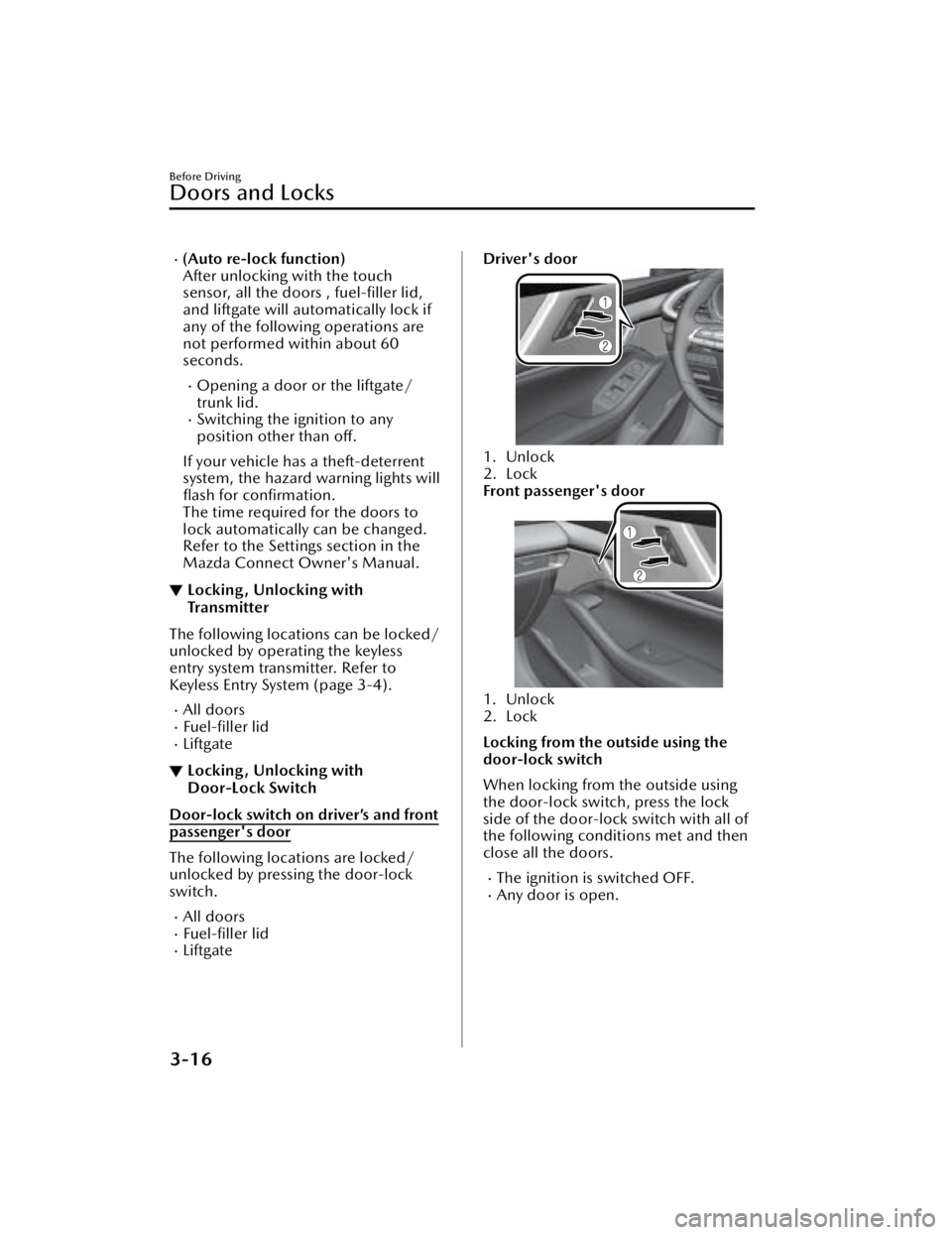
Door-lock switch on driver’s and front
passenger's door
The following locations are locked/
unlocked by pressing the door-lock
switch.
All doorsFuel-filler lidLiftgate
Driver's door
1. Unlock
2. Lock
Front passenger's door
1. Unlock
2. Lock
Locking from the outside using the
door-lock switch
When locking from the outside using
the door-lock switch, press the lock
side of the door-lock switch with all of
the following conditions met and then
close all the doors.
The ignition is switched OFF.Any door is open.
Before Driving
Doors and Locks
3-16
Mazda3_8JM2-EA-20H_Edition2_new
2020-8-19 13:13:07
Page 109 of 612

▼Rear Door Child Safety Locks
Rear doors that have been locked
using the child safety lock switched to
the lock side cannot be opened from
inside the vehicle.
For child safety, switch the child safety
lock on both rear doors to the lock
side.
When opening a rear door with the
child safety lock switched to the lock
side, pull the outer door handle with
the lock knob inside the vehicle
switched to the unlock side.
1. Auxiliary key (page 3-2)
2. Lock
3. Unlock
Liftgate/Trunk Lid
▼Liftgate/Trunk Lid
WARNING
Never allow a person to ride in the
luggage compartment/trunk:
Allowing a person to ride in the
luggage compartment/trunk is
dangerous. The person in the luggage
compartment/trunk could be seriously
injured or killed during sudden braking
or a collision.
Do not drive with the liftgate/trunk
lid open:
Exhaust gas in the cabin of a vehicle is
dangerous. An open liftgate/trunk lid
in a moving vehicle will cause exhaust
gas to be drawn into the cabin. This
gas contains CO (carbon monoxide),
which is colorless, odorless, and highly
poisonous, and it can cause loss of
consciousness and death. Moreover,
an open liftgate/trunk lid could cause
occupants to fall out in an accident.
Do not stack or leave loaded luggage
unsecured in the luggage
compartment:
Otherwise, the luggage may move or
collapse, resulting in injury or an
accident. In addition, do not load
luggage higher than the seatbacks. It
may affect the side or rear field of view.
Additionally, if the air bags deploy, the
cargo may scatter which could result in
serious injury or death.
Before Driving
Doors and Locks
3-19
Mazda3_8JM2-EA-20H_Edition2_new
2020-8-19 13:13:07
Page 111 of 612

The liftgate can be closed when the
doors are locked with the key left in
the vehicle. However, to prevent
locking the key in the vehicle, the
liftgate can be opened by pressing
the electric liftgate opener. If the
liftgate cannot be opened despite
doing this procedure, first push the
liftgate completely closed, then press
the electric liftgate opener to fully
open the liftgate.
When the liftgate latch is released by
pressing the electric liftgate opener,
the liftgate raises slightly. If the
liftgate is not operated for a certain
period of time, the liftgate cannot be
raised.
To o p e n
Press the electric liftgate opener
again.
To c l o s e
To close the liftgate from its slightly
raised position, open it first by
pressing the electric liftgate opener,
then close it after waiting at least 1
second.
If the vehicle battery is dead or there
is a malfunction in the electrical
system and the liftgate cannot be
unlocked, the liftgate can be opened
by performing the emergency
procedure.
Refer to When Liftgate/Trunk Lid
Cannot be Opened on page 7-48.
Opening the trunk lid (4–door)
Using the trunk lid release button
Push the trunk lid release button.
Using the electric trunk lid opener
(With the advanced keyless function)
A trunk lid can also be opened while
the key is being carried.
Press the electric trunk lid opener on
the trunk lid, then raise the trunk lid
when the latch releases.
NOTE
When opening the trunk lid with the
doors locked, it may require a few
seconds for the trunk lid latch to
release after the electric trunk lid
opener is pressed.
Before Driving
Doors and Locks
3-21
Mazda3_8JM2-EA-20H_Edition2_new2020-8-19 13:13:07