LTE MAZDA MAZDA 2023 Owners Manual
[x] Cancel search | Manufacturer: MAZDA, Model Year: 2023, Model line: MAZDA, Model: MAZDA MAZDA 2023Pages: 623, PDF Size: 15.08 MB
Page 56 of 623
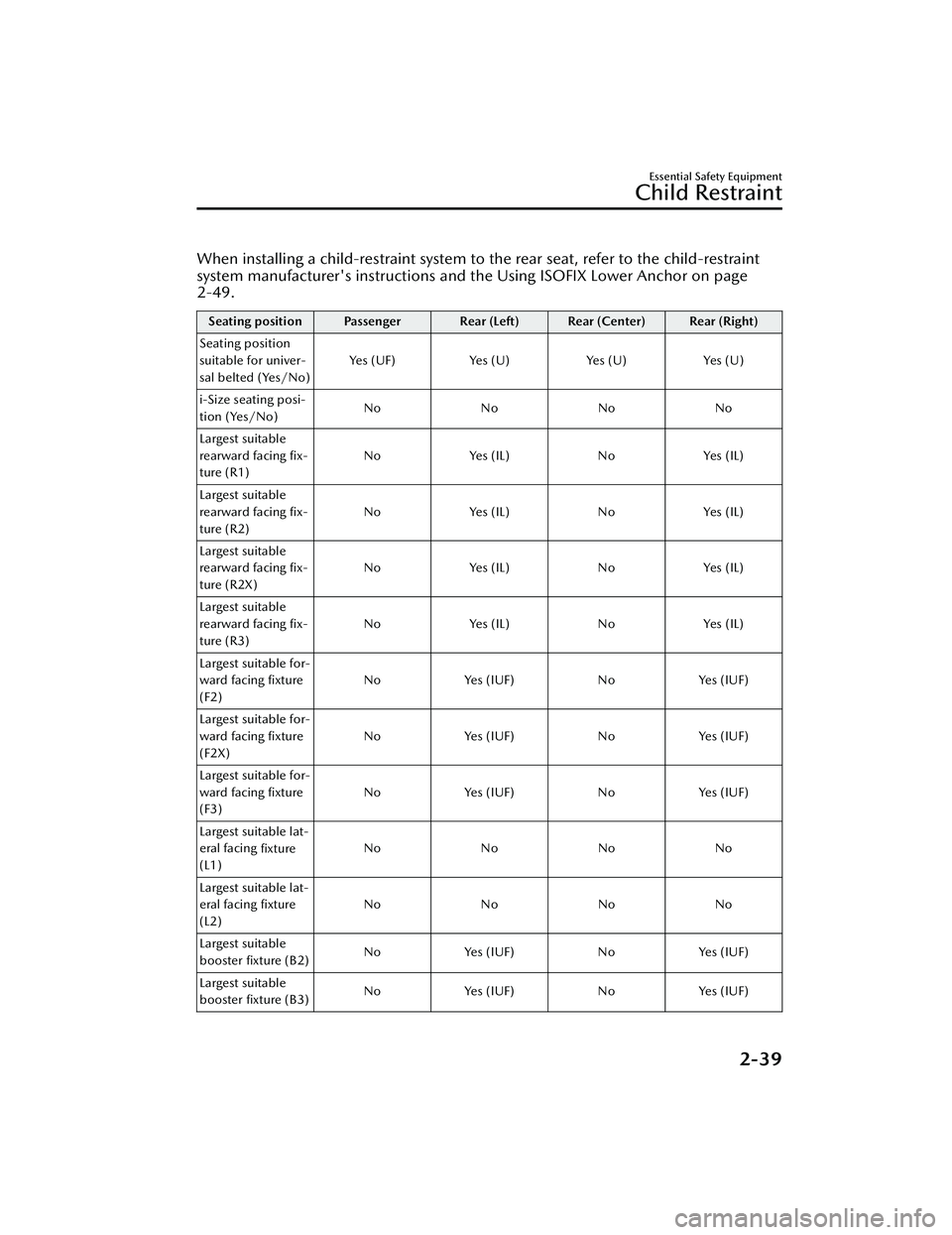
When installing a child-restraint system to the rear seat, refer to the child-restraint
system manufacturer's instructions and the Using ISOFIX Lower Anchor on page
2-49.
Seating position Passenger Rear (Left) Rear (Center) Rear (Right)
Seating position
suitable for univer-
sal belted (Yes/No) Yes (UF) Yes (U) Yes (U) Yes (U)
i-Size seating posi-
tion (Yes/No) No No No No
Largest suitable
rearward facing fix-
ture (R1) No Yes (IL) No Yes (IL)
Largest suitable
rearward facing fix-
ture (R2) No Yes (IL) No Yes (IL)
Largest suitable
rearward facing fix-
ture (R2X) No Yes (IL) No Yes (IL)
Largest suitable
rearward facing fix-
ture (R3) No Yes (IL) No Yes (IL)
Largest suitable for-
ward facing fixture
(F2) No Yes (IUF) No Yes (IUF)
Largest suitable for-
ward facing fixture
(F2X) No Yes (IUF) No Yes (IUF)
Largest suitable for-
ward facing fixture
(F3) No Yes (IUF) No Yes (IUF)
Largest suitable lat-
eral facing fixture
(L1) No No No No
Largest suitable lat-
eral facing fixture
(L2) No No No No
Largest suitable
booster fixture (B2) No Yes (IUF) No Yes (IUF)
Largest suitable
booster fixture (B3) No Yes (IUF) No Yes (IUF)
Essential Safety Equipment
Child Restraint
2-39
Mazda3_8LC2-EA-22G_Edition1_new
2022-5-20 11:26:10
Page 90 of 623
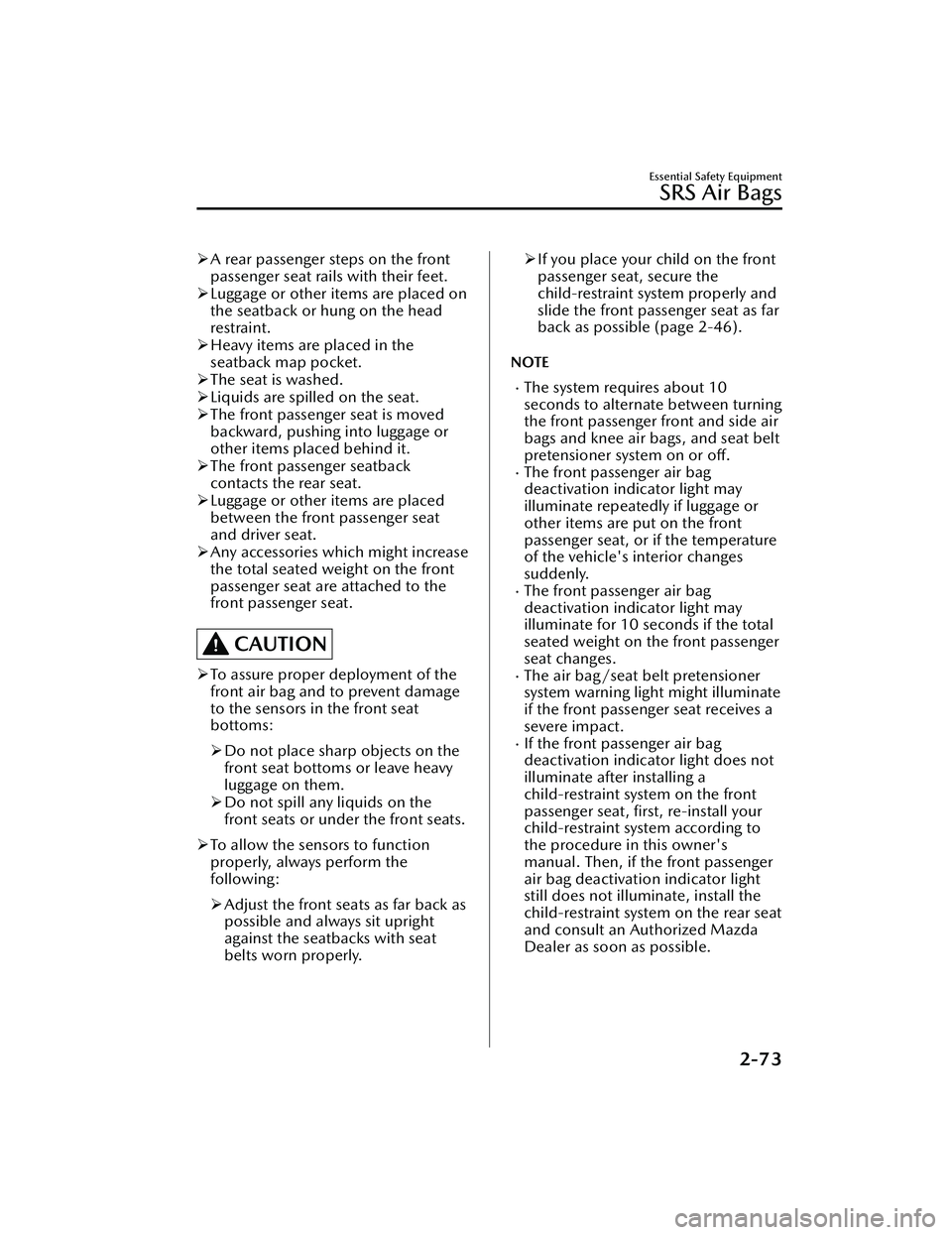
A rear passenger steps on the front
passenger seat rails with their feet.
Luggage or other items are placed on
the seatback or hung on the head
restraint.
Heavy items are placed in the
seatback map pocket.
The seat is washed.
Liquids are spilled on the seat.
The front passenger seat is moved
backward, pushing into luggage or
other items placed behind it.
The front passenger seatback
contacts the rear seat.
Luggage or other items are placed
between the front passenger seat
and driver seat.
Any accessories which might increase
the total seated weight on the front
passenger seat are attached to the
front passenger seat.
CAUTION
To assure proper deployment of the
front air bag and to prevent damage
to the sensors in the front seat
bottoms:
Do not place sharp objects on the
front seat bottoms or leave heavy
luggage on them.
Do not spill any liquids on the
front seats or under the front seats.
To allow the sensors to function
properly, always perform the
following:
Adjust the front seats as far back as
possible and always sit upright
against the seatbacks with seat
belts worn properly.
If you place your child on the front
passenger seat, secure the
child-restraint system properly and
slide the front passenger seat as far
back as possible (page 2-46).
NOTE
The system requires about 10
seconds to alternate between turning
the front passenger front and side air
bags and knee air bags, and seat belt
pretensioner system on or off.
The front passenger air bag
deactivation indicator light may
illuminate repeatedly if luggage or
other items are put on the front
passenger seat, or if the temperature
of the vehicle's interior changes
suddenly.
The front passenger air bag
deactivation indicator light may
illuminate for 10 seconds if the total
seated weight on the front passenger
seat changes.
The air bag/seat belt pretensioner
system warning light might illuminate
if the front passenger seat receives a
severe impact.
If the front passenger air bag
deactivation indicator light does not
illuminate after installing a
child-restraint system on the front
passenger seat, first, re-install your
child-restraint system according to
the procedure in this owner's
manual. Then, if the front passenger
air bag deactivation indicator light
still does not illuminate, install the
child-restraint system on the rear seat
and consult an Authorized Mazda
Dealer as soon as possible.
Essential Safety Equipment
SRS Air Bags
2-73
Mazda3_8LC2-EA-22G_Edition1_new 2022-5-20 11:26:10
Page 123 of 623
Power mirrors with reverse tilt down
function*
The outside mirrors tilt downward to
facilitate the view of the lower area on
each side of the vehicle.
1. Switch the ignition ON.
2. Press the select switch for theoutside mirror to be tilted
downward to turn on the indicator
light of the select switch.
3. Shift the shift lever/selector lever to the R position to tilt the outer
mirror on the side where the select
button was pressed downward.
NOTE
When any of the fo llowing condition is
met, the outer mirrors return to their
normal positions.
The ignition is switched to a position
other than ON.
The shift lever/selector lever is
shifted to a position other than R.
The select switch is pressed again.
Folding outside mirror
WARNING
Always return the outside mirrors to
the driving position before you start
driving:
Driving with the outside mirrors folded
in is dangerous. Your rear view will be
restricted, and you could have an
accident.
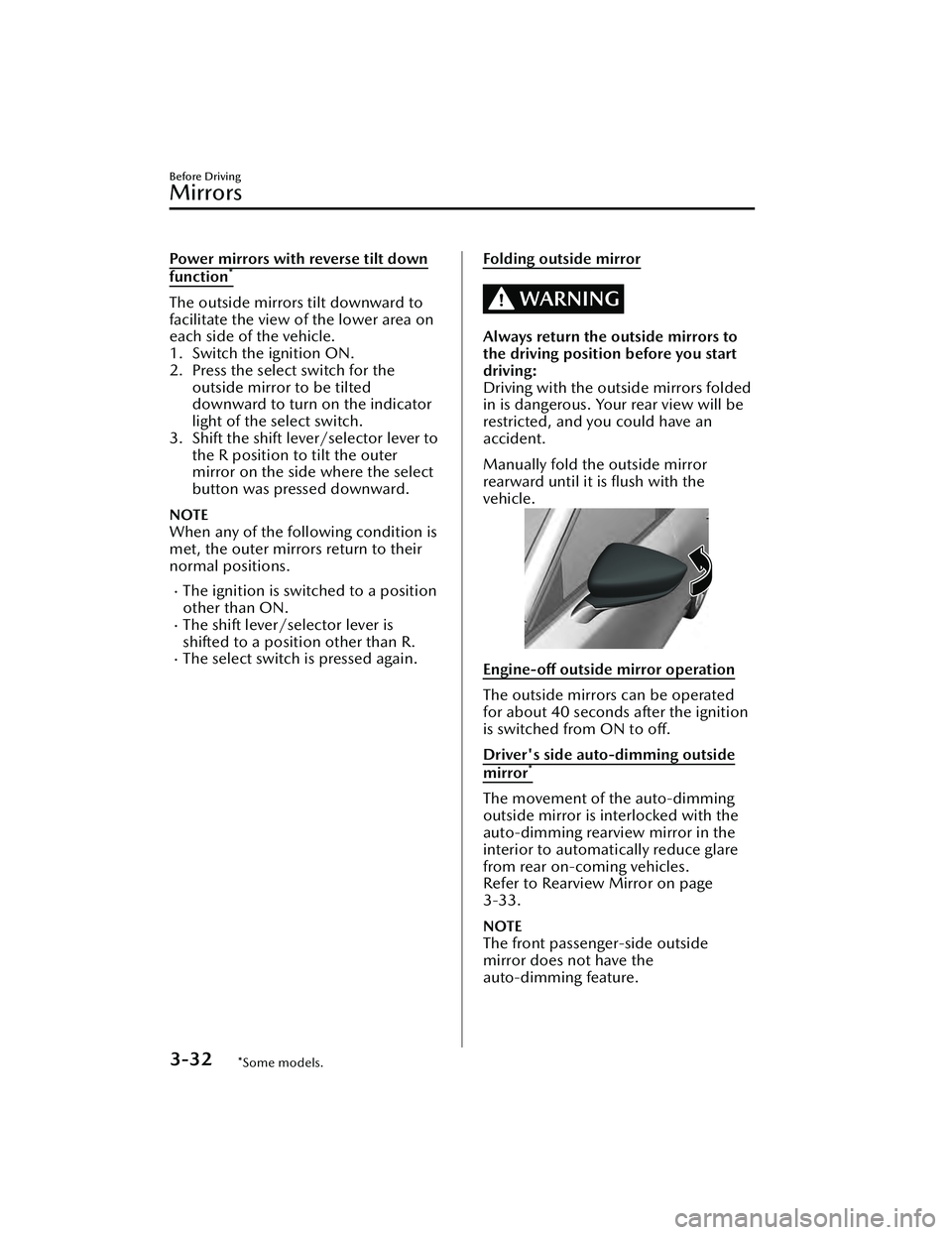
Manually fold the outside mirror
rearward until it is flush with the
vehicle.
Engine-off outside mirror operation
The outside mirrors can be operated
for about 40 seconds after the ignition
is switched from ON to off.
Driver's side auto-dimming outside
mirror*
The movement of the auto-dimming
outside mirror is interlocked with the
auto-dimming rearview mirror in the
interior to automatically reduce glare
from rear on-coming vehicles.
Refer to Rearview Mirror on page
3-33.
NOTE
The front passenger-side outside
mirror does not have the
auto-dimming feature.
Before Driving
Mirrors
3-32*Some models.
Mazda3_8LC2-EA-22G_Edition1_new 2022-5-20 11:26:10
Page 130 of 623
Make sure nothing blocks the
moonroof just before it reaches the
fully closed position:
Blocking the moonroof just before it
reaches the closed position is
dangerous.
In this case, the jam-safe function
cannot prevent the moonroof from
closing. If fingers are caught, serious
injuries could occur.
CAUTION
Do not sit on or put heavy items on
the area where the moonroof opens
and closes. Otherwise, the
moonroof could be damaged.
Do not open or close the moonroof
forcefully during freezing
temperatures or snowfall. Otherwise,
the moonroof could be damaged.
The sunshade does not tilt. To avoid
damaging the sunshade, do not push
it up.
Do not close the sunshade while the
moonroof is opening. Trying to force
the sunshade closed could damage
it.
▼ Tilt/Slide Operation
The moonroof can be opened or
closed electrically only when the
ignition is switched ON.
Before leaving the vehicle or washing
your Mazda, make sure the
moonroof is completely closed so
that water does not get inside the
cabin area.
After washing your Mazda or after it
rains, wipe the water off the
moonroof before operating it to
avoid water penetration which could
cause rust and water damage to your
headliner.
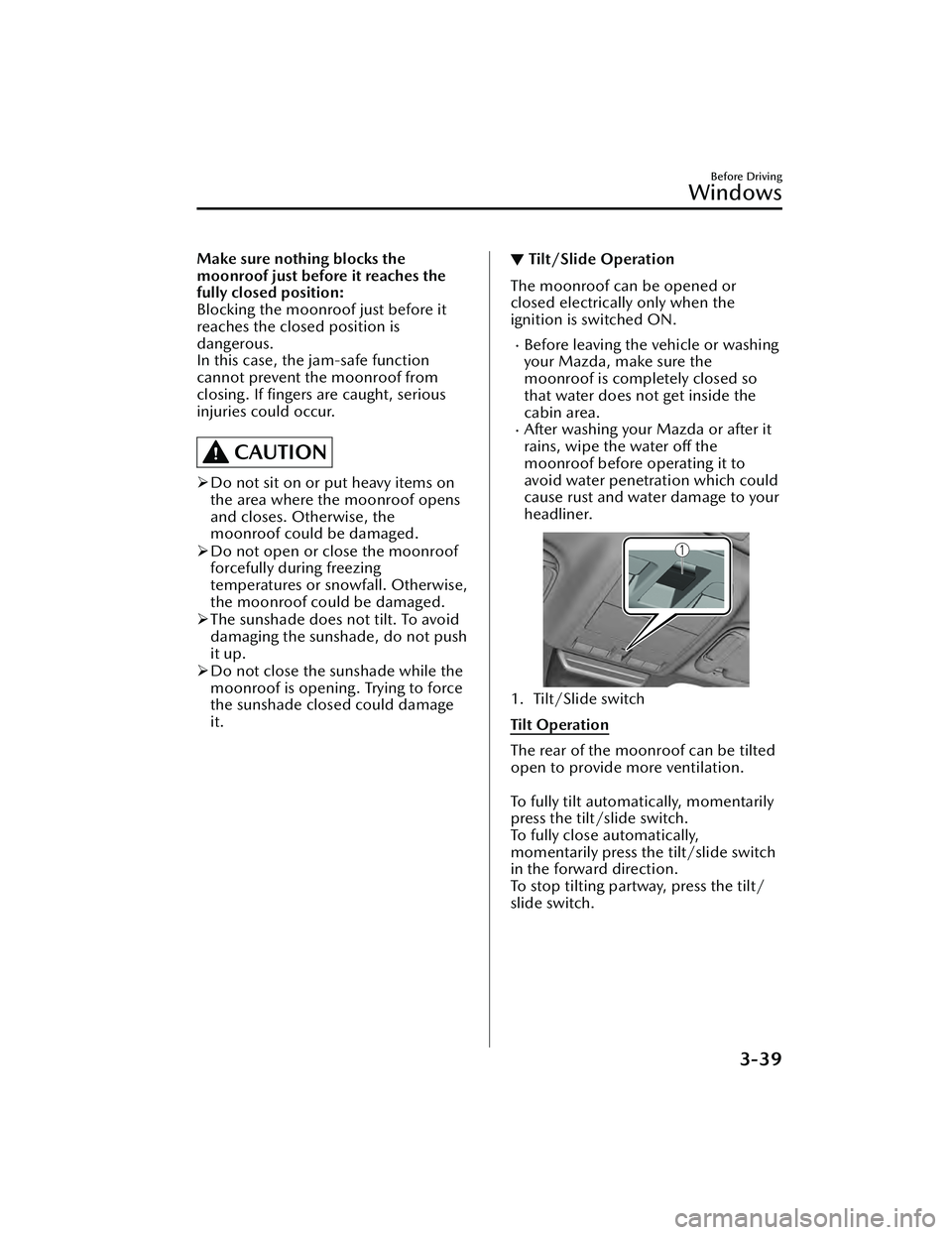
1. Tilt/Slide switch
Tilt Operation
The rear of the moonroof can be tilted
open to provide more ventilation.
To fully tilt automatically, momentarily
press the tilt/slide switch.
To fully close automatically,
momentarily press the tilt/slide switch
in the forward direction.
To stop tilting partway, press the tilt/
slide switch.
Before Driving
Windows
3-39
Mazda3_8LC2-EA-22G_Edition1_new
2022-5-20 11:26:10
Page 131 of 623
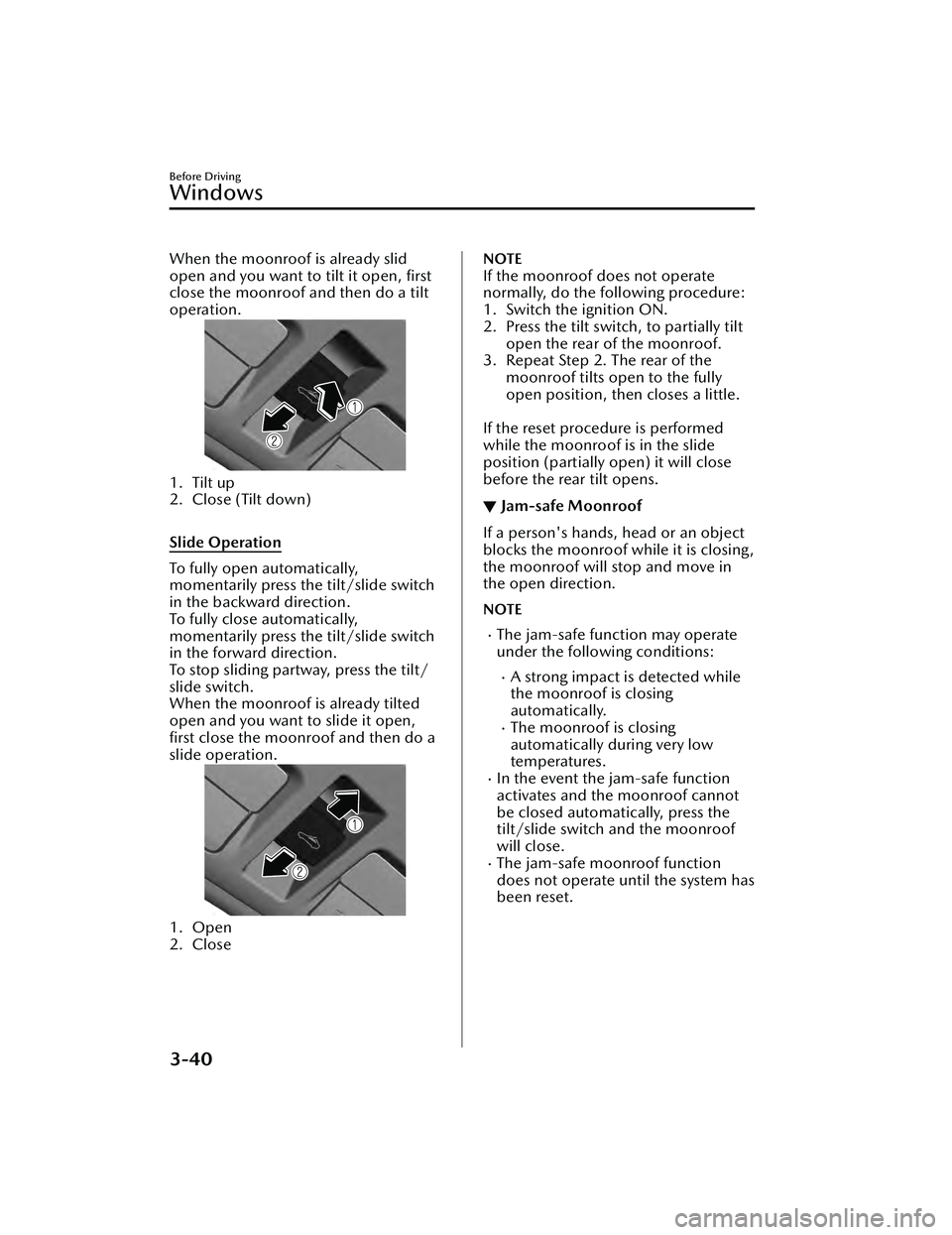
When the moonroof is already slid
open and you want to tilt it open, first
close the moonroof and then do a tilt
operation.
1. Tilt up
2. Close (Tilt down)
Slide Operation
To fully open automatically,
momentarily press the tilt/slide switch
in the backward direction.
To fully close automatically,
momentarily press the tilt/slide switch
in the forward direction.
To stop sliding partway, press the tilt/
slide switch.
When the moonroof is already tilted
open and you want to slide it open,
first close the moonroof and then do a
slide operation.
1. Open
2. Close
NOTE
If the moonroof does not operate
normally, do the following procedure:
1. Switch the ignition ON.
2. Press the tilt switch, to partially tiltopen the rear of the moonroof.
3. Repeat Step 2. The rear of the moonroof tilts open to the fully
open position, then closes a little.
If the reset procedure is performed
while the moonroof is in the slide
position (partially open) it will close
before the rear tilt opens.
▼ Jam-safe Moonroof
If a person's hands, head or an object
blocks the moonroof while it is closing,
the moonroof will stop and move in
the open direction.
NOTE
The jam-safe function may operate
under the following conditions:
A strong impact is detected while
the moonroof is closing
automatically.
The moonroof is closing
automatically during very low
temperatures.
In the event the jam-safe function
activates and the moonroof cannot
be closed automatically, press the
tilt/slide switch and the moonroof
will close.
The jam-safe moonroof function
does not operate until the system has
been reset.
Before Driving
Windows
3-40
Mazda3_8LC2-EA-22G_Edition1_new
2022-5-20 11:26:10
Page 143 of 623
Driving on Uneven Road
▼Driving on Uneven Road
Your vehicle's suspension and
underbody can be damaged if driven
on rough/uneven roads or over speed
bumps at excessive speeds. Use care
and reduce speed when traveling on
rough/uneven roads or over speed
bumps.
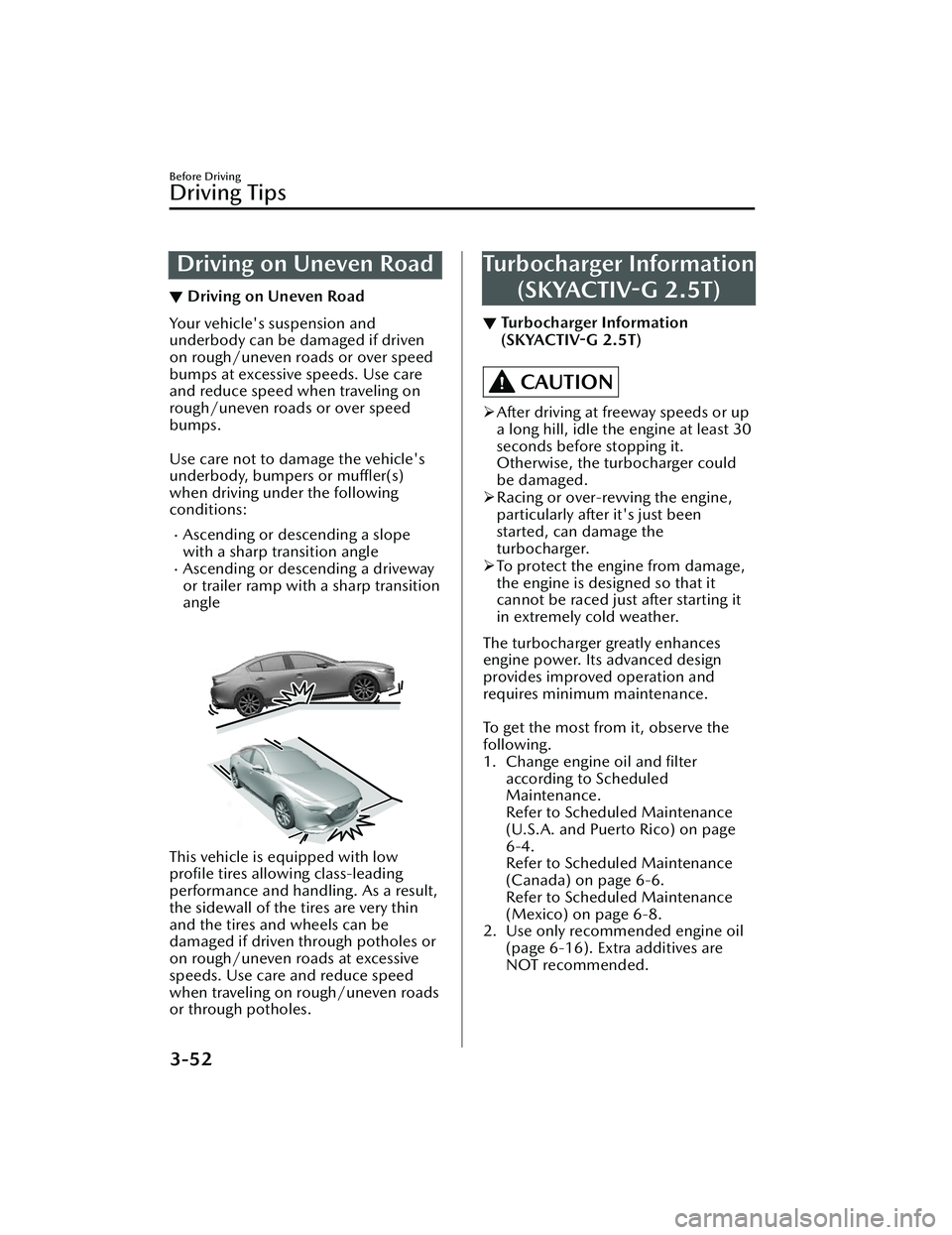
Use care not to damage the vehicle's
underbody, bumpers or
muffler(s)
when driving under the following
conditions:
Ascending or descending a slope
with a sharp transition angle
Ascending or descending a driveway
or trailer ramp with a sharp transition
angle
This vehicle is equipped with low
profile tires allowing class-leading
performance and handling. As a result,
the sidewall of the tires are very thin
and the tires and wheels can be
damaged if driven through potholes or
on rough/uneven roads at excessive
speeds. Use care and reduce speed
when traveling on rough/uneven roads
or through potholes.
Turbocharger Information (SKYACTIV-G 2.5T)
▼Turbocharger Information
(SKYACTIV-G
2.5T)
CAUTION
After driving at freeway speeds or up
a long hill, idle the engine at least 30
seconds before stopping it.
Otherwise, the turbocharger could
be damaged.
Racing or over-revving the engine,
particularly after it's just been
started, can damage the
turbocharger.
To protect the engine from damage,
the engine is designed so that it
cannot be raced just after starting it
in extremely cold weather.
The turbocharger greatly enhances
engine power. Its advanced design
provides improved operation and
requires minimum maintenance.
To get the most from it, observe the
following.
1. Change engine oil and filter according to Scheduled
Maintenance.
Refer to Scheduled Maintenance
(U.S.A. and Puerto Rico) on page
6-4.
Refer to Scheduled Maintenance
(Canada) on page 6-6.
Refer to Scheduled Maintenance
(Mexico) on page 6-8.
2. Use only recommended engine oil (page 6-16). Extra additives are
NOT recommended.
Before Driving
Driving Tips
3-52
Mazda3_8LC2-EA-22G_Edition1_new 2022-5-20 11:26:10
Page 232 of 623
Hill Launch Assist (HLA)
▼Hill Launch Assist (HLA)
The HLA functions to assist in
accelerating the vehicle from a stop on
slopes. When releasing the brake pedal
and depressing the accelerator pedal
to accelerate the vehicle from a stop
while on a slope, the function prevents
the vehicle from rolling. The HLA also
operates when reversing on a slope.
The braking force is maintained
automatically after releasing the brake
pedal on a steep slope.
For manual transmission vehicles, the
HLA operates when the vehicle is tilted
rearward with the shift lever in a
forward gear, and operates when the
vehicle is tilted forward with the shift
lever in the R position.
For automatic transmission vehicles,
the HLA operates when the vehicle is
tilted rearward with the selector lever
in a forward gear, and operates when
the vehicle is tilted forward with the
selector lever in the R position.
WARNING
Do not rely completely on
HLA:
HLA is an auxiliary device for
accelerating from a stop on a slope.
The system only operates for about 2
seconds and therefore, relying only on
the system, when accelerating from a
stop is dangerous because the vehicle
may move (roll) unexpectedly and
cause an accident.
The vehicle could roll depending on
the vehicle's load or if it is towing
something. In addition, for vehicles
with a manual transmission, the
vehicle could still roll depending on
how the clutch pedal or the accelerator
pedal is operated.
Always confirm the safety around the
vehicle before starting to drive the
vehicle.
NOTE
HLA does not operate on a gentle
slope. In addition, the gradient of
the slope on which the system will
operate changes depending on the
vehicle's load.
HLA does not operate if the parking
brake is applied, the vehicle has not
stopped completely, or the clutch
pedal is released.
While HLA is operating, the brake
pedal may feel stiff and vibrate,
however, this does not indicate a
malfunction.
HLA does not operate while the
TCS/DSC indicator light is
illuminated.
Refer to TCS/DSC Indication/
Indicator Light (Turns on) on page
7-33.
HLA does not turn off even if the
DSC OFF switch is pressed to turn off
the TCS/DSC.
When Driving
Brake
4-87
Mazda3_8LC2-EA-22G_Edition1_new 2022-5-20 11:26:10
Page 249 of 623
WARNING
Do not rely completely on the LDWS:
The LDWS system is not designed to
compensate for a driver’s lack of
caution and relying too much on the
system could lead to an accident.
The functions of the LDWS have
limitations. Always stay on course
using the steering wheel and drive
with care.
CAUTION
Heed the following cautions so that
the LDWS can operate normally.
Do not modify the vehicle's
suspensions.
Always use tires of the specified type
and size for the front and rear
wheels. Consult an Authorized
Mazda Dealer for tire replacement.
NOTE
The system may not operate normally
under the following conditions.
The white (yellow) lane lines are less
visible because of dirt or paint
flaking.
White (yellow) lane lines are less
visible because of bad weather (rain,
fog, or snow).
The vehicle is driven on a temporary
lane or section with a closed lane
resulting from construction where
there might be multiple white
(yellow) lane lines, or they are
interrupted.
The camera picks up an obscure line,
such as a temporary line being used
for construction, or because of
shade, unmelted snow, or groovesfilled with water.
The surrounding brightness suddenly
changes such as when entering or
exiting a tunnel.
Back-light is reflected off the road
surface.
The road surface is wet and shiny
after rain, or there are puddles on
the road.
The width of a lane is excessively
narrow.
The vehicle is driven on roads with
tight curves.
Heavy luggage is loaded in the
trunk/luggage compartment or on
the rear seat causing the vehicle to
tilt.
The vehicle is driven through a fork in
the road or a junction.
The shade of a guardrail parallel to a
white (yellow) lane line is cast on the
road.
The illumination of the headlights is
weakened because of dirt or the
optical axis is deviated at night.
The road is excessively uneven.The vehicle is shaken after hitting a
road bump.
A vehicle in front of your vehicle is
running near a white (yellow) lane
line making it less visible.
The windshield is dirty or foggy.Strong light is directed from the front
of the vehicle (such as sunlight, or
headlights (high-beam) of
on-coming vehicles).
The vehicle is driven through an
intersection or a roundabout.
When Driving
i-ACTIVSENSE
4-104
Mazda3_8LC2-EA-22G_Edition1_new 2022-5-20 11:26:10
Page 259 of 623
NOTE
The TSR is not supported in some countries or regions. For information concerning
the supported countries or regions, consult an Authorized Mazda Dealer.
The TSR operates only if the navigation system SD card (Mazda genuine) is
inserted in the SD card slot. Consult an Authorized Mazda Dealer for details.
The TSR does not operate if there is a malfunction in the Forward Sensing Camera
(FSC).
Under the following conditions, the TSR may not operate normally.
An object placed on the dashboard is reflected in the windshield and picked up
by the camera.
Heavy luggage is loaded in the luggage co mpartment or on the rear seat and the
vehicle is tilted.
The tire pressures are not adjusted to the specified pressure.Tires other than standard tires are equipped.The vehicle is driven on the ramp and surrounding area to or from a rest area or
a tollgate on a highway.
When surrounding brightness
suddenly changes such as when entering or exiting
a tunnel.
The illumination of the headlights is weakened because of dirt or the optical axis
is deviated.
The windshield is dirty or foggy.The windshield and camera are fogged (water droplets).Strong light is directed at the front of the vehicle (such as backlight or high-beam
headlights of on-coming vehicles).
The vehicle is making a sharp turn.Strong light reflects off the road.A traffic sign is in a position which makes it
difficult to
reflect the light from the
vehicle's headlights, such as when the ve hicle is driven at night or in a tunnel.
The vehicle is driven under weather conditions such as rain, fog, or snow.The stored map data for the navigation system is not current.A traffic sign is obscured by mud or snow.A
traffic sign is concealed by trees or a vehicle.A traffic sign is partially shaded.A
traffic sign is bent or warped.A traffic sign is too low or too high.A traffic sign is too bright or too dark
(including electronic traffic signs).A
traffic sign is too big or too small.There is an object similar to the traffic
sign being read (such as another traffic
sign or other signs resembling it).
The TSR can be set to invisible on the active driving display.
Refer to the Settings section in the Mazda Connect Owner's Manual.
When Driving
i-ACTIVSENSE
4-114
Mazda3_8LC2-EA-22G_Edition1_new 2022-5-20 11:26:10
Page 265 of 623
WARNING
Do not rely completely on DAA and
always drive carefully:
The DAA detects driver fatigue and
decreased attentiveness and
encourages the driver to take a rest,
however, it is not designed to prevent
the vehicle from straying. If you rely too
much on the DAA it could lead to an
accident. Drive carefully and operate
the steering wheel appropriately.
In addition, the system may not be
able to detect driver fatigue and
decreased attentiveness correctly
depending on the traffic and driving
conditions. The driver must take
sufficient rest in order to drive safely.
NOTE
The DAA operates when all of the
following conditions are met.
The vehicle speed is about 65 to
140 km/h (41 to 86 mph).
The system detects white (yellow)
lane lines.
The system has completed learning
of the driver’s driving data after 60
minutes have passed since the
driver began driving vehicle.
The DAA does not operate under the
following conditions.
The vehicle speed is less than
about 65 km/h (41 mph).
The vehicle speed exceeds about
140 km/h (86 mph).
The vehicle is making a sharp turn.The vehicle is changing lanes.The system cannot detect white
(yellow) lane lines.
The DAA may not operate normally
under the following conditions.
White (yellow) lane lines are less
visible because of dirt or fading/
patchiness.
The vehicle is jolted or swayed
continuously by strong winds or
rough roads.
The vehicle is driven aggressively.When making frequent lane
changes.
The vehicle is making a curve.The DAA detects driver fatigue and
decreased attentiveness based on
the driving data when the vehicle is
driven at about 65 to 140 km/h (41
to 86 mph) for about 20 minutes.
The driving data will be reset under
the following conditions.
The vehicle is stopped for 15
minutes or longer.
The vehicle is driven at less than
about 65 km/h (41 mph) for
about 30 minutes.
The ignition is switched
off.After the DAA has displayed the first
message encouraging rest, it does
not display the next one until 60
minutes have passed.
When Driving
i-ACTIVSENSE
4-120
Mazda3_8LC2-EA-22G_Edition1_new 2022-5-20 11:26:10