change MAZDA MODEL 3 4-DOOR 2009 Owner's Guide
[x] Cancel search | Manufacturer: MAZDA, Model Year: 2009, Model line: MODEL 3 4-DOOR, Model: MAZDA MODEL 3 4-DOOR 2009Pages: 418, PDF Size: 5.31 MB
Page 204 of 418
Black plate (204,1)
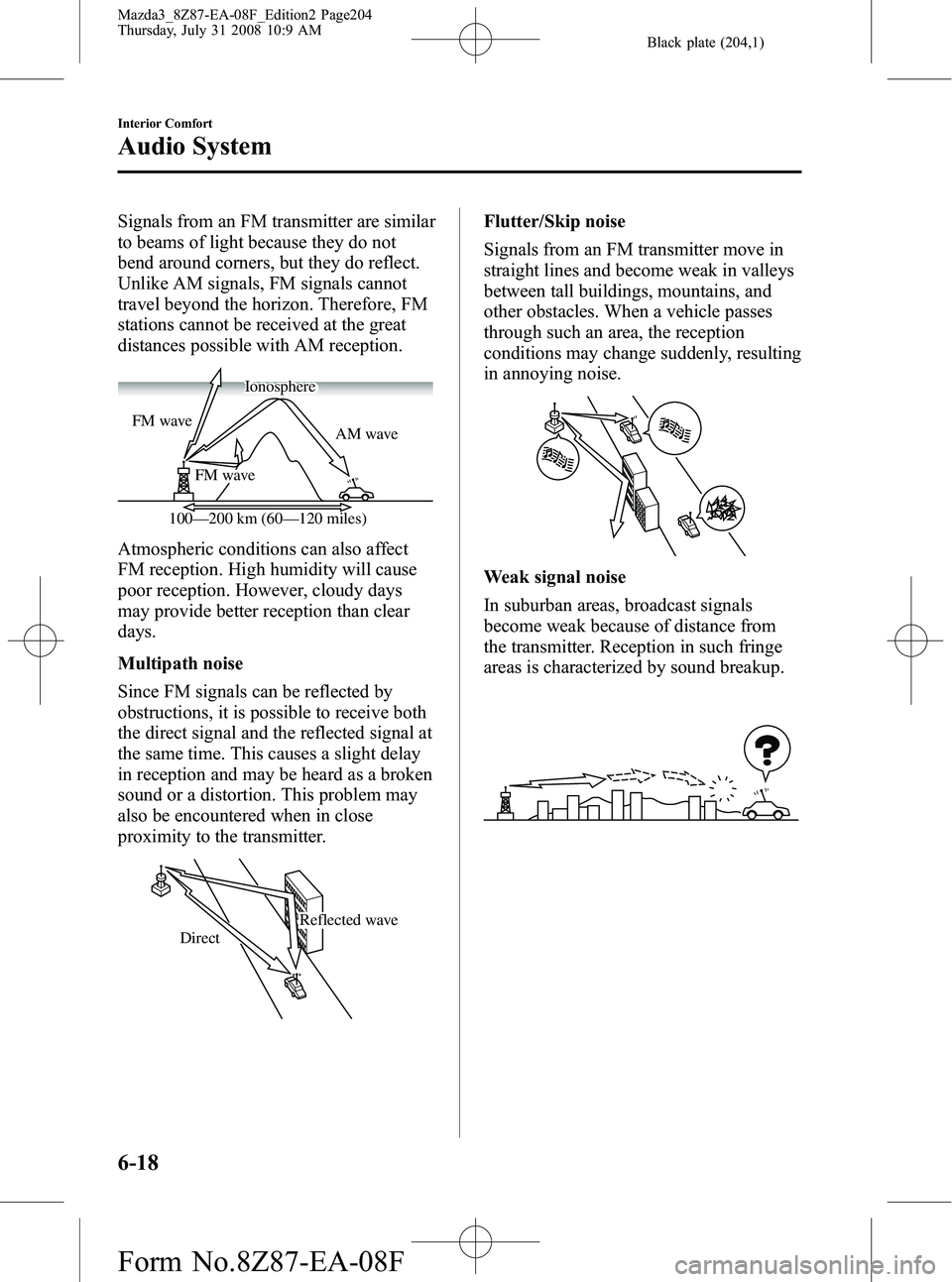
Signals from an FM transmitter are similar
to beams of light because they do not
bend around corners, but they do reflect.
Unlike AM signals, FM signals cannot
travel beyond the horizon. Therefore, FM
stations cannot be received at the great
distances possible with AM reception.
AM wave
FM wave
FM wave
100—200 km (60—120 miles) Ionosphere
Atmospheric conditions can also affect
FM reception. High humidity will cause
poor reception. However, cloudy days
may provide better reception than clear
days.
Multipath noise
Since FM signals can be reflected by
obstructions, it is possible to receive both
the direct signal and the reflected signal at
the same time. This causes a slight delay
in reception and may be heard as a broken
sound or a distortion. This problem may
also be encountered when in close
proximity to the transmitter.
Reflected wave
Direct
Flutter/Skip noise
Signals from an FM transmitter move in
straight lines and become weak in valleys
between tall buildings, mountains, and
other obstacles. When a vehicle passes
through such an area, the reception
conditions may change suddenly, resulting
in annoying noise.
Weak signal noise
In suburban areas, broadcast signals
become weak because of distance from
the transmitter. Reception in such fringe
areas is characterized by sound breakup.
6-18
Interior Comfort
Audio System
Mazda3_8Z87-EA-08F_Edition2 Page204
Thursday, July 31 2008 10:9 AM
Form No.8Z87-EA-08F
Page 205 of 418
Black plate (205,1)
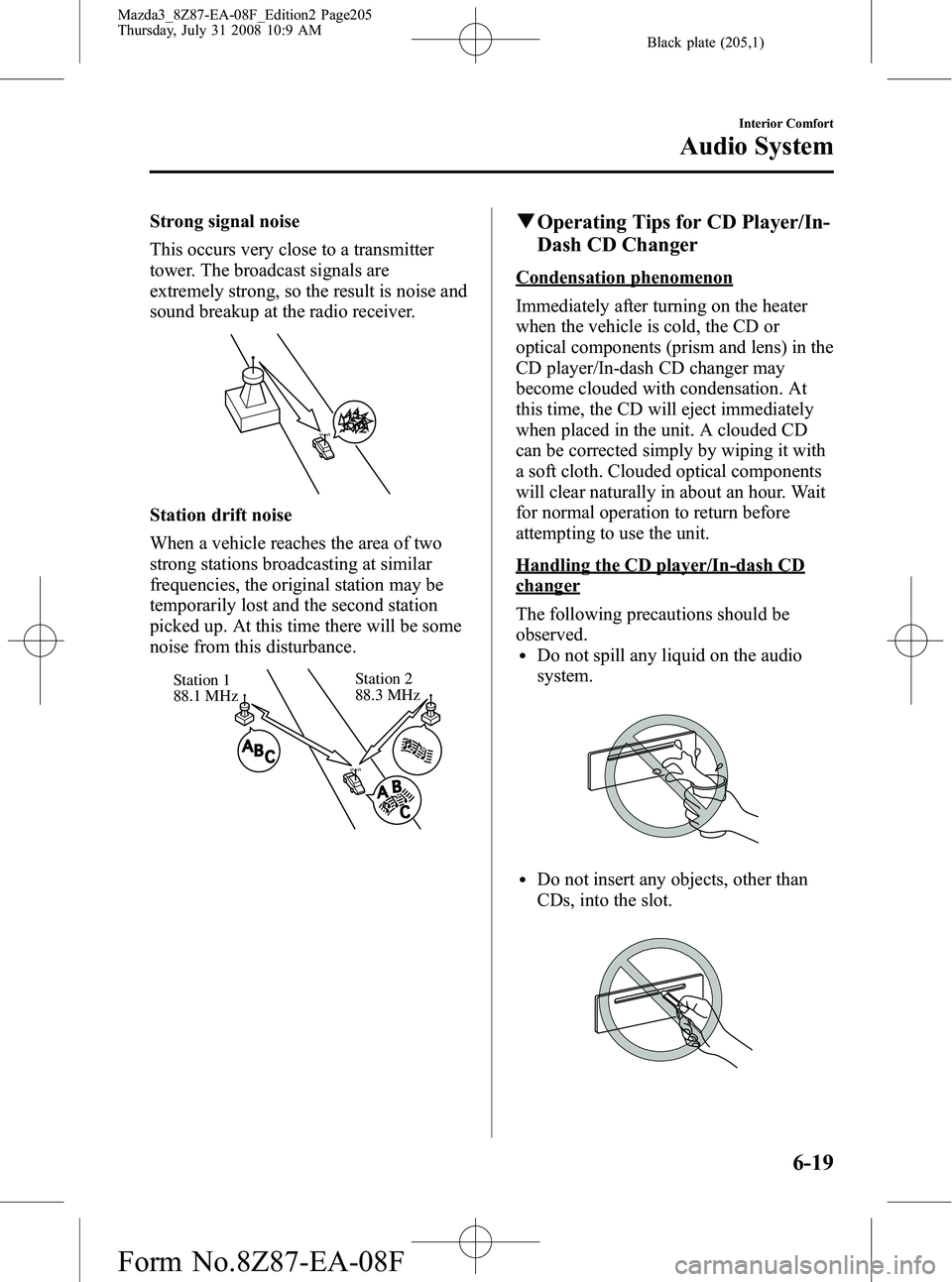
Strong signal noise
This occurs very close to a transmitter
tower. The broadcast signals are
extremely strong, so the result is noise and
sound breakup at the radio receiver.
Station drift noise
When a vehicle reaches the area of two
strong stations broadcasting at similar
frequencies, the original station may be
temporarily lost and the second station
picked up. At this time there will be some
noise from this disturbance.
Station 2
88.3 MHz
Station 1
88.1 MHz
q
Operating Tips for CD Player/In-
Dash CD Changer
Condensation phenomenon
Immediately after turning on the heater
when the vehicle is cold, the CD or
optical components (prism and lens) in the
CD player/In-dash CD changer may
become clouded with condensation. At
this time, the CD will eject immediately
when placed in the unit. A clouded CD
can be corrected simply by wiping it with
a soft cloth. Clouded optical components
will clear naturally in about an hour. Wait
for normal operation to return before
attempting to use the unit.
Handling the CD player/In-dash CD
changer
The following precautions should be
observed.
lDo not spill any liquid on the audio
system.
lDo not insert any objects, other than
CDs, into the slot.
Interior Comfort
Audio System
6-19
Mazda3_8Z87-EA-08F_Edition2 Page205
Thursday, July 31 2008 10:9 AM
Form No.8Z87-EA-08F
Page 206 of 418
Black plate (206,1)
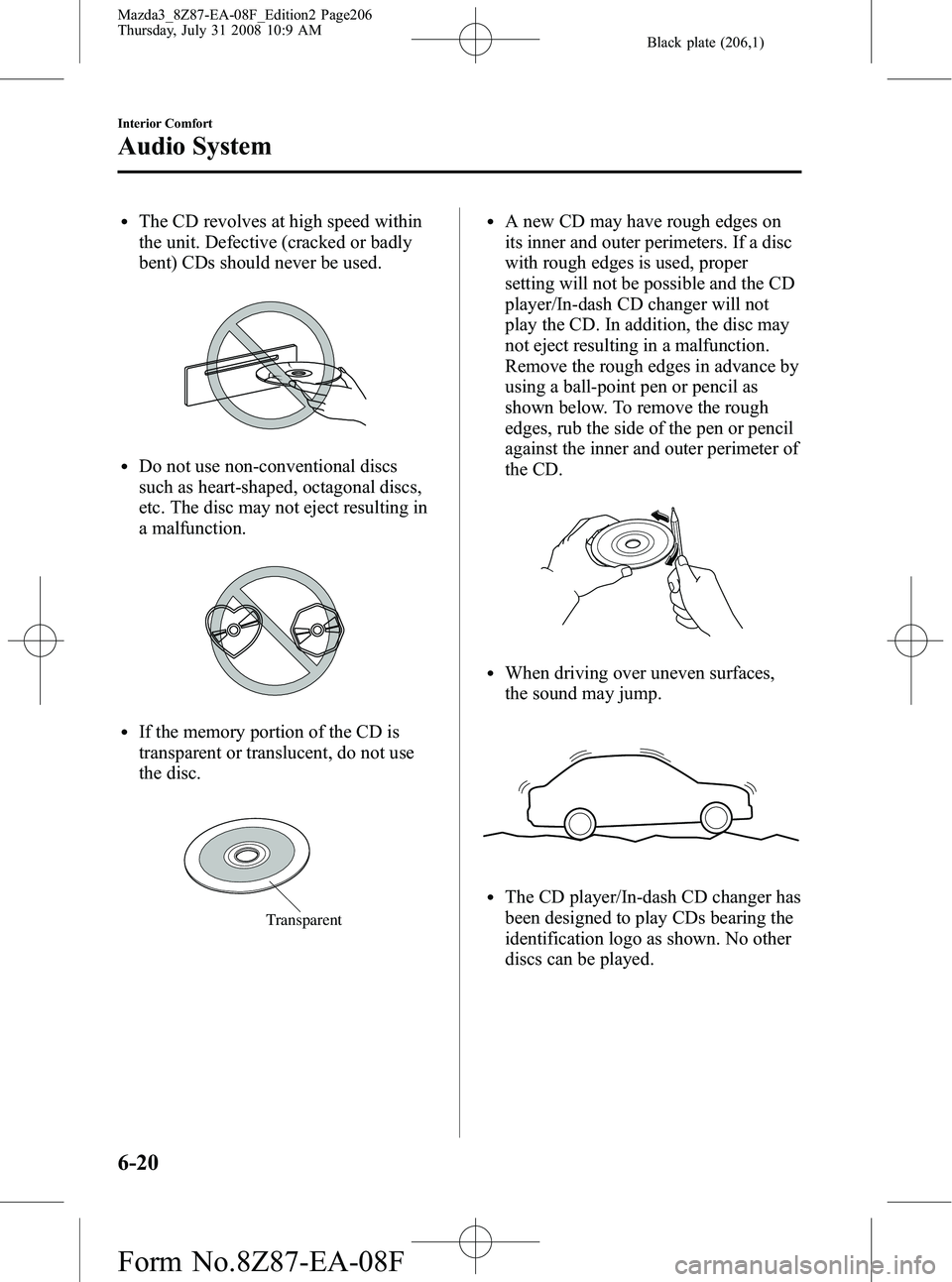
lThe CD revolves at high speed within
the unit. Defective (cracked or badly
bent) CDs should never be used.
lDo not use non-conventional discs
such as heart-shaped, octagonal discs,
etc. The disc may not eject resulting in
a malfunction.
lIf the memory portion of the CD is
transparent or translucent, do not use
the disc.
Transparent
lA new CD may have rough edges on
its inner and outer perimeters. If a disc
with rough edges is used, proper
setting will not be possible and the CD
player/In-dash CD changer will not
play the CD. In addition, the disc may
not eject resulting in a malfunction.
Remove the rough edges in advance by
using a ball-point pen or pencil as
shown below. To remove the rough
edges, rub the side of the pen or pencil
against the inner and outer perimeter of
the CD.
lWhen driving over uneven surfaces,
the sound may jump.
lThe CD player/In-dash CD changer has
been designed to play CDs bearing the
identification logo as shown. No other
discs can be played.
6-20
Interior Comfort
Audio System
Mazda3_8Z87-EA-08F_Edition2 Page206
Thursday, July 31 2008 10:9 AM
Form No.8Z87-EA-08F
Page 207 of 418

Black plate (207,1)
lUse discs that have been legitimately
produced. If illegally-copied discs such
as pirated discs are used, the system
may not operate properly.
lBe sure never to touch the signal
surface when handling the CDs. Pick
up a CD by grasping the outer edge or
the edge of the hole and the outer edge.
lDo not stick paper or tape on the CD.
Avoid scratching the reverse side (the
side without a label). The disc may not
eject resulting in a malfunction.
lDust, finger smudges, and dirt can
decrease the amount of light reflected
from the signal surface, thus affecting
sound quality. If the CD should
become soiled, gently wipe it with a
soft cloth from the center of the CD to
the edge.
lDo not use record sprays, antistatic
agents, or household spray cleaners.
Volatile chemicals such as benzine and
thinner can also damage the surface of
the CD and must not be used. Anything
that can damage, warp, or fog plastic
should never be used to clean CDs.
lInsert discs one by one. If two discs are
inserted at the same time, the system
may not operate properly.
lCD TEXT textual information cannot
be displayed by audio units other than
the CD player/In-dash CD changer.
(Only playback is possible.)
lThe following player can play MP3
files recorded in CD-ROM, CD-R, and
CD-RW.
· CD player
· In-dash CD changer
lThe CD player/In-dash CD changer
ejects the CD if the CD is inserted
upside down. Also dirty and/or
defective CDs may be ejected.
lAn 8 cm (3 in) CD can be played in the
CD player.
The In-dash CD changer is specially
made for 12 cm (5 in) CDs.
An 8 cm (3 in) CD can be played in the
In-dash CD changer if an 8 cm (3 in)
CD adapter is used.
If an 8 cm (3 in) CD adapter is not
used, the In-dash CD changer may be
damaged. Always use a CD adapter.
lDo not insert cleaning discs in the CD
player/In-dash CD changer.
lDo not insert any disc with a peel-off
seal affixed to it.
lThis unit may not be able to play
certain CD-R/CD-RWs made using a
computer or music CD recorder due to
disc characteristics, scratches,
smudges, dirt, etc., or due to dust or
condensation on the lens inside the
unit.
lStoring CDs in the vehicle exposed to
direct sunlight or high temperature may
damage the CD-R/CD-RWs, and make
them unplayable.
lCD-R/CD-RW exceeding 700 MB
cannot be played.
Interior Comfort
Audio System
6-21
Mazda3_8Z87-EA-08F_Edition2 Page207
Thursday, July 31 2008 10:9 AM
Form No.8Z87-EA-08F
Page 213 of 418

Black plate (213,1)
Audio Set
Audio information is displayed on the information display.
Illustration is of a representative audio unit.
In-dash CD Changer
CD Player
Power/Volume/Sound Controls .............................................................................. page 6-28
Operating the Radio ............................................................................................... page 6-30
Operating the Satellite Radio ................................................................................. page 6-32
Operating the Compact Disc (CD) Player .............................................................. page 6-46
Operating the In-Dash CD Changer ....................................................................... page 6-50
Operating the Auxiliary jack .................................................................................. page 6-54
Error Indications ..................................................................................................... page 6-55
Interior Comfort
Audio System
6-27
Mazda3_8Z87-EA-08F_Edition2 Page213
Thursday, July 31 2008 10:9 AM
Form No.8Z87-EA-08F
Page 214 of 418
Black plate (214,1)
qPower/Volume/Sound Controls
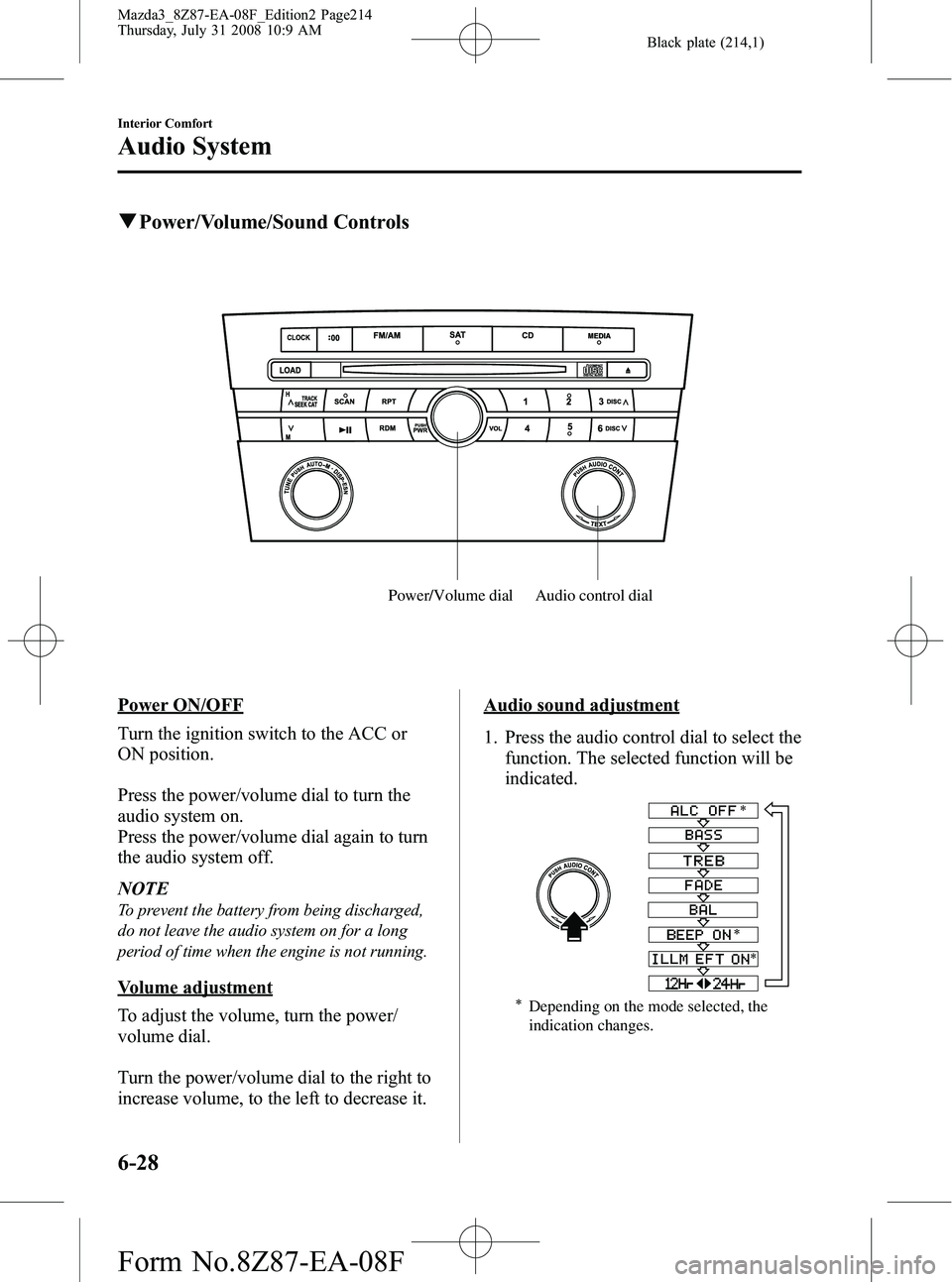
Audio control dial
Power/Volume dial
Power ON/OFF
Turn the ignition switch to the ACC or
ON position.
Press the power/volume dial to turn the
audio system on.
Press the power/volume dial again to turn
the audio system off.
NOTE
To prevent the battery from being discharged,
do not leave the audio system on for a long
period of time when the engine is not running.
Volume adjustment
To adjust the volume, turn the power/
volume dial.
Turn the power/volume dial to the right to
increase volume, to the left to decrease it.
Audio sound adjustment
1. Press the audio control dial to select the
function. The selected function will be
indicated.
Depending on the mode selected, the
indication changes.
6-28
Interior Comfort
Audio System
Mazda3_8Z87-EA-08F_Edition2 Page214
Thursday, July 31 2008 10:9 AM
Form No.8Z87-EA-08F
Page 215 of 418
Black plate (215,1)
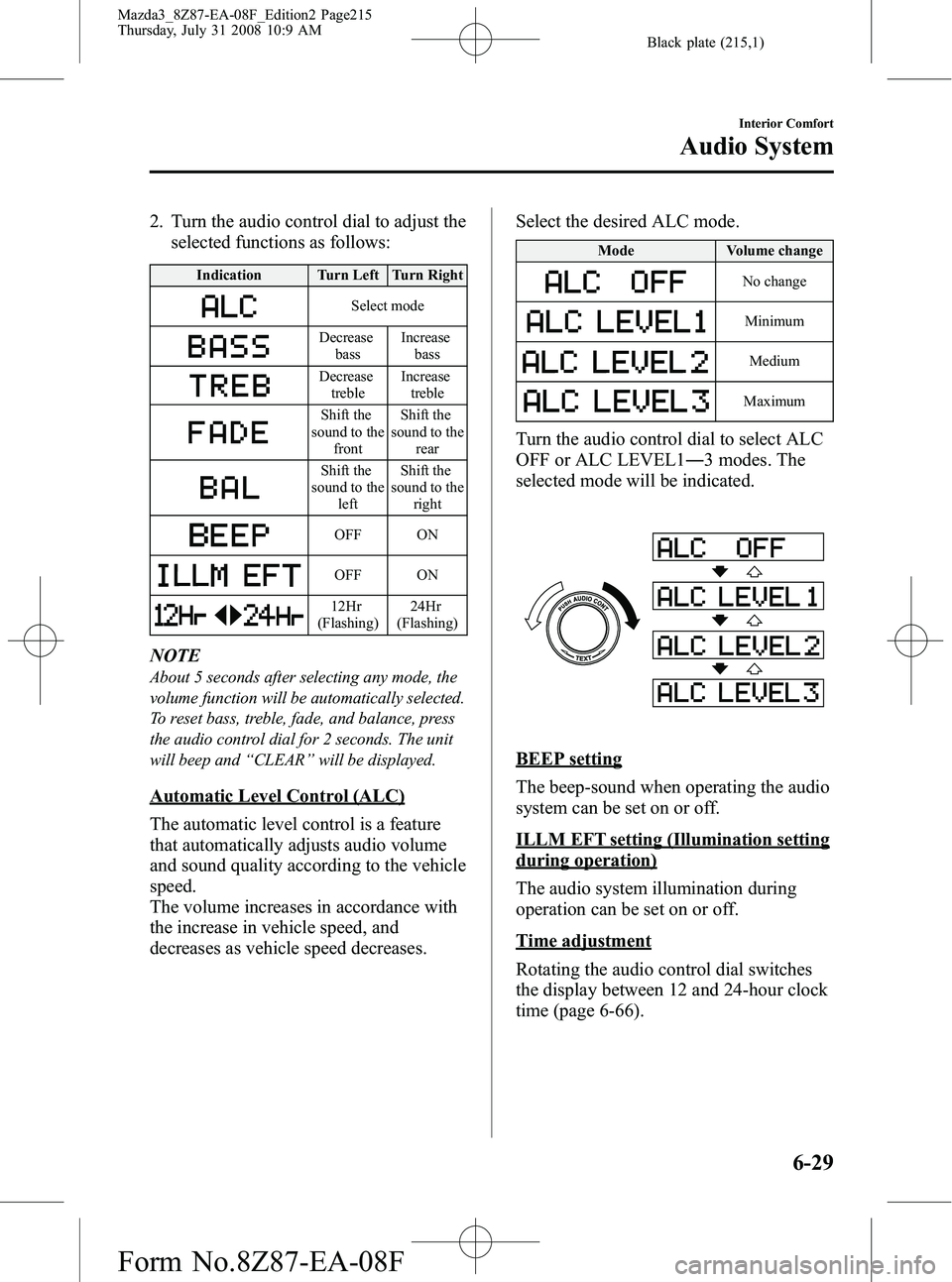
2. Turn the audio control dial to adjust theselected functions as follows:
Indication Turn Left Turn Right
Select mode
Decrease
bass Increase
bass
Decreasetreble Increase
treble
Shift the
sound to the front Shift the
sound to the rear
Shift the
sound to the left Shift the
sound to the right
OFF ON
OFF ON
12Hr
(Flashing) 24Hr
(Flashing)
NOTE
About 5 seconds after selecting any mode, the
volume function will be automatically selected.
To reset bass, treble, fade, and balance, press
the audio control dial for 2 seconds. The unit
will beep and “CLEAR ”will be displayed.
Automatic Level Control (ALC)
The automatic level control is a feature
that automatically adjusts audio volume
and sound quality according to the vehicle
speed.
The volume increases in accordance with
the increase in vehicle speed, and
decreases as vehicle speed decreases. Select the desired ALC mode.
Mode
Volume change
No change
Minimum
Medium
Maximum
Turn the audio control dial to select ALC
OFF or ALC LEVEL1― 3 modes. The
selected mode will be indicated.
BEEP setting
The beep-sound when operating the audio
system can be set on or off.
ILLM EFT setting (Illumination setting
during operation)
The audio system illumination during
operation can be set on or off.
Time adjustment
Rotating the audio control dial switches
the display between 12 and 24-hour clock
time (page 6-66).
Interior Comfort
Audio System
6-29
Mazda3_8Z87-EA-08F_Edition2 Page215
Thursday, July 31 2008 10:9 AM
Form No.8Z87-EA-08F
Page 216 of 418

Black plate (216,1)
qOperating the Radio
Channel
preset
buttons
Manual tuning dial/Auto memory button Scan button
Band selector buttons
Seek tuning buttons
Radio ON
Press a band selector button (
) to
turn the radio on.
Band selection
Successively pressing the band selector
button (
) switches the bands as
follows: FM1 →FM2 →AM.
The selected mode will be indicated. If
FM stereo is being received, “ST ”will be
displayed.
NOTE
If the FM broadcast signal becomes weak,
reception automatically changes from
STEREO to MONO for reduced noise, and the
“ ST ”indicator will go out.
Tuning
The radio has the following tuning
methods: Manual, Seek, Scan, Preset
channel, and Auto memory tuning. The
easiest way to tune stations is to set them
on preset channels.
NOTE
If the power supply is interrupted (fuse blows
or the battery is disconnected), the preset
channels will be erased.
Manual tuning
Turning the manual tuning dial will
change the frequency higher or lower.
Seek tuning
Pressing the seek tuning button (
,)
will cause the tuner to seek a higher or
lower frequency automatically.
6-30
Interior Comfort
Audio System
Mazda3_8Z87-EA-08F_Edition2 Page216
Thursday, July 31 2008 10:9 AM
Form No.8Z87-EA-08F
Page 220 of 418
Black plate (220,1)
Selecting SIRIUS radio mode (Satellite
button)
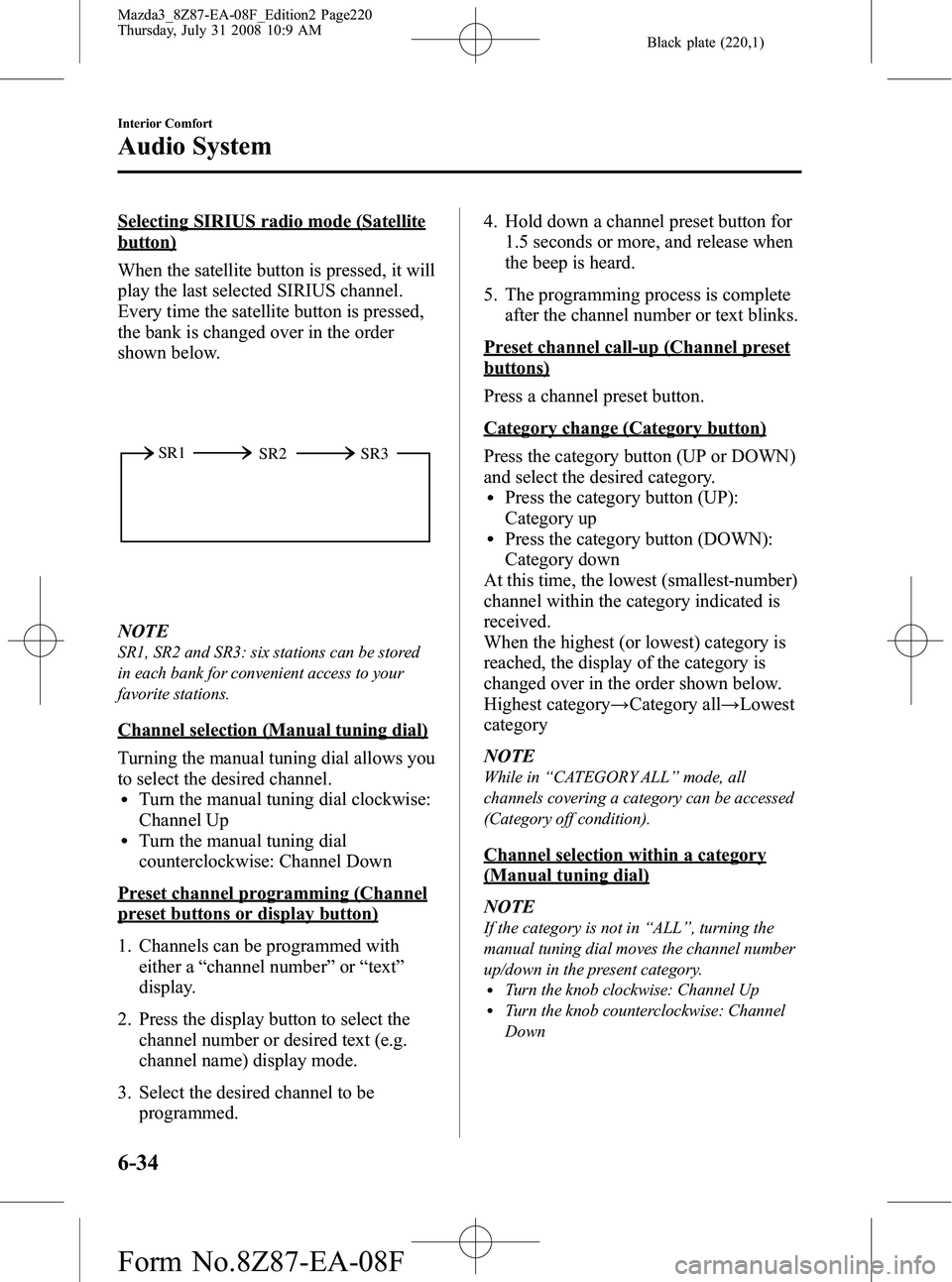
When the satellite button is pressed, it will
play the last selected SIRIUS channel.
Every time the satellite button is pressed,
the bank is changed over in the order
shown below.
SR2
SR1
SR3
NOTE
SR1, SR2 and SR3: six stations can be stored
in each bank for convenient access to your
favorite stations.
Channel selection (Manual tuning dial)
Turning the manual tuning dial allows you
to select the desired channel.
lTurn the manual tuning dial clockwise:
Channel Up
lTurn the manual tuning dial
counterclockwise: Channel Down
Preset channel programming (Channel
preset buttons or display button)
1. Channels can be programmed with
either a “channel number ”or “text ”
display.
2. Press the display button to select the channel number or desired text (e.g.
channel name) display mode.
3. Select the desired channel to be programmed. 4. Hold down a channel preset button for
1.5 seconds or more, and release when
the beep is heard.
5. The programming process is complete after the channel number or text blinks.
Preset channel call-up (Channel preset
buttons)
Press a channel preset button.
Category change (Category button)
Press the category button (UP or DOWN)
and select the desired category.
lPress the category button (UP):
Category up
lPress the category button (DOWN):
Category down
At this time, the lowest (smallest-number)
channel within the category indicated is
received.
When the highest (or lowest) category is
reached, the display of the category is
changed over in the order shown below.
Highest category →Category all →Lowest
category
NOTE
While in “CATEGORY ALL ”mode, all
channels covering a category can be accessed
(Category off condition).
Channel selection within a category
(Manual tuning dial)
NOTE
If the category is not in “ALL ”, turning the
manual tuning dial moves the channel number
up/down in the present category.
lTurn the knob clockwise: Channel UplTurn the knob counterclockwise: Channel
Down
6-34
Interior Comfort
Audio System
Mazda3_8Z87-EA-08F_Edition2 Page220
Thursday, July 31 2008 10:9 AM
Form No.8Z87-EA-08F
Page 221 of 418

Black plate (221,1)
Channel number, channel, category,
artist, and song title display (Display
button, display feed dial)
Each time the display button is briefly
pressed during SIRIUS reception, the
display of the text data changes in the
order shown below.
Channel number Channel nameCategory
name
Artist name
Info
Song title
NOTElEight characters can be displayed on 1
screen.
lBy turning the display feed dial
counterclockwise, it is possible to display
the remaining part of the title one character
at a time each time the dial is rotated one
increment.
How to subscribe to satellite radio
Once the system is installed you must first
subscribe to the SIRIUS Radio service to
activate the system.
The SIRIUS Radio service uses an ID
code to identify your radio. This code is
needed to subscribe to SIRIUS Radio, and
if needed, is also used to report any
problems should there be any in the
future. Listeners can subscribe using any
of the following methods:
lVisiting SIRIUS on the web at www.
sirius.com
lSubscribing to SIRIUS customer care,
available 24 hours a day, 7 days a
week.
lCalling (888) 539-7474lE-mail at: customercare@sirius-
radio.com
lWriting to: SATELLITE RADIO
1221 Avenue of the Americas
New York, NY 10020
Attention: Customer Care
Customers should have their SIRIUS
Radio ID Electronic Serial Number
(ESN#) ready.
NOTE
Your ESN# should have been recorded at the
time of installation. If not, refer to
“ DISPLAYING THE SIRIUS ID (ESN) ”to
retrieve your ESN#.
Satellite radio activation
For activation and subscription
information call toll-free at 1-888-539-
SIRI (7474). A SIRIUS Customer Care
representative will take the necessary
information and walk you through the
activation process. Or you can visit
SIRIUS online at WWW.siriusradio.com
and click on the “Join ”button.
When you call the SIRIUS Customers
Care number you have two options
available.
(1) The full package which allows you
access to all SIRIUS content except
pay- per-view.
(2) The family package which allows access to certain channels. Please see
the website: www.sirius.com for
details.
Please have the following information
ready when attempting to activate your
service:
lSIRIUS ID (ESN*)
Interior Comfort
Audio System
6-35
Mazda3_8Z87-EA-08F_Edition2 Page221
Thursday, July 31 2008 10:9 AM
Form No.8Z87-EA-08F