change MAZDA MODEL 3 4-DOOR 2009 Owner's Manual
[x] Cancel search | Manufacturer: MAZDA, Model Year: 2009, Model line: MODEL 3 4-DOOR, Model: MAZDA MODEL 3 4-DOOR 2009Pages: 418, PDF Size: 5.31 MB
Page 156 of 418

Black plate (156,1)
When changing tires yourself
If you or someone else changes tires, you
or someone else can also undertake the
steps for the TPMS to complete the ID
signal code registration.
1. After tires have been changed, turn theignition switch to the ON position, then
turn it back to the ACC or LOCK
position.
2. Wait for about 15 minutes.
3. After about 15 minutes, drive the vehicle at a speed of at least 25 km/h
(16 mph) for 10 minutes and the tire
pressure sensor ID signal code will be
registered automatically.
NOTE
If the vehicle is driven within about 15 minutes
of changing tires, the tire pressure monitoring
system warning light will flash because the
sensor ID signal code would not have been
registered. If this happens, park the vehicle for
about 15 minutes, after which the sensor ID
signal code will register upon driving the
vehicle for 10 minutes.
Replacing tires and wheels
CAUTION
Ø When replacing/repairing the tires
or wheels or both, have the work
done by an Authorized Mazda
Dealer, or the tire pressure sensors
may be damaged.
Ø The wheels equipped on your
Mazda are specially designed for
installation of the tire pressure
sensors. Do not use non-genuine
wheels, otherwise it may not be
possible to install the tire pressure
sensors. Be sure to have the tire pressure sensors
installed whenever tires or wheels are
replaced.
When having a tire or wheel or both
replaced, the following types of tire
pressure sensor installations are possible.
lThe tire pressure sensor is removed
from the old wheel and installed to the
new one.
lThe same tire pressure sensor is used
with the same wheel. Only the tire is
replaced.
lA new tire pressure sensor is installed
to a new wheel.
NOTE
lThe tire pressure sensor ID signal code
must be registered when a new tire pressure
sensor is purchased. For purchase of a tire
pressure sensor and registration of the tire
pressure sensor ID signal code, consult an
Authorized Mazda Dealer.
lWhen reinstalling a previously removed tire
pressure sensor to a wheel, replace the
grommet (seal between valve body/sensor
and wheel) for the tire pressure sensor.
5-32
Driving Your Mazda
Starting and Driving
Mazda3_8Z87-EA-08F_Edition2 Page156
Thursday, July 31 2008 10:8 AM
Form No.8Z87-EA-08F
Page 158 of 418

Black plate (158,1)
qSpeedometer
The speedometer indicates the speed of
the vehicle.
qOdometer, Trip Meter and Trip
Meter Selector
The display mode can be changed
between trip meter A and trip meter B by
pressing the selector while one of them is
displayed. The selected mode will be
displayed.
Selector
Trip meter
Odometer
Odometer
Odometer Trip meter A
Press the selector
Press the selector
Trip meter B
NOTEl(Standard meter)
The odometer and trip meter can be
displayed as follows even when the ignition
switch is in the ACC or LOCK position.
lDisplays for 10 minutes after the
ignition switch is turned to the ACC or
LOCK position from the ON position.
lDisplays for 10 minutes after the
driver's door is opened.
l(Black-out meter)
When the ignition switch is in the ACC or
LOCK position, the odometer or trip meters
cannot be displayed, however, pressing the
selector button can inadvertently switch the
trip meters or reset them during an
approximate ten-minute period in the
following cases:
lAfter the ignition switch is turned to the
ACC or LOCK position from the ON
position.
lAfter the driver's door is opened.
5-34
Driving Your Mazda
Instrument Cluster and Indicators
Mazda3_8Z87-EA-08F_Edition2 Page158
Thursday, July 31 2008 10:8 AM
Form No.8Z87-EA-08F
Page 159 of 418

Black plate (159,1)
Odometer
The odometer records the total distance
the vehicle has been driven.
Trip meter
The trip meter can record the total
distance of two trips. One is recorded in
trip meter A, and the other is recorded in
trip meter B.
For instance, trip meter A can record the
distance from the point of origin, and trip
meter B can record the distance from
where the fuel tank is filled.
When trip meter A is selected, pressing
the selector again within one second will
change to trip meter B mode.
When trip meter A is selected, TRIP A
will be displayed. When trip meter B is
selected, TRIP B will be displayed.
The trip meter records the total distance
the vehicle is driven until the meter is
again reset. Return it to“0.0 ”by holding
the selector depressed for 1 second or
more. Use this meter to measure trip
distances and to compute fuel
consumption.
NOTE
lOnly the trip meters record tenths of
kilometers (miles).
lThe trip record will be erased when:lThe power supply is interrupted (blown
fuse or the battery is disconnected).
lThe vehicle is driven over 999.9 km
(mile).
q Tachometer
The tachometer shows engine speed in
thousands of revolutions per minute
(rpm).
Red zone
With turbocharger
Without turbocharger
CAUTION
Do not run the engine with the
tachometer needle in the RED ZONE.
This may cause severe engine
damage.
qEngine Coolant Temperature Gauge
The engine coolant temperature gauge
shows the temperature of the engine
coolant.
If the needle is near H, it indicates
overheating.
Driving Your Mazda
Instrument Cluster and Indicators
5-35
Mazda3_8Z87-EA-08F_Edition2 Page159
Thursday, July 31 2008 10:8 AM
Form No.8Z87-EA-08F
Page 160 of 418
Black plate (160,1)
CAUTION
Driving with an overheated engine
can cause serious engine damage
(page 7-14).
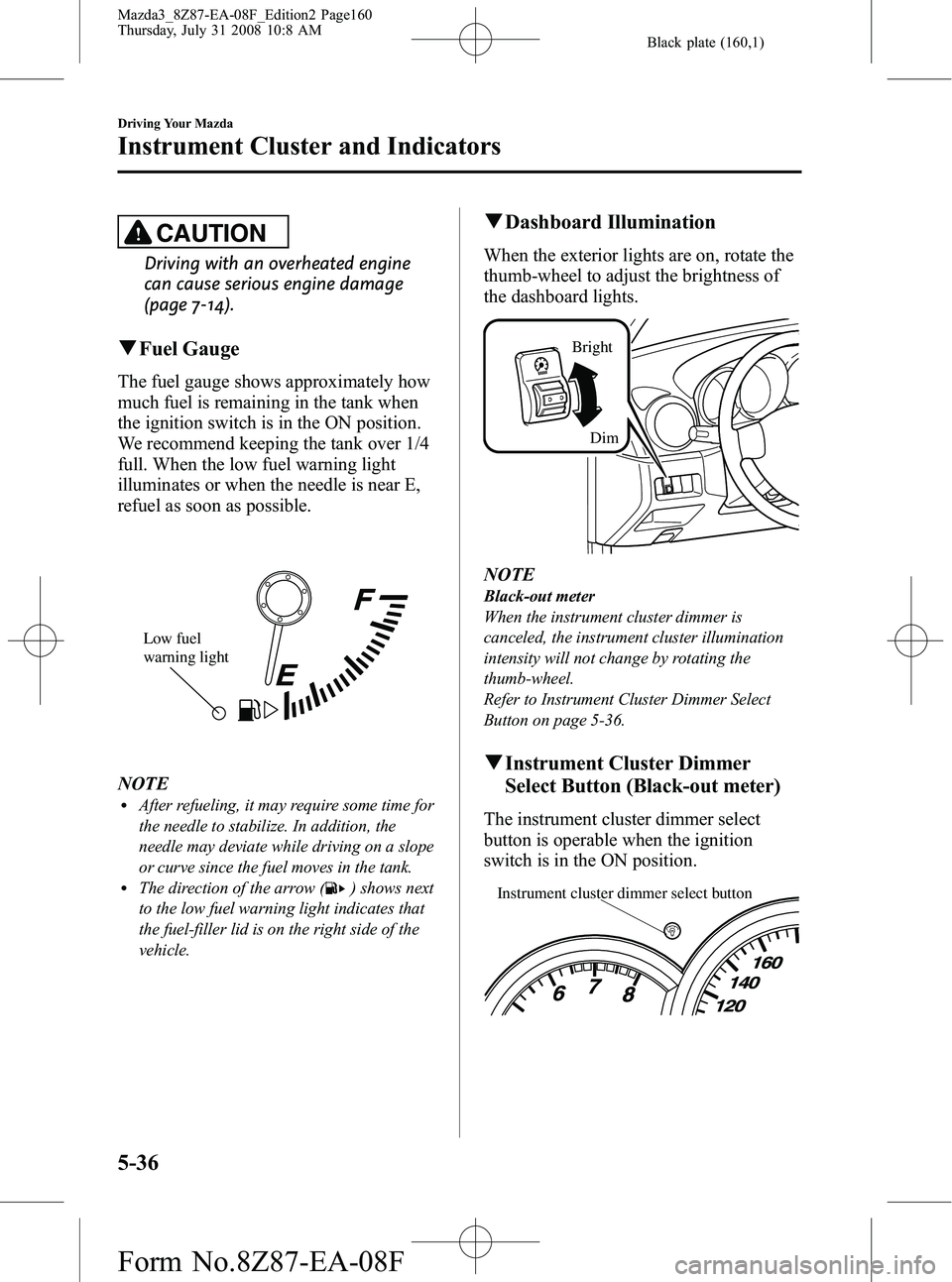
qFuel Gauge
The fuel gauge shows approximately how
much fuel is remaining in the tank when
the ignition switch is in the ON position.
We recommend keeping the tank over 1/4
full. When the low fuel warning light
illuminates or when the needle is near E,
refuel as soon as possible.
Low fuel
warning light
NOTElAfter refueling, it may require some time for
the needle to stabilize. In addition, the
needle may deviate while driving on a slope
or curve since the fuel moves in the tank.
lThe direction of the arrow () shows next
to the low fuel warning light indicates that
the fuel-filler lid is on the right side of the
vehicle.
q Dashboard Illumination
When the exterior lights are on, rotate the
thumb-wheel to adjust the brightness of
the dashboard lights.
Bright
Dim
NOTE
Black-out meter
When the instrument cluster dimmer is
canceled, the instrument cluster illumination
intensity will not change by rotating the
thumb-wheel.
Refer to Instrument Cluster Dimmer Select
Button on page 5-36.
qInstrument Cluster Dimmer
Select Button (Black-out meter)
The instrument cluster dimmer select
button is operable when the ignition
switch is in the ON position.
Instrument cluster dimmer select button
5-36
Driving Your Mazda
Instrument Cluster and Indicators
Mazda3_8Z87-EA-08F_Edition2 Page160
Thursday, July 31 2008 10:8 AM
Form No.8Z87-EA-08F
Page 176 of 418
Black plate (176,1)
CAUTION
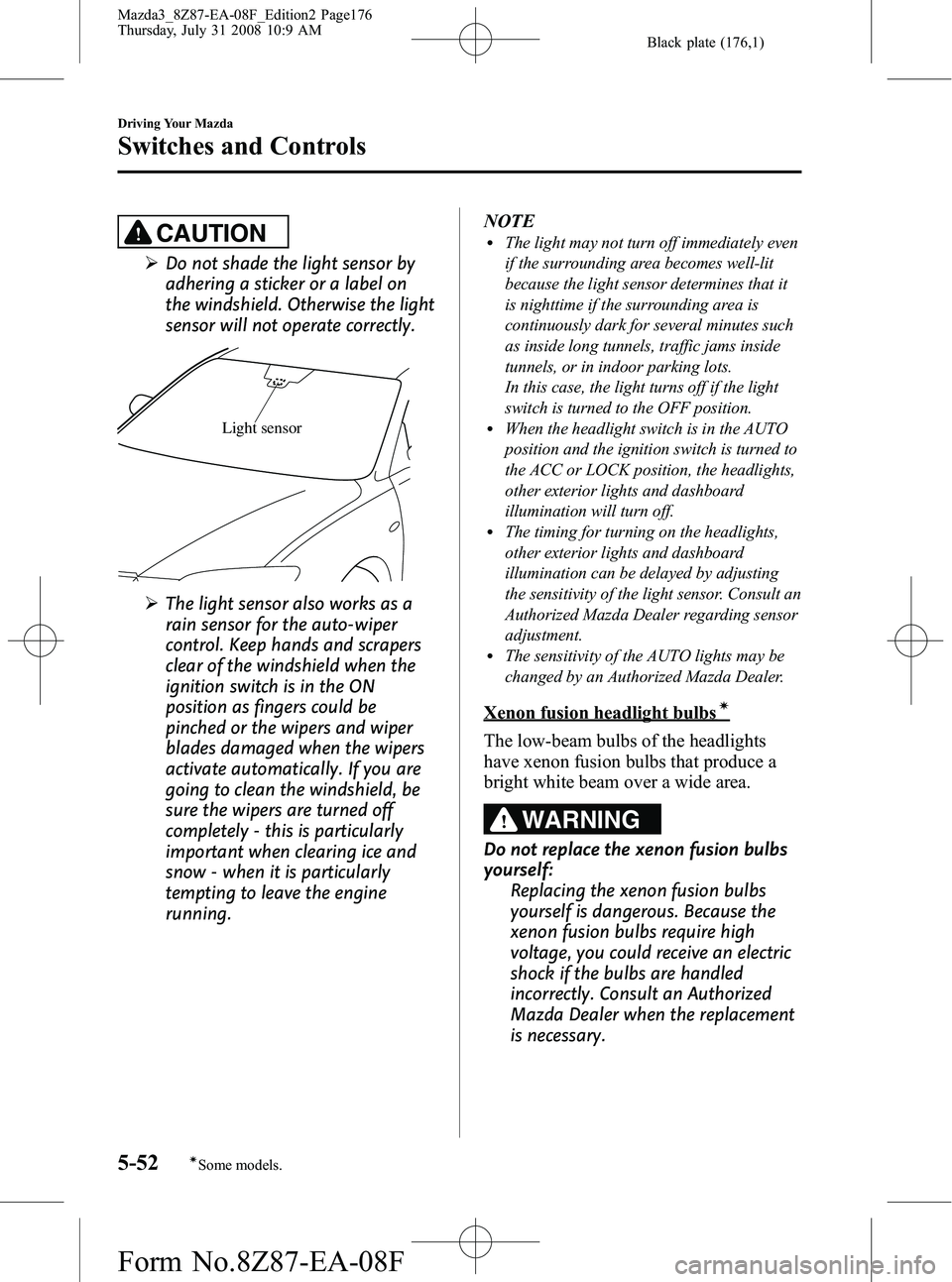
ØDo not shade the light sensor by
adhering a sticker or a label on
the windshield. Otherwise the light
sensor will not operate correctly.
Light sensor
ØThe light sensor also works as a
rain sensor for the auto-wiper
control. Keep hands and scrapers
clear of the windshield when the
ignition switch is in the ON
position as fingers could be
pinched or the wipers and wiper
blades damaged when the wipers
activate automatically. If you are
going to clean the windshield, be
sure the wipers are turned off
completely - this is particularly
important when clearing ice and
snow - when it is particularly
tempting to leave the engine
running. NOTE
lThe light may not turn off immediately even
if the surrounding area becomes well-lit
because the light sensor determines that it
is nighttime if the surrounding area is
continuously dark for several minutes such
as inside long tunnels, traffic jams inside
tunnels, or in indoor parking lots.
In this case, the light turns off if the light
switch is turned to the OFF position.
lWhen the headlight switch is in the AUTO
position and the ignition switch is turned to
the ACC or LOCK position, the headlights,
other exterior lights and dashboard
illumination will turn off.
lThe timing for turning on the headlights,
other exterior lights and dashboard
illumination can be delayed by adjusting
the sensitivity of the light sensor. Consult an
Authorized Mazda Dealer regarding sensor
adjustment.
lThe sensitivity of the AUTO lights may be
changed by an Authorized Mazda Dealer.
Xenon fusion headlight bulbsí
The low-beam bulbs of the headlights
have xenon fusion bulbs that produce a
bright white beam over a wide area.
WARNING
Do not replace the xenon fusion bulbs
yourself:
Replacing the xenon fusion bulbs
yourself is dangerous. Because the
xenon fusion bulbs require high
voltage, you could receive an electric
shock if the bulbs are handled
incorrectly. Consult an Authorized
Mazda Dealer when the replacement
is necessary.
5-52
Driving Your Mazda
íSome models.
Switches and Controls
Mazda3_8Z87-EA-08F_Edition2 Page176
Thursday, July 31 2008 10:9 AM
Form No.8Z87-EA-08F
Page 177 of 418
Black plate (177,1)
NOTE
If the headlights flicker, or the brightness
weakens, the bulb-life may be depleted and a
replacement is necessary. Consult an
Authorized Mazda Dealer.
qLights-On Reminder
If lights are on and the key is removed
from the ignition switch, a continuous
beep sound will be heard when the
driver's door is opened.
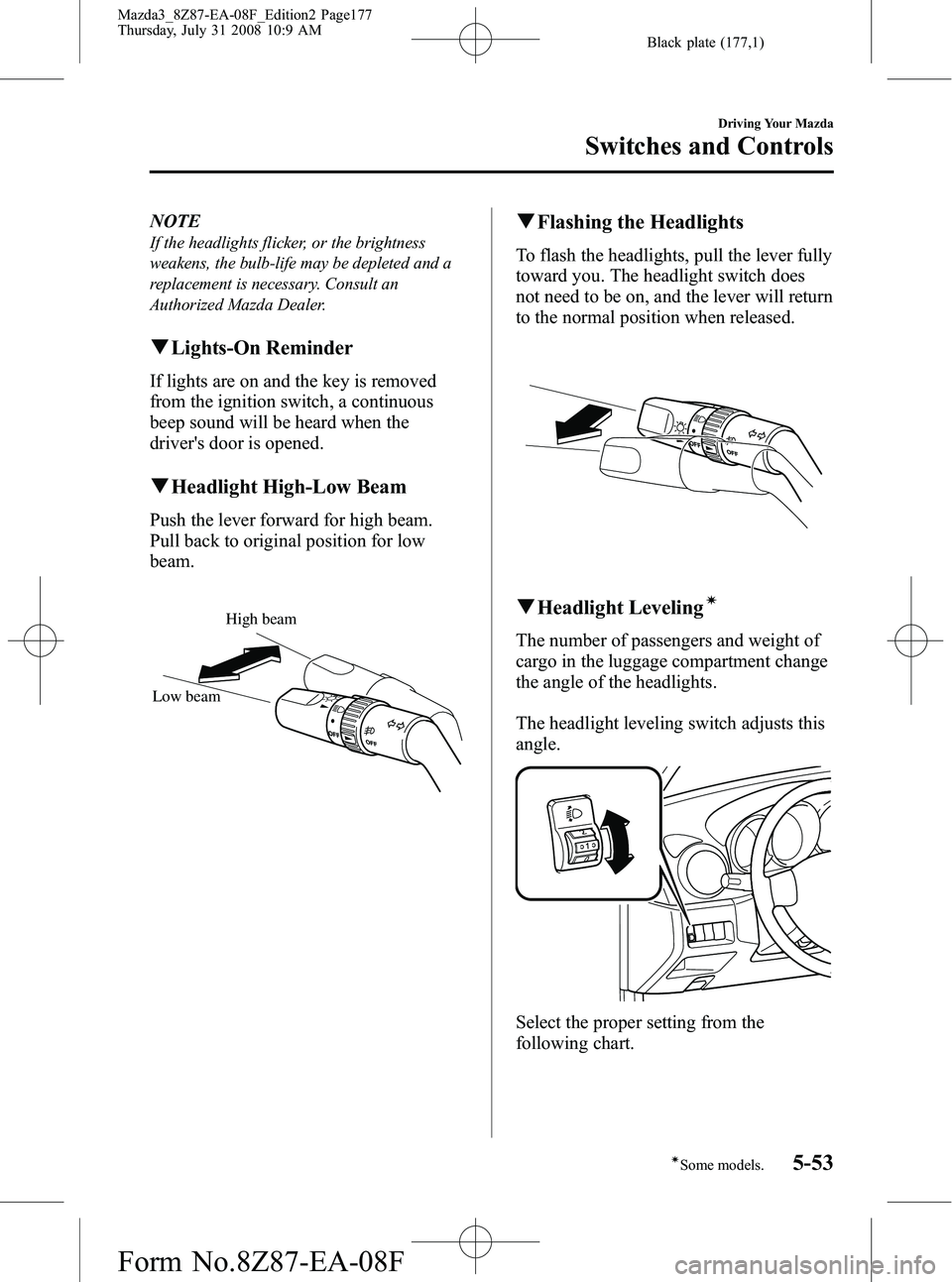
qHeadlight High-Low Beam
Push the lever forward for high beam.
Pull back to original position for low
beam.
High beam
Low beam
q Flashing the Headlights
To flash the headlights, pull the lever fully
toward you. The headlight switch does
not need to be on, and the lever will return
to the normal position when released.
qHeadlight Levelingí
The number of passengers and weight of
cargo in the luggage compartment change
the angle of the headlights.
The headlight leveling switch adjusts this
angle.
Select the proper setting from the
following chart.
Driving Your Mazda
Switches and Controls
5-53íSome models.
Mazda3_8Z87-EA-08F_Edition2 Page177
Thursday, July 31 2008 10:9 AM
Form No.8Z87-EA-08F
Page 178 of 418
Black plate (178,1)
Without turbocharger
Front seatRear
seat Load
Switch
Position
Driver Passenger
× ――― 0
×× ――0
×× × ―1
×× ×× 2
× ―― ×3
×: Yes
― :No
With turbocharger
Front seat
Rear
seat LoadSwitch
Position
Driver Passenger
× ――― 0
×× ――0
××× ―1
××××1
× ―― ×2
×: Yes
― :No
qDaytime Running Lights (Canada)
In Canada, vehicles must be driven with
the headlights on during daytime
operation.
For that reason, the daytime running lights
automatically turn on when the ignition
switch is turned to the ON position.
NOTE
The Daytime Running Lights turn off when the
parking brake is applied.
Turn and Lane-Change
Signals
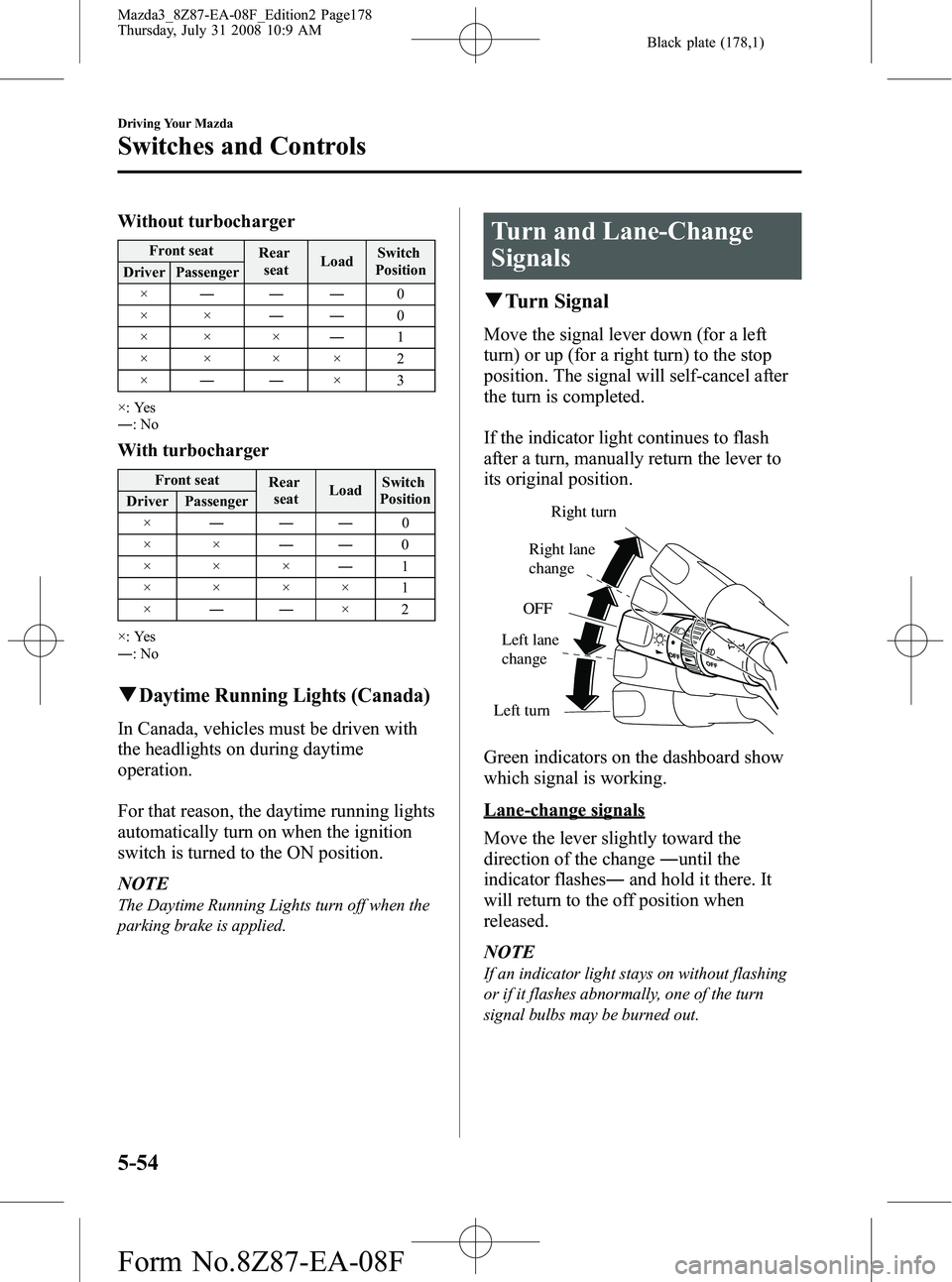
q Turn Signal
Move the signal lever down (for a left
turn) or up (for a right turn) to the stop
position. The signal will self-cancel after
the turn is completed.
If the indicator light continues to flash
after a turn, manually return the lever to
its original position.
Right turn
Left turn OFF
Right lane
change
Left lane
change
Green indicators on the dashboard show
which signal is working.
Lane-change signals
Move the lever slightly toward the
direction of the change ―until the
indicator flashes ―and hold it there. It
will return to the off position when
released.
NOTE
If an indicator light stays on without flashing
or if it flashes abnormally, one of the turn
signal bulbs may be burned out.
5-54
Driving Your Mazda
Switches and Controls
Mazda3_8Z87-EA-08F_Edition2 Page178
Thursday, July 31 2008 10:9 AM
Form No.8Z87-EA-08F
Page 188 of 418
Black plate (188,1)
Operating Tips
qOperating the Climate Control
System
Operate the climate control system with
the engine running.
NOTE
To prevent the battery from being discharged,
do not leave the fan control dial on for a long
period of time with the ignition switch in the
ON position when the engine is not running.
qClearing the Air Inlet
Clear all obstructions such as leaves,
snow and ice from the hood and the air
inlet in the cowl grille to improve the
system efficiency.
qFoggy Windows
The windows may fog up easily in humid
weather. Use the climate control system to
defog the windows.
To help defog the windows, operate the
air conditioner to dehumidify the air.
NOTE
The air conditioner may be used along with the
heater to dehumidify the air.
qOutside/Recirculated Air Position
Use the outside air position in normal
conditions. The recirculated air position
should be used only when driving on
dusty roads or for quick cooling of the
interior.
qParking in Direct Sunlight
If the vehicle has been parked in direct
sunlight during hot weather, open the
windows to let warm air escape, then run
the climate control system.
qNot Using for a Long Period
Run the air conditioner about 10 minutes
at least once a month to keep internal
parts lubricated.
qCheck the Refrigerant before the
Weather Gets Hot
Have the air conditioner checked before
the weather gets hot. Lack of refrigerant
may make the air conditioner less
efficient. Consult an Authorized Mazda
Dealer for refrigerant inspection.
The air conditioner is filled with
HFC134a (R134a), a refrigerant that will
not damage the ozone layer.
If the air conditioner is low on refrigerant
or has a malfunction, consult an
Authorized Mazda Dealer.
qReplacement of the Cabin Air
Filterí
If your vehicle is equipped with an air
filter for the air conditioner, it is necessary
to change the filter periodically as
indicated in scheduled maintenance (page
8-3). Consult an Authorized Mazda
Dealer for replacement of the cabin air
filter.
6-2
Interior Comfort
íSome models.
Climate Control System
Mazda3_8Z87-EA-08F_Edition2 Page188
Thursday, July 31 2008 10:9 AM
Form No.8Z87-EA-08F
Page 194 of 418
Black plate (194,1)
Recirculated air mode (indicator light
illuminated)
Outside air is shut off. Air within the
vehicle is recirculated.
This mode can be used when driving on a
dusty road or in similar conditions. It also
helps to provide quicker cooling of the
interior.
WARNING
Do not use the recirculated air mode in
cold or rainy weather:Using the recirculated air mode in
cold or rainy weather is dangerous as
it will cause the windows to fog up.
Your vision will be hampered, which
could lead to a serious accident.
qHeating
1. Set the mode selector dial to the
position.
2. Set the temperature control dial to the hot position.
3. Set the fan control dial to the desired speed. NOTE
lIf the windshield fogs up easily, set the
mode selector dial to the
position.lIf cooler air is desired at face level, set the
mode selector dial at the
position and
adjust the temperature control dial to
maintain maximum comfort.
lThe air to the floor is warmer than air to
the face (except when the temperature
control dial is set at the extreme hot or cold
position).
lIn the,,orposition, the air
conditioner is automatically turned on
(however, the indicator light does not
illuminate) and the outside air mode is
automatically selected to defrost the
windshield.
In the
orposition, the outside air
mode cannot be changed to the recirculated
air mode.
q Cooling (With Air Conditioner)
1. Set the mode selector dial to the
position.
2. Set the temperature control dial to the cold position.
3. Set the fan control dial to the desired speed.
4. Turn on the air conditioner by pressing the A/C switch.
5. Adjust the fan control dial and temperature control dial to maintain
maximum comfort.
6-8
Interior Comfort
Climate Control System
Mazda3_8Z87-EA-08F_Edition2 Page194
Thursday, July 31 2008 10:9 AM
Form No.8Z87-EA-08F
Page 195 of 418
Black plate (195,1)
CAUTION
When using the air conditioner while
driving up long hills or in heavy
traffic, closely monitor the
temperature gauge (page 5-35).
The air conditioner may cause engine
overheating. If the gauge indicates
overheating, turn the air conditioner
off (page 7-14).
NOTE
lWhen maximum cooling is desired, set the
temperature control dial to the extreme cold
position and set the air intake selector to
the recirculated air mode, then set the fan
control dial to position 4.
lIf warmer air is desired at floor level, set
the mode selector dial at the
position
and adjust the temperature control dial to
maintain maximum comfort.
lThe air to the floor is warmer than air to
the face (except when the temperature
control dial is set at the extreme hot or cold
position).
q Ventilation
1. Set the mode selector dial to the
position.
2. Set the air intake selector to the outside air mode.
3. Set the temperature control dial to the desired position.
4. Set the fan control dial to the desired speed.
qWindshield Defrosting and Defogging
1. Set the mode selector dial to the
position.
2. Set the temperature control dial to the desired position.
3. Set the fan control dial to the desired speed.
WARNING
Do not defog the windshield using the
position with the temperature
control set to the cold position: Using the
position with the
temperature control set to the cold
position is dangerous as it will cause
the outside of the windshield to fog
up. Your vision will be hampered,
which could lead to a serious
accident. Set the temperature control
to the hot or warm position when
using the
position.
NOTE
lFor maximum defrosting, set the
temperature control dial to the extreme hot
position and the fan control dial to position
4.
lIf warm air is desired at the floor, set the
mode selector dial to the
position.lIn the,,orposition, the air
conditioner is automatically turned on
(however, the indicator light does not
illuminate) and the outside air mode is
automatically selected to defrost the
windshield.
In the
orposition, the outside air
mode cannot be changed to the recirculated
air mode.
Interior Comfort
Climate Control System
6-9
Mazda3_8Z87-EA-08F_Edition2 Page195
Thursday, July 31 2008 10:9 AM
Form No.8Z87-EA-08F