ECO mode MAZDA MODEL 3 4-DOOR 2010 Service Manual
[x] Cancel search | Manufacturer: MAZDA, Model Year: 2010, Model line: MODEL 3 4-DOOR, Model: MAZDA MODEL 3 4-DOOR 2010Pages: 504, PDF Size: 5.62 MB
Page 297 of 504
Black plate (297,1)
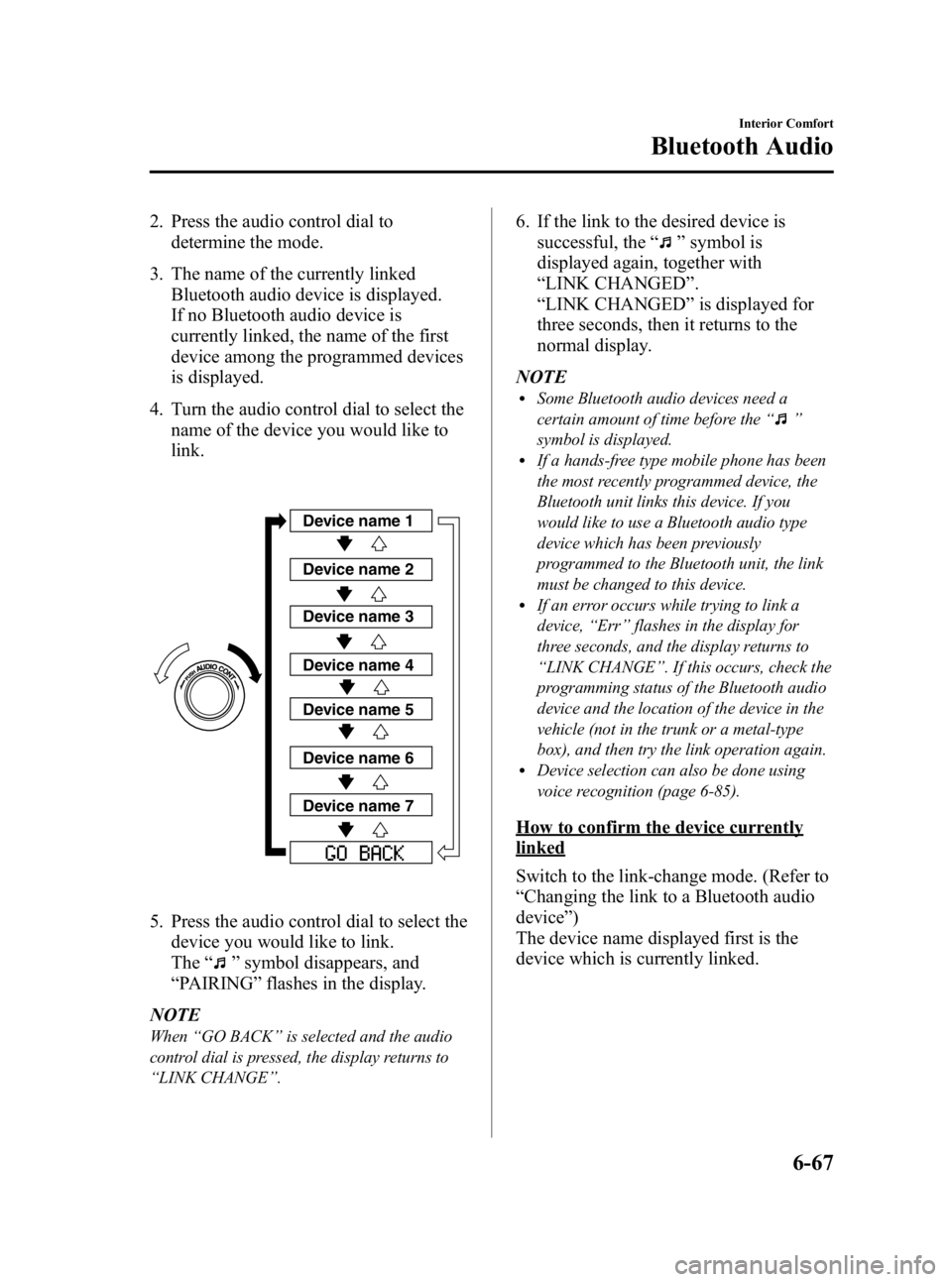
2. Press the audio control dial todetermine the mode.
3. The name of the currently linked Bluetooth audio device is displayed.
If no Bluetooth audio device is
currently linked, the name of the first
device among the programmed devices
is displayed.
4. Turn the audio control dial to select the name of the device you would like to
link.
Device name 1
Device name 2
Device name 3
Device name 4
Device name 5
Device name 6
Device name 7
5. Press the audio control dial to select thedevice you would like to link.
The “
”symbol disappears, and
“ PAIRING ”flashes in the display.
NOTE
When “GO BACK ”is selected and the audio
control dial is pressed, the display returns to
“ LINK CHANGE ”.
6. If the link to the desired device is
successful, the “
”symbol is
displayed again, together with
“ LINK CHANGED ”.
“ LINK CHANGED ”is displayed for
three seconds, then it returns to the
normal display.
NOTE
lSome Bluetooth audio devices need a
certain amount of time before the “
”
symbol is displayed.
lIf a hands-free type mobile phone has been
the most recently programmed device, the
Bluetooth unit links this device. If you
would like to use a Bluetooth audio type
device which has been previously
programmed to the Bluetooth unit, the link
must be changed to this device.
lIf an error occurs while trying to link a
device, “Err ”flashes in the display for
three seconds, and the display returns to
“ LINK CHANGE ”. If this occurs, check the
programming status of the Bluetooth audio
device and the location of the device in the
vehicle (not in the trunk or a metal-type
box), and then try the link operation again.
lDevice selection can also be done using
voice recognition (page 6-85).
How to confirm the device currently
linked
Switch to the link-change mode. (Refer to
“ Changing the link to a Bluetooth audio
device ”)
The device name displayed first is the
device which is currently linked.
Interior Comfort
Bluetooth Audio
6-67
Mazda3_8BG3-EA-09J_Edition2 Page297
Tuesday, December 8 2009 1:29 PM
Form No.8BG3-EA-09J
Page 298 of 504

Black plate (298,1)
Deleting the link to a Bluetooth audio
device
1. Using the audio control dial, select thepairing delete mode “PAIR DELETE ”
in the “BT SETUP” mode. (Refer to
“ Bluetooth audio device set-up ”for
details.)
2. Press the audio control dial to determine the mode.
3. The name of the first device among the programmed devices is displayed.
4. Rotate the audio control dial and select the name of the programmed device
you would like to delete.
Device name 1
Device name 2
Device name 3
Device name 4
Device name 5
Device name 6
Device name 7
NOTE
Only the names of programmed devices can be
displayed. If only one device is programmed,
only the name for this device is displayed.
5. If a selection other than “GO BACK ”
is made and the audio control dial is
pressed, “SURE ? NO ”is displayed.
6. Rotate the audio control dial clockwise and switch the display to “SURE ?
YES ”.
NOTE
The display changes as follows depending on
whether the audio control dial is rotated
clockwise or counterclockwise.
-Clockwise: “SURE ? YES ”displayed
-Counterclockwise: “SURE ? NO ”displayed
7. Press the audio control dial to delete
the selected device.
NOTE
Select “GO BACK ”and press the audio
control dial to return to the “PAIR DELETE ”
display.
8. “PAIR DELETED ”is displayed for
three seconds after the deletion is
completed, and then it returns to the
normal display.
NOTE
If an error occurs while trying to delete the
programmed device, “Err ”flashes in the
display for three seconds and the display
returns to “LINK DELETE ”.
Bluetooth audio device information
display
1. Using the audio control dial, select the
pair device information display mode
“DEVICE INFO ”in the “BT SETUP”
mode. (Refer to
“ Bluetooth audio device set-up ”for
details.)
2. Press the audio control dial to determine the mode.
6-68
Interior Comfort
Bluetooth Audio
Mazda3_8BG3-EA-09J_Edition2 Page298
Tuesday, December 8 2009 1:29 PM
Form No.8BG3-EA-09J
Page 299 of 504

Black plate (299,1)
3. The name of the Bluetooth unit deviceis displayed.
4. Rotate the audio control dial to select the information for the Bluetooth unit
which you would like to view.
Device name
BT address
NOTE
When “GO BACK ”is selected and the audio
control dial is pressed, the display returns to
“ DEVICE INFO ”.
q How to Use the Bluetooth Audio
System
Switching to Bluetooth audio mode
To listen to music or voice audio recorded
to a Bluetooth audio device, switch to the
Bluetooth audio mode to operate the
audio device using the audio system
control panel.
Any Bluetooth audio device must be
programmed to the vehicle's Bluetooth
unit before it can be used. (Refer to
“Bluetooth audio device programming ”)
1. Switch the ignition to ACC or ON. 2. Turn on the Bluetooth audio device's
power.
Make sure that the “
”symbol is
displayed in the information display.
The symbol is not displayed if an
unprogrammed Bluetooth audio device
is being used or the vehicle's Bluetooth
unit has a malfunction.
NOTE
Some Bluetooth audio devices need a certain
amount of time before the “
”symbol is
displayed.
3. Press the AUX button to switch the Bluetooth audio mode to “BT Audio ”.
4. The audio recorded to the Bluetooth audio device begins playback.
NOTE
lIf the Bluetooth audio device does not begin
playback, press the Play/Pause button
(
).lIf the mode is switched from Bluetooth
audio mode to another mode (radio mode),
audio playback from the Bluetooth audio
device stops.
lIf a call is received on a hands-free mobile
phone during playback from the Bluetooth
audio device, the playback is stopped.
Playback from the Bluetooth audio device
resumes after the call ends.
Playback
1. To listen to a Bluetooth audio device over the vehicle's speaker system,
switch the mode to Bluetooth audio
mode. (Refer to
“Switching to Bluetooth audio mode ”)
2. To stop playback, press the Play/Pause button (
).
3. Press the button again to resume playback.
Interior Comfort
Bluetooth Audio
6-69
Mazda3_8BG3-EA-09J_Edition2 Page299
Tuesday, December 8 2009 1:29 PM
Form No.8BG3-EA-09J
Page 326 of 504

Black plate (326,1)
qClockí
The time is displayed when the ignition is
switched to ACC or ON.
Time setting
1. Turn the ignition switch to the ACC or
ON position.
2. Adjust the time using the time setting buttons (
,).
The hours advance while the time
setting button (
) is pressed.
The minutes advance while the time
setting button (
) is pressed.
Time resetting
1. Turn the ignition switch to the ACC or ON position.
2. Press the :00 button.
3. When the button is pressed, the time will be reset as follows:
(Example)
12:01 ―12:29 →12:00
12:30 ―12:59 →1:00
NOTE
When the :00 button is pressed, the seconds
will start at “00 ”.
q Outside Temperature Display
(Fully Automatic Type)
When the ignition switch is in the ON
position, the ambient temperature is
displayed.
NOTE
Under the following conditions, the ambient
temperature display may differ from the actual
ambient temperature depending on the
surroundings and vehicle conditions:
lSignificantly cold or hot temperatures.lSudden changes in ambient temperature.lThe vehicle is parked.lThe vehicle is driven at low speeds.
qClimate Control Display
The climate control system status is
displayed. To operate the climate control
system, refer to “Climate Control System ”
(page 6-2).
q Audio Display
The audio system status is displayed. To
operate the audio system, refer to
“Audio System ”(page 6-16).
6-96
Interior Comfort
íSome models.
Interior Equipment
Mazda3_8BG3-EA-09J_Edition2 Page326
Tuesday, December 8 2009 1:29 PM
Form No.8BG3-EA-09J
Page 330 of 504
Black plate (330,1)
qAudio Display
Press the INFO switch until the AUDIO
screen is displayed. The audio operation
status is displayed.
To operate the audio system, refer to
“Audio System ”(page 6-16).
q Trip Computer
The trip computer can display the
following:
lThe average fuel economy.lThe average vehicle speed.lThe current fuel economy.lThe approximate distance you can
travel on the available fuel.
1. Switch the ignition ON.
2. Press the INFO switch until the trip computer screen is displayed.
If you have any problems with your trip
computer, consult an Authorized Mazda
Dealer.
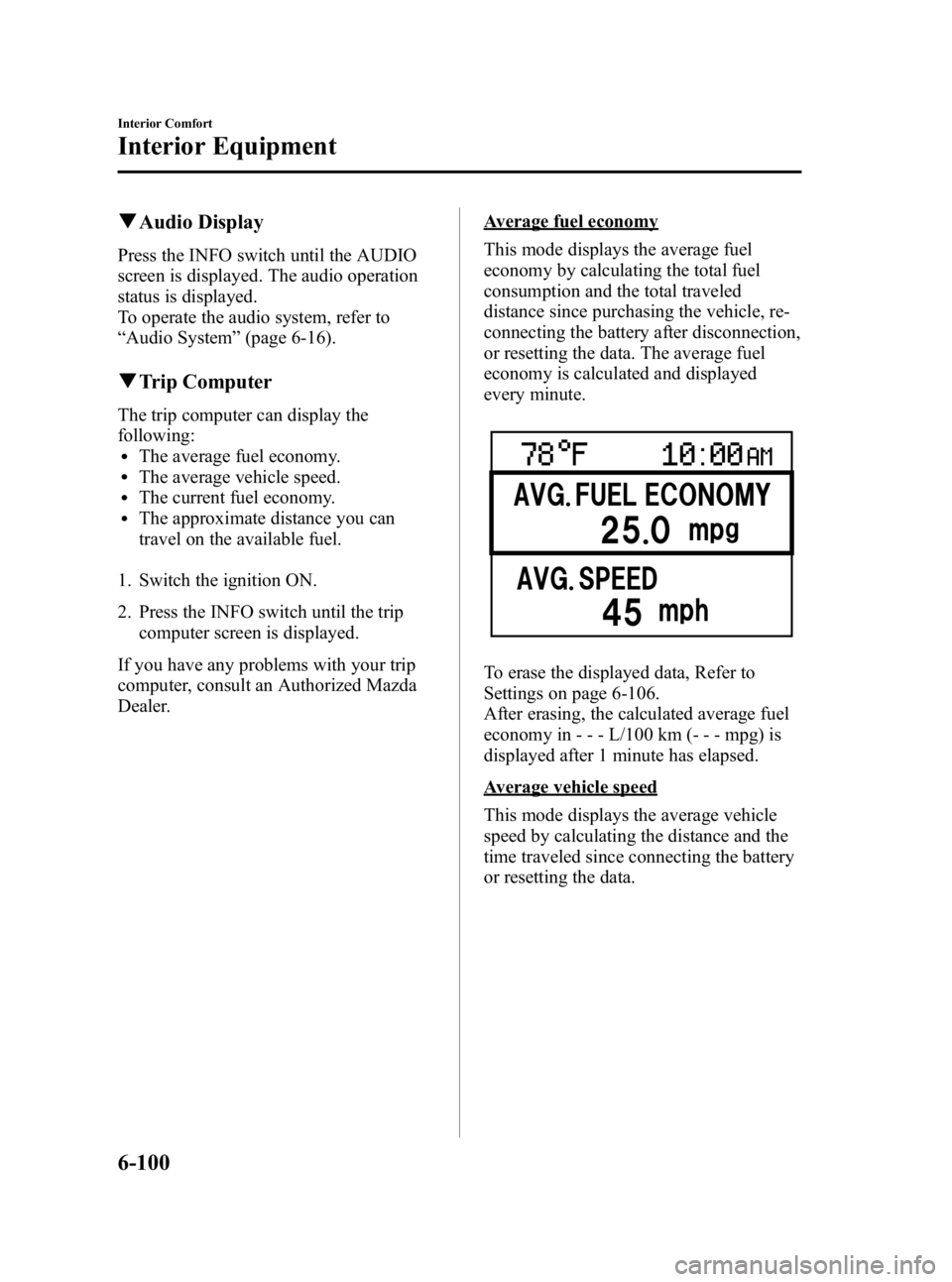
Average fuel economy
This mode displays the average fuel
economy by calculating the total fuel
consumption and the total traveled
distance since purchasing the vehicle, re-
connecting the battery after disconnection,
or resetting the data. The average fuel
economy is calculated and displayed
every minute.
To erase the displayed data, Refer to
Settings on page 6-106.
After erasing, the calculated average fuel
economy in - - - L/100 km (- - - mpg) is
displayed after 1 minute has elapsed.
Average vehicle speed
This mode displays the average vehicle
speed by calculating the distance and the
time traveled since connecting the battery
or resetting the data.
6-100
Interior Comfort
Interior Equipment
Mazda3_8BG3-EA-09J_Edition2 Page330
Tuesday, December 8 2009 1:29 PM
Form No.8BG3-EA-09J
Page 331 of 504
Black plate (331,1)
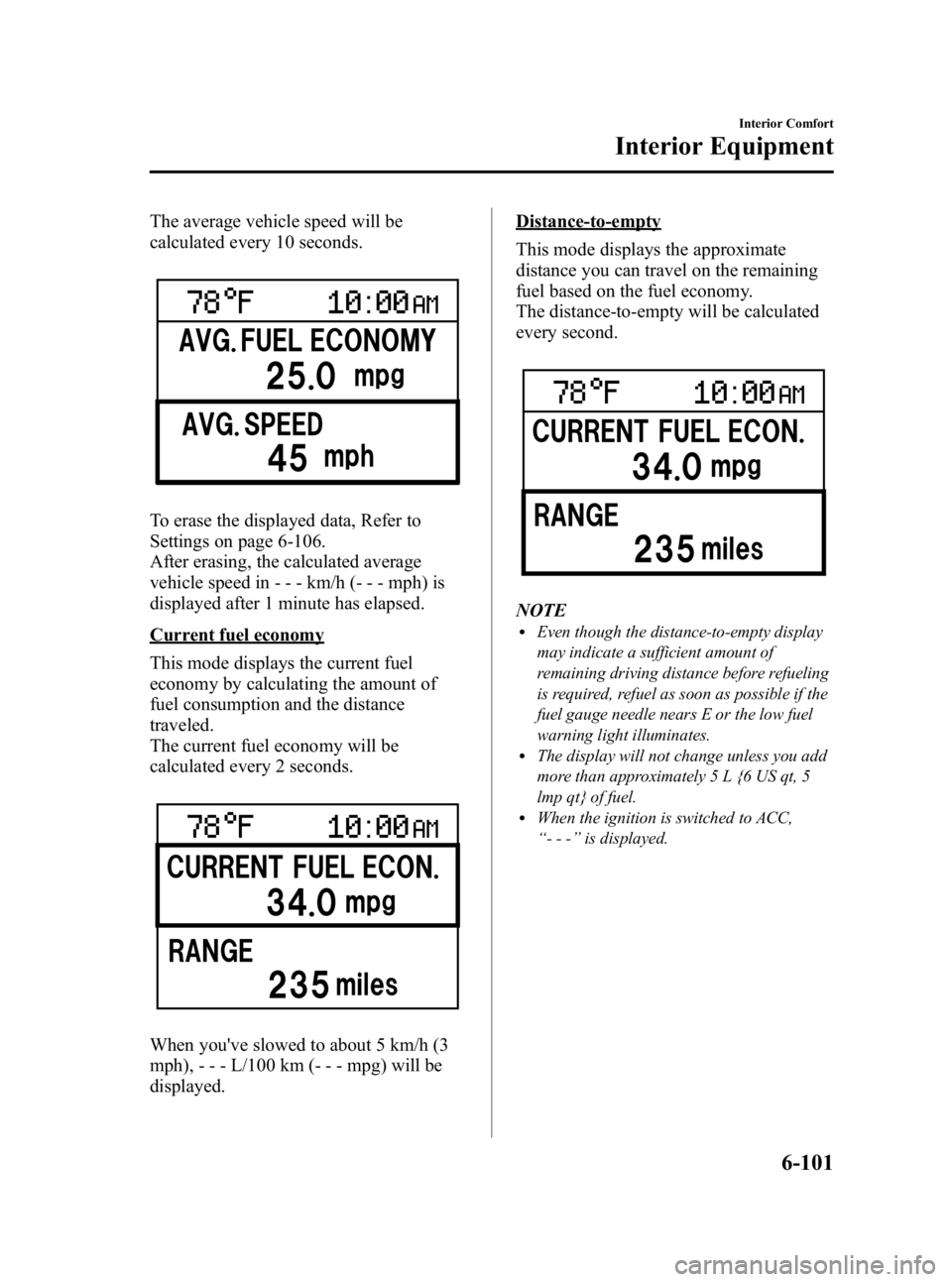
The average vehicle speed will be
calculated every 10 seconds.
To erase the displayed data, Refer to
Settings on page 6-106.
After erasing, the calculated average
vehicle speed in - - - km/h (- - - mph) is
displayed after 1 minute has elapsed.
Current fuel economy
This mode displays the current fuel
economy by calculating the amount of
fuel consumption and the distance
traveled.
The current fuel economy will be
calculated every 2 seconds.
When you've slowed to about 5 km/h (3
mph), - - - L/100 km (- - - mpg) will be
displayed.
Distance-to-empty
This mode displays the approximate
distance you can travel on the remaining
fuel based on the fuel economy.
The distance-to-empty will be calculated
every second.
NOTElEven though the distance-to-empty display
may indicate a sufficient amount of
remaining driving distance before refueling
is required, refuel as soon as possible if the
fuel gauge needle nears E or the low fuel
warning light illuminates.
lThe display will not change unless you add
more than approximately 5 L {6 US qt, 5
lmp qt} of fuel.
lWhen the ignition is switched to ACC,
“--- ”is displayed.
Interior Comfort
Interior Equipment
6-101
Mazda3_8BG3-EA-09J_Edition2 Page331
Tuesday, December 8 2009 1:29 PM
Form No.8BG3-EA-09J
Page 396 of 504

Black plate (396,1)
Power Steering Fluid
qInspecting Power Steering Fluid
Level
CAUTION
To avoid damage to the power
steering pump, don't operate the
vehicle for long periods when the
power steering fluid level is low.
NOTE
Use specified power steering fluid (page 10-4).
Inspect the fluid level in the reservoir at
each engine oil change with the engine off
and cold. Add fluid if necessary; it does
not require periodic changing.
The level must be kept between MIN and
MAX.
Visually examine the lines and hoses for
leaks and damage.
If new fluid is required frequently, consult
an Authorized Mazda Dealer.
Automatic Transaxle Fluid
(ATF)
í
q Inspecting Automatic Transaxle
Fluid Level
The automatic transaxle fluid level should
be inspected regularly. Measure it as
described below.
CAUTION
Ø Always check the automatic
transaxle fluid level according to
the following procedure. If the
procedure is not done correctly,
the automatic transaxle fluid level
cannot be measured accurately
which could lead to automatic
transaxle damage.
Ø A low fluid level can cause
transaxle slippage. Overfilling can
cause foaming, loss of fluid, and
transaxle malfunction.
Ø It is recommended to use Mazda
Genuine automatic transaxle fluid
(page 10-4).
1. Park on a level surface and set the parking brake firmly.
2. Make sure there is no ATF leakage from the ATF hose or the housing.
3. Shift the shift lever to the park position (P), start the engine and warm it up.
CAUTION
Do not shift the shift lever while the
engine is warming up. If the ATF level
is extremely low, the automatic
transaxle could be damaged.
8-24
Maintenance and Care
íSome models.
Owner Maintenance
Mazda3_8BG3-EA-09J_Edition2 Page396
Tuesday, December 8 2009 1:30 PM
Form No.8BG3-EA-09J
Page 408 of 504

Black plate (408,1)
The Tire Pressure Monitoring Systemí
does not alleviate the need to check the
tire condition every day, including
whether the tires all look inflated properly.
Inspect all tire pressure monthly
(including the spare) when the tires are
cold. Maintain recommended pressures
for the best ride, handling, and minimum
tire wear.
When checking the tire pressures, use of a
digital tire pressure gauge is
recommended.
Refer to the specification charts (page
10-9).NOTE
lAlways check tire pressure when tires are
cold.
lWarm tires normally exceed recommended
pressures. Don't release air from warm tires
to adjust the pressure.
lUnderinflation can cause reduced fuel
economy, uneven and accelerated tire wear,
and poor sealing of the tire bead, which
will deform the wheel and cause separation
of tire from rim.
lOverinflation can produce a harsh ride,
uneven and accelerated tire wear, and a
greater possibility of damage from road
hazards.
Keep your tire pressure at the correct
levels. If one frequently needs inflating,
have it inspected.
q
Tire Rotation
To equalize tread wear, rotate the tires if
irregular wear develops. According to the
scheduled maintenance charts.Refer to
Scheduled Maintenance on page 8-3.
During rotation, inspect them for correct
balance.
Do not include (TEMPORARY USE ONLY)
spare tire in rotation.Forward
Also, inspect them for uneven wear and
damage. Abnormal wear is usually caused
by one or a combination of the following:
lIncorrect tire pressure
8-36
Maintenance and Care
íSome models.
Owner Maintenance
Mazda3_8BG3-EA-09J_Edition2 Page408
Tuesday, December 8 2009 1:30 PM
Form No.8BG3-EA-09J
Page 436 of 504

Black plate (436,1)
qAluminum Wheel Maintenanceí
A protective coating is provided over the
aluminum wheels. Special care is needed
to protect this coating.
NOTE
lDo not use a wire brush or any abrasive
cleaner, polishing compound, or solvent on
aluminum wheels. They may damage the
coating.
lOnly use a mild soap or neutral detergent
and always use a sponge or soft cloth to
clean the wheels.
Rinse thoroughly with lukewarm or cold
water. Also, be sure to clean the wheels
after driving on dusty or salted roads. This
helps prevent corrosion.
lAvoid washing your vehicle in an automatic
car wash that uses high-speed or hard
brushes.
lIf your aluminum wheels lose luster, wax
the wheels.
(With Tire Pressure Monitoring System)
Check special requirements for Tire Pressure
Monitoring System.
Refer to Tires and Wheels on page 5-34.
q Plastic Part Maintenance
When cleaning the plastic lenses of the
lights, do not use gasoline, kerosene,
rectified spirit, paint, thinner, highly
acidic detergents, or strongly alkaline
detergents. Otherwise, these chemical
agents can discolor or damage the
surfaces resulting in a significant loss in
functionality. If plastic parts become
inadvertently exposed to any of these
chemical agents, flush with water
immediately.
Interior Care
qDashboard Precautions
Prevent caustic solutions such as perfume
and cosmetic oils from contacting the
dashboard. They'll damage and discolor it.
If these solutions get on the dashboard,
wipe them off immediately.
CAUTION
Do not use glazing agents.
Glazing agents contain ingredients
which may cause discoloration,
wrinkling, cracks and peeling.
qCleaning the Upholstery and
Interior Trim
Vinyl
Remove dust and loose dirt from vinyl
with a whisk broom or vacuum cleaner.
Clean vinyl with a leather-and-vinyl
cleaner.
Leatherí
Real leather is not uniform and may have
scars, scratches, and wrinkles. Clean it
with a leather cleaner or mild soap.
Wipe it with a dampsoft cloth; then dry
and buff it with a drysoft cloth.
Fabric
Remove dust and loose dirt from fabric
with a whisk broom or vacuum cleaner.
Clean it with a mild soap solution good
for upholstery and carpets. Remove fresh
spots immediately with a fabric spot
cleaner.
8-64
Maintenance and Care
íSome models.
Appearance Care
Mazda3_8BG3-EA-09J_Edition2 Page436
Tuesday, December 8 2009 1:30 PM
Form No.8BG3-EA-09J
Page 437 of 504

Black plate (437,1)
To keep the fabric looking clean and
fresh, take care of it. Otherwise its color
will be affected, it can be stained easily,
and its fire-resistance may be reduced.
CAUTION
Use only recommended cleaners and
procedures. Others may affect
appearance and fire-resistance.
Multi information display edge panelí,
Panel beside the multi information
displayí
Multi information display edge panel and
panel beside the multi information display
are fitted with panels that have been
treated with a special coating that resists
scratching.
When the panel needs to be cleaned, use a
soft cloth to wipe off dirt from the surface.
NOTE
Scratches or nicks on the panels resulting from
the use of a hard brush or cloth may not be
repairable.
Front passenger's side instrument panel
top (soft pad)
lExtremely soft material is used for the
soft pad surface. When cleaning, it is
recommended that you use a clean
towel dampened in a mild detergent to
remove soiling.
lIf the soft pad surface is rubbed
harshly, it could result in the surface
being damaged leaving white scratch
marks.
qCleaning the Lap/Shoulder Belt
Webbing
Clean the webbing with a mild soap
solution recommended for upholstery or
carpets. Follow instructions. Don't bleach
or dye the webbing; this may weaken it.
After cleaning the belts, thoroughly dry
the belt webbing and make sure there is
no remaining moisture before retracting
them.
WARNING
Have an Authorized Mazda Dealer
replace damaged seat belts
immediately:
Using damaged seat belts is
dangerous. In a collision, damaged
belts cannot provide adequate
protection.
qCleaning the Window Interiors
If the windows become covered with an
oily, greasy, or waxy film, clean them
with glass cleaner. Follow the directions
on the container.
CAUTION
Don't scrape or scratch the inside of
the rear window. You may damage
the rear window defroster grid.
Maintenance and Care
Appearance Care
8-65íSome models.
Mazda3_8BG3-EA-09J_Edition2 Page437
Tuesday, December 8 2009 1:30 PM
Form No.8BG3-EA-09J