Turn On MAZDA MODEL 3 4-DOOR 2010 Service Manual
[x] Cancel search | Manufacturer: MAZDA, Model Year: 2010, Model line: MODEL 3 4-DOOR, Model: MAZDA MODEL 3 4-DOOR 2010Pages: 504, PDF Size: 5.62 MB
Page 142 of 504
Black plate (142,1)
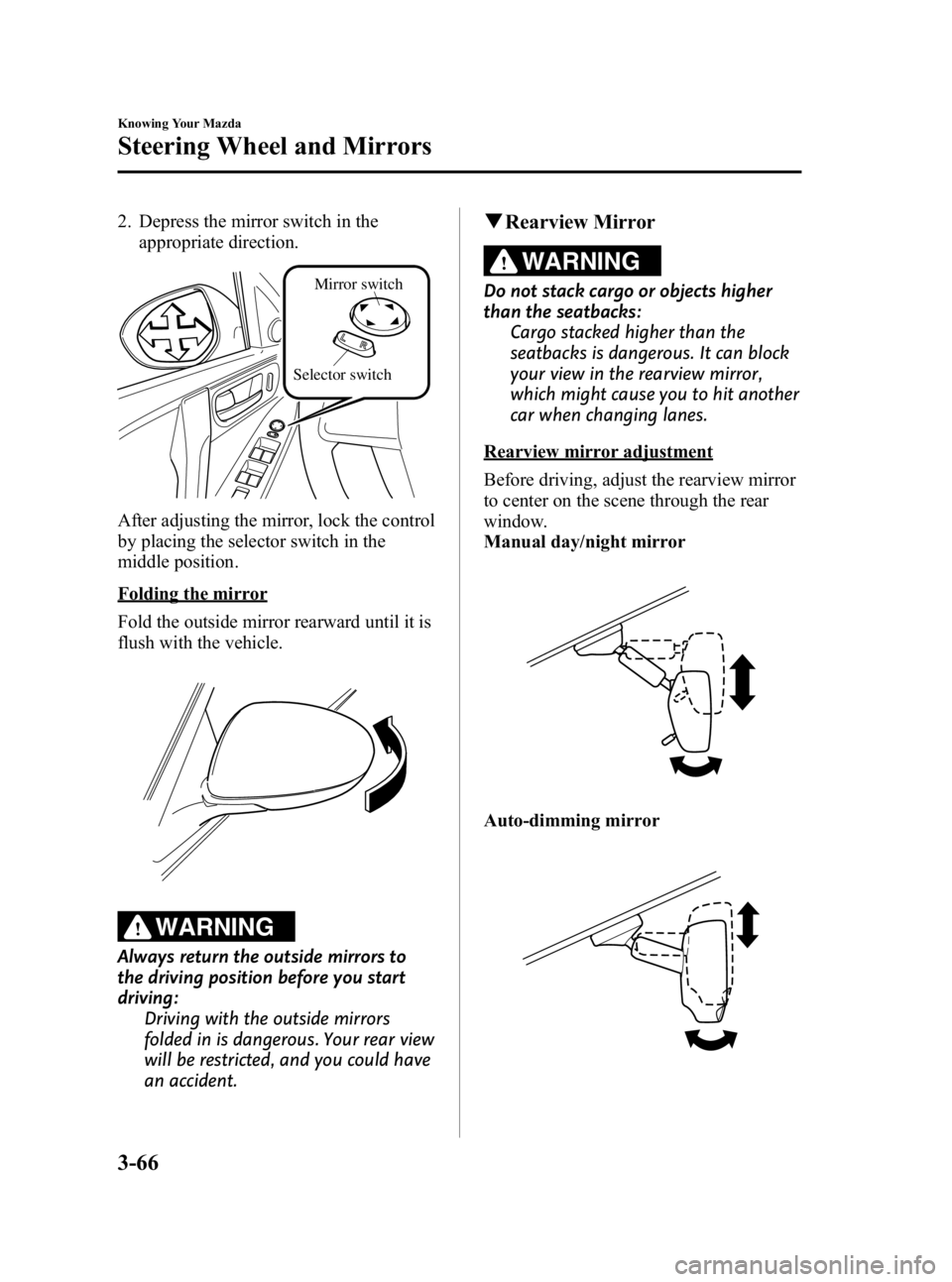
2. Depress the mirror switch in theappropriate direction.
Selector switch Mirror switch
After adjusting the mirror, lock the control
by placing the selector switch in the
middle position.
Folding the mirror
Fold the outside mirror rearward until it is
flush with the vehicle.
WARNING
Always return the outside mirrors to
the driving position before you start
driving:
Driving with the outside mirrors
folded in is dangerous. Your rear view
will be restricted, and you could have
an accident.
qRearview Mirror
WARNING
Do not stack cargo or objects higher
than the seatbacks:
Cargo stacked higher than the
seatbacks is dangerous. It can block
your view in the rearview mirror,
which might cause you to hit another
car when changing lanes.
Rearview mirror adjustment
Before driving, adjust the rearview mirror
to center on the scene through the rear
window.
Manual day/night mirror
Auto-dimming mirror
3-66
Knowing Your Mazda
Steering Wheel and Mirrors
Mazda3_8BG3-EA-09J_Edition2 Page142
Tuesday, December 8 2009 1:28 PM
Form No.8BG3-EA-09J
Page 143 of 504

Black plate (143,1)
NOTE
For the manual day/night mirror, perform the
adjustment with the day/night lever in the day
position.
Reducing glare from headlights
Manual day/night mirror
Push the day/night lever forward for day
driving. Pull it back to reduce glare of
headlights from cars at the rear.
Night
Day Day/Night lever
Auto-dimming mirror
The auto-dimming mirror automatically
reduces glare of headlights from cars at
the rear when the ignition is switched ON. Press the ON/OFF button (
) to cancel
the automatic dimming function. The
indicator light will turn off.
To reactivate the automatic dimming
function, press the ON/OFF button (
).
The indicator light will illuminate.
ON/OFF button
Indicator light
Knowing Your Mazda
Steering Wheel and Mirrors
3-67
Mazda3_8BG3-EA-09J_Edition2 Page143
Tuesday, December 8 2009 1:28 PM
Form No.8BG3-EA-09J
Page 148 of 504
Black plate (148,1)
Emission Control System
Your vehicle is equipped with an emission control system (the catalytic converter is part of
this system) that enables your vehicle to comply with existing exhaust emissions
requirements.
WARNING
Never park over or near anything flammable:Parking over or near anything flammable, such as dry grass, is dangerous. Even with
the engine turned off, the exhaust system remains very hot after normal use and
could ignite anything flammable. A resulting fire could cause serious injury or death.
CAUTION
Ignoring the following precautions could cause lead to accumulate on the catalyst
inside the converter or cause the converter to get very hot. Either condition will
damage the converter and cause poor performance.
ØUSE ONLY UNLEADED FUEL.
Ø Do not drive your Mazda with any sign of engine malfunction.
Ø Do not coast with the ignition switched off.
Ø Do not descend steep grades in gear with the ignition switched off.
Ø Do not operate the engine at high idle for more than 5 minutes.
Ø Do not tamper with the emission control system. All inspections and adjustments
must be made by a qualified technician.
Ø Do not push-start or pull-start your vehicle.
NOTE
Under U.S. federal law, any modification to the original-equipment emission control system before
the first sale and registration of a vehicle is subject to penalties. In some states, such modification
made on a used vehicle is also subject to penalties.
NOTE
While the engine is off, the sound of a valve opening and closing can be heard at the rear of the right
side of the vehicle, however this does not indicate an abnormality. Your vehicle has a self-checking
device and it operates while the engine is off.
4-4
Before Driving Your Mazda
Fuel and Engine Exhaust Precautions
Mazda3_8BG3-EA-09J_Edition2 Page148
Tuesday, December 8 2009 1:28 PM
Form No.8BG3-EA-09J
Page 154 of 504
Black plate (154,1)
qSnow Tires
Use snow tires on all four wheels
Do not go faster than 120 km/h (75 mph)
while driving with snow tires. Inflate
snow tires 30 kPa (0.3 kgf/cm
2, 4.3 psi)
more than recommended on the tire
pressure label (driver's door frame), but
never more than the maximum cold-tire
pressure shown on the tires.
Your vehicle is originally equipped with
all season radials designed to be used all
year around. In some extreme climates
you may find it necessary to replace them
with snow tires during the winter months
to further improve traction on snow and
ice covered roads.
WARNING
Use only the same size and type tires
(snow, radial, or non-radial) on all four
wheels: Using tires different in size or type is
dangerous. Your vehicle's handling
could be greatly affected and result
in an accident.
CAUTION
Check local regulations before using
studded tires.
NOTE
If your vehicle is equipped with the tire
pressure monitoring system, the system may
not function correctly when using tires with
steel wire reinforcement in the sidewalls (page
5-34).
q Tire Chains
Check local regulations before using tire
chains.
CAUTION
Ø Chains may affect handling.
Ø Do not go faster than 50 km/h (30
mph) or the chain manufacturer's
recommended limit, whichever is
lower.
Ø Drive carefully and avoid bumps,
holes, and sharp turns.
Ø Avoid locked-wheel braking.
Ø Do not use chains on a temporary
spare tire; it may result in damage
to the vehicle and to the tire.
Ø Do not use chains on roads that
are free of snow or ice. The tires
and chains could be damaged.
Ø Chains may scratch or chip
aluminum wheels.
NOTE
lUse of tire chains on a vehicle equipped
with P225/40R18 specification tires could
cause interference with the vehicle body
and scratching. If tire chains are to be used,
replace both front and rear tires with P
205/50R17 tires. Please consult an
Authorized Mazda Dealer.
lIf your vehicle is equipped with the tire
pressure monitoring system, the system may
not function correctly when using tire
chains.
Install the chains on the front tires.
Do not use chains on the rear tires.
Please consult an Authorized Mazda
Dealer.
Installing the chains
1. Remove the wheel covers, or the chain bands will scratch them.
4-10
Before Driving Your Mazda
Driving Tips
Mazda3_8BG3-EA-09J_Edition2 Page154
Tuesday, December 8 2009 1:28 PM
Form No.8BG3-EA-09J
Page 155 of 504

Black plate (155,1)
2. Secure the chains on the front tires astightly as possible. Always follow the
chain manufacturer's instructions.
3. Retighten the chains after driving 1/2 ―1 km (1/4 ―1/2 mile).Driving In Flooded Area
WARNING
Dry wet brakes by driving very slowly
and applying the brakes lightly until
brake performance returns to normal:
Driving with wet brakes is
dangerous. Increased stopping
distance or the vehicle pulling to one
side when braking could result in a
serious accident. Light braking will
indicate whether the brakes have
been affected.
CAUTION
Do not drive the vehicle on flooded
roads as it could cause short
circuiting of electrical/electronic
parts, or engine damage or stalling
from water absorption. If the vehicle
has been immersed in water, consult
an Authorized Mazda Dealer.
Before Driving Your Mazda
Driving Tips
4-11
Mazda3_8BG3-EA-09J_Edition2 Page155
Tuesday, December 8 2009 1:28 PM
Form No.8BG3-EA-09J
Page 158 of 504
Black plate (158,1)
Turbocharger Informationí
The turbocharger greatly enhances engine power. Its advanced design provides improved
operation and requires minimum additional maintenance. To get maximum performance
from your turbocharged engine, take note of the following tips:
lThe turbocharged engine is designed for optimal operation with premium unleaded
gasoline (page 4-2). Do not use fuel with a lower octane rating. Extra fuel additives are
NOT recommended.
lChange the engine oil and filter using the turbo engine interval outlined in the
maintenance schedule (for your driving condition).
lUse only the recommended engine oil (page 8-18). Extra oil additives are NOT
recommended.
lAfter driving at freeway speeds or up a long hill, idle the engine at least 30 seconds to
cool the turbo before turning off the engine. Avoid simply shutting the engine off
abruptly after a hard or long drive. Damage to the turbocharger may result.
lDo not race or over-rev the engine when starting. This should not be done with ANY
engine, especially not with one that's turbocharged.
lDo not add any aftermarket devices to alter the engine's ignition timing, fuel delivery, or
turbo boost pressure. This may lead to serious engine damage and may void your
warranty.
4-14
Before Driving Your Mazda
íSome models.
Driving Tips
Mazda3_8BG3-EA-09J_Edition2 Page158
Tuesday, December 8 2009 1:28 PM
Form No.8BG3-EA-09J
Page 161 of 504
Black plate (161,1)
5Driving Your Mazda
Explanation of instruments and controls.
Starting and Driving ..................................................................... 5-2Ignition Switch .......................................................................... 5-2
Starting the Engine .................................................................... 5-4
Turning Off the Engine ............................................................. 5-5
Brake System ............................................................................ 5-5
Manual Transaxle Operation ................................................... 5-10
Automatic Transaxle Controls ................................................ 5-13
Power Steering ........................................................................ 5-20
Cruise Control
í...................................................................... 5-21
Traction Control System (TCS)í........................................... 5-26
Dynamic Stability Control (DSC)í........................................ 5-27
Tire Pressure Monitoring Systemí......................................... 5-30
Instrument Cluster and Indicators ............................................ 5-36 Meters and Gauges .................................................................. 5-36
Warning/Indicator Lights and Beep Sounds ............................ 5-41 Warning/Indicator Lights ........................................................ 5-41
Beep Sounds ........................................................................... 5-56
Switches and Controls ................................................................ 5-58 Lighting Control ..................................................................... 5-58
Turn and Lane-Change Signals ............................................... 5-62
Fog Lights
í............................................................................ 5-63
Windshield Wipers and Washer .............................................. 5-64
Rear Window Wiper and Washer (5 Door) ............................. 5-68
Rear Window Defroster ........................................................... 5-68
Horn ........................................................................................ 5-69
Hazard Warning Flasher .......................................................... 5-70
5-1íSome models.
Mazda3_8BG3-EA-09J_Edition2 Page161
Tuesday, December 8 2009 1:28 PM
Form No.8BG3-EA-09J
Page 162 of 504

Black plate (162,1)
Ignition Switch
With advanced key
Refer to“Starting the engine (page 3-11) ”
for information on how to use the ignition
switch.
q Ignition Switch Positions
(Without Advanced Key)
LOCKí
The steering wheel locks to protect
against theft. Only in this position can the
key be removed.
Manual transaxle
To turn the key from the ACC to the
LOCK position, push the button when the
key is at the ACC position, then turn the
key to the LOCK position.
Button
Push the
button
Automatic transaxle
To turn the key from the ACC to the
LOCK position, the shift lever must be in
the P position.
Shift lever
engaged in P
(park)
5-2
Driving Your Mazda
íSome models.
Starting and Driving
Mazda3_8BG3-EA-09J_Edition2 Page162
Tuesday, December 8 2009 1:28 PM
Form No.8BG3-EA-09J
Page 163 of 504

Black plate (163,1)
WARNING
Remove the key only when the vehicle
is parked:Removing the key from the ignition
switch while the vehicle is moving is
dangerous. Removing the key allows
the steering wheel to lock. You will
lose steering control and a serious
accident could occur.
Before leaving the driver's seat, always
switch the ignition off, set the parking
brake, and make sure the shift lever is
in P (automatic transaxle) or in 1st gear
or R (manual transaxle): Leaving the driver's seat without
switching off the ignition, setting the
parking brake, and shifting the shift
lever to P (automatic transaxle) or to
1st gear or R (manual transaxle) is
dangerous. Unexpected vehicle
movement could occur which could
result in an accident.
In addition, if your intention is to
leave the vehicle for even a short
period, it is important to switch the
ignition off, as leaving it in another
position will disable some of the
vehicle's security systems and run the
battery down.
NOTE
If turning the key is difficult, jiggle the steering
wheel from side to side.
Leaving the key in any position but LOCK
position also disables some of the security
features and may run the battery down.
ACC (Accessory)
The steering wheel unlocks and some
electrical accessories will operate.
ON
This is the normal running position after
the engine is started. Some indicator
lights/warning lights should be inspected
before the engine is started (page 5-41).
NOTE
When the ignition switch is turned to the ON
position, the sound of the fuel pump motor
operating near the fuel tank can be heard. This
does not indicate an abnormality.
NOTE
(With headlight auto-leveling)
When the ignition switch is turned to the ON
position, the sound of the headlight leveling
motors operating at the front of the engine
compartment can be heard. This does not
indicate an abnormality.
START
The engine is started in this position. It
will crank until you release the key. It
then returns to the ON position.
q Ignition Key Reminder
If the ignition is switched to off (LOCK)
or ACC with the key inserted, a
continuous beep sound will be heard
when the driver's door is opened.
NOTE
A personalized function is available to change
the sound volume for the ignition key reminder.
Refer to Personalization Features on page
10-10.
Driving Your Mazda
Starting and Driving
5-3
Mazda3_8BG3-EA-09J_Edition2 Page163
Tuesday, December 8 2009 1:28 PM
Form No.8BG3-EA-09J
Page 164 of 504
Black plate (164,1)
Starting the Engine
With advanced key
Refer to“Starting the engine (page 3-11) ”
for information on how to start the engine.
NOTE
Engine-starting is controlled by the spark
ignition system.
This system meets all Canadian Interference-
Causing Equipment Standard requirements
regulating the impulse electrical field strength
of radio noise.
1. Occupants should fasten their seat
belts.
2. Make sure the parking brake is on.
3. Depress the brake pedal.
4. (Manual transaxle)
Depress the clutch pedal all the way
and shift into neutral.
Keep the clutch pedal depressed while
cranking the engine.
(Automatic transaxle)
Put the vehicle in park (P). If you must
restart the engine while the vehicle is
moving, shift into neutral (N).
NOTE
(Manual transaxle)
The starter will not operate unless the clutch is
depressed sufficiently.
(Automatic transaxle)
The starter will not operate if the shift lever is
not in P or N.
5. Turn the ignition switch to the START
position and hold (up to 10 seconds at
a time) until the engine starts.
CAUTION
Do not try the starter for more than
10 seconds at a time. If the engine
stalls or fails to start, wait 10 seconds
before trying again. Otherwise, you
may damage the starter and drain
the battery.
6. After starting the engine, let it idle for about 10 seconds.
NOTE
lIn extremely cold weather or after the
vehicle has not been driven in several days,
let the engine warm up without operating
the accelerator.
lWhether the engine is cold or warm, it
should be started without use of the
accelerator.
lIf the engine does not start the first time,
refer to Starting a Flooded Engine under
Emergency Starting. If the engine still does
not start, have your vehicle inspected by an
Authorized Mazda Dealer (page 7-17).
5-4
Driving Your Mazda
Starting and Driving
Mazda3_8BG3-EA-09J_Edition2 Page164
Tuesday, December 8 2009 1:28 PM
Form No.8BG3-EA-09J