Turn On MAZDA MODEL 3 4-DOOR 2010 Workshop Manual
[x] Cancel search | Manufacturer: MAZDA, Model Year: 2010, Model line: MODEL 3 4-DOOR, Model: MAZDA MODEL 3 4-DOOR 2010Pages: 504, PDF Size: 5.62 MB
Page 165 of 504

Black plate (165,1)
Turning Off the Engine
1. Stop the vehicle completely.
2.(Manual transaxle)
Shift into neutral.
(Automatic transaxle)
Shift the shift lever to the P position.
3. (Without Advanced Keyless Entry &
Push Button Start System)
Turn the ignition switch from the ON
position to the LOCK position.
(With Advanced Keyless Entry &
Push Button Start System)
Press the push button start to turn off
the engine.
CAUTION
When leaving the vehicle, make sure
the ignition is switched OFF.
NOTE
The electrical fan in the engine compartment
could turn on for a few minutes after the
ignition is switched from the ON to the OFF,
whether or not the A/C is on or off, to cool the
engine compartment quickly.
Brake System
q Foot Brake
Your Mazda has power-assisted brakes
that adjust automatically through normal
use.
Should power-assist fail, you can stop by
applying greater force than normal to the
brake pedal. But the distance required to
stop will be greater than usual.
Driving Your Mazda
Starting and Driving
5-5
Mazda3_8BG3-EA-09J_Edition2 Page165
Tuesday, December 8 2009 1:28 PM
Form No.8BG3-EA-09J
Page 166 of 504

Black plate (166,1)
WARNING
Do not coast with the engine stalled or
turned off, find a safe place to stop:Coasting with the engine stalled or
turned off is dangerous. Braking will
require more effort, and the brake's
power-assist could be depleted if you
pump the brake. This will cause
longer stopping distances or even an
accident.
Shift to a lower gear when going down
steep hills: Driving with your foot continuously
on the brake pedal or steadily
applying the brakes for long
distances is dangerous. This causes
overheated brakes, resulting in
longer stopping distances or even
total brake failure. This could cause
loss of vehicle control and a serious
accident. Avoid continuous
application of the brakes.
Dry brakes that have become wet by
driving very slowly and applying the
brakes lightly until brake performance
is normal: Driving with wet brakes is
dangerous. Increased stopping
distance or the vehicle pulling to one
side when braking could result in a
serious accident. Light braking will
indicate whether the brakes have
been affected.
qParking Brake
WARNING
Before leaving the driver's seat, always
switch the ignition off, set the parking
brake, and make sure the shift lever is
in P (automatic transaxle) or in 1st gear
or R (manual transaxle):
Leaving the driver's seat without
switching off the ignition, setting the
parking brake, and shifting the shift
lever to P (automatic transaxle) or to
1st gear or R (manual transaxle) is
dangerous. Unexpected vehicle
movement could occur which could
result in an accident.
In addition, if your intention is to
leave the vehicle for even a short
period, it is important to switch the
ignition off, as leaving it in another
position will disable some of the
vehicle's security systems and run the
battery down.
CAUTION
Driving with the parking brake on
will cause excessive wear of the brake
linings or pads.
NOTE
For parking in snow, refer to Winter Driving
(page 4-9) regarding parking brake use.
5-6
Driving Your Mazda
Starting and Driving
Mazda3_8BG3-EA-09J_Edition2 Page166
Tuesday, December 8 2009 1:28 PM
Form No.8BG3-EA-09J
Page 167 of 504
Black plate (167,1)
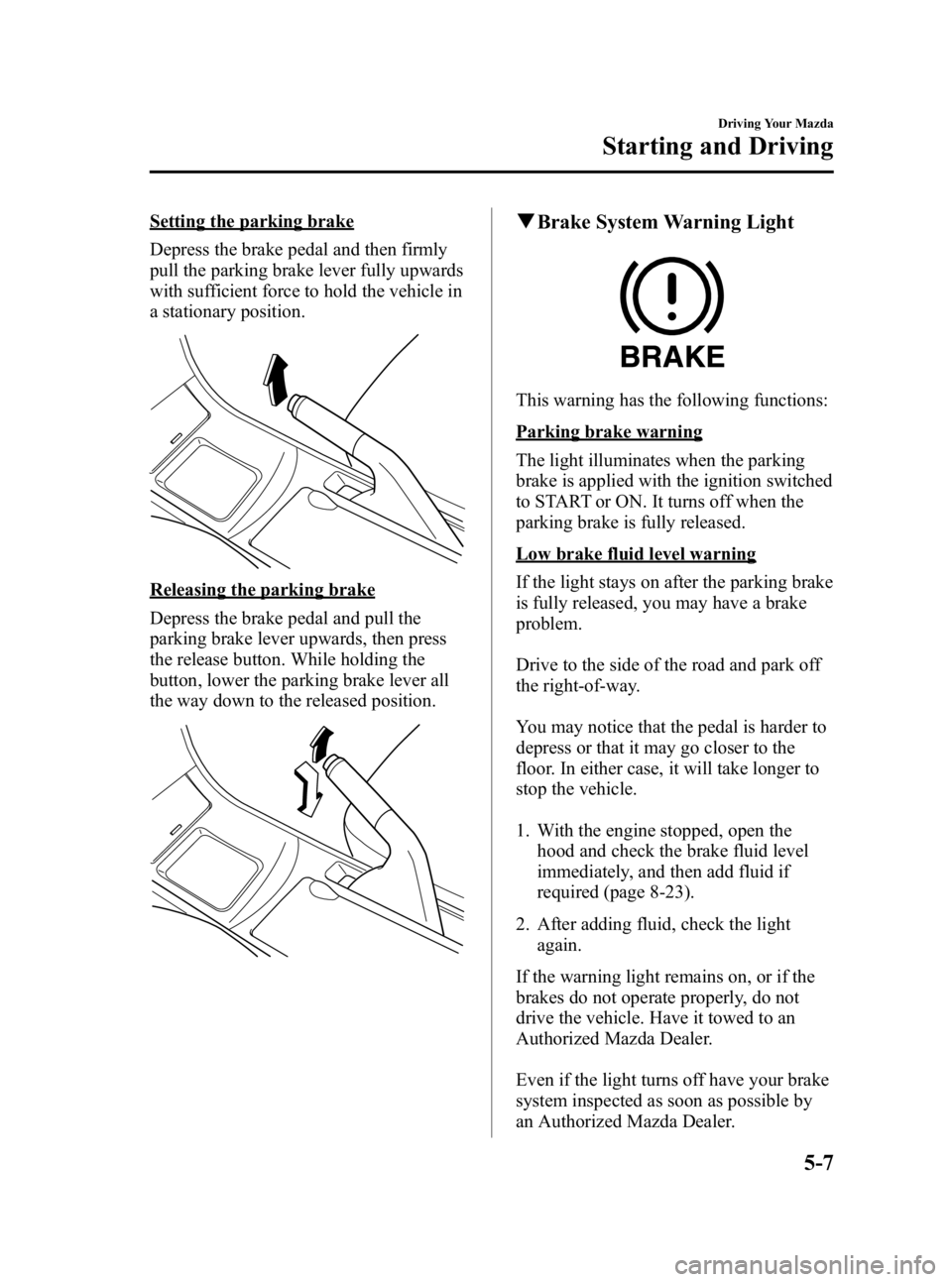
Setting the parking brake
Depress the brake pedal and then firmly
pull the parking brake lever fully upwards
with sufficient force to hold the vehicle in
a stationary position.
Releasing the parking brake
Depress the brake pedal and pull the
parking brake lever upwards, then press
the release button. While holding the
button, lower the parking brake lever all
the way down to the released position.
qBrake System Warning Light
This warning has the following functions:
Parking brake warning
The light illuminates when the parking
brake is applied with the ignition switched
to START or ON. It turns off when the
parking brake is fully released.
Low brake fluid level warning
If the light stays on after the parking brake
is fully released, you may have a brake
problem.
Drive to the side of the road and park off
the right-of-way.
You may notice that the pedal is harder to
depress or that it may go closer to the
floor. In either case, it will take longer to
stop the vehicle.
1. With the engine stopped, open the
hood and check the brake fluid level
immediately, and then add fluid if
required (page 8-23).
2. After adding fluid, check the light again.
If the warning light remains on, or if the
brakes do not operate properly, do not
drive the vehicle. Have it towed to an
Authorized Mazda Dealer.
Even if the light turns off have your brake
system inspected as soon as possible by
an Authorized Mazda Dealer.
Driving Your Mazda
Starting and Driving
5-7
Mazda3_8BG3-EA-09J_Edition2 Page167
Tuesday, December 8 2009 1:28 PM
Form No.8BG3-EA-09J
Page 176 of 504
Black plate (176,1)
qManual Shift Mode
This mode gives you the feel of driving a
manual transaxle vehicle by operating the
shift lever and allows you to control
engine rpm and torque to the front wheels
much like a manual transaxle when more
control is desired.
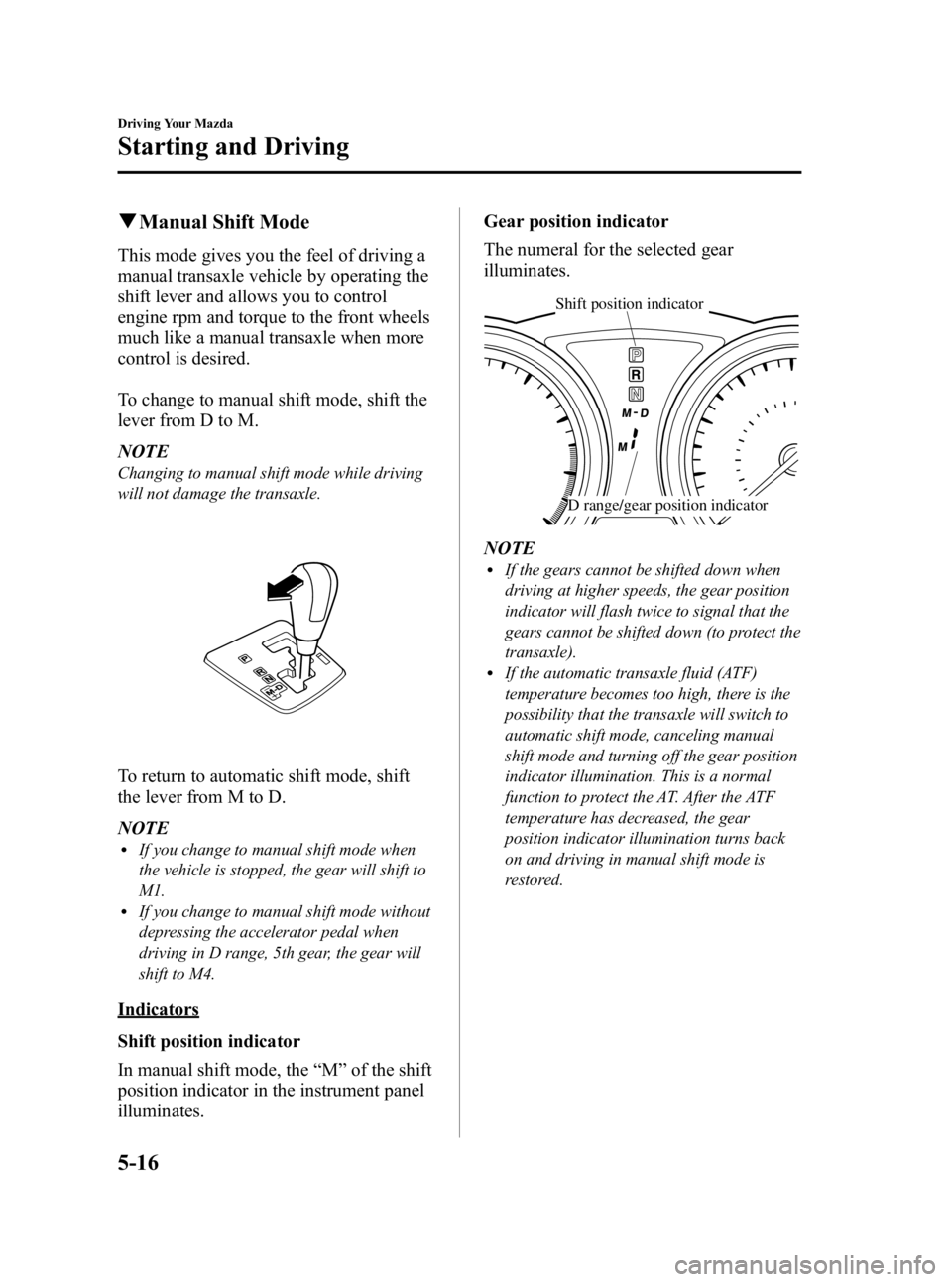
To change to manual shift mode, shift the
lever from D to M.
NOTE
Changing to manual shift mode while driving
will not damage the transaxle.
To return to automatic shift mode, shift
the lever from M to D.
NOTE
lIf you change to manual shift mode when
the vehicle is stopped, the gear will shift to
M1.
lIf you change to manual shift mode without
depressing the accelerator pedal when
driving in D range, 5th gear, the gear will
shift to M4.
Indicators
Shift position indicator
In manual shift mode, the “M ”of the shift
position indicator in the instrument panel
illuminates. Gear position indicator
The numeral for the selected gear
illuminates.
Shift position indicator
D range/gear position indicator
NOTElIf the gears cannot be shifted down when
driving at higher speeds, the gear position
indicator will flash twice to signal that the
gears cannot be shifted down (to protect the
transaxle).
lIf the automatic transaxle fluid (ATF)
temperature becomes too high, there is the
possibility that the transaxle will switch to
automatic shift mode, canceling manual
shift mode and turning off the gear position
indicator illumination. This is a normal
function to protect the AT. After the ATF
temperature has decreased, the gear
position indicator illumination turns back
on and driving in manual shift mode is
restored.
5-16
Driving Your Mazda
Starting and Driving
Mazda3_8BG3-EA-09J_Edition2 Page176
Tuesday, December 8 2009 1:28 PM
Form No.8BG3-EA-09J
Page 180 of 504

Black plate (180,1)
Power Steering
Power steering is only operable when the
engine is running. If the engine is off or if
the power steering system is inoperable,
you can still steer, but it requires more
physical effort.
If the steering feels stiffer than usual
during normal driving, consult an
Authorized Mazda Dealer.
CAUTION
Never hold the steering wheel to the
extreme left or right for more than 5
seconds with the engine running.
This could damage the power
steering system.
qPower Steering Malfunction
Indicator Light
This indicator light illuminates when the
ignition is switched ON, and turns off
when the engine is started. If the light remains illuminated after the
engine is started, or illuminates while
driving, turn off the engine after parking
in a safe place, and then start the engine
again.
If the light does not illuminate after
restarting the engine, this indicates that
the power steering is restored and normal
steering is possible.
If the light remains illuminated, the power
steering is still inoperable. Consult an
Authorized Mazda Dealer.
NOTE
lThe power steering system is inoperable
when the power steering malfunction
indicator light illuminates. Steering is
possible, but requires more physical effort.
lRepeatedly jerking the steering wheel left
and right while the vehicle is stopped or
moving extremely slowly will cause the
power steering system to go into protective
mode which will make the steering feel
heavy, but this does not indicate a
malfunction. If this occurs, park the vehicle
safely and wait a few minutes for the system
to return to normal.
5-20
Driving Your Mazda
Starting and Driving
Mazda3_8BG3-EA-09J_Edition2 Page180
Tuesday, December 8 2009 1:28 PM
Form No.8BG3-EA-09J
Page 182 of 504
Black plate (182,1)
WARNING
Always turn off the cruise control
system when it is not in use:Leaving the cruise control system in
an activation-ready state while the
cruise control is not in use is
dangerous as the cruise control could
unexpectedly activate if the
activation button is accidentally
pressed, and result in loss of vehicle
control and an accident.
qTo Set Speed
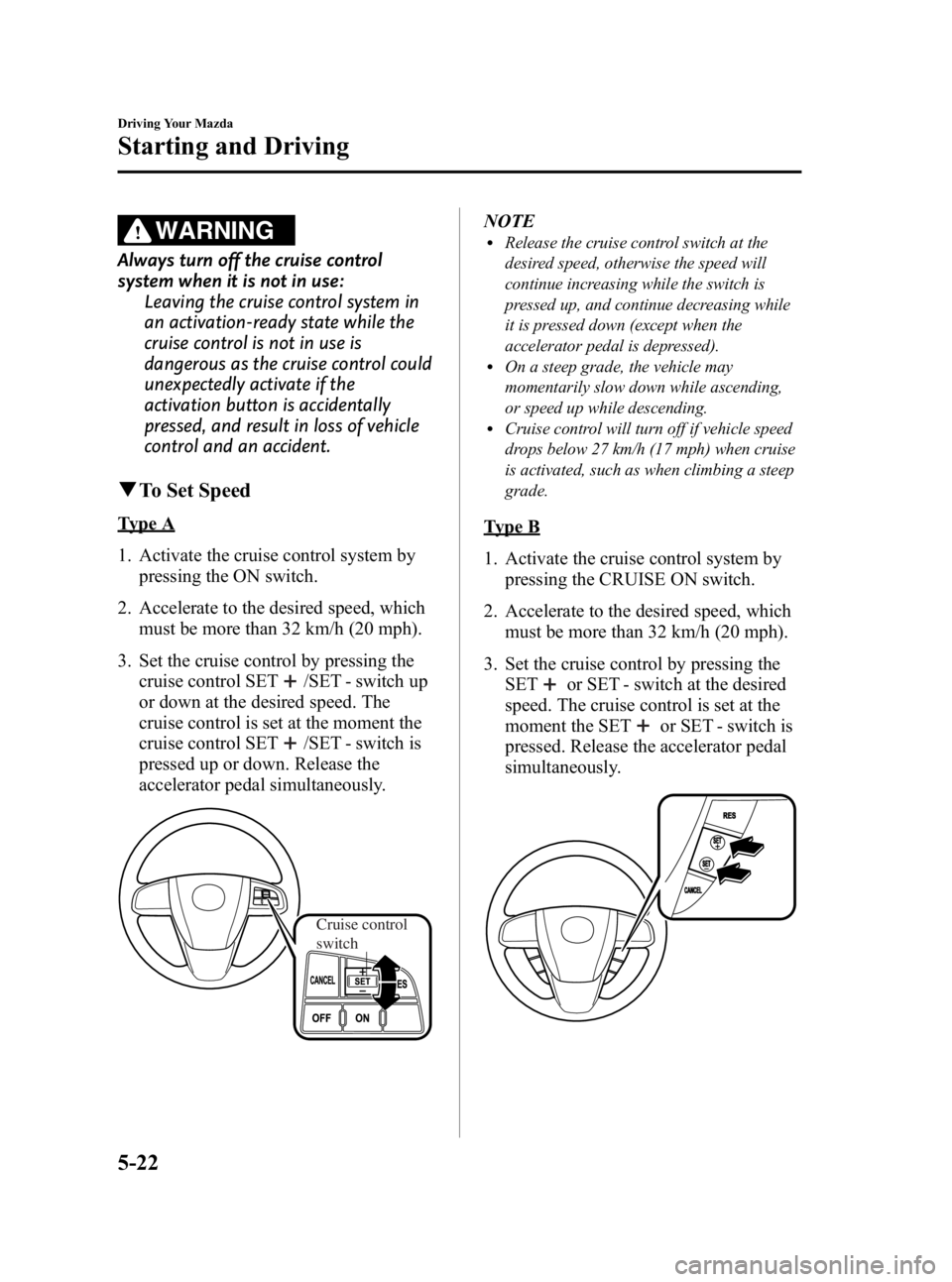
Type A
1. Activate the cruise control system by
pressing the ON switch.
2. Accelerate to the desired speed, which must be more than 32 km/h (20 mph).
3. Set the cruise control by pressing the cruise control SET
/SET - switch up
or down at the desired speed. The
cruise control is set at the moment the
cruise control SET
/SET - switch is
pressed up or down. Release the
accelerator pedal simultaneously.
Cruise control
switch
NOTElRelease the cruise control switch at the
desired speed, otherwise the speed will
continue increasing while the switch is
pressed up, and continue decreasing while
it is pressed down (except when the
accelerator pedal is depressed).
lOn a steep grade, the vehicle may
momentarily slow down while ascending,
or speed up while descending.
lCruise control will turn off if vehicle speed
drops below 27 km/h (17 mph) when cruise
is activated, such as when climbing a steep
grade.
Type B
1. Activate the cruise control system by pressing the CRUISE ON switch.
2. Accelerate to the desired speed, which must be more than 32 km/h (20 mph).
3. Set the cruise control by pressing the SET
or SET - switch at the desired
speed. The cruise control is set at the
moment the SET
or SET - switch is
pressed. Release the accelerator pedal
simultaneously.
5-22
Driving Your Mazda
Starting and Driving
Mazda3_8BG3-EA-09J_Edition2 Page182
Tuesday, December 8 2009 1:28 PM
Form No.8BG3-EA-09J
Page 183 of 504

Black plate (183,1)
NOTElRelease the SETor SET - switch at the
desired speed, otherwise the speed will
continue increasing while the SET
switch is pressed and held, and continue
decreasing while the SET - switch is pressed
and held (except when the accelerator
pedal is depressed).
lOn a steep grade, the vehicle may
momentarily slow down while ascending,
or speed up while descending.
lCruise control will turn off if vehicle speed
drops below 27 km/h (17 mph) when cruise
is activated, such as when climbing a steep
grade.
q To Increase Cruising Speed
Follow either of these procedures.
To increase speed using cruise control
switch
Type A
Press up the cruise control SET
switch
and hold it. Your vehicle will accelerate.
Release the switch at the speed you want.
Cruise control
switch
Your vehicle has a tap-up feature that
allows you to increase your current speed
in increments of 1.6 km/h (1 mph) by a
momentary tap of the cruise control SET
switch. Multiple taps will increase
your vehicle speed 1.6 km/h (1 mph) for
each tap.
Type B
Press the SET
switch and hold it. Your
vehicle will accelerate.
Release the switch at the speed you want.
Your vehicle has a tap-up feature that
allows you to increase your current speed
in increments of 1.6 km/h (1 mph) by a
momentary tap of the SET
switch.
Multiple taps will increase your vehicle
speed 1.6 km/h (1 mph) for each tap.
Driving Your Mazda
Starting and Driving
5-23
Mazda3_8BG3-EA-09J_Edition2 Page183
Tuesday, December 8 2009 1:28 PM
Form No.8BG3-EA-09J
Page 184 of 504

Black plate (184,1)
To increase speed using accelerator
pedal
Type A
Depress the accelerator pedal to accelerate
to the desired speed.
Press down or press up on the cruise
control SET
/SET - switch and release
it immediately.
Cruise control
switch
NOTE
Accelerate if you want to speed up temporarily
when the cruise control is on. Greater speed
will not interfere with or change the set speed.
Take your foot off the accelerator to return to
the set speed.
Type B
Depress the accelerator pedal to accelerate
to the desired speed. Press the SET
or
SET - switch and release it immediately.
NOTE
Accelerate if you want to speed up temporarily
when the cruise control is on. Greater speed
will not interfere with or change the set speed.
Take your foot off the accelerator to return to
the set speed.
q To Decrease Cruising Speed
Type A
Press down the cruise control SET -
switch and hold it. The vehicle will
gradually slow.
Release the switch at the speed you want.
Cruise control
switch
Your vehicle has a tap-down feature that
allows you to decrease your current speed
in decrements of 1.6 km/h (1 mph) by a
momentary tap of the cruise control SET -
switch. Multiple taps will decrease your
vehicle speed 1.6 km/h (1 mph) for each
tap.
5-24
Driving Your Mazda
Starting and Driving
Mazda3_8BG3-EA-09J_Edition2 Page184
Tuesday, December 8 2009 1:28 PM
Form No.8BG3-EA-09J
Page 186 of 504

Black plate (186,1)
(Type A)
(Type B)
The system turns off when the ignition is
off.
NOTE
Cruise control will cancel at about 15 km/h (9
mph) below the preset speed (such as may
happen when climbing a long, steep grade).
Traction Control System
(TCS)
í
The Traction Control System (TCS)
enhances traction and safety by
controlling engine torque and braking.
When the TCS detects driving wheel
slippage, it lowers engine torque and
operates the brakes to prevent loss of
traction.
This means that on a slick surface, the
engine adjusts automatically to provide
optimum power to the drive wheels
without causing them to spin and lose
traction.
WARNING
Do not rely on the traction control
system as a substitute for safe driving:The traction control system (TCS)
cannot compensate for unsafe and
reckless driving, excessive speed,
tailgating (following another vehicle
too closely), and hydroplaning
(reduced tire friction and road
contact because of water on the road
surface). You can still have an
accident.
Use snow tires or tire chains and drive
at reduced speeds when roads are
covered with ice and/or snow: Driving without proper traction
devices on snow and/or ice-covered
roads is dangerous. The traction
control system (TCS) alone cannot
provide adequate traction and you
could still have an accident.
NOTE
To turn off the TCS, press the DSC OFF switch
(page 5-28).
5-26
Driving Your Mazda
íSome models.
Starting and Driving
Mazda3_8BG3-EA-09J_Edition2 Page186
Tuesday, December 8 2009 1:28 PM
Form No.8BG3-EA-09J
Page 188 of 504
Black plate (188,1)
CAUTION
ØThe DSC may not operate correctly
unless the following are observed:
ØUse tires of the correct size
specified for your Mazda on all
four wheels.
ØUse tires of the same
manufacturer, brand and tread
pattern on all four wheels.
ØDo not mix worn tires.
Ø The DSC may not operate correctly
when tire chains are used or a
temporary spare tire is installed
because the tire diameter changes.
NOTE
After switching the ignition ON, a clicking
sound may be heard behind the dashboard.
This sound is the result of the DSC system self-
check operation and does not indicate an
abnormality.
q TCS/DSC Indicator Light
This indicator light stays on for a few
seconds when the ignition is switched
ON. If the TCS or DSC is operating, the
indicator light flashes.
If the light stays on, the TCS or DSC may
have a malfunction and they may not
operate correctly. Take your vehicle to an
Authorized Mazda Dealer.
qDSC OFF Indicator Light
This indicator light stays on for a few
seconds when the ignition is switched
ON.
It also illuminates when the DSC OFF
switch is pressed and TCS/DSC is
switched off (page 5-28).
If the light stays on when the TCS/DSC is
not switched off, take your vehicle to an
Authorized Mazda Dealer. The dynamic
stability control may have a malfunction.
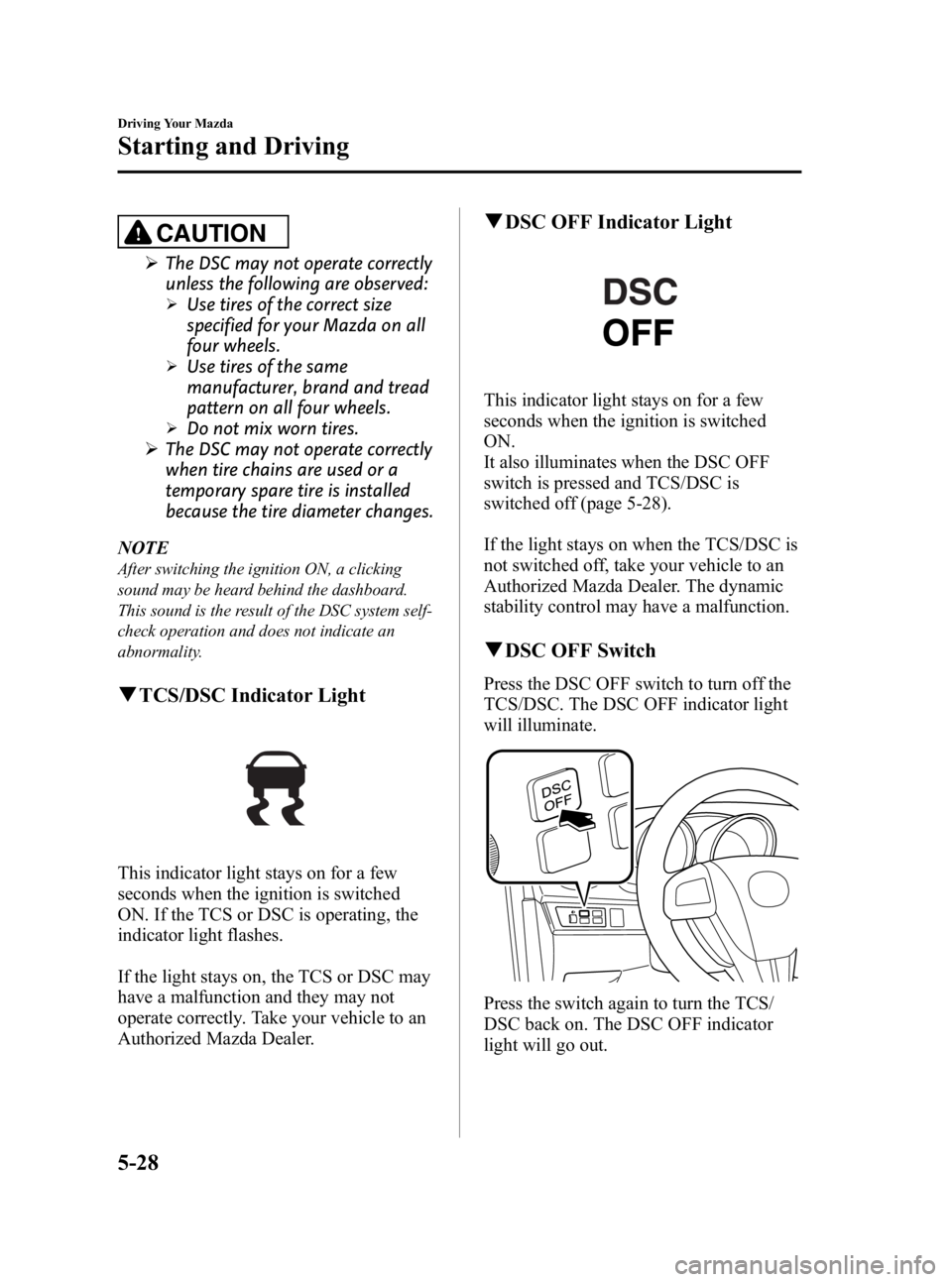
qDSC OFF Switch
Press the DSC OFF switch to turn off the
TCS/DSC. The DSC OFF indicator light
will illuminate.
Press the switch again to turn the TCS/
DSC back on. The DSC OFF indicator
light will go out.
5-28
Driving Your Mazda
Starting and Driving
Mazda3_8BG3-EA-09J_Edition2 Page188
Tuesday, December 8 2009 1:28 PM
Form No.8BG3-EA-09J