mazda3 model 2010 MAZDA MODEL 3 4-DOOR 2011 Workshop Manual
[x] Cancel search | Manufacturer: MAZDA, Model Year: 2011, Model line: MODEL 3 4-DOOR, Model: MAZDA MODEL 3 4-DOOR 2011Pages: 514, PDF Size: 6.58 MB
Page 263 of 514

Black plate (263,1)
Standard audio-equipped model
*1*1
*1
*1
*2
Bose Sound System-equipped model
*1 *1
*1
*1
*1
*2
*1 Depending on the mode selected, the indication changes.
*2 Depending on the model, this
function, may not be available.
2. Turn the audio control dial to adjust the selected functions as follows:
Standard audio-equipped model
Indication Turn Left Turn Right
Select mode
Decrease bass Increase
bass
Decreasetreble Increase
treble
Shift the
sound to the front Shift the
sound to the rear
Shift the
sound to the
left Shift the
sound to the
right
off on
off on
off on
Select mode
Interior Comfort
Audio System
6-31
Mazda3_8BM5-EA-10F_Edition3 Page263
Tuesday, October 5 2010 9:6 AM
Form No.8BM5-EA-10F
Page 264 of 514

Black plate (264,1)
Bose®Sound System-equipped model
Indication Turn Left Turn Right
off on
off on
Decreasebass Increase
bass
Decreasetreble Increase
treble
Shift the
sound to the
front Shift the
sound to the
rear
Shift the
sound to the left Shift the
sound to the right
off on
off on
off on
Select mode
NOTElDepending on the type of audio unit, the
order in which the functions appear differs.
lAbout 5 seconds after selecting any mode,
the volume function will be automatically
selected. To reset bass, treble, fade, and
balance, press the audio control dial for 2
seconds. The unit will beep and “CLEAR ”
will be displayed.
Automatic Level Control (ALC)
(Standard audio-equipped model)
The automatic level control (ALC) is a
feature that automatically adjusts audio
volume and sound quality according to
the vehicle speed.
The volume increases in accordance with
the increase in vehicle speed, and
decreases as vehicle speed decreases. Select the desired ALC mode.
Mode
Volume change
No change
Minimum
Medium
Maximum
Turn the audio control dial to select ALC
OFF or ALC LEVEL1― 7 modes. The
selected mode will be indicated.
6-32
Interior Comfort
Audio System
Mazda3_8BM5-EA-10F_Edition3 Page264
Tuesday, October 5 2010 9:6 AM
Form No.8BM5-EA-10F
Page 265 of 514
Black plate (265,1)
*AudioPilot®2 (Bose®Sound System-
equipped model)
AudioPilot
®2 automatically adjusts audio
volume and sound quality in accordance
with the level of noise entering the vehicle
interior while driving. When AudioPilot
®
2 is turned on, the system automatically
calculates the conditions for optimum
hearing of sound which may be difficult
to hear depending on exterior noise.
* AudioPilot
®2 is a registered trademark
of Bose Corporation.
*Centerpoint®(Bose®Sound System-
equipped model)
Centerpoint
®offers you the experience of
5.1-channel surround sound in your
vehicle even with your conventional 2-
channel stereo CDs.
Centerpoint
®can be set on or off.
NOTE
lCenterpoint®operates optimally with a 2-
channel stereo CD. MP3 audio files can be
played, however, MP3 audio files encoded
with high compression may result in poor
sound quality.
lCenterpoint®is available for 2-channel
stereo audio except for AM radio/FM radio/
SIRIUS digital satellite radio/AUX/BT
audio.
* Centerpoint®is a registered trademark
of Bose Corporation.
BEEP setting
The beep-sound when operating the audio
system can be set on or off.
ILLM EFT setting (Illumination setting
during operation)
The audio system illumination during
operation can be set on or off.
Welcome mode
Sound is heard when the ignition is
switched ON.
BT SETUP modeí
Music and other audio such as voice data
recorded on portable audio devices and
mobile phones available on the market
which are equipped with the Bluetooth
transmission function can be listened to
via wireless transmission over the
vehicle's speakers. Using the BT SETUP
mode, these devices can be programmed
to the Bluetooth unit or changed. For
details, refer to Bluetooth audio (page
6-64).
Interior Comfort
Audio System
6-33íSome models.
Mazda3_8BM5-EA-10F_Edition3 Page265
Tuesday, October 5 2010 9:6 AM
Form No.8BM5-EA-10F
Page 290 of 514
Black plate (290,1)
Audio Control Switch
Operation
í
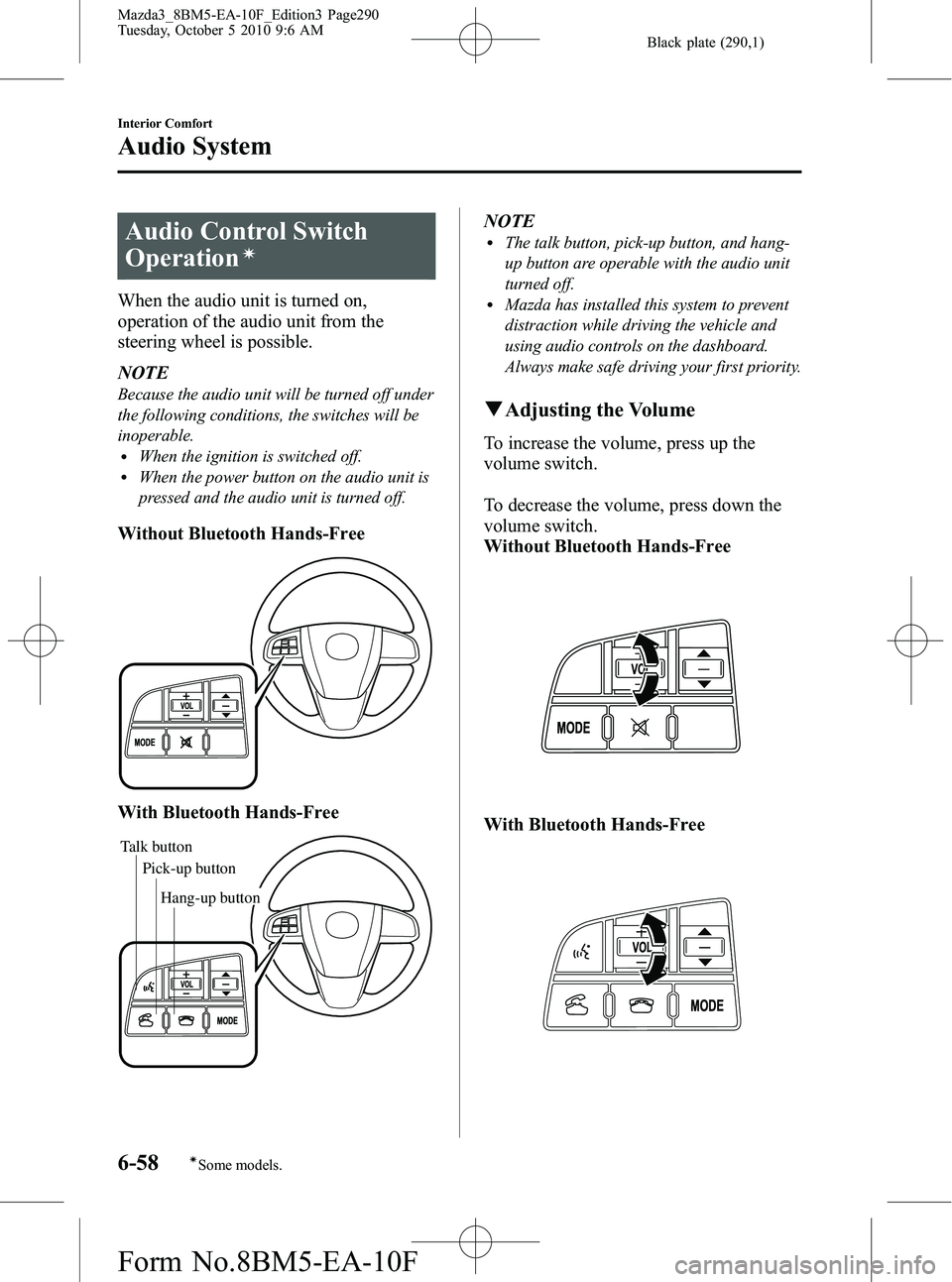
When the audio unit is turned on,
operation of the audio unit from the
steering wheel is possible.
NOTE
Because the audio unit will be turned off under
the following conditions, the switches will be
inoperable.
lWhen the ignition is switched off.lWhen the power button on the audio unit is
pressed and the audio unit is turned off.
Without Bluetooth Hands-Free
With Bluetooth Hands-Free
Talk buttonPick-up buttonTalk button
Hang-up button
Pick-up button
NOTElThe talk button, pick-up button, and hang-
up button are operable with the audio unit
turned off.
lMazda has installed this system to prevent
distraction while driving the vehicle and
using audio controls on the dashboard.
Always make safe driving your first priority.
q
Adjusting the Volume
To increase the volume, press up the
volume switch.
To decrease the volume, press down the
volume switch.
Without Bluetooth Hands-Free
With Bluetooth Hands-Free
6-58
Interior Comfort
íSome models.
Audio System
Mazda3_8BM5-EA-10F_Edition3 Page290
Tuesday, October 5 2010 9:6 AM
Form No.8BM5-EA-10F
Page 292 of 514
Black plate (292,1)
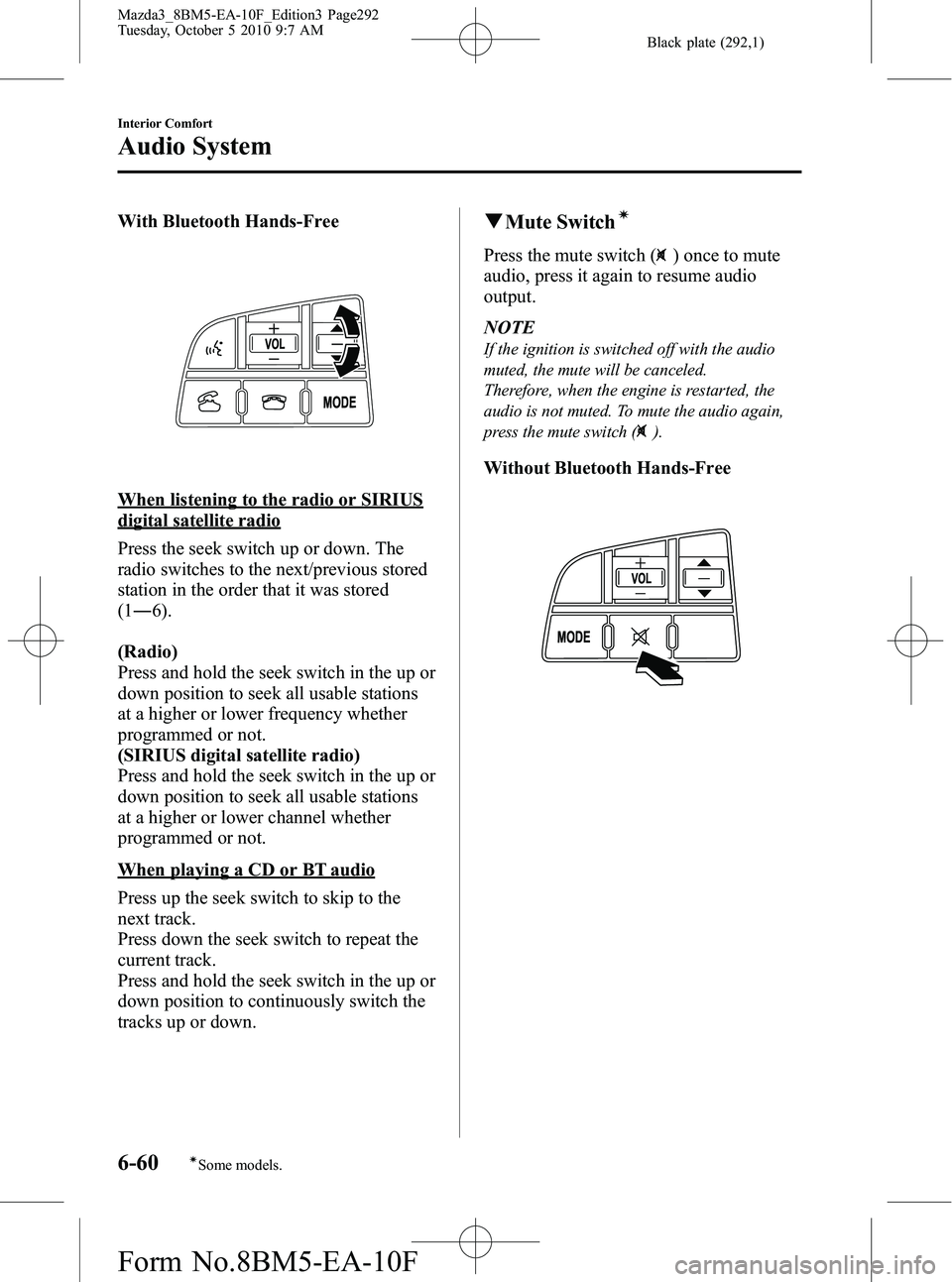
With Bluetooth Hands-Free
When listening to the radio or SIRIUS
digital satellite radio
Press the seek switch up or down. The
radio switches to the next/previous stored
station in the order that it was stored
(1― 6).
(Radio)
Press and hold the seek switch in the up or
down position to seek all usable stations
at a higher or lower frequency whether
programmed or not.
(SIRIUS digital satellite radio)
Press and hold the seek switch in the up or
down position to seek all usable stations
at a higher or lower channel whether
programmed or not.
When playing a CD or BT audio
Press up the seek switch to skip to the
next track.
Press down the seek switch to repeat the
current track.
Press and hold the seek switch in the up or
down position to continuously switch the
tracks up or down.
q Mute Switchí
Press the mute switch () once to mute
audio, press it again to resume audio
output.
NOTE
If the ignition is switched off with the audio
muted, the mute will be canceled.
Therefore, when the engine is restarted, the
audio is not muted. To mute the audio again,
press the mute switch (
).
Without Bluetooth Hands-Free
6-60
Interior Comfort
íSome models.
Audio System
Mazda3_8BM5-EA-10F_Edition3 Page292
Tuesday, October 5 2010 9:7 AM
Form No.8BM5-EA-10F
Page 296 of 514
Black plate (296,1)
Bluetooth Audioí
qWhat is Bluetooth Audio?
Bluetooth audio outline
By programming portable audio devices
equipped with the Bluetooth
communication function to the vehicle's
Bluetooth unit, you can listen to music or
audio recorded on these audio devices
from the vehicle's speakers. Bluetooth
audio devices do not need to be plugged
into the auxiliary jack.
After programming, operate the audio
system's control panel to play/stop the
music or audio.
CAUTION
Ø Always program audio devices to
the Bluetooth audio system while
the vehicle is stopped.
Ø Because only specified Bluetooth
audio devices can be used, consult
an Authorized Mazda Dealer when
purchasing or changing devices.
Bluetooth audio devices which
correspond to specified Bluetooth
versions and profiles can be
Bluetooth-connected to the
vehicle's Bluetooth unit. However,
even among these devices are ones
which cannot be Bluetooth-
connected or have limited
functionality. Each device to be
used with the vehicle's Bluetooth
unit needs to be checked
individually for compatibility.
Consult an Authorized Mazda
Dealer concerning device
compatibility.
ØU.S.A.
Phone: 800-430-0153
Web: www.MazdaUSA.com/
bluetooth
ØCanada
Phone: 800-430-0153
Web: www.mazdahandsfree.ca
ØMexico
Center of Attention to Client
(CAC)
Phone: 01-800-01-MAZDA
Web: www.MazdaUSA.com/
bluetooth
Applicable Bluetooth specification
Ver. 2.0 or higher
6-64
Interior Comfort
íSome models.
Bluetooth Audio
Mazda3_8BM5-EA-10F_Edition3 Page296
Tuesday, October 5 2010 9:7 AM
Form No.8BM5-EA-10F
Page 298 of 514
Black plate (298,1)
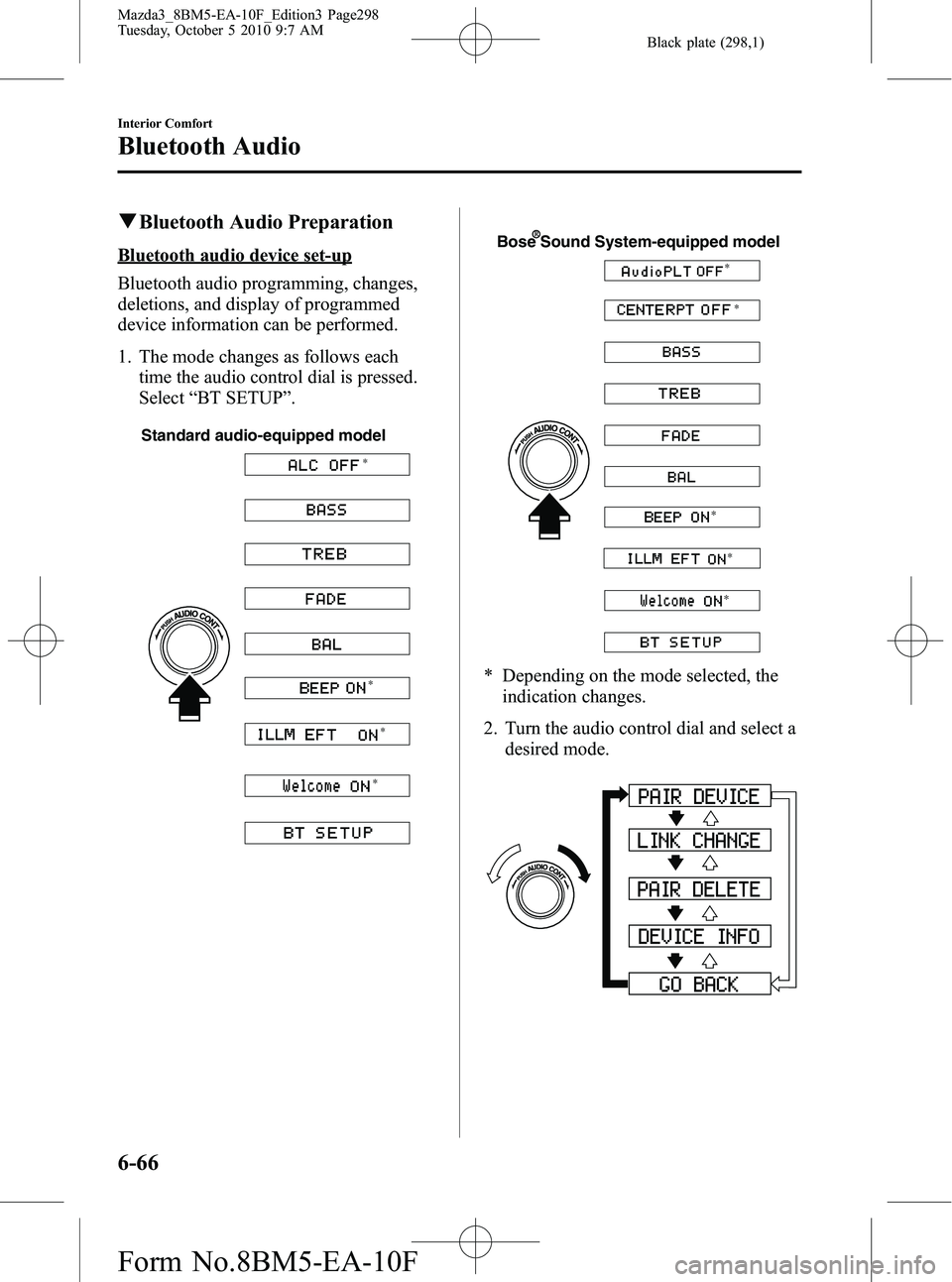
qBluetooth Audio Preparation
Bluetooth audio device set-up
Bluetooth audio programming, changes,
deletions, and display of programmed
device information can be performed.
1. The mode changes as follows each
time the audio control dial is pressed.
Select “BT SETUP” .
Standard audio-equipped model
*
* *
*
Bose Sound System-equipped model
* *
*
*
*
* Depending on the mode selected, theindication changes.
2. Turn the audio control dial and select a desired mode.
6-66
Interior Comfort
Bluetooth Audio
Mazda3_8BM5-EA-10F_Edition3 Page298
Tuesday, October 5 2010 9:7 AM
Form No.8BM5-EA-10F
Page 306 of 514
Black plate (306,1)
Bluetooth Hands-Freeí
qWhat is Bluetooth Hands-Free?
Bluetooth Hands-Free Outline
By connecting a Bluetooth equipped
device (Mobile phone) to the hands-free
unit equipped on the vehicle, making and
receiving calls are possible using the talk
button, pick-up button and hang-up button
located on the steering wheel, and saying
the voice commands.
WARNING
Perform phonebook registration related
operations while the vehicle is parked:
Performing phonebook registration
while driving the vehicle could be a
distraction to your driving and result
in an accident. In addition, a mistake
in performing the phonebook
operation could result in the loss of
important data.
Bluetooth equipped device (Mobile
phone)
A Bluetooth equipped device (Mobile
phone) communicates with the hands-free
unit equipped on the vehicle using radio
transmission (Bluetooth).
For example, if the device (Mobile phone)
is placed in a coat pocket, the phone calls
can be made through your mobile service
without taking out and handling the
device (Mobile phone).
CAUTION
The types of devices (Mobile phone)
which can be connected to the
hands-free unit are limited.
Therefore, before purchasing or
changing your device (Mobile phone)
model, consult Mazda Bluetooth
Hands-Free Customer Service or visit
www.MazdaUSA.com/bluetooth for a
complete list of compatible phones.
Devices (Mobile phone) which can be
connected to the hands-free system
need to be compliant with Bluetooth
specifications and the appropriate
profile. However, even among these
Bluetooth devices (Mobile phone) are
some which will not connect with
your Mazda or will have limited
function. Therefore, consult Mazda
Bluetooth Hands-Free Customer
Service for information regarding
device (Mobile phone) compatibility:
ØU.S.A.
Phone: 800-430-0153
Web: www.MazdaUSA.com/
bluetooth
Ø Canada
Phone: 800-430-0153
Web: www.mazdahandsfree.ca
Ø Mexico
Center of Attention to Client (CAC)
Phone: 01-800-01-MAZDA
Web: www.MazdaUSA.com/
bluetooth
Applicable Bluetooth specification
Ver. 2.0 or higher
Response profile
lHFP (Hands Free Profile) Ver. 1.5lDUN (Dial-up Networking Profile)
Ver. 1.1
lPBAP (Phone Book Access Profile)
Ver. 1.0
6-74
Interior Comfort
íSome models.
Bluetooth Hands-Free
Mazda3_8BM5-EA-10F_Edition3 Page306
Tuesday, October 5 2010 9:7 AM
Form No.8BM5-EA-10F
Page 331 of 514

Black plate (331,1)
Information Display
ClockAudio display
Audio display
Ambient temperature display Climate control display
Climate control display Hands-free display
Without multi
information
display
With multi
information
display
Clock adjustment
buttons
qInformation Display Functions
The information display has the following functions:lClockí
lAmbient Temperature Display (Outside Temperature Display)í
lClimate Control DisplaylAudio DisplaylBluetooth Hands-Free DisplayíRefer to Bluetooth Hands-Free on page 6-74.
Interior Comfort
Interior Equipment
6-99íSome models.
Mazda3_8BM5-EA-10F_Edition3 Page331
Tuesday, October 5 2010 9:7 AM
Form No.8BM5-EA-10F
Page 332 of 514

Black plate (332,1)
qClockí
When the ignition is switched to ACC or
ON, the time is displayed.
Time setting
1. Switch the ignition to ACC or ON.
2. Adjust the time using the time setting
buttons (
,).
The hours advance while the time
setting button (
) is pressed.
The minutes advance while the time
setting button (
) is pressed.
Time resetting
1. Switch the ignition to ACC or ON.
2. Press the :00 button.
3. When the button is pressed, the time will be reset as follows:
(Example)
12:01 ―12:29 →12:00
12:30 ―12:59 →1:00
NOTE
When the button is pressed, the seconds will
start at “00 ”.
q Outside Temperature Display
(Fully Automatic Type)
When the ignition is switched ON, the
ambient temperature is displayed.
NOTE
Under the following conditions, the ambient
temperature display may differ from the actual
ambient temperature depending on the
surroundings and vehicle conditions:
lSignificantly cold or hot temperatures.lSudden changes in ambient temperature.lThe vehicle is parked.lThe vehicle is driven at low speeds.
qClimate Control Display
The climate control system status is
displayed. To operate the climate control
system, refer to “Climate Control System ”
(page 6-2).
q Audio Display
The audio system status is displayed. To
operate the audio system, refer to
“Audio System ”(page 6-18).
6-100
Interior Comfort
íSome models.
Interior Equipment
Mazda3_8BM5-EA-10F_Edition3 Page332
Tuesday, October 5 2010 9:7 AM
Form No.8BM5-EA-10F