wheel MAZDA MODEL 3 4-DOOR 2013 Owner's Guide
[x] Cancel search | Manufacturer: MAZDA, Model Year: 2013, Model line: MODEL 3 4-DOOR, Model: MAZDA MODEL 3 4-DOOR 2013Pages: 610, PDF Size: 7.05 MB
Page 223 of 610

Black plate (223,1)
qBSM OFF Indicator Lightí
This indicator light illuminates for a few
seconds when the ignition is switched
ON.
The BSM OFF indicator light illuminates
when the BSM system is turned off by
pressing the BSM OFF switch.
The indicator light flashes if the BSM
system has a malfunction. Consult an
Authorized Mazda Dealer.
NOTE
If the vehicle is driven on a road with less
traffic and few vehicles that the radar sensors
can detect, the system may pause (The BSM
OFF indicator light in the instrument panel
flashes). However, it does not indicate a
malfunction.
qLights-On Indicator Light
This indicator light illuminates when the
exterior lights and dashboard illumination
are on.
qPower Steering Malfunction
Indicator Light
This indicator light illuminates when the
ignition is switched ON, and turns off
when the engine is started.
If the light remains illuminated after the
engine is started, or illuminates while
driving, turn off the engine after parking
in a safe place, and then start the engine
again.
If the light does not illuminate after
restarting the engine, this indicates that
the power steering is restored and normal
steering is possible.
If the light remains illuminated, the power
steering is still inoperable. Consult an
Authorized Mazda Dealer.
NOTE
lThe power steering system is inoperable
when the power steering malfunction
indicator light illuminates. Steering is
possible, but requires more physical effort.
lRepeatedly jerking the steering wheel left
and right while the vehicle is stopped or
moving at slow speeds will cause the power
steering system to go into protective mode
which will make the steering feel heavy, but
this does not indicate a malfunction. If this
occurs, park the vehicle safely and wait a
few minutes for the system to return to
normal.
Driving Your Mazda
Warning/Indicator Lights and Beep Sounds
5-61íSome models.
Mazda3_8CV6-EA-12H_Edition3 Page223
Thursday, February 28 2013 11:28 AM
Form No.8CV6-EA-12H
Page 230 of 610
Black plate (230,1)
Manual type
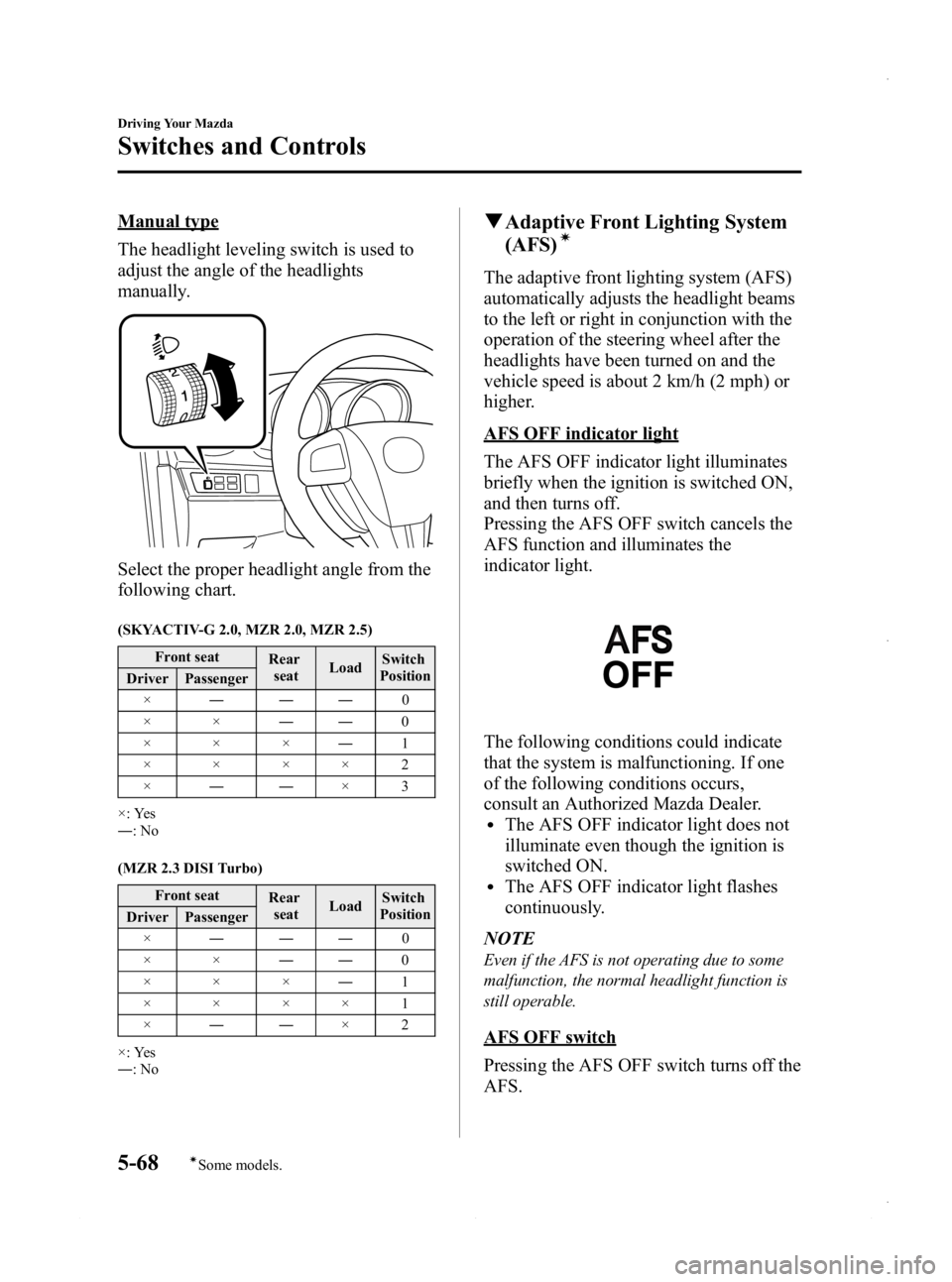
The headlight leveling switch is used to
adjust the angle of the headlights
manually.
Select the proper headlight angle from the
following chart.
(SKYACTIV-G 2.0, MZR 2.0, MZR 2.5)Front seat Rear
seat LoadSwitch
Position
Driver Passenger
× ――― 0
×× ――0
××× ―1
××××2
× ―― ×3
×: Yes
― :No
(MZR 2.3 DISI Turbo) Front seat Rear
seat LoadSwitch
Position
Driver Passenger
× ――― 0
×× ――0
××× ―1
××××1
× ―― ×2
×: Yes
― :No
q Adaptive Front Lighting System
(AFS)í
The adaptive front lighting system (AFS)
automatically adjusts the headlight beams
to the left or right in conjunction with the
operation of the steering wheel after the
headlights have been turned on and the
vehicle speed is about 2 km/h (2 mph) or
higher.
AFS OFF indicator light
The AFS OFF indicator light illuminates
briefly when the ignition is switched ON,
and then turns off.
Pressing the AFS OFF switch cancels the
AFS function and illuminates the
indicator light.
The following conditions could indicate
that the system is malfunctioning. If one
of the following conditions occurs,
consult an Authorized Mazda Dealer.
lThe AFS OFF indicator light does not
illuminate even though the ignition is
switched ON.
lThe AFS OFF indicator light flashes
continuously.
NOTE
Even if the AFS is not operating due to some
malfunction, the normal headlight function is
still operable.
AFS OFF switch
Pressing the AFS OFF switch turns off the
AFS.
5-68
Driving Your Mazda
íSome models.
Switches and Controls
Mazda3_8CV6-EA-12H_Edition3 Page230
Thursday, February 28 2013 11:28 AM
Form No.8CV6-EA-12H
Page 238 of 610
Black plate (238,1)
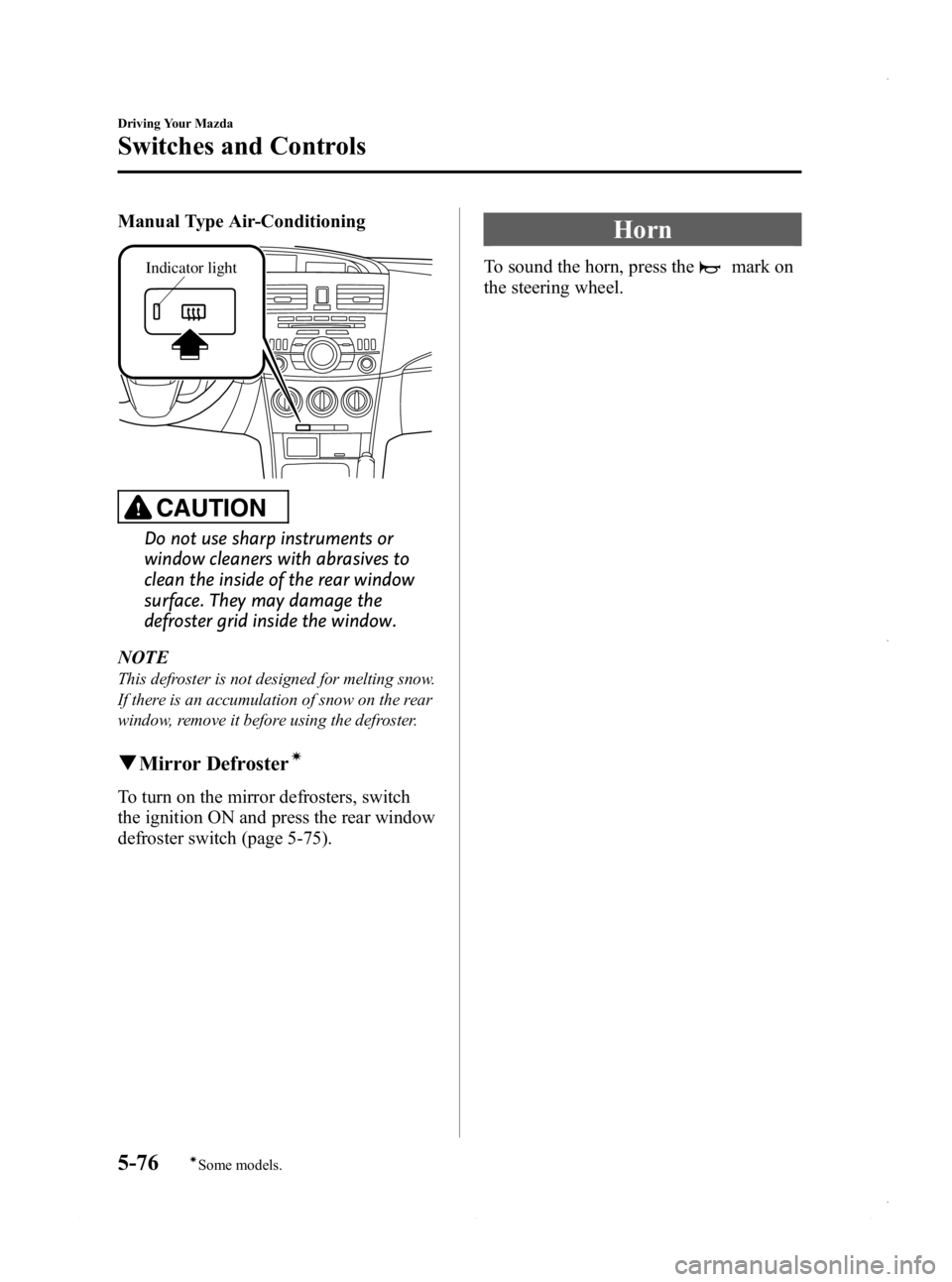
Manual Type Air-Conditioning
Indicator light
CAUTION
Do not use sharp instruments or
window cleaners with abrasives to
clean the inside of the rear window
surface. They may damage the
defroster grid inside the window.
NOTE
This defroster is not designed for melting snow.
If there is an accumulation of snow on the rear
window, remove it before using the defroster.
q Mirror Defrosterí
To turn on the mirror defrosters, switch
the ignition ON and press the rear window
defroster switch (page 5-75).
Horn
To sound the horn, press themark on
the steering wheel.
5-76
Driving Your Mazda
íSome models.
Switches and Controls
Mazda3_8CV6-EA-12H_Edition3 Page238
Thursday, February 28 2013 11:28 AM
Form No.8CV6-EA-12H
Page 257 of 610
Black plate (257,1)
NOTE
When leaving your vehicle unattended, we
recommend that you remove the antenna and
store it inside the vehicle.Operating Tips for Audio
System
WARNING
Do not adjust the audio control
switches while driving the vehicle:Adjusting the audio while driving the
vehicle is dangerous as it could
distract your attention from the
vehicle operation which could lead to
a serious accident. Always adjust the
audio while the vehicle is stopped.
Even if the audio control switches are
equipped on the steering wheel, learn
to use the switches without looking
down at them so that you can keep
your maximum attention on the road
while driving the vehicle.
CAUTION
For the purposes of safe driving,
adjust the audio volume to a level
that allows you to hear sounds
outside of the vehicle including car
horns and particularly emergency
vehicle sirens.
NOTE
lTo prevent the battery from being
discharged, do not leave the audio system
on for a long period of time when the
engine is not running.
lIf a cellular phone or CB radio is used in
or near the vehicle, it could cause noise to
occur from the audio system, however, this
does not indicate that the system has been
damaged.
Interior Comfort
Audio System
6-17
Mazda3_8CV6-EA-12H_Edition3 Page257
Thursday, February 28 2013 11:28 AM
Form No.8CV6-EA-12H
Page 324 of 610
Black plate (324,1)
Sound
Refer to Power/Volume/Display/Sound
Controls on page 6-64.
Language
1. Press the setup button (
).
2. Touch the
on-screen tab to
display the language setting screen.
3. Touch the desired language from the list.
4. Touch the
on-screen button.
NOTE
Only the available languages are displayed.
Audio Control Switch
Operation
í
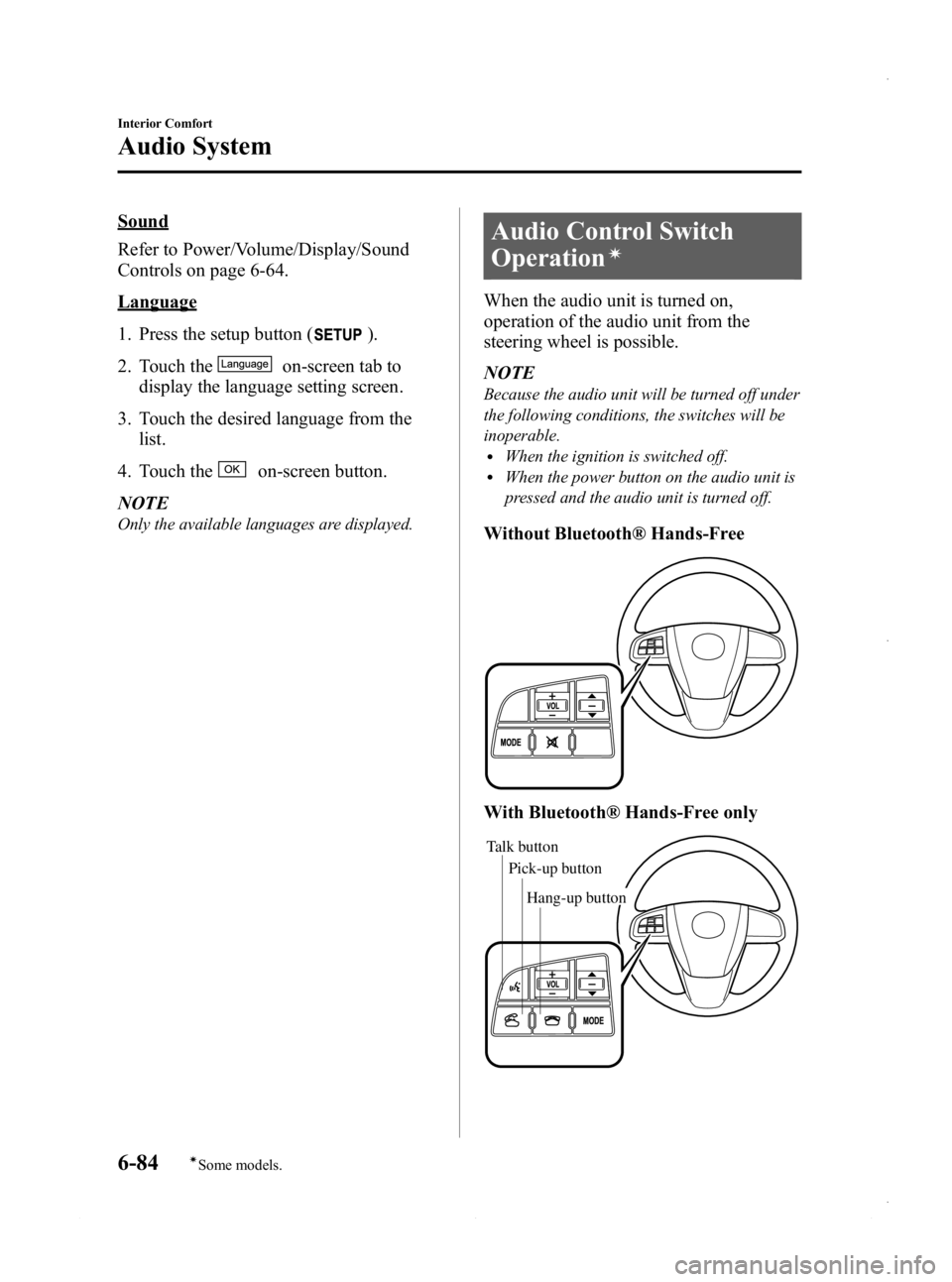
When the audio unit is turned on,
operation of the audio unit from the
steering wheel is possible.
NOTE
Because the audio unit will be turned off under
the following conditions, the switches will be
inoperable.
lWhen the ignition is switched off.lWhen the power button on the audio unit is
pressed and the audio unit is turned off.
Without Bluetooth® Hands-Free
With Bluetooth® Hands-Free only
Talk button Pick-up buttonTalk button
Hang-up button
Pick-up button
6-84
Interior Comfort
íSome models.
Audio System
Mazda3_8CV6-EA-12H_Edition3 Page324
Thursday, February 28 2013 11:29 AM
Form No.8CV6-EA-12H
Page 330 of 610
Black plate (330,1)
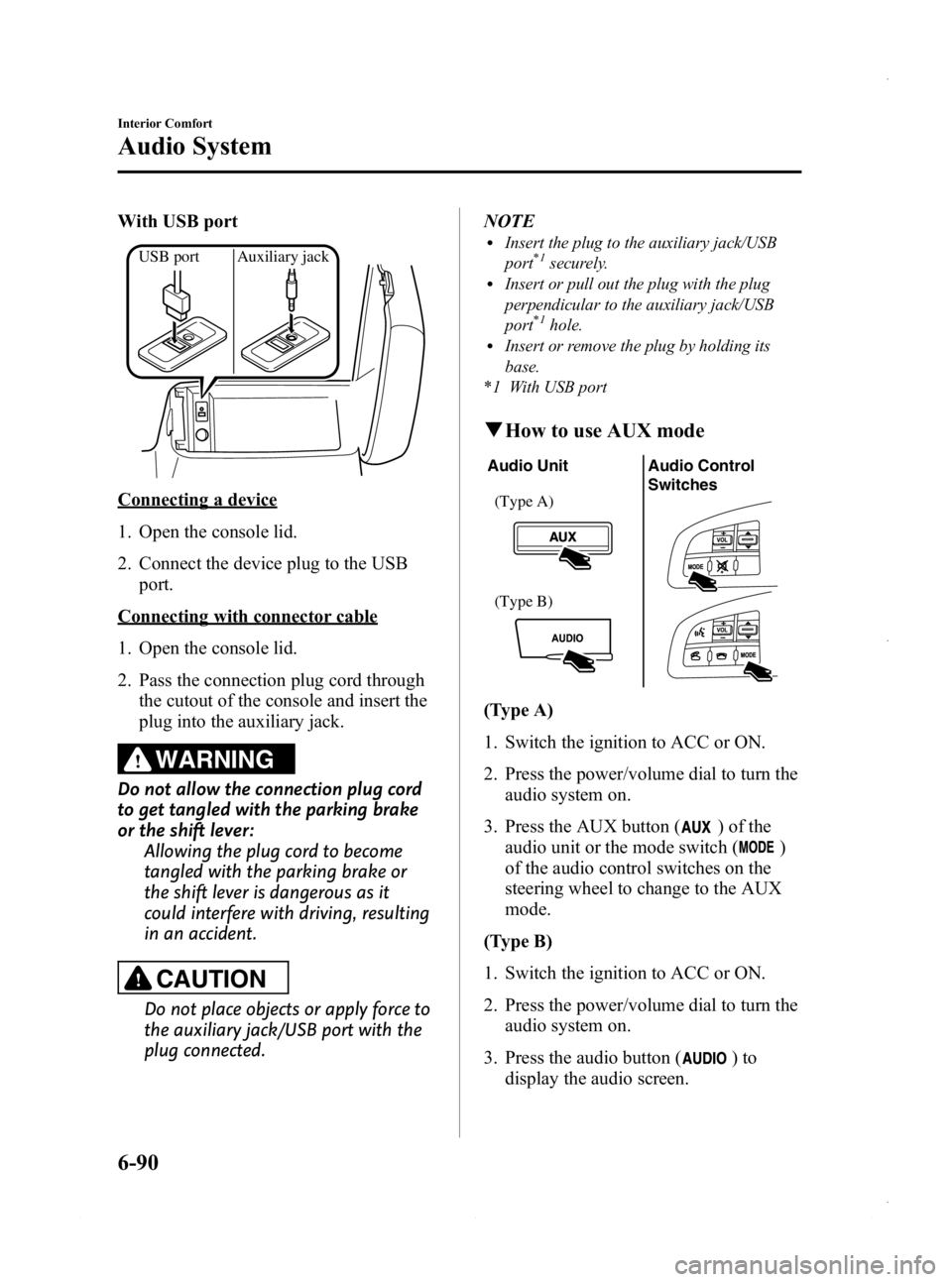
With USB port
USB port Auxiliary jack
Connecting a device
1. Open the console lid.
2. Connect the device plug to the USBport.
Connecting with connector cable
1. Open the console lid.
2. Pass the connection plug cord throughthe cutout of the console and insert the
plug into the auxiliary jack.
WARNING
Do not allow the connection plug cord
to get tangled with the parking brake
or the shift lever: Allowing the plug cord to become
tangled with the parking brake or
the shift lever is dangerous as it
could interfere with driving, resulting
in an accident.
CAUTION
Do not place objects or apply force to
the auxiliary jack/USB port with the
plug connected. NOTE
lInsert the plug to the auxiliary jack/USB
port*1securely.lInsert or pull out the plug with the plug
perpendicular to the auxiliary jack/USB
port
*1hole.lInsert or remove the plug by holding its
base.
*1 With USB port
q How to use AUX mode
Audio Unit Audio Control
Switches
(Type A)
(Type B)
(Type A)
1. Switch the ignition to ACC or ON.
2. Press the power/volume dial to turn the
audio system on.
3. Press the AUX button (
) of the
audio unit or the mode switch (
)
of the audio control switches on the
steering wheel to change to the AUX
mode.
(Type B)
1. Switch the ignition to ACC or ON.
2. Press the power/volume dial to turn the audio system on.
3. Press the audio button (
)to
display the audio screen.
6-90
Interior Comfort
Audio System
Mazda3_8CV6-EA-12H_Edition3 Page330
Thursday, February 28 2013 11:29 AM
Form No.8CV6-EA-12H
Page 332 of 610
Black plate (332,1)
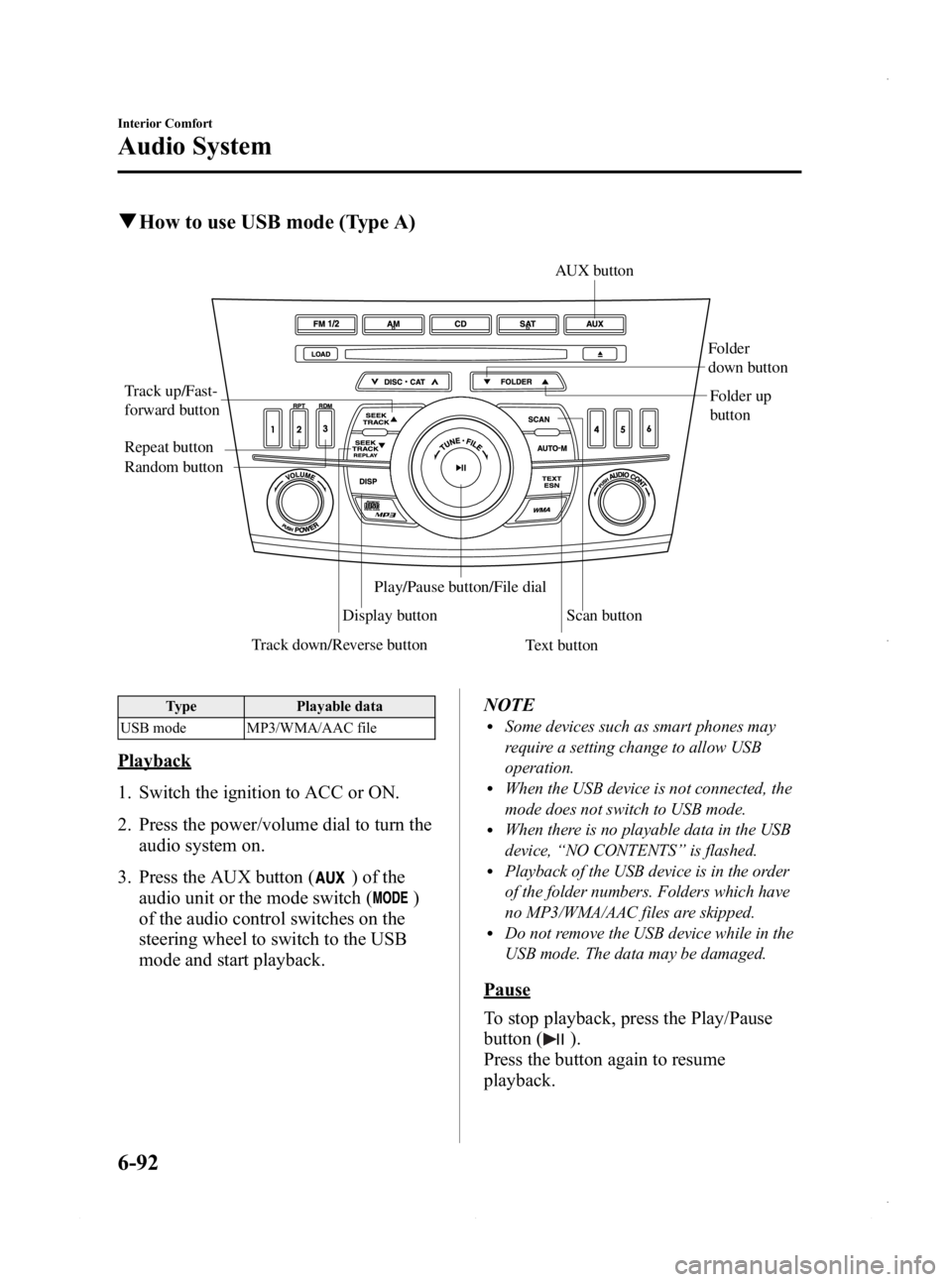
qHow to use USB mode (Type A)
Track down/Reverse button
Track up/Fast-
forward button
Display button Folder
down button
Folder up
button
Random button Repeat button
Text buttonScan button
AUX button
Play/Pause button/File dial
Type
Playable data
USB mode MP3/WMA/AAC file
Playback
1. Switch the ignition to ACC or ON.
2. Press the power/volume dial to turn the audio system on.
3. Press the AUX button (
) of the
audio unit or the mode switch (
)
of the audio control switches on the
steering wheel to switch to the USB
mode and start playback. NOTE
lSome devices such as smart phones may
require a setting change to allow USB
operation.
lWhen the USB device is not connected, the
mode does not switch to USB mode.
lWhen there is no playable data in the USB
device,
“NO CONTENTS ”is flashed.
lPlayback of the USB device is in the order
of the folder numbers. Folders which have
no MP3/WMA/AAC files are skipped.
lDo not remove the USB device while in the
USB mode. The data may be damaged.
Pause
To stop playback, press the Play/Pause
button (
).
Press the button again to resume
playback.
6-92
Interior Comfort
Audio System
Mazda3_8CV6-EA-12H_Edition3 Page332
Thursday, February 28 2013 11:29 AM
Form No.8CV6-EA-12H
Page 340 of 610
Black plate (340,1)
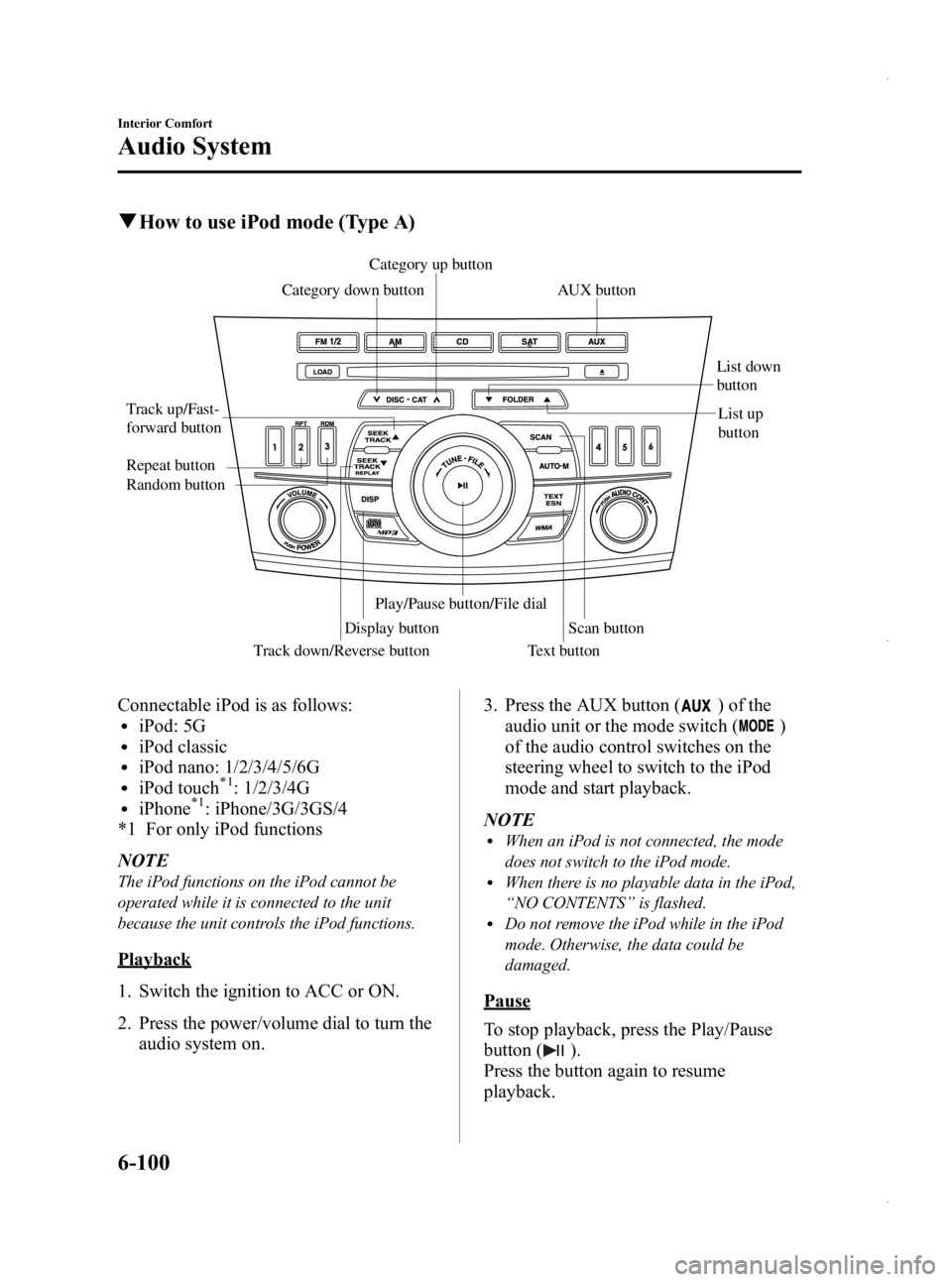
qHow to use iPod mode (Type A)
Track down/Reverse button
Track up/Fast-
forward button
Category up button
Category down button
Display button List down
button
List up
button
Random button Repeat button
Text button
Scan button
Play/Pause button/File dialAUX button
Connectable iPod is as follows:liPod: 5GliPod classicliPod nano: 1/2/3/4/5/6GliPod touch*1: 1/2/3/4GliPhone*1: iPhone/3G/3GS/4
*1 For only iPod functions
NOTE
The iPod functions on the iPod cannot be
operated while it is connected to the unit
because the unit controls the iPod functions.
Playback
1. Switch the ignition to ACC or ON.
2. Press the power/volume dial to turn the audio system on. 3. Press the AUX button (
) of the
audio unit or the mode switch (
)
of the audio control switches on the
steering wheel to switch to the iPod
mode and start playback.
NOTE
lWhen an iPod is not connected, the mode
does not switch to the iPod mode.
lWhen there is no playable data in the iPod,
“ NO CONTENTS ”is flashed.
lDo not remove the iPod while in the iPod
mode. Otherwise, the data could be
damaged.
Pause
To stop playback, press the Play/Pause
button (
).
Press the button again to resume
playback.
6-100
Interior Comfort
Audio System
Mazda3_8CV6-EA-12H_Edition3 Page340
Thursday, February 28 2013 11:29 AM
Form No.8CV6-EA-12H
Page 358 of 610
Black plate (358,1)
Bluetooth® Hands-Freeí
qWhat is Bluetooth® Hands-Free?
Bluetooth®Hands-Free Outline
By connecting a Bluetooth
®equipped
device (Mobile phone) to the hands-free
unit equipped on the vehicle, making and
receiving calls is possible using the talk
button, pick-up button and hang-up button
located on the steering wheel, and saying
the voice commands.
WARNING
Perform phonebook registration related
operations while the vehicle is parked: Performing phonebook registration
while driving the vehicle could be a
distraction to your driving and result
in an accident. In addition, a mistake
in performing the phonebook
operation could result in the loss of
important data.
Bluetooth®equipped device (Mobile
phone)
A Bluetooth
®equipped device (Mobile
phone) communicates with the hands-free
unit equipped on the vehicle using radio
transmission (Bluetooth
®).
For example, if the device (Mobile phone)
is placed in a coat pocket, the phone calls
can be made through your mobile service
without taking out and handling the
device (Mobile phone).
CAUTION
The types of devices (Mobile phone)
which can be connected to the
hands-free unit are limited.
Therefore, before purchasing or
changing your device (Mobile phone)
model, consult Mazda Bluetooth
®
Hands-Free Customer Service or visit
www.MazdaUSA.com/bluetooth for a
complete list of compatible phones.
Devices (Mobile phone) which can be
connected to the hands-free system
need to be compliant with
Bluetooth
®specifications and the
appropriate profile. However, even
among these Bluetooth
®devices
(Mobile phone) are some which will
not connect with your Mazda or will
have limited function. Therefore,
consult Mazda Bluetooth
®Hands-
Free Customer Service for
information regarding device (Mobile
phone) compatibility:
Ø U.S.A.
Phone: 800-430-0153
Web: www.MazdaUSA.com/
bluetooth
Ø Canada
Phone: 800-430-0153
Web: www.mazdahandsfree.ca
Ø Mexico
Center of Attention to Client (CAC)
Phone: 01-800-01-MAZDA
Web: www.mazdamexico.com.mx
Applicable Bluetooth
®specification
Ver. 2.0 or higher
Response profile
lHFP (Hands Free Profile) Ver. 1.5lDUN (Dial-up Networking Profile)
Ver. 1.1
lPBAP (Phone Book Access Profile)
Ver. 1.0
6-118
Interior Comfort
íSome models.
Bluetooth® Hands-Free (Type A)
Mazda3_8CV6-EA-12H_Edition3 Page358
Thursday, February 28 2013 11:29 AM
Form No.8CV6-EA-12H
Page 359 of 610
Black plate (359,1)
lA2DP (Advanced Audio Distribution
Profile) Ver. 1.0
lOPP (Object Push Profile) Ver. 1.1
NOTE
lThe Bluetooth®Hands-Free system is
operable several seconds after the ignition
is switched to ACC or ON (requires less
than 15 seconds).
lIf the ignition is switched off during a
hands-free call, the line is transferred to the
device (Mobile phone) automatically.
lIf the device (Mobile phone) is in a location
where radio reception is difficult such as a
metal container or in the trunk, the call may
not be connected using Bluetooth
®.If
communication is not possible, change the
location of the device (Mobile phone).
q Component Parts
Bluetooth®Hands-Free consists of the
following items:
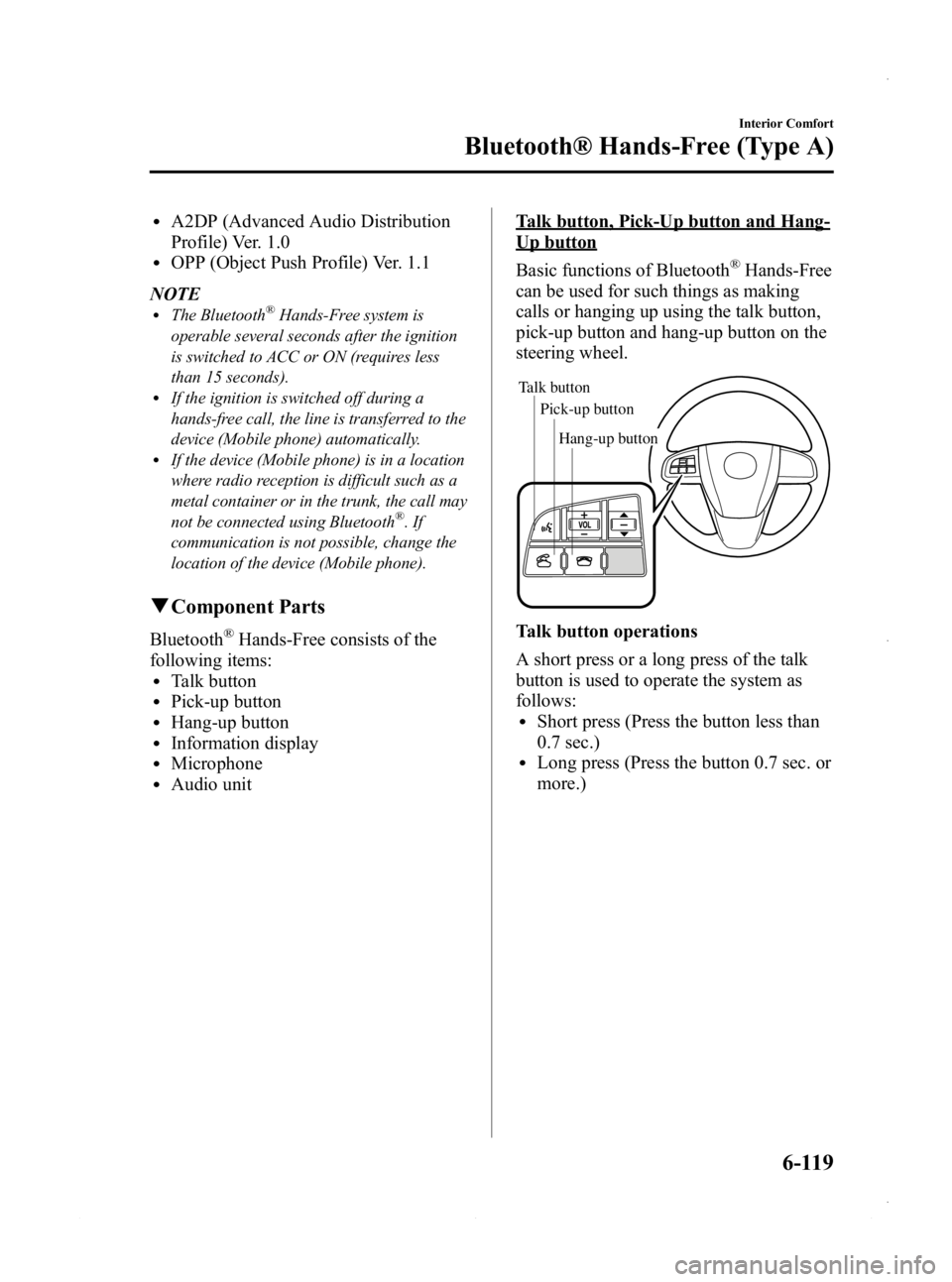
lTalk buttonlPick-up buttonlHang-up buttonlInformation displaylMicrophonelAudio unit
Talk button, Pick-Up button and Hang-
Up button
Basic functions of Bluetooth
®Hands-Free
can be used for such things as making
calls or hanging up using the talk button,
pick-up button and hang-up button on the
steering wheel.
Talk button
Pick-up buttonTalk button
Hang-up button
Pick-up button
Talk button operations
A short press or a long press of the talk
button is used to operate the system as
follows:
lShort press (Press the button less than
0.7 sec.)
lLong press (Press the button 0.7 sec. or
more.)
Interior Comfort
Bluetooth® Hands-Free (Type A)
6-119
Mazda3_8CV6-EA-12H_Edition3 Page359
Thursday, February 28 2013 11:29 AM
Form No.8CV6-EA-12H