audio MAZDA MODEL 3 4-DOOR 2013 Repair Manual
[x] Cancel search | Manufacturer: MAZDA, Model Year: 2013, Model line: MODEL 3 4-DOOR, Model: MAZDA MODEL 3 4-DOOR 2013Pages: 610, PDF Size: 7.05 MB
Page 318 of 610
Black plate (318,1)
Storing songs, artists, and sports team
names
NOTE
lA maximum of 10 songs, artists, and sports
team names each can be stored.
lIf the song title, artist name, sports team
name cannot be displayed,
“No available items for this program ”is
displayed.
lEven if the song title, and artist name are
displayed in the main screen, it may not be
possible to record information for old
songs.
lIf a song name is stored, the song seek
function is turned on.
lIf an artist name is stored, the artist seek
function is turned on.
lIf a sports team name is stored, the game
alert function is turned on.
1. Touch theon-screen button to
display the current song and artist
names currently being received. The
sports team name is displayed while
the sports program is being received.
2. Select the item you want to store from song title, artist name and sports team
name.
3. “XXXXX (song, artist, sports team
name) stored ”is displayed.
NOTE
If there is not enough available storage space,
“ Song Memory Full” or“Artist Memory Full”
or “Team Memory Full” and
“ Delete one to store new one ”are displayed.
Delete from the list.
Seek alert setting
On or off switching to song seek, artist
seek, or game alert function, and deletion
of stored information can be performed.
Touch the
on-screen button and the
on-screen button. Touch the button
you want to change from
,,or
.
(On or off switching)
Touch the
,, and
on-screen button.
(Deletion)
1. Select song title, artist name, or sports team name that you want to delete from
the list.
2. Touch the
on-screen button to
display “XXXXX (song, artist, sports
team name) deleted ”.
6-78
Interior Comfort
Audio System
Mazda3_8CV6-EA-12H_Edition3 Page318
Thursday, February 28 2013 11:29 AM
Form No.8CV6-EA-12H
Page 320 of 610
Black plate (320,1)
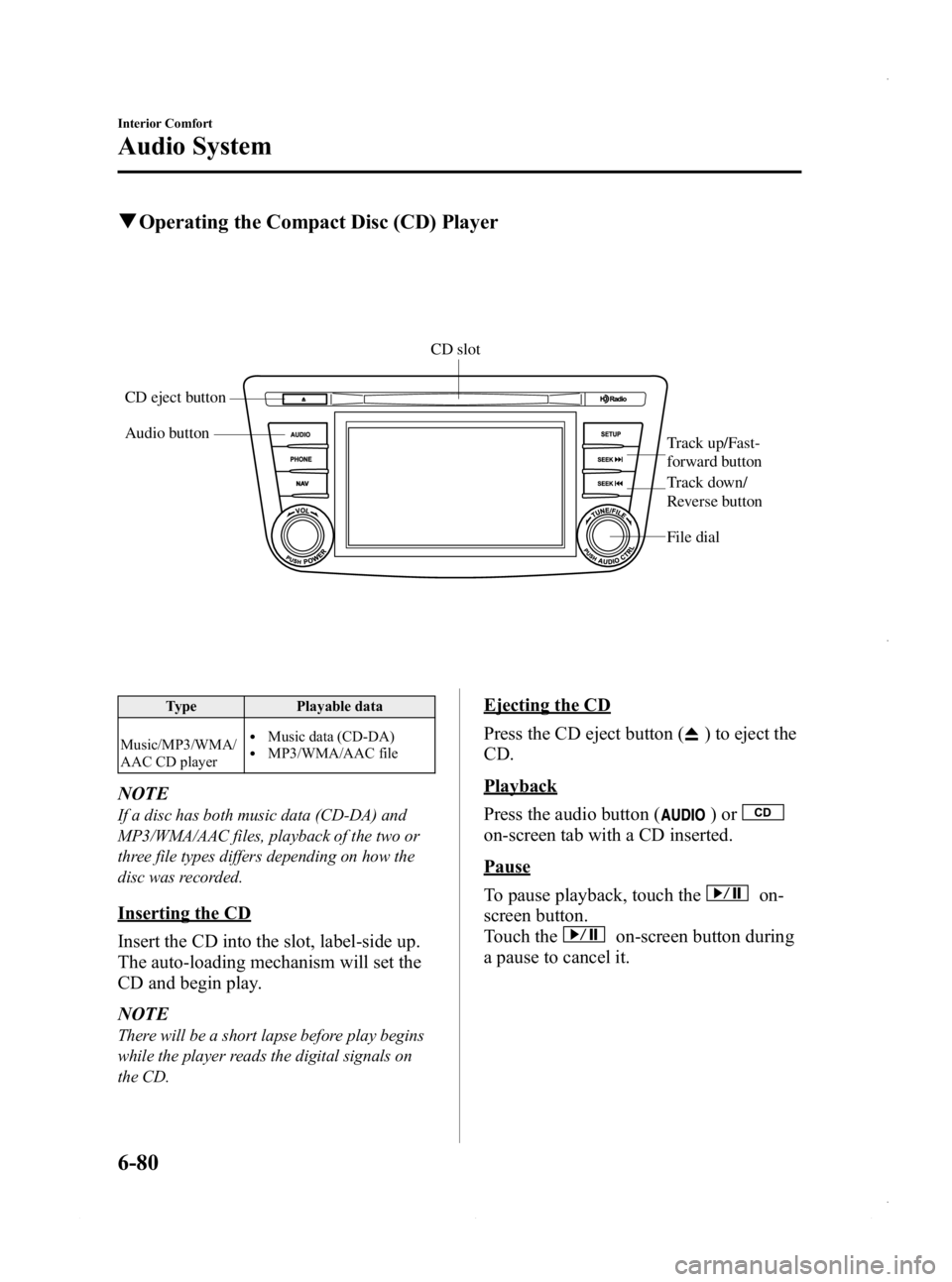
qOperating the Compact Disc (CD) Player
Audio button
Track up/Fast-
forward button
File dial
CD eject buttonCD slot
Track down/
Reverse button
Type
Playable data
Music/MP3/WMA/
AAC CD player
lMusic data (CD-DA)lMP3/WMA/AAC file
NOTE
If a disc has both music data (CD-DA) and
MP3/WMA/AAC files, playback of the two or
three file types differs depending on how the
disc was recorded.
Inserting the CD
Insert the CD into the slot, label-side up.
The auto-loading mechanism will set the
CD and begin play.
NOTE
There will be a short lapse before play begins
while the player reads the digital signals on
the CD.
Ejecting the CD
Press the CD eject button (
) to eject the
CD.
Playback
Press the audio button (
)or
on-screen tab with a CD inserted.
Pause
To pause playback, touch the
on-
screen button.
Touch the
on-screen button during
a pause to cancel it.
6-80
Interior Comfort
Audio System
Mazda3_8CV6-EA-12H_Edition3 Page320
Thursday, February 28 2013 11:29 AM
Form No.8CV6-EA-12H
Page 321 of 610
Black plate (321,1)
Fast-forward/Reverse
Operations using audio panel
Press and hold the fast-forward button
(
) to advance through a track at high
speed.
Press and hold the reverse button (
)to
reverse through a track at high speed.
Operations on screen
Touch and hold the
on-screen
button to advance through a track at high
speed.
Touch and hold the
on-screen
button to reverse through a track at high
speed.
Track search
Operations using audio panel
Press the track up button (
) or turn the
file dial clockwise once to skip forward to
the beginning of the next track.
Press the track down button (
) or turn
the file dial counterclockwise within a few
seconds after playback begins to track
down to the beginning of the previous
track.
Press the track down button (
) or turn
the file dial counterclockwise after a few
seconds have elapsed to start playback
from the beginning of the current track.
Operations on screen
Touch the
on-screen button once to
skip forward to the beginning of the next
track.
Touch the
on-screen button within
a few seconds after playback begins to
track down to the beginning of the
previous track.
Touch the
on-screen button after a
few seconds have elapsed to start
playback from the beginning of the
current track.
Displaying file list
The desired file list in the CD can be
viewed.
During music CD playback
Touch the
on-screen button to display
the track list in the CD.
During MP3/WMA/AAC CD playback
(Viewing file list in desired folder)
1. Touch the
on-screen button to
display the folder list in the CD.
2. Touch the folder which you want to select.
(Viewing file list of current folder)
Touch the
on-screen button.
Selecting file/track
Select the file/track you want to play.
During music CD playback
1. Touch the
on-screen button to
display the track list in the CD.
2. Touch the track you want to play.
During MP3/WMA/AAC CD playback
NOTE
Press theon-screen button on the file list
screen to display the list of folders.
(Selection from all folders in CD)
1. When the
on-screen button is
touched, the folder list in the CD is
displayed.
2. Select the folder name from the displayed list.
3. The files in the selected folder are displayed.
4. Select the file you want to play.
Interior Comfort
Audio System
6-81
Mazda3_8CV6-EA-12H_Edition3 Page321
Thursday, February 28 2013 11:29 AM
Form No.8CV6-EA-12H
Page 322 of 610
Black plate (322,1)
(Selection from inside folder in which a
song is currently being played)
1. Press the
on-screen button to
select the song list.
2. Touch the song you want to listen to.
Music scan
During music CD playback
This function scans the titles on a CD and
plays 10 seconds of each song to aid you
in finding a song you want to listen to.
1. Touch the
on-screen button
during playback to play 10 seconds of
each subsequent track starting from the
next song.
2. Touch the
on-screen button
during playback of the song you want
to listen to and continue the playback
from that point.
During MP3/WMA/AAC CD playback
This function scans the titles in a folder
currently being played and plays 10
seconds of each song to aid you in finding
a song you want to listen to.
1. Touch the
on-screen button
during playback to play 10 seconds of
each subsequent track starting from the
next song.
2. Touch the
on-screen button
during playback of the song you want
to listen to and continue the playback
from that point.
NOTE
lIf the unit is left in scan, normal playback
will resume where scan was selected.
lIf all the tracks are scanned, the unit will
resume normal playback.
Repeat playback
During music CD playback
Touch the
on-screen button during
playback to play the song currently being
played repeatedly.“
” is displayed
during playback.
Touch the
on-screen button while
“
” is displayed to cancel.
During MP3/WMA/AAC CD playback
(Track repeat)
Touch the
on-screen button to play
the song during playback repeatedly. “
”
is displayed during playback.
Touch the
on-screen button two
times while “
”is displayed to cancel.
(Folder repeat)
Touch the
on-screen button two
times to play the songs in the folder
repeatedly. “
”is displayed during
playback.
Touch the
on-screen button while
“
” is displayed to cancel.
Shuffle playback
During music CD playback
Touch the
on-screen button during
playback to play the songs in the CD
shuffle. “
”is displayed during
playback.
Touch the
on-screen button while
“
” is displayed to cancel.
During MP3/WMA/AAC CD playback
(Folder shuffle)
Touch the
on-screen button during
playback to play the songs in the folder
shuffle. “
”is displayed during
playback.
Touch the
on-screen button two
times while “
”is displayed to cancel.
6-82
Interior Comfort
Audio System
Mazda3_8CV6-EA-12H_Edition3 Page322
Thursday, February 28 2013 11:29 AM
Form No.8CV6-EA-12H
Page 323 of 610
Black plate (323,1)
(CD shuffle)
Touch the
on-screen button two
times during playback to play the songs in
the CD shuffle. “
”is displayed during
playback.
Touch the
on-screen button while
“
” is displayed to cancel.
Display scroll
If a whole title cannot be displayed at one
time, touch the
on-screen button on
the right side of the title. When the last
character is displayed, touch the
on-
screen button to display the first character
of the title.
NOTE
lTheon-screen button is displayed only
if a whole title cannot be displayed at one
time.
lThe information viewable in the display is
only CD information (such as artist name,
song title) which has been recorded to the
CD.
lThis unit cannot display some characters.
Characters which cannot be displayed are
indicated by an asterisk (
).lThe number of characters which can be
displayed is restricted.
Message Display
If “CD Error ”is displayed, it means that
there is some CD malfunction. Check the
CD for damage, dirt, or smudges, and
then properly reinsert. If the message
appears again, take the unit to an
Authorized Mazda Dealer for service.
qHow to use Auxiliary jack/USB port
Audio can be heard from the vehicle's
speakers by connecting a commercially-
available portable audio unit to the
auxiliary jack.
Use a commercially-available, non-
impedance (3.5
) stereo mini plug cable.
Contact an Authorized Mazda Dealer for
details.
In addition, audio can be played from the
vehicle audio device by connecting a USB
device or an iPod to the USB port.
Refer to AUX/USB/iPod Mode on page
6-88.
q Error Indications
If you see an error indication on the
display, find the cause in the chart. If you
cannot clear the error indication, take the
vehicle to an Authorized Mazda Dealer.
IndicationCause Solution
CD
Error CD is inserted
upside down
Insert the CD
properly. If the error
indication continues
to display, consult an
Authorized Mazda
Dealer.
CD is defective Insert another CD
properly. If the error
indication continues
to display, consult an
Authorized Mazda
Dealer.
q
Setup
You can customize settings in the setup
display as follows:
Display
Refer to Power/Volume/Display/Sound
Controls on page 6-64.
Interior Comfort
Audio System
6-83
Mazda3_8CV6-EA-12H_Edition3 Page323
Thursday, February 28 2013 11:29 AM
Form No.8CV6-EA-12H
Page 324 of 610
Black plate (324,1)
Sound
Refer to Power/Volume/Display/Sound
Controls on page 6-64.
Language
1. Press the setup button (
).
2. Touch the
on-screen tab to
display the language setting screen.
3. Touch the desired language from the list.
4. Touch the
on-screen button.
NOTE
Only the available languages are displayed.
Audio Control Switch
Operation
í
When the audio unit is turned on,
operation of the audio unit from the
steering wheel is possible.
NOTE
Because the audio unit will be turned off under
the following conditions, the switches will be
inoperable.
lWhen the ignition is switched off.lWhen the power button on the audio unit is
pressed and the audio unit is turned off.
Without Bluetooth® Hands-Free
With Bluetooth® Hands-Free only
Talk button Pick-up buttonTalk button
Hang-up button
Pick-up button
6-84
Interior Comfort
íSome models.
Audio System
Mazda3_8CV6-EA-12H_Edition3 Page324
Thursday, February 28 2013 11:29 AM
Form No.8CV6-EA-12H
Page 325 of 610

Black plate (325,1)
With Bluetooth® Hands-Free and
navigation system
Talk buttonPick-up buttonTalk button
Hang-up button
Pick-up button
NOTElThe talk button, pick-up button, and hang-
up button are operable with the audio unit
turned off.
lMazda has installed this system to prevent
distraction while driving the vehicle and
using audio controls on the dashboard.
Always make safe driving your first priority.
q
Adjusting the Volume
To increase the volume, press up the
volume switch.
To decrease the volume, press down the
volume switch.
Without Bluetooth® Hands-Free
With Bluetooth® Hands-Free
qChanging the Sourceí
Press the mode switch () to change
the audio source (FM1 radio →FM2
radio →AM radio →CD player or CD
changer →SIRIUS1 →SIRIUS2 →
SIRIUS3 →AUX →BT audio →USB/
iPod →cyclical).
Without Bluetooth® Hands-Free
Interior Comfort
Audio System
6-85íSome models.
Mazda3_8CV6-EA-12H_Edition3 Page325
Thursday, February 28 2013 11:29 AM
Form No.8CV6-EA-12H
Page 326 of 610
Black plate (326,1)
With Bluetooth® Hands-Free only
NOTElCD, CD changer, AUX, USB/iPod, SIRIUS
digital satellite radio, and BT audio modes
cannot be selected in the following cases:
lAuxiliary jack, USB device, iPod,
SIRIUS digital satellite radio unit, or BT
audio unit is not equipped on the audio
system.
lCD has not been inserted.lThe AUX mode is unavailable unless you
connect a commercially available portable
audio unit (such as an MP3 player) to the
auxiliary jack. Connect a portable audio
unit or similar product on the market to the
auxiliary jack to listen to music or audio
over the vehicle's speakers. Change the
audio source to AUX mode (page 6-88).
qSeek Switch
Without Bluetooth® Hands-Free
With Bluetooth® Hands-Free
When listening to the radio or SIRIUS
digital satellite radio
Press the seek switch up or down. The
radio switches to the next/previous stored
station in the order that it was stored
(1― 6).
(Radio)
Press and hold the seek switch in the up or
down position to seek all usable stations
at a higher or lower frequency whether
programmed or not.
6-86
Interior Comfort
Audio System
Mazda3_8CV6-EA-12H_Edition3 Page326
Thursday, February 28 2013 11:29 AM
Form No.8CV6-EA-12H
Page 327 of 610
Black plate (327,1)
(SIRIUS digital satellite radio)
Press and hold the seek switch in the up or
down position to seek all usable stations
at a higher or lower channel whether
programmed or not.
NOTE
During radio reception
Radio stations which have been previously
stored in the auto memory tuning can be called
up by pressing the seek switch up or down
while any radio station stored in the auto
memory tuning is being received. Radio
stations can be called up in the order they
were stored with each press of the switch up or
down.
When playing a CD, USB, iPod or BT
audio
Press the seek switch up to skip to the
next track.
Press the seek switch down to repeat the
current track.
Press and hold the seek switch in the up or
down position to continuously switch the
tracks up or down.
qMute Switchí
Press the mute switch () once to mute
audio, press it again to resume audio
output.
NOTE
If the ignition is switched off with the audio
muted, the mute will be canceled.
Therefore, when the engine is restarted, the
audio is not muted. To mute the audio again,
press the mute switch (
).
Without Bluetooth® Hands-Free
Interior Comfort
Audio System
6-87íSome models.
Mazda3_8CV6-EA-12H_Edition3 Page327
Thursday, February 28 2013 11:29 AM
Form No.8CV6-EA-12H
Page 328 of 610
Black plate (328,1)
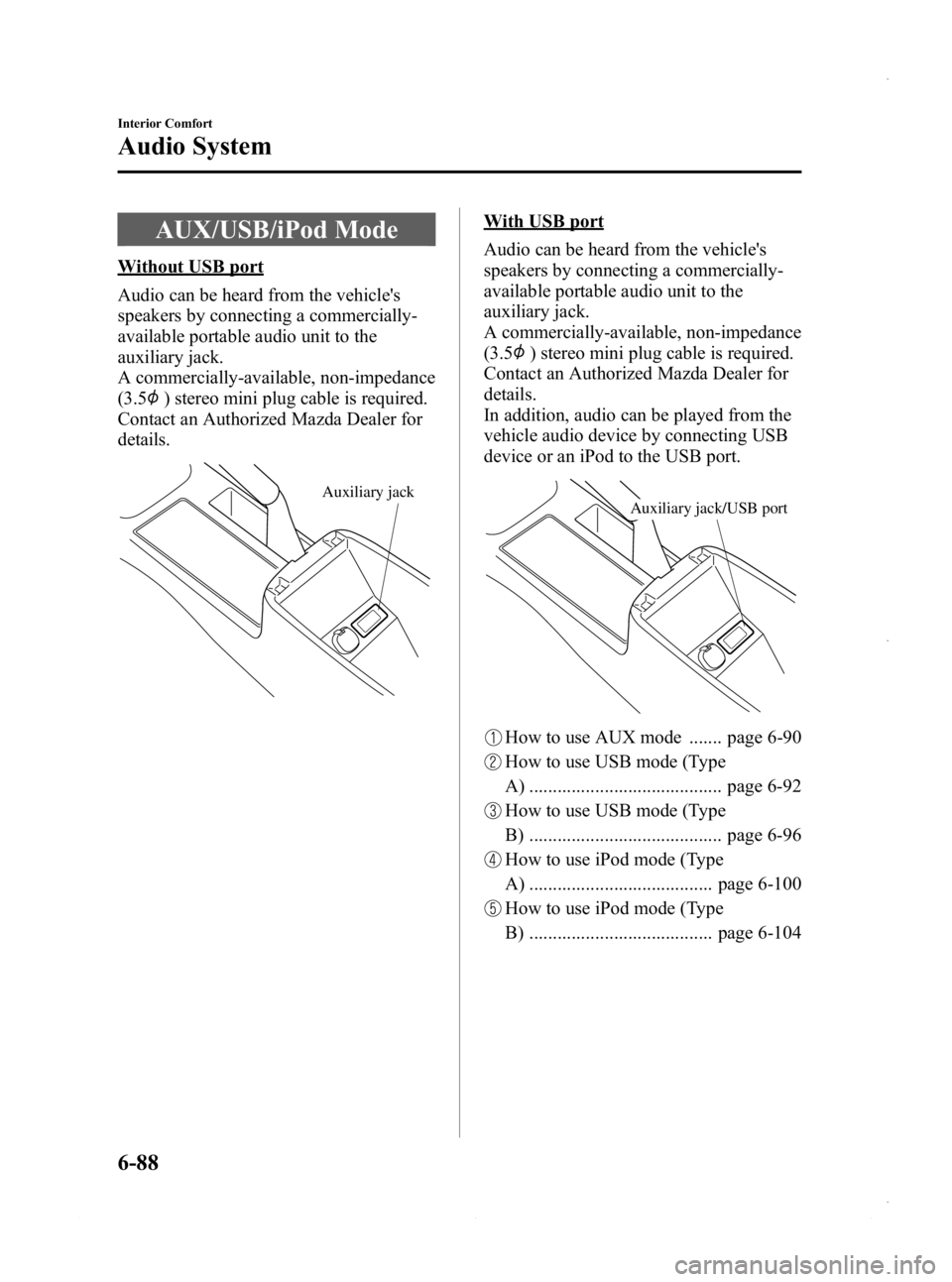
AUX/USB/iPod Mode
Without USB port
Audio can be heard from the vehicle's
speakers by connecting a commercially-
available portable audio unit to the
auxiliary jack.
A commercially-available, non-impedance
(3.5
) stereo mini plug cable is required.
Contact an Authorized Mazda Dealer for
details.
Auxiliary jack
With USB port
Audio can be heard from the vehicle's
speakers by connecting a commercially-
available portable audio unit to the
auxiliary jack.
A commercially-available, non-impedance
(3.5
) stereo mini plug cable is required.
Contact an Authorized Mazda Dealer for
details.
In addition, audio can be played from the
vehicle audio device by connecting USB
device or an iPod to the USB port.
Auxiliary jack/USB port
How to use AUX mode ....... page 6-90
How to use USB mode (Type
A) ......................................... page 6-92
How to use USB mode (Type
B) ......................................... page 6-96
How to use iPod mode (Type
A) ....................................... page 6-100
How to use iPod mode (Type
B) ....................................... page 6-104
6-88
Interior Comfort
Audio System
Mazda3_8CV6-EA-12H_Edition3 Page328
Thursday, February 28 2013 11:29 AM
Form No.8CV6-EA-12H