steering MAZDA MODEL 3 4-DOOR 2016 User Guide
[x] Cancel search | Manufacturer: MAZDA, Model Year: 2016, Model line: MODEL 3 4-DOOR, Model: MAZDA MODEL 3 4-DOOR 2016Pages: 598, PDF Size: 30.13 MB
Page 139 of 598
4–11
When Driving
Instrument Cluster and Display
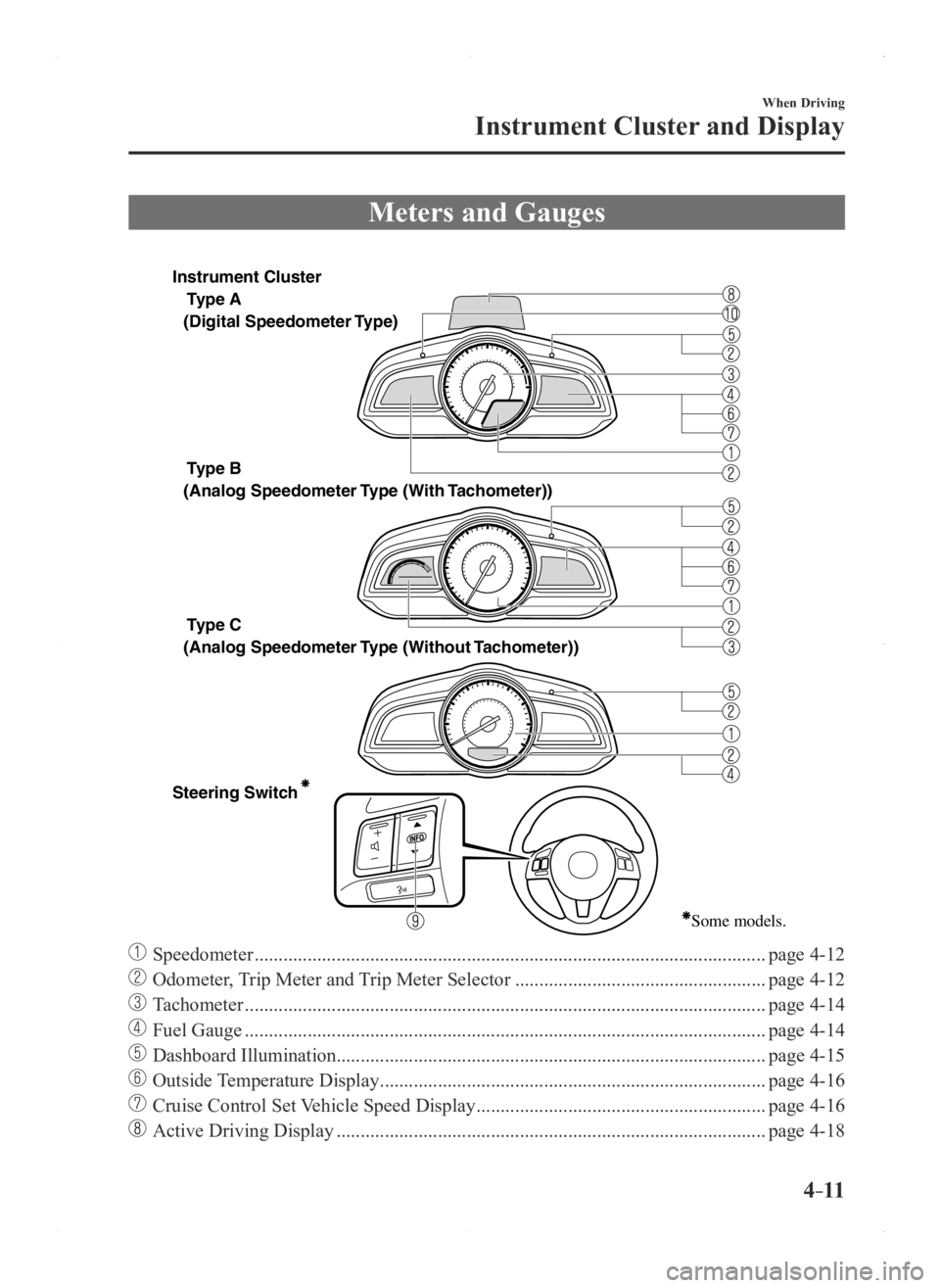
Meters and Gauges
Type A
Type B
Type C
Steering Switch
(Digital Speedometer Type)
(Analog Speedometer Type (With
Tachometer))
(Analog Speedometer Type (Without Tachometer))
Some models.
Instrument Cluster
Speedometer ........................................................................\
..................................page 4-12
Odometer, Trip Meter and Trip Meter Selector ....................................................page 4-12
Tachometer ........................................................................\
....................................page 4-14
Fuel Gauge ........................................................................\
....................................page 4-14
Dashboard Illumination........................................................................\
................. page 4-15
Outside Temperature Display ........................................................................\
........page 4-16
Cruise Control Set Vehicle Speed Display ............................................................page 4-16
Active Driving Display ........................................................................\
.................page 4-18
Mazda3_8FA4-EA-15G_Edition1.indb 112015/05/11 14:00:35
Page 144 of 598

4–16
When Driving
Instrument Cluster and Display
*Some models.
Outside Temperature Display*
When the ignition is switched ON, the
outside temperature is displayed.
NOTE
Under the following conditions, the
outside temperature display may differ
from the actual outside temperature
depending on the surroundings and vehicle
conditions:
Significantly cold or hot
temperatures. Sudden changes in outside
temperature. The vehicle is parked. The vehicle is driven at low speeds.
The outside temperature unit can be
switched between Celsius and Fahrenheit
using the following procedure.
1. Press the INFO button with the ignition
switched off and continue pressing the
INFO button for 5 seconds or longer
while switching the ignition ON. The
outside temperature display flashes.
2. Press the up or down part of the
INFO switch to change the outside
temperature unit.
3. Press and hold the INFO button for 3
seconds or longer while the outside
temperature display is flashing. The
outside temperature display illuminates.
Cruise Contr ol Set Vehicle Speed
Display*
The vehicle speed preset using the cruise
control is displayed.
Trip Computer and INFO Switch*
The following information can be selected
by pressing the up
or down part of
the steering switch with the ignition
switched ON.
Distance-to-empty Average fuel economy Current fuel economy Average vehicle speed
If you have any problems with your trip
computer, consult an Authorized Mazda
Dealer.
Distance-to-empty mode
This mode displays the approximate
distance you can travel on the remaining
fuel based on the fuel economy.
The distance-to-empty will be calculated
and displayed every second.
Mazda3_8FA4-EA-15G_Edition3.indb 162015/12/04 19:22:38
Page 149 of 598
4–21
When Driving
Instrument Cluster and Display
*Some models.
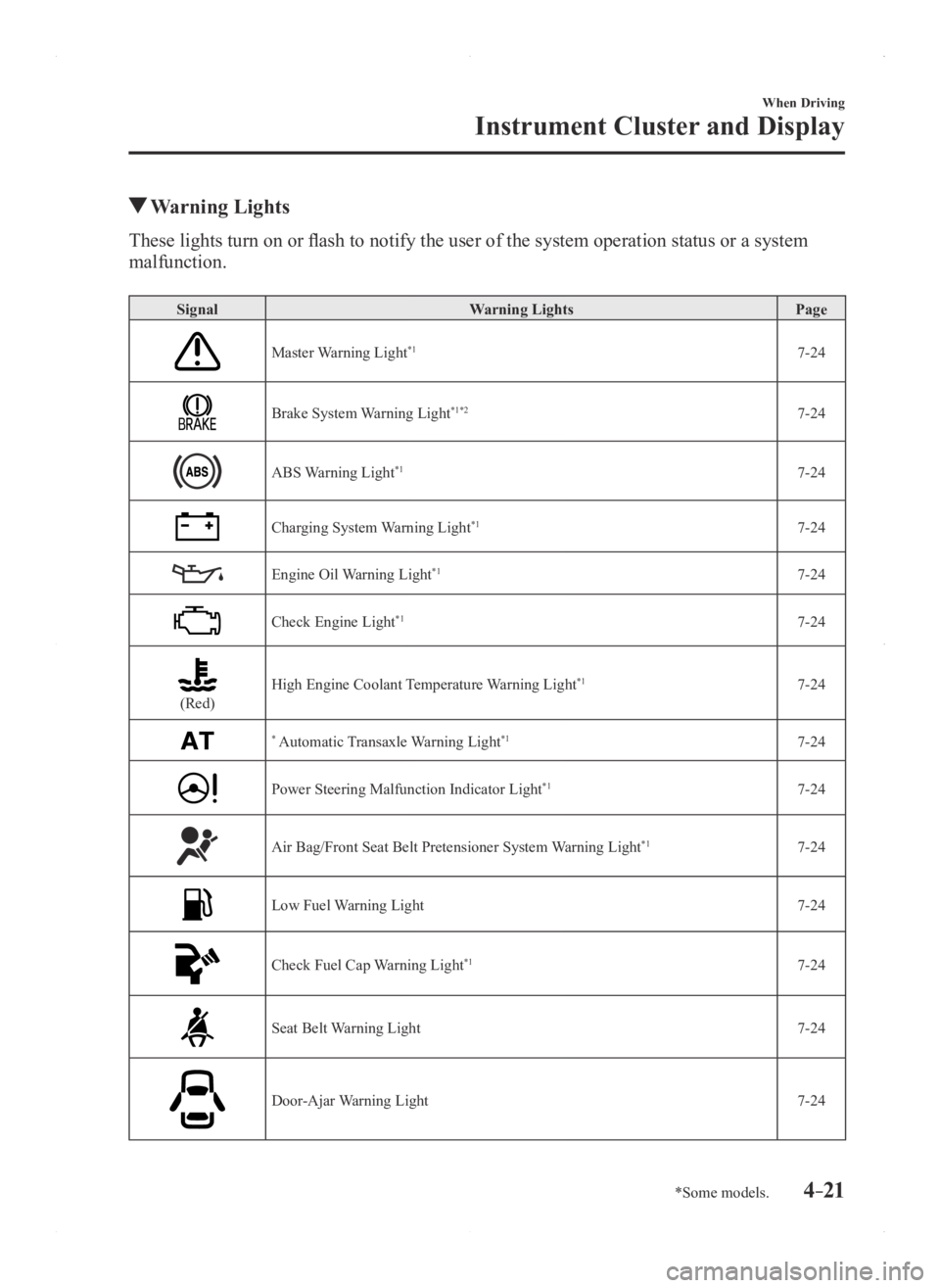
Warning Lights
These lights turn on or flash to notify the user of the system operation status or a system
malfunction.
SignalWarning Lights Page
Master Warning Light*17-24
Brake System Warning Light*1*27-24
ABS Warning Light*17-24
Charging System Warning Light*17-24
Engine Oil Warning Light*17-24
Check Engine Light*17-24
(Red)High Engine Coolant Temperature Warning Light*17-24
* Automatic Transaxle Warning Light*17-24
Power Steering Malfunction Indicator Light*17-24
Air Bag/Front Seat Belt Pretensioner System Warning Light*17-24
Low Fuel Warning Light7-24
Check Fuel Cap Warning Light*17-24
Seat Belt Warning Light7-24
Door-Ajar Warning Light7-24
Mazda3_8FA4-EA-15G_Edition1.indb 212015/05/11 14:00:40
Page 161 of 598

4–33
When Driving
Transaxle
*Some models.
Type B
Gear position indication
Manual shift mode indication
Type C
Manual shift mode indicationGear position indication
NOTE
If the gears cannot be shifted down
when driving at higher speeds, the gear
position indication will flash twice to
signal that the gears cannot be shifted
down (to protect the transaxle).
If the automatic transaxle fluid (A
TF)
temperature becomes too high, there
is the possibility that the transaxle
will switch to automatic shift mode,
canceling manual shift mode and
turning off the gear position indication
illumination. This is a normal function
to protect the automatic transaxle. After
the ATF temperature has decreased, the
gear position indication illumination
turns back on and driving in manual
shift mode is restored.
Shifting
You can shift gears up and down by
operating the selector lever or the steering
shift switches
*.
Manually Shifting up
(M1 → M2 → M3 → M4 → M5 → M6)
To shift up to a higher gear, move the
selector lever back
once.
Mazda3_8FA4-EA-15G_Edition1.indb 332015/05/11 14:00:46
Page 162 of 598
4–34
When Driving
Transaxle
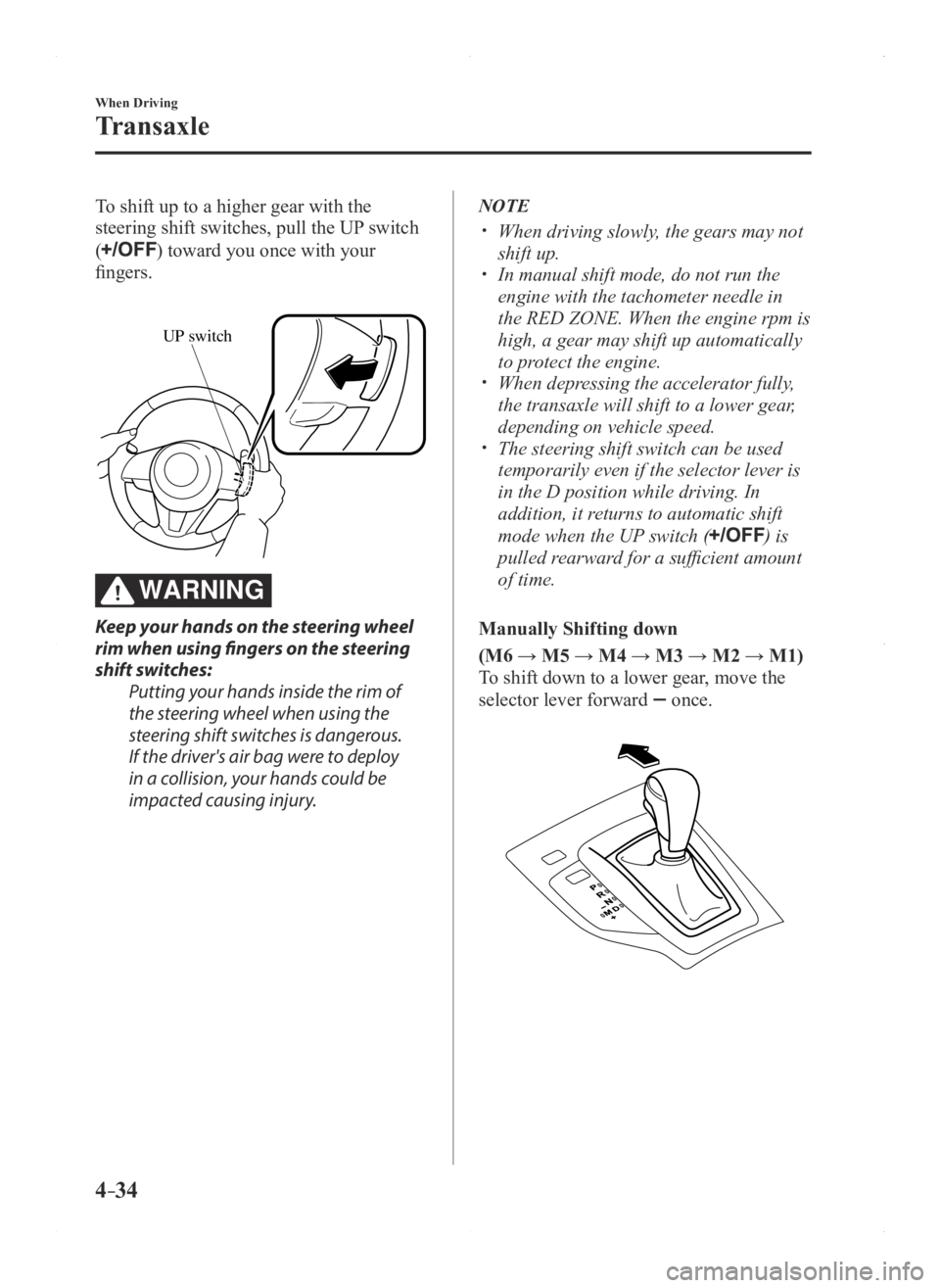
To shift up to a higher gear with the
steering shift switches, pull the UP switch
(
) toward you once with your
fingers.
UP switch
WARNING
Keep your hands on the steering wheel
rim when using fingers on the steering
shift switches:Putting your hands inside the rim of
the steering wheel when using the
steering shift switches is dangerous.
If the driver's air bag were to deploy
in a collision, your hands could be
impacted causing injury.
NOTE
When driving slowly , the gears may not
shift up. In manual shift mode, do not run the
engine with the tachometer needle in
the RED ZONE. When the engine rpm is
high, a gear may shift up automatically
to protect the engine.
When depressing the accelerator fully,
the transaxle will shift to a lower gear,
depending on vehicle speed.
The steering shift switch can be used
temporarily even if the selector lever is
in the D position while driving. In
addition, it returns to automatic shift
mode when the UP switch (
) is
pulled rearward for a sufficient amount
of time.
Manually Shifting down
(M6 → M5 → M4 → M3 → M2 → M1)
To shift down to a lower gear, move the
selector lever forward
once.
Mazda3_8FA4-EA-15G_Edition1.indb 342015/05/11 14:00:47
Page 163 of 598
4–35
When Driving
Transaxle
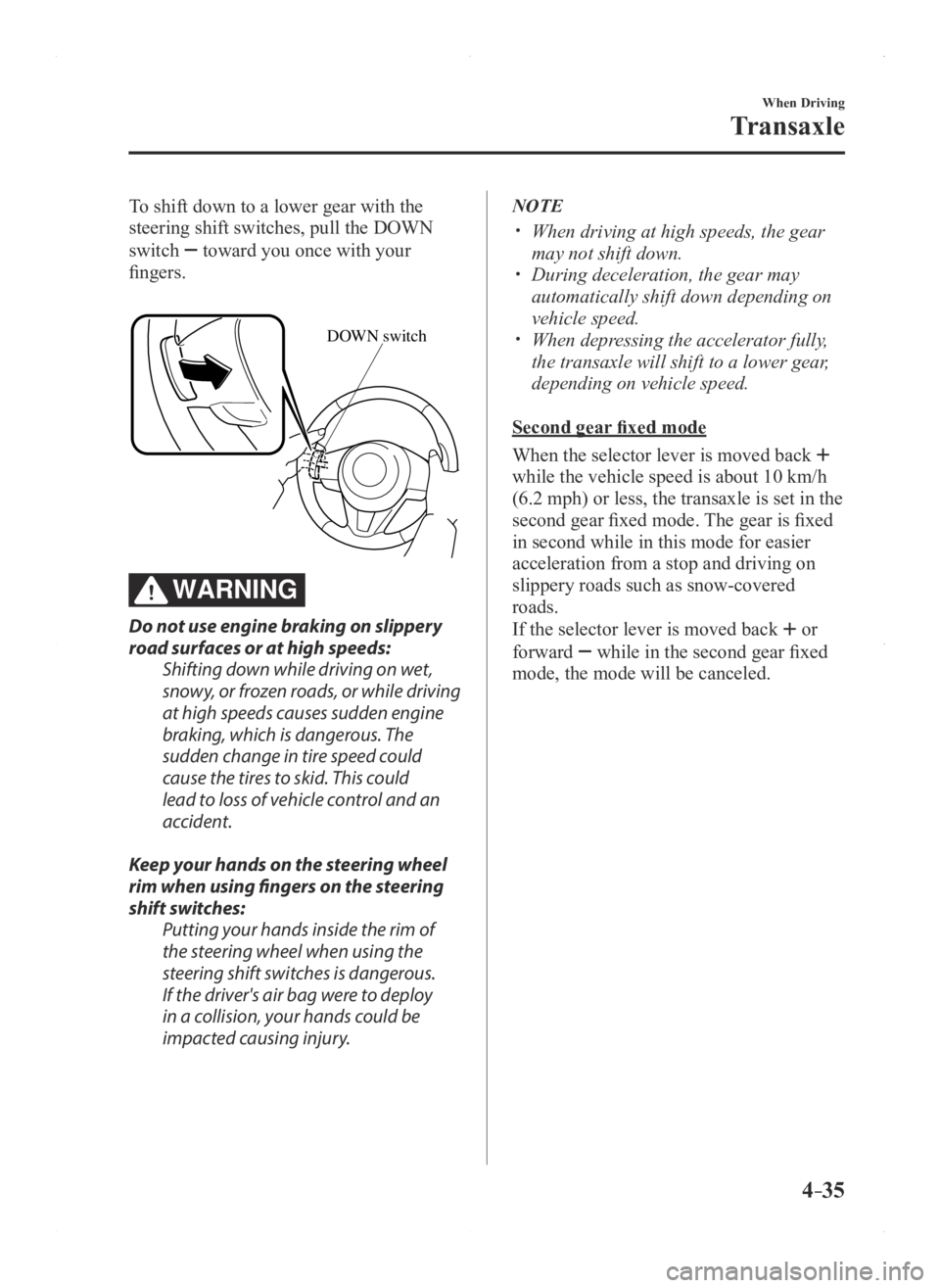
To shift down to a lower gear with the
steering shift switches, pull the DOWN
switch
toward you once with your
fingers.
DOWN switch
WARNING
Do not use engine braking on slippery
road surfaces or at high speeds: Shifting down while driving on wet,
snowy, or frozen roads, or while driving
at high speeds causes sudden engine
braking, which is dangerous. The
sudden change in tire speed could
cause the tires to skid. This could
lead to loss of vehicle control and an
accident.
Keep your hands on the steering wheel
rim when using fingers on the steering
shift switches: Putting your hands inside the rim of
the steering wheel when using the
steering shift switches is dangerous.
If the driver's air bag were to deploy
in a collision, your hands could be
impacted causing injury.
NOTE
When driving at high speeds, the gear
may not shift down. During deceleration, the gear may
automatically shift down depending on
vehicle speed.
When depressing the accelerator fully,
the transaxle will shift to a lower gear,
depending on vehicle speed.
Second gear fixed mode
When the selector lever is moved back
while the vehicle speed is about 10 km/h
(6.2 mph) or less, the transaxle is set in the
second gear fixed mode. The gear is fixed
in second while in this mode for easier
acceleration from a stop and driving on
slippery roads such as snow-covered
roads.
If the selector lever is moved back
or
forward
while in the second gear fixed
mode, the mode will be canceled.
Mazda3_8FA4-EA-15G_Edition1.indb 352015/05/11 14:00:47
Page 166 of 598

4–38
When Driving
Transaxle
*Some models.
Direct Mode*
Direct mode can be used for temporarily
switching gears by operating the steering
shift switch while the vehicle is being
driven with the selector lever in the D
range.
While in direct mode, the D and M
indication illuminate and the gear position
in use is illuminated.
Direct mode is canceled (released) under
the following conditions.
The UP switch () is pulled
rearward for a certain amount of time or
longer.
The vehicle is driven for a certain
amount of time or longer (time differs
depending on the driving conditions
while operating).
The vehicle is stopped or moving at a
slow speed.
Type A
Gear position indication
Direct mode indication
Type B
Gear position indication
Direct mode indication
Type C
Gear position indication
Direct mode indication
NOTE
Shifting up and down while in direct mode
may not be possible depending on the
vehicle speed. In addition, because direct
mode is canceled (released) depending
on the rate of acceleration or if the
accelerator is fully depressed, use of the
manual shift mode is recommended if you
need to drive the vehicle in a particular
gear for long periods.
Mazda3_8FA4-EA-15G_Edition1.indb 382015/05/11 14:00:48
Page 167 of 598
4–39
When Driving
Transaxle
Driving Tips
WARNING
Do not let the vehicle move in a
direction opposite to the direction
selected by the selector lever:Do not let the vehicle move backward
with the selector lever in a forward
position, or do not let the vehicle
move forward with the selector lever
in the reverse position. Otherwise, the
engine may stop, causing the loss of
the power brake and power steering
functions, and make it difficult to
control the vehicle which could result
in an accident.
Passing
For extra power when passing another
vehicle or climbing steep grades, depress
the accelerator fully. The transaxle will
shift to a lower gear, depending on vehicle
speed.
NOTE
(Some models)
The accelerator pedal may initially feel
heavy as it is being depressed, then feel
lighter as it is depressed further. This
change in pedal force aids the engine
control system in determining how much
the accelerator pedal has been depressed
for performing kickdown, and functions to
control whether or not kickdown should be
performed.
Climbing steep grades from a stop
To climb a steep grade from a stopped
position:
1. Depress the brake pedal.
2. Shift to D or M1, depending on the
load weight and grade steepness.
3. Release the brake pedal while gradually
accelerating.
Descending steep grades
When descending a steep grade, shift to
lower gears, depending on load weight and
grade steepness. Descend slowly, using the
brakes only occasionally to prevent them
from overheating.
Mazda3_8FA4-EA-15G_Edition1.indb 392015/05/11 14:00:48
Page 181 of 598
4–53
When Driving
Switches and Controls
*Some models.
Mirror Defogger*
To turn on the mirror defoggers, switch
the ignition ON and press the rear window
defogger switch (page 4-52).
Horn
To sound the horn, press the mark on
the steering wheel.
Mazda3_8FA4-EA-15G_Edition1.indb 532015/05/11 14:00:53
Page 196 of 598

4–68
When Driving
i-ELOOP
i-ELOOP Indicator Light/Control
Status Display
The driver is notified of the i-ELOOP
power generating status and the vehicle
conditions by the i-ELOOP indicator light
and the control status display.
i-ELOOP Indicator Light
Illuminated (vehicle without type B
audio)
The light turns on during power
generation.
Flashing
If the engine is started after the vehicle has
not been driven for a long period of time,
the i-ELOOP indicator light may flash.
Leave the engine idling and wait until the
indicator light turns off.
NOTE
The beep will sound if the vehicle is
driven while the i-ELOOP indicator
light is flashing. In addition, if you
turn the steering wheel while the light
is flashing, it will feel heavier than
normal, but this does not indicate an
abnormality. Stop the vehicle in a safe
location with the engine running and do
not attempt to turn the steering wheel.
The steering operation will return to
normal after the i-ELOOP indicator
light stops flashing.
(Vehicles with type B audio)
A notification is displayed in the center
display and the i-ELOOP indicator light
flashes at the same time.
Refer to Warning Message Indicated on
Display on page 7-33.
Control status display (vehicles with
type B audio)
The i-ELOOP power generating status is
displayed in the center display.
Refer to Control Status Display on page
4-70.
Mazda3_8FA4-EA-15G_Edition1.indb 682015/05/11 14:00:57