steering MAZDA MODEL 3 4-DOOR 2016 Owner's Manual
[x] Cancel search | Manufacturer: MAZDA, Model Year: 2016, Model line: MODEL 3 4-DOOR, Model: MAZDA MODEL 3 4-DOOR 2016Pages: 598, PDF Size: 30.13 MB
Page 199 of 598

4–71
When Driving
Drive Selection
*Some models.
Drive Selection*
Drive selection is a system to switch the vehicle's drive mode. When the sport mode
is selected, vehicle's response against accelerator operation is enhance\
d. This provides
additional quick acceleration which may be needed to safely make maneuvers such as lane
changes, merging onto freeways, or passing other vehicles.
CAUTION
Do not use the sport mode when driving on slippery roads such as wet or snow-covered
roads. It may cause tire slipping.
NOTE
When the sport mode is selected, driving at higher engine speeds increases and it may
increase fuel consumption. Mazda recommends that you cancel the sport mode on normal
driving.
Drive mode cannot be switched in the following conditions:
ABS/TCS/DSC is operating The Mazda Radar Cruise Control (MRCC) system/cruise control is operating. Steering wheel is being operated abruptly
Mazda3_8FA4-EA-15G_Edition1.indb 712015/05/11 14:00:59
Page 201 of 598

4–73
When Driving
Power Steering
Power Steering
Power steering is only operable when
the engine is running. If the engine is
off or if the power steering system is
inoperable, you can still steer, but it
requires more physical effort.
If the steering feels stiffer than usual
during normal driving or the steering
vibrates, consult an Authorized Mazda
Dealer.
The warning light notifies the driver
of system abnormalities and operation
conditions.
In addition, the buzzer may also activate
depending on the system abnormality or
operation condition.
Refer to Warning Lights on page
4-21.
Refer to Power Steering Warning Buzzer
on page 7-38.
CAUTION
Never hold the steering wheel to the
extreme left or right for more than 5
seconds with the engine running. This
could damage the power steering
system.
Mazda3_8FA4-EA-15G_Edition1.indb 732015/05/11 14:01:00
Page 204 of 598

4–76
When Driving
i-ACTIVSENSE
Adaptive Front Lighting
System (AFS)
The adaptive front lighting system (AFS)
automatically adjusts the headlight beams
to the left or right in conjunction with the
operation of the steering wheel after the
headlights have been turned on.
AFS OFF Indicator Light
When illuminated
This indicator light illuminates briefly
when the ignition is switched ON, and
then turns off. Pressing the AFS OFF
switch cancels the AFS function and
illuminates the indicator light.
When flashing
The indicator light flashes continuously if
the system is malfunctioning. Consult an
Authorized Mazda Dealer.
NOTE
Even if the AFS is not operating due to
some malfunction, the normal headlight
function is still operable.
If there is a malfunction with the
headlight auto-leveling function, the
indicator light flashes.
AFS OFF switch
Pressing the AFS OFF switch turns off the
AFS. The AFS OFF indicator light in the
instrument cluster illuminates.
Pressing the AFS OFF switch again turns
off the switch illumination and turns on
the AFS operation. The AFS OFF indicator
light turns off.
Mazda3_8FA4-EA-15G_Edition1.indb 762015/05/11 14:01:00
Page 208 of 598

4–80
When Driving
i-ACTIVSENSE
Lane Departure Warning System (LDWS)
The LDWS notifies the driver that the vehicle may be deviating from its lane.
The system detects the white or yellow lines on the traffic lane using the Forward Sensing
Camera (FSC). If it determines that the vehicle may be deviating from its lane, it notifies
the driver by flashing the LDWS indicator light (green) and operating the LDWS warning
sound.
Refer to Forward Sensing Camera on page 4-111.
Use the LDWS when you drive the vehicle on roads with white or yellow li\
nes.
Forward Sensing Camera (FSC)
LDWS warning light (Amber)/
LDWS indicator light (Green)
The warning light flashes when the system has a malfunction.
Refer to Warning Lights on page 4-21.
WARNING
Do not use the LDWS under the following conditions:
The system may not operate adequately according to the actual driving conditions,
resulting in an accident.
Driving on roads with tight curves. Driving under bad weather conditions (rain, fog, and snow).
The functions of the LDWS have limitations:
Always stay on course using the steering wheel and drive with care. The system is not
designed to compensate for a driver’s lack of caution and if you rely too much on the
LDWS it could lead to an accident. The driver is responsible for assuring lane changes and
other maneuvers. Always pay attention to the direction in which the vehicle is traveling
and the vehicle’s surroundings.
Mazda3_8FA4-EA-15G_Edition1.indb 802015/05/11 14:01:01
Page 209 of 598
4–81
When Driving
i-ACTIVSENSE
CAUTION
Do not modify the suspension. If the vehicle height or the damping force of the
suspensions is changed, the LDWS may not operate correctly.
NOTE
If your vehicle deviates from its traffic lane, the LDWS operates (warning sound and
indicator light). Steer the vehicle adequately to drive the vehicle to \
the center of the lane. When the turn signal lever is operated for a lane change, the LDWS warni\
ng is
automatically canceled. The LDWS warning becomes operable when the turn \
signal lever
is returned and the system detects the white or yellow lines.
If the steering wheel, accelerator pedal, or brake pedal is operated abr\
uptly and the
vehicle moves close to a white or yellow line, the system determines tha\
t the driver is
making a lane change and the LDWS warning is automatically canceled.
The LDWS may not operate during the period immediately after the vehicle\
has deviated
from its lane and the LDWS has operated, or the vehicle deviates from its lane repeatedly
within a short period of time.
The LDWS does not operate if it does not detect the white or ye llow lines of the traffic
lane.
Mazda3_8FA4-EA-15G_Edition1.indb 812015/05/11 14:01:01
Page 212 of 598
4–84
When Driving
i-ACTIVSENSE
Auto cancel
Under the following conditions, the
LDWS is automatically canceled and
kept on stand-by, and the LDWS warning
light (amber) in the instrument cluster
illuminates.
The system cannot detect white or
yellow lines. The vehicle speed is less than about 65
km/h (40 mph). The vehicle is making a sharp turn. The vehicle is making a turn at an
inadequate speed. The temperature inside the camera is
high or low. The windshield around the camera is
foggy. The windshield around the camera is
blocked by an obstruction, causing poor
forward visibility.
The lane indication (bordered line) is
indicated in the active driving display
(Type A instrument cluster
*1) or the multi
information display (Type B instrument
cluster
*1).
The LDWS is automatically enabled when
the condition changes and the system is
operable.
*1 To determine which instrument cluster
is equipped on your Mazda, Refer to
Meters and Gauges on page 4-11.
Auto cancel of warning
Under the following conditions, the
LDWS determines that the driver is
making lane changes and the warning is
automatically canceled.
The LDWS is automatically enabled after
the operation.
The steering wheel is operated abruptly . The brake pedal is depressed abruptly. The accelerator pedal is depressed
abruptly. A turn signal lever is operated (after the
turn signal lever is returned, the LDWS
warning may not operate for about 3
seconds which is the period of time
required to make a lane correction).
NOTE
After about 5 seconds have elapsed
with the turn signal lever left operating,
the LDWS warning may operate if the
vehicle is close to a white or yellow line.
The sensitivity of the warning
(sensitivity with which the system
determines the driver's intentional lane
change) can be changed.
Refer to Personalization Features on
page 9-12.
Canceling the System
To cancel the LDWS, press the LDWS
switch. The LDWS indicator light (Green/
Amber) in the instrument cluster turns off.
The lane indication displayed in the
active driving display (Type A instrument
cluster
*1) or the multi information display
(Type B instrument cluster*1) turns off.
*1 To determine which instrument cluster
is equipped on your Mazda, Refer to
Meters and Gauges on page 4-11.
Mazda3_8FA4-EA-15G_Edition1.indb 842015/05/11 14:01:02
Page 213 of 598
4–85
When Driving
i-ACTIVSENSE
LDWS Warning
If the system determines that the vehicle
may be deviating from its lane while the
system is operating, the LDWS warning
sounds and the LDWS indicator light
(green) flashes.
Refer to Lane Departure Warning System
(LDWS) Warning Sound on page 7-37.
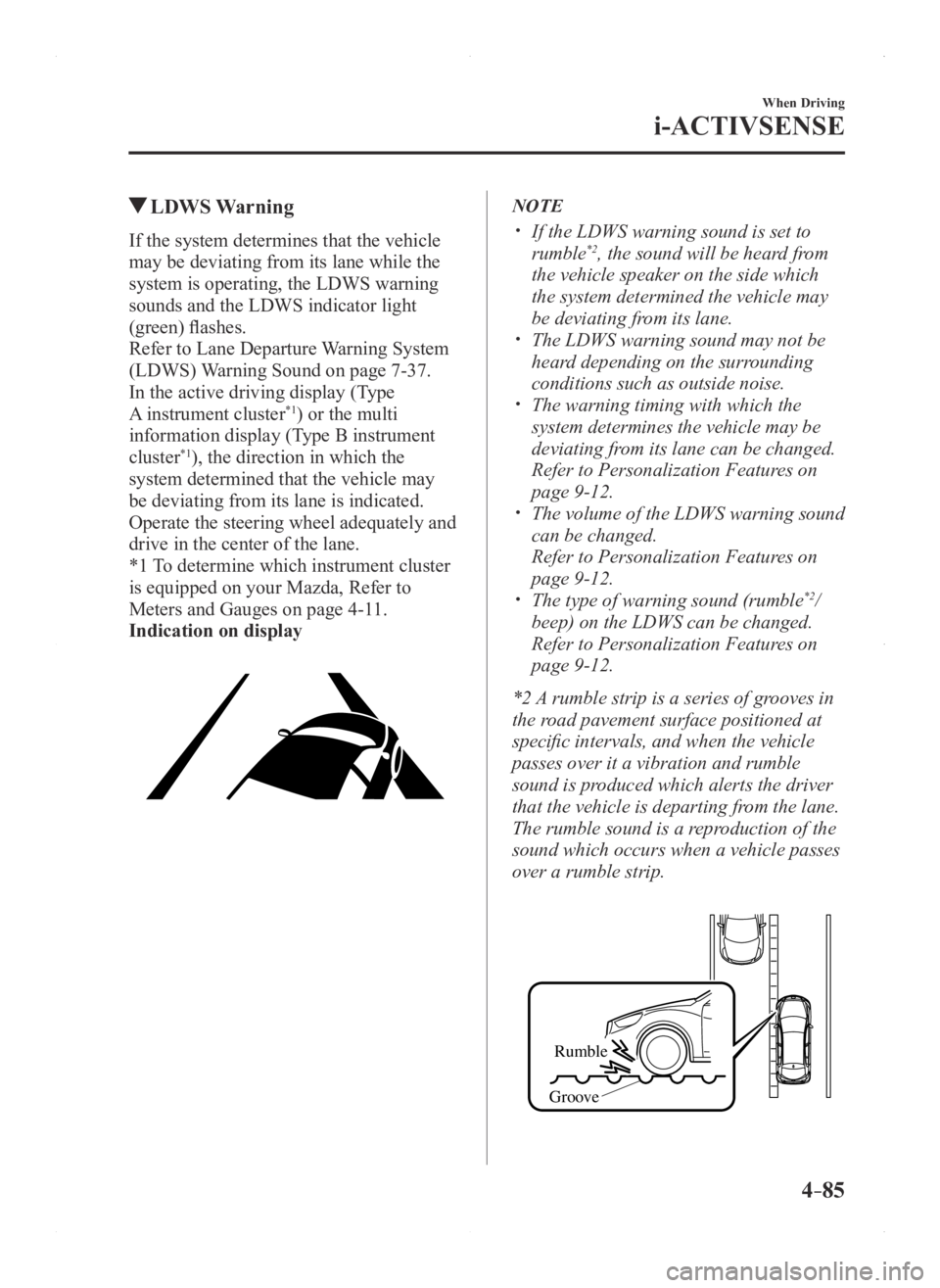
In the active driving display (Type
A instrument cluster
*1) or the multi
information display (Type B instrument
cluster
*1), the direction in which the
system determined that the vehicle may
be deviating from its lane is indicated.
Operate the steering wheel adequately and
drive in the center of the lane.
*1 To determine which instrument cluster
is equipped on your Mazda, Refer to
Meters and Gauges on page 4-11.
Indication on display
NOTE
If the LDWS warning sound is set to
rumble*2, the sound will be heard from
the vehicle speaker on the side which
the system determined the vehicle may
be deviating from its lane.
The LDWS warning sound may not be
heard depending on the surrounding
conditions such as outside noise.
The warning timing with which the
system determines the vehicle may be
deviating from its lane can be changed.
Refer to Personalization Featur es on
page 9-12. The volume of the LDWS warning sound
can be changed.
Refer to Personalization Features on
page 9-12. The type of warning sound (rumble*2/
beep) on the LDWS can be changed.
Refer to Personalization Featur es on
page 9-12.
*2 A rumble strip is a series of grooves in
the road pavement surface positioned at
specific intervals, and when the vehicle
passes over it a vibration and rumble
sound is produced which alerts the driver
that the vehicle is departing from the lane.
The rumble sound is a reproduction of the
sound which occurs when a vehicle passes
over a rumble strip.
Rumble
Groove
Mazda3_8FA4-EA-15G_Edition1.indb 852015/05/11 14:01:02
Page 223 of 598

4–95
When Driving
i-ACTIVSENSE
Forward Obstruction Warning (FOW)
Forward Obstruction Warning (FOW) is a system which alerts the driver of a possible
collision using an indicator and warning sound in the instrument cluster\
while the vehicle
is being driven at about 15 km/h or faster (10 mph or faster) and the \
system's radar sensor
determines that your vehicle may hit a vehicle or obstruction ahead.
WARNING
Do not rely completely on the Forward Obstruction Warning (FOW) system and always
drive carefully:Forward Obstruction Warning (FOW) is only designed to reduce damage in the event of
a collision. The ability to detect an obstruction is limited depending on the obstruction,
weather conditions, or traffic conditions. Therefore, if the accelerator pedal or brake
pedal is mistakenly operated it could result in an accident. Always verify the safety of the
surrounding area and depress the brake pedal or accelerator pedal while keeping a safe
distance from vehicles ahead or on-coming vehicles.
NOTE
The Forwar d Obstruction Warning (FOW) system operates when all of the following
conditions are met:
The ignition is switched ON. The Forward Obstruction Warning (FOW) system is on. The vehicle speed is about 15 km/h (10 mph) or faster . The relative speed between your vehicle and the vehicle or obstruction ahead \
is about
15 km/h (10 mph) or faster.
The Forward Obstruction Warning (FOW) system may not operate under the following
conditions:
If there is the possibility of hitting only a part of a vehicle or obstruction \
ahead. If the vehicle is accelerated rapidly and it comes close to a vehicle ah\
ead. The DSC is malfunctioning. The vehicle is driven at the same speed as the vehicle ahead. The accelerator pedal is depr essed. The brake pedal is depressed. The steering wheel is being operated. The selector lever is being operated. The turn signal is being used.
Mazda3_8FA4-EA-15G_Edition1.indb 952015/05/11 14:01:05
Page 236 of 598

4–10 8
When Driving
i-ACTIVSENSE
CAUTION
When driving off-road in areas where there is grass or forage, it is recommended that the
Smart City Brake Support (SCBS) system be turned off. Always use tires for all wheels that are of the specified size, and the same manufacturer,
brand, and tread pattern. In addition, do not use tires with significantly different wear
patterns on the same vehicle as the Smart City Brake Support (SCBS) system may not
operate normally.
The laser sensor (front) includes a function for detecting a soiled windshield and informing
the driver, however, depending on the conditions, it may not detect plastic shopping bags,
ice or snow on the windshield. In such cases, the system cannot accurately determine a
vehicle ahead and may not be able to operate normally. Always drive carefully and pay
attention to the road ahead.
NOTE
The Smart City Brake Support (SCBS) system will not operate if the dri\
ver is deliberately
performing driving operations (accelerator pedal and steering wheel). The Smart City Brake Support (SCBS) system will operate under the foll\
owing conditions.
The engine is running. The Smart City Brake Support (SCBS) warning light (amber) does not i\
lluminate. The vehicle speed is between about 4 to 30 km/h (2 to 18 mph). The Smart City Brake Support (SCBS) system is not turned off. The DSC operation is not turned off using the DSC OFF switch. The DSC is not malfunctioning.
The Smart City Brake Support (SCBS) detects a vehicle ahead by emittin\
g a near-infrared
laser beam and receiving the beam reflected off the reflector of the vehicle ahead, and
then using it for the measurement. Consequently, the Smart City Brake Support (SCBS)
may not operate under the following conditions:
Reflection of the laser is poor due to the shape of the vehicle ahead. The vehicle ahead is significantly dirty. Under bad weather condition, such as rain, fog and snow . The window washer is being used or the windshield wipers ar e not used when it's
raining. The windshield is dirty. The steering wheel is turned completely left or right, or the vehicle is\
accelerated
rapidly and comes close to the vehicle ahead. Trucks with low loading platforms and vehicles with an extremely low or high profile. Vehicles with certain shapes such as a vehicle carrier.
Mazda3_8FA4-EA-15G_Edition1.indb 1082015/05/11 14:01:08
Page 253 of 598
4–125
When Driving
Tire Pressure Monitoring System
NOTE
Because this system detects slight changes in tire conditions, the timing of the warning may
be faster or slower in the following cases:
The size, manufacturer, or the type of tires is different from the specification. The size, manufacturer, or the type of a tire is different from the others, or the level of tire
wear is excessively different between them. A run-flat tire, studless tire, snow tire, or tire chains are used. An emergency tire is used (The tire pressure monitoring system warning light may flash
and then continue illuminating). A tire is repaired using the emergency flat tire repair kit. The tire pressure is excessively higher than the specified pressure, or the tire pressure is
suddenly lowered for some reason such as a tire burst during driving. The vehicle speed is lower than about 15 km/h (9.3 mph) (including wh\
en the vehicle is
stopped), or the drive period is shorter than 5 minutes. The vehicle is driven on an extr emely rough road or a slippery, icy road. Hard steering and rapid acceleration/deceleration are repeated such as during aggressive
driving on a winding road. Load on the vehicle is applied to a tir e such as by loading heavy luggage to one side of
the vehicle. System initialization has not been implemented with the specifie d tire pressure.
Mazda3_8FA4-EA-15G_Edition1.indb 1252015/05/11 14:01:11