lights MAZDA MODEL 3 4-DOOR 2016 Workshop Manual
[x] Cancel search | Manufacturer: MAZDA, Model Year: 2016, Model line: MODEL 3 4-DOOR, Model: MAZDA MODEL 3 4-DOOR 2016Pages: 598, PDF Size: 30.13 MB
Page 216 of 598
4–88
When Driving
i-ACTIVSENSE
If the road width is extremely narrow, vehicles two lanes over may be detected.
The detection area of the radar sensors (rear) is set according to the road width of
expressways.
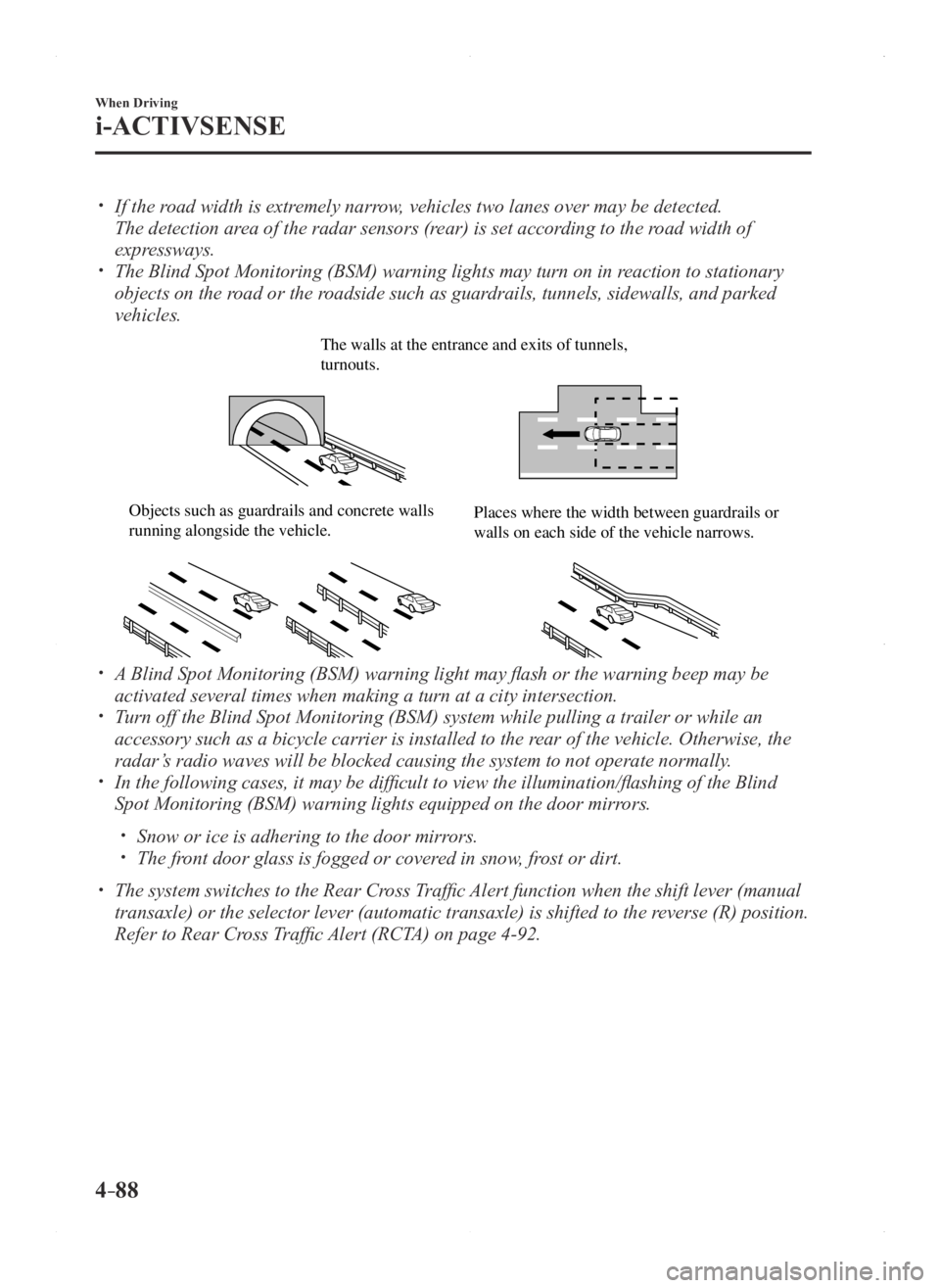
The Blind Spot Monitoring (BSM) warning lights may turn on in reaction to stationary
objects on the road or the roadside such as guardrails, tunnels, sidewalls, and parked
vehicles.
The walls at the entrance and exits of tunnels, turnouts.
Objects such as guardrails and concrete walls running alongside the vehicle.Places where the width between guardrails or walls on each side of the vehicle narrows.
A Blind Spot Monitoring (BSM) warning light may flash or the warning beep may be
activated several times when making a turn at a city intersection. Turn off the Blind Spot Monitoring (BSM) system while pulling a trailer\
or while an
accessory such as a bicycle carrier is installed to the rear of the vehicle. Otherwise, the
radar’s radio waves will be blocked causing the system to not operate normally\
.
In the following cases, it may be difficult to view the illumination/flashing of the Blind
Spot Monitoring (BSM) warning lights equipped on the door mirrors.
Snow or ice is adhering to the door mirrors. The front door glass is fogged or covered in snow, frost or dirt.
The system switches to the Rear Cross Traffic Alert function when the shift lever (manual
transaxle) or the selector lever (automatic transaxle) is shifted to \
the reverse (R) position.
Refer to Rear Cross Traffic Alert (RCTA) on page 4-92.
Mazda3_8FA4-EA-15G_Edition1.indb 882015/05/11 14:01:03
Page 217 of 598
4–89
When Driving
i-ACTIVSENSE
Blind Spot Monitoring (BSM) Warning Lights/Blind Spot Monitoring (BSM)
Warning Beep
The Blind Spot Monitoring (BSM) or Rear Cross Traffic Alert (RCTA) system notifies the
driver of the presence of vehicles in adjacent lanes to the rear of your\
vehicle using the
Blind Spot Monitoring (BSM) warning lights and the warning beep while the systems are
operational.
Blind Spot Monitoring (BSM) warning lights
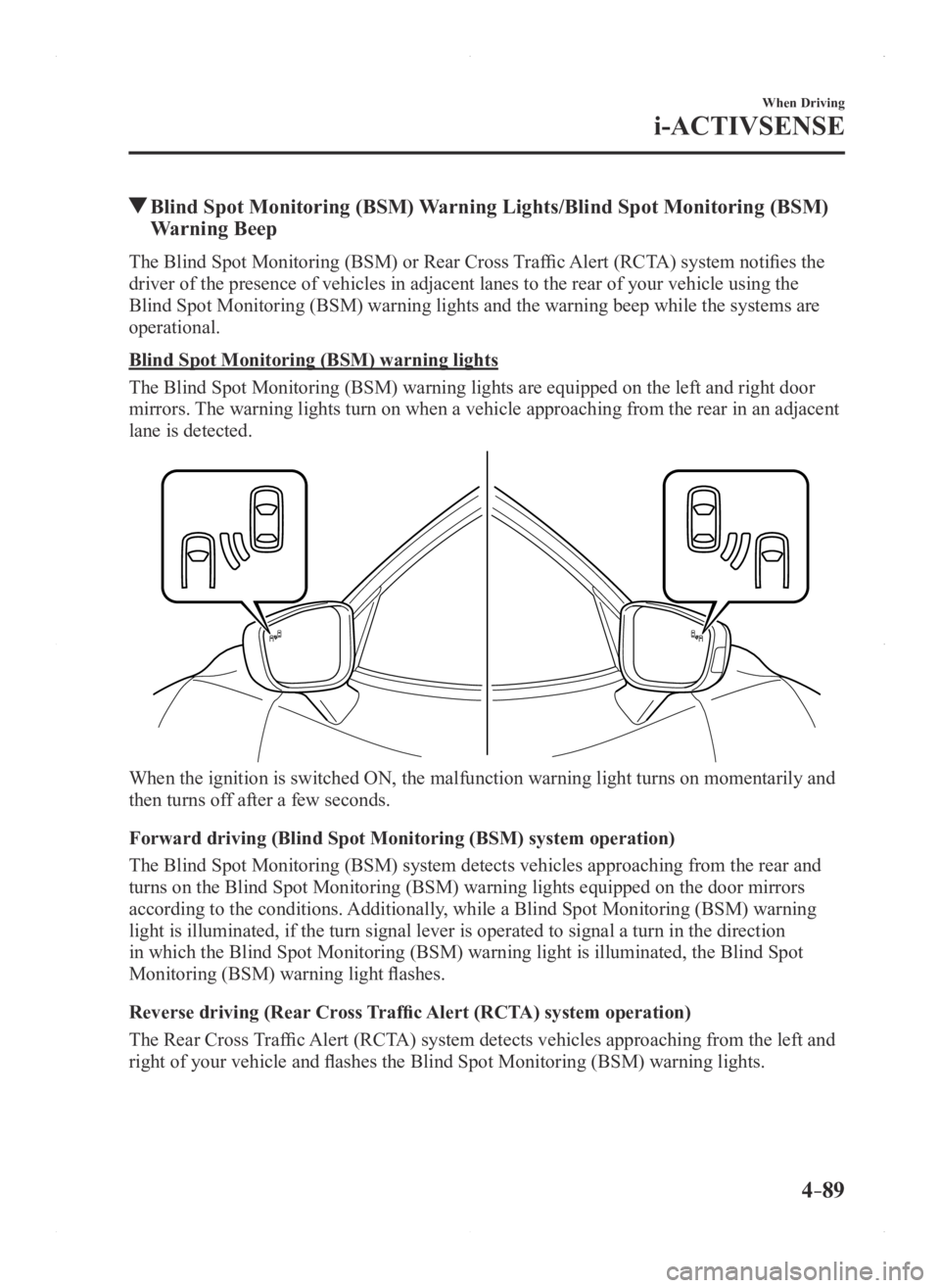
The Blind Spot Monitoring (BSM) warning lights are equipped on the left and right door
mirrors. The warning lights turn on when a vehicle approaching from the rear in a\
n adjacent
lane is detected.
When the ignition is switched ON, the malfunction warning light turns on momentarily and
then turns off after a few seconds.
Forward driving (Blind Spot Monitoring (BSM) system operation)
The Blind Spot Monitoring (BSM) system detects vehicles approaching from the rear and
turns on the Blind Spot Monitoring (BSM) warning lights equipped on the door mirrors
according to the conditions. Additionally, while a Blind Spot Monitoring (BSM) warning
light is illuminated, if the turn signal lever is operated to signal a t\
urn in the direction
in which the Blind Spot Monitoring (BSM) warning light is illuminated, the Blind Spot
Monitoring (BSM) warning light flashes.
Reverse driving (Rear Cross Traffic Alert (RCTA) system operation)
The Rear Cross Traffic Alert (RCTA) system detects vehicles approaching from the left and
right of your vehicle and flashes the Blind Spot Monitoring (BSM) warning lights.
Mazda3_8FA4-EA-15G_Edition1.indb 892015/05/11 14:01:03
Page 218 of 598
4–90
When Driving
i-ACTIVSENSE
Function for cancelling illumination dimmer
When the headlight switch is in the
or position, the brightness of the Blind Spot
Monitoring (BSM) warning lights is dimmed.
If the Blind Spot Monitoring (BSM) warning lights are difficult to see due to glare from
surrounding brightness when traveling on snow-covered roads or under fog\
gy conditions,
press the dimmer cancellation button to cancel the dimmer and increase t\
he brightness of
Blind Spot Monitoring (BSM) warning lights when they turn on.
Refer to Dashboard Illumination on page 4-15.
Blind Spot Monitoring (BSM) warning beep
The Blind Spot Monitoring (BSM) warning beep is activated simultaneously with the
flashing of a Blind Spot Monitoring (BSM) warning light.
Mazda3_8FA4-EA-15G_Edition1.indb 902015/05/11 14:01:03
Page 220 of 598
4–92
When Driving
i-ACTIVSENSE
Rear Cross Traffic Alert (RCTA)
The Rear Cross Traffic Alert (RCTA) system is designed to assist the driver in checking the
area to the rear of the vehicle on both sides while the vehicle is rever\
sing by alerting the
driver to the presence of vehicles approaching the rear of the vehicle.
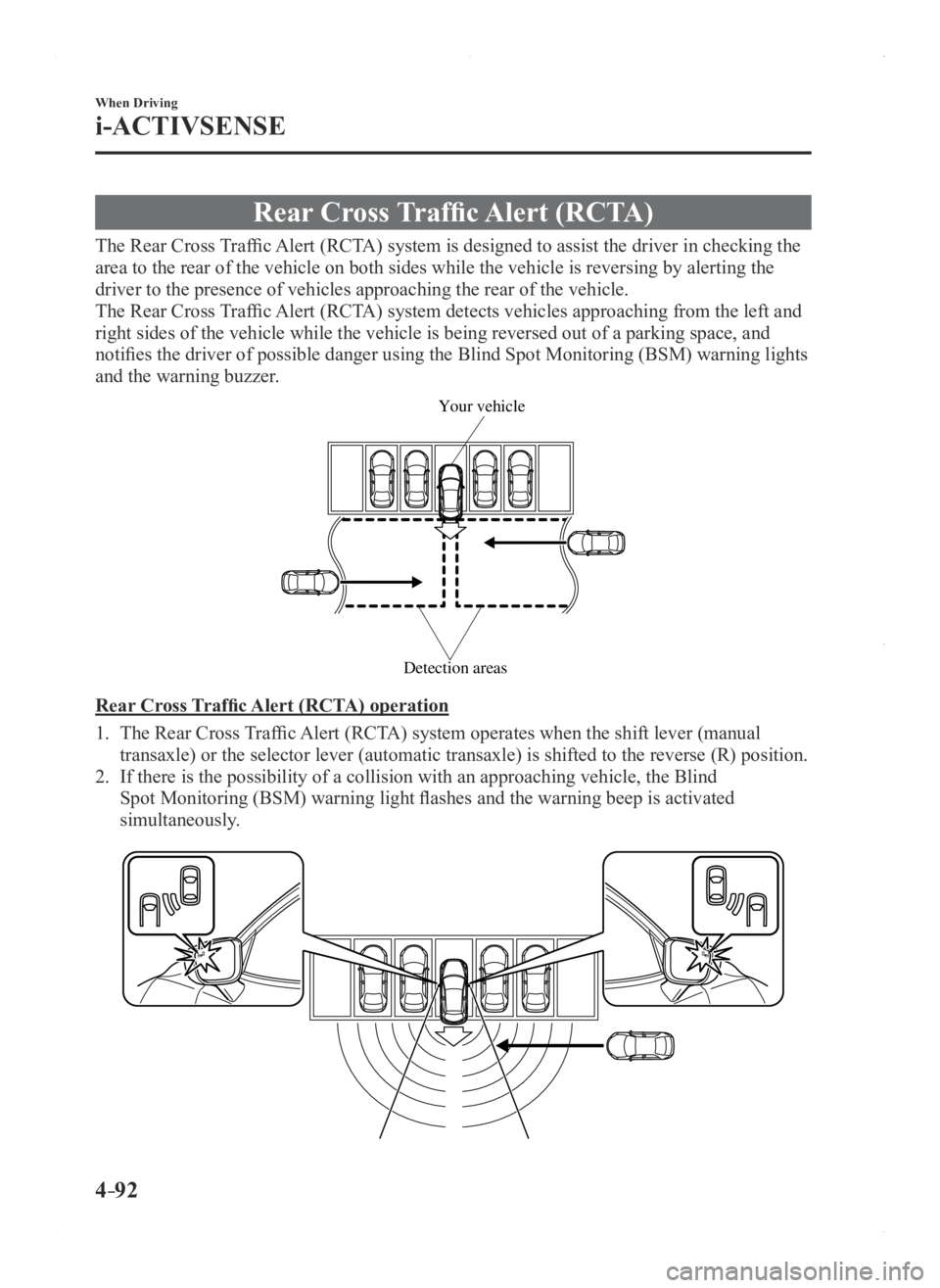
The Rear Cross Traffic Alert (RCTA) system detects vehicles approaching from the left and
right sides of the vehicle while the vehicle is being reversed out of a \
parking space, and
notifies the driver of possible danger using the Blind Spot Monitoring (BSM) warning lights
and the warning buzzer.
Detection areas
Your vehicle
Rear Cross Traffic Alert (RCTA) operation
1. The Rear Cross Traffic Alert (RCTA) system operates when the shift lever (manual
transaxle) or the selector lever (automatic transaxle) is shifted to the reverse (R) position.
2. If there is the possibility of a collision with an approaching vehicle, the Blind
Spot Monitoring (BSM) warning light flashes and the warning beep is activated
simultaneously.
Mazda3_8FA4-EA-15G_Edition1.indb 922015/05/11 14:01:04
Page 221 of 598

4–93
When Driving
i-ACTIVSENSE
WARNING
Always check the surrounding area visually before actually putting the vehicle in
reverse:The system is only designed to assist you in checking for vehicles at the rear when putting
the vehicle in reverse. Due to certain limitations with the operation of this system, the
Blind Spot Monitoring (BSM) warning light may not flash or it might be delayed even
though a vehicle is behind your vehicle. Always make it your responsibility as a driver to
check the rear.
NOTE
In the following cases, the BSM OFF Indicator Light turns on and operati\
on of the
system is stopped. If the BSM OFF Indicator Light remains illuminated, have the vehicle
inspected at an Authorized Mazda Dealer as soon as possible.
Some problem with the system including the Blind Spot Monitoring (BSM) warnin\
g
lights has occurred. A large deviation in the installation position of a radar sensor (rear) on the vehicle has
occurred. There is a large accumulation of snow or ice on the rear bumper near a radar sensor
(rear). Driving on snow-cover ed roads for long periods. The temperature near the radar sensors becomes extremely hot due to driving for long
periods on slopes during the summer. The battery voltage has decr eased.
Mazda3_8FA4-EA-15G_Edition1.indb 932015/05/11 14:01:04
Page 222 of 598

4–94
When Driving
i-ACTIVSENSE
Under the following conditions, the radar sensors (rear) cannot detect target objects or it
may be difficult to detect them.
The vehicle speed when reversing is about 10 km/h (6.3 mph) or faster. The radar sensor (rear) detection area is obstructed by a nearby wall or parked
vehicle. (Reverse the vehicle to a position where the radar sensor detection area is no
longer obstructed.)
Your vehicle
A vehicle is approaching directly from the rear of your vehicle.
Your vehicle
The vehicle is parked on a slant.
Your vehicle
Directly after pressing the BSM OFF switch and the system becomes operable.
In the following cases, it may be difficult to view the illumina tion/flashing of the Blind
Spot Monitoring (BSM) warning lights equipped on the door mirrors.
Snow or ice adheres to the door mirrors. The front door glass is fogged or covered in snow, frost or dirt.
Turn off the Rear Cross Traffic Alert (RCTA) system while pulling a trailer or while an
accessory such as a bicycle carrier is installed to the rear of the vehicle. Otherwise,
the radio waves emitted by the radar will be blocked causing the system \
to not operate
normally.
Mazda3_8FA4-EA-15G_Edition3.indb 942015/12/04 19:23:19
Page 228 of 598

4–10 0
When Driving
i-ACTIVSENSE
During headway control travel, the system accelerates and decelerates your vehicle in
conjunction with the speed of the vehicle ahead. However, if it is necessary to accelerate
for a lane change or if the vehicle ahead brakes suddenly causing you to\
close in on the
vehicle rapidly, accelerate using the accelerator pedal or decelerate using the brake
pedal depending on the conditions.
While the Mazda Radar Cruise Contr ol (MRCC) system is in use, it does not cancel even
if the selector lever (automatic transaxle)/shift lever (manual trans\
axle) is operated and
any intended engine braking will not occur. If deceleration is required, lower the vehicle
speed setting or depress the brake pedal.
The brake lights are illuminated while the Mazda Radar Cruise Control (MRCC)
automatic braking is operating. The Mazda Radar Cruise Contr ol (MRCC) warning light (amber) turns on when the
system has a malfunction. Refer to Warning/Indicator Lights on page 4-20.
Mazda Radar Cruise Control (MRCC) Display Indication
The setting status and operation conditions of the Mazda Radar Cruise Control (MRCC)
system are indicated in the active driving display.
Vehicle ahead display
MRCC Distance between vehicle display
MRCC Set vehicle
speed
Close Proximity Warning
If your vehicle rapidly closes in on the vehicle ahead because the vehic\
le applies the brakes
suddenly while you are traveling in headway control, the warning sound a\
ctivates and
the brake warning is indicated in the display. Always verify the safety of the surrounding
area and depress the brake pedal while keeping a safer distance from the\
vehicle ahead.
Additionally, always keep a safer distance from the vehicles behind you.
Mazda3_8FA4-EA-15G_Edition1.indb 1002015/05/11 14:01:06
Page 237 of 598
 sy\
stem may not
operate normally.
Heavy luggage is loaded in the luggage c")
4–109
When Driving
i-ACTIVSENSE
*Some models.
Under the following conditions, the Smart City Brake Support (SCBS) sy\
stem may not
operate normally.
Heavy luggage is loaded in the luggage compartment or on the rear seat. If there is the possibility of partial contact with a vehicle ahead. When driving on continuously curving roads, and entering and exiting exits. Elongated luggage or cargo is loaded onto installed roof rails and covers the laser
sensor (front). Exhaust gas from the vehicle in front, sand, snow, and water vapor rising from
manholes and grating, and water splashed into the air. When towing a malfunctioning vehicle.
In the following cases, the laser sensor (fr ont) may inadvertently determine that there is a
vehicle ahead and the Smart City Brake Support (SCBS) system may opera\
te.
Objects on the road at the entrance to a curve. Vehicles passing in the opposite lane while making a curve. Metal objects, bumps, or pr otruding objects on the road. When passing through a toll gate. When passing under a vinyl curtain or flag. Plastic objects such as pylons. Two-wheeled vehicles, pedestrians, animals or standing trees. Vehicle is driven with some of the tires having significant wear.
When the system operates, the user is notified by the flashing Sm art City Brake Support
(SCBS) indicator light (red) and the active driving display*. The Smart City Brake Support (SCBS) warning light (amber) turns on w\
hen the system
has a malfunction.
Refer to Warning Lights on page 4-21.
Mazda3_8FA4-EA-15G_Edition1.indb 1092015/05/11 14:01:08
Page 251 of 598
 monitors the air pressure of all\
four tires. If
the ai")
4–123
When Driving
Tire Pressure Monitoring System
*Some models.
Tire Pressure Monitoring System*
The Tire Pressure Monitoring System (TPMS) monitors the air pressure of all\
four tires. If
the air pressure of one or more tires is too low, the system warns the driver by indicating the
tire pressure monitoring system warning light in the instrument cluster \
and operating a beep
sound. The system monitors the tire pressures indirectly using the data sent from the ABS
wheel speed sensors.
To allow the system to operate correctly, the system needs to be initialized with the specified
tire pressure (value on the tire pressure label). Follow the procedure\
and perform the
initialization.
Refer to Tire Pressure Monitoring System Initialization on page 4-126.
The warning light flashes when the system has a malfunction.
Refer to Warning Lights on page 4-21.
ABS wheel speed sensor
Mazda3_8FA4-EA-15G_Edition1.indb 1232015/05/11 14:01:11
Page 263 of 598
5–1*Some models.
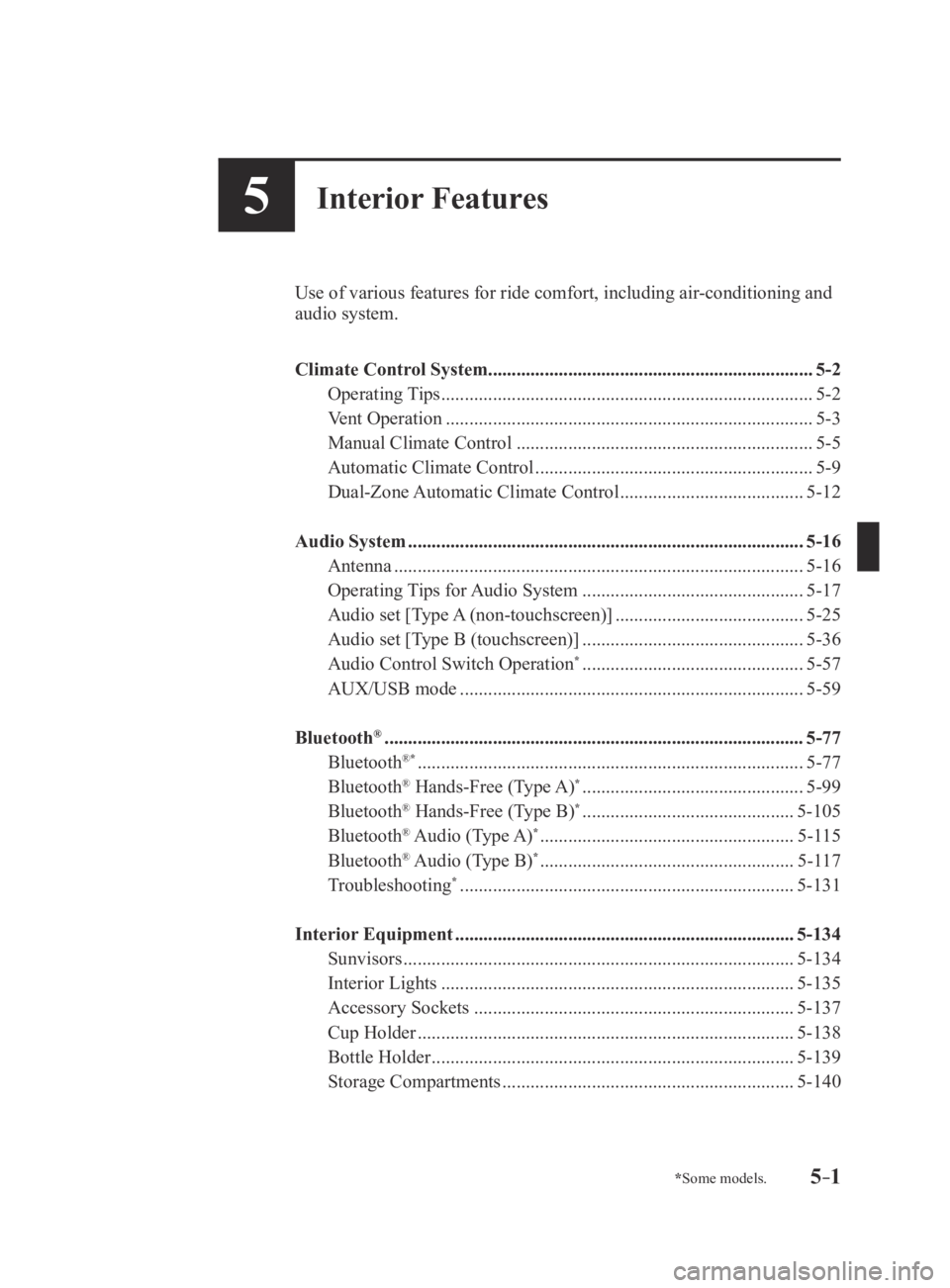
5Interior Features
Use of various features for ride comfort, including air-conditioning and
audio system.
Climate Control System..................................................................... 5-2
Operating Tips
........................................................................\
.......5-2
Vent Operation
........................................................................\
......5-3
Manual Climate Control
...............................................................5-5
Automatic Climate Control
...........................................................5-9
Dual-Zone Automatic Climate Control
.......................................5-12
Audio System
........................................................................\
............5-16
Antenna
........................................................................\
...............5-16
Operating Tips for Audio System
...............................................5-17
Audio set [Type A (non-touchscreen)]
........................................5-25
Audio set [Type B (touchscreen)]
...............................................5-36
Audio Control Switch Operation* ...............................................5-57
AUX/USB mode
........................................................................\
.5-59
Bluetooth
® ........................................................................\
.................5-77
Bluetooth®* ........................................................................\
..........5-77
Bluetooth® Hands-Free (Type A)* ...............................................5-99
Bluetooth® Hands-Free (Type B)* .............................................5-105
Bluetooth® Audio (Type A)* ......................................................5-115
Bluetooth® Audio (Type B)* ......................................................5-117
Troubleshooting* .......................................................................5-131
Interior Equipment
........................................................................\
5-134
Sunvisors
........................................................................\
...........5-134
Interior Lights
........................................................................\
...5-135
Accessory Sockets
....................................................................5-137
Cup Holder
........................................................................\
........5-138
Bottle Holder
........................................................................\
.....5-139
Storage Compartments
..............................................................5-140
Mazda3_8FA4-EA-15G_Edition3.indb 12015/12/04 19:23:34