bluetooth MAZDA MODEL 3 4-DOOR 2016 Repair Manual
[x] Cancel search | Manufacturer: MAZDA, Model Year: 2016, Model line: MODEL 3 4-DOOR, Model: MAZDA MODEL 3 4-DOOR 2016Pages: 598, PDF Size: 30.13 MB
Page 393 of 598

5–131
Interior Features
Bluetooth®
*Some models.
Troubleshooting*
Mazda Bluetooth® Hands-Free Customer Service
If you have any problems with Bluetooth
®, contact our toll-free customer service center.
U.S.A.
Phone: 800-430-0153 (T oll-free)
Web: www.MazdaUSA.com/bluetooth Canada
Phone: 800-430-0153 (Toll-free)
Web: www.mazdahandsfree.ca Mexico
Center of Attention to Client (CAC)
Phone: 01-800-01-MAZDA (Toll-free)
Web: www.mazdamexico.com.mx
Bluetooth® Device pairing, connection problems
Symptom CauseSolution method
Unable to perform pairing —First make sure the device is
compatible with the Bluetooth
®
unit, and then check whether the
Bluetooth
® function and the Find
Mode/Visible setting*1 on the device
are turned on. If pairing is still
not possible after this, contact an
Authorized Mazda Dealer or Mazda
Bluetooth
® Hands-Free Customer
Service.
Pairing cannot be performed again The pairing information paired to
the Bluetooth
® unit or device is not
recognized correctly. Perform pairing using the following
procedure.Clear “Mazda” stored in the device.Perform pairing again.
Unable to perform pairing The Bluetooth
® function and the
Find Mode/Visible setting*1 on the
device may turn off automatically
after a period of time has elapsed
depending on the device. Check whether the Bluetooth®
function and the Find Mode/Visible
setting
*1 on the device are turned on
and pairing or reconnect.
Does not connect automatically
when starting the engine
Automatically connects, but then
disconnects suddenly
Disconnects intermittently
The device is in a location in which
radio wave interference can occur
easily, such as inside a bag in a rear
seat, in a rear pocket of a pair of
pants.Move the device to a location in
which radio wave interference is less
likely to occur.
Does not connect automatically
when starting the engine The pairing information is updated
when the device OS is updated.
Perform pairing again.
*1 Setting which detects the existence of a device external to the
Bluetooth® unit
Mazda3_8FA4-EA-15G_Edition1.indb 1312015/05/11 14:02:03
Page 394 of 598

5–132
Interior Features
Bluetooth®
NOTE
When the OS of the device is updated, the pairing information may be del\
eted. If this
happens, reprogram the pairing information to the Bluetooth® unit. If you pair your phone which has already been paired to your vehicle more than once in
the past, you need to delete “Mazda” on your mobile device. Then, \
execute the Bluetooth®
search on your mobile device once again, and pair to a newly detected “Ma\
zda”.
Before you pair your device, make sure that Bluetooth® is “ON”, both on your phone and
on the vehicle.
Voice recognition related problems
Symptom CauseSolution method
Poor voice recognition
Excessive, slow speech. Excessive, forceful speech (shouting).
Speaking before the beep sound has ended.
Loud noise (speaking or noise from outside/inside vehicle).
Airflow from A/C is blowing against the microphone.
Speaking in off-standard expressions (dialect). Regarding the causes indicated
on the left, be careful with how
you speak. In addition, when
numbers are spoken in a sequence,
recognition ability will improve
if no stop is placed between the
numbers.
False recognition of numbers
Poor voice recognition
There is a malfunction in the
microphone.A poor connection or malfunction
with the microphone may have
occurred. Consult an Authorized
Mazda Dealer.
Phone-related voice recognition is
disabled There is a problem with the
connection between the Bluetooth
®
unit and the device. If there is any malfunction after
checking the pairing situation, check
for device pairing or connection
problems.
Names in the phonebook are not
easily recognized The Bluetooth
® system is under a
condition in which recognition is
difficult. By carrying out the following
measures, the rate of recognition
will improve.Clear memory from the phonebook
which is not used very often.
Avoid shortened names, use full names. (Recognition improves the
longer the name is. By not using
names such as “Mom”, “Dad”,
recognition will improve.)
When operating the audio, a song
name is not recognized Song names cannot be recognized
by voice.
—
You want to skip guidance —Guidance can be skipped by quickly
pressing and releasing the Talk
button.
Mazda3_8FA4-EA-15G_Edition1.indb 1322015/05/11 14:02:04
Page 395 of 598
5–133
Interior Features
Bluetooth®
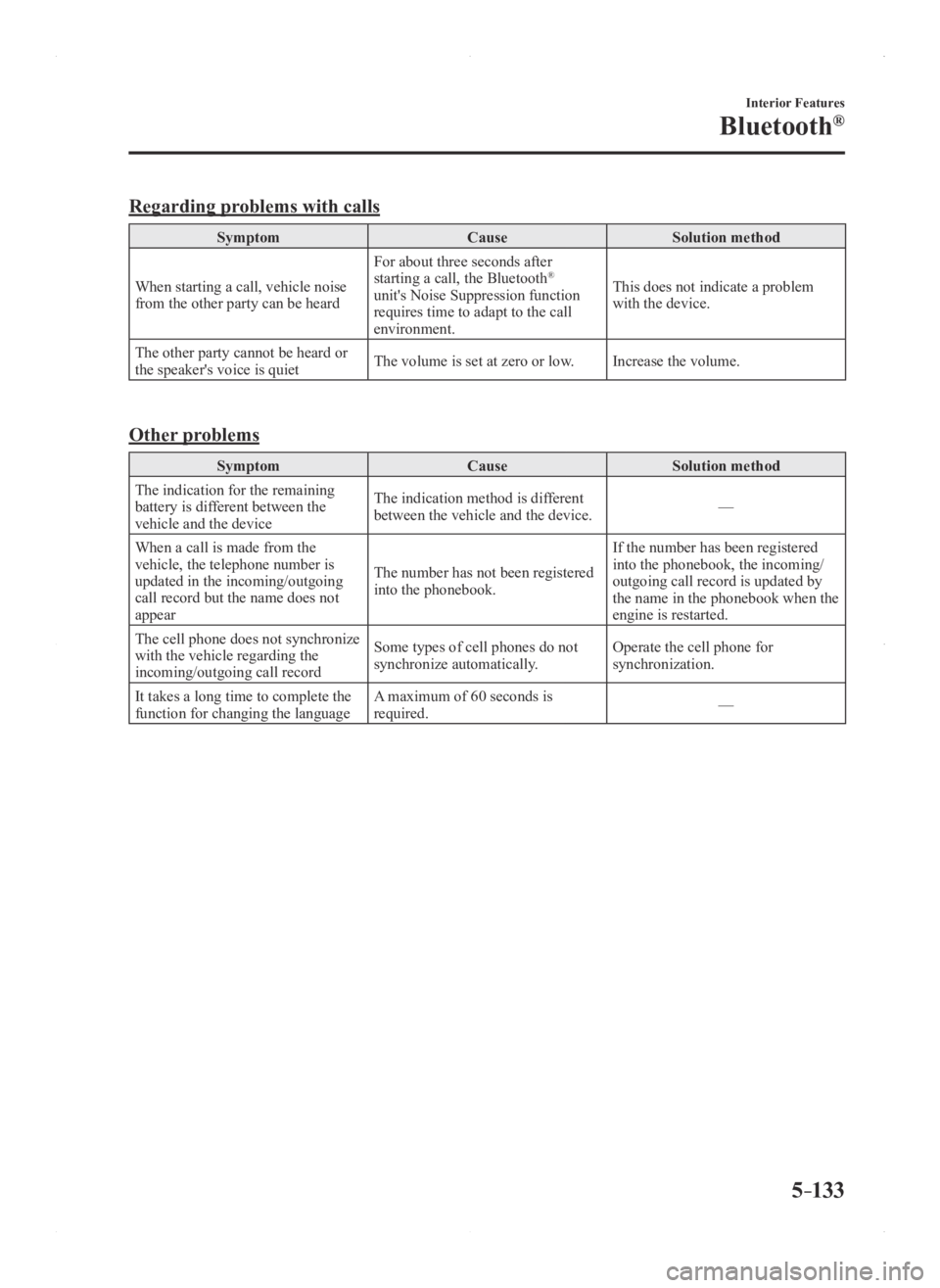
Regarding problems with calls
SymptomCauseSolution method
When starting a call, vehicle noise
from the other party can be heard For about three seconds after
starting a call, the Bluetooth
®
unit's Noise Suppression function
requires time to adapt to the call
environment. This does not indicate a problem
with the device.
The other party cannot be heard or
the speaker's voice is quiet The volume is set at zero or low.
Increase the volume.
Other problems
Symptom CauseSolution method
The indication for the remaining
battery is different between the
vehicle and the device The indication method is different
between the vehicle and the device.
—
When a call is made from the
vehicle, the telephone number is
updated in the incoming/outgoing
call record but the name does not
appear The number has not been registered
into the phonebook.If the number has been registered
into the phonebook, the incoming/
outgoing call record is updated by
the name in the phonebook when the
engine is restarted.
The cell phone does not synchronize
with the vehicle regarding the
incoming/outgoing call record Some types of cell phones do not
synchronize automatically.
Operate the cell phone for
synchronization.
It takes a long time to complete the
function for changing the language A maximum of 60 seconds is
required.
—
Mazda3_8FA4-EA-15G_Edition1.indb 1332015/05/11 14:02:04
Page 570 of 598

8–46
Customer Information and Reporting Safety Defects
Declaration of Conformity
Bluetooth® Hands-Free
Type A
U.S.A. and Canada
FCC ID: CB2MBLUEC09 IC:279B-MBLUEC09
This device complies with Part 15 of the FCC Rules and with RSS-210 of Industry Canada.
Operation is subject to the following two conditions:
(1) This device may not cause harmful interference, and
(2) This device must accept any interference received, including interferenc\
e that may cause
undesired operation.
WARNING
Changes or modifications not expressly approved by the party responsible for compliance
could void the user's authority to operate the equipment.
The term “IC: ” before the radio certification number only signifies that Industry Canada
technical specifications were met.
The antenna used for this transmitter must not be co-located or operatin\
g in conjunction
with any other antenna or transmitter. End-users and installers must be provided with
installation instructions and transmitter operating conditions for satisfying RF exposure
compliance.
Mazda Bluetooth
® Hands-Free Customer Service
U.S.A.
Phone: 800-430-0153 (T oll-free)
Web: www.MazdaUSA.com/bluetooth Canada
Phone: 800-430-0153 (Toll-free)
Web: www.mazdahandsfree.ca
Mazda3_8FA4-EA-15G_Edition1.indb 462015/05/11 14:02:56
Page 571 of 598
8–47
Customer Information and Reporting Safety Defects
Declaration of Conformity
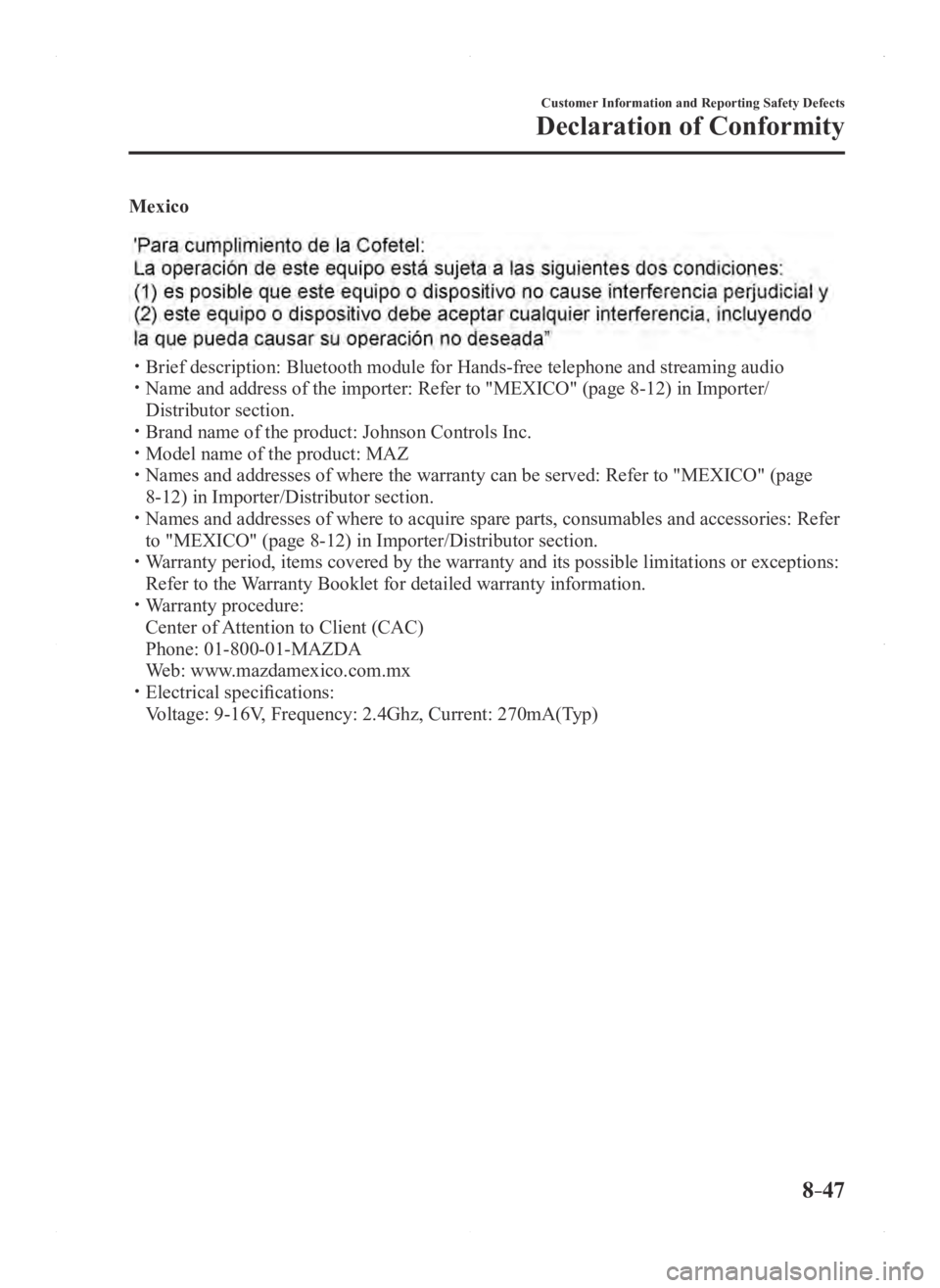
Mexico
Brief description: Bluetooth module for Hands-free telephone and streaming audio Name and address of the importer: Refer to "MEXICO" (page 8-12) in Importer/
Distributor section.
Brand name of the product: Johnson Controls Inc. Model name of the product: MAZ Names and addresses of where the warranty can be served: Refer to "MEXICO" (page
8-12) in Importer/Distributor section. Names and addresses of where to acquire spare parts, consumable s and accessories: Refer
to "MEXICO" (page 8-12) in Importer/Distributor section. Warranty period, items covered by the warranty and its possible limitatio\
ns or exceptions:
Refer to the Warranty Booklet for detailed warranty information. Warranty procedure:
Center of Attention to Client (CAC)
Phone: 01-800-01-MAZDA
Web: www.mazdamexico.com.mx Electrical specifications:
Voltage: 9-16V, Frequency: 2.4Ghz, Current: 270mA(Typ)
Mazda3_8FA4-EA-15G_Edition1.indb 472015/05/11 14:02:56
Page 592 of 598
10–2
Index
A
Accessory Socket ..............................5-137
Active Driving Display
.......................4-18
Adaptive Front Lighting System
(AFS)................................................... 4-76
AFS OFF indicator light ................4-76
AFS OFF switch
............................4-76
Add-On Non-Genuine Parts and
Accessories
.........................................8-18
Advanced Key Advanced keyless entry system
......3-9
Operational range
..........................3-10
Advanced Key removed from vehicle
warning beep
.......................................7-36
Air Bag/Front Seat Belt Pretensioner
System Warning Beep
.........................7-35
Air Bag Systems
.................................2-40
Ambient Temperature Display
............4-16
Antilock Brake System (ABS)
............4-62
Audio Control Switch Adjusting the Volume
....................5-58
Mute Switch
..................................5-58
Seek Switch
...................................5-58
Audio System
......................................5-16
AUX/USB mode
...........................5-59
Antenna
.........................................5-16
Audio Control Switch
...................5-57
Audio set
[Type A (non-touchscreen)]
...........5-25
Audio set [Type B (touchscreen)] ...5-36
Operating Tips for Audio System ...5-17
Satellite Radio
...............................5-47
Automatic Transaxle
...........................4-29
Active Adaptive Shift (AAS)
........4-31
Direct Mode
..................................4-38
Driving tips .................................... 4-39
Manual shift mode .........................4-32
Shift-lock system
...........................4-31
Shift position indication
................4-30
Warning light
.................................4-30
B
Battery .................................................6-38
Maintenance
..................................6-40
Replacement
..................................6-40
Specifications
..................................9-4
Battery runs out
...................................7-15
Jump-Starting
................................7-15
Blind Spot Monitoring (BSM)
............4-86
Blind Spot Monitoring (BSM)
switch
............................................4-91
Blind Spot Monitoring (BSM) System
warning beep
.......................................7-38
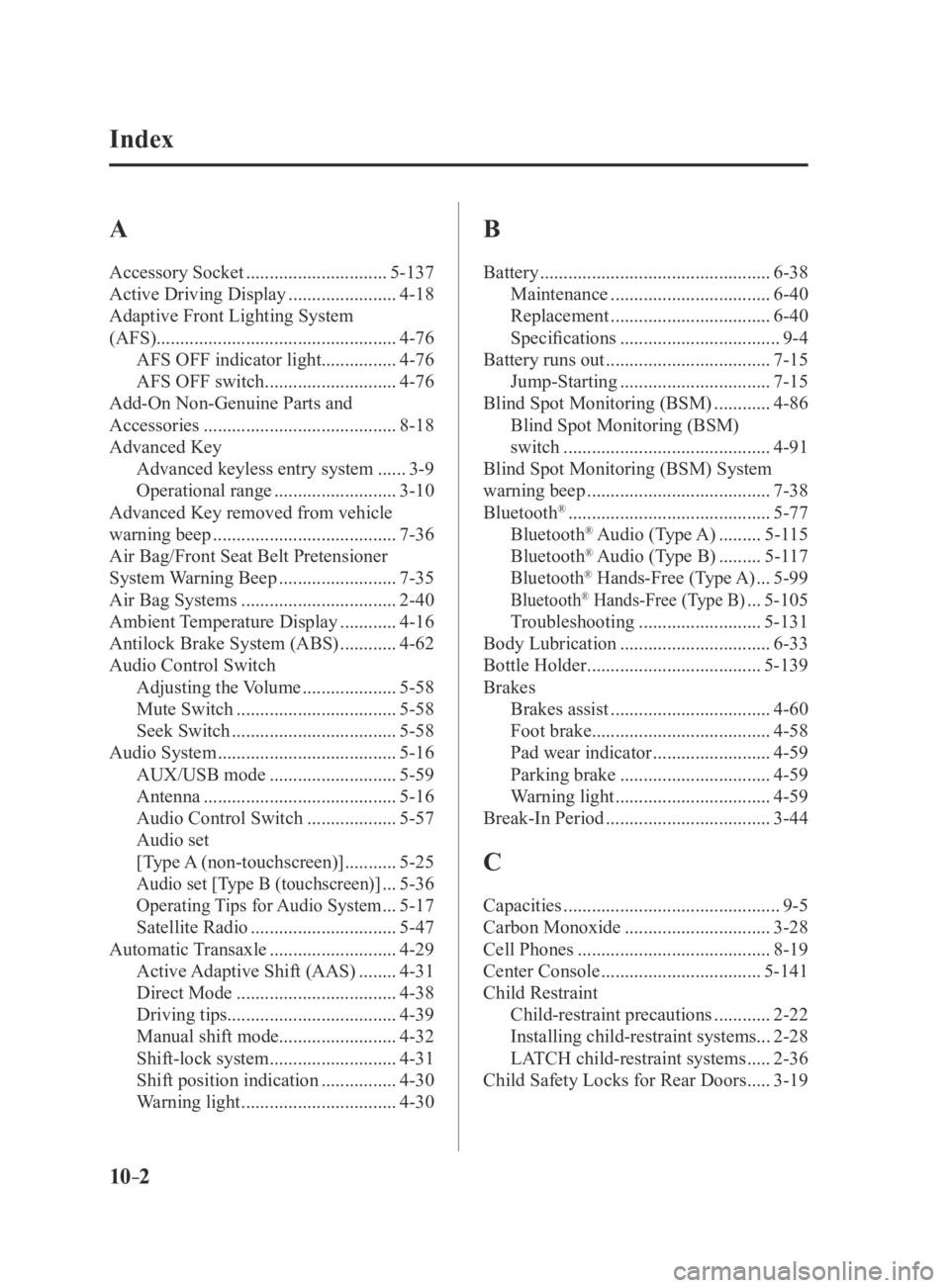
Bluetooth® ...........................................5-77
Bluetooth® Audio (Type A) .........5-115
Bluetooth® Audio (Type B) .........5-117
Bluetooth® Hands-Free (Type A) ...5-99
Bluetooth® Hands-Free (Type B) ...5-105
Troubleshooting
..........................5-131
Body Lubrication
................................6-33
Bottle Holder
.....................................5-139
Brakes Brakes assist
..................................4-60
Foot brake ...................................... 4-58
Pad wear indicator
.........................4-59
Parking brake
................................4-59
Warning light
.................................4-59
Break-In Period
...................................3-44
C
Capacities ..............................................9-5
Carbon Monoxide
...............................3-28
Cell Phones
.........................................8-19
Center Console
..................................5-141
Child Restraint Child-restraint precautions
............2-22
Installing child-restraint systems ...2-28
LATCH child-restraint systems
.....2-36
Child Safety Locks for Rear Doors
.....3-19
Mazda3_8FA4-EA-15G_Edition3.indb 22015/12/04 19:26:19