headlights MAZDA MODEL 3 4-DOOR 2017 User Guide
[x] Cancel search | Manufacturer: MAZDA, Model Year: 2017, Model line: MODEL 3 4-DOOR, Model: MAZDA MODEL 3 4-DOOR 2017Pages: 612
Page 214 of 612
4–84
When Driving
i-ACTIVSENSE
*Some models.
Adaptive Front Lighting
System (AFS)*
The adaptive front lighting system (AFS)
automatically adjusts the headlight beams
to the left or right in conjunction with the
operation of the steering wheel after the
headlights have been turned on.
Mazda3_8FL6-EA-16F_Edition2.indb 842016/08/10 17:36:36
Page 215 of 612
4–85
When Driving
i-ACTIVSENSE
*Some models.
High Beam Control System (HBC)*
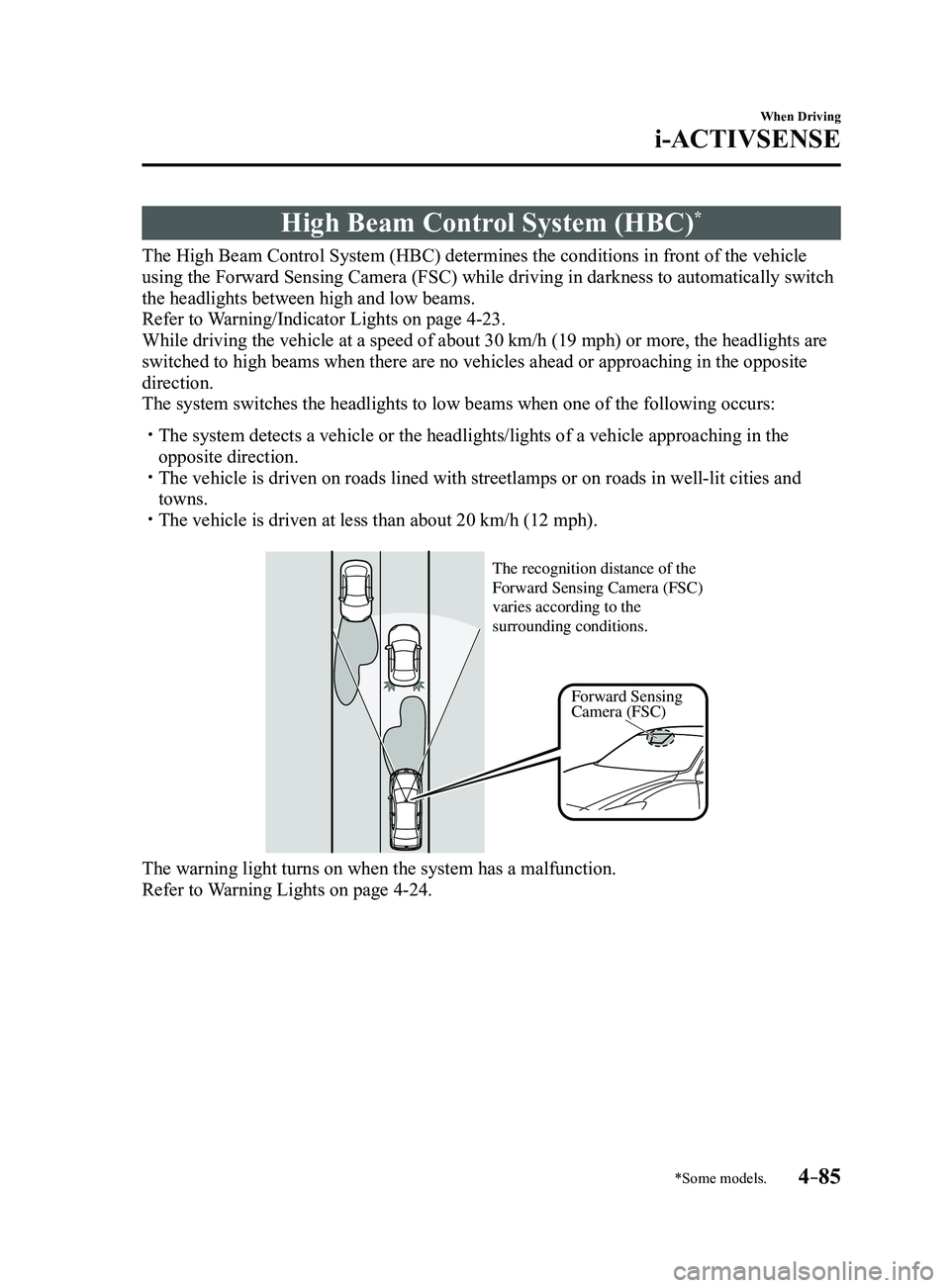
The High Beam Control System (HBC) determines the conditions in front of the vehicle
using the Forward Sensing Camera (FSC) while driving in darkness to au\
tomatically switch
the headlights between high and low beams.
Refer to Warning/Indicator Lights on page
4-23.
While driving the vehicle at a speed of about 30 km/h (19 mph) or more\
, the headlights are
switched to high beams when there are no vehicles ahead or approaching i\
n the opposite
direction.
The system switches the headlights to low beams when one of the followin\
g occurs:
The system detects a vehicle or the headlights/lights of a vehicle appro\
aching in the
opposite direction. The vehicle is driven on roads lined with streetlamps or on roads in wel\
l-lit cities and
towns. The vehicle is driven at less than about 20 km/h (12 mph).
Forward Sensing
Camera (FSC)
The recognition distance of the
Forward Sensing Camera (FSC)
varies according to the
surrounding conditions.
The warning light turns on when the system has a malfunction.
Refer to Warning Lights on page 4-24.
Mazda3_8FL6-EA-16F_Edition2.indb 852016/08/10 17:36:36
Page 216 of 612
4–86
When Driving
i-ACTIVSENSE
CAUTION
Do not adjust the vehicle height, modify the headlight units, or remove the camera,
otherwise the system will not operate normally. Do not rely excessively on the High Beam Control System (HBC) and drive the vehicle while
paying sufficient attention to safety. Switch the headlights between the high beams and
low beams manually if necessary.
NOTE
The timing in which the system switches the headlights changes under the\
following
conditions. If the system does not switch the headlights appropriately, manually switch
between high and low beams according to the visibility as well as road and traffic
conditions.
When there are sources of light in the area such as street lamps, illuminated signboards,
and traffic signals. When there are reflective objects in the surrounding area such as reflective plates and
signs. When visibility is reduced under rain, snow and foggy conditions. When driving on roads with sharp turn or hilly terrain. When the headlights/r ear lamps of vehicles in front of you or in the opposite lane are dim
or not illuminated. When there is sufficient darkness such as at dawn or dusk. When the luggage compartment is loaded with heavy objects or the r ear passenger seats
are occupied. When visibility is reduced due to a vehicle in front of you spraying water from its tires
onto your windshield.
Mazda3_8FL6-EA-16F_Edition2.indb 862016/08/10 17:36:36
Page 217 of 612
4–87
When Driving
i-ACTIVSENSE
To Operate the System
The High Beam Control System (HBC)
operates to switch the headlights
automatically between high and low
beams after the ignition is switched ON
and the headlight switch is in the AUTO
and high beam position.
The High Beam Control System (HBC)
determines that it is dark based on the
brightness of the surrounding area. At the
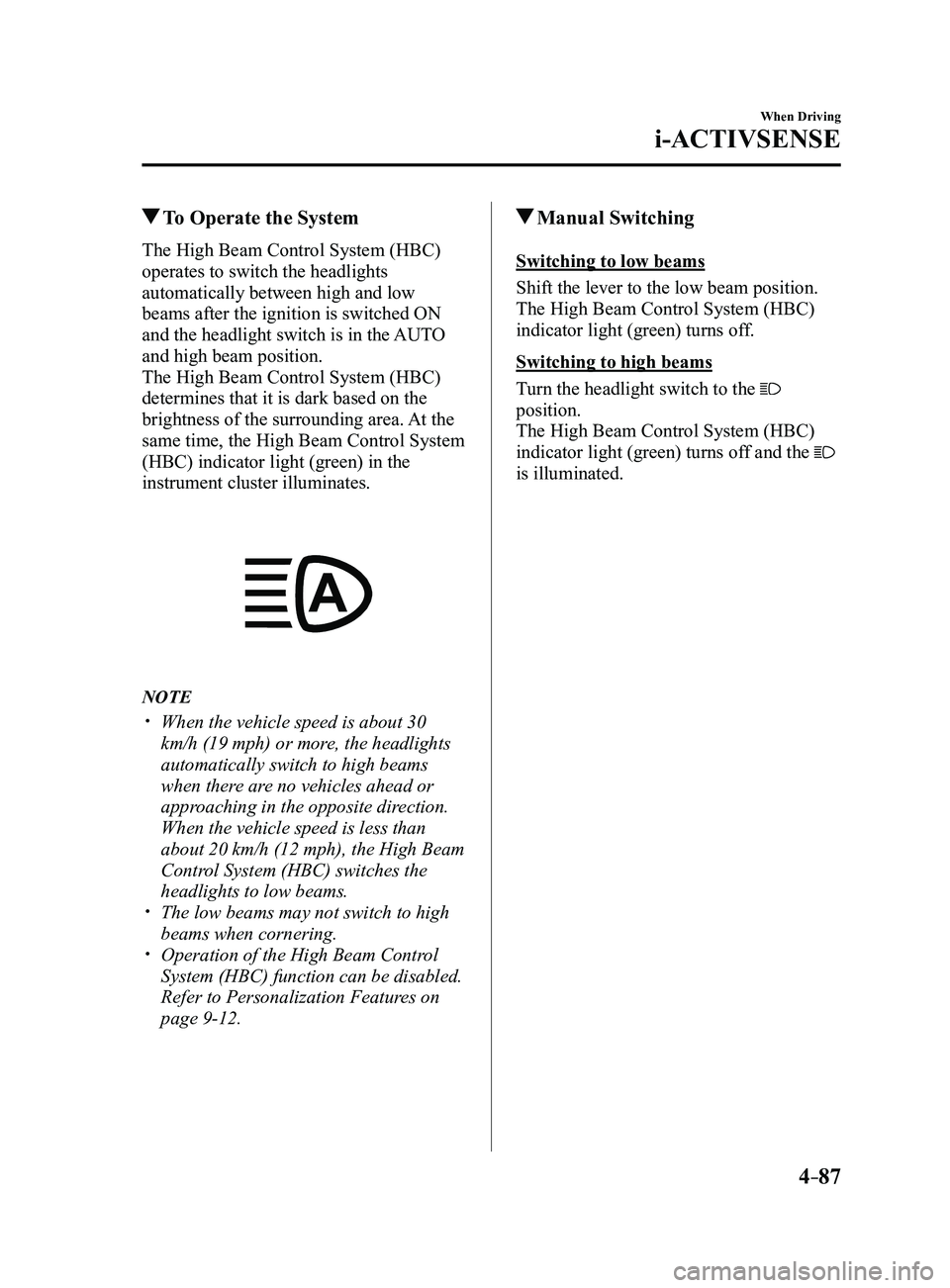
same time, the High Beam Control System
(HBC) indicator light (green) in the
instrument cluster illuminates.
NOTE
When the vehicle speed is about 30
km/h (19 mph) or more, the headlights
automatically switch to high beams
when there are no vehicles ahead or
approaching in the opposite direction.
When the vehicle speed is less than
about 20 km/h (12 mph), the High Beam
Control System (HBC) switches the
headlights to low beams.
The low beams may not switch to high
beams when cornering. Operation of the High Beam Control
System (HBC) function can be disabled.
Refer to Personalization Features on
page
9-12.
Manual Switching
Switching to low beams
Shift the lever to the low beam position.
The High Beam Control System (HBC)
indicator light (green) turns off.
Switching to high beams
Turn the headlight switch to the
position.
The High Beam Control System (HBC)
indicator light (green) turns off and the
is illuminated.
Mazda3_8FL6-EA-16F_Edition2.indb 872016/08/10 17:36:37
Page 226 of 612
4–96
When Driving
i-ACTIVSENSE
NOTE
The Traffic Sign Recognition System (TSR) does not operate if there is a malfunction in
the Forward Sensing Camera (FSC). Under the following conditions, the Traffic Sign Recognition System (TSR) may not
operate normally.
An object placed on the dashboard is reflected in the windshield and picked up by the
camera. Heavy luggage is loaded in the luggage compartment or on the r ear seat and the
vehicle is tilted. The tire pressures are not adjusted to the specified pressure. Tires other than standard tires are equipped. The vehicle is driven on the ramp and surrounding area to or from a rest area or a
tollgate on a highway. When surrounding brightness suddenly changes such as when entering or exiting a
tunnel. The illumination of the headlights is weakened because of dirt or the op\
tical axis is
deviated. The windshield is dirty or foggy. The windshield and camera are fogged (water droplets). Strong light is directed at the front of the vehicle (such as backlight or high-beam
headlights of on-coming vehicles). The vehicle is making a sharp turn. Strong light reflects off the road. A traffic sign is in a position which makes it difficult to reflect the light from the
vehicle's headlights, such as when the vehicle is driven at night or in \
a tunnel. The vehicle is driven under weather conditions such as rain, fog, or sno\
w . The stored map data for the navigation system is not current. The camera cannot capture a traffic sign's image. A traffic sign is obscured by mud or snow. A traffic sign is concealed by trees or a vehicle. A traffic sign is partially shaded. A traffic sign is bent or warped. A traffic sign is too low or too high. A traffic sign is too bright or too dark (including electronic traffic signs). A traffic sign is too big or too small. There is an object similar to the traffic sign being read (such as another traffic sign or
other signs resembling it).
The Traffic Sign Recognition System (TSR) does not operate if the active driving display
is set to non-display. The Traffic Sign Recognition System (TSR) can be set to inoperable.
Refer to Personalization Featur es on page 9-12.
Mazda3_8FL6-EA-16F_Edition2.indb 962016/08/10 17:36:41
Page 249 of 612
 line, the system determines that")
4–119
When Driving
i-ACTIVSENSE
If the steering wheel, accelerator pedal, or brake pedal is operated abr\
uptly and the vehicle
moves close to a white (yellow) line, the system determines that the d\
river is making a lane
change and the Lane-keep Assist System (LAS) & Lane Departure Warning System (LDWS)
operation is temporarily canceled. The Lane-keep Assist System (LAS) & Lane Departure
Warning System (LDWS) becomes operational again when the system detects\
white (yellow)
lane lines while the vehicle is being driven normally within its vehicle\
lane.
If the vehicle deviates from its lane repeatedly within a short period of time, the Lane-
keep Assist System (LAS) & Lane Departure Warning System (LDWS) may not operate. When white (yellow) lane lines ar e not detected, the Lane-keep Assist System (LAS) &
Lane Departure Warning System (LDWS) does not operate. Under the following conditions, the Lane-keep Assist System (LAS) & Lane Departure
Warning System (LDWS) may not be able to detect white (yellow) lane l\
ines correctly and
it may not operate normally.
If an object placed on the dashboard is reflected in the windshield and picked up by the
camera. Heavy luggage is loaded in the luggage compartment or on the r ear seat and the
vehicle is tilted. The tire pressures are not adjusted to the specified pressure. Tires other than conventional tires are equipped. When the vehicle is driven on the guiding branch to or from the rest area or tollgate of
a highway. The white (yellow) lane lines are less visible because of dirt or fading/patchiness. A vehicle in front of your vehicle is running near a white (yellow) lane line making \
it
less visible. A white (yellow) lane line is less visible because of bad weather (rai\
n, fog, or snow). The vehicle is driven on a temporary lane or section with a closed lane \
resulting from
construction where there may be multiple white (yellow) lane lines or they are interrupted.
A misleading line is picked up on the road such as a temporary line for construction,
or because of shade, lingering snow, or grooves filled with water. The surrounding brightness suddenly changes such as when entering or exiting a t\
unnel. The illumination of the headlights is weakened because of dirt or the op\
tical axis is
deviated. The windshield is dirty or foggy . The windshield, camera is fogged (water dr oplets). Back-light is reflected off the road surface. The road surface is wet and shiny after rain, or there are puddles on the road. The shade of a guar drail parallel to a white (yellow) lane line is cast on the road. The width of the driving lane is narr ow (less than about 2.5 m (98 in)) or wide (more
than about 4.5 m (178 in)) Driving on roads with tight curves. The road is excessively uneven. The vehicle is shaken after hitting a r oad bump. There are two or more adjacent white (yellow) lane lines. There are various road markings or lane markings of various shapes near an intersection.
Mazda3_8FL6-EA-16F_Edition2.indb 1192016/08/10 17:36:52
Page 268 of 612
4–138
When Driving
i-ACTIVSENSE
NOTE
In the following cases, the Forward Sensing Camera (FSC) cannot detect target objects
correctly, and each system may be unable to operate normally.
The height of the vehicle ahead is low . You drive your vehicle at the same speed as the vehicle ahead. Headlights are not turned on during the night or when going through a tunnel.
Mazda3_8FL6-EA-16F_Edition2.indb 1382016/08/10 17:36:59
Page 269 of 612
4–139
When Driving
i-ACTIVSENSE
In the following cases, the Forward Sensing Camera (FSC) may not be able to detect
target objects correctly.
Under bad weather condition, such as rain, fog and snow . The window washer is being used or the windshield wipers ar e not used when it's
raining. Ice, fog, snow, frost, rainfall, dirt, or foreign matter such as a plastic bag is stuck on
the windshield. Trucks with low loading platforms and vehicles with an extremely low or high profile. When driving next to walls with no patterning (including fences and lon\
gitudinally
striped walls). The taillights of the vehicle ahead ar e turned off. A vehicle is outside the illumination range of the headlights. The vehicle is making a sharp turn, or ascending or descending a steep s\
lope. Entering or exiting a tunnel. Heavy luggage is loaded causing the vehicle to tilt. Strong light is shone at the front of the vehicle (back light or high-beam light from on-
coming vehicles). There are many light emitters on the vehicle ahead. When the vehicle ahead is not equipped with taillights or the taillights\
ar e turned off at
nighttime. Elongated luggage or cargo is loaded onto installed roof rails and covers the Forward
Sensing Camera (FSC). Exhaust gas from the vehicle in front, sand, snow, and water vapor rising from
manholes and grating, and water splashed into the air. When towing a malfunctioning vehicle. The vehicle is driven with tir es having significantly different wear. The vehicle is driven on down slopes or bumpy r oads. There are water puddles on the road. The surroundings are dark such as during the night, early evening, or early morning,
or in a tunnel or indoor parking lot. The illumination brightness of the headlights is r educed or the headlight illumination
is weakened due to dirt or a deviated optical axis. The target object enters the blind spot of the Forward Sensing Camera (FSC). A person or object bursts onto the road from the shoulder or cuts right in front of you. You change lanes and approach a vehicle ahead. When driving extremely close to the target object. Tire chains or a temporary spare tire is installed. The vehicle ahead has a special shape. For example, a vehicle towing a t\
railer house
or a boat, or a vehicle carrier carrying a vehicle with its front pointed rearward.
Mazda3_8FL6-EA-16F_Edition2.indb 1392016/08/10 17:36:59
Page 457 of 612
6–45
Maintenance and Care
Owner Maintenance
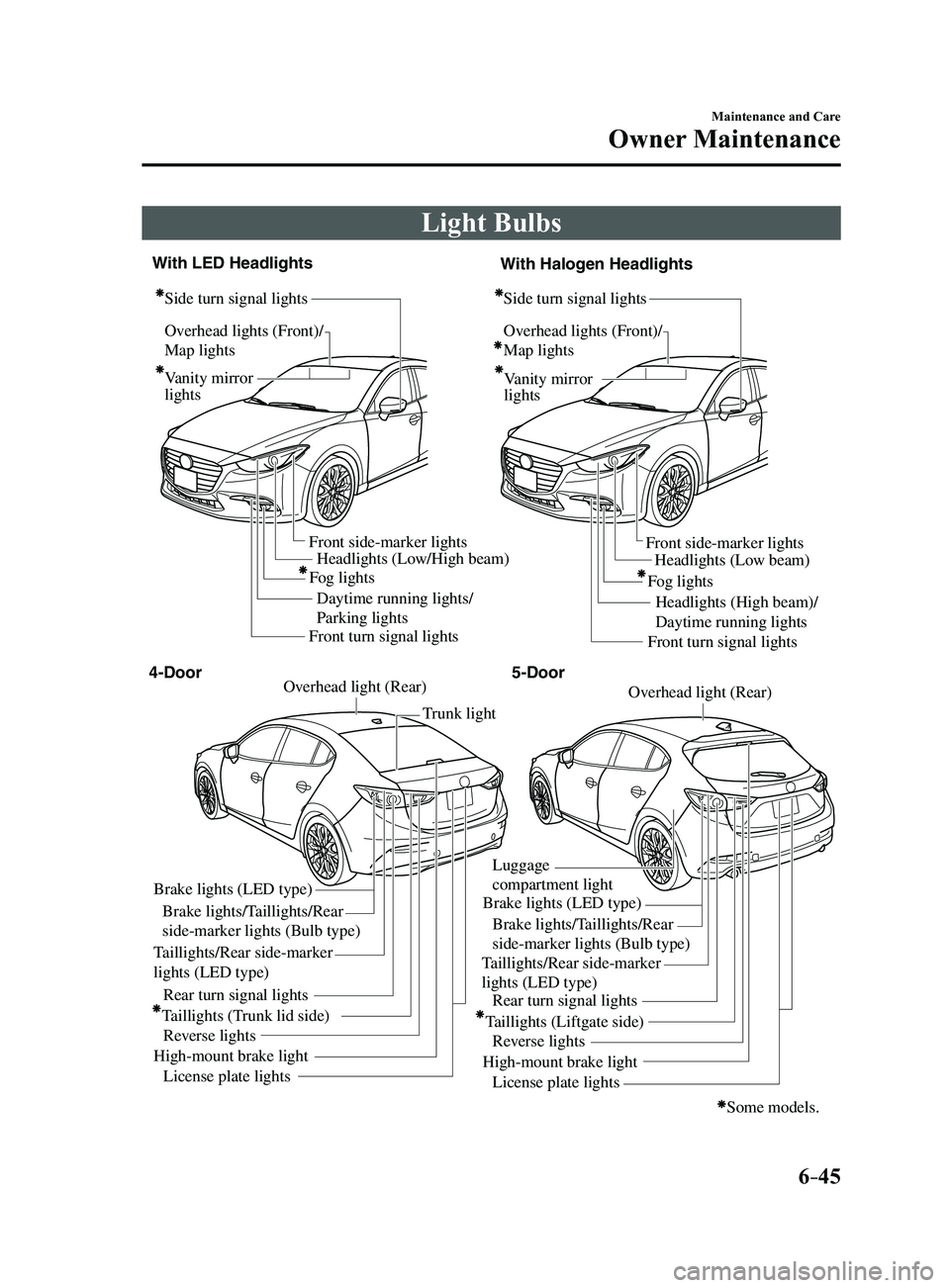
Light Bulbs
Overhead lights (Front)/
Map lights
Vanity mirror
lightsHeadlights (Low/High beam)
Daytime running lights/
Parking lights Headlights (Low beam)
Headlights (High beam)/
Daytime running lights
Fog lights
Front side-marker lights
Front side-marker lights
Side turn signal lights
Side turn signal lightsOverhead lights (Front)/
Map lights
Vanity mirror
lights
Some models.
Front turn signal lights Front turn signal lights
Brake lights (LED type)
Brake lights/Taillights/Rear
side-marker lights (Bulb type)
Taillights/Rear side-marker
lights (LED type) Taillights/Rear side-marker
lights (LED type)
Rear turn signal lights
Taillights (Trunk lid side) Reverse lights
High-mount brake light License plate lights Trunk light
Overhead light (Rear)Overhead light (Rear)
Brake lights (LED type)
Luggage
compartment light
Brake lights/Taillights/Rear
side-marker lights (Bulb type)
Rear turn signal lights
Taillights (Liftgate side) Reverse lights
High-mount brake light License plate lights
4-Door 5-Door
With LED Headlights
With Halogen Headlights
Fog lights
Mazda3_8FL6-EA-16F_Edition2.indb 452016/08/10 17:38:49
Page 458 of 612
6–46
Maintenance and Care
Owner Maintenance
*Some models.
WARNING
Never touch the glass portion of a
halogen bulb with your bare hands
and always wear eye protection when
handling or working around the bulbs:When a halogen bulb breaks, it is
dangerous. These bulbs contain
pressurized gas. If one is broken, it will
explode and serious injuries could be
caused by the flying glass.
If the glass portion is touched with
bare hands, body oil could cause the
bulb to overheat and explode when lit.
Always keep halogen bulbs out of the
reach of children: Playing with a halogen bulb is
dangerous. Serious injuries could be
caused by dropping a halogen bulb or
breaking it some other way.
CAUTION
When removing the lens or lamp unit
using a flathead screwdriver, make
sure that the flathead screwdriver does
not contact the interior terminal. If
the flathead screwdriver contacts the
terminal, a short circuit may occur.
NOTE
To replace the bulb, contact an
Authorized Mazda Dealer. If the halogen bulb is accidentally
touched, it should be cleaned with
rubbing alcohol before being used.
Use the protective cover and carton for
the replacement bulb to dispose of the
old bulb promptly and out of the reach
of children.
Replacing Exterior Light Bulbs
Headlights (With LED headlights),
Daytime running lights/Parking lights
(With LED headlights), Fog lights
*
The LED bulb cannot be replaced as a
single unit because it is an integrated unit.
The LED bulb has to be replaced with the
unit. We recommend an Authorized Mazda
Dealer when the replacement is necessary.
Headlights (With halogen headlights)
Low-beam bulbs
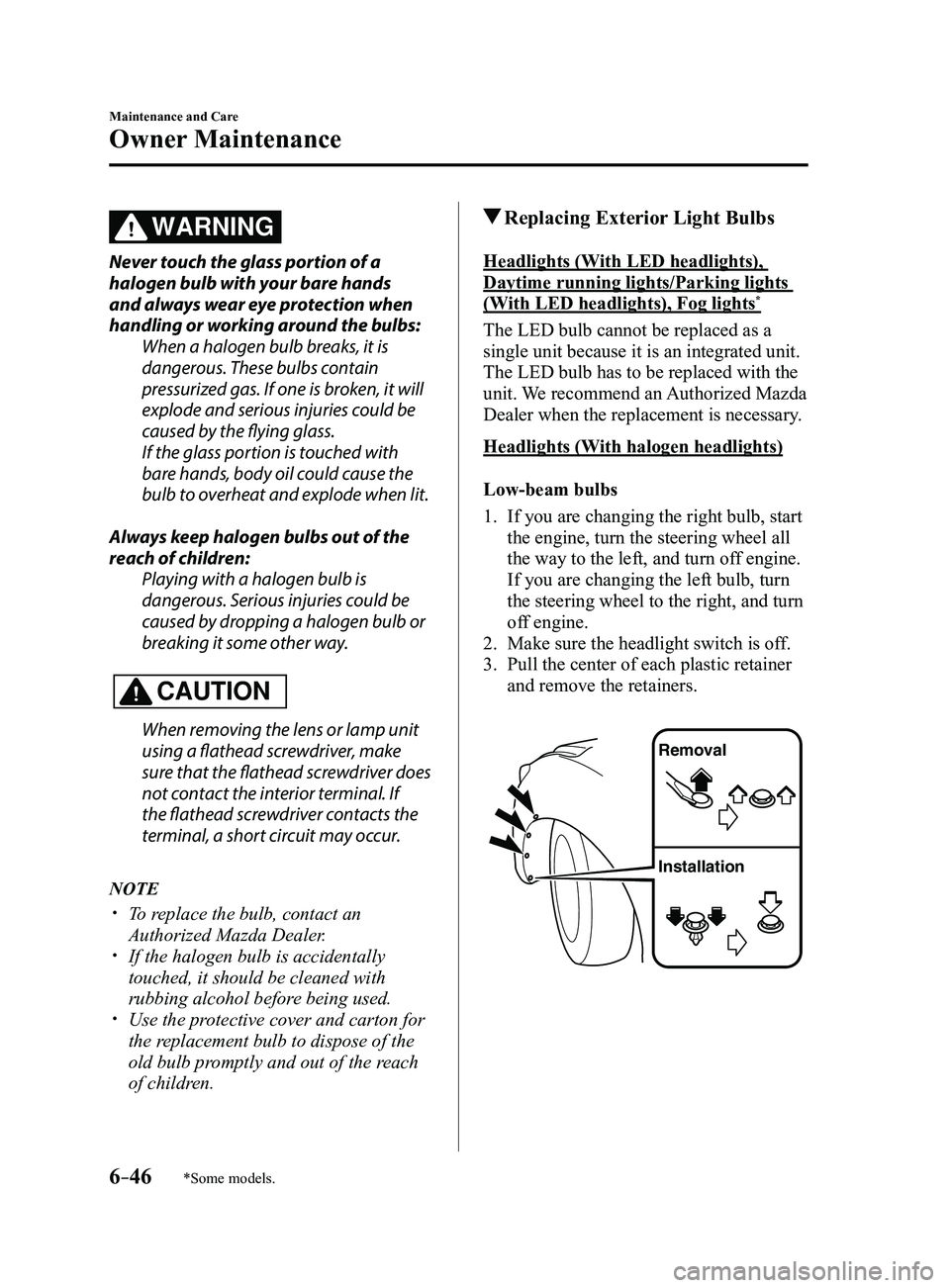
1. If you are changing the right bulb, start
the engine, turn the steering wheel all
the way to the left, and turn off engine.
If you are changing the left bulb, turn
the steering wheel to the right, and turn
off engine.
2. Make sure the headlight switch is of f.
3. Pull the center of each plastic retainer
and remove the retainers.
Removal
Installation
Mazda3_8FL6-EA-16F_Edition2.indb 462016/08/10 17:38:50