engine MAZDA MODEL 3 4-DOOR 2017 Workshop Manual
[x] Cancel search | Manufacturer: MAZDA, Model Year: 2017, Model line: MODEL 3 4-DOOR, Model: MAZDA MODEL 3 4-DOOR 2017Pages: 612
Page 182 of 612
4–52
When Driving
Switches and Controls
CAUTION
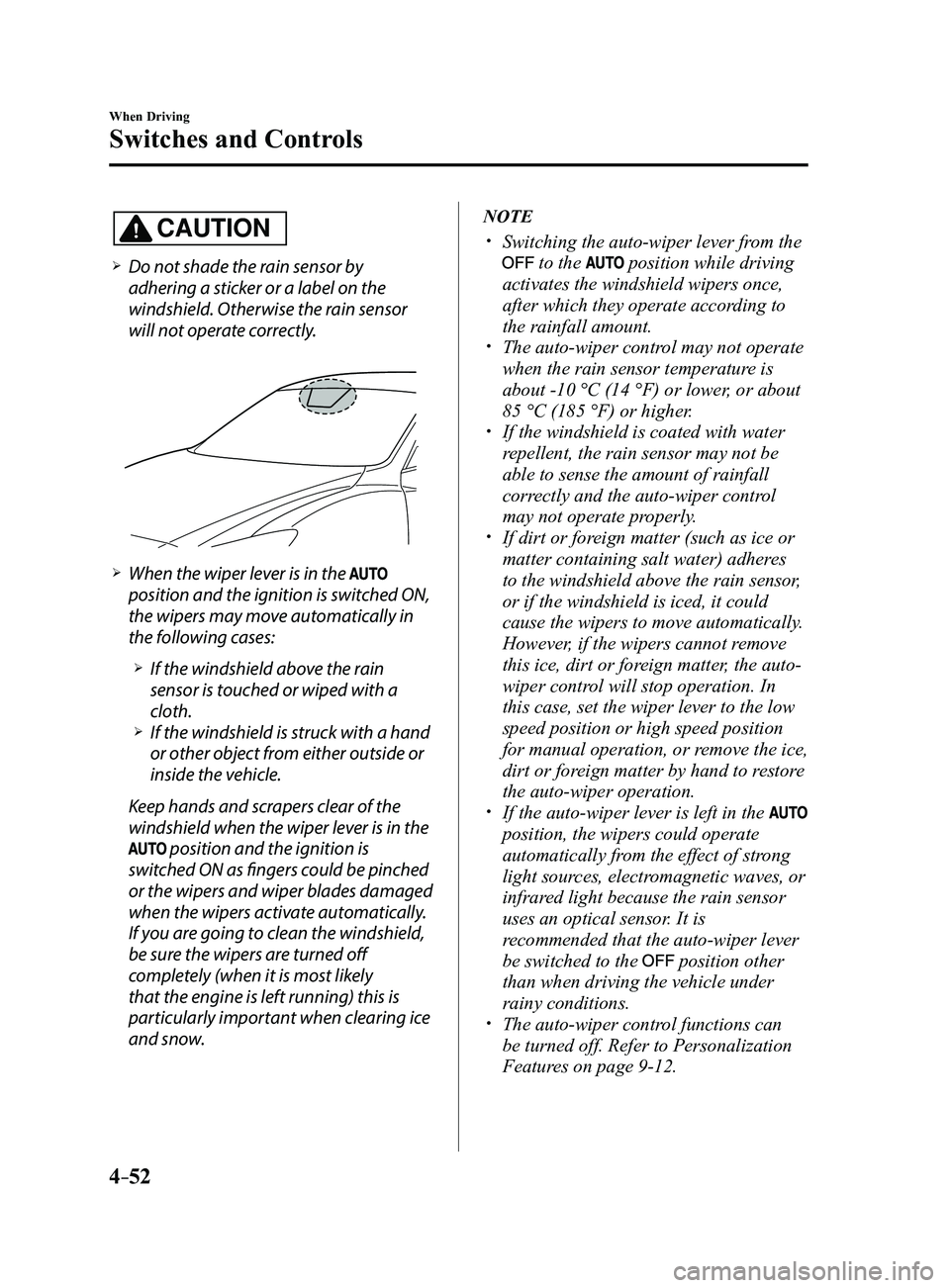
Do not shade the rain sensor by
adhering a sticker or a label on the
windshield. Otherwise the rain sensor
will not operate correctly.
When the wiper lever is in the
position and the ignition is switched ON,
the wipers may move automatically in
the following cases:
If the windshield above the rain
sensor is touched or wiped with a
cloth.
If the windshield is struck with a hand
or other object from either outside or
inside the vehicle.
Keep hands and scrapers clear of the
windshield when the wiper lever is in the
position and the ignition is
switched ON as fingers could be pinched
or the wipers and wiper blades damaged
when the wipers activate automatically.
If you are going to clean the windshield,
be sure the wipers are turned off
completely (when it is most likely
that the engine is left running) this is
particularly important when clearing ice
and snow.
NOTE
Switching the auto-wiper lever from the
to the position while driving
activates the windshield wipers once,
after which they operate according to
the rainfall amount.
The auto-wiper control may not operate
when the rain sensor temperature is
about -10 °C (14 °F) or lower, or about
85 °C (185 °F) or higher.
If the windshield is coated with water
repellent, the rain sensor may not be
able to sense the amount of rainfall
correctly and the auto-wiper control
may not operate properly.
If dirt or foreign matter (such as ice or
matter containing salt water) adheres
to the windshield above the rain sensor,
or if the windshield is iced, it could
cause the wipers to move automatically.
However, if the wipers cannot remove
this ice, dirt or foreign matter, the auto-
wiper control will stop operation. In
this case, set the wiper lever to the low
speed position or high speed position
for manual operation, or remove the ice,
dirt or foreign matter by hand to restore
the auto-wiper operation.
If the auto-wiper lever is left in the
position, the wipers could operate
automatically from the effect of strong
light sources, electromagnetic waves, or
infrared light because the rain sensor
uses an optical sensor. It is
recommended that the auto-wiper lever
be switched to the
position other
than when driving the vehicle under
rainy conditions.
The auto-wiper contr ol functions can
be turned off. Refer to Personalization
Features on page
9-12.
Mazda3_8FL6-EA-16F_Edition2.indb 522016/08/10 17:36:21
Page 191 of 612
4–61
When Driving
Brake
Brake System
Foot Brake
This vehicle has power-assisted brakes
that adjust automatically through normal
use.
Should power-assist fail, you can stop by
applying greater force than normal to the
brake pedal. But the distance required to
stop will be greater than usual.
WARNING
Do not coast with the engine stalled or
turned off, find a safe place to stop:Coasting with the engine stalled or
turned off is dangerous. Braking will
require more effort, and the brake's
power-assist could be depleted if
you pump the brake. This will cause
longer stopping distances or even an
accident.
Shift to a lower gear when going down
steep hills: Driving with your foot continuously on
the brake pedal or steadily applying
the brakes for long distances is
dangerous. This causes overheated
brakes, resulting in longer stopping
distances or even total brake failure.
This could cause loss of vehicle
control and a serious accident. Avoid
continuous application of the brakes.
Dry off brakes that have become
wet by driving slowly, releasing the
accelerator pedal and lightly applying
the brakes several times until the brake
performance returns to normal: Driving with wet brakes is dangerous.
Increased stopping distance or the
vehicle pulling to one side when
braking could result in a serious
accident. Light braking will indicate
whether the brakes have been affected.
Mazda3_8FL6-EA-16F_Edition2.indb 612016/08/10 17:36:25
Page 195 of 612
4–65
When Driving
Brake
When releasing the electric parking
brake
The electric parking brake can be released
while the ignition is switched ON or
the engine is running. When the electric
parking brake is released, the brake system
warning light and the electric parking
brake switch indicator light turn off.
Electric parking brake manual release
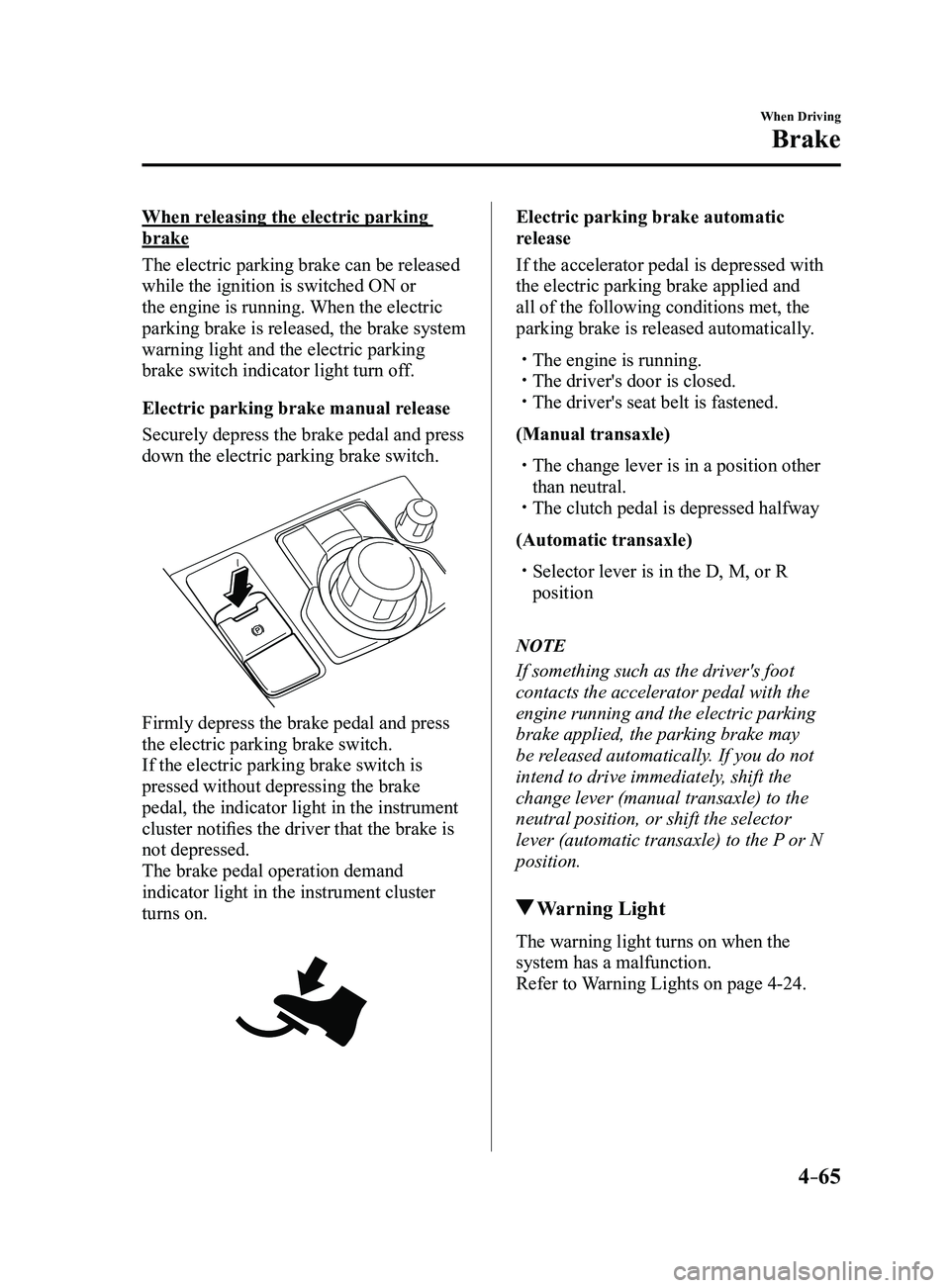
Securely depress the brake pedal and press
down the electric parking brake switch.
Firmly depress the brake pedal and press
the electric parking brake switch.
If the electric parking brake switch is
pressed without depressing the brake
pedal, the indicator light in the instrument
cluster notifies the driver that the brake is
not depressed.
The brake pedal operation demand
indicator light in the instrument cluster
turns on.
Electric parking brake automatic
release
If the accelerator pedal is depressed with
the electric parking brake applied and
all of the following conditions met, the
parking brake is released automatically.
The engine is running. The driver's door is closed. The driver's seat belt is fastened.
(Manual transaxle)
The change lever is in a position other
than neutral. The clutch pedal is depressed halfway
(Automatic transaxle)
Selector lever is in the D, M, or R
position
NOTE
If something such as the driver's foot
contacts the accelerator pedal with the
engine running and the electric parking
brake applied, the parking brake may
be released automatically. If you do not
intend to drive immediately, shift the
change lever (manual transaxle) to the
neutral position, or shift the selector
lever (automatic transaxle) to the P or N
position.
Warning Light
The warning light turns on when the
system has a malfunction.
Refer to Warning Lights on page
4-24.
Mazda3_8FL6-EA-16F_Edition2.indb 652016/08/10 17:36:27
Page 198 of 612
4–68
When Driving
ABS/TCS/DSC
Antilock Brake System
(ABS)
The ABS control unit continuously
monitors the speed of each wheel. If
one wheel is about to lock up, the ABS
responds by automatically releasing and
reapplying that wheel's brake.
The driver will feel a slight vibration in
the brake pedal and may hear a chattering
noise from the brake system. This is
normal ABS system operation. Continue to
depress the brake pedal without pumping
the brakes.
The warning light turns on when the
system has a malfunction.
Refer to Warning Lights on page
4-24.
WARNING
Do not rely on ABS as a substitute for
safe driving:The ABS cannot compensate for unsafe
and reckless driving, excessive speed,
tailgating (following another vehicle
too closely), driving on ice and snow,
and hydroplaning (reduced tire friction
and road contact because of water on
the road surface). You can still have an
accident.
NOTE
Braking distances may be longer on
loose surfaces (snow or gravel, for
example) which usually have a hard
foundation. A vehicle with a normal
braking system may require less
distance to stop under these conditions
because the tires will build up a wedge
of surface layer when the wheels skid.
The sound of the ABS operating may
be heard when starting the engine
or immediately after starting the
vehicle, however, it does not indicate a
malfunction.
Mazda3_8FL6-EA-16F_Edition2.indb 682016/08/10 17:36:28
Page 199 of 612
4–69
When Driving
ABS/TCS/DSC
Traction Control System
(TCS)
The Traction Control System (TCS)
enhances traction and safety by controlling
engine torque and braking. When the TCS
detects driving wheel slippage, it lowers
engine torque and operates the brakes to
prevent loss of traction.
This means that on a slick surface, the
engine adjusts automatically to provide
optimum power to the drive wheels,
limiting wheel spin and loss of traction.
The warning light turns on when the
system has a malfunction.
Refer to Warning Lights on page
4-24.
WARNING
Do not rely on the Traction Control
System (TCS) as a substitute for safe
driving:The Traction Control System (TCS)
cannot compensate for unsafe and
reckless driving, excessive speed,
tailgating (following another vehicle
too closely), and hydroplaning
(reduced tire friction and road contact
because of water on the road surface).
You can still have an accident.
Use snow tires or tire chains and drive at
reduced speeds when roads are covered
with ice and/or snow: Driving without proper traction devices
on snow and/or ice-covered roads
is dangerous. The Traction Control
System (TCS) alone cannot provide
adequate traction and you could still
have an accident.
NOTE
To turn off the TCS, press the DSC OFF
switch (page
4-71).
TCS/DSC Indicator Light
This indicator light stays on for a few
seconds when the ignition is switched
ON. If the TCS or DSC is operating, the
indicator light flashes.
If the light stays on, the TCS, DSC
or the brake assist system may have a
malfunction and they may not operate
correctly. Take your vehicle to an
Authorized Mazda Dealer.
NOTE
In addition to the indicator light
flashing, a slight lugging sound will
come from the engine. This indicates
that the TCS/DSC is operating properly.
On slippery surfaces, such as fr esh
snow, it will be impossible to achieve
high rpm when the TCS is on.
Mazda3_8FL6-EA-16F_Edition2.indb 692016/08/10 17:36:29
Page 200 of 612
4–70
When Driving
ABS/TCS/DSC
Dynamic Stability
Control (DSC)
The Dynamic Stability Control (DSC)
automatically controls braking and engine
torque in conjunction with systems such
as ABS and TCS to help control side slip
when driving on slippery surfaces, or
during sudden or evasive maneuvering,
enhancing vehicle safety.
Refer to ABS (page
4-68) and TCS
(page
4-69).
DSC operation is possible at speeds
greater than 20 km/h (12 mph).
The warning light turns on when the
system has a malfunction.
Refer to Warning Lights on page
4-24.
WARNING
Do not rely on the Dynamic Stability
Control as a substitute for safe driving: The Dynamic Stability Control (DSC)
cannot compensate for unsafe and
reckless driving, excessive speed,
tailgating (following another vehicle
too closely), and hydroplaning
(reduced tire friction and road contact
because of water on the road surface).
You can still have an accident.
CAUTION
The DSC may not operate correctly
unless the following are observed:
Use tires of the correct size specified
for your Mazda on all four wheels. Use tires of the same manufacturer,
brand and tread pattern on all four
wheels.
Do not mix worn tires.
The DSC may not operate correctly when
tire chains are used or a temporary spare
tire is installed because the tire diameter
changes.
TCS/DSC Indicator Light
This indicator light stays on for a few
seconds when the ignition is switched
ON. If the TCS or DSC is operating, the
indicator light flashes.
If the light stays on, the TCS, DSC
or the brake assist system may have a
malfunction and they may not operate
correctly. Take your vehicle to an
Authorized Mazda Dealer.
Mazda3_8FL6-EA-16F_Edition2.indb 702016/08/10 17:36:29
Page 201 of 612
4–71
When Driving
ABS/TCS/DSC
DSC OFF Indicator Light
This indicator light stays on for a few
seconds when the ignition is switched ON.
It also illuminates when the DSC OFF
switch is pressed and TCS/DSC is
switched off.
Refer to DSC OFF Switch on page
4-71.
If the light remains illuminated and the
TCS/DSC is not switched off, take your
vehicle to an Authorized Mazda Dealer.
The DSC may have a malfunction.
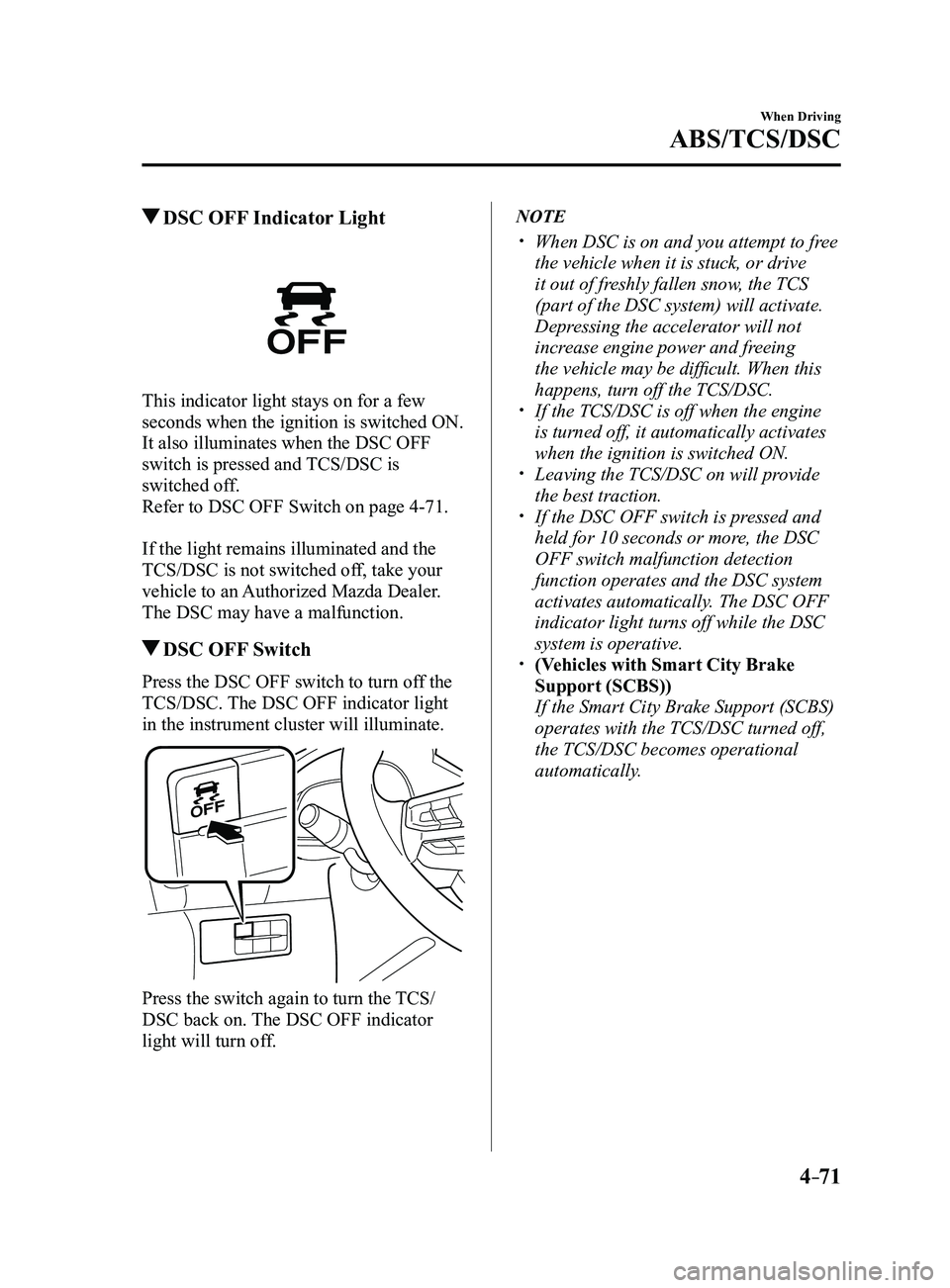
DSC OFF Switch
Press the DSC OFF switch to turn off the
TCS/DSC. The DSC OFF indicator light
in the instrument cluster will illuminate.
Press the switch again to turn the TCS/
DSC back on. The DSC OFF indicator
light will turn off.
NOTE
When DSC is on and you attempt to fr ee
the vehicle when it is stuck, or drive
it out of freshly fallen snow, the TCS
(part of the DSC system) will activate.
Depressing the accelerator will not
increase engine power and freeing
the vehicle may be difficult. When this
happens, turn off the TCS/DSC.
If the TCS/DSC is off when the engine
is turned off, it automatically activates
when the ignition is switched ON.
Leaving the TCS/DSC on will provide
the best traction. If the DSC OFF switch is pressed and
held for 10 seconds or more, the DSC
OFF switch malfunction detection
function operates and the DSC system
activates automatically. The DSC OFF
indicator light turns off while the DSC
system is operative.
(Vehicles with Smart City Brake
Support (SCBS))
If the Smart City Brake Support (SCBS)
operates with the TCS/DSC turned off,
the TCS/DSC becomes operational
automatically.
Mazda3_8FL6-EA-16F_Edition2.indb 712016/08/10 17:36:30
Page 202 of 612
4–72
When Driving
i-ELOOP
*Some models.
i-ELOOP*
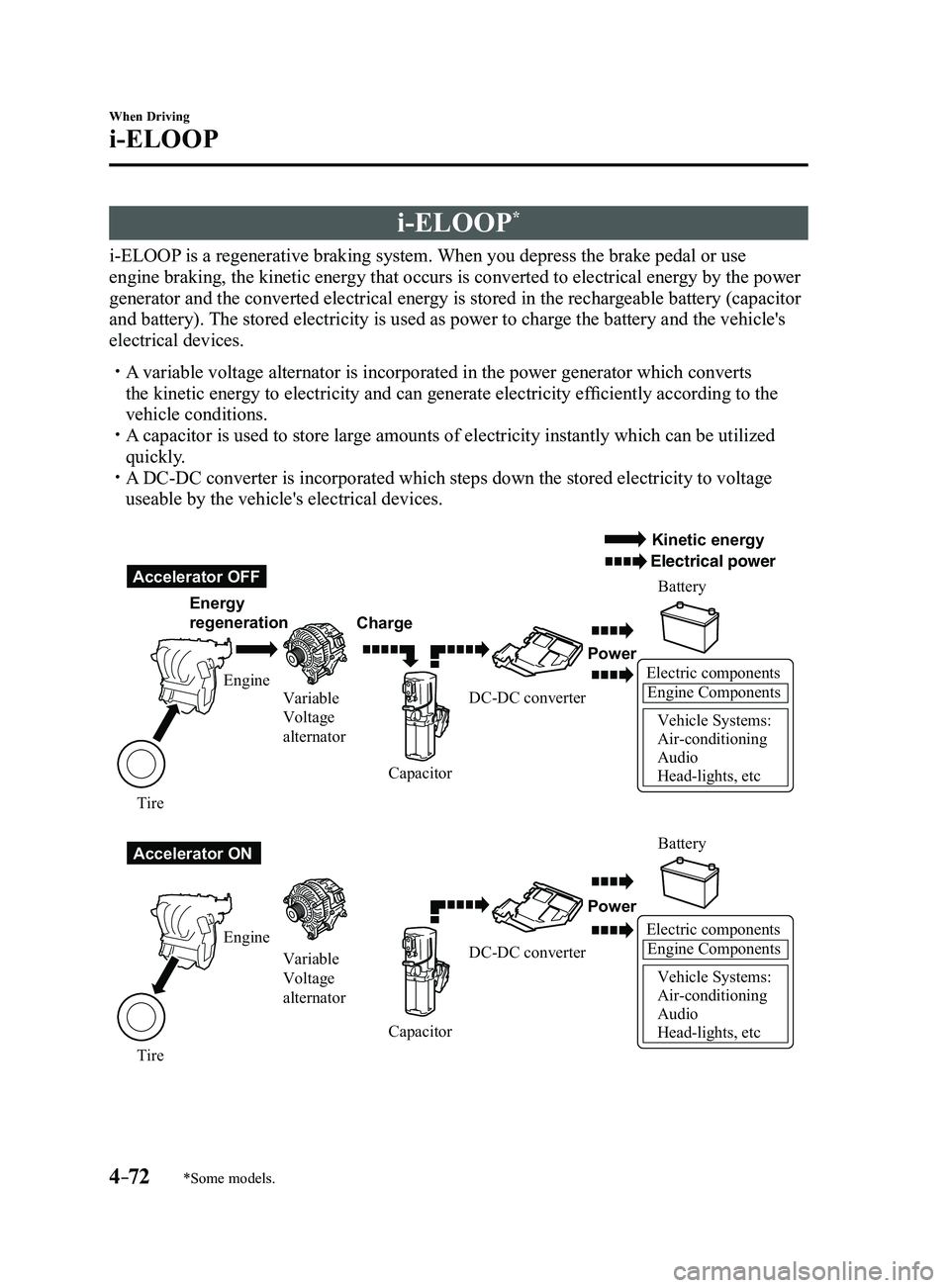
i-ELOOP is a regenerative braking system. When you depress the brake pedal or use
engine braking, the kinetic energy that occurs is converted to electrical energy by the power
generator and the converted electrical energy is stored in the rechargeable battery (capacitor
and battery). The stored electricity is used as power to charge the battery and the vehicle's
electrical devices.
A variable voltage alternator is incorporated in the power generator whic\
h converts
the kinetic energy to electricity and can generate electricity efficiently according to the
vehicle conditions.
A capacitor is used to store large amounts of electricity instantly which can be utilized
quickly. A DC-DC converter is incorporated which steps down the stored electricity\
to voltage
useable by the vehicle's electrical devices.
Electric componentsEngine Components
Vehicle Systems:
Air-conditioning
Audio
Head-lights, etc
Accelerator OFF
Accelerator ON Energy
regeneration
Charge Battery
Battery
Power
Power
Electric componentsEngine Components
Vehicle Systems:
Air-conditioning
Audio
Head-lights, etc
Engine Variable
Voltage
alternator
Variable
Voltage
alternator
Engine
Tire Tire Capacitor
CapacitorDC-DC converter
DC-DC converter
Kinetic energy
Electrical power
Mazda3_8FL6-EA-16F_Edition2.indb 722016/08/10 17:36:30
Page 204 of 612
4–74
When Driving
i-ELOOP
i-ELOOP Indicator Light/Control
Status Display
The driver is notified of the i-ELOOP
power generating status and the vehicle
conditions by the i-ELOOP indicator light
and the control status display.
i-ELOOP Indicator Light
Illuminated (vehicle without type B
audio)
The light turns on during power
generation.
Flashing
If the engine is started after the vehicle has
not been driven for a long period of time,
the i-ELOOP indicator light may flash.
Leave the engine idling and wait until the
indicator light turns off.
NOTE
The beep will sound if the vehicle is
driven while the i-ELOOP indicator
light is flashing. In addition, if you
turn the steering wheel while the light
is flashing, it will feel heavier than
normal, but this does not indicate an
abnormality. Stop the vehicle in a safe
location with the engine running and do
not attempt to turn the steering wheel.
The steering operation will return to
normal after the i-ELOOP indicator
light stops flashing.
(Vehicles with type B audio)
A notification is displayed in the center
display and the i-ELOOP indicator light
flashes at the same time.
Refer to Warning Message Indicated on
Display on page 7-37.
Control status display (vehicles with
type B audio)
The i-ELOOP power generating status is
displayed in the center display.
Refer to Control Status Display on page
4-77.
Mazda3_8FL6-EA-16F_Edition2.indb 742016/08/10 17:36:31
Page 208 of 612
4–78
When Driving
Drive Selection
*Some models.
Drive Selection*
Drive selection is a system to switch the vehicle's drive mode. When the sport mode
is selected, vehicle's response against accelerator operation is enhance\
d. This provides
additional quick acceleration which may be needed to safely make maneuvers such as lane
changes, merging onto freeways, or passing other vehicles.
CAUTION
Do not use the sport mode when driving on slippery roads such as wet or snow-covered
roads. It may cause tire slipping.
NOTE
When the sport mode is selected, driving at higher engine speeds increases and it may
increase fuel consumption. Mazda recommends that you cancel the sport mode on normal
driving.
Drive mode cannot be switched in the following conditions:
ABS/TCS/DSC is operating The Mazda Radar Cruise Control (MRCC) system/cruise control is operating. Steering wheel is being operated abruptly
Mazda3_8FL6-EA-16F_Edition2.indb 782016/08/10 17:36:34