radio controls MAZDA MODEL 3 4-DOOR 2017 Owners Manual
[x] Cancel search | Manufacturer: MAZDA, Model Year: 2017, Model line: MODEL 3 4-DOOR, Model: MAZDA MODEL 3 4-DOOR 2017Pages: 612
Page 78 of 612
3–2
Before Driving
Keys
Keys
WARNING
Do not leave the key in your vehicle with
children and keep them in a place where
your children will not find or play with
them:Leaving children in a vehicle with the
key is dangerous. This could result in
someone being badly injured or even
killed. Children may find these keys to
be an interesting toy to play with and
could cause the power windows or
other controls to operate, or even make
the vehicle move.
CAUTION
Because the key (transmitter) uses
low-intensity radio waves, it may not
function correctly under the following
conditions:
The key is carried with
communication devices such as
cellular phones.
The key contacts or is covered by a
metal object. The key is near electronic devices such
as personal computers. Non-Mazda genuine electronic
equipment is installed in the vehicle. There is equipment which discharges
radio waves near the vehicle.
The key (transmitter) may consume
battery power excessively if it receives
high-intensity radio waves. Do not place
the key near electronic devices such as
televisions or personal computers.
To avoid damage to the key
(transmitter), DO NOT:
Drop the key. Get the key wet. Disassemble the key. Expose the key to high temperatures
on places such as the dashboard or
hood, under direct sunlight.
Expose the key to any kind of
magnetic field. Place heavy objects on the key. Put the key in an ultrasonic cleaner. Put any magnetized objects close to
the key.
Mazda3_8FL6-EA-16F_Edition2.indb 22016/08/10 17:35:15
Page 135 of 612
4–5
When Driving
Start/Stop Engine
ACC (Accessory)
Some electrical accessories will operate
and the indicator light (amber) illuminates.
NOTE
The keyless entry system does not function
while the push button start has been
pressed to ACC, and the doors will not
lock/unlock even if they have been locked
manually.
ON
This is the normal running position after
the engine is started. The indicator light
(amber) turns off. (The indicator light
(amber) illuminates when the ignition
is switched ON and the engine is not
running.)
Some indicator lights/warning lights
should be inspected before the engine is
started (page
4-23).
NOTE
When the push button start is pressed to
ON, the sound of the fuel pump motor
operating near the fuel tank can be heard.
This does not indicate an abnormality.
Starting the Engine
WARNING
Radio waves from the key may affect
medical devices such as pacemakers:
Before using the key near people who use
medical devices, ask the medical device
manufacturer or your physician if radio
waves from the key will affect the device.
NOTE
The key must be carried because the key
carries an immobilizer chip that must
communicate with the engine controls at
short range.
The engine can be started when the push
button start is pressed from off, ACC, or ON.
The push button start system functions
(function which can start the engine by
only carrying the key) can be deactivated
to prevent any possible adverse effect
on a user wearing a pacemaker or
other medical device. If the system is
deactivated, you will be unable to start
the engine by carrying the key. Consult
an Authorized Mazda Dealer for details.
If the push button start system functions
have been deactivated, you can start
the engine by following the procedure
indicated when the key battery goes dead.
Refer to Engine Start Function When
Key Battery is Dead on page 4-8. After starting a cold engine, the engine
speed increases and a whining sound from
the engine compartment can be heard.
This is for improved exhaust gas purification
and does not indicate any parts defect.
Engine-starting is controlled by the
spark ignition system.
This system meets all Canadian
Interference-Causing Equipment Standard
requirements regulating the impulse
electrical field strength of radio noise.
Mazda3_8FL6-EA-16F_Edition2.indb 52016/08/10 17:35:41
Page 188 of 612
4–58
When Driving
Switches and Controls
Pre-programming the HomeLink
System
NOTE
It is recommended that a new battery be
placed in the hand-held transmitter of the
device being programmed to HomeLink
for quicker training and accurate
transmission of the radio-frequency signal.
Verify that there is a remote control
transmitter available for the device you
would like to program.
Disconnect the power to the device.
Programming the HomeLink
System
CAUTION
When programming a garage door
opener or a gate, disconnect the power
to these devices before performing
programming. Continuous operation
of the devices could damage the
motor.
The HomeLink system provides 3 buttons
which can be individually selected and
programmed using the transmitters for
current, on-market devices as follows:
1. Disconnect the power to the garage
door opener or gate programmed to the
hand-held transmitter.
2. Position the end of your hand-held
transmitter 2.5—7.5 cm (1—3 inches)
away from the HomeLink button you
wish to program while keeping the
indicator light in view.
3. Simultaneously press and hold both
the chosen HomeLink and hand-held
transmitter buttons. Do not release
the buttons until step 3 has been
completed.
NOTE
Some gate operators and garage door
openers may require you to replace this
Programming Step 2 with procedures
noted in the “Gate Operator/Canadian
Programming” section.
4. After the HomeLink indicator light
changes from a slow to a rapidly
blinking light, release both the
HomeLink and hand-held transmitter
buttons.
NOTE
If the HomeLink indicator light does not
change to a rapidly blinking light, contact
HomeLink at www.homelink.com or call
1-800-355-3515 for assistance.
5. Connect the power to the garage door
opener or gate programmed to the
hand-held transmitter.
6. Firmly press and hold the programmed
HomeLink button for five seconds,
and then release it. Perform this
operation two times to activate the door
or gate. If the door or gate does not
activate, press and hold the just-trained
HomeLink button and observe the
indicator light.
If the indicator light stays on
constantly, programming is complete
and your device should activate when
the HomeLink button is pressed and
released.
Mazda3_8FL6-EA-16F_Edition2.indb 582016/08/10 17:36:24
Page 189 of 612
4–59
When Driving
Switches and Controls
NOTE
To program the remaining two HomeLink
buttons, begin with “Programming”—
step 1
If the indicator light blinks rapidly
for two seconds and then turns
to a constant light, continue with
“Programming” steps 7—9 to
complete the programming of a rolling
code equipped device (most commonly
a garage door opener).
7. At the garage door opener receiver
(motor-head unit) in the garage, locate
the “learn” or “smart” button. This can
usually be found where the hanging
antenna wire is attached to the motor-
head unit.
8. Firmly press and release the “learn” or
“smart” button. (The name and color of
the button may vary by manufacturer.)
NOTE
Complete the programming within 30
seconds.
9. Return to the vehicle and firmly press,
hold for two seconds and release the
programmed HomeLink button. Repeat
the “ press/hold/release” sequence a
second time, and, depending on the
brand of the garage door opener (or
other rolling code equipped device),
repeat this sequence a third time to
complete the programming process.
HomeLink should now activate your
rolling code equipped device.
NOTE
To program the remaining two HomeLink
buttons, begin with “Programming”—
step 1
For questions or comments, please contact
HomeLink at www.homelink.com or 1-
800-355-3515.
Gate operator/Canadian
Programming
Canadian radio-frequency laws require
transmitter signals to “time-out” (or quit)
after several seconds of transmission
— which may not be long enough for
HomeLink to pick up the signal during
programming. Similar to this Canadian
law, some U.S. gate operators are designed
to “time-out” in the same manner.
If you live in Canada or you are having
difficulties programming a gate operator
by using the “Programming” procedures
(regardless of where you live), replace
“Programming HomeLink” step 3 with
the following:
NOTE
If programming a garage door opener or
gate operator, it is advised to unplug the
device during the “cycling” process to
prevent possible overheating.
Continue to press and hold the HomeLink
button while you press and release
— every two seconds (“cycle”) your
hand-held transmitter until the frequency
signal has successfully been accepted by
HomeLink. (The indicator light will flash
slowly and then rapidly.)
Proceed with “Programming” step 4 to
complete.
Mazda3_8FL6-EA-16F_Edition2.indb 592016/08/10 17:36:25
Page 318 of 612
![MAZDA MODEL 3 4-DOOR 2017 Owners Manual 5–26
Interior Features
Audio System
Audio set [Type A (non-touchscreen)]
Power/Volume/Sound Controls ........................................................................\
.....page 5-28
Clock](/img/28/40993/w960_40993-317.png "MAZDA MODEL 3 4-DOOR 2017 Owners Manual 5–26
Interior Features
Audio System
Audio set [Type A (non-touchscreen)]
Power/Volume/Sound Controls ........................................................................\
.....page 5-28
Clock")
5–26
Interior Features
Audio System
Audio set [Type A (non-touchscreen)]
Power/Volume/Sound Controls ........................................................................\
.....page 5-28
Clock ........................................................................\
.............................................page 5-30
Operating the Radio ........................................................................\
......................page 5-32
How to use Auxiliary jack/USB port ....................................................................page 5-33
Mazda3_8FL6-EA-16F_Edition2.indb 262016/08/10 17:37:25
Page 334 of 612
5–42
Interior Features
Audio System
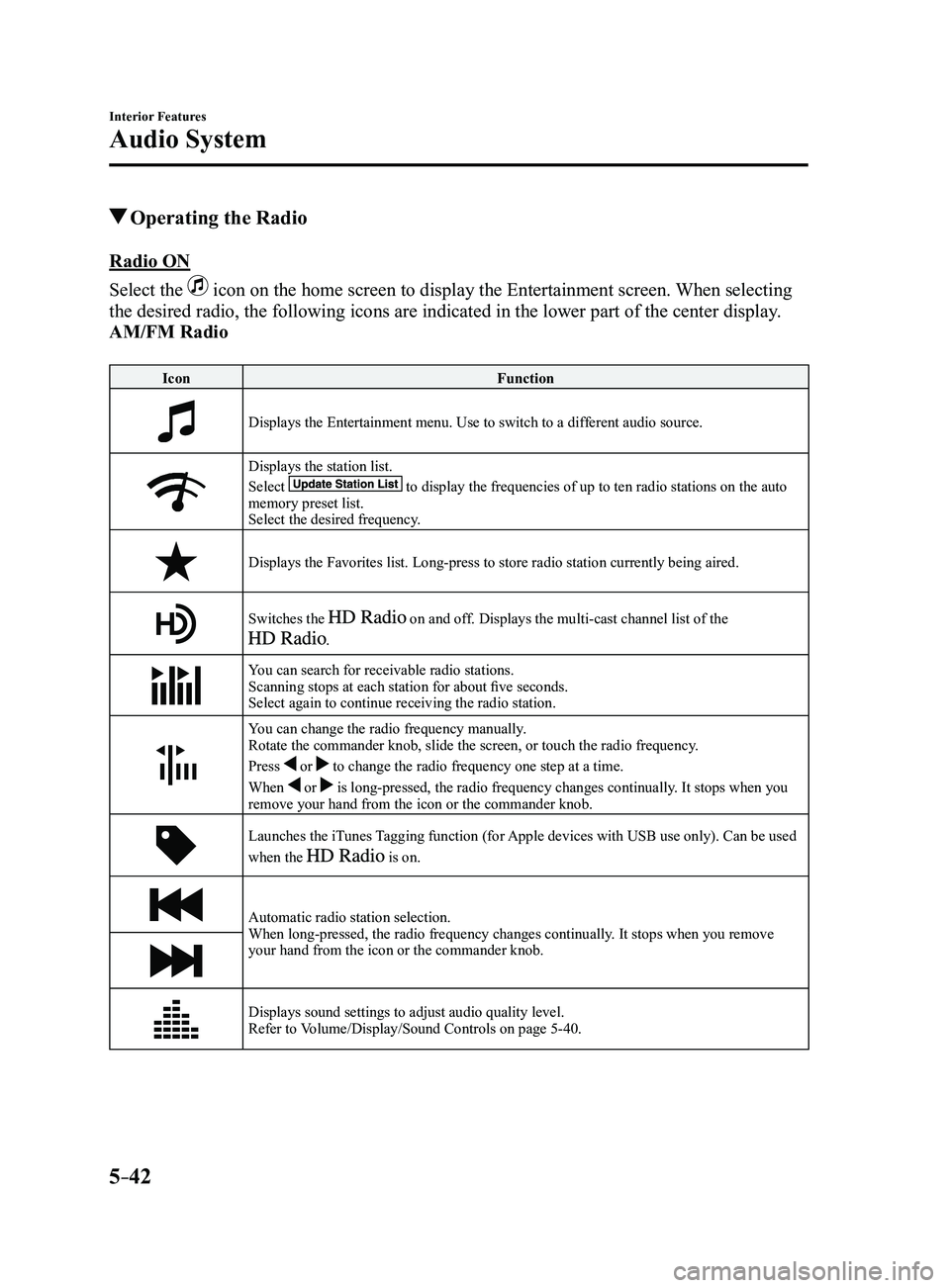
Operating the Radio
Radio ON
Select the
icon on the home screen to display the Entertainment screen. When selecting
the desired radio, the following icons are indicated in the lower part o\
f the center display.
AM/FM Radio
IconFunction
Displays the Entertainment menu. Use to switch to a different audio source.
Displays the station list.
Select to display the frequencies of up to ten radio stations on the auto memory preset list.
Select the desired frequency.
Displays the Favorites list. Long-press to store radio station currently\
being aired.
Switches the on and off. Displays the multi-cast channel list of the
.
You can search for receivable radio stations.
Scanning stops at each station for about five seconds.
Select again to continue receiving the radio station.
You can change the radio frequency manually.
Rotate the commander knob, slide the screen, or touch the radio frequency.
Press
or to change the radio frequency one step at a time.
When
or is long-pressed, the radio frequency changes continually. It stops when you
remove your hand from the icon or the commander knob.
Launches the iTunes Tagging function (for Apple devices with USB use only). Can be used
when the is on.
Automatic radio station selection.
When long-pressed, the radio frequency changes continually. It stops when you remove
your hand from the icon or the commander knob.
Displays sound settings to adjust audio quality level.
Refer to Volume/Display/Sound Controls on page 5-40.
Mazda3_8FL6-EA-16F_Edition2.indb 422016/08/10 17:37:38
Page 339 of 612
5–47
Interior Features
Audio System
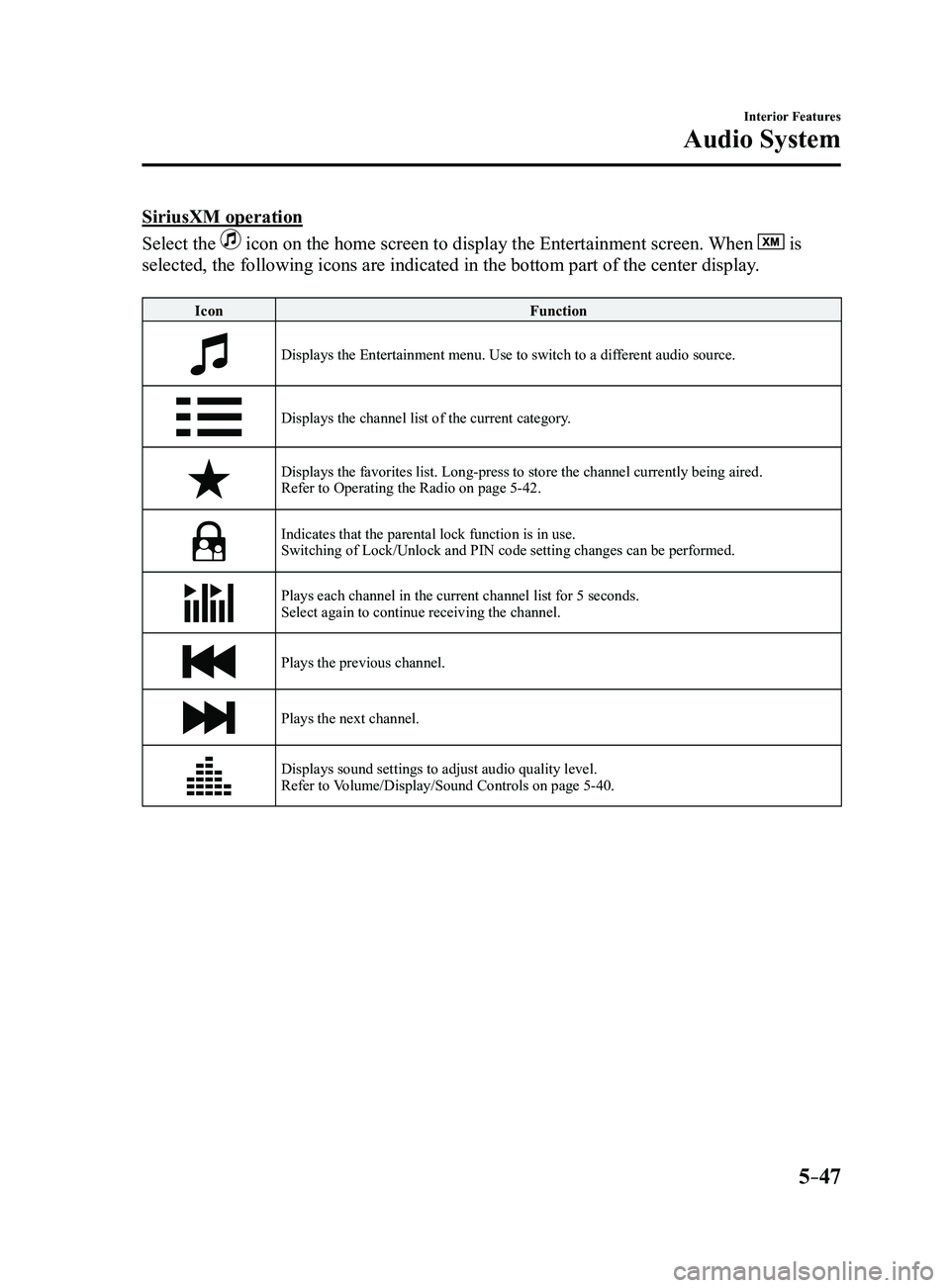
SiriusXM operation
Select the
icon on the home screen to display the Entertainment screen. When is
selected, the following icons are indicated in the bottom part of the ce\
nter display.
Icon Function
Displays the Entertainment menu. Use to switch to a different audio source.
Displays the channel list of the current category.
Displays the favorites list. Long-press to store the channel currently b\
eing aired.
Refer to Operating the Radio on page 5-42.
Indicates that the parental lock function is in use.Switching of Lock/Unlock and PIN code setting changes can be performed.
Plays each channel in the current channel list for 5 seconds.
Select again to continue receiving the channel.
Plays the previous channel.
Plays the next channel.
Displays sound settings to adjust audio quality level.
Refer to Volume/Display/Sound Controls on page 5-40.
Mazda3_8FL6-EA-16F_Edition2.indb 472016/08/10 17:37:42
Page 580 of 612
8–46
Customer Information and Reporting Safety Defects
Declaration of Conformity
WARNING
Changes or modifications not expressly approved by the party responsible for compliance
could void the user's authority to operate the equipment.
The term “IC: ” before the radio certification number only signifies that Industry Canada
technical specifications were met.
The antenna used for this transmitter must not be co-located or operatin\
g in conjunction
with any other antenna or transmitter. End-users and installers must be provided with
installation instructions and transmitter operating conditions for satisfying RF exposure
compliance.
Mazda Bluetooth
® Hands-Free Customer Service
U.S.A.
Phone: 800-430-0153 (T oll-free)
Web: www.mazdausa.com/mazdaconnect Canada
Phone: 800-430-0153 (Toll-free)
Web: www.mazdahandsfree.ca
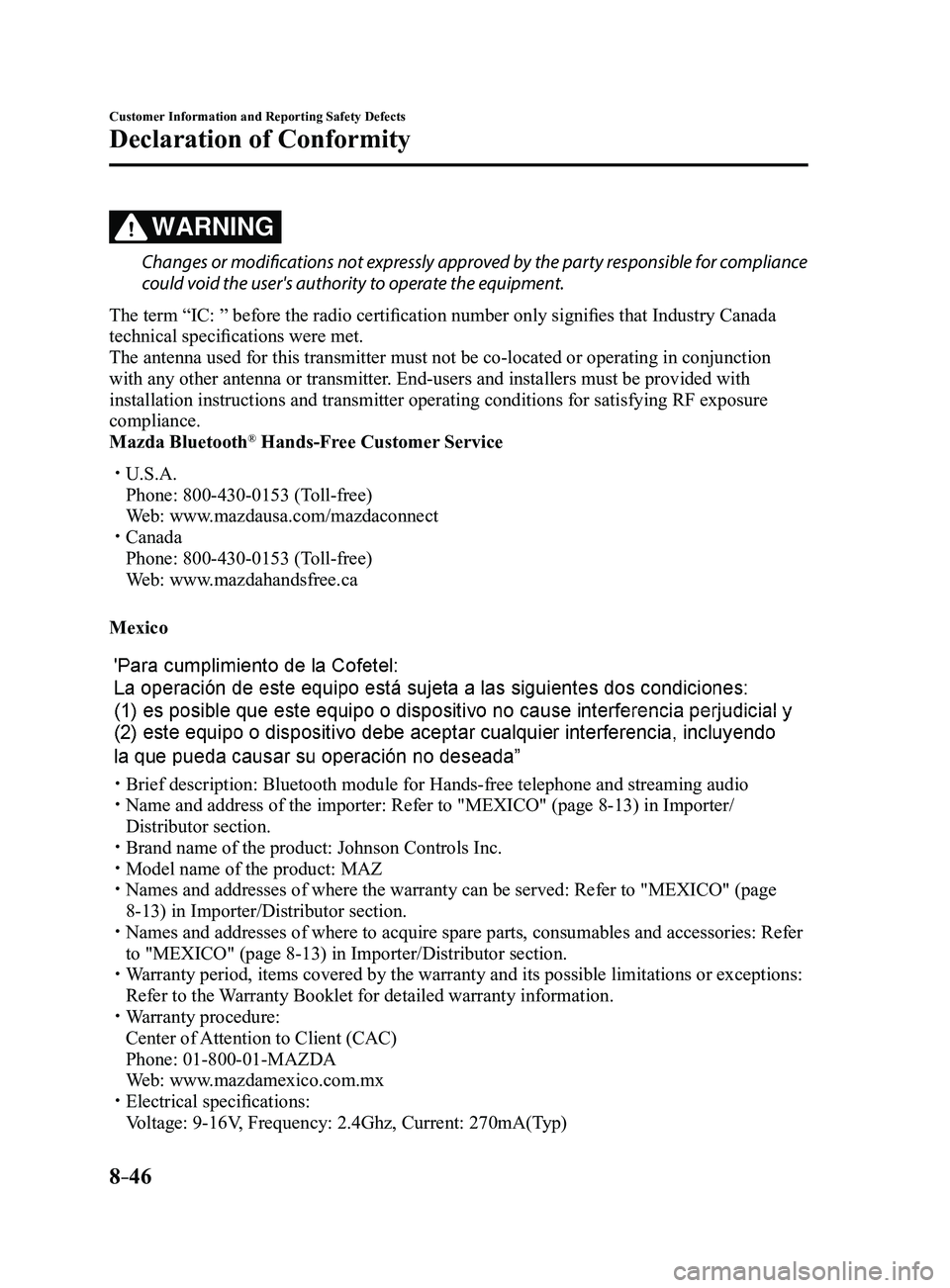
Mexico
Brief description: Bluetooth module for Hands-free telephone an d streaming audio Name and address of the importer: Refer to "MEXICO" (page 8-13) in Importer/
Distributor section.
Brand name of the product: Johnson Controls Inc. Model name of the product: MAZ Names and addresses of where the warranty can be served: Refer to "MEXICO" (page
8-13) in Importer/Distributor section. Names and addresses of where to acquire spare parts, consumable s and accessories: Refer
to "MEXICO" (page 8-13) in Importer/Distributor section. Warranty period, items covered by the warranty and its possible limitatio\
ns or exceptions:
Refer to the Warranty Booklet for detailed warranty information. Warranty procedure:
Center of Attention to Client (CAC)
Phone: 01-800-01-MAZDA
Web: www.mazdamexico.com.mx Electrical specifications:
Voltage: 9-16V, Frequency: 2.4Ghz, Current: 270mA(Typ)
Mazda3_8FL6-EA-16F_Edition2.indb 462016/08/10 17:39:48
Page 604 of 612
10–2
Index
A
Accessory Socket ..............................5-113
Active Driving Display
.......................4-21
Adaptive Front Lighting System
(AFS)................................................... 4-84
Add-On Non-Genuine Parts and
Accessories
.........................................8-19
Advanced Key Advanced keyless entry system
....3-10
Operational range
..........................3-11
Advanced Key removed from vehicle
warning beep
.......................................7-40
Air Bag/Front Seat Belt Pretensioner
System Warning Beep
.........................7-39
Air Bag Systems
.................................2-41
Ambient Temperature Display
............4-19
Antilock Brake System (ABS)
............4-68
Audio Control Switch Adjusting the Volume
....................5-55
Seek Switch
...................................5-56
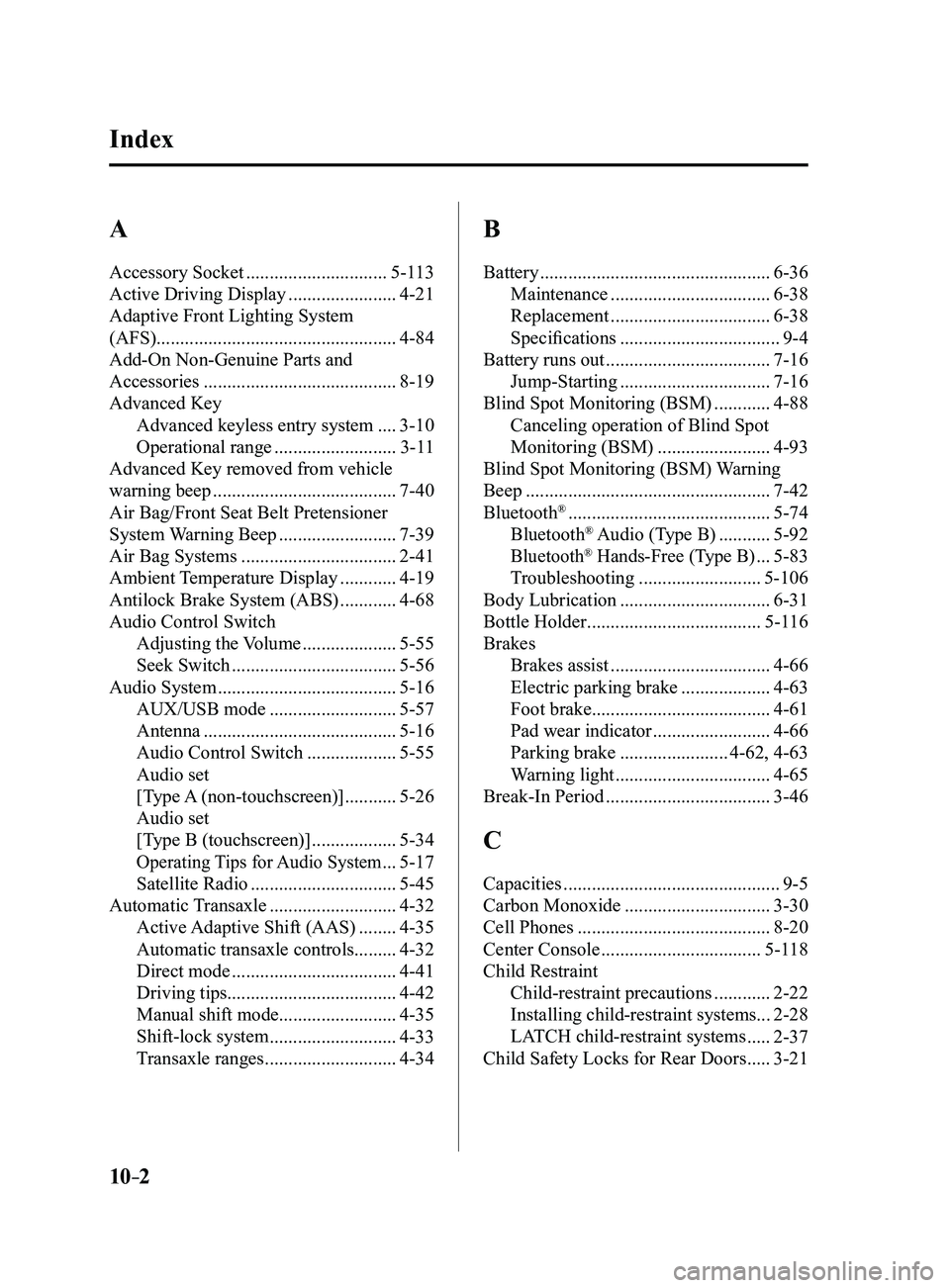
Audio System
......................................5-16
AUX/USB mode
...........................5-57
Antenna
.........................................5-16
Audio Control Switch
...................5-55
Audio set
[Type A (non-touchscreen)]
...........5-26
Audio set
[Type B (touchscreen)]
..................5-34
Operating Tips for Audio System ...5-17
Satellite Radio
...............................5-45
Automatic Transaxle
...........................4-32
Active Adaptive Shift (AAS)
........4-35
Automatic transaxle controls .........4-32
Direct mode
...................................4-41
Driving tips .................................... 4-42
Manual shift mode .........................4-35
Shift-lock system
...........................4-33
Transaxle ranges
............................4-34
B
Battery .................................................6-36
Maintenance
..................................6-38
Replacement
..................................6-38
Specifications
..................................9-4
Battery runs out
...................................7-16
Jump-Starting
................................7-16
Blind Spot Monitoring (BSM)
............4-88
Canceling operation of Blind Spot
Monitoring (BSM)
........................4-93
Blind Spot Monitoring (BSM) Warning
Beep
....................................................7-42
Bluetooth® ...........................................5-74
Bluetooth® Audio (Type B) ...........5-92
Bluetooth® Hands-Free (Type B) ...5-83
Troubleshooting
..........................5-106
Body Lubrication
................................6-31
Bottle Holder
.....................................5-116
Brakes Brakes assist
..................................4-66
Electric parking brake
...................4-63
Foot brake ...................................... 4-61
Pad wear indicator
.........................4-66
Parking brake
.......................4-62, 4-63
Warning light
.................................4-65
Break-In Period
...................................3-46
C
Capacities ..............................................9-5
Carbon Monoxide
...............................3-30
Cell Phones
.........................................8-20
Center Console
..................................5-118
Child Restraint Child-restraint precautions
............2-22
Installing child-restraint systems ...2-28
LATCH child-restraint systems
.....2-37
Child Safety Locks for Rear Doors
.....3-21
Mazda3_8FL6-EA-16F_Edition2.indb 22016/08/10 17:39:57