phone MAZDA MODEL 3 4-DOOR 2018 Owner's Manual
[x] Cancel search | Manufacturer: MAZDA, Model Year: 2018, Model line: MODEL 3 4-DOOR, Model: MAZDA MODEL 3 4-DOOR 2018Pages: 624, PDF Size: 59.23 MB
Page 375 of 624
![MAZDA MODEL 3 4-DOOR 2018 Owners Manual 7.Prompt: “Please say a 4-digit
passcode. Remember this passcode. It
will be required to use this system.”
8. Say: [Beep] “XXXX” (Say a desired
4-digit passcode, “PCode”.)
9. Prompt: “](/img/28/40990/w960_40990-374.png "MAZDA MODEL 3 4-DOOR 2018 Owners Manual 7.Prompt: “Please say a 4-digit
passcode. Remember this passcode. It
will be required to use this system.”
8. Say: [Beep] “XXXX” (Say a desired
4-digit passcode, “PCode”.)
9. Prompt: “")
7.Prompt: “Please say a 4-digit
passcode. Remember this passcode. It
will be required to use this system.”
8. Say: [Beep] “XXXX” (Say a desired
4-digit passcode, “PCode”.)
9. Prompt: “Passcode XXXX (Passcode,
PCode). Is this correct?”
10. Say: [Beep] “Yes”
11. Prompt: “Passcode is enabled.”
Using Bluetooth
® Hands-Free with a
passcode
1. Press the pick-up button or talk button
with a short press.
2. Prompt: “Hands-Free system is
locked. State the passcode to
continue.”
3. Say: [Beep] “XXXX” (Say the set
passcode “PCode”.)
4. If the correct passcode is input, voice
guidance “XXXXXX. .. (Ex. “Mary's
device”) (Device tag) is connected” is
announced.
If the passcode is incorrect, voice
guidance “XXXX (4-digit passcode,
Pcode) incorrect passcode, please try
again” is announced.
Canceling the passcode
NOTE
Do this function only when parked. It is
too distracting to attempt while driving
and you may make too many errors to be
effective.
1. Press the pick-up button or talk button
with a short press.
2. Say: [Beep] “Setup”
3. Prompt: “Select one of the following:
Pairing options, confirmation prompts,
language, passcode, select phone or
select music player.”
4. Say: [Beep] “Passcode”
5. Prompt: “Passcode is enabled. Would
you like to disable it?”
6. Say: [Beep] “Yes”
7. Prompt: “Passcode is disabled.”
Confirmation Prompts
The confirmation prompt confirms the
command content to the user before
advancing to the operation requested by
the user. When this function is turned on,
the system reads out the voice input
command previously received and
confirms whether the command is correct
before advancing to the command
execution.
When the confirmation prompt function is
turned on:
(Ex. “Calling John 's device. Is this
correct?”)
When the confirmation prompt function is
turned off:
(Ex. “Calling John's device.”)
NOTE
If the confirmation prompt function is
turned off when making an emergency
call, the system reads out and confirms the
command before executing it.
1. Press the pick-up button or talk button with a short press.
2. Say: [Beep] “Setup”
3. Prompt: “Select one of the following:
Pairing options, confirmation prompts,
language, passcode, select phone or
select music player.”
4. Say: [Beep] “Confirmation prompts”
5. Prompt: “Confirmation prompts are
on/off. Would you like to turn
confirmation prompts off/on?”
6. Say: [Beep] “Yes”
Interior Features
Bluetooth®
5-85
Mazda3_8GE4-EA-17F_Edition1 2017-4-7 11:59:21
Page 377 of 624
![MAZDA MODEL 3 4-DOOR 2018 Owners Manual 8.Say: [Beep] “0123456789” (Say the
voice input command for voice
recognition learning (1 to 8) according
to the voice guidance.)
9. Prompt: “Speaker enrollment is
complete.”
NOTE
If an erro](/img/28/40990/w960_40990-376.png "MAZDA MODEL 3 4-DOOR 2018 Owners Manual 8.Say: [Beep] “0123456789” (Say the
voice input command for voice
recognition learning (1 to 8) according
to the voice guidance.)
9. Prompt: “Speaker enrollment is
complete.”
NOTE
If an erro")
8.Say: [Beep] “0123456789” (Say the
voice input command for voice
recognition learning (1 to 8) according
to the voice guidance.)
9. Prompt: “Speaker enrollment is
complete.”
NOTE
If an error occurred in the voice
recognition learning, re-learning can be
done by pressing the talk button with a
short press.
Voice input command list for voice
recognition learning
When reading out, the following points
must be observed:
Read out the numbers one at a time
correctly and naturally.
(For example, “1234” must be read out
“one, two, three, four” not “twelve,
thirty four”.)
Do not read out parentheses. “(” and
hyphens “-” are used for separating
numbers in a phone number.
Ex.
“(888) 555-1212” must be spoken “Eight,
eight, eight, five, five, five, one, two, one,
two.”
Phrase Command
1 0123456789
2 (888) 555-1212
3Call
4Dial
5Setup
6 Cancel
7 Continue
8Help
NOTE
The applicable phrase appears in the
audio display.
After user voice registration is
completed, voice guidance “Speaker
enrollment is complete” is announced.
Voice recognition learning on/off
1. Press the pick-up button or talk button with a short press.
2. Say: [Beep] “Voice training”
3. Prompt: “Enrollment is enabled/
disabled. Would you like to disable/
enable or retrain?”
4. Say: [Beep] “Disable” or “Enable”
5. When “Disable” is spoken, the voice
recognition learning is turned off.
When “Enable” is spoken, the voice
recognition learning is turned on.
6. Prompt: “Speaker Enrollment is
disabled/enabled.”
▼ Bluetooth® Preparation (Type B)
Device pairing
To use Bluetooth® audio and Hands-Free,
the device equipped with Bluetooth
® has
to be paired to the un it using the following
procedure. A maximum of seven devices
including Bluetooth
® audio devices and
hands-free mobile phones can be paired.
Interior Features
Bluetooth®
5-87
Mazda3_8GE4-EA-17F_Edition1 2017-4-7 11:59:21
Page 378 of 624

NOTE
The Bluetooth® system may not operate
for 1 or 2 minutes after the ignition is
switched to ACC or ON. However, this
does not indicate a problem. If the
Bluetooth
® system does not connect
automatically after 1 or 2 minutes have
elapsed, make sure that the Bluetooth
®
setting on the device is normal and
attempt to reconnect the
Bluetooth
®-enabled device from the
vehicle side.
If Bluetooth®-enabled devices are used
in the following loca tions or conditions,
connection via Bluetooth
® may not be
possible.
The device is in a location hidden
from the center display such as behind
or under a seat, or inside the glove
compartment.
The device contacts or is covered by a
metal object or body.
The device is set to power-saving
mode.
Pairing Procedure
1. Select the
icon on the home screen
to display the Settings screen.
2. Select the
tab.
3. Select
.
4. Turn the Bluetooth
® setting on.
5. Select
to display the
message and switch to the device
operation.
6. Using your device, perform a search
for the Bluetooth
® device (Peripheral
device).
7. Select “Mazda” from the device list searched by the device.
8.(Device with Bluetooth® version 2.0)
Input the displayed 4-digit pairing
code into the device.
(Device with Bluetooth
® version 2.1
or higher)
Make sure the displayed 6-digit code
on the audio is also displayed on the
device, and touch the
.
Connection permission and phonebook
access permission for your mobile
device may be required depending on
the mobile device.
9. If pairing is successful, the functions
of the device connected to Bluetooth
®
are displayed.
10. (Devices compatible with Mazda
Email / SMS function)
SMS (Short Message Service)
messages, and E-mail for the device
are downloaded automatically. A
download permission operation for
your device may be required
depending on the device.
NOTE
When Call history and messages are
downloaded automati cally, each automatic
download setting must be on.
Refer to Communication Settings on page
5-110.
After a device is registered, the system
automatically identifies the device. By
activating Bluetooth
® Hands-Free again,
or by activating Bluetooth
® Hands-Free
first after switching the ignition from OFF
to ACC, the device connection condition
is indicated in the center display.
Interior Features
Bluetooth®
5-88
Mazda3_8GE4-EA-17F_Edition1 2017-4-7 11:59:21
Page 379 of 624

IMPORTANT note about pairing and
automatic reconnection:
If pairing is redone on the same
mobile phone device, first clear
“Mazda” displayed on the Bluetooth
®
setting screen of the mobile device.
When the OS of the device is updated,
the pairing information may be deleted.
If this happens, reprogram the pairing
information to the Bluetooth
® unit.
Before you pair your device, make sure
that Bluetooth
® is “ON”, both on your
phone and on the vehicle.
Device selection
If several devices have been paired, the
Bluetooth
® unit links the device last
paired. If you would like to link a different
paired device, it is n ecessary to change the
link. The order of device priority after the
link has been changed is maintained even
when the ignition is switched off.
Connecting other devices
1. Select the
icon on the home screen
to display the Settings screen.
2. Select the
tab.
3. Select
.
4. Turn the Bluetooth
® setting on.
5. Select the name of the device you
would like to connect.
6.
selection
Connects both devices as hands-free
and Bluetooth
® audio.
selection
Connects as a hands-free device.
selection
Connects as Bluetooth
® audio.
NOTE
The following functions can be used for
the Hands-free or audio.
Hands-free: Phone calls and
E-mail/SMS
Audio: Bluetooth® audio, Pandora®,
Aha™, Stitcher™ radio
Disconnecting a device
1. Select the
icon on the home screen
to display the Settings screen.
2. Select the
tab.
3. Select
.
4. Turn the Bluetooth
® setting on.
5. Select the device name which is currently connected.
6. Select
.
Deleting a device
Selecting and deleting devices
1. Select the
icon on the home screen
to display the Settings screen.
2. Select the
tab.
3. Select
.
4. Turn the Bluetooth
® setting on.
5. Select the device name which you would like to delete.
6. Select
.
7. Select
.
Deleting all devices
1. Select the
icon on the home screen
to display the Settings screen.
2. Select the
tab.
3. Select
.
4. Select
.
5. Select
.
6. Select
.
Interior Features
Bluetooth®
5-89
Mazda3_8GE4-EA-17F_Edition1 2017-4-7 11:59:21
Page 380 of 624

Changing PIN code
PIN code (4 digits) can be changed.
1. Select the
icon on the home screen
to display the Settings screen.
2. Select the
tab.
3. Select
.
4. Select
.
5. Select
.
6. Input the new PIN code to be set.
7. Select
.
▼ Available Language (Type B)
The Bluetooth® Hands-Free System
applies to the following languages:
English
Spanish
French
Refer to Settings on page 5-50.
▼ Voice Recognition (Type B)
In this section, the basic operation of the
voice recognition is explained.
Activating Voice Recognition
Press the talk button.
Ending Voice Recognition
Use one of the following methods:
Press the hang-up button.
Say, “Cancel”.
Operate the commander switch or the
center display (only when vehicle is
stopped).
Skipping Voice Guidance (for faster
operation)
Press and release the talk button.
Troubleshooting for Voice Recognition
If you do not understand an operation
method while in the voice recognition
mode, say “Tutorial” or “Help”.
Commands useable anytime during
voice recognition
“Go Back” and “Can cel” are commands
which can be used at anytime during voice
recognition.
Returning to previous operation
To return to the previous operation, say,
“Go Back” while in voice recognition
mode.
Cancel
To put the Bluetooth
® Hands-Free system
in standby mode, say, “Cancel” while in
voice recognition mode.
To prevent a deterioration in the voice
recognition rate and voice quality, the
following points should be observed:
The voice recognition cannot be
performed while voi ce guidance or the
beep sound is operating. Wait until
the voice guidance or the beep sound
is finished before saying your
commands.
Phone related commands are available
only when your phone is connected via
Bluetooth
®. Make sure your phone is
connected via Bluetooth
® before you
operate phone related voice commands.
Music play commands, such as Play
Artist and Play Album can be used only
in USB audio mode.
Do not speak too sl owly or loudly (no
loud voice).
Interior Features
Bluetooth®
5-90
Mazda3_8GE4-EA-17F_Edition1 2017-4-7 11:59:21
Page 381 of 624

Speak clearly, without pausing between
words or numbers.
Dialects or different wording other than
hands-free prompts cannot be
recognized by voice recognition. Speak
in the wording specified by the voice
commands.
It is not necessary to face the
microphone or approach it. Speak the
voice commands while maintaining a
safe driving position.
Close the windows and/or the moonroof
to reduce loud noises from outside the
vehicle, or turn dow n the airflow of the
climate control system while Bluetooth
®
Hands-Free is being used.
Make sure the vents are not directing air
up towards the microphone.
NOTE
If the voice recognition performance is not
satisfactory.
Refer to Troubleshooting on page 5-125.
Interior Features
Bluetooth®
5-91
Mazda3_8GE4-EA-17F_Edition1 2017-4-7 11:59:21
Page 382 of 624
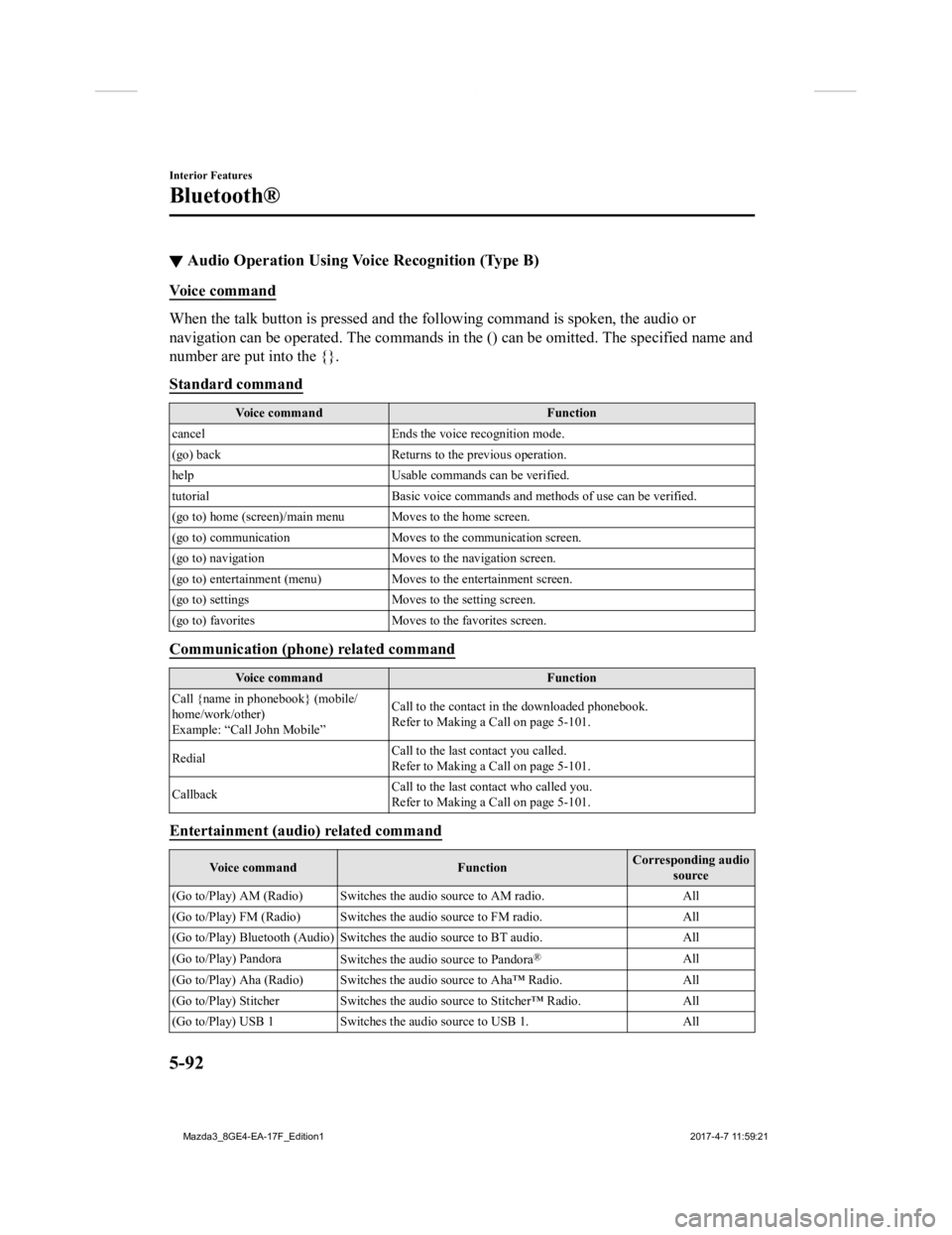
▼Audio Operation Using Voice Recognition (Type B)
Voice command
When the talk button is pressed and the following command is sp
oken, the audio or
navigation can be operated. The commands in the () can be omitt ed. The specified name and
number are put into the {}.
Standard command
Voice command Function
cancel Ends the voice recognition mode.
(go) back Returns to the previous operation.
help Usable commands can be verified.
tutorial Basic voice commands and methods of use can be verified .
(go to) home (screen)/main men u Moves to the home screen.
(go to) communication Moves to the communication screen.
(go to) navigation Moves to the navigation screen.
(go to) entertainment (menu) Moves to the entertainment screen.
(go to) settings Moves to the setting screen.
(go to) favorites Moves to the favorites screen.
Communication (phone) related command
Voice command Function
Call {name in phonebook} (mobile/
home/work/other)
Example: “Call John Mobile” Call to the contact in th
e downloaded phonebook.
Refer to Making a Call on page 5-101.
Redial Call to the last contact you called.
Refer to Making a Call on page 5-101.
Callback Call to the last contact who called you.
Refer to Making a Call on page 5-101.
Entertainment (audio) related command
Voice command
FunctionCorresponding audio
source
(Go to/Play) AM (Radio ) Switches the audio source to AM radio. All
(Go to/Play) FM (Radio ) Switches the audio source to FM radio. All
(Go to/Play) Bluetooth (Audio) Switches the audio source to BT a udio.All
(Go to/Play) Pandora Switches the audio source to Pandora
®All
(Go to/Play) Aha (Radio) Switches the audio source to Aha™ Radio.A ll
(Go to/Play) Stitcher Switches th e audio source to Stitcher™ Radio.All
(Go to/Play) USB 1 Switches the audio source to USB 1. All
Interior Features
Bluetooth®
5-92
Mazda3_8GE4-EA-17F_Edition1 2017-4-7 11:59:21
Page 384 of 624

Bluetooth® Hands-Free
(Type A)
*
▼ Making a Call
Phonebook Usage
Telephone calls can be made by saying the
name of a person (voice tag) whose phone
number has been registered in Bluetooth
®
Hands-Free in advance. Refer to
Phonebook registration.
1. Press the pick-up
button or talk button
with a short press.
2. Say: [Beep] “Call”
3. Prompt: “Name please.”
4. Say: [Beep] “XXXXX... (Ex. “John's
phone”)” (Say a voice tag registered in
the phonebook.)
5. Prompt: “Calling XXXXX... (Ex.
“John's phone”) XXXX (Ex. “at
home”). Is this correct?” (Voice tag
and phone number location registered
in phonebook).
6. Say: [Beep] “Yes”
7. Prompt: “Dialing”
NOTE
The “Call” command and the voice tag
can be combined.
Ex. In Step 2, say, “Call John's phone”,
then, Steps 3 and 4 can be skipped.
Phonebook registration
Phone numbers can be registered to the
Bluetooth
® Hands-Free phonebook.
NOTE
Do this function only when parked. It is
too distracting to attempt while driving
and you may make too many errors to be
effective.
1. Press the pick-up button or talk button
with a short press.
2. Say: [Beep] “Phonebook”
3. Prompt: “Select one of the following:
New entry, edit, l ist names, delete,
erase all or import contact.”
4. Say: [Beep] “New entry”
5. Prompt: “Name please.”
6. Say: [Beep] “XXXXX... (Ex. “Mary's
phone”)” (Say a voice tag for the name
registered.)
7. Prompt: “Adding XXXXX... (Ex.
“Mary's phone”) (Registered voice
tag). Is this correct?”
8. Say: [Beep] “Yes”
9. Prompt: “Home, Work, Mobile, or
Other?”
10. Say: [Beep] “Mobile” (Say “Home” ,
“Work”, “Mobile”, or “Other”, for the
desired location to be registered.)
11. Prompt: “Mobile (Location to be
registered). Is this correct?”
12. Say: [Beep] “Yes”
13. Prompt: “Number, please.”
14. Say: [Beep] “XXXXXXXXXXX”
(Say the phone number to be
registered.)
15. Prompt: “XXXXXXXXXXX (Phone
number registration). After the beep,
continue to add numbers, or say
Go-Back to re-enter the last entered
numbers, or press the Pick-Up button
to save the number.”
Interior Features
Bluetooth®
5-94*Some models.
Mazda3_8GE4-EA-17F_Edition1 2017-4-7 11:59:21
Page 385 of 624

16.(Registration)
Press the pick-up button or say
“Enter”, then go to Step 17.
(Adding/inputting telephone
number)
Say, “XXXX” (desired telephone
number), then go to Step 15.
(Telephone number correction)
Say, “Go Back”. The prompt replies,
“Go Back. The last entered numbers
have been removed.”. Then go back to
Step 13.
17. Prompt: “Number saved. Would you
like to add another number for this
entry?”
18. Say: [Beep] “Yes” or “No”.
19. If “Yes”, an additional phone number registration can be made for the same
entry.
If “No”, the system returns to standby
status.
(Import contact)
Phonebook data from your device (Mobile
phone) can be sent and registered to your
Bluetooth
® Hands-Free phonebook using
Bluetooth
®.
1. Press the pick-up button or talk button
with a short press.
2. Say: [Beep] “Phonebook”
3. Prompt: “Select one of the following:
New entry, edit, l ist names, delete,
erase all or import contact.”
4. Say: [Beep] “Import contact”
5. Prompt: “The hands free System is
ready to receive a contact from a
phone. Only a hom e, a work, and a
mobile number can be imported, This
process requires operation of a mobile
phone. refer to the phone's manual for
more information”
6. Device (Mobile phone) operation: Select one entry from the phonebook
and send it using Bluetooth
®.
7. Prompt: “X (Number of locations
which include data) numbers have
been imported. What name would you
like to use for these numbers?”
8. Say: [Beep] “XXXXX... (Ex. “Mary's
phone”)” (Say a voice tag for the name
registered.)
9. Prompt: “Adding XXXXX... (Ex.
“Mary's phone”) (Voice tag). Is this
correct?”
10. Say: [Beep] “Yes”
11. Prompt: “Number saved. Would you
like to import another contact?”
12. Say: [Beep] “Yes” or “No”
13. If “Yes”, the procedure proceeds to Step 5.
If “No”, the system returns to standby
status.
Editing phonebook
The data registere d to the Bluetooth
®
Hands-Free phonebook can be edited.
NOTE
Do this function only when parked. It is
too distracting to attempt while driving
and you may make too many errors to be
effective.
1. Press the pick-up button or talk button
with a short press.
2. Say: [Beep] “Phonebook”
3. Prompt: “Select one of the following:
New entry, edit, list names, delete,
erase all or import contact.”
4. Say: [Beep] “Edit”
5. Prompt: “Please say the name of the
entry you would like to edit or say,
“List names”.”
Interior Features
Bluetooth®
5-95
Mazda3_8GE4-EA-17F_Edition1 2017-4-7 11:59:21
Page 386 of 624
![MAZDA MODEL 3 4-DOOR 2018 Owners Manual 6.Say: [Beep] “XXXXX ... (Ex. “Mary's
phone”)” (Say the voice tag for the
registered name to be edited in the
phonebook.)
7. Prompt: “Home, Work, Mobile, or
Other?”
8. Say: [Beep] â](/img/28/40990/w960_40990-385.png "MAZDA MODEL 3 4-DOOR 2018 Owners Manual 6.Say: [Beep] “XXXXX ... (Ex. “Mary's
phone”)” (Say the voice tag for the
registered name to be edited in the
phonebook.)
7. Prompt: “Home, Work, Mobile, or
Other?”
8. Say: [Beep] â")
6.Say: [Beep] “XXXXX ... (Ex. “Mary's
phone”)” (Say the voice tag for the
registered name to be edited in the
phonebook.)
7. Prompt: “Home, Work, Mobile, or
Other?”
8. Say: [Beep] “Home” (Say the
registered location to be edited:
“Home”, “Work”, “Mobile”, or
“Other”.)
9. Prompt: “XXXXX... (Ex. “Mary's
phone”) (Registered voice tag) XXXX
(Ex. “Home”) (Registered location). Is
this correct?”
10. Say: [Beep] “Yes”
11. Prompt: “The current number is
XXXXXXXXXXX (Ex. “555-1234”)
(Currently registered number). New
number, please.”
NOTE
If there was no previous phone number
registered to a location (Ex. “Work”),
the prompt will only read out
“Number, please”
12. Say: [Beep] “XXXXXXXXXXX (Ex.
“555-5678”)” (Say the new phone
number to be registered.)
13. Prompt: “XXXXXXXX (Telephone
number) After the beep, continue to
add numbers, or say Go-Back to
re-enter the last entered numbers, or
press the Pick-Up button to save the
number.”
14. (Number Change)
Press the pick-up button, then go to
Step 15.
(Adding/inputting telephone
number)
Say, “XXXX” (desired telephone
number), then go to Step 13.
(Telephone number correction)
Say, “Go Back”. The prompt replies,
“Go Back. The last entered numbers
have been removed. Number, please.”.
Then go back to Step 12.
15. Prompt: “Number changed.”
Phonebook data deletion
(Erasing individual phonebook data)
Individual data registered to the
Bluetooth
® Hands-Free phonebook can be
cleared.
NOTE
Do this function only when parked. It is
too distracting to attempt while driving
and you may make too many errors to be
effective.
1. Press the pick-up button or talk button
with a short press.
2. Say: [Beep] “Phonebook”
3. Prompt: “Select one of the following:
New entry, edit, l ist names, delete,
erase all or import contact.”
4. Say: [Beep] “Delete”
5. Prompt: “Please say t he name of the
entry you would like to delete or say,
“List names”. ”
6. Say: [Beep] “XXXXX... (Ex. “John's
phone”) ” (Say the registered voice tag
to be deleted from the phonebook.)
Interior Features
Bluetooth®
5-96
Mazda3_8GE4-EA-17F_Edition1 2017-4-7 11:59:21