ignition MAZDA MODEL 3 5-DOOR 2010 Manual Online
[x] Cancel search | Manufacturer: MAZDA, Model Year: 2010, Model line: MODEL 3 5-DOOR, Model: MAZDA MODEL 3 5-DOOR 2010Pages: 504, PDF Size: 5.62 MB
Page 226 of 504

Black plate (226,1)
CAUTION
ØDo not shade the rain sensor by
adhering a sticker or a label on
the windshield. Otherwise the rain
sensor will not operate correctly.
Rain sensor
ØWhen the wiper lever is in the
AUTO position and the ignition is
switched ON, the wipers may
move automatically in the
following cases:
ØIf the windshield above the rain
sensor is touched.
ØIf the windshield above the rain
sensor is wiped with a cloth.
ØIf the windshield is struck with
a hand or other object.
ØIf the rain sensor is struck with
a hand or other object from
inside the vehicle.
Keep hands and scrapers clear of
the windshield when the wiper
lever is in the AUTO position and
the ignition is switched ON as
fingers could be pinched or the
wipers and wiper blades damaged
when the wipers activate
automatically.
If you are going to clean the
windshield, be sure the wipers are
turned off completely - this is
particularly important when
clearing ice and snow - when it is
particularly tempting to leave the
engine running.
5-66
Driving Your Mazda
Switches and Controls
Mazda3_8BG3-EA-09J_Edition2 Page226
Tuesday, December 8 2009 1:29 PM
Form No.8BG3-EA-09J
Page 228 of 504
Black plate (228,1)
Rear Window Wiper and
Washer (5 Door)
The ignition must be switched ON.
qRear Window Wiper
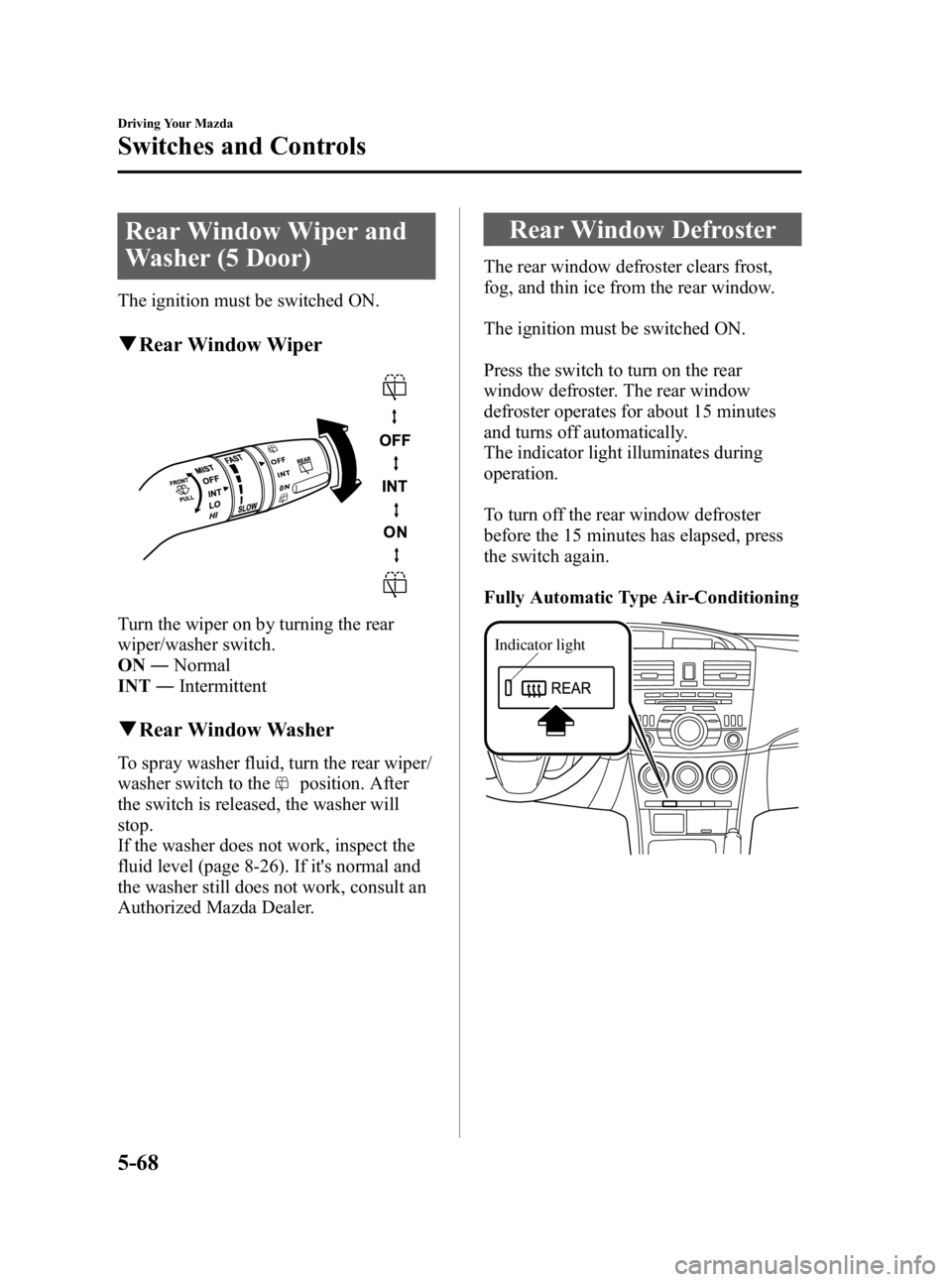
Turn the wiper on by turning the rear
wiper/washer switch.
ON ―Normal
INT ―Intermittent
qRear Window Washer
To spray washer fluid, turn the rear wiper/
washer switch to the
position. After
the switch is released, the washer will
stop.
If the washer does not work, inspect the
fluid level (page 8-26). If it's normal and
the washer still does not work, consult an
Authorized Mazda Dealer.
Rear Window Defroster
The rear window defroster clears frost,
fog, and thin ice from the rear window.
The ignition must be switched ON.
Press the switch to turn on the rear
window defroster. The rear window
defroster operates for about 15 minutes
and turns off automatically.
The indicator light illuminates during
operation.
To turn off the rear window defroster
before the 15 minutes has elapsed, press
the switch again.
Fully Automatic Type Air-Conditioning
Indicator light
5-68
Driving Your Mazda
Switches and Controls
Mazda3_8BG3-EA-09J_Edition2 Page228
Tuesday, December 8 2009 1:29 PM
Form No.8BG3-EA-09J
Page 229 of 504
Black plate (229,1)
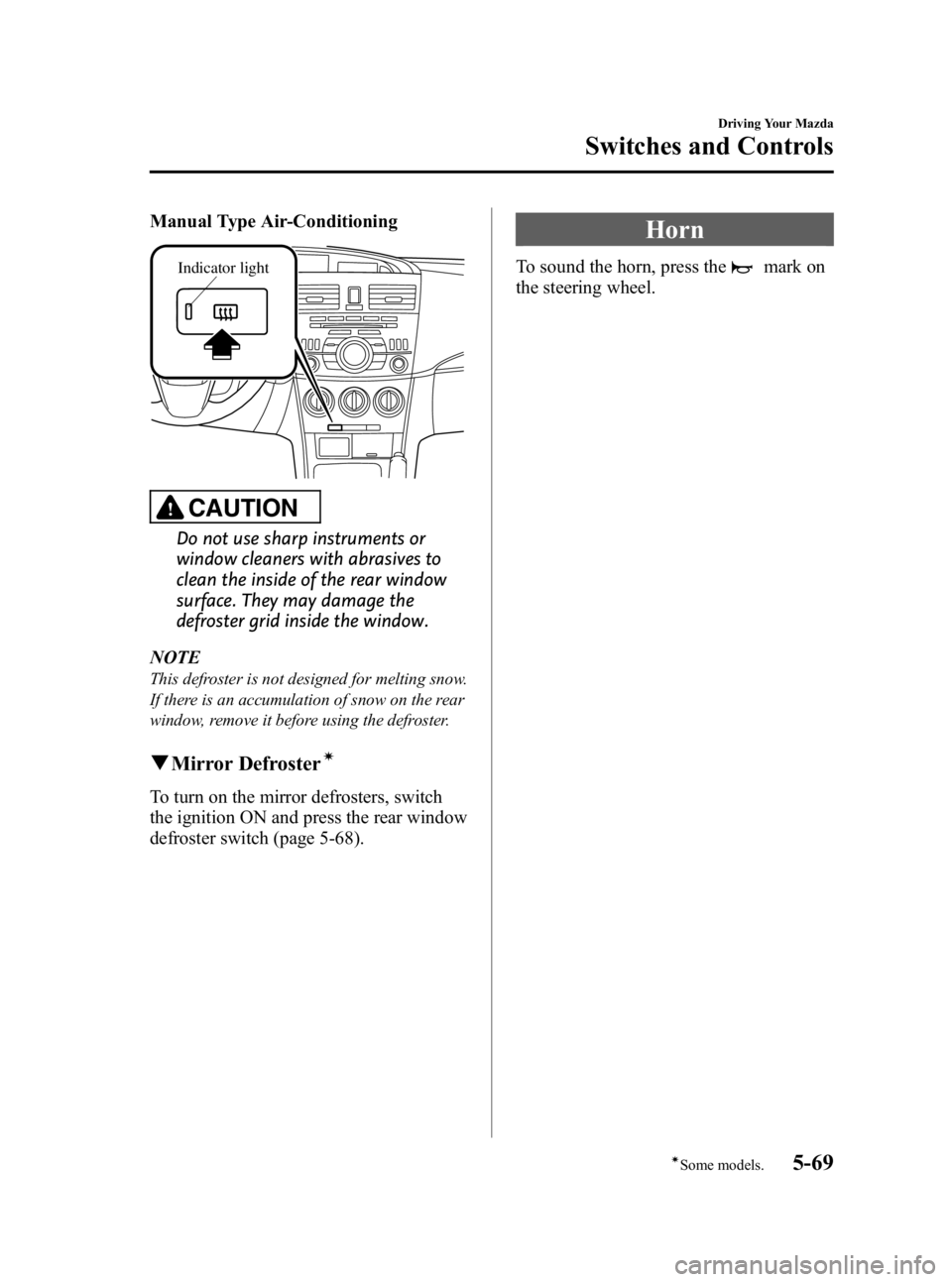
Manual Type Air-Conditioning
Indicator light
CAUTION
Do not use sharp instruments or
window cleaners with abrasives to
clean the inside of the rear window
surface. They may damage the
defroster grid inside the window.
NOTE
This defroster is not designed for melting snow.
If there is an accumulation of snow on the rear
window, remove it before using the defroster.
q Mirror Defrosterí
To turn on the mirror defrosters, switch
the ignition ON and press the rear window
defroster switch (page 5-68).
Horn
To sound the horn, press themark on
the steering wheel.
Driving Your Mazda
Switches and Controls
5-69íSome models.
Mazda3_8BG3-EA-09J_Edition2 Page229
Tuesday, December 8 2009 1:29 PM
Form No.8BG3-EA-09J
Page 232 of 504
Black plate (232,1)
Operating Tips
qOperating the Climate Control
System
Operate the climate control system with
the engine running.
NOTE
To prevent the battery from being discharged,
do not leave the fan control dial on for a long
period of time with the ignition in ON when the
engine is not running.
qClearing the Air Inlet
Clear all obstructions such as leaves,
snow and ice from the hood and the air
inlet in the cowl grille to improve the
system efficiency.
qFoggy Windows
The windows may fog up easily in humid
weather. Use the climate control system to
defog the windows.
To help defog the windows, operate the
air conditioner to dehumidify the air.
NOTE
The air conditioner may be used along with the
heater to dehumidify the air.
qParking in Direct Sunlight
If the vehicle has been parked in direct
sunlight during hot weather, open the
windows to let warm air escape, then run
the climate control system.
qNot Using for a Long Period
Run the air conditioner about 10 minutes
at least once a month to keep internal
parts lubricated.
qCheck the Refrigerant before the
Weather Gets Hot
Have the air conditioner checked before
the weather gets hot. Lack of refrigerant
may make the air conditioner less
efficient. Consult an Authorized Mazda
Dealer for refrigerant inspection.
The air conditioner is filled with
HFC134a (R134a), a refrigerant that will
not damage the ozone layer.
If the air conditioner is low on refrigerant
or has a malfunction, consult an
Authorized Mazda Dealer.
qReplacement of the Cabin Air
Filterí
If your vehicle is equipped with an air
filter for the air conditioner, it is necessary
to change the filter periodically as
indicated in scheduled maintenance (page
8-3). Consult an Authorized Mazda
Dealer for replacement of the cabin air
filter.
6-2
Interior Comfort
íSome models.
Climate Control System
Mazda3_8BG3-EA-09J_Edition2 Page232
Tuesday, December 8 2009 1:29 PM
Form No.8BG3-EA-09J
Page 258 of 504

Black plate (258,1)
qPower/Volume/Sound Controls
Power/Volume dial Audio control dial
Power ON/OFF
Switch the ignition to ACC or ON.
Press the power/volume dial to turn the
audio system on.
Press the power/volume dial again to turn
the audio system off.
NOTE
To prevent the battery from being discharged,
do not leave the audio system on for a long
period of time when the engine is not running.
Volume adjustment
To adjust the volume, turn the power/
volume dial.
Turn the power/volume dial to the right to
increase volume, to the left to decrease it.
Audio sound adjustment
1. Press the audio control dial to select the
function. The selected function will be
indicated.
6-28
Interior Comfort
Audio System
Mazda3_8BG3-EA-09J_Edition2 Page258
Tuesday, December 8 2009 1:29 PM
Form No.8BG3-EA-09J
Page 261 of 504

Black plate (261,1)
*AudioPilot®2 (Bose®Sound System-
equipped model)
AudioPilot
®2 automatically adjusts audio
volume and sound quality in accordance
with the level of noise entering the vehicle
interior while driving. When AudioPilot
®
2 is turned on, the system automatically
calculates the conditions for optimum
hearing of sound which may be difficult
to hear depending on exterior noise.
* AudioPilot
®2 is a registered trademark
of Bose Corporation.
*Centerpoint®(Bose®Sound System-
equipped model)
Centerpoint
®offers you the experience of
5.1-channel surround sound in your
vehicle even with your conventional 2-
channel stereo CDs.
Centerpoint
®can be set on or off.
NOTE
lCenterpoint®operates optimally with a 2-
channel stereo CD. MP3 audio files can be
played, however, MP3 audio files encoded
with high compression may result in poor
sound quality.
lCenterpoint®is available for 2-channel
stereo audio except for AM radio/FM radio/
SIRIUS digital satellite radio/AUX/BT
audio.
* Centerpoint®is a registered trademark
of Bose Corporation.
BEEP setting
The beep-sound when operating the audio
system can be set on or off.
ILLM EFT setting (Illumination setting
during operation)
The audio system illumination during
operation can be set on or off.
Welcome modeí
The welcome mode provides the
following presentation:
Sound is heard when the ignition is turned
on.
BT SETUP modeí
Music and other audio such as voice data
recorded on portable audio devices and
mobile phones available on the market
which are equipped with the Bluetooth
transmission function can be listened to
via wireless transmission over the
vehicle's speakers. Using the BT SETUP
mode, these devices can be programmed
to the Bluetooth unit or changed. For
details, refer to Bluetooth audio (page
6-62).
Interior Comfort
Audio System
6-31íSome models.
Mazda3_8BG3-EA-09J_Edition2 Page261
Tuesday, December 8 2009 1:29 PM
Form No.8BG3-EA-09J
Page 267 of 504

Black plate (267,1)
Every time the satellite button is pressed,
the bank changes in the order shown
below.
SR2
SR1
SR3
NOTE
SR1, SR2 and SR3: six stations can be stored
in each bank for convenient access to your
favorite stations.
Operation in the initial state
It may take some time to start up the
equipment when it is in the initial state,
when there is a change in the user's
subscription condition, or when the
SIRIUS channel map is changed.
“UPDATING xx% ”is displayed when the
SIRIUS channel map is changed. If the
unit is initialized or the user contract
content is changed, “UPDATING ”is
displayed. Updating could take as long as
three minutes depending on the
geographical area. When the unit is in an
initialized state, channel 184 is displayed
after the display indicates
“ UPDATING 100% ”. If the SIRIUS
channel map or the user contract content
is changed, the channel prior to the
change is displayed after “UPDATING ”is
displayed. After the initialization display,
it may take as long as 12 seconds to
receive channel 184. NOTE
Do not perform the following operation while
“
UPDATING ”is displayed. Otherwise, the
updating procedure will be cancelled.
lTurning off the audio powerlSwitching to other modeslSwitching the ignition off
When the SIRIUS mode is switched to
another mode, or when the power is
turned off, the present channel which is
being received is stored as the last
channel.
Channel selection
Turning the manual tuning dial allows you
to select the desired receiving channel.
lTurn the knob clockwise: Channel UplTurn the knob counterclockwise:
Channel Down
Unsubscribed channel
When a selected station has not been
subscribed to, the display indicates the
following:
After the channel number is displayed,
[CALL
888] and [539SIRI]
(Flashes alternately) is displayed.
NOTE
When the subscription contract is canceled, all
of the channels including channel 184 appear
as unsubscribed.
Invalid channel
The display switches between [SR
(bank number)INVALID] and [SR
(bank number)CHANNEL] only
when a selected channel is not
broadcasting.
Interior Comfort
Audio System
6-37
Mazda3_8BG3-EA-09J_Edition2 Page267
Tuesday, December 8 2009 1:29 PM
Form No.8BG3-EA-09J
Page 281 of 504

Black plate (281,1)
2. Press the channel preset button for thedesired tray number while “WAIT ”is
displayed.
3. When “IN ”is displayed, insert the CD.
NOTE
The CD cannot be inserted to the desired tray
number if the number is already occupied.
Multiple insertion
1. Press and hold the load button (
)
for about 2 seconds until a beep sound
is heard.
2. When “IN ”is displayed, insert the CD.
3. When “IN ”is displayed again, insert
the next CD.
NOTE
The first-inserted CD will be played
automatically when:
lNo other CD is inserted within 15 seconds
after “IN ”is displayed.
lThe CD trays are full.
Displaying the CD-inserted tray
number
When you want to know the number for a
CD-inserted tray, press the display button
(
). The tray number will be displayed
for 5 seconds.
Ejecting the CD
Normal ejection
1. Press the CD eject button (
). The
disc number and “DISC OUT ”will be
displayed.
2. Pull out the CD.
NOTE
When the CD is ejected during play, the next
CD will be played automatically.
Ejecting CDs from desired tray number
1. Press and hold the CD eject button (
)
for about 2 seconds until a beep sound
is heard.
The “DISC OUT ”display flashes.
2. Press the channel preset button for the desired CD number for less than 5
seconds after the beep sound is heard.
3. Pull out the CD.
Multiple ejection
1. Press and hold the CD eject button (
)
for about 2 seconds until a beep sound
is heard.
The “DISC OUT ”display flashes.
2. Press the CD eject button (
) again
for less than 5 seconds after the beep
sound is heard.
NOTE
If the button is not pressed and about 5
seconds have elapsed while “DISC OUT ”is
flashing, CDs are automatically ejected.
3. Pull out the CD, then the next CD will be ejected.
NOTE
lCDs will be ejected starting with the one
with the lowest number.
lAll CDs in the tray will be ejected
continuously.
lCDs can be ejected when the ignition is
switched off. Press and hold the CD eject
button (
) for about 2 seconds and all
CDs will eject.
Playback
Press the CD play button (
) to start
play when a CD is in the unit.
If a CD is not in the unit when the CD
play button (
) is pressed, “NO DISC ”
will flash on and off.
Interior Comfort
Audio System
6-51
Mazda3_8BG3-EA-09J_Edition2 Page281
Tuesday, December 8 2009 1:29 PM
Form No.8BG3-EA-09J
Page 286 of 504

Black plate (286,1)
Audio Control Switch
Operation
í
When the audio unit is turned on,
operation of the audio unit from the
steering wheel is possible.
NOTE
Because the audio unit will be turned off under
the following conditions, the switches will be
inoperable.
lWhen the ignition is turned off (LOCK).lWhen the power button on the audio unit is
pressed and the audio unit is turned off.
Without Bluetooth Hands-Free
With Bluetooth Hands-Free
Talk buttonPick-up buttonTalk button
Hang-up button
Pick-up button
NOTElThe talk button, pick-up button, and hang-
up button are operable with the audio unit
turned off.
lMazda has installed this system to prevent
distraction while driving the vehicle and
using audio controls on the dashboard.
Always make safe driving your first priority.
q
Adjusting the Volume
To increase the volume, pull up the
volume switch.
To decrease the volume, press down the
volume switch.
Without Bluetooth Hands-Free
With Bluetooth Hands-Free
6-56
Interior Comfort
íSome models.
Audio System
Mazda3_8BG3-EA-09J_Edition2 Page286
Tuesday, December 8 2009 1:29 PM
Form No.8BG3-EA-09J
Page 288 of 504

Black plate (288,1)
When listening to the radio or SIRIUS
digital satellite radio
Pull up or press down the seek switch, the
radio switches to the next/previous stored
station in the order that it was stored
(1― 6).
Pull up or press down the seek switch for
about 2 seconds until a beep sound is
heard to seek all usable stations at a
higher or lower frequency whether
programmed or not.
When playing a CD or BT audio
Pull up the seek switch to skip to the next
track.
Press down the seek switch to repeat the
current track.
Pull up or press down and hold the seek
switch to continuously switch the tracks
up or down.
q Mute Switchí
Press the mute switch () once to mute
audio, press it again to resume audio
output.
NOTE
If the ignition is turned off (LOCK) with the
audio muted, the mute will be canceled.
Therefore, when the engine is restarted, the
audio is not muted. To mute the audio again,
press the mute switch (
).
Without Bluetooth Hands-Free
6-58
Interior Comfort
íSome models.
Audio System
Mazda3_8BG3-EA-09J_Edition2 Page288
Tuesday, December 8 2009 1:29 PM
Form No.8BG3-EA-09J