lock MAZDA MODEL 3 5-DOOR 2013 Owners Manual
[x] Cancel search | Manufacturer: MAZDA, Model Year: 2013, Model line: MODEL 3 5-DOOR, Model: MAZDA MODEL 3 5-DOOR 2013Pages: 610, PDF Size: 7.05 MB
Page 284 of 610
Black plate (284,1)
(Programming with“text ”display (e.g.
channel name))
1. Select the desired channel to be programmed. At this point, the
following is displayed:
[SR
(bank number)(selected text
(e.g. channel name))]
2. Keep pressing the channel preset button for 1.5 seconds or more.
The programming process is complete
after the text (e.g. channel name)
flashes. Then, [SR
(bank number)]
is displayed and you will hear beep
sound at the same time.
3. [SR
(bank number)CH
(preset number)(channel number)]
are displayed.
4. Three seconds later, it returns to normal display. [SR
(bank number)(text
(e.g. channel name))]
NOTE
Six stations can be stored in each bank, SR1,
SR2, and SR3 for convenient access to your
favorite stations.
Preset channel call-up
Press and release the channel preset
button,
[SR
(bank number)CH(preset
number)
(channel number)] appears.
When the preset button is pressed during
text mode, its channel number is
displayed first for three second and then
its text is displayed.
NOTE
In the initial setting, all channels are preset to
184.
Category change
Press the category button (
or) and
select the desired category.
lPress the category button ():
Category up
lPress the category button ():
Category down
Every time the category button (
)is
pressed, the category is changed over in
the order shown below.
At this time, the lowest (smallest-number)
channel within the category indicated is
received.
When the highest (or lowest) category is
reached, the category is changed over in
the order shown below.
Highest category →All categories →
Lowest category
NOTE
While all categories are selected, all channels
covering a category can be accessed
(Category off condition).
Channel selection within a category
If you are in a selected category and the
channel number is displayed, turning the
manual tuning dial moves the channel
number up/down in that category.
lTurn the manual tuning dial clockwise:
Channel Up
lTurn the manual tuning dial
counterclockwise: Channel Down
NOTE
The channel number needs to be indicated in
the display to use manual tuning dial for this
function.
6-44
Interior Comfort
Audio System
Mazda3_8CV6-EA-12H_Edition3 Page284
Thursday, February 28 2013 11:28 AM
Form No.8CV6-EA-12H
Page 285 of 610
Black plate (285,1)
Scan tuning
Press the scan button (
)to
automatically sample stations. Scanning
stops at each station for about five
seconds. To hold a station, press the scan
button (
) again during this interval.
NOTE
lUnsubscribed channels, invalid channels,
parental lock channels and channel 0 are
not subject to the scan, therefore these
channels will be skipped automatically.
lYou can scan all channels while all
categories are selected. If you are in a
selected category, you can only scan the
channels in that category.
Channel number, channel name,
category, artist, song titles and info
display
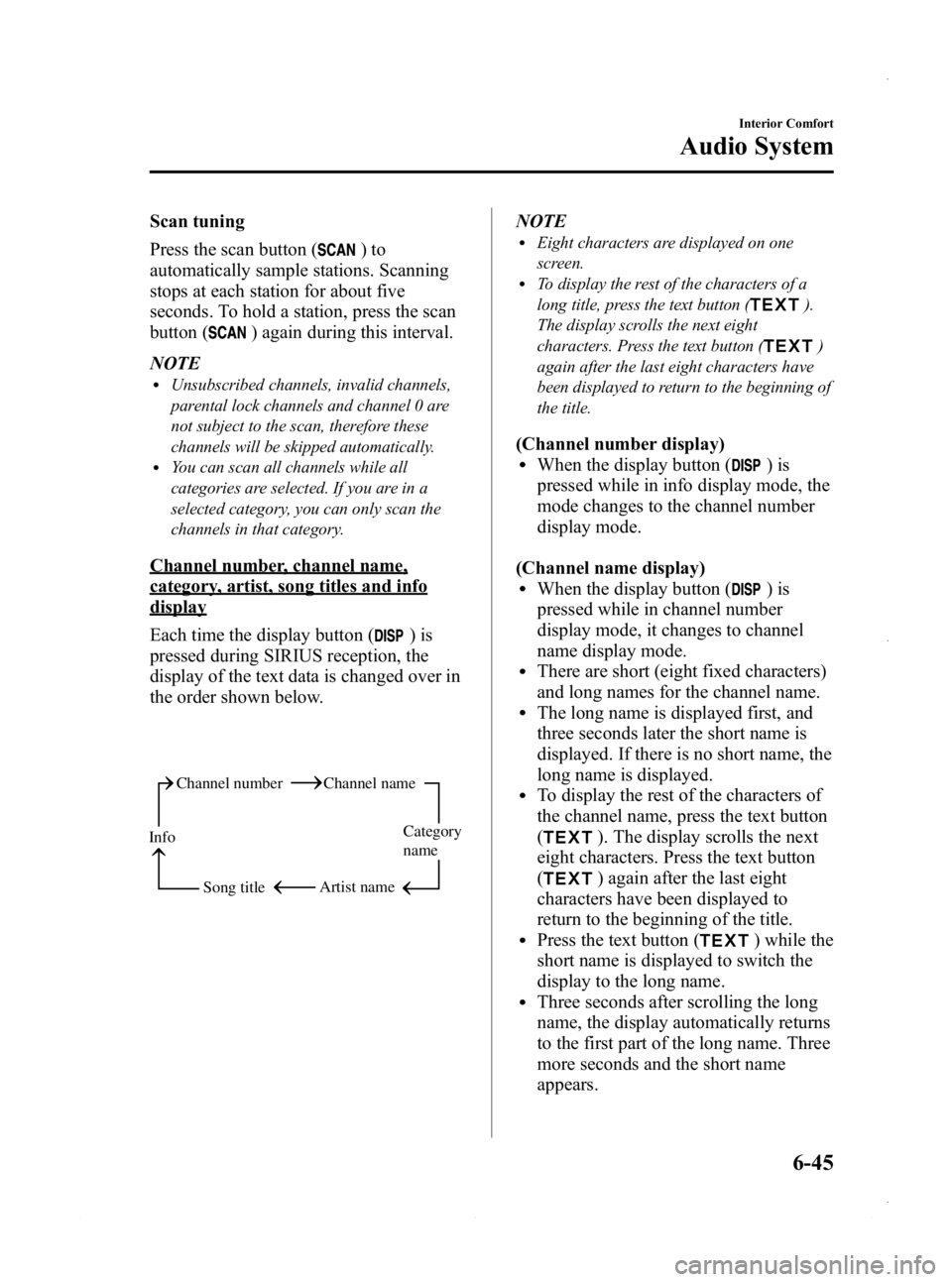
Each time the display button (
)is
pressed during SIRIUS reception, the
display of the text data is changed over in
the order shown below.
Channel number Channel name
Category
name
Artist name
Info
Song title
NOTElEight characters are displayed on one
screen.
lTo display the rest of the characters of a
long title, press the text button (
).
The display scrolls the next eight
characters. Press the text button (
)
again after the last eight characters have
been displayed to return to the beginning of
the title.
(Channel number display)lWhen the display button ()is
pressed while in info display mode, the
mode changes to the channel number
display mode.
(Channel name display)
lWhen the display button ()is
pressed while in channel number
display mode, it changes to channel
name display mode.
lThere are short (eight fixed characters)
and long names for the channel name.
lThe long name is displayed first, and
three seconds later the short name is
displayed. If there is no short name, the
long name is displayed.
lTo display the rest of the characters of
the channel name, press the text button
(
). The display scrolls the next
eight characters. Press the text button
(
) again after the last eight
characters have been displayed to
return to the beginning of the title.
lPress the text button () while the
short name is displayed to switch the
display to the long name.
lThree seconds after scrolling the long
name, the display automatically returns
to the first part of the long name. Three
more seconds and the short name
appears.
Interior Comfort
Audio System
6-45
Mazda3_8CV6-EA-12H_Edition3 Page285
Thursday, February 28 2013 11:28 AM
Form No.8CV6-EA-12H
Page 288 of 610
![MAZDA MODEL 3 5-DOOR 2013 Owners Manual Black plate (288,1)
6.“PIN CLEARED ”appears which
indicates that the master code input has
been completed.
7. The ID code is set to the default [0000] and the initialization process is
completed.](/img/28/41005/w960_41005-287.png "MAZDA MODEL 3 5-DOOR 2013 Owners Manual Black plate (288,1)
6.“PIN CLEARED ”appears which
indicates that the master code input has
been completed.
7. The ID code is set to the default [0000] and the initialization process is
completed.")
Black plate (288,1)
6.“PIN CLEARED ”appears which
indicates that the master code input has
been completed.
7. The ID code is set to the default [0000] and the initialization process is
completed.
NOTE
Master code:
The Master Code is used to initialize or re-
initialize the ID code in the event that the code
is not set to [0000] and/or the personalized ID
code is not known. The initialization process
resets the ID code to [0000]. The master code
can potentially defeat the intent of the security
of the parental lock if it is located by persons
not authorized by the owner to access certain
channels.
SIRIUS Satellite Radio Master Code: [0913]
NOTElWhen a numeric value other than the
master code is input and the auto memory
button or scan button (
) is pressed,
“ SR1 Err ”is displayed and then it returns
to the “SR1---- ”display again.
lIf an ID code is not input for ten seconds,
“Err ”is displayed and it returns to the
former display.
lChannel preset buttons 1, 2, 3, 4 and the
auto memory button or scan button (
)
are used for inputting the ID code. Buttons
5 and 6 cannot be used.
Change of ID code
Setting condition: SAT mode
When changing the ID code, the new ID
code is input after the previous one is
input first. NOTE
The scan button refers to the operation for an
In-dash CD changer-equipped vehicle, and the
auto memory button refers to the operation for
a CD player-equipped vehicle.
(Registered ID code input)
1. Press and hold the auto memory button
or scan button (
), then press
channel preset button 5. Hold both
buttons together for 1.5 seconds.
2. “ENTER PIN ”appears for three
seconds which indicates that it is in
code input mode.
3. “SR1 - - - - ”appears, which indicates
that it is ready for code input.
4. Input the registered ID code using channel preset buttons 1-4.
Example: When the registered ID code
is“2323 ”, input “2323 ”. At this time
“ SR1 2323 ”is displayed.
Press 1 for the first digit, 2 for the
second, 3 for the third, and 4 for the
last digit. For example, if your number
is 2323, press 1 three times (includes
0), 2 four times, 3 three times, and 4
four times. If the display goes off while
inputting, begin from Step 1.
NOTE
The registered ID code is the default [0000] at
the time of factory shipment. If [0000] results
in “Err ”on the display, go to the
“ INITIALIZATION OF ID CODE” section to
reset to [0000].
(Verification with the registered ID
code)
5. Determine the input code by pressing the auto memory button or scan button
(
).
6-48
Interior Comfort
Audio System
Mazda3_8CV6-EA-12H_Edition3 Page288
Thursday, February 28 2013 11:29 AM
Form No.8CV6-EA-12H
Page 289 of 610
Black plate (289,1)
6. If it does not match with the previouslyregistered code, “SR1 Err ”is displayed
and then it returns to “SR1 - - - - ”.
7. If it matches with the previously registered code, “ENTER PIN ”appears
again and it switches to code input
mode.
8. “SR1 - - - - ”appears, and it is ready for
input of the new ID code.
(New ID code input)
9. Input the new ID code using channel preset buttons 1-4.
Example: If “1234 ”is input as the new
code, “SR1 1234 ”is displayed.
(New ID code input determination)
10. Determine the new ID code which has been input by pressing the auto
memory button or scan button
(
).
11. “PIN CHANGED ”appears for three
seconds which indicates that the new
ID code input has been completed.
12. It returns to the former display.
NOTE
lIf an ID code is not input for ten seconds,
“ Err ”is displayed and it returns to the
former display.
lChannel preset buttons 1, 2, 3, 4 and the
auto memory button or scan button (
)
are used for input of the ID code. Buttons 5
and 6 cannot be used.
Individual channel locking
If a channel is locked, the channel is
muted. NOTE
lIf the registered ID code is forgotten, return
the ID code to the default [0000]. (See
“
INTIALIZATION OF ID CODE” section)
lThe scan button refers to the operation for
an In-dash CD changer-equipped vehicle,
and the auto memory button refers to the
operation for a CD player-equipped
vehicle.
(Locking a channel)
1. Select a channel to be locked by
turning the manual tuning dial.
Example: Select channel 100
(Registered ID code input preparation)
2. Press and hold the auto memory button or scan button (
), then press
channel preset button 6. Hold both
buttons together for 1.5 seconds.
3. “ENTER PIN ”appears for three
seconds which indicates that it is in
code input mode.
4. “SR1 - - - - ”appears which indicates
that it is ready for code input.
(Registered ID code input)
5. Input the registered ID code using channel preset buttons 1-4. Example: If
the registered ID code is “2323 ”, input
“ 2323 ”. At this time “SR1 2323 ”is
displayed.
(Registered ID code input
determination)
6. Determine the code which has been input by pressing the auto memory
button or scan button (
).
7. If it does not match the registered code, “SR1 Err ”is displayed and then it
returns to “SR1 - - - - ”.
Interior Comfort
Audio System
6-49
Mazda3_8CV6-EA-12H_Edition3 Page289
Thursday, February 28 2013 11:29 AM
Form No.8CV6-EA-12H
Page 290 of 610
Black plate (290,1)
8. If it matches the registered code,“SR1 LOCK ”appears for three
seconds which indicates that the code
input has been completed.
9. “SR1 LOCK 100 ”appears which
indicates that the parental lock is
activated. At this time, mute is on and
no sound is heard.
NOTE
lIf an ID code is not input for ten seconds,
“ Err ”is displayed and it returns to the
former display.
lChannel preset buttons 1, 2, 3, 4 and the
auto memory button or scan button (
)
are used for input of the ID code. Buttons 5
and 6 cannot be used.
Lock cancellation
Setting condition: SAT mode
NOTE
The scan button refers to the operation for an
In-dash CD changer-equipped vehicle, and the
auto memory button refers to the operation for
a CD player-equipped vehicle.
(Releasing a locked channel)
1. Select a channel to be released by turning the manual tuning dial.
Example: Select the locked channel
(i.e. 100). At this time,
“SR1 LOCK 100 ”is displayed.
(Registered ID code input preparation)
2. Press and hold the auto memory button or scan button (
), then press
channel preset button 6. Hold both
buttons together for 1.5 seconds.
3. “ENTER PIN ”appears for three
seconds which indicates that it is in
code input mode. 4.
“SR1 - - - - ”appears, which indicates
that it is ready for code input.
(Registered ID code input)
5. Input the registered ID code using channel preset buttons 1-4. Example:
When the registered ID code is “2323 ”,
input “2323 ”. At this time “SR1 2323 ”
is displayed.
NOTE
If “Err ”is displayed, go to the
“ INITIALIZATION OF ID CODE” section to
reset the ID code to [0000].
(Registered ID code input
determination)
6. Determine the input code by pressing the auto memory button or scan button
(
).
7. If it does not match the registered code, “SR1 Err ”is displayed and then it
returns to “SR1 - - - - ”.
8. If it matches the registered code, “SR1 UNLOCK ”appears for three
seconds which indicates that the code
input has been completed.
9. “SR1 100 ”appears which indicates that
the parental lock is off. At this time,
sound is heard.
NOTE
lIf an ID code is not input for ten seconds,
“ Err ”is displayed and it returns to the
former display.
lChannel preset buttons 1, 2, 3, 4 and the
auto memory button or scan button (
)
are used for input of the ID code. Buttons 5
and 6 cannot be used.
6-50
Interior Comfort
Audio System
Mazda3_8CV6-EA-12H_Edition3 Page290
Thursday, February 28 2013 11:29 AM
Form No.8CV6-EA-12H
Page 293 of 610
Black plate (293,1)
Fast-forward/Reverse
Press and hold the fast-forward button
(
) to advance through a track at high
speed.
Press and hold the reverse button (
)to
reverse through a track at high speed.
Track search
Press the track up button (
) or turn the
file dial clockwise once to skip forward to
the beginning of the next track.
Press the track down button (
) or turn
the file dial counterclockwise once to skip
back to the beginning of the current track.
Folder search (during MP3/WMA CD
playback)
To change to the previous folder, press the
folder down button (
), or press the
folder up button (
) to advance to the
next folder.
Music scan
During music CD playback
This function scans the titles on a CD and
plays 10 seconds of each song to aid you
in finding a song you want to listen to.
During MP3/WMA CD playback
This function scans the titles in a folder
currently being played and plays 10
seconds of each song to aid you in finding
a song you want to listen to.
Press the scan button (
) during
playback to start the scan play operation
(the track number will flash).
Press the scan button (
) again to
cancel scan playback.
NOTE
If the unit is left in scan, normal playback will
resume where scan was selected.
Repeat playback
During music CD playback
1. Press the repeat button (
) during
playback to play the current track
repeatedly. “RPT ”is displayed.
2. Press the button again to cancel the repeat playback.
During MP3/WMA CD playback
(Track repeat)
1. Press the repeat button (
) during
playback to play the current track
repeatedly. “TRACK RPT ”is
displayed.
2. To cancel the repeat playback, press the button again after 3 seconds.
(Folder repeat)
1. Press the repeat button (
) during
playback, and then press the button
again within 3 seconds to play the
tracks in the current folder repeatedly.
“ FOLDER RPT ”is displayed.
2. Press the button again to cancel the repeat playback.
Random playback
Tracks are randomly selected and played.
During music CD playback
1. Press the random button (
) during
playback to play the tracks on the CD
randomly. “RDM ”is displayed.
2. Press the button again to cancel the random playback.
Interior Comfort
Audio System
6-53
Mazda3_8CV6-EA-12H_Edition3 Page293
Thursday, February 28 2013 11:29 AM
Form No.8CV6-EA-12H
Page 298 of 610
Black plate (298,1)
Pause
To stop playback, press the Play/Pause
button (
).
Press the button again to resume
playback.
Fast-forward/Reverse
Press and hold the fast-forward button
(
) to advance through a track at high
speed.
Press and hold the reverse button (
)to
reverse through a track at high speed.
Track search
Press the track up button (
) or turn the
file dial clockwise once to skip forward to
the beginning of the next track.
Press the track down button (
) or turn
the file dial counterclockwise once to skip
back to the beginning of the current track.
Disc search
To change the disc, press the DISC button
(
or) during playback.
Folder search (during MP3/WMA CD
playback)
To change to the previous folder, press the
folder down button (
), or press the
folder up button (
) to advance to the
next folder.
Music scan
During music CD playback
This function scans the titles on a CD and
plays 10 seconds of each song to aid you
in finding a song you want to listen to.
During MP3/WMA CD playback
This function scans the titles in a folder
currently being played and plays 10
seconds of each song to aid you in finding
a song you want to listen to. Press the scan button (
) during
playback to start the scan play operation
(the track number will flash).
Press the scan button (
) again to
cancel scan playback.
NOTE
If the unit is left in scan, normal playback will
resume where scan was selected.
Repeat playback
During music CD playback
1. Press the repeat button (
) during
playback to play the current track
repeatedly. “RPT ”is displayed.
2. Press the button again to cancel the repeat playback.
During MP3/WMA CD playback
(Track repeat)
1. Press the repeat button (
) during
playback to play the current track
repeatedly. “TRACK RPT ”is
displayed.
2. To cancel the repeat playback, press the button again after 3 seconds.
(Folder repeat)
1. Press the repeat button (
) during
playback, and then press the button
again within 3 seconds to play the
tracks in the current folder repeatedly.
“ FOLDER RPT ”is displayed.
2. Press the button again to cancel the repeat playback.
Random playback
Tracks are randomly selected and played.
6-58
Interior Comfort
Audio System
Mazda3_8CV6-EA-12H_Edition3 Page298
Thursday, February 28 2013 11:29 AM
Form No.8CV6-EA-12H
Page 314 of 610
Black plate (314,1)
NOTE
Do not perform the following operation while
“Updating Channels XXX %” ,
“ Updating Receiver ”is displayed. Otherwise,
the updating procedure will be canceled.
lTurning off the audio powerlSwitching to other modeslSwitching the ignition off
When the SIRIUS mode is switched to
another mode, or when the power is
turned off, the present channel which is
being received is stored as the last
channel.
Channel up
Turn the manual tuning dial to the right or
press the seek up button (
).
Channel down
Turn the manual tuning dial to the left or
press the seek down button (
).
NOTE
The channel is continuously switched to the
next or previous channel while the seek tuning
button (
,) is continuously pressed.
Unsubscribed channel
When a channel which has been preset
becomes unsubscribed or the current
channel being listened to becomes
unsubscribed, the following is displayed:
“ Call 888-539-SIRIUS”
“ to subscribe ”
NOTE
When the subscription contract is canceled, all
of the channels including channel 184 appear
as unsubscribed.
Preset channel programming
1. Select the desired channel to be programmed. 2. Long-press any of the preset on-screen
buttons.
NOTE
Six stations can be stored in each bank,
SIRIUS1, SIRIUS2 and SIRIUS3 for
convenient access to your favorite stations.
Preset channel call-up
Touch the preset on-screen button for the
channel which you want to select.
NOTE
In the initial setting, all channels are preset to
184.
Selection from channel list
Receivable channels can be displayed on
the channel list screen. You can easily
select the channel you want to listen from
the list. Each category can be also
displayed.
1. Touch the
on-screen button.
2. Touch the channel you want to listen from the list.
NOTE
Currently available channels (including
parental locked channels) are all displayed in
the list.
(Select from category list)
1. Touch the
on-screen
button on the channel list screen.
2. Touch the category name which you want to select from the list.
NOTE
A category can be set only when a channel
which belongs to a category is being received.
6-74
Interior Comfort
Audio System
Mazda3_8CV6-EA-12H_Edition3 Page314
Thursday, February 28 2013 11:29 AM
Form No.8CV6-EA-12H
Page 315 of 610
Black plate (315,1)
Scan tuning
Touch the
on-screen button to
automatically sample stations. Scanning
stops at each station for about five
seconds.
To hold a station, touch the
on-
screen button again during this interval.
NOTE
Unsubscribed channels, invalid channels,
parental lock channels and channel 0 are not
subject to the scan, therefore these channels
will skip automatically.
Channel number, channel name,
category name, artist name, song titles
and information display
The information regarding the channel
which is currently being received is
displayed.
NOTE
If channels have not been subscribed to or
parental locked, the channel name, category
name, artist name, song title and information
is not displayed.
Display scroll
If a whole title cannot be displayed at one
time, touch the
on-screen button on
the right side of the title. When the last
character is displayed, touch the
on-
screen button to display the first character
of the title.
NOTE
Theon-screen button is displayed only if a
whole title cannot be displayed at one time.
Instant replay
This function allows you to rewind and
replay the program that you were
previously or are currently listening to. When the
on-screen button is
touched, playback starts from the
beginning of the current program.
When the
on-screen button is
touched twice, playback starts from the
beginning of the previous program.
Touch and hold the
on-screen
button to reverse the program while the
button is being pressed.
When the
on-screen button is
touched, playback starts from the
beginning of the next program.
When the
on-screen button is
touched while the last program is being
played, the instant replay mode is
canceled.
Touch and hold the
on-screen
button to fast-forward the program while
the button is being pressed.
When touching and holding the button
until the end of the program, the instant
replay mode is canceled.
Instant replay (PAUSE)
If the
on-screen button is touched,
instant replay mode is turned on in a
paused condition (PAUSE).
Touch the
on-screen button again
to resume playback from the point at
which it was paused.
Parental lock
Parental lock, parental unlock, parental
lock code change, and parental lock code
reset can be set.
Interior Comfort
Audio System
6-75
Mazda3_8CV6-EA-12H_Edition3 Page315
Thursday, February 28 2013 11:29 AM
Form No.8CV6-EA-12H
Page 316 of 610
Black plate (316,1)
NOTElTouch theon-screen button during
all the settings to return to the previous
display.
lTouch theon-screen button during the
code and master code input to delete an
input number.
lIf only a four-digit code or master code is
input, “Done ”can be selected.
lIf the registered code has been forgotten,
reset the code in “Initialize Parental Code ”
to [0000].
Parental lock
If a channel is locked, the channel is
muted.
1. Turn the manual tuning dial to select the desired channel.
2. Touch the
on-screen button to
display the settings screen.
3. Touch the
on-screen
button to display the parental lock
settings screen.
4. “Input Parental Code ”is displayed, and
input of the registered code is possible.
To enter a number, use the numerical
keypad.
5. After inputting the four digits, touch the
on-screen button to confirm
the four digits.
6. If the four digits match the registered code, “Channel XXX locked ”appears
and mute is turned on. If they do not
match the registered code,
“ Wrong code ”appears and then the
display returns to
“ Input Parental Code ”. Parental unlock
Channels locked using the parental lock
function can be unlocked.
1. Select a channel to be unlocked by
turning the manual tuning dial.
2. Touch the
on-screen button to
display the settings screen.
3. Touch the
on-screen
button to display the parental unlock
settings screen.
4. “Input Parental Code ”is displayed, and
input of the registered code is possible.
To enter a number, use the numerical
keypad.
5. After inputting the four digits, touch the
on-screen button to confirm
the four digits.
6. If the four digits match the registered code, “Channel XXX unlocked ”
appears and mute is canceled. If they
do not match the registered code,
“ Wrong code ”appears and then the
display returns to
“ Input Parental Code ”.
Parental-lock code change
When changing the code, the new code is
input after the previous one is input first.
1. Touch the
on-screen button to
display the settings screen.
2. Touch the
on-
screen button to display the code
change screen.
3. “Enter Current Code ”is displayed, and
input of the registered code is possible.
To enter a number, use the numerical
keypad.
6-76
Interior Comfort
Audio System
Mazda3_8CV6-EA-12H_Edition3 Page316
Thursday, February 28 2013 11:29 AM
Form No.8CV6-EA-12H