phone MAZDA MODEL 3 5-DOOR 2013 Owners Manual
[x] Cancel search | Manufacturer: MAZDA, Model Year: 2013, Model line: MODEL 3 5-DOOR, Model: MAZDA MODEL 3 5-DOOR 2013Pages: 610, PDF Size: 7.05 MB
Page 82 of 610
Black plate (82,1)
CAUTION
ØBecause the advanced key uses low-intensity radio waves, it may not function
correctly under the following conditions:
ØThe advanced key is carried with communication devices such as cellular
phones.
ØThe advanced key contacts or is covered by a metal object.
ØThe advanced key is near electronic devices such as personal computers or cell
phones.
ØNon-Mazda genuine electronic equipment is installed in the vehicle.
ØThere is equipment which discharges radio waves near the vehicle.
ØIf the vehicle is near equipment such as wireless pay devices installed at certain
gas stations.
Ø The advanced key may consume battery power excessively if it receives high-
intensity radio waves. Do not place the advanced key near electronic devices such
as televisions or personal computers.
Ø To avoid damage to the advanced key, DO NOT:
ØDrop the advanced key.
ØGet the advanced key wet.
ØDisassemble the advanced key.
ØExpose the advanced key to high temperatures on places such as the
dashboard or hood, under direct sunlight.
ØPlace heavy objects on the advanced key.
ØPut the advanced key in an ultrasonic cleaner.
ØPut any magnetized objects close to the advanced key.
NOTE
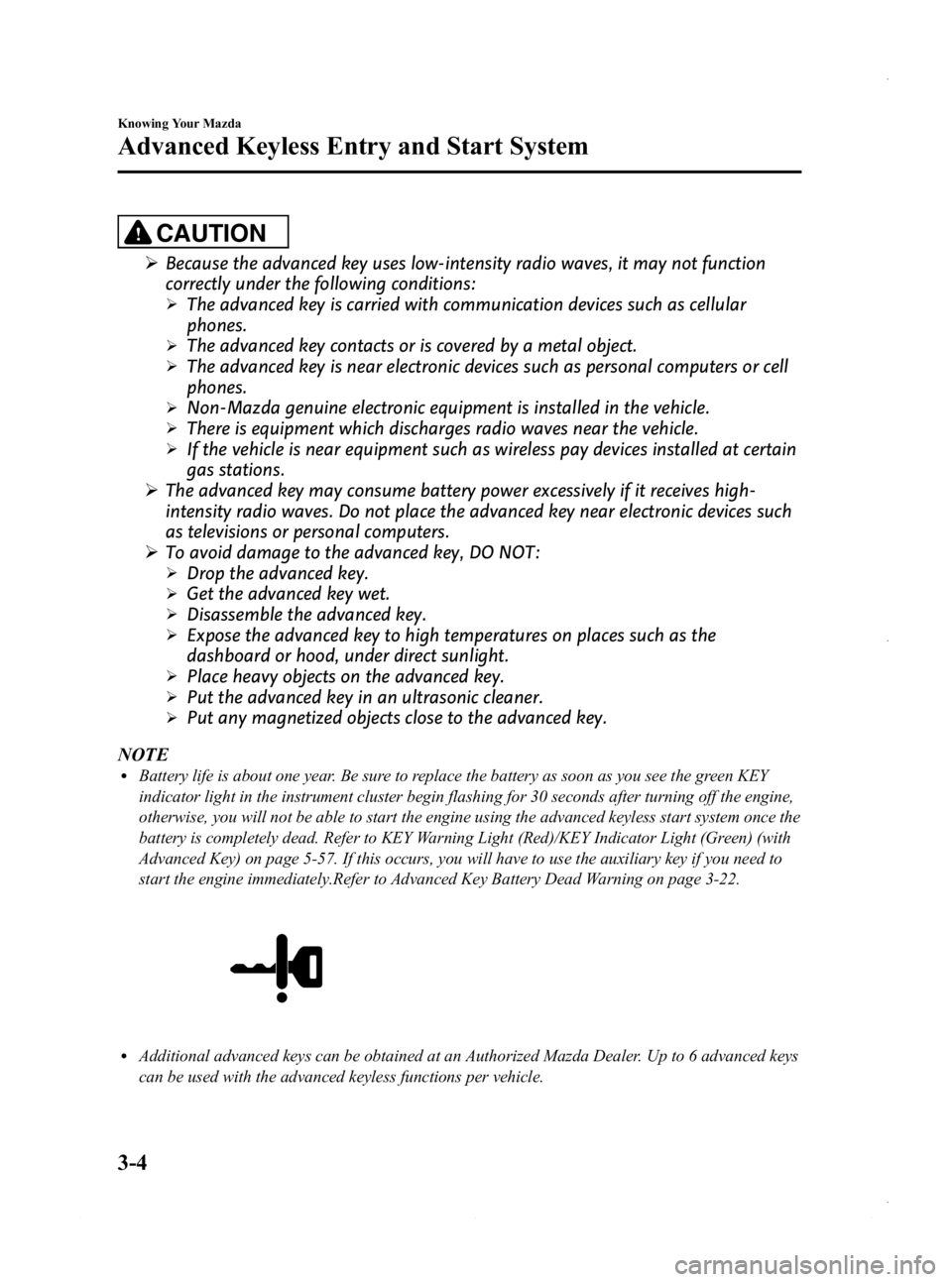
lBattery life is about one year. Be sure to replace the battery as soon as you see the green KEY
indicator light in the instrument cluster begin flashing for 30 seconds after turning off the engine,
otherwise, you will not be able to start the engine using the advanced keyless start system once the
battery is completely dead. Refer to KEY Warning Light (Red)/KEY Indicator Light (Green) (with
Advanced Key) on page 5-57. If this occurs, you will have to use the auxiliary key if you need to
start the engine immediately.Refer to Advanced Key Battery Dead Warning on page 3-22.
lAdditional advanced keys can be obtained at an Authorized Mazda Dealer. Up to 6 advanced keys
can be used with the advanced keyless functions per vehicle.
3-4
Knowing Your Mazda
Advanced Keyless Entry and Start System
Mazda3_8CV6-EA-12H_Edition3 Page82
Thursday, February 28 2013 11:26 AM
Form No.8CV6-EA-12H
Page 135 of 610

Black plate (135,1)
qOperation
Arming
The system is armed when the ignition is
switched from ON to ACC or OFF. The
security indicator light in the instrument
cluster flashes every 2 seconds until the
system is disarmed.
Disarming
The system is disarmed when the ignition
is switched ON with the registered
advanced key.
The security indicator light illuminates for
about 3 seconds and goes out.
If the engine does not start with the
correct advanced key, and the security
indicator light keeps illuminating or
flashing, the system may have a
malfunction. Consult an Authorized
Mazda Dealer. NOTE
lThe engine may not start and the security
indicator light may illuminate or flash if the
advanced key is placed in an area where it
is difficult for the system to detect the
signal, such as on the dashboard, or in the
glove box. Move the advanced key to
another place, switch the ignition off, and
then restart the engine.
lSignals from a TV or radio station, or from
a transceiver or a mobile telephone could
interfere with your immobilizer system. If
you are using the proper advanced key and
the engine fails to start, check the security
indicator light. If the indicator light is
flashing, switch the ignition to ACC or
switch the ignition off and wait for a while,
then restart the engine. If it does not start
after 3 or more tries, contact an Authorized
Mazda Dealer.
lIf the security indicator light flashes
continuously while you are driving, do not
shut off the engine. Go to an Authorized
Mazda Dealer and have it checked. If the
engine is shut off while the indicator light is
flashing, you will not be able to restart it.
lSince the electronic codes are reset when
repairing the immobilizer system, the
advanced key (including auxiliary key) are
needed. Bring all the advanced keys
(including auxiliary keys) to an Authorized
Mazda Dealer.
Knowing Your Mazda
Security System
3-57
Mazda3_8CV6-EA-12H_Edition3 Page135
Thursday, February 28 2013 11:27 AM
Form No.8CV6-EA-12H
Page 139 of 610

Black plate (139,1)
qOperation
Arming
The system is armed when the ignition is
switched from ON to ACC or OFF.
The security indicator light in the
instrument cluster flashes every two
seconds until the system is disarmed.
Disarming
The system is disarmed when the ignition
is switched ON with the correct ignition
key.
The security indicator light illuminates for
about three seconds and goes out.
If the engine does not start with the
correct ignition key, and the security
indicator light keeps illuminating or
flashing, the system may have a
malfunction. Consult an Authorized
Mazda Dealer. NOTE
lIf the security indicator light illuminates
and stays on or flashes when the ignition is
switched ON, the engine will not start.
lSignals from a TV or radio station, or from
a transceiver or a mobile telephone, could
interfere with your immobilizer system. If
you are using the proper key and your
engine fails to start, check the security
indicator light. If it is flashing, remove the
ignition key and wait 2 seconds or more,
then reinsert it and try starting the engine
again. If it does not start after 3 or more
tries, contact an Authorized Mazda Dealer.
lIf the security indicator light flashes
continuously while you are driving, do not
shut off the engine. Go to an Authorized
Mazda Dealer and have it checked. If you
shut off the engine while the light is
flashing you will not be able to restart it.
lSince the electronic codes are reset when
repairing the immobilizer system, the keys
are needed. Bring all the existing keys to an
Authorized Mazda Dealer.
q
Modification and Add-On
Equipment
Mazda cannot guarantee the immobilizer
system's operation if the system has been
modified or if any add-on equipment has
been installed.
CAUTION
To avoid damage to your vehicle, do
not modify the system or install any
add-on equipment to the immobilizer
system or the vehicle.
Knowing Your Mazda
Security System
3-61
Mazda3_8CV6-EA-12H_Edition3 Page139
Thursday, February 28 2013 11:27 AM
Form No.8CV6-EA-12H
Page 257 of 610
Black plate (257,1)
NOTE
When leaving your vehicle unattended, we
recommend that you remove the antenna and
store it inside the vehicle.Operating Tips for Audio
System
WARNING
Do not adjust the audio control
switches while driving the vehicle:Adjusting the audio while driving the
vehicle is dangerous as it could
distract your attention from the
vehicle operation which could lead to
a serious accident. Always adjust the
audio while the vehicle is stopped.
Even if the audio control switches are
equipped on the steering wheel, learn
to use the switches without looking
down at them so that you can keep
your maximum attention on the road
while driving the vehicle.
CAUTION
For the purposes of safe driving,
adjust the audio volume to a level
that allows you to hear sounds
outside of the vehicle including car
horns and particularly emergency
vehicle sirens.
NOTE
lTo prevent the battery from being
discharged, do not leave the audio system
on for a long period of time when the
engine is not running.
lIf a cellular phone or CB radio is used in
or near the vehicle, it could cause noise to
occur from the audio system, however, this
does not indicate that the system has been
damaged.
Interior Comfort
Audio System
6-17
Mazda3_8CV6-EA-12H_Edition3 Page257
Thursday, February 28 2013 11:28 AM
Form No.8CV6-EA-12H
Page 268 of 610
Black plate (268,1)
CAUTION
This unit plays files with the file
extension (.aac/.m4a) as an AAC file.
Do not use the AAC file extension for
files other than AAC files. Otherwise,
it could result in noise or a
malfunction.
lAAC files written under specifications
other than the indicated specification
may not play normally or files or folder
names may not display correctly.
lThe file extension may not be provided
depending on the computer operating
system, version, software, or settings.
In this case, add the file extension
“.mp4 ”or “.m4a” to the end of the file
name, and then write it to the memory.
q Operating Tips for iPod
This unit supports playback of music files
recorded to an iPod.
liPod is a trademark of Apple Inc.,
registered in the U.S. and other
countries.
liPod classic is a trademark of Apple
Inc., registered in the U.S. and other
countries.
liPod nano is a trademark of Apple Inc.,
registered in the U.S. and other
countries.
liPod touch is a trademark of Apple
Inc., registered in the U.S. and other
countries.
liPhone is a trademark of Apple Inc.,
registered in the U.S. and other
countries.
Connectable iPods are as follows:
(Type A)
liPod: 5G
liPod classicliPod nano: 1/2/3/4/5/6GliPod touch*1: 1/2/3/4GliPhone*1: iPhone/3G/3GS/4
*1 Only iPod function
(Type B)
liPod classicliPod nano: 4/5/6GliPod touch*1: 2/3/4GliPhone*1: 3GS/4/4S
*1 Only iPod function
CAUTION
Ø Remove the iPod when it is not in
use. Because the iPod is not
designed to withstand excessive
changes in temperature inside the
cabin, it could be damaged or the
battery may deteriorate due to the
excessive temperature or humidity
inside the cabin if it is left in the
vehicle.
Ø If data in the iPod is lost while it is
connected to the unit, Mazda
cannot guarantee recovery of any
lost data.
Ø If the iPod battery is deteriorated,
the iPod may not recharge and
playback may not be possible
when it is connected to the unit.
Replace the iPod battery
immediately.
Ø Be careful not to pinch the iPod
connecting cable when opening/
closing the center console.
Ø For the details on using the iPod,
refer to the iPod instruction
manual.
Ø When connecting the iPod to a
USB port, all commands are made
from the audio unit. iPod control is
not possible.
6-28
Interior Comfort
Audio System
Mazda3_8CV6-EA-12H_Edition3 Page268
Thursday, February 28 2013 11:28 AM
Form No.8CV6-EA-12H
Page 277 of 610

Black plate (277,1)
AudioPilot®2*(Bose®Sound System-
equipped model)
AudioPilot
®2 automatically adjusts audio
volume and sound quality in accordance
with the level of noise entering the vehicle
interior while driving. When AudioPilot
®
2 is turned on, the system automatically
calculates the conditions for optimum
hearing of sound which may be difficult
to hear depending on exterior noise.
* AudioPilot
®2 is a registered trademark
of Bose Corporation.
Centerpoint®*(Bose®Sound System-
equipped model)
Centerpoint
®offers you the experience of
5.1-channel surround sound in your
vehicle even with your conventional 2-
channel stereo CDs.
Centerpoint
®can be set on or off.
NOTE
lCenterpoint®operates optimally with a 2-
channel stereo CD. MP3 audio files can be
played, however, MP3 audio files encoded
with high compression may result in poor
sound quality.
lCenterpoint®is available for 2-channel
stereo audio except for AM radio/FM radio/
SIRIUS digital satellite radio/AUX/BT
audio.
* Centerpoint®is a registered trademark
of Bose Corporation.
BEEP setting
The beep-sound when operating the audio
system can be set on or off.
ILLM EFT setting (Action Illumination
setting during operation)
The audio system illumination during
operation can be set on or off.
Welcome mode (Welcome sound)
Sound is heard when the ignition is
switched ON.
BT SETUP modeí
Music and other audio such as voice data
recorded on portable audio devices and
mobile phones available on the market
which are equipped with the Bluetooth
®
transmission function can be listened to
via wireless transmission over the
vehicle's speakers. Using the BT SETUP
mode, these devices can be programmed
to the Bluetooth
®unit or changed.
Refer to Bluetooth® Audio (Type A) on
page 6-108.
Interior Comfort
Audio System
6-37íSome models.
Mazda3_8CV6-EA-12H_Edition3 Page277
Thursday, February 28 2013 11:28 AM
Form No.8CV6-EA-12H
Page 304 of 610

Black plate (304,1)
qPower/Volume/Display/Sound Controls
Audio button
Setup button
Audio control dial
Phone button
Navigation button
Power/Volume dial
Power ON/OFF
Switch the ignition to ACC or ON.
Press the power/volume dial to turn the
audio system on. Press the power/volume
dial again to turn the audio system off.
Volume adjustment
To adjust the volume, turn the power/
volume dial.
Turn the power/volume dial to the right to
increase volume, to the left to decrease it.
Display setting
Press the setup button (
) to display
the display setting screen.
Touch the
on-screen tab to select
the item you would like to change.
Brightness adjustment
: Increase brightness
: Decrease brightness Contrast adjustment
: Higher contrast
: Lower contrast
Daytime/nighttime screen setting
The daytime or nighttime screen can be
selected even if the headlights are
illuminated or turned off (when bright
screen is required at night or dark screen
is required at noon).
: Daytime screen setting
: Nighttime screen setting
: Switches screen automatically
according to headlight illumination
condition
6-64
Interior Comfort
Audio System
Mazda3_8CV6-EA-12H_Edition3 Page304
Thursday, February 28 2013 11:29 AM
Form No.8CV6-EA-12H
Page 305 of 610

Black plate (305,1)
Display OFF
The display can be turned off. Touch the
on-screen button to turn the
display off.
The display can be turned back on as
follows:
lPress the audio button ()to
display the audio screen.
lPress the navigation button ()to
display the navigation screen.
lPress the phone button ()to
display the Bluetooth®dial screen.lPress the setup button ()to
display the setup dial setting screen.
lPress the audio control dial to display
the setup sound setting screen.
NOTE
The screen can also be turned off using voice
recognition.
Refer to Component Parts on page 6-142.
Display setting reset
All of the screen setting values can be
reset to their initial settings.
1. Touch the
on-screen button.
2. Touch the
on-screen button.
Audio sound adjustment
Press the audio control dial or touch the
on-screen button to display the
sound setting screen.
Indication Setting value
Bass
(Low pitch sound)
: Low pitch
enhancement
: Low pitch
reduction
Treble
(Treble sound)
: Treble
enhancement
: Treble reduction
Balance
(Left/right volume
balance)
: Right side
volume reduction
: Left side
volume reduction
Fader
(Front/back volume
balance)
: Front speaker
volume reduction
: Rear speaker
volume reduction
Button Beep
(Audio operation sound)
: on/off*1
Auto Level Control*2
(Automatic volume
adjustment): Level up: Level down
AudioPilot
*3
(Automatic volume
adjustment): on/off
Centerpoint
*3
(Automatic surround
level adjustment): on/off
*1 Some functions do not turn off
*2 Standard audio
*3 Bose
®Sound System
Automatic Level Control (ALC)
The automatic level control is a feature
that automatically adjusts audio volume
and sound quality according to the vehicle
speed. The volume increases in
accordance with the increase in vehicle
speed, and decreases as vehicle speed
decreases.
Interior Comfort
Audio System
6-65
Mazda3_8CV6-EA-12H_Edition3 Page305
Thursday, February 28 2013 11:29 AM
Form No.8CV6-EA-12H
Page 332 of 610
Black plate (332,1)
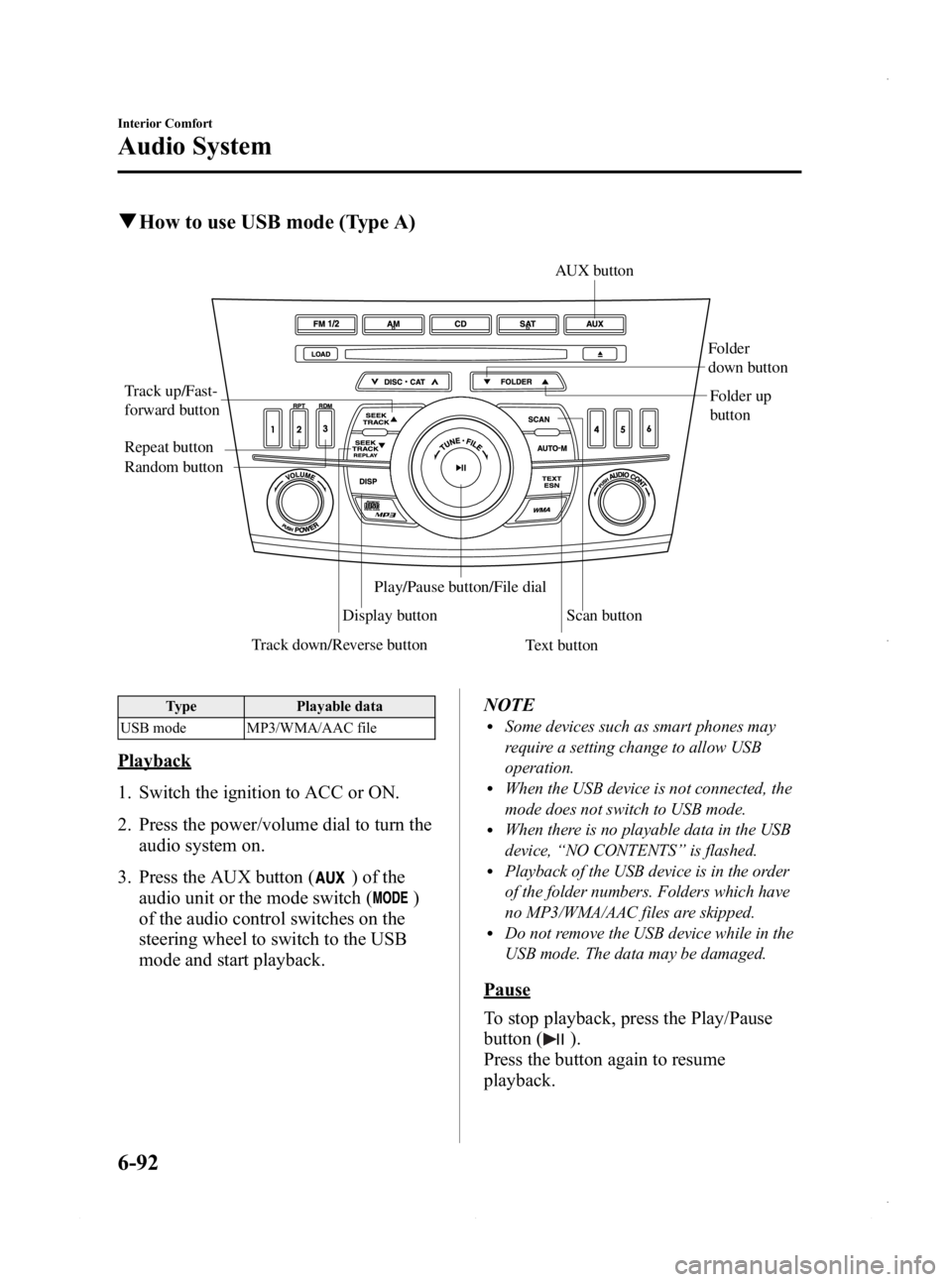
qHow to use USB mode (Type A)
Track down/Reverse button
Track up/Fast-
forward button
Display button Folder
down button
Folder up
button
Random button Repeat button
Text buttonScan button
AUX button
Play/Pause button/File dial
Type
Playable data
USB mode MP3/WMA/AAC file
Playback
1. Switch the ignition to ACC or ON.
2. Press the power/volume dial to turn the audio system on.
3. Press the AUX button (
) of the
audio unit or the mode switch (
)
of the audio control switches on the
steering wheel to switch to the USB
mode and start playback. NOTE
lSome devices such as smart phones may
require a setting change to allow USB
operation.
lWhen the USB device is not connected, the
mode does not switch to USB mode.
lWhen there is no playable data in the USB
device,
“NO CONTENTS ”is flashed.
lPlayback of the USB device is in the order
of the folder numbers. Folders which have
no MP3/WMA/AAC files are skipped.
lDo not remove the USB device while in the
USB mode. The data may be damaged.
Pause
To stop playback, press the Play/Pause
button (
).
Press the button again to resume
playback.
6-92
Interior Comfort
Audio System
Mazda3_8CV6-EA-12H_Edition3 Page332
Thursday, February 28 2013 11:29 AM
Form No.8CV6-EA-12H
Page 336 of 610
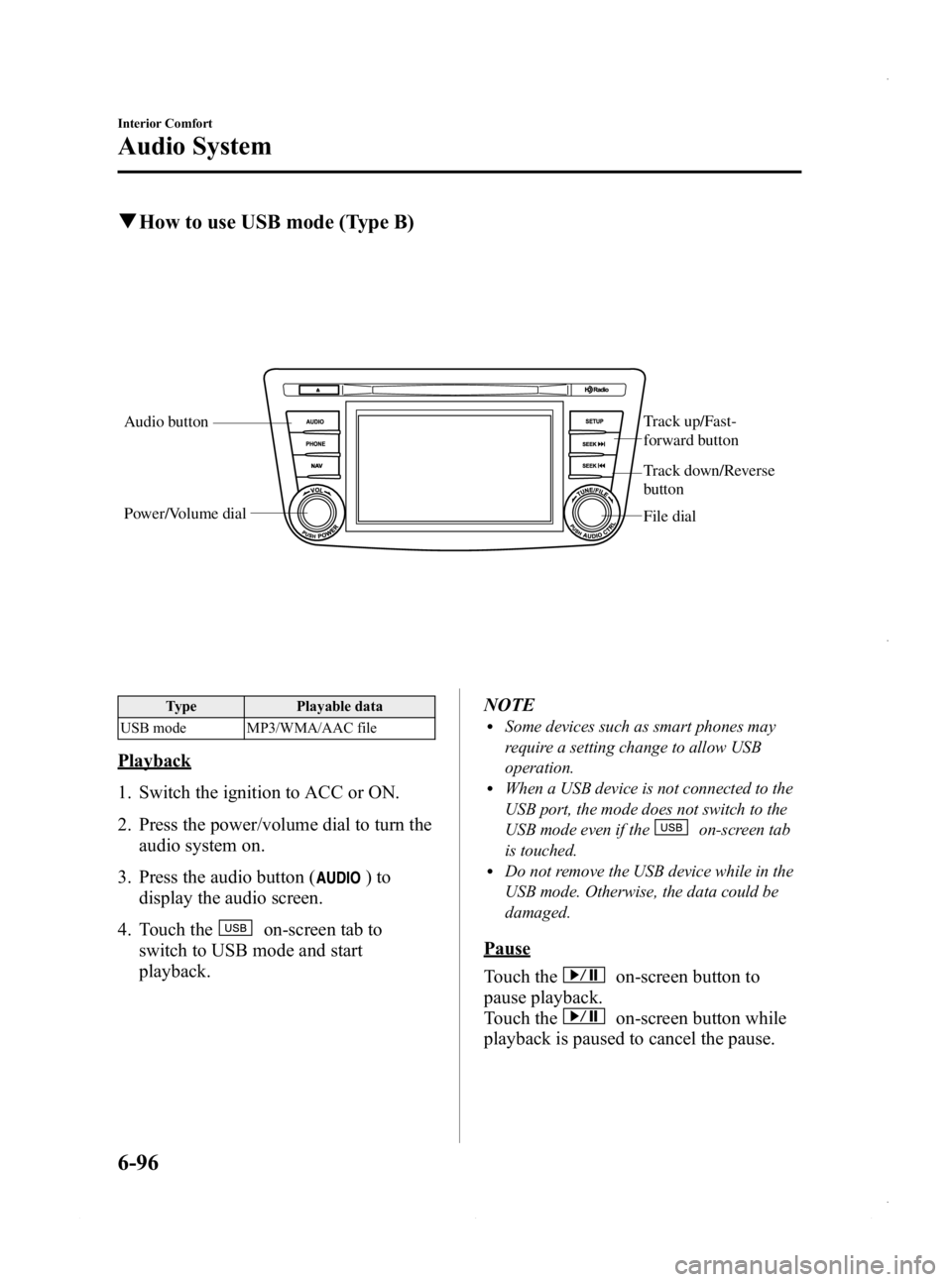
Black plate (336,1)
qHow to use USB mode (Type B)
Audio button Track up/Fast-
forward button
File dial
Power/Volume dial
Track down/Reverse
button
Type
Playable data
USB mode MP3/WMA/AAC file
Playback
1. Switch the ignition to ACC or ON.
2. Press the power/volume dial to turn the audio system on.
3. Press the audio button (
)to
display the audio screen.
4. Touch the
on-screen tab to
switch to USB mode and start
playback. NOTE
lSome devices such as smart phones may
require a setting change to allow USB
operation.
lWhen a USB device is not connected to the
USB port, the mode does not switch to the
USB mode even if the
on-screen tab
is touched.
lDo not remove the USB device while in the
USB mode. Otherwise, the data could be
damaged.
Pause
Touch the
on-screen button to
pause playback.
Touch the
on-screen button while
playback is paused to cancel the pause.
6-96
Interior Comfort
Audio System
Mazda3_8CV6-EA-12H_Edition3 Page336
Thursday, February 28 2013 11:29 AM
Form No.8CV6-EA-12H