brake MAZDA MODEL 3 5-DOOR 2016 User Guide
[x] Cancel search | Manufacturer: MAZDA, Model Year: 2016, Model line: MODEL 3 5-DOOR, Model: MAZDA MODEL 3 5-DOOR 2016Pages: 598, PDF Size: 30.13 MB
Page 135 of 598

4–7
When Driving
Start/Stop Engine
CAUTION
If the KEY warning light (red)
illuminates, or the push button
start indicator light (amber) flashes,
this could indicate a problem with
the engine starting system and the
inability to start the engine or switch
the ignition to ACC or ON. Have your
vehicle inspected at an Authorized
Mazda Dealer as soon as possible.
NOTE
Under the following conditions, the
KEY warning light (red) flashes after
the push button start is pressed to
inform the driver that the push button
start will not switch to ACC even if it is
pressed from off.
The key battery is dead. The key is out of operational range. The key is placed in areas where it is
difficult for the system to detect the
signal (page 3-7).
A key from another manufacturer
similar to the key is in the
operational range.
(Forced engine starting method)
If the KEY warning light (r ed)
illuminates, or the push button start
indicator light (amber) flashes, this
could indicate that the engine may not
start using the usual starting method.
Have your vehicle inspected at an
Authorized Mazda Dealer as soon as
possible. If this occurs, the engine can
be force-started. Press and hold the
push button start until the engine starts.
Other procedures necessary for starting
the engine such as having the key in the
cabin, and depressing the clutch pedal
(manual transaxle) or the brake pedal
(automatic transaxle) are required.
When the engine is force-started,
the KEY warning light (red) remains
illuminated and the push button
start indicator light (amber) remains
flashing.
(Automatic transaxle)
When the selector lever is in the neutral
(N) position, the KEY indicator light
(green) and the push button start
indicator light (green) do not illuminate.
7. Press the push button start after both
the KEY indicator light (green) in the
instrument cluster and the push button
start indicator light (green) illuminate.
NOTE
After starting the engine, the push
button start indicator light (amber)
turns off and the ignition switches to the
ON position.
After pressing the push button start and
before the engine starts, the operation
sound of the fuel pump motor from near
the fuel tank can be heard, however, this
does not indicate a malfunction.
8. After starting the engine, let it idle for
about ten seconds.
NOTE
Whether the engine is cold or warm, it
should be started without the use of the
accelerator.
If the engine does not start the first
time, refer to Starting a Flooded Engine
under Emergency Starting. If the engine
still does not start, have your vehicle
inspected by an Authorized Mazda
Dealer (page 7-18).
Mazda3_8FA4-EA-15G_Edition1.indb 72015/05/11 14:00:33
Page 136 of 598
4–8
When Driving
Start/Stop Engine
Engine Start Function When Key
Battery is Dead
CAUTION
When starting the engine by holding
the transmitter over the push button
start due to a dead key battery or a
malfunctioning key, be careful not
to allow the following, otherwise the
signal from the key will not be received
correctly and the engine may not start.
Metal parts of other keys or metal
objects touch the key.
Spare keys or keys for other vehicles
equipped with an immobilizer system
touch or come near the key.
Devices for electronic purchases, or
security passage touch or come near
the key. If the engine cannot be started due to a
dead key battery, the engine can be started
using the following procedure:
1. Continue to depress the brake pedal
firmly until the engine has completely
started.
2. (Manual transaxle)
Continue to depress the clutch pedal
firmly until the engine has completely
started.
3. Verify that the push button start
indication light (green) flashes.
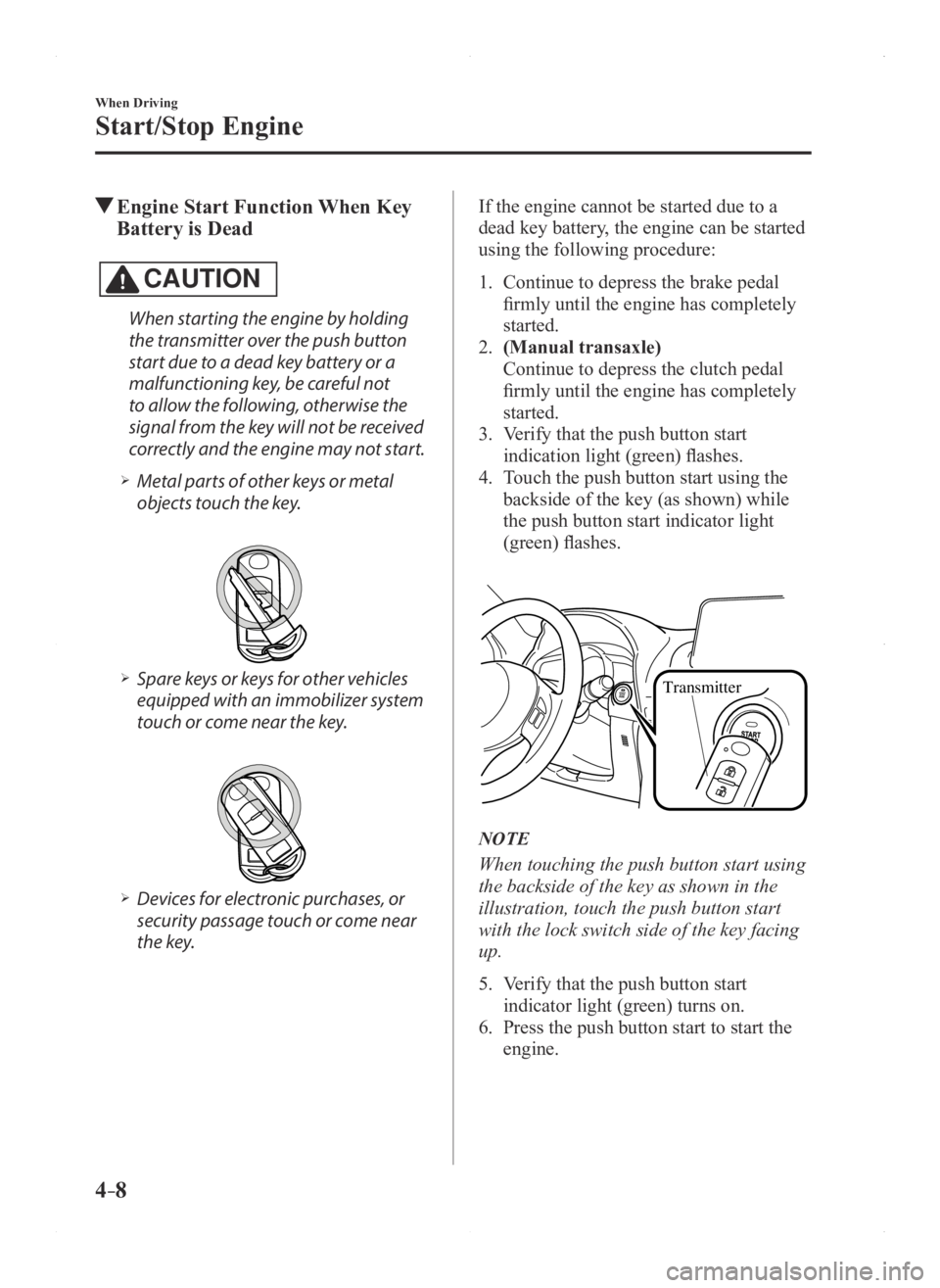
4. Touch the push button start using the
backside of the key (as shown) while
the push button start indicator light
(green) flashes.
Transmitter
NOTE
When touching the push button start using
the backside of the key as shown in the
illustration, touch the push button start
with the lock switch side of the key facing
up.
5. Verify that the push button start
indicator light (green) turns on.
6. Press the push button start to start the
engine.
Mazda3_8FA4-EA-15G_Edition1.indb 82015/05/11 14:00:33
Page 137 of 598
4–9
When Driving
Start/Stop Engine
NOTE
The engine cannot be started unless the
clutch pedal is fully depressed (manual
transaxle) or the brake pedal is fully
depressed (automatic transaxle).
If there is a malfunction with the push
button start function, the push button
start indicator light (amber) flashes.
In this case, the engine may start,
however, have the vehicle checked at an
Authorized Mazda Dealer as soon as
possible.
If the push button start indicator light
(green) does not illuminate, perform the
operation from the beginning again. If
it does not illuminate, have the vehicle
checked at an Authorized Mazda Dealer.
To switch the ignition position without
starting the engine, perform the
following operations after the push
button start indicator light (green) turns
on.
1. Release the clutch pedal (manual
transaxle) or brake pedal (automatic
transaxle).
2. Press the push button start to switch
the ignition position. The ignition
switches in the order of ACC, ON,
and off each time the push button
start is pressed. To switch the
ignition position again, perform the
operation from the beginning.
Emergency Operation for Starting
the Engine
If the KEY warning light (red) illuminates,
or the push button start indicator light
(amber) flashes, this could indicate that
the engine may not start using the usual
starting method. Have your vehicle
inspected at an Authorized Mazda Dealer
as soon as possible. If this occurs, the
engine can be force-started. Press and hold
the push button start until the engine starts.
Other procedures necessary for starting the
engine such as having the key in the cabin,
and depressing the clutch pedal (manual
transaxle) or the brake pedal (automatic
transaxle) are required.
Mazda3_8FA4-EA-15G_Edition1.indb 92015/05/11 14:00:33
Page 138 of 598
4–10
When Driving
Start/Stop Engine
Turning the Engine Off
WARNING
Do not stop the engine while the vehicle
is moving:Stopping the engine while the vehicle
is moving for any reason other than in
an emergency is dangerous. Stopping
the engine while the vehicle is moving
will result in reduced braking ability
due to the loss of power braking, which
could cause an accident and serious
injury.
1. Stop the vehicle completely .
2. (Manual transaxle)
Shift into neutral and set the parking
brake.
(Automatic transaxle)
Shift the selector lever to the P position
and set the parking brake.
3. Press the push button start to turn of f
the engine. The ignition position is off.
CAUTION
When leaving the vehicle, make sure
the push button start is off.
NOTE
The cooling fan in the engine
compartment could turn on for a few
minutes after the ignition is switched
from ON to OFF, whether or not the
A/C is on or off, to cool the engine
compartment quickly.
When the push button start is pressed
from ON to ACC or OFF, the KEY
indicator light (green) may flash for
approximately 30 seconds indicating
that the remaining battery power of the
key is low.
Replace with a new battery befor e the
key becomes unusable.
Refer to Key Battery Replacement on
page 6-40. (Automatic transaxle)
If the engine is turned off while the
selector lever is in a position other than
P, the ignition switches to ACC.
Emergency Engine Stop
Continuously pressing the push button
start or quickly pressing it any number of
times while the engine is running or the
vehicle is being driven will turn the engine
off immediately. The ignition switches to
ACC.
Mazda3_8FA4-EA-15G_Edition1.indb 102015/05/11 14:00:34
Page 147 of 598
4–19
When Driving
Instrument Cluster and Display
The active driving display indicates the following information:
Mazda Radar Cruise Control (MRCC) Operation Conditions and Warnings
Refer to Mazda Radar Cruise Control (MRCC) on page 4-98. Lane Departure Warning System (LDWS) Operation Conditions and Warnings
Refer to Lane Departure Warning System (LDWS) on page 4-80. Smart City Brake Support (SCBS) Operation Conditions and Warnings
Refer to Smart City Brake Support (SCBS) on page 4-106. Forward Obstruction Warning (FOW) Operation Conditions and Warnings
Refer to Forward Obstruction Warning (FOW) on page 4-95. Vehicle Speed Setting Using Cruise Control
Refer to Cruise Control on page 4-119. Turn-by-Turn (TBT) (Direction and Distance) and Lane Guidance Vehicle Speed
Each setting/adjustment for the active driving display can be performed on the center
display (Type B audio).
1. Select the ( ) icon on the home screen and display the Settings screen.
2. Select the AD-Disp tab.
3. Select the desired item and perform the setting/adjustment.
Height : Active driving display position Brightness Control : Method for adjusting screen brightness (Automatically/Manually) Calibration : Brightness initialization setting (when selecting automatic adjustment) Brightness : Brightness adjustment (when selecting manual adjustment) Navigation : On/Off Active Driving Display : On/Off Reset
Mazda3_8FA4-EA-15G_Edition1.indb 192015/05/11 14:00:38
Page 149 of 598
4–21
When Driving
Instrument Cluster and Display
*Some models.
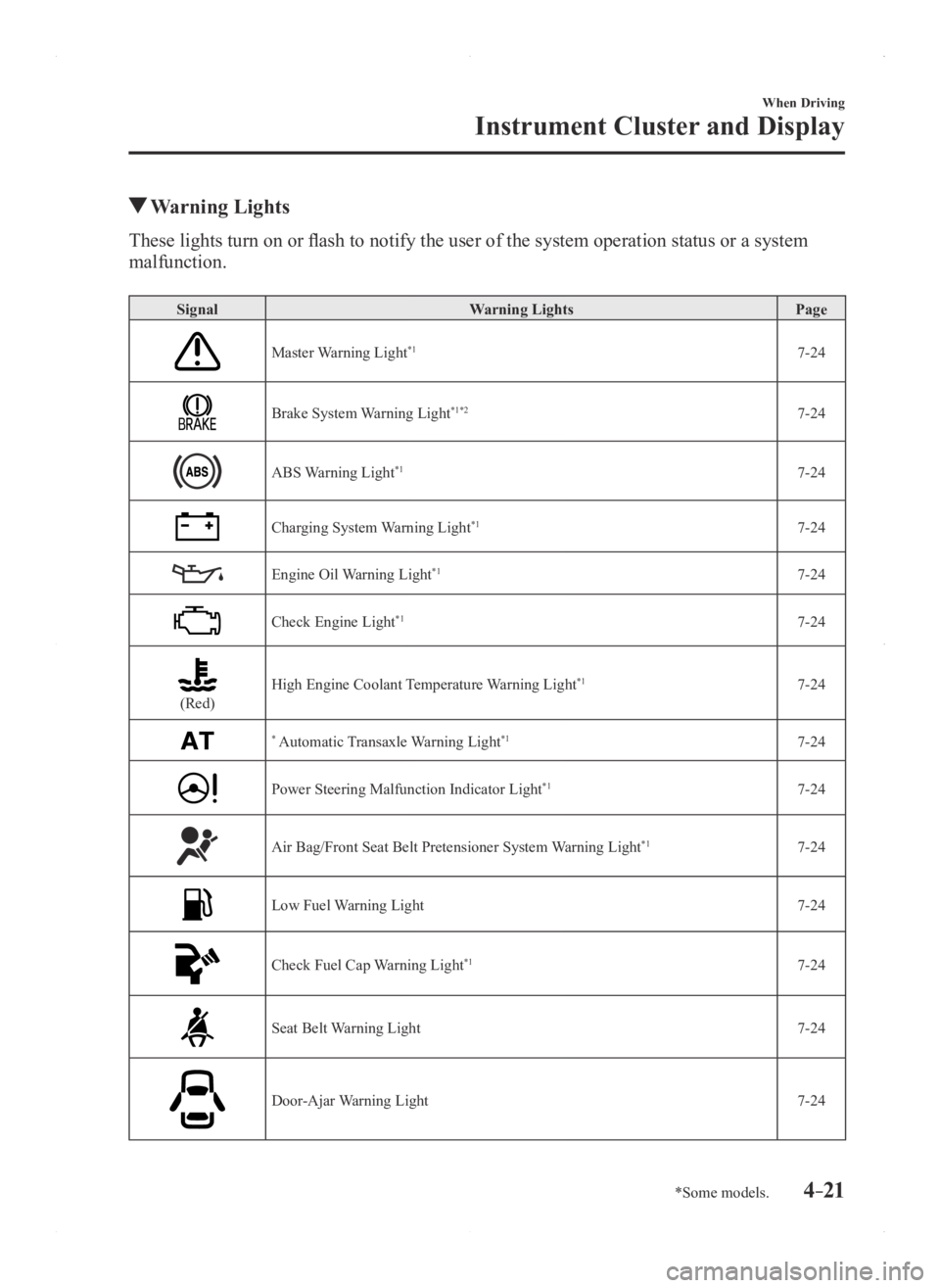
Warning Lights
These lights turn on or flash to notify the user of the system operation status or a system
malfunction.
SignalWarning Lights Page
Master Warning Light*17-24
Brake System Warning Light*1*27-24
ABS Warning Light*17-24
Charging System Warning Light*17-24
Engine Oil Warning Light*17-24
Check Engine Light*17-24
(Red)High Engine Coolant Temperature Warning Light*17-24
* Automatic Transaxle Warning Light*17-24
Power Steering Malfunction Indicator Light*17-24
Air Bag/Front Seat Belt Pretensioner System Warning Light*17-24
Low Fuel Warning Light7-24
Check Fuel Cap Warning Light*17-24
Seat Belt Warning Light7-24
Door-Ajar Warning Light7-24
Mazda3_8FA4-EA-15G_Edition1.indb 212015/05/11 14:00:40
Page 150 of 598

4–22
When Driving
Instrument Cluster and Display
*Some models.
SignalWarning Lights Page
*Low Washer Fluid Level Warning Light 7-24
* Tire Pressure Monitoring System Warning Light*17-24
(Red)
KEY Warning Light*17-24
(Amber)
* Forward Obstruction Warning/Smart City Brake Support (FOW/SCBS)
Warning Light*17-24
(Amber)
* Lane Departure Warning System (LDWS) Warning Light*1*37-24
* Headlight Auto-Leveling Malfunction Indicator Light*17-24
(Amber)
* High Beam Control System (HBC) Warning Light*17-24
(Amber)
* Mazda Radar Cruise Control (MRCC) Warning Light*17-24
*1 The light turns on when the ignition is switched on for an operation che\
ck, and turns of f a few seconds later or when the engine is started. If the light does not turn on or remains tur\
ned on, have the vehicle inspected at an
Authorized Mazda Dealer.
*2 The light turns on continuously when the parking brake is applied.*3 The light turns on when the system on stand-by. The light flashes when the system has a malfunction.
Mazda3_8FA4-EA-15G_Edition1.indb 222015/05/11 14:00:41
Page 151 of 598

4–23
When Driving
Instrument Cluster and Display
*Some models.
Indicator Lights
These lights turn on or flash to notify the user of the system operation status or a system
malfunction.
SignalIndicator Lights Page
* BSM OFF Indicator Light 4-91
(Green)
* Lane Departure Warning System (LDWS) Indicator Light4-84
(Green)
KEY Indicator Light 3-9
(Green)
* High Beam Control System (HBC) Indicator Light4-79
Wrench Indicator Light*14-25
TCS/DSC Indicator Light*14-63,
4-64
DSC OFF Indicator Light*14-65
* AFS OFF Indicator Light*14-76
(Red)
* Forward Obstruction Warning/Smart City Brake Support (FOW/SCBS)
Indicator Light*14-97,
4-110
* Forward Obstruction Warning/Smart City Brake Support (FOW/SCBS) OFF
Indicator Light*14-110
* i-ELOOP Indicator Light 4-68
(Blue)Low Engine Coolant Temperature Indicator Light 4-25
Mazda3_8FA4-EA-15G_Edition1.indb 232015/05/11 14:00:42
Page 154 of 598

4–26
When Driving
Transaxle
Manual Transaxle
Operation
Manual Transaxle Shift Pattern
Neutral position
The shift pattern of the transaxle is
conventional, as shown.
Depress the clutch pedal all the way down
while shifting; then release it slowly.
Your vehicle is equipped with a device to
prevent shifting to R (reverse) by mistake.
Push the shift lever downward and shift
to R.
WARNING
Do not use sudden engine braking on
slippery road surfaces or at high speeds:Shifting down while driving on wet,
snowy, or frozen roads, or while driving
at high speeds causes sudden engine
braking, which is dangerous. The
sudden change in tire speed could
cause the tires to skid. This could
lead to loss of vehicle control and an
accident.
Always leave the shift lever in 1 or R
position and set the parking brake when
leaving the vehicle unattended: Otherwise the vehicle could move and
cause an accident.
CAUTION
Keep your foot off the clutch pedal
except when shifting gears. Also, do not
use the clutch to hold the vehicle on an
upgrade. Riding the clutch will cause
needless clutch wear and damage.
Do not apply any excessive lateral force
to the shift lever when changing from
5th to 4th gear. This could lead to the
accidental selection of 2nd gear, which
could result in damage to the transaxle.
Make sure the vehicle comes to a
complete stop before shifting to R.
Shifting to R while the vehicle is still
moving may damage the transaxle.
Mazda3_8FA4-EA-15G_Edition1.indb 262015/05/11 14:00:43
Page 156 of 598

4–28
When Driving
Transaxle
Recommendations for Shifting (for
Vehicles without Gear Shift
Indication)
Upshifting
For normal acceleration, Mazda
recommends these shift points:
(U.S.A. and Canada)
GearVehicle speed
1 to 2 24 km/h (15 mph)
2 to 3 42 km/h (26 mph)
3 to 4 60 km/h (37 mph)
4 to 5 75 km/h (46 mph)
5 to 6 79 km/h (49 mph)
For cruising, Mazda recommends these
shift points:
(U.S.A. and Canada)
Gear Vehicle speed
1 to 2 13 km/h (8 mph)
2 to 3 29 km/h (18 mph)
3 to 4 49 km/h (30 mph)
4 to 5 63 km/h (39 mph)
5 to 6 70 km/h (43 mph)
Downshifting
When you must slow down in heavy traffic
or on a steep upgrade, downshift before
the engine starts to overwork. This reduces
the chance of stalling and gives better
acceleration when you need more speed.
On a steep downgrade, downshifting
helps maintain safe speed and prolongs
brake life.
Mazda3_8FA4-EA-15G_Edition1.indb 282015/05/11 14:00:44