warning light MAZDA MODEL 3 5-DOOR 2017 Owners Manual
[x] Cancel search | Manufacturer: MAZDA, Model Year: 2017, Model line: MODEL 3 5-DOOR, Model: MAZDA MODEL 3 5-DOOR 2017Pages: 612
Page 524 of 612
7–36
If Trouble Arises
Warning/Indicator Lights and Warning Sounds
*Some models.
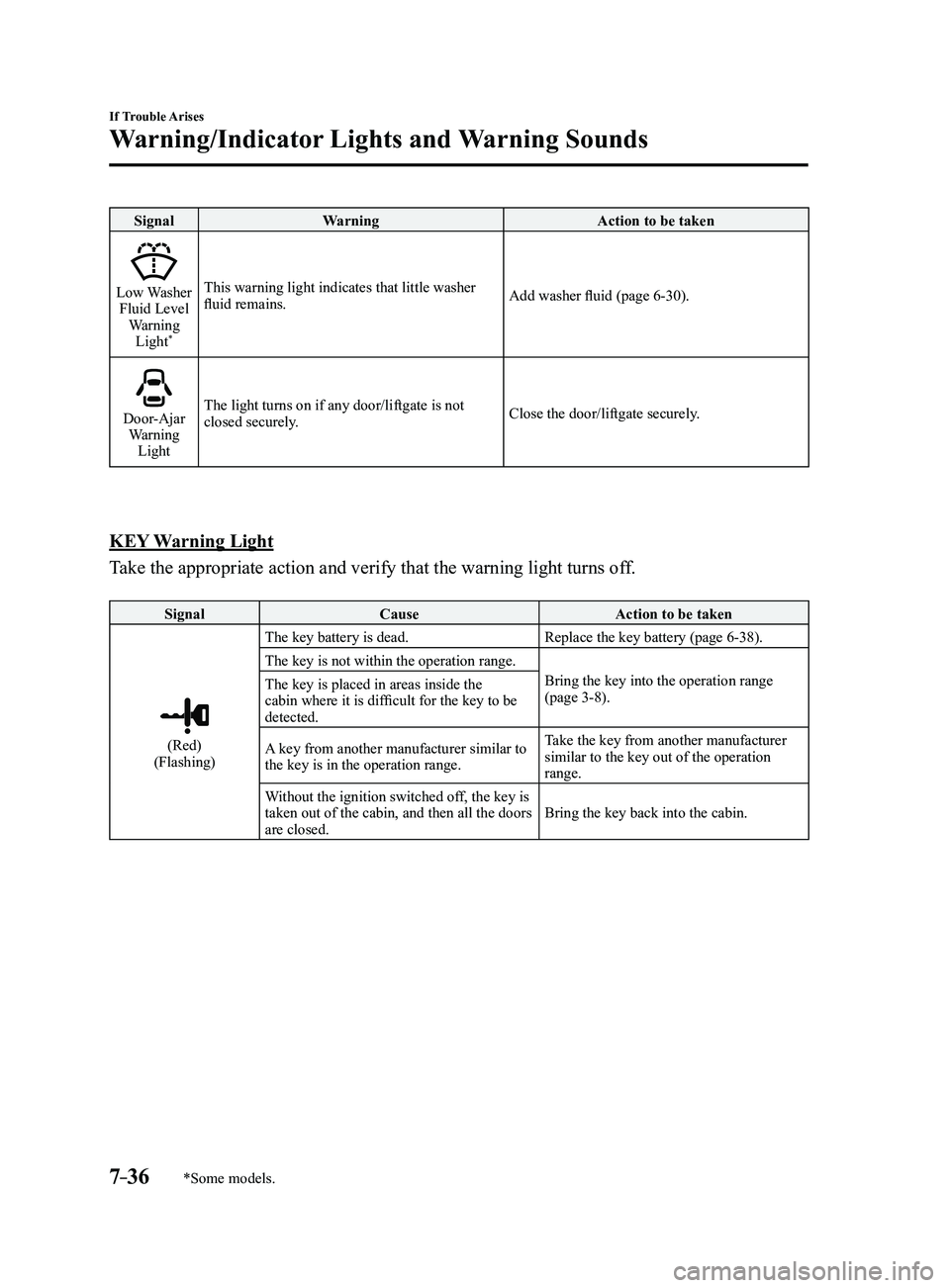
SignalWarning Action to be taken
Low Washer Fluid Level
Warning Light
*
This warning light indicates that little washer
fluid remains. Add washer fluid (page 6-30).
Door-Ajar Warning
Light The light turns on if any door/liftgate is not
closed securely.
Close the door/liftgate securely.
KEY Warning Light
Take the appropriate action and verify that the warning light turns off.
Signal
Cause Action to be taken
(Red)(Flashing)The key battery is dead.
Replace the key battery (page
6-38).
The key is not within the operation range. Bring the key into the operation range
(page
3-8).
The key is placed in areas inside the
cabin where it is difficult for the key to be
detected.
A key from another manufacturer similar to
the key is in the operation range. Take the key from another manufacturer
similar to the key out of the operation
range.
Without the ignition switched off, the key is
taken out of the cabin, and then all the doors
are closed. Bring the key back into the cabin.
Mazda3_8FL6-EA-16F_Edition2.indb 362016/08/10 17:39:31
Page 525 of 612
7–37
If Trouble Arises
Warning/Indicator Lights and Warning Sounds
*Some models.
Message Indicated on Display*
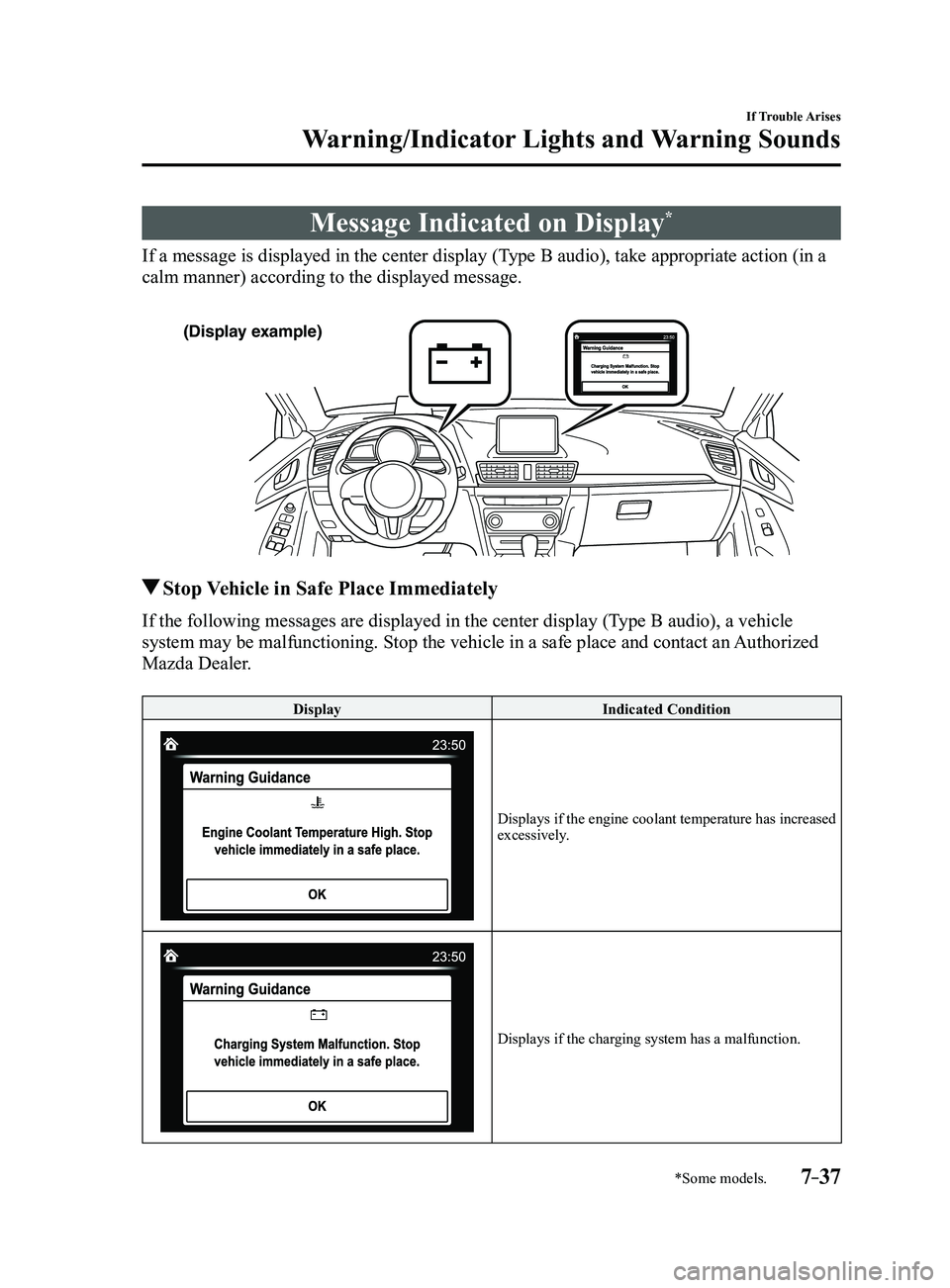
If a message is displayed in the center display (Type B audio), take appropriate action (in a
calm manner) according to the displayed message.
(Display example)
Stop Vehicle in Safe Place Immediately
If the following messages are displayed in the center display (Type B audio), a vehicle
system may be malfunctioning. Stop the vehicle in a safe place and conta\
ct an Authorized
Mazda Dealer.
DisplayIndicated Condition
Displays if the engine coolant temperature has increased excessively.
Displays if the charging system has a malfunction.
Mazda3_8FL6-EA-16F_Edition2.indb 372016/08/10 17:39:32
Page 526 of 612
7–38
If Trouble Arises
Warning/Indicator Lights and Warning Sounds
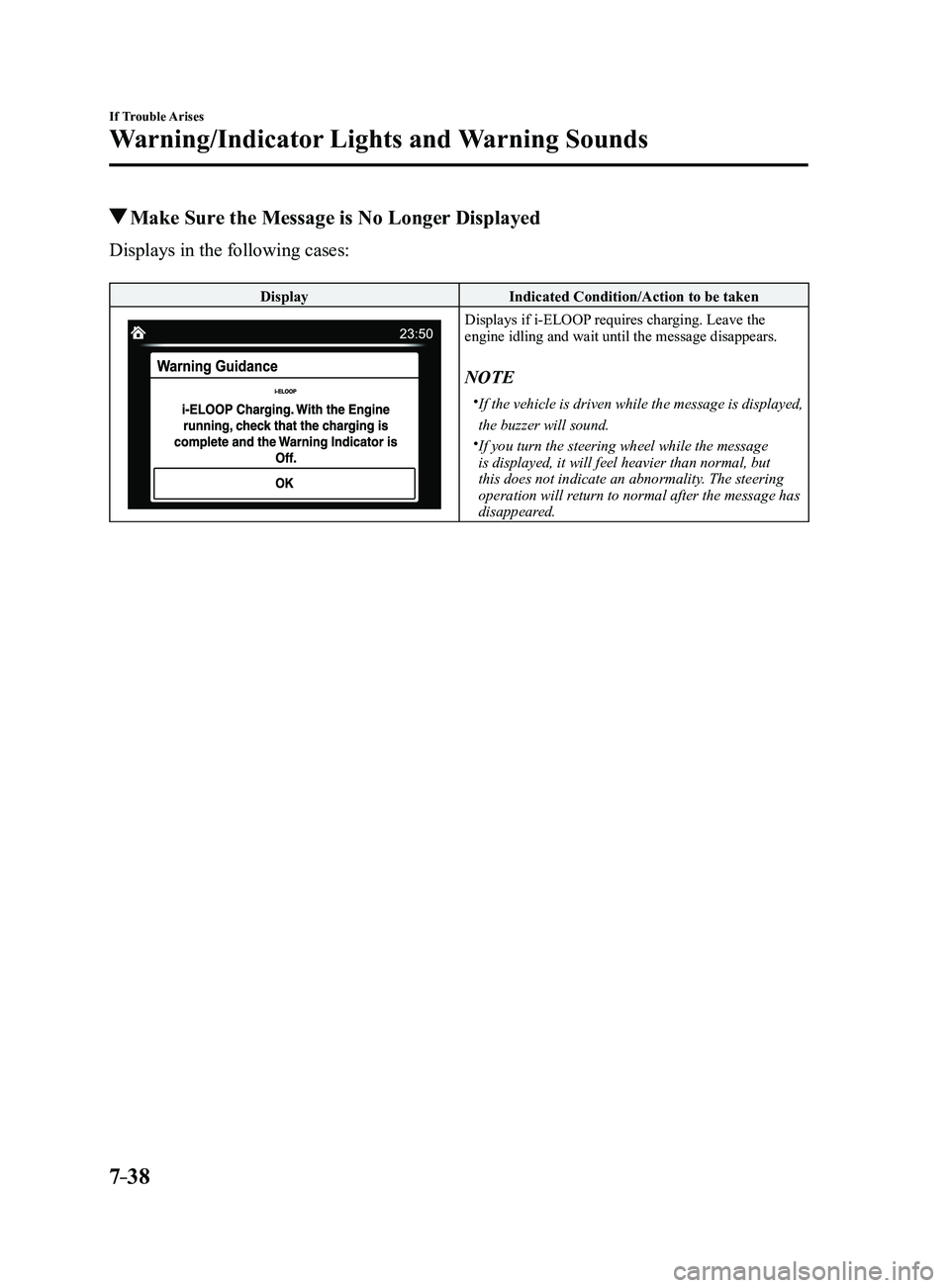
Make Sure the Message is No Longer Displayed
Displays in the following cases:
DisplayIndicated Condition/Action to be taken
Displays if i-ELOOP requires charging. Leave the engine idling and wait until the message disappears.
NOTE
If the vehicle is driven while the message is displayed,
the buzzer will sound.
If you turn the steering wheel while the message
is displayed, it will feel heavier than normal, but
this does not indicate an abnormality. The steering
operation will return to normal after the message has
disappeared.
Mazda3_8FL6-EA-16F_Edition2.indb 382016/08/10 17:39:32
Page 527 of 612
7–39
If Trouble Arises
Warning/Indicator Lights and Warning Sounds
Warning Sound is
Activated
Lights-On Reminder
The lights-on reminder is operable when
the time setting*1 of the auto headlight off
function is off.
If lights are on and the ignition is switched
to ACC or off, a continuous beep sound
will be heard when the driver's door is
opened.
*1 If the light switch is left on, the auto
headlight off function automatically
turns off the lights about 30 seconds
after switching the ignition off. The
time setting can be changed.
Refer to Personalization Features on
page 9-12.
NOTE
When the ignition is switched to ACC,
the “Ignition Not Switched Off (STOP)
Warning Beep” (page
7-40) overrides
the lights-on reminder.
A personalized function is available to
change the sound volume for the lights-
on reminder.
Refer to Personalization Featur es on
page 9-12.
Air Bag/Front Seat Belt
Pretensioner System Warning
Beep
If there is a problem with the air bag/seat
belt pretensioner systems and the warning
light illumination, a warning beep sound
will be heard for about 5 seconds every
minute.
The air bag and seat belt pretensioner
system warning beep sound will continue
to be heard for approximately 35
minutes. Have your vehicle inspected at
an Authorized Mazda Dealer as soon as
possible.
WARNING
Do not drive the vehicle with the air
bag/seat belt pretensioner system
warning beep sounding:
Driving the vehicle with the air bag/
seat belt pretensioner system warning
beep sounding is dangerous. In a
collision, the air bags and the seat belt
pretensioner system will not deploy
and this could result in death or serious
injury. Contact an Authorized Mazda
Dealer to have the vehicle inspected as
soon as possible.
Mazda3_8FL6-EA-16F_Edition2.indb 392016/08/10 17:39:33
Page 528 of 612
7–40
If Trouble Arises
Warning/Indicator Lights and Warning Sounds
Seat Belt Warning Beep
If the driver's seat belt is not fastened
when the ignition is switched ON, a beep
sound will be heard for about 6 seconds. If
the driver or the front passenger's seat belt
is not fastened and the vehicle is driven
at a speed faster than about 20 km/h (12
mph), a beep sound will be heard again for
a specified period of time.
NOTE
To allow the front passenger occupant
classification sensor to function
properly, do not place and sit on an
additional seat cushion on the front
passenger seat. The sensor may not
function properly because the additional
seat cushion could cause sensor
interference.
When a small child sits on the front
passenger seat, it is possible that the
warning beep will not operate.
Ignition Not Switched Off (STOP)
Warning Beep
If the driver's door is opened with the
ignition switched to ACC, a beep will
be heard continuously in the cabin to
notify the driver that the ignition has not
been switched OFF (STOP). Under this
condition, the keyless entry system will
not operate, the vehicle cannot be locked,
and the battery voltage will be depleted.
Key Removed from Vehicle
Warning Beep
Vehicles with advanced keyless function
If the key is taken out of the vehicle while
the ignition is not switched OFF and
all the doors are closed, the beep which
sounds outside of the vehicle will be heard
6 times, the beep which sounds inside
the vehicle will be heard 6 times, and the
KEY warning light (red) in the instrument
cluster flashes continuously to notify
the driver that the ignition has not been
switched OFF.
Vehicles without advanced keyless
function
If the key is taken out of the vehicle while
the ignition is not switched OFF and all
the doors are closed, a beep will be heard
in the cabin 6 times and the KEY warning
light (red) in the instrument cluster turns
on continuously to notify the driver that
the ignition has not been switched OFF.
NOTE
Because the key utilizes low-intensity
radio waves, the Key Removed From
Vehicle Warning may activate if the key is
carried together with a metal object or it
is placed in a poor signal reception area.
Request Switch Inoperable
Warning Beep (With the advanced
keyless function)
If the request switch is pressed with the
door open or ajar, or the ignition is not
switched OFF with a key being carried,
a beep will be heard outside for about 2
seconds to notify the driver that the door
or liftgate/trunk lid cannot be locked.
Mazda3_8FL6-EA-16F_Edition2.indb 402016/08/10 17:39:33
Page 529 of 612
7–41
If Trouble Arises
Warning/Indicator Lights and Warning Sounds
*Some models.
Key Left-in-luggage Compartment
Warning Beep (With the advanced
keyless function)
If the key is left in the luggage
compartment/trunk with all the doors
locked and the liftgate/trunk lid closed,
a beep will be heard outside for about 10
seconds to notify the driver that the key
is in the luggage compartment/trunk. In
this case, take out the key by pressing
the electric liftgate/trunk lid opener and
opening the liftgate/trunk lid. The key
taken out of the luggage compartment/
trunk may not operate because its
functions have been temporarily stopped.
To restore the key's functions, perform the
applicable procedure (page
3-9).
Key Left-in-vehicle Warning Beep
(With the advanced keyless
function)
If all the doors and luggage compartment/
trunk are locked using another key while
the key is left in the cabin, the beep
which sounds outside of the vehicle will
be heard for about 10 seconds to notify
the driver that the key is in the cabin. In
this case, take out the key by opening the
door. A key taken out of the vehicle using
this method may not operate because its
functions have been temporarily stopped.
To restore the key's functions, perform the
applicable procedure (page
3-9).
i-ELOOP Warning Beep*
The beep will activate if you attempt to
drive the vehicle under the following
conditions.
The i-ELOOP indicator light is flashing
green. “i-ELOOP Charging” is indicated in the
center display (Type B audio).
The beep will stop when the vehicle is
stopped. Make sure the indicator light is
no longer illuminated and the message
is no longer displayed before driving the
vehicle.
Tire Inflation Pressure Warning
Beep*
The warning beep sound will be heard
for about 3 seconds when there is any
abnormality in tire inflation pressures
(page
4-151).
Lane Departur e Warning Sound
While the system is operating, if the
system determines that the vehicle may
depart from the lane, it sounds a warning
sound.
NOTE
The volume of the Lane-keep Assist
System (LAS) & Lane Departure
Warning System (LDWS) warning sound
can be changed.
Refer to Personalization Featur es on
page 9-12. The type of the Lane-keep Assist System
(LAS) & Lane Departure Warning
System (LDWS) warning sound can be
changed.
Refer to Personalization Featur es on
page 9-12.
Mazda3_8FL6-EA-16F_Edition2.indb 412016/08/10 17:39:34
Page 530 of 612
7–42
If Trouble Arises
Warning/Indicator Lights and Warning Sounds
*Some models.
Blind Spot Monitoring (BSM)
Warning Beep*
Driving forward
The warning beep operates when the turn
signal lever is operated to the side where
the Blind Spot Monitoring (BSM) warning
light is illuminated.
NOTE
A personalized function is available to
change the Blind Spot Monitoring (BSM)
warning beep sound volume.
Refer to Personalization Features on page
9-12.
Reversing
If a moving object such as a vehicle or
two-wheeled vehicle approaches on the
left or right from behind your vehicle, the
Blind Spot Monitoring (BSM) warning
sound is activated.
Excessive Speed Warning
If the vehicle speed exceeds the speed
limit sign displayed on the active driving
display, the warning sound is activated
and the area around the speed limit sign
displayed on the active driving display
flashes 3 times in amber, and if the vehicle
speed continues to exceed the displayed
speed limit sign, the indication stops
flashing and remains on.
Mazda Radar Cruise Control
(MRCC) System Warnings*
The Mazda Radar Cruise Control (MRCC)
system warnings notify the driver of
system malfunctions and cautions on use
when required.
Check based on the beep sound.
Cautions What to check
The beep sounds 1 time
while the Mazda Radar
Cruise Control (MRCC)
is operating The vehicle speed is
slower than 25 km/h (16
mph) and the Mazda
Radar Cruise Control
(MRCC) system has
been canceled.
The beep sounds
continuously while
driving The distance between
your vehicle and the
vehicle ahead is too
close. Verify the safety
of the surrounding area
and reduce vehicle
speed.
When the Mazda Radar
Cruise Control (MRCC)
is operating, the beep
sounds and the Mazda
Radar Cruise Control
(MRCC) warning
light (amber) in the
instrument cluster turns
on. A malfunction in
the system may be
indicated. Have your
vehicle inspected at
an Authorized Mazda
Dealer.
Collision warning*
If there is a possibility of a collision with
a vehicle ahead or an obstruction at the
rear of the vehicle, the warning light in the
instrument cluster flashes at the same time
as the warning indication is displayed in
the active driving display, and a warning
sound is activated intermittently.
Mazda3_8FL6-EA-16F_Edition2.indb 422016/08/10 17:39:34
Page 531 of 612
7–43
If Trouble Arises
Warning/Indicator Lights and Warning Sounds
*Some models.
Power Steering Warning Buzzer
If the power steering system has
a malfunction, the power steering
malfunction light turns on or flashes and
the buzzer operates at the same time.
Refer to Warning Lights on page
4-24.
Over Rev. Buzzer*
The buzzer sounds to notify the driver if
the engine speed is about to exceed the
permissible engine speed.
CAUTION
Operate the accelerator and shift gears
according to the driving conditions so
that the buzzer does not sound. If the
engine speed exceeds the permissible
engine speed, the engine could be
damaged.
Electric Parking Brake Warning
Beep
The warning buzzer is activated under the
following conditions:
The vehicle is driven with the electric
parking brake applied. The electric parking brake switch is
pulled while the vehicle is driven.
Mazda3_8FL6-EA-16F_Edition2.indb 432016/08/10 17:39:35
Page 600 of 612
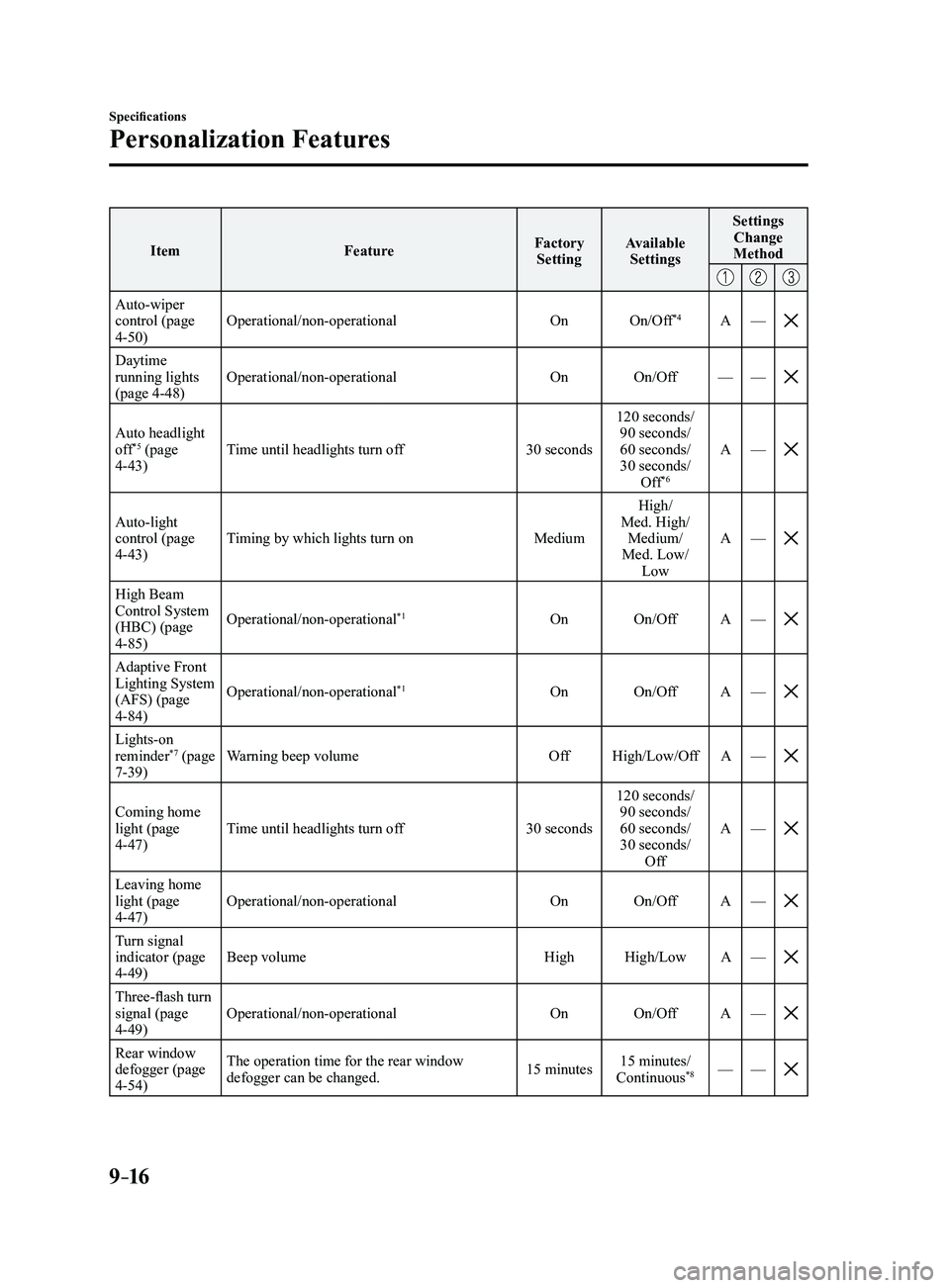
9–16
Specifications
Personalization Features
ItemFeatureFactory
Setting Available
Settings Settings
Change
Method
Auto-wiper control (page 4-50) Operational/non-operational
OnOn/Off
*4A—
Daytime running lights
(page 4-48) Operational/non-operational
OnOn/Off ——
Auto headlight off*5 (page 4-43) Time until headlights turn off
30 seconds120 seconds/
90 seconds/
60 seconds/
30 seconds/ Off*6
A —
Auto-light control (page 4-43) Timing by which lights turn on
MediumHigh/
Med. High/ Medium/
Med. Low/ Low A
—
High Beam Control System
(HBC) (page
4-85) Operational/non-operational
*1On
On/Off A—
Adaptive Front Lighting System
(AFS) (page
4-84) Operational/non-operational
*1On
On/Off A—
Lights-on reminder*7 (page 7-39) Warning beep volume
OffHigh/Low/Off A—
Coming home light (page 4-47) Time until headlights turn off
30 seconds120 seconds/
90 seconds/
60 seconds/
30 seconds/ Off A
—
Leaving home light (page 4-47) Operational/non-operational
OnOn/Off A—
Turn signal indicator (page 4-49) Beep volume
HighHigh/Low A—
Three-flash turn signal (page 4-49) Operational/non-operational
OnOn/Off A—
Rear window defogger (page 4-54) The operation time for the rear window
defogger can be changed.
15 minutes15 minutes/
Continuous*8— —
Mazda3_8FL6-EA-16F_Edition2.indb 162016/08/10 17:39:56
Page 602 of 612
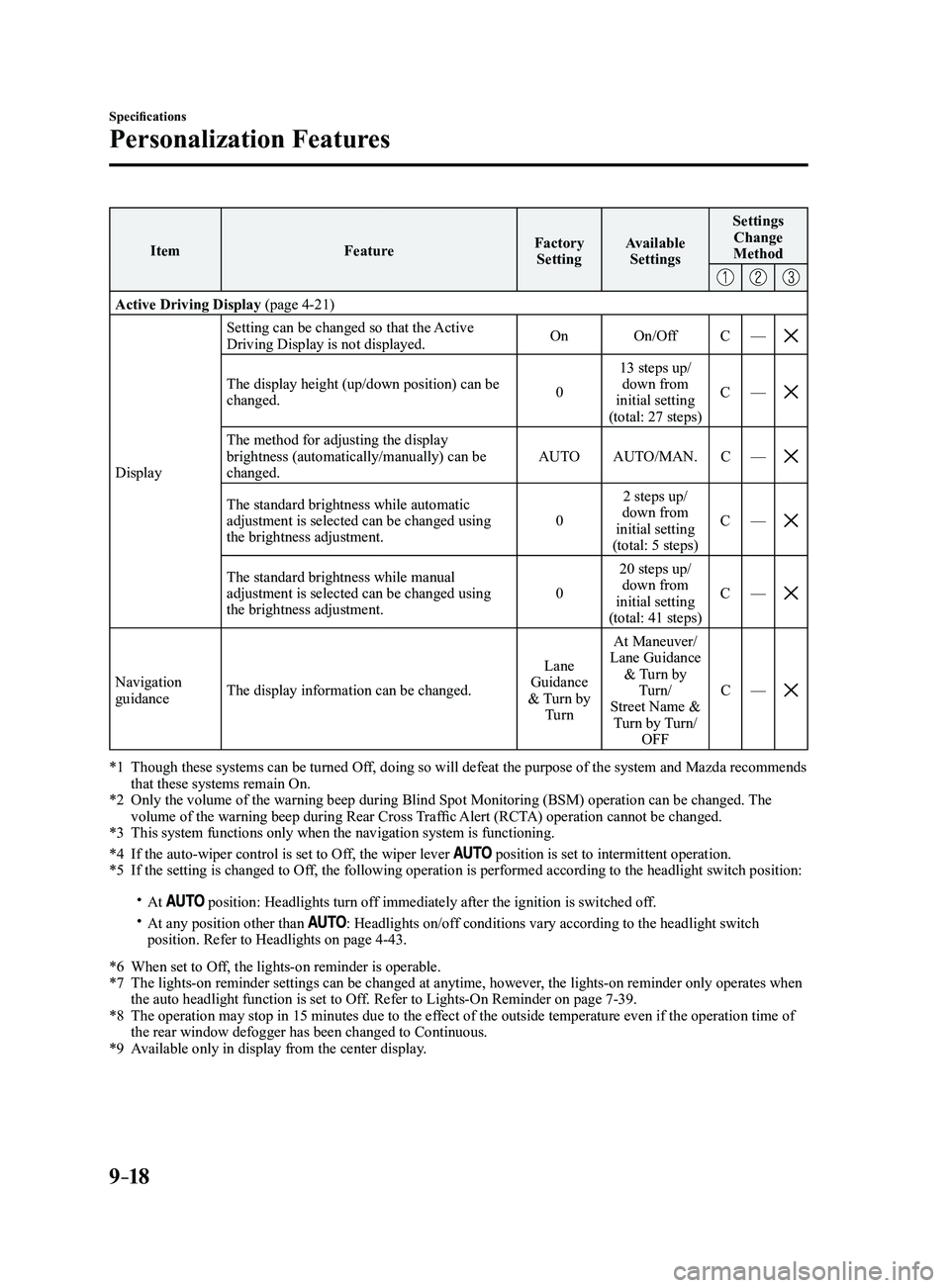
9–18
Specifications
Personalization Features
ItemFeatureFactory
Setting Available
Settings Settings
Change
Method
Active Driving Display (page 4-21)
Display Setting can be changed so that the Active
Driving Display is not displayed.
On
On/Off C—
The display height (up/down position) can be changed. 013 steps up/
down from
initial setting
(total: 27 steps) C
—
The method for adjusting the display brightness (automatically/manually) can be
changed. AUTO
AUTO/MAN. C—
The standard brightness while automatic adjustment is selected can be changed using
the brightness adjustment. 02 steps up/
down from
initial setting
(total: 5 steps) C
—
The standard brightness while manual adjustment is selected can be changed using
the brightness adjustment. 020 steps up/
down from
initial setting
(total: 41 steps) C
—
Navigation guidance The display information can be changed. Lane
Guidance
& Turn by Turn At Maneuver/
Lane Guidance & Turn by Turn/
Street Name & Turn by Turn/ OFF C
—
*1 Though these systems can be turned Of f, doing so will defeat the purpose of the system and Mazda recommends that these systems remain On.*2 Only the volume of the warning beep during Blind Spot Monitorin g (BSM) operation can be changed. The volume of the warning beep during Rear Cross Traffic Alert (RCTA) operation cannot be changed.*3 This system functions only when the navigation system is functioning.
*4 If the auto-wiper control is set to Off, the wiper lever position is set to intermittent operation.*5 If the setting is changed to Off, the following operation is performed according to the headlight switc\
h position:
At position: Headlights turn off immediately after the ignition is switched off. At any position other than : Headlights on/off conditions vary according to the headlight switch
position. Refer to Headlights on page 4-43.
*6 When set to Of f, the lights-on reminder is operable.*7 The lights-on reminder settings can be changed at anytime, however , the lights-on reminder only operates when the auto headlight function is set to Off. Refer to Lights-On Reminder on page 7-39.*8 The operation may stop in 15 minutes due to the effect of the outside temperature even if the operation time of the rear window defogger has been changed to Continuous.*9 Available only in display from the center display.
Mazda3_8FL6-EA-16F_Edition2.indb 182016/08/10 17:39:57