lights MAZDA MODEL 3 5-DOOR 2017 User Guide
[x] Cancel search | Manufacturer: MAZDA, Model Year: 2017, Model line: MODEL 3 5-DOOR, Model: MAZDA MODEL 3 5-DOOR 2017Pages: 612
Page 84 of 612
3–8
Before Driving
Keys
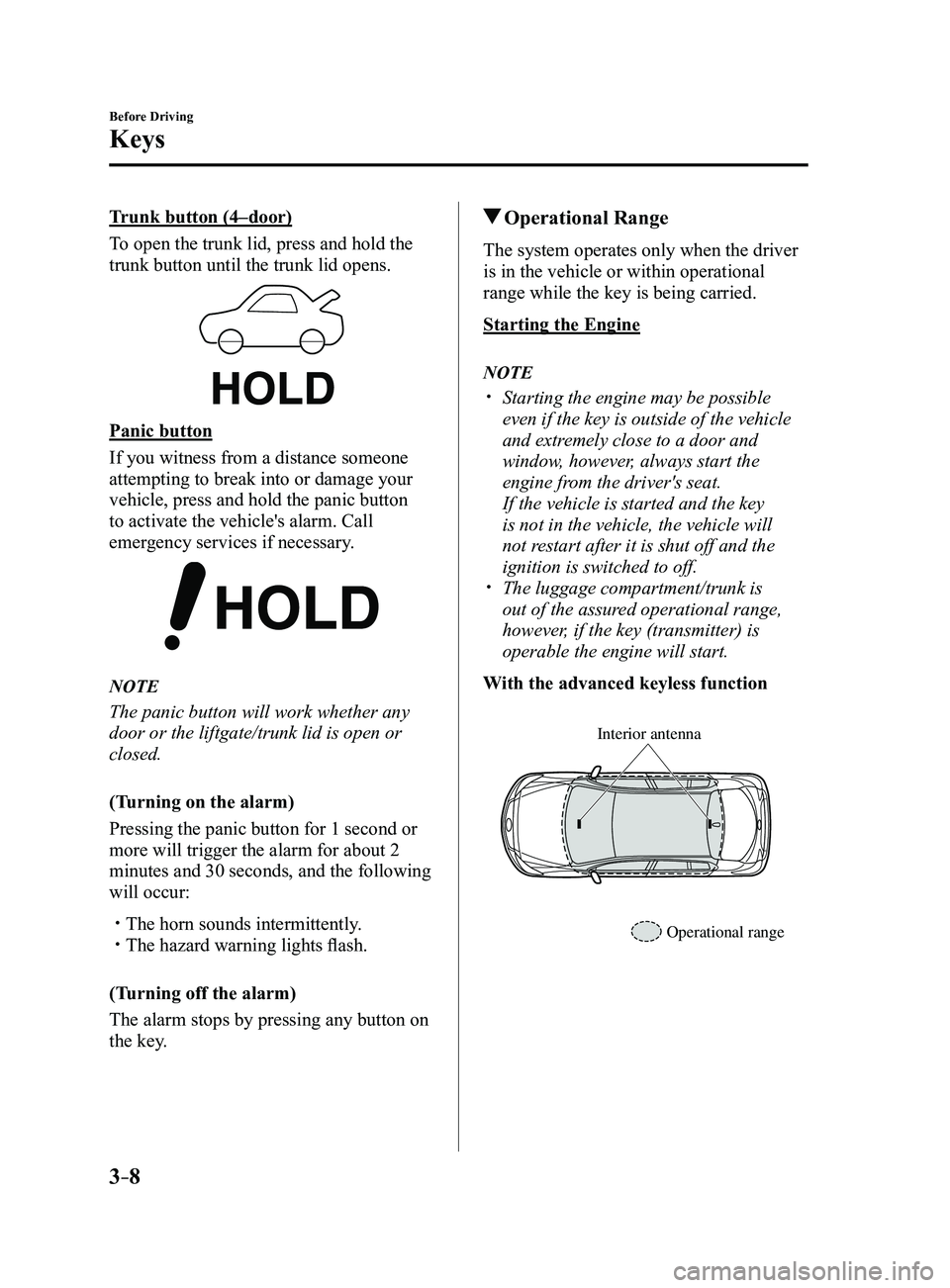
Trunk button (4–door)
To open the trunk lid, press and hold the
trunk button until the trunk lid opens.
Panic button
If you witness from a distance someone
attempting to break into or damage your
vehicle, press and hold the panic button
to activate the vehicle's alarm. Call
emergency services if necessary.
NOTE
The panic button will work whether any
door or the liftgate/trunk lid is open or
closed.
(Turning on the alarm)
Pressing the panic button for 1 second or
more will trigger the alarm for about 2
minutes and 30 seconds, and the following
will occur:
The horn sounds intermittently. The hazard warning lights flash.
(Turning off the alarm)
The alarm stops by pressing any button on
the key.
Operational Range
The system operates only when the driver
is in the vehicle or within operational
range while the key is being carried.
Starting the Engine
NOTE
Starting the engine may be possible
even if the key is outside of the vehicle
and extremely close to a door and
window, however, always start the
engine from the driver's seat.
If the vehicle is started and the key
is not in the vehicle, the vehicle will
not restart after it is shut off and the
ignition is switched to off.
The luggage compartment/trunk is
out of the assured operational range,
however, if the key (transmitter) is
operable the engine will start.
With the advanced keyless function
Interior antenna
Operational range
Mazda3_8FL6-EA-16F_Edition2.indb 82016/08/10 17:35:18
Page 90 of 612
3–14
Before Driving
Doors and Locks
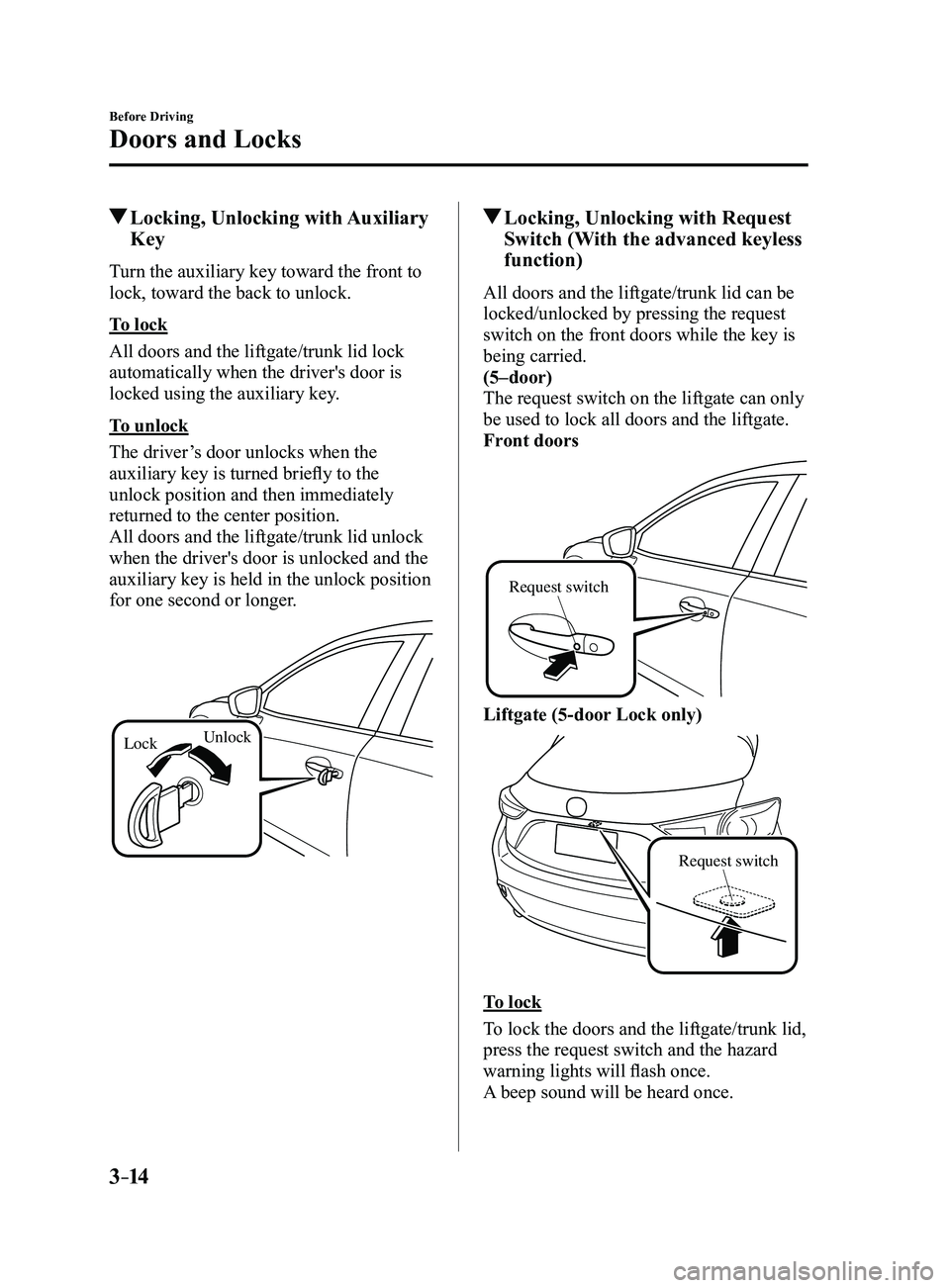
Locking, Unlocking with Auxiliary
Key
Turn the auxiliary key toward the front to
lock, toward the back to unlock.
To lock
All doors and the liftgate/trunk lid lock
automatically when the driver's door is
locked using the auxiliary key.
To unlock
The driver’s door unlocks when the
auxiliary key is turned briefly to the
unlock position and then immediately
returned to the center position.
All doors and the liftgate/trunk lid unlock
when the driver's door is unlocked and the
auxiliary key is held in the unlock position
for one second or longer.
LockUnlock
Locking, Unlocking with Request
Switch (With the advanced keyless
function)
All doors and the liftgate/trunk lid can be
locked/unlocked by pressing the request
switch on the front doors while the key is
being carried.
(5–door)
The request switch on the liftgate can only
be used to lock all doors and the liftgate.
Front doors
Request switch
Liftgate (5-door Lock only)
Request switch
To lock
To lock the doors and the liftgate/trunk lid,
press the request switch and the hazard
warning lights will flash once.
A beep sound will be heard once.
Mazda3_8FL6-EA-16F_Edition2.indb 142016/08/10 17:35:20
Page 91 of 612
3–15
Before Driving
Doors and Locks
To unlock
Driver's door request switch
To unlock the driver's door, press the
request switch. A beep sound will be heard
twice and the hazard warning lights will
flash twice.
To unlock all doors and the liftgate/trunk
lid, press the request switch again within
3 seconds and two more beep sounds will
be heard.
Front passenger door request switch
To unlock all doors and the liftgate/trunk
lid, press the request switch. A beep sound
will be heard twice and the hazard warning
lights will flash twice.NOTE
The system can be set to unlock all
doors by performing a single operation.
Refer to Personalization Features on
page 9-12.
Use the following procedure to change
the setting.
1. Switch the ignition off and close all
of the doors and the liftgate/trunk
lid.
2. Open the driver's door .
3. Within 30 seconds of opening the
driver's door, press and hold the
UNLOCK button on the key for 5
seconds or longer (the sound of
the doors locking/unlocking can be
heard).
After this, the system switches the
setting of pressing the driver's
request switch once or twice to
unlock all doors and the liftgate/
trunk lid each time the UNLOCK
button is pressed (the sound of the
doors locking/unlocking can be
heard).
4. The setting change is completed by
doing any one of the following:
Switching the ignition to ACC or
ON. Closing the driver's door. Opening the liftgate/trunk lid. Not operating the key for 10
seconds. Pressing any button except the
UNLOCK button on the key. Pressing a request switch.
Confirm that all doors and the liftgate/
trunk lid are securely locked.
For the liftgate/trunk lid, move it
without pressing the electric liftgate/
trunk lid opener to verify that the
liftgate/trunk lid has not been left ajar.
Mazda3_8FL6-EA-16F_Edition2.indb 152016/08/10 17:35:20
Page 92 of 612
3–16
Before Driving
Doors and Locks
All doors and the liftgate/trunk lid
cannot be locked when any door or the
liftgate is open.
It may require a few seconds for the
doors to unlock after the request switch
is pressed.
A beep sound is heard for confirmation
when the doors and the liftgate/trunk lid
are locked/unlocked using the request
switch. If you prefer, the beep sound can
be turned off.
The volume of the beep sound can also
be changed. Refer to Personalization
Features on page
9-12.
Use the following procedure to change
the setting.
1. Switch the ignition off and close all
of the doors and the liftgate/trunk lid.
2. Open the driver's door .
3. Within 30 seconds of opening the
driver's door, press and hold the
LOCK button on the key for 5
seconds or longer.
All of the doors and the liftgate/
trunk lid lock and the beep sound
activates at the currently set volume.
The setting changes each time the
LOCK button on the key is pressed
and the beep sound activates at the
set volume. (If the beep sound has
been set to not activate, it will not
activate.)
4. The setting change is completed by
doing any one of the following:
Switching the ignition to ACC or
ON. Closing the driver's door. Opening the liftgate/trunk lid. Not operating the key for 10
seconds. Pressing any button except the
LOCK button on the key. Pressing a request switch.
(With theft-deterrent system)
The hazard warning lights flash when
the theft-deterrent system is armed or
turned off.
Refer to Theft-Deterrent System on page
3-44. The setting can be changed so that
the doors and the liftgate/trunk lid are
locked automatically without pressing
the request switch.
Refer to Personalization Featur es on
page 9-12.
(Auto-lock function)
A beep sound is heard when all doors
and the liftgate are closed while the
advanced key is being carried. All
doors and the liftgate/trunk lid are
locked automatically after about three
seconds when the advanced key is
out of the operational range. Also,
the hazard warning lights flash once.
(Even if the driver is in the operational
range, all doors and the liftgate/trunk
lid are locked automatically after
about 30 seconds.) If you are out of
the operational range before the doors
and the liftgate/trunk lid are completely
closed or another key is left in the
vehicle, the auto-lock function will not
work. Always make sure that all doors
and the liftgate/trunk lid are closed and
locked before leaving the vehicle. The
auto-lock function does not close the
power windows.
Mazda3_8FL6-EA-16F_Edition2.indb 162016/08/10 17:35:21
Page 93 of 612
3–17
Before Driving
Doors and Locks
Auto re-lock function
After unlocking with the request switch,
all doors and the liftgate/trunk lid
will automatically lock if any of the
following operations are not performed
within about 60 seconds. If your
vehicle has a theft-deterrent system,
the hazard warning lights will flash for
confirmation.
The time required for the doors to lock
automatically can be changed.
Refer to Personalization Featur es on
page 9-12.
Opening a door or the liftgate/trunk
lid. Switching the ignition to any position
other than off.
Locking, Unlocking with
Transmitter
All doors and the liftgate/trunk lid can be
locked/unlocked by operating the keyless
entry system transmitter, refer to Keyless
Entry System (page
3-3).
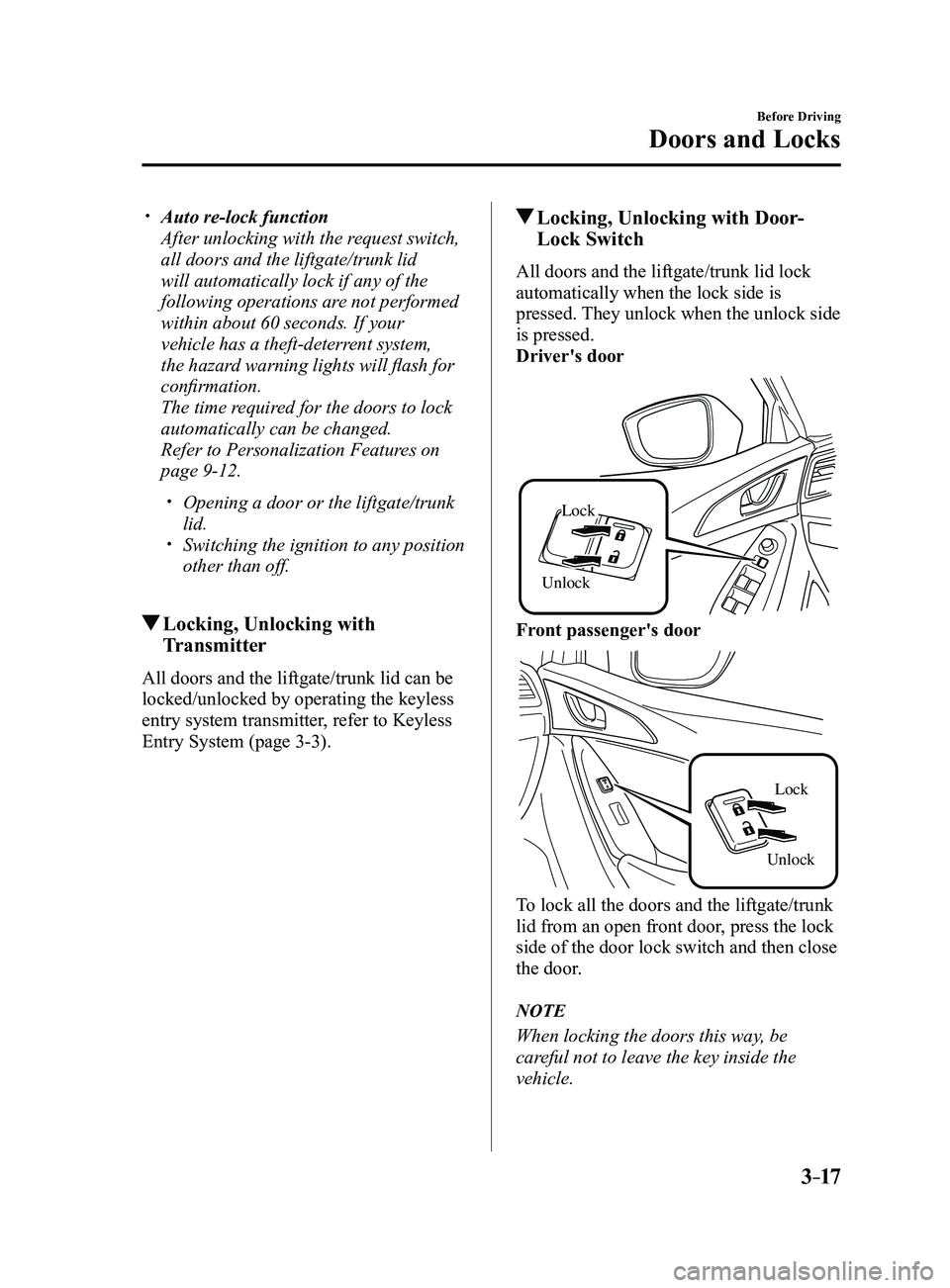
Locking, Unlocking with Door-
Lock Switch
All doors and the liftgate/trunk lid lock
automatically when the lock side is
pressed. They unlock when the unlock side
is pressed.
Driver's door
Unlock
Lock
Front passenger's door
UnlockLock
To lock all the doors and the liftgate/trunk
lid from an open front door, press the lock
side of the door lock switch and then close
the door.
NOTE
When locking the doors this way, be
careful not to leave the key inside the
vehicle.
Mazda3_8FL6-EA-16F_Edition2.indb 172016/08/10 17:35:21
Page 111 of 612
3–35
Before Driving
Mirrors
Rearview Mirror
WARNING
Do not stack cargo or objects higher
than the seatbacks: Cargo stacked higher than the
seatbacks is dangerous. It can block
your view in the rearview mirror, which
might cause you to hit another car
when changing lanes.
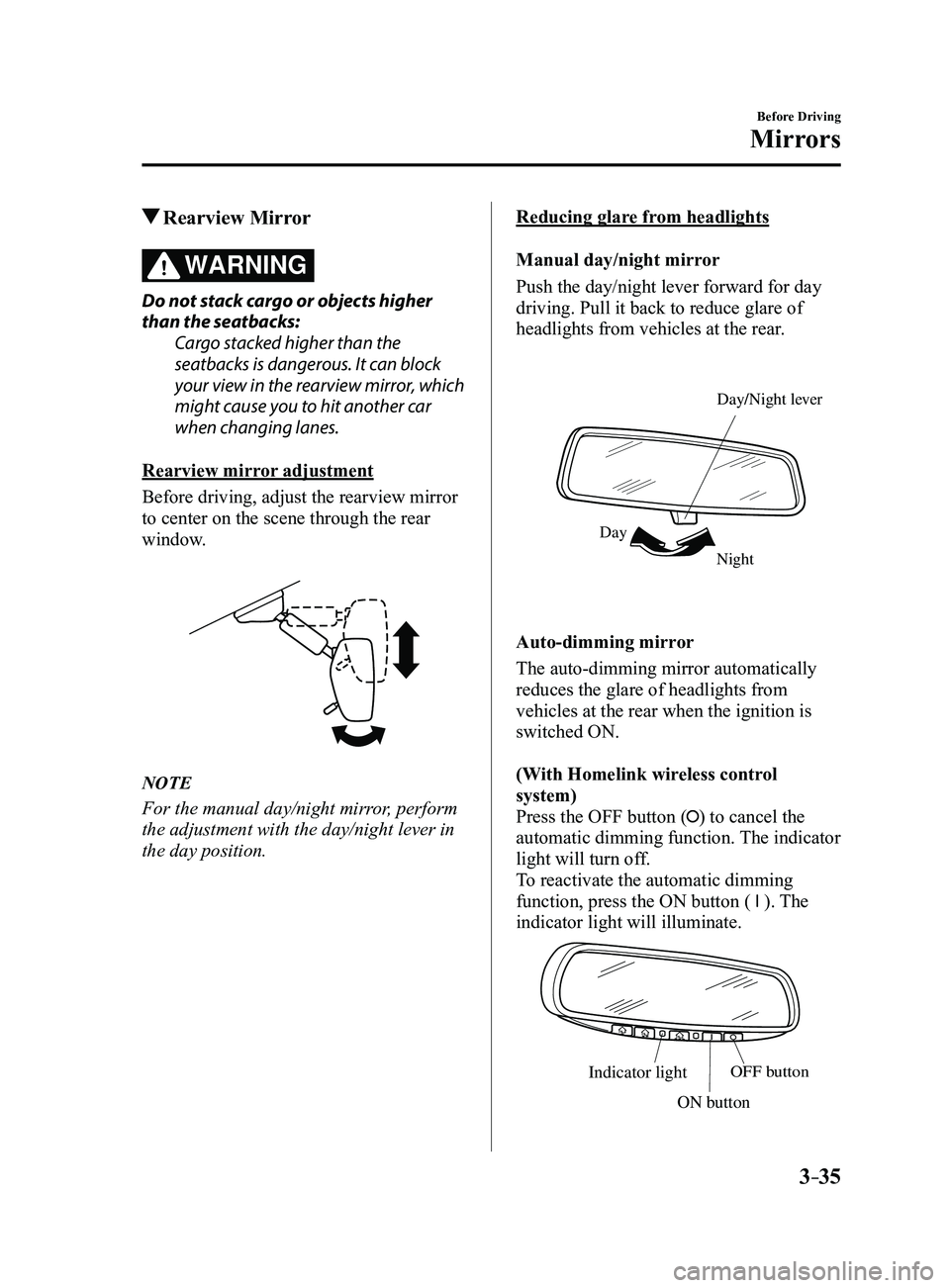
Rearview mirror adjustment
Before driving, adjust the rearview mirror
to center on the scene through the rear
window.
NOTE
For the manual day/night mirror, perform
the adjustment with the day/night lever in
the day position.
Reducing glare from headlights
Manual day/night mirror
Push the day/night lever forward for day
driving. Pull it back to reduce glare of
headlights from vehicles at the rear.
Night
Day Day/Night le
ver
Auto-dimming mirror
The auto-dimming mirror automatically
reduces the glare of headlights from
vehicles at the rear when the ignition is
switched ON.
(With Homelink wireless control
system)
Press the OFF button (
) to cancel the
automatic dimming function. The indicator
light will turn off.
To reactivate the automatic dimming
function, press the ON button (
). The
indicator light will illuminate.
Indicator lightOFF button
ON button
Mazda3_8FL6-EA-16F_Edition2.indb 352016/08/10 17:35:32
Page 120 of 612
3–44
Before Driving
Security System
*Some models.
Theft-Deterrent System*
If the theft-deterrent system detects an
inappropriate entry into the vehicle,
which could result in the vehicle or its
contents being stolen, the alarm alerts the
surrounding area of an abnormality by
sounding the horn and flashing the hazard
warning lights.
The system will not function unless it's
properly armed. So when you leave the
vehicle, follow the arming procedure
correctly.
Operation
System triggering conditions
The horn sounds intermittently and the
hazard warning lights flash for about 30
seconds when the system is triggered by
any one of the following:
Unlocking a door with the key, door
lock switch, or an inside door-lock knob. Forcing open a door, the hood or the
liftgate/trunk lid. Opening the hood by operating the hood
release handle. Switching the ignition ON without using
the push button start.
If the system is triggered again, the lights
and horn will activate until the driver's
door is unlocked with the transmitter.
(With the advanced keyless function)
The lights and horn can also be
deactivated by pressing the request switch
on a door.
NOTE
If the battery goes dead while the theft-
deterrent system is armed, the horn will
activate and the hazard warning lights
will flash when the battery is charged or
replaced.
How to Arm the System
1. Close the windows and the moonroof *
securely.
2. Switch the ignition OFF .
3. Make sure the hood, the doors, and the
liftgate/trunk lid are closed.
4. Press the lock button on the transmitter
or lock the driver's door from the
outside with the auxiliary key.
The hazard warning lights will flash
once.
The following method will also arm the
theft-deterrent system:
Press the door-lock switch “” while
any door is open and then close all of
the doors.
(With the advanced keyless function)
Press a request switch.
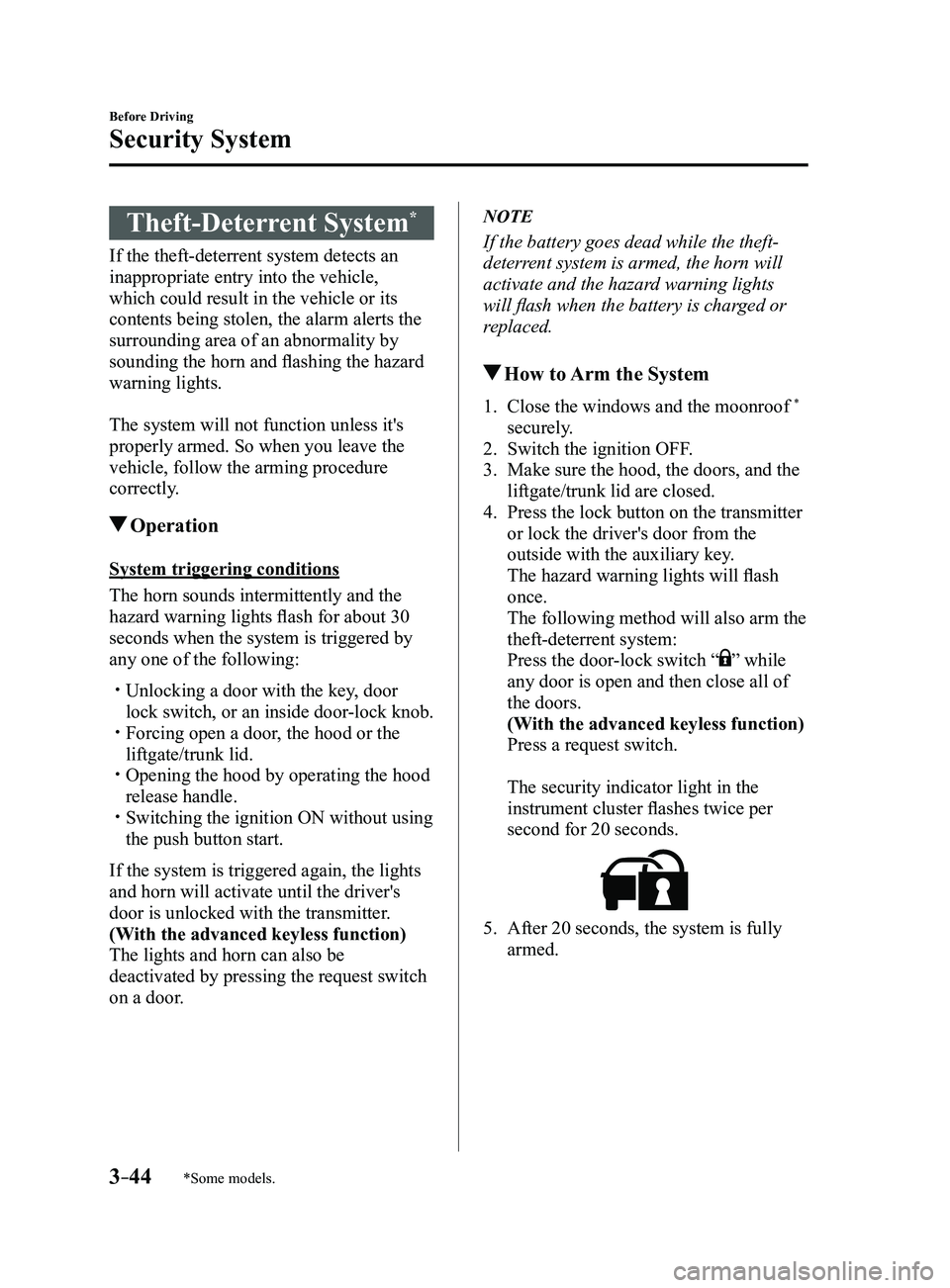
The security indicator light in the
instrument cluster flashes twice per
second for 20 seconds.
5. After 20 seconds, the system is fully
armed.
Mazda3_8FL6-EA-16F_Edition2.indb 442016/08/10 17:35:37
Page 121 of 612
3–45
Before Driving
Security System
NOTE
The theft-deterrent system can also be
armed by activating the auto relock
function with all the doors, the liftgate/
trunk lid and the hood closed.
Refer to Transmitter on page 3-5. The system will disarm if one of the
following operations takes place within
20 seconds after pressing the lock
button:
Unlocking any door . Opening any door. Opening the hood. Switching the ignition ON.
To rearm the system, do the arming
procedure again. When the doors ar e locked by pressing
the lock button on the transmitter
or using the auxiliary key while the
theft-deterrent system is armed, the
hazard warning lights will flash once to
indicate that the system is armed.
To Turn Off an Armed System
An armed system can be turned off using
any one of the following methods:
Pressing the unlock button on the
transmitter. Starting the engine with the push button
start. (With the advanced keyless function)
Pressing a request switch on the doors.
The hazard warning lights will flash twice.
NOTE
When the doors are unlocked by pressing
the unlock button on the transmitter while
the theft-deterrent system is turned off, the
hazard warning lights will flash twice to
indicate that the system is turned off.
To Stop the Alarm
A triggered alarm can be turned off using
any one of the following methods:
Pressing the unlock button on the
transmitter. Starting the engine with the push button
start. (With the advanced keyless function)
Pressing a request switch on the doors. Pressing the electric liftgate/trunk lid
opener while the key is being carried.
The hazard warning lights will flash twice.
Mazda3_8FL6-EA-16F_Edition2.indb 452016/08/10 17:35:37
Page 131 of 612
4–1
*Some models.
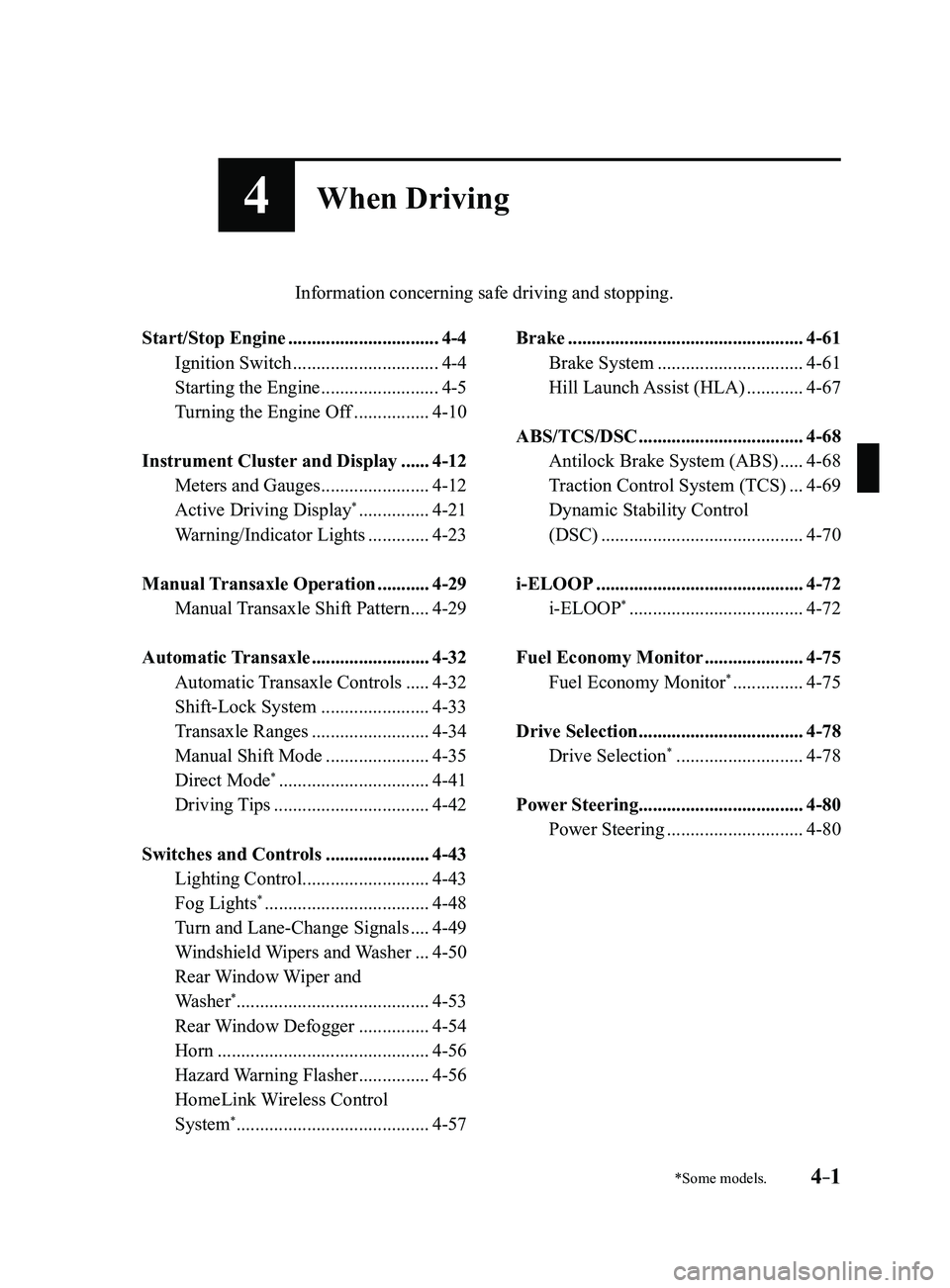
4When Driving
Information concerning safe driving and stopping.
Start/Stop Engine ................................4-4
Ignition Switch ...............................4-4
Starting the Engine .........................4-5
Turning the Engine Off ................4-10
Instrument Cluster and Display ......4-12
Meters and Gauges .......................4-12
Active Driving Display* ...............4-21
Warning/Indicator Lights .............4-23
Manual Transaxle Operation ...........4-29
Manual Transaxle Shift Pattern ....4-29
Automatic Transaxle .........................4-32
Automatic Transaxle Controls .....4-32
Shift-Lock System .......................4-33
Transaxle Ranges .........................4-34
Manual Shift Mode ......................4-35
Direct Mode* ................................4-41
Driving Tips .................................4-42
Switches and Controls ......................4-43
Lighting Control ...........................4-43
Fog Lights* ...................................4-48
Turn and Lane-Change Signals ....4-49
Windshield Wipers and Washer ...4-50
Rear Window Wiper and
Washer*.........................................4-53
Rear Window Defogger ...............4-54
Horn .............................................4-56
Hazard Warning Flasher ...............4-56
HomeLink Wireless Control
System* .........................................4-57
Brake ..................................................4-61
Brake System ...............................4-61
Hill Launch Assist (HLA) ............4-67
ABS/TCS/DSC ...................................4-68
Antilock Brake System (ABS) .....4-68
Traction Control System (TCS) ...4-69
Dynamic Stability Control
(DSC)
...........................................4-70
i-ELOOP ............................................4-72
i-ELOOP* .....................................4-72
Fuel Economy Monitor .....................4-75
Fuel Economy Monitor* ...............4-75
Drive Selection ...................................4-78
Drive Selection* ...........................4-78
Power Steering ...................................4-80
Power Steering .............................4-80
Mazda3_8FL6-EA-16F_Edition2.indb 12016/08/10 17:35:40
Page 135 of 612
4–5
When Driving
Start/Stop Engine
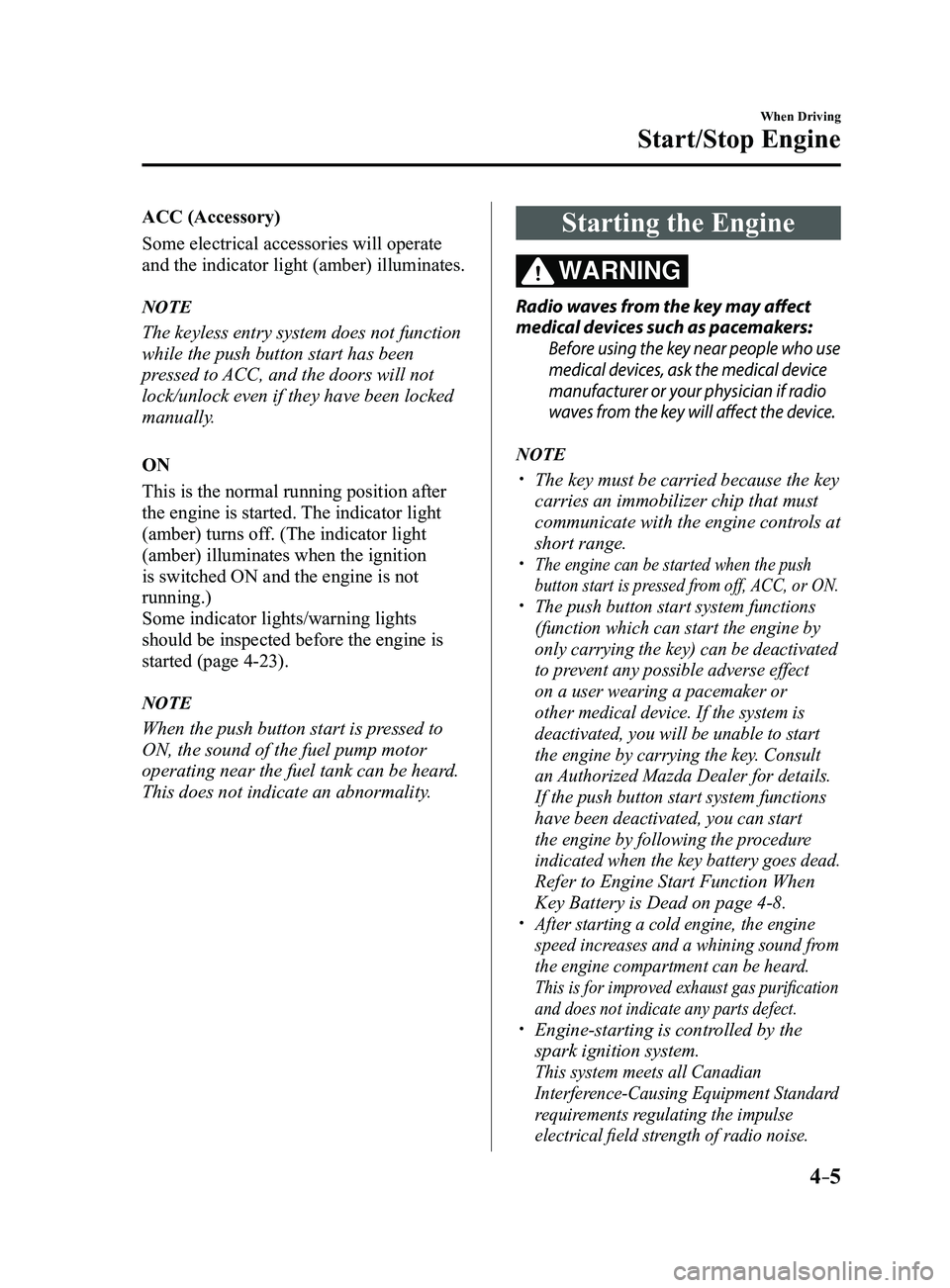
ACC (Accessory)
Some electrical accessories will operate
and the indicator light (amber) illuminates.
NOTE
The keyless entry system does not function
while the push button start has been
pressed to ACC, and the doors will not
lock/unlock even if they have been locked
manually.
ON
This is the normal running position after
the engine is started. The indicator light
(amber) turns off. (The indicator light
(amber) illuminates when the ignition
is switched ON and the engine is not
running.)
Some indicator lights/warning lights
should be inspected before the engine is
started (page
4-23).
NOTE
When the push button start is pressed to
ON, the sound of the fuel pump motor
operating near the fuel tank can be heard.
This does not indicate an abnormality.
Starting the Engine
WARNING
Radio waves from the key may affect
medical devices such as pacemakers:
Before using the key near people who use
medical devices, ask the medical device
manufacturer or your physician if radio
waves from the key will affect the device.
NOTE
The key must be carried because the key
carries an immobilizer chip that must
communicate with the engine controls at
short range.
The engine can be started when the push
button start is pressed from off, ACC, or ON.
The push button start system functions
(function which can start the engine by
only carrying the key) can be deactivated
to prevent any possible adverse effect
on a user wearing a pacemaker or
other medical device. If the system is
deactivated, you will be unable to start
the engine by carrying the key. Consult
an Authorized Mazda Dealer for details.
If the push button start system functions
have been deactivated, you can start
the engine by following the procedure
indicated when the key battery goes dead.
Refer to Engine Start Function When
Key Battery is Dead on page 4-8. After starting a cold engine, the engine
speed increases and a whining sound from
the engine compartment can be heard.
This is for improved exhaust gas purification
and does not indicate any parts defect.
Engine-starting is controlled by the
spark ignition system.
This system meets all Canadian
Interference-Causing Equipment Standard
requirements regulating the impulse
electrical field strength of radio noise.
Mazda3_8FL6-EA-16F_Edition2.indb 52016/08/10 17:35:41