warning lights MAZDA MODEL 3 5-DOOR 2017 Owners Manual
[x] Cancel search | Manufacturer: MAZDA, Model Year: 2017, Model line: MODEL 3 5-DOOR, Model: MAZDA MODEL 3 5-DOOR 2017Pages: 612
Page 21 of 612
2–7
Essential Safety Equipment
Seats
*Some models.
Seat Warmer*
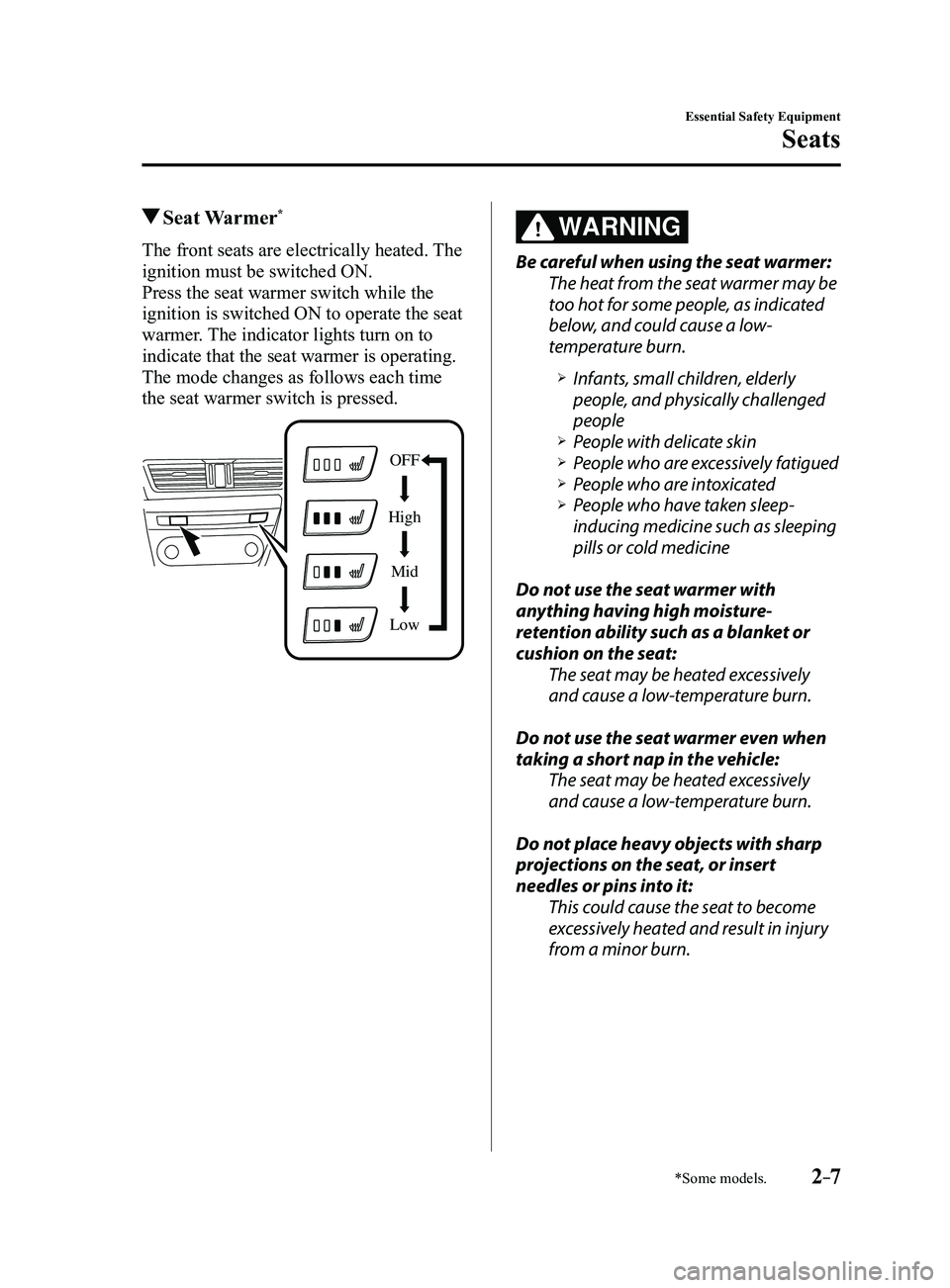
The front seats are electrically heated. The
ignition must be switched ON.
Press the seat warmer switch while the
ignition is switched ON to operate the seat
warmer. The indicator lights turn on to
indicate that the seat warmer is operating.
The mode changes as follows each time
the seat warmer switch is pressed.
OFF
High Mid
Low
WARNING
Be careful when using the seat warmer:
The heat from the seat warmer may be
too hot for some people, as indicated
below, and could cause a low-
temperature burn.
Infants, small children, elderly
people, and physically challenged
people
People with delicate skin People who are excessively fatigued People who are intoxicated People who have taken sleep-
inducing medicine such as sleeping
pills or cold medicine
Do not use the seat warmer with
anything having high moisture-
retention ability such as a blanket or
cushion on the seat: The seat may be heated excessively
and cause a low-temperature burn.
Do not use the seat warmer even when
taking a short nap in the vehicle: The seat may be heated excessively
and cause a low-temperature burn.
Do not place heavy objects with sharp
projections on the seat, or insert
needles or pins into it: This could cause the seat to become
excessively heated and result in injury
from a minor burn.
Mazda3_8FL6-EA-16F_Edition2.indb 72016/08/10 17:34:52
Page 32 of 612
2–18
Essential Safety Equipment
Seat Belt Systems
Seat Belt Warning Systems
If it detects that the occupant seat belt
is unfastened, the warning light or beep
alerts the occupant.
Refer to Warning/Indicator Lights on page
4-23.
Refer to Seat Belt Warning Beep on page
7-40.
Front Seat Belt
Pretensioner and Load
Limiting Systems
For optimum protection, the driver and
front passenger seat belts are equipped
with pretensioner and load limiting
systems. For both these systems to work
properly you must wear the seat belt
properly.
Pretensioners:
When a collision is detected, the
pretensioners deploy simultaneously with
the air bags.
For vehicles with the front passenger
occupant classification system, the
pretensioners deploy simultaneously
with the air bags when a roll-over is also
detected.
For deployment details, refer to the SRS
Air Bag Deployment Criteria (page
2-54).
The front seat belt retractors remove slack
quickly as the air bags are expanding.
Any time the air bags and seat belt
pretensioners have fired they must be
replaced.
A system malfunction or operation
conditions are indicated by a warning.
Refer to Warning/Indicator Lights on page
4-23.
Refer to Air Bag/Front Seat Belt
Pretensioner System Warning Beep on
page
7-39.
Mazda3_8FL6-EA-16F_Edition2.indb 182016/08/10 17:34:58
Page 67 of 612
2–53
Essential Safety Equipment
SRS Air Bags
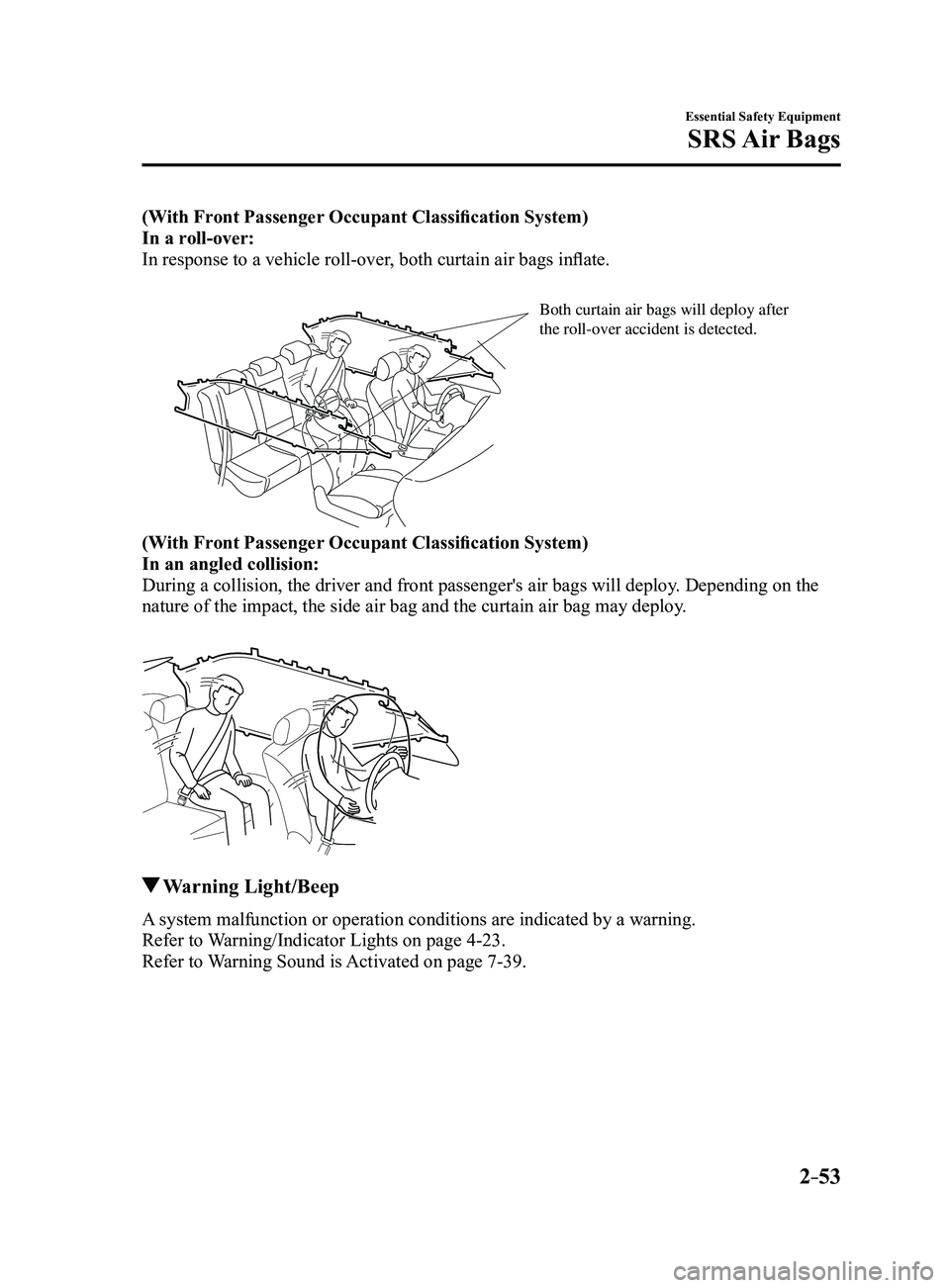
(With Front Passenger Occupant Classification System)
In a roll-over:
In response to a vehicle roll-over, both curtain air bags inflate.
Both curtain air bags will deploy after the roll-over accident is detected.
(With Front Passenger Occupant Classification System)
In an angled collision:
During a collision, the driver and front passenger's air bags will deplo\
y. Depending on the
nature of the impact, the side air bag and the curtain air bag may deplo\
y.
Warning Light/Beep
A system malfunction or operation conditions are indicated by a warning.
Refer to Warning/Indicator Lights on page
4-23.
Refer to Warning Sound is Activated on page
7-39.
Mazda3_8FL6-EA-16F_Edition2.indb 532016/08/10 17:35:10
Page 79 of 612
3–3
Before Driving
Keys
A code number is stamped on the plate
attached to the key set; detach this plate
and store it in a safe place (not in the
vehicle) for use if you need to make a
replacement key (auxiliary key).
Also write down the code number and
keep it in a separate safe and convenient
place, but not in the vehicle.
If your key (auxiliary key) is lost, consult
your Authorized Mazda Dealer and have
your code number ready.
NOTE
The driver must carry the key to ensure the
system functions properly.
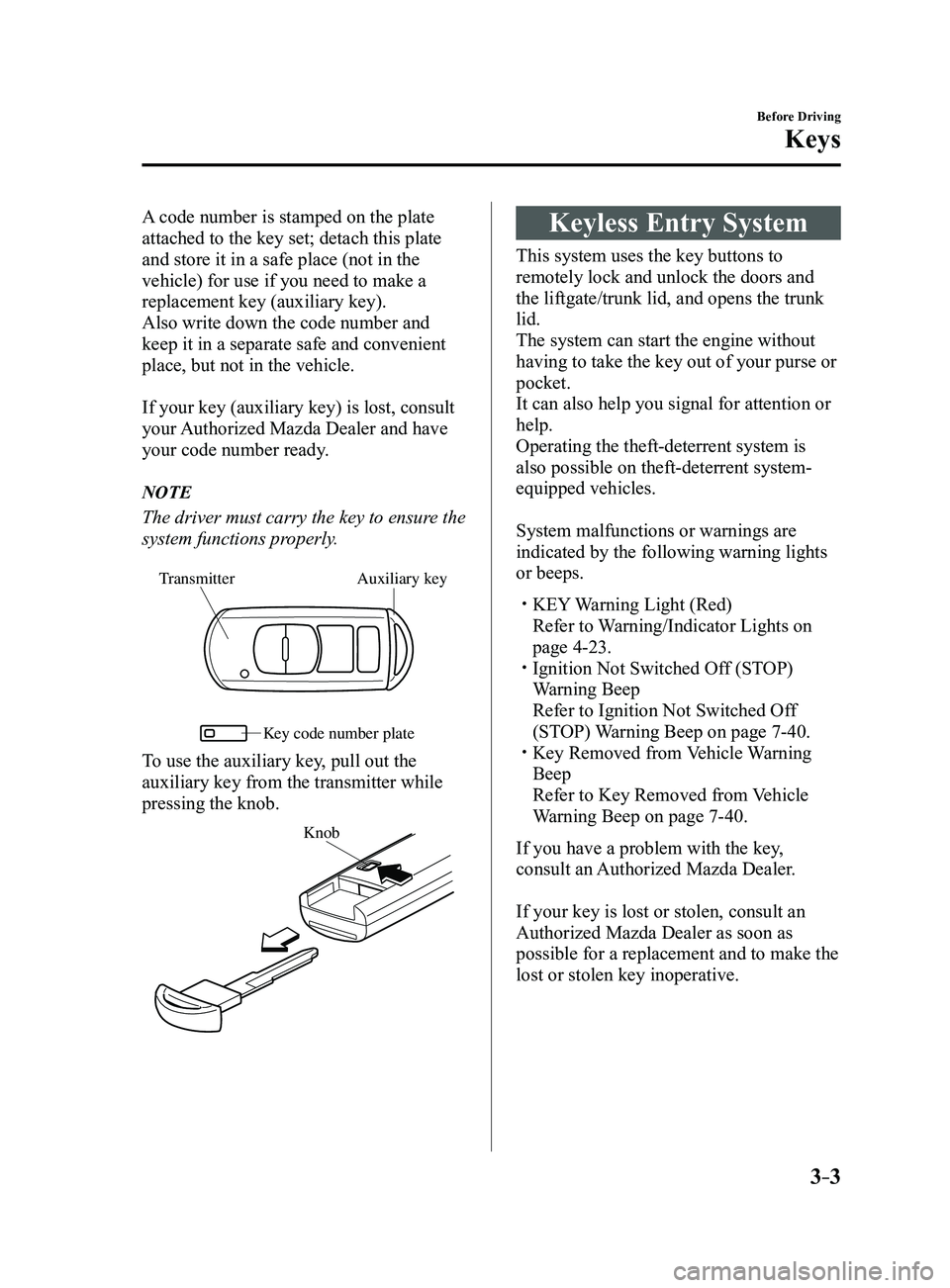
Auxiliary key
Transmitter
Ke y code number plate
To use the auxiliary key, pull out the
auxiliary key from the transmitter while
pressing the knob.
Knob
Keyless Entry System
This system uses the key buttons to
remotely lock and unlock the doors and
the liftgate/trunk lid, and opens the trunk
lid.
The system can start the engine without
having to take the key out of your purse or
pocket.
It can also help you signal for attention or
help.
Operating the theft-deterrent system is
also possible on theft-deterrent system-
equipped vehicles.
System malfunctions or warnings are
indicated by the following warning lights
or beeps.
KEY Warning Light (Red)
Refer to Warning/Indicator Lights on
page 4-23. Ignition Not Switched Of f (STOP)
Warning Beep
Refer to Ignition Not Switched Of f
(STOP) Warning Beep on page 7-40. Key Removed from Vehicle Warning
Beep
Refer to Key Removed from Vehicle
Warning Beep on page 7-40.
If you have a problem with the key,
consult an Authorized Mazda Dealer.
If your key is lost or stolen, consult an
Authorized Mazda Dealer as soon as
possible for a replacement and to make the
lost or stolen key inoperative.
Mazda3_8FL6-EA-16F_Edition2.indb 32016/08/10 17:35:16
Page 81 of 612
3–5
Before Driving
Keys
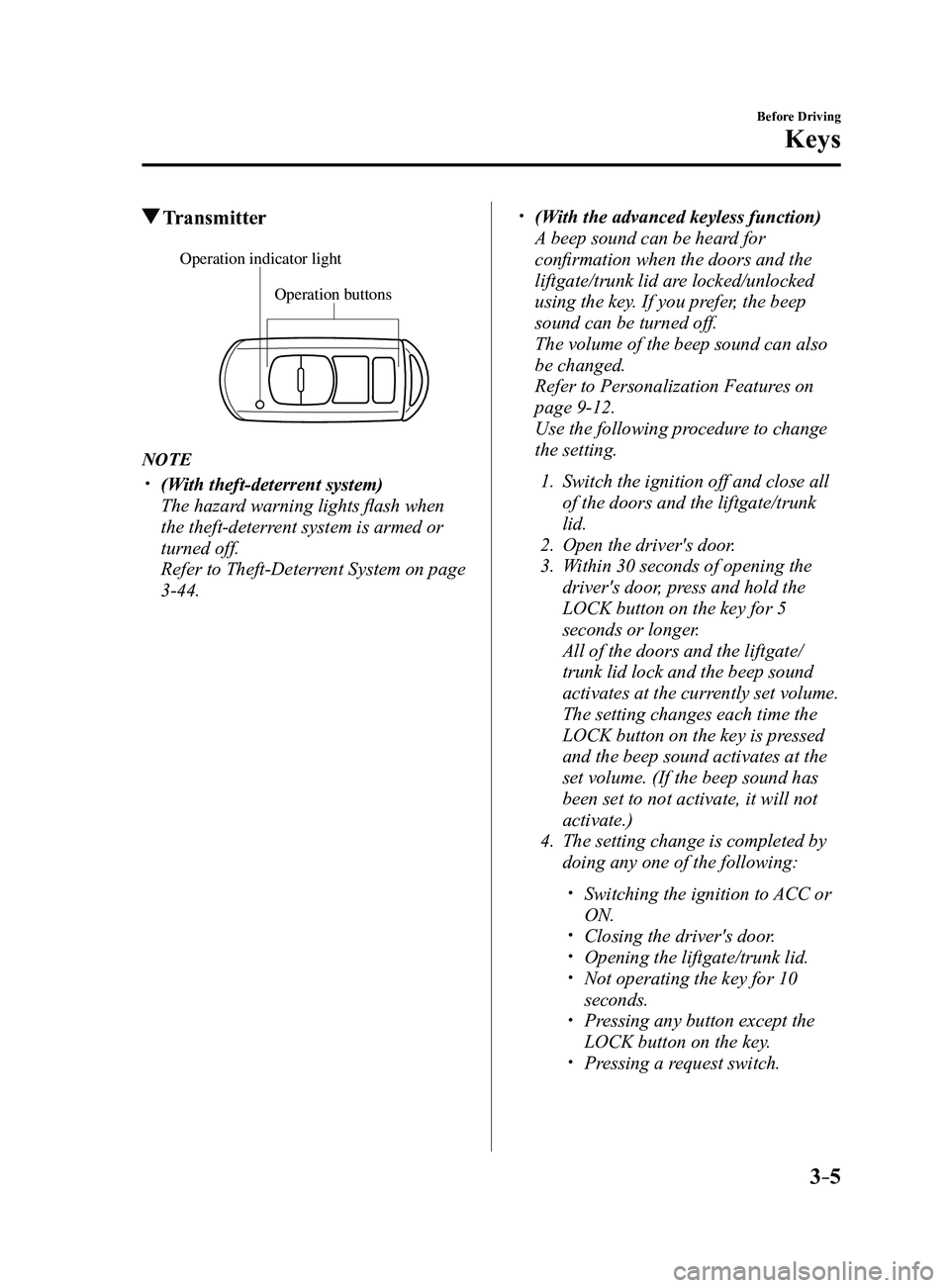
Transmitter
Operation buttons
Operation indicator light
NOTE
(With theft-deterrent system)
The hazard warning lights flash when
the theft-deterrent system is armed or
turned off.
Refer to Theft-Deterrent System on page
3-44.
(With the advanced keyless function)
A beep sound can be heard for
confirmation when the doors and the
liftgate/trunk lid are locked/unlocked
using the key. If you prefer, the beep
sound can be turned off.
The volume of the beep sound can also
be changed.
Refer to Personalization Featur es on
page 9-12.
Use the following procedure to change
the setting.
1. Switch the ignition off and close all
of the doors and the liftgate/trunk
lid.
2. Open the driver's door .
3. Within 30 seconds of opening the
driver's door, press and hold the
LOCK button on the key for 5
seconds or longer.
All of the doors and the liftgate/
trunk lid lock and the beep sound
activates at the currently set volume.
The setting changes each time the
LOCK button on the key is pressed
and the beep sound activates at the
set volume. (If the beep sound has
been set to not activate, it will not
activate.)
4. The setting change is completed by
doing any one of the following:
Switching the ignition to ACC or
ON. Closing the driver's door. Opening the liftgate/trunk lid. Not operating the key for 10
seconds. Pressing any button except the
LOCK button on the key. Pressing a request switch.
Mazda3_8FL6-EA-16F_Edition2.indb 52016/08/10 17:35:17
Page 82 of 612
3–6
Before Driving
Keys
The operation indicator light flashes when
the buttons are pressed.
Lock button
To lock the doors and the liftgate/trunk
lid, press the lock button and the hazard
warning lights will flash once.
(With the advanced keyless function)
A beep sound will be heard once.
To confirm that all doors and the liftgate/
trunk lid have been locked, press the lock
button again within 5 seconds. If they are
closed and locked, the horn will sound.
NOTE
The doors and the liftgate/trunk lid can
be locked by pressing the lock button
while any other door or the liftgate/
trunk lid is open. The hazard warning
lights will not flash.
When the lock button is pressed while
any door is open and then the door is
closed, all the doors and the liftgate/
trunk lid are locked.
Confirm that all doors and the liftgate/
trunk lid are locked visually or audibly
by use of the double click.
Make sure all doors and the liftgate/
trunk lid are locked after pressing the
button.
(With theft-deterrent system)
When the doors are locked by pressing
the lock button on the key while the
theft-deterrent system is armed, the
hazard warning lights will flash once to
indicate that the system is armed.
Unlock button
To unlock the driver's door, press the
unlock button and the hazard warning
lights will flash twice.
(With the advanced keyless function)
A beep sound will be heard twice.
To unlock all doors and the liftgate/trunk
lid, press the unlock button again within
3 seconds and two more beep sounds will
be heard.
Mazda3_8FL6-EA-16F_Edition2.indb 62016/08/10 17:35:17
Page 83 of 612
3–7
Before Driving
Keys
NOTE
The system can be set to unlock all
doors by performing a single operation.
Refer to Personalization Features on
page 9-12.
Use the following procedure to change
the setting.
1. Switch the ignition off and close all
of the doors and the liftgate/trunk
lid.
2. Open the driver's door .
3. Within 30 seconds of opening the
driver's door, press and hold the
UNLOCK button on the key for 5
seconds or longer (the sound of
the doors locking/unlocking can be
heard).
After this, the system switches the
setting each time the UNLOCK
button is pressed (the sound of the
doors locking/unlocking can be
heard).
4. The setting change is completed by
doing any one of the following:
Switching the ignition to ACC or
ON. Closing the driver's door. Opening the liftgate/trunk lid. Not operating the key for 10
seconds. Pressing any button except the
UNLOCK button on the key. Pressing a request switch.
(Auto re-lock function)
After unlocking with the key , all
doors and the liftgate/trunk lid will
automatically lock if any of the
following operations are not performed
within about 60 seconds. If your
vehicle has a theft-deterrent system,
the hazard warning lights will flash for
confirmation.
The time required for the doors to lock
automatically can be changed.
Refer to Personalization Featur es on
page 9-12.
A door or the liftgate/trunk lid is
opened. The ignition is switched to any
position other than off.
(With theft-deterrent system)
When the doors are unlocked by
pressing the unlock button on the key
while the theft-deterrent system is
turned off, the hazard warning lights
will flash twice to indicate that the
system is turned off.
Mazda3_8FL6-EA-16F_Edition2.indb 72016/08/10 17:35:17
Page 84 of 612
3–8
Before Driving
Keys
Trunk button (4–door)
To open the trunk lid, press and hold the
trunk button until the trunk lid opens.
Panic button
If you witness from a distance someone
attempting to break into or damage your
vehicle, press and hold the panic button
to activate the vehicle's alarm. Call
emergency services if necessary.
NOTE
The panic button will work whether any
door or the liftgate/trunk lid is open or
closed.
(Turning on the alarm)
Pressing the panic button for 1 second or
more will trigger the alarm for about 2
minutes and 30 seconds, and the following
will occur:
The horn sounds intermittently. The hazard warning lights flash.
(Turning off the alarm)
The alarm stops by pressing any button on
the key.
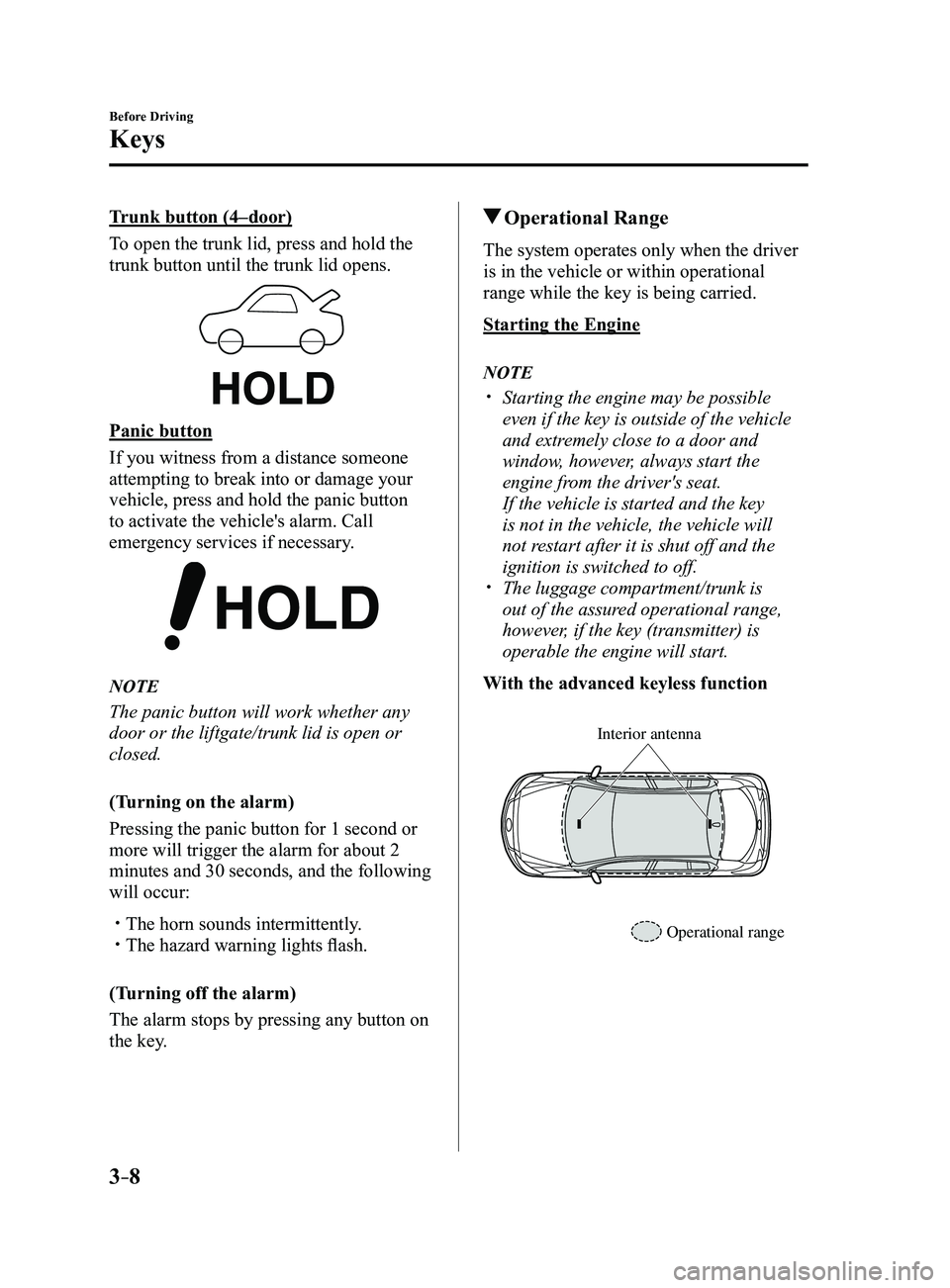
Operational Range
The system operates only when the driver
is in the vehicle or within operational
range while the key is being carried.
Starting the Engine
NOTE
Starting the engine may be possible
even if the key is outside of the vehicle
and extremely close to a door and
window, however, always start the
engine from the driver's seat.
If the vehicle is started and the key
is not in the vehicle, the vehicle will
not restart after it is shut off and the
ignition is switched to off.
The luggage compartment/trunk is
out of the assured operational range,
however, if the key (transmitter) is
operable the engine will start.
With the advanced keyless function
Interior antenna
Operational range
Mazda3_8FL6-EA-16F_Edition2.indb 82016/08/10 17:35:18
Page 90 of 612
3–14
Before Driving
Doors and Locks
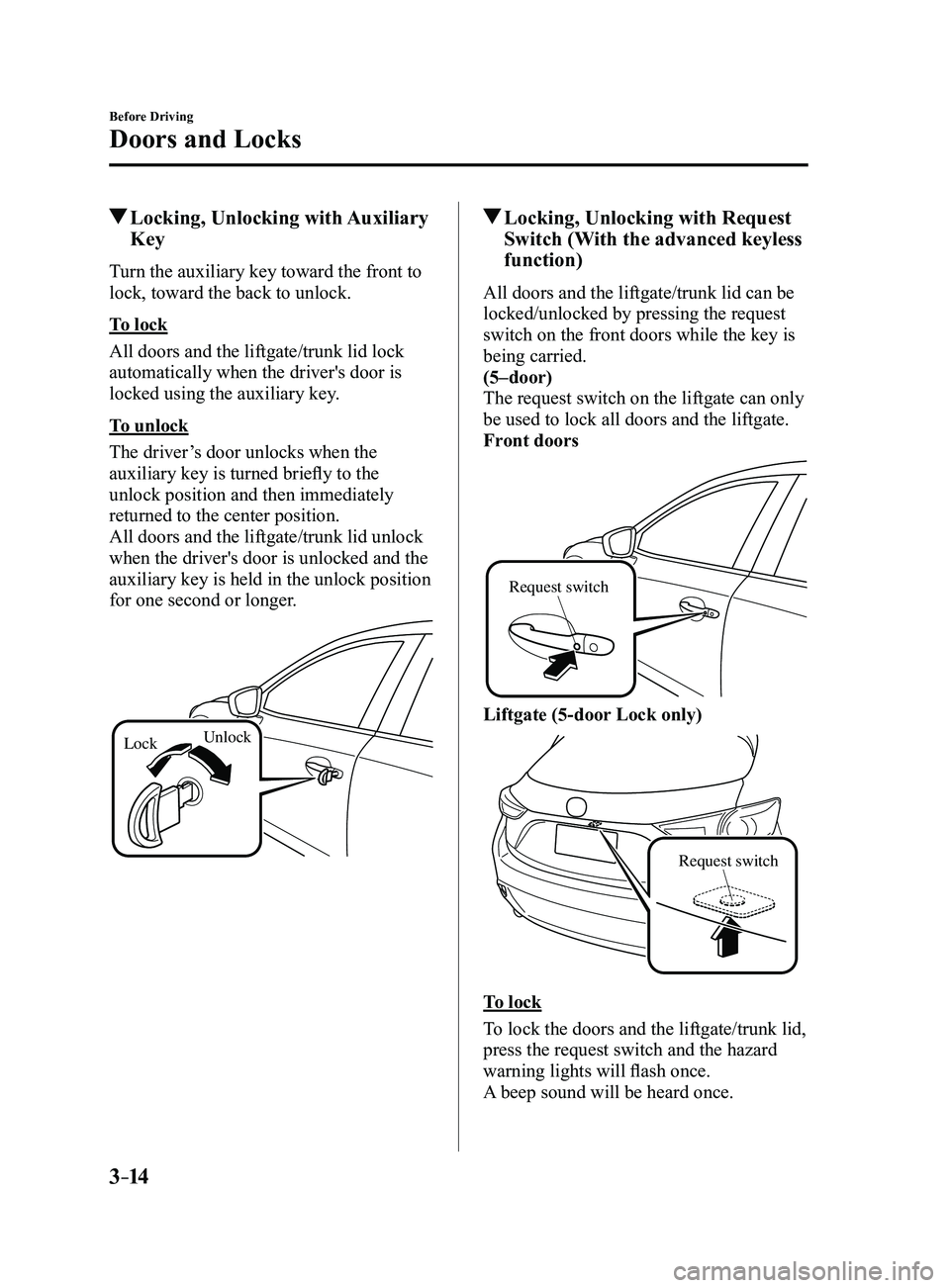
Locking, Unlocking with Auxiliary
Key
Turn the auxiliary key toward the front to
lock, toward the back to unlock.
To lock
All doors and the liftgate/trunk lid lock
automatically when the driver's door is
locked using the auxiliary key.
To unlock
The driver’s door unlocks when the
auxiliary key is turned briefly to the
unlock position and then immediately
returned to the center position.
All doors and the liftgate/trunk lid unlock
when the driver's door is unlocked and the
auxiliary key is held in the unlock position
for one second or longer.
LockUnlock
Locking, Unlocking with Request
Switch (With the advanced keyless
function)
All doors and the liftgate/trunk lid can be
locked/unlocked by pressing the request
switch on the front doors while the key is
being carried.
(5–door)
The request switch on the liftgate can only
be used to lock all doors and the liftgate.
Front doors
Request switch
Liftgate (5-door Lock only)
Request switch
To lock
To lock the doors and the liftgate/trunk lid,
press the request switch and the hazard
warning lights will flash once.
A beep sound will be heard once.
Mazda3_8FL6-EA-16F_Edition2.indb 142016/08/10 17:35:20
Page 91 of 612
3–15
Before Driving
Doors and Locks
To unlock
Driver's door request switch
To unlock the driver's door, press the
request switch. A beep sound will be heard
twice and the hazard warning lights will
flash twice.
To unlock all doors and the liftgate/trunk
lid, press the request switch again within
3 seconds and two more beep sounds will
be heard.
Front passenger door request switch
To unlock all doors and the liftgate/trunk
lid, press the request switch. A beep sound
will be heard twice and the hazard warning
lights will flash twice.NOTE
The system can be set to unlock all
doors by performing a single operation.
Refer to Personalization Features on
page 9-12.
Use the following procedure to change
the setting.
1. Switch the ignition off and close all
of the doors and the liftgate/trunk
lid.
2. Open the driver's door .
3. Within 30 seconds of opening the
driver's door, press and hold the
UNLOCK button on the key for 5
seconds or longer (the sound of
the doors locking/unlocking can be
heard).
After this, the system switches the
setting of pressing the driver's
request switch once or twice to
unlock all doors and the liftgate/
trunk lid each time the UNLOCK
button is pressed (the sound of the
doors locking/unlocking can be
heard).
4. The setting change is completed by
doing any one of the following:
Switching the ignition to ACC or
ON. Closing the driver's door. Opening the liftgate/trunk lid. Not operating the key for 10
seconds. Pressing any button except the
UNLOCK button on the key. Pressing a request switch.
Confirm that all doors and the liftgate/
trunk lid are securely locked.
For the liftgate/trunk lid, move it
without pressing the electric liftgate/
trunk lid opener to verify that the
liftgate/trunk lid has not been left ajar.
Mazda3_8FL6-EA-16F_Edition2.indb 152016/08/10 17:35:20