fog light MAZDA MODEL 3 5-DOOR 2017 Owner's Manual
[x] Cancel search | Manufacturer: MAZDA, Model Year: 2017, Model line: MODEL 3 5-DOOR, Model: MAZDA MODEL 3 5-DOOR 2017Pages: 612
Page 307 of 612
5–15
Interior Features
Climate Control System
Windshield Defrosting and
Defogging
Press the windshield defroster switch.
In this position, the outside air position
is automatically selected, and the air
conditioner automatically turns on. The
air conditioner will directly dehumidify
the air to the front windshield and side
windows on page
5-4.
Airflow amount will be increased.
WARNING
Set the temperature control to the hot
or warm position when defogging
(
position):
Using the position with the
temperature control set to the cold
position is dangerous as it will cause
the outside of the windshield to fog up.
Your vision will be hampered, which
could lead to a serious accident.
NOTE
Use the temperature control dial to
increase the air flow temperature and
defog the windshield more quickly.
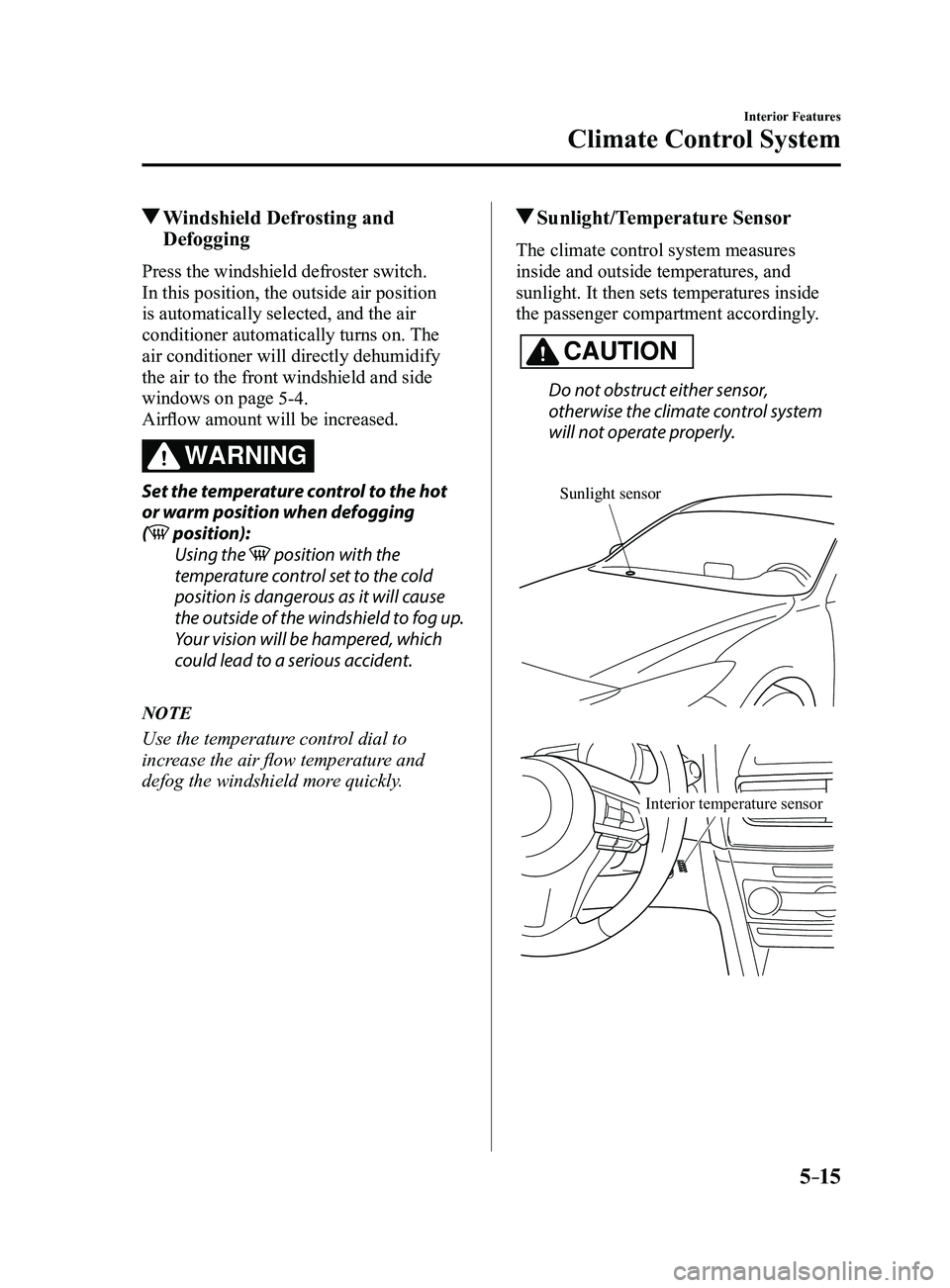
Sunlight/Temperature Sensor
The climate control system measures
inside and outside temperatures, and
sunlight. It then sets temperatures inside
the passenger compartment accordingly.
CAUTION
Do not obstruct either sensor,
otherwise the climate control system
will not operate properly.
Sunlight sensor
Interior temperature sensor
Mazda3_8FL6-EA-16F_Edition2.indb 152016/08/10 17:37:18
Page 313 of 612
5–21
Interior Features
Audio System
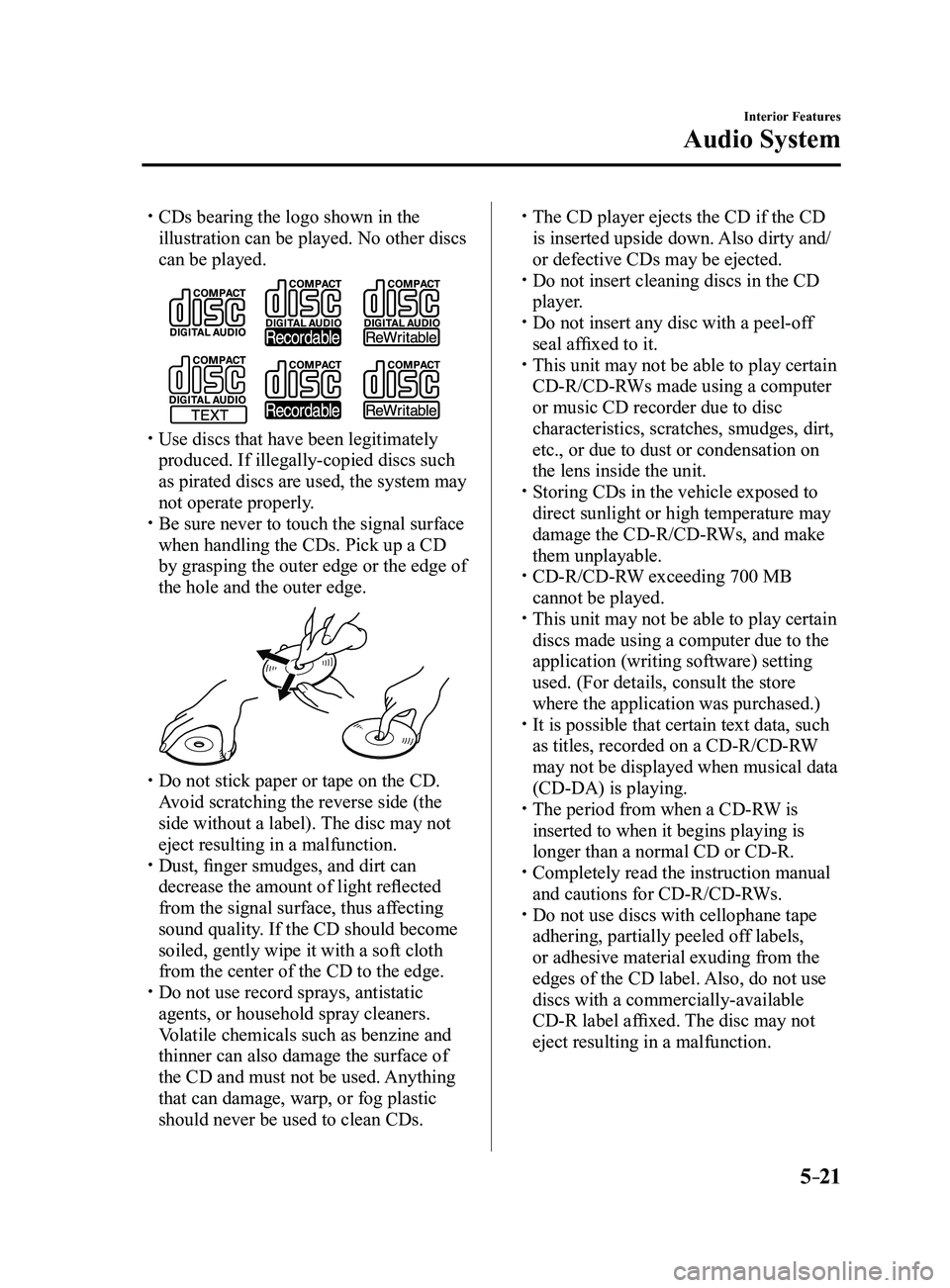
CDs bearing the logo shown in the
illustration can be played. No other discs
can be played.
Use discs that have been legitimately
produced. If illegally-copied discs such
as pirated discs are used, the system may
not operate properly.
Be sure never to touch the signal surface
when handling the CDs. Pick up a CD
by grasping the outer edge or the edge of
the hole and the outer edge.
Do not stick paper or tape on the CD.
Avoid scratching the reverse side (the
side without a label). The disc may not
eject resulting in a malfunction.
Dust, finger smudges, and dirt can
decrease the amount of light reflected
from the signal surface, thus affecting
sound quality. If the CD should become
soiled, gently wipe it with a soft cloth
from the center of the CD to the edge.
Do not use record sprays, antistatic
agents, or household spray cleaners.
Volatile chemicals such as benzine and
thinner can also damage the surface of
the CD and must not be used. Anything
that can damage, warp, or fog plastic
should never be used to clean CDs.
The CD player ejects the CD if the CD
is inserted upside down. Also dirty and/
or defective CDs may be ejected.
Do not insert cleaning discs in the CD
player. Do not insert any disc with a peel-off
seal affixed to it. This unit may not be able to play certain
CD-R/CD-RWs made using a computer
or music CD recorder due to disc
characteristics, scratches, smudges, dirt,
etc., or due to dust or condensation on
the lens inside the unit.
Storing CDs in the vehicle exposed to
direct sunlight or high temperature may
damage the CD-R/CD-RWs, and make
them unplayable.
CD-R/CD-RW exceeding 700 MB
cannot be played. This unit may not be able to play certain
discs made using a computer due to the
application (writing software) setting
used. (For details, consult the store
where the application was purchased.)
It is possible that certain text data, such
as titles, recorded on a CD-R/CD-RW
may not be displayed when musical data
(CD-DA) is playing.
The period from when a CD-R W is
inserted to when it begins playing is
longer than a normal CD or CD-R.
Completely read the instruction manual
and cautions for CD-R/CD-RWs. Do not use discs with cellophane tape
adhering, partially peeled off labels,
or adhesive material exuding from the
edges of the CD label. Also, do not use
discs with a commercially-available
CD-R label affixed. The disc may not
eject resulting in a malfunction.
Mazda3_8FL6-EA-16F_Edition2.indb 212016/08/10 17:37:23
Page 457 of 612
6–45
Maintenance and Care
Owner Maintenance
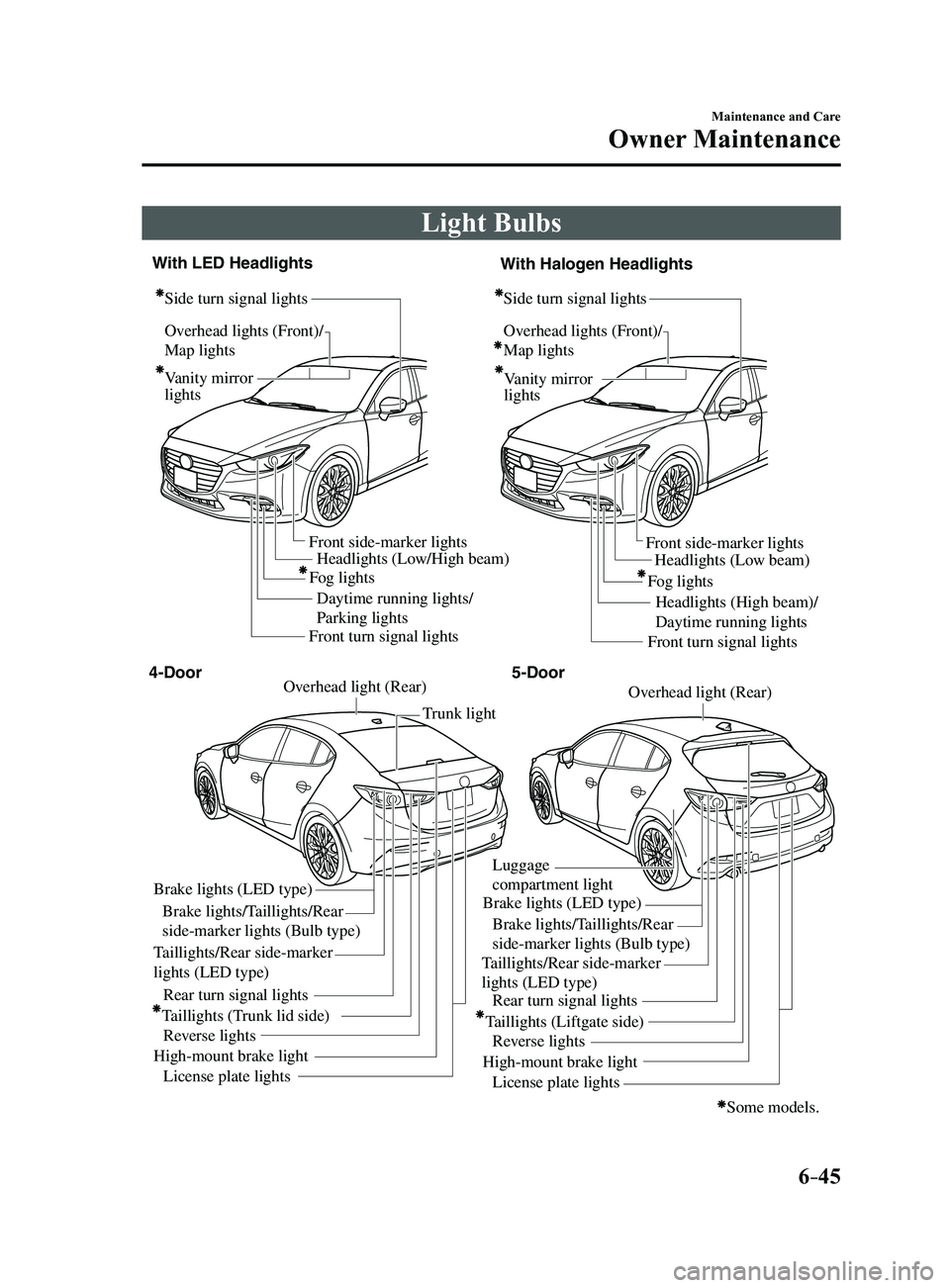
Light Bulbs
Overhead lights (Front)/
Map lights
Vanity mirror
lightsHeadlights (Low/High beam)
Daytime running lights/
Parking lights Headlights (Low beam)
Headlights (High beam)/
Daytime running lights
Fog lights
Front side-marker lights
Front side-marker lights
Side turn signal lights
Side turn signal lightsOverhead lights (Front)/
Map lights
Vanity mirror
lights
Some models.
Front turn signal lights Front turn signal lights
Brake lights (LED type)
Brake lights/Taillights/Rear
side-marker lights (Bulb type)
Taillights/Rear side-marker
lights (LED type) Taillights/Rear side-marker
lights (LED type)
Rear turn signal lights
Taillights (Trunk lid side) Reverse lights
High-mount brake light License plate lights Trunk light
Overhead light (Rear)Overhead light (Rear)
Brake lights (LED type)
Luggage
compartment light
Brake lights/Taillights/Rear
side-marker lights (Bulb type)
Rear turn signal lights
Taillights (Liftgate side) Reverse lights
High-mount brake light License plate lights
4-Door 5-Door
With LED Headlights
With Halogen Headlights
Fog lights
Mazda3_8FL6-EA-16F_Edition2.indb 452016/08/10 17:38:49
Page 458 of 612
6–46
Maintenance and Care
Owner Maintenance
*Some models.
WARNING
Never touch the glass portion of a
halogen bulb with your bare hands
and always wear eye protection when
handling or working around the bulbs:When a halogen bulb breaks, it is
dangerous. These bulbs contain
pressurized gas. If one is broken, it will
explode and serious injuries could be
caused by the flying glass.
If the glass portion is touched with
bare hands, body oil could cause the
bulb to overheat and explode when lit.
Always keep halogen bulbs out of the
reach of children: Playing with a halogen bulb is
dangerous. Serious injuries could be
caused by dropping a halogen bulb or
breaking it some other way.
CAUTION
When removing the lens or lamp unit
using a flathead screwdriver, make
sure that the flathead screwdriver does
not contact the interior terminal. If
the flathead screwdriver contacts the
terminal, a short circuit may occur.
NOTE
To replace the bulb, contact an
Authorized Mazda Dealer. If the halogen bulb is accidentally
touched, it should be cleaned with
rubbing alcohol before being used.
Use the protective cover and carton for
the replacement bulb to dispose of the
old bulb promptly and out of the reach
of children.
Replacing Exterior Light Bulbs
Headlights (With LED headlights),
Daytime running lights/Parking lights
(With LED headlights), Fog lights
*
The LED bulb cannot be replaced as a
single unit because it is an integrated unit.
The LED bulb has to be replaced with the
unit. We recommend an Authorized Mazda
Dealer when the replacement is necessary.
Headlights (With halogen headlights)
Low-beam bulbs
1. If you are changing the right bulb, start
the engine, turn the steering wheel all
the way to the left, and turn off engine.
If you are changing the left bulb, turn
the steering wheel to the right, and turn
off engine.
2. Make sure the headlight switch is of f.
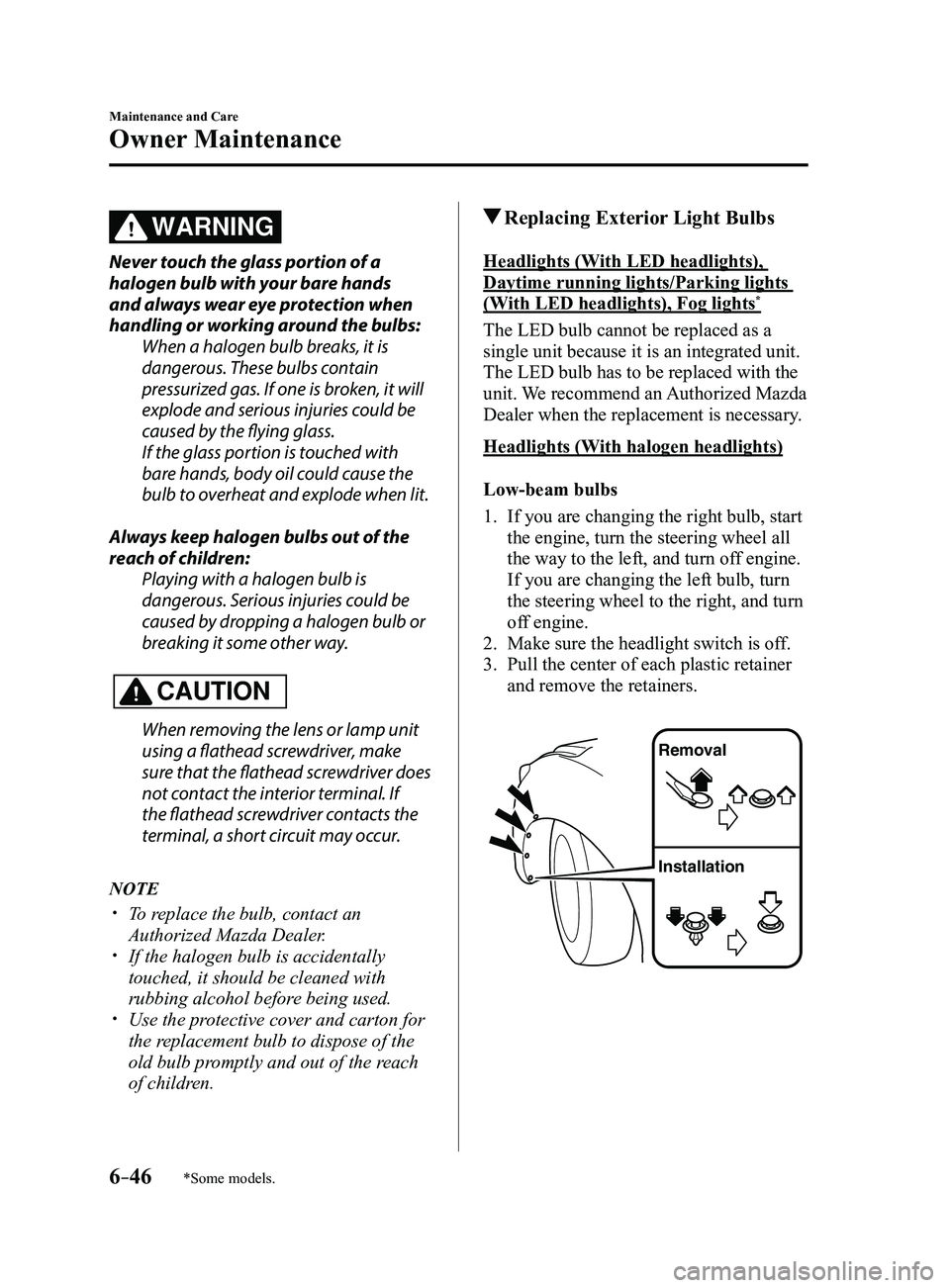
3. Pull the center of each plastic retainer
and remove the retainers.
Removal
Installation
Mazda3_8FL6-EA-16F_Edition2.indb 462016/08/10 17:38:50
Page 475 of 612
6–63
Maintenance and Care
Owner Maintenance
*Some models.
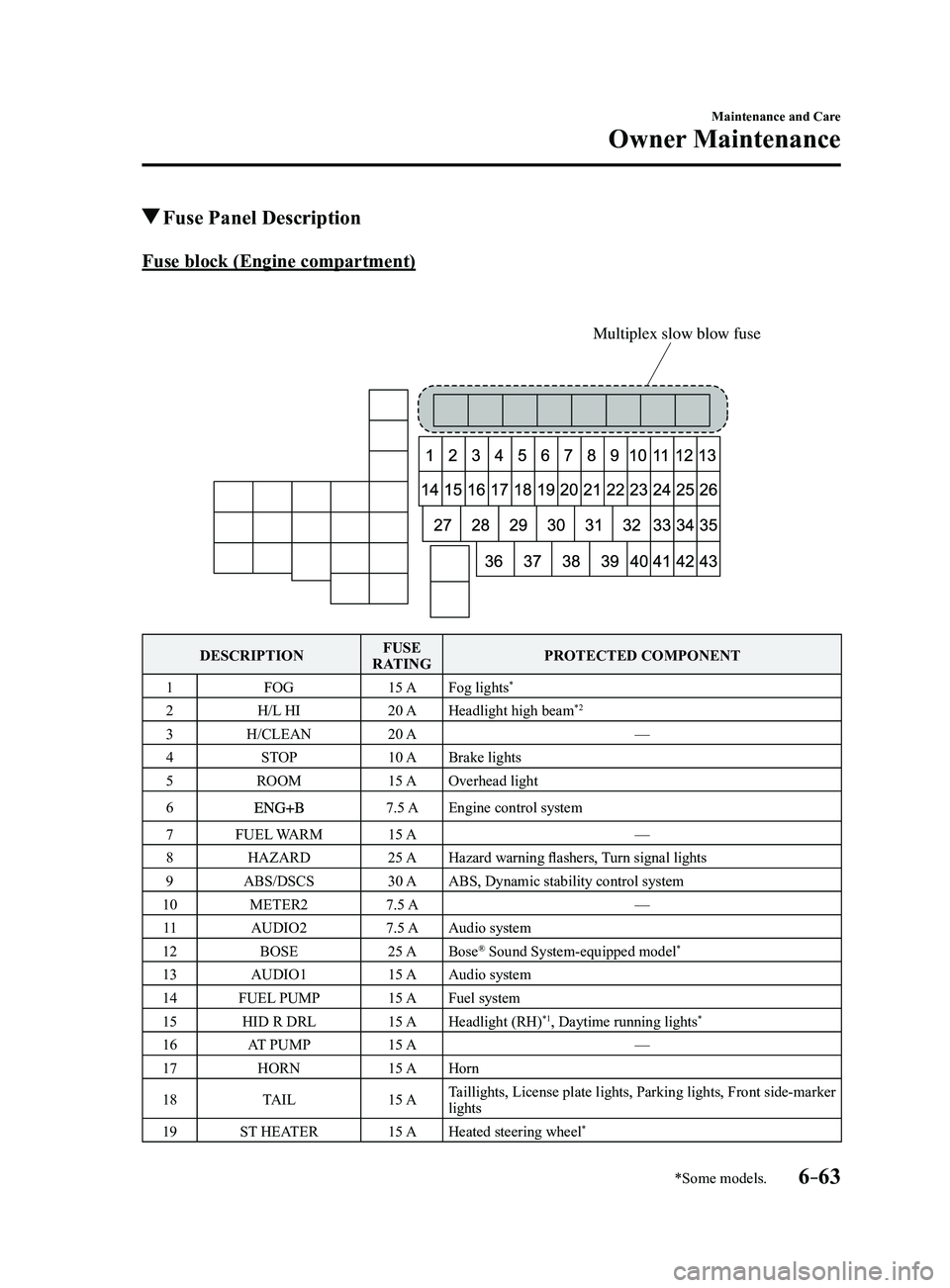
Fuse Panel Description
Fuse block (Engine compartment)
Multiplex slow blow fuse
DESCRIPTIONFUSE
RATING PROTECTED COMPONENT
1 FOG 15 AFog lights
*
2 H/L HI 20 AHeadlight high beam*2
3 H/CLEAN 20 A —
4 STOP 10 ABrake lights
5 ROOM 15 AOverhead light
6
7.5 AEngine control system
7 FUEL WARM 15 A —
8 HAZARD 25 AHazard warning flashers, Turn signal lights
9 ABS/DSCS 30 AABS, Dynamic stability control system
10 METER2 7.5 A —
11 AUDIO2 7.5 AAudio system
12 BOSE 25 ABose
® Sound System-equipped model*
13 AUDIO1 15 AAudio system
14 FUEL PUMP 15 AFuel system
15 HID R DRL 15 AHeadlight (RH)
*1, Daytime running lights*
16 AT PUMP 15 A —
17 HORN 15 AHorn
18 TAIL 15 ATaillights, License plate lights, Parking lights, Front side-marker
lights
19 ST HEATER 15 AHeated steering wheel
*
Mazda3_8FL6-EA-16F_Edition2.indb 632016/08/10 17:39:02
Page 519 of 612
7–31
If Trouble Arises
Warning/Indicator Lights and Warning Sounds
*Some models.
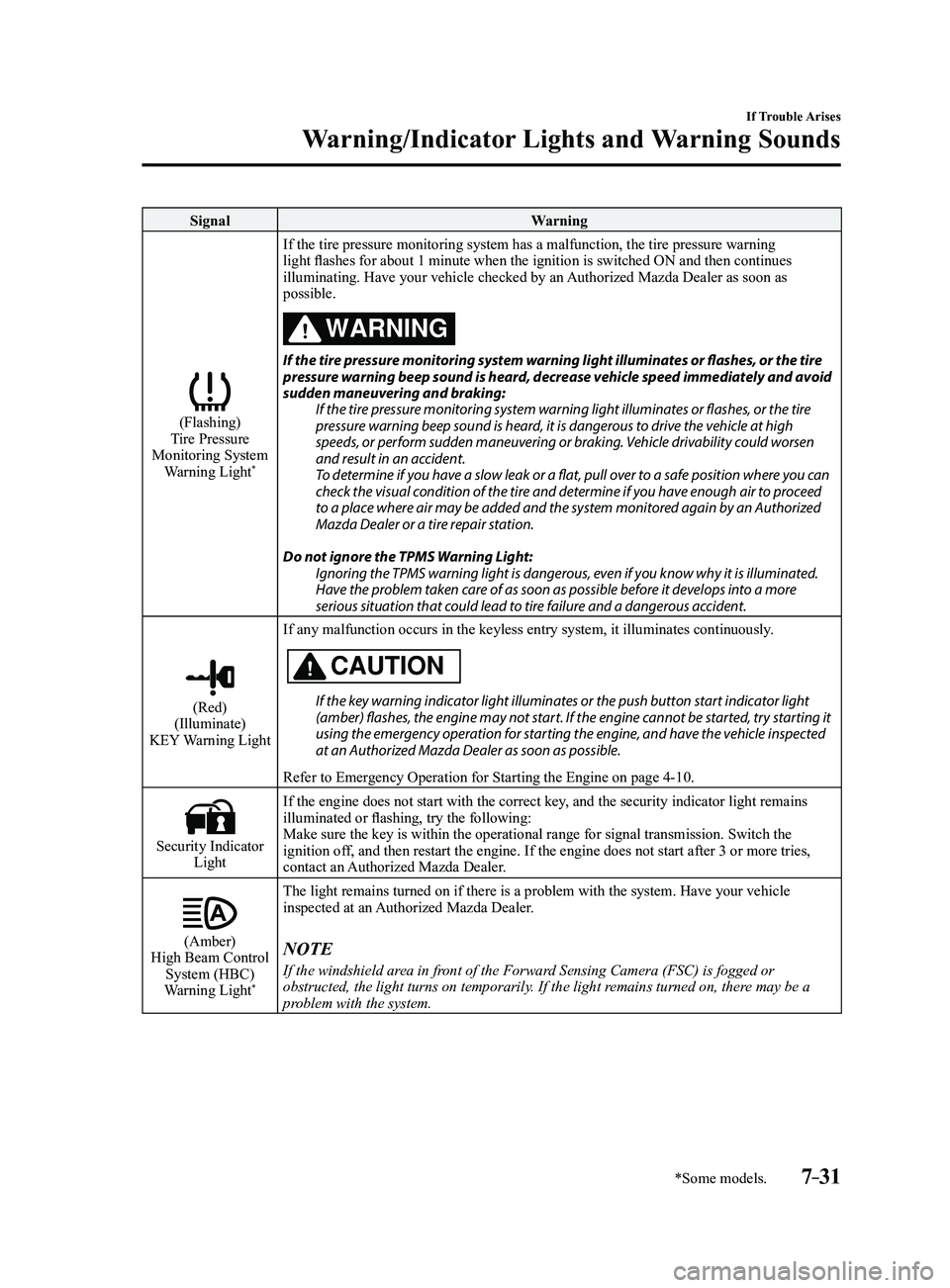
SignalWarning
(Flashing)Tire Pressure
Monitoring System Warning Light
*
If the tire pressure monitoring system has a malfunction, the tire press\
ure warning
light flashes for about 1 minute when the ignition is switched ON and then continues
illuminating. Have your vehicle checked by an Authorized Mazda Dealer as soon as
possible.
WARNING
If the tire pressure monitoring system warning light illuminates or flashes, or the tire pressure warning beep sound is heard, decrease vehicle speed immediately and avoid
sudden maneuvering and braking: If the tire pressure monitoring system warning light illuminates or flashes, or the tire
pressure warning beep sound is heard, it is dangerous to drive the vehicle at high
speeds, or perform sudden maneuvering or braking. Vehicle drivability could worsen
and result in an accident.
To determine if you have a slow leak or a flat, pull over to a safe position where you can
check the visual condition of the tire and determine if you have enough air to proceed
to a place where air may be added and the system monitored again by an Authorized
Mazda Dealer or a tire repair station.
Do not ignore the TPMS Warning Light: Ignoring the TPMS warning light is dangerous, even if you know why it is illuminated.
Have the problem taken care of as soon as possible before it develops into a more
serious situation that could lead to tire failure and a dangerous accident.
(Red)(Illuminate)
KEY Warning Light If any malfunction occurs in the keyless entry system, it illuminates co\
ntinuously.
CAUTION
If the key warning indicator light illuminates or the push button start indicator light (amber) flashes, the engine may not start. If the engine cannot be started, try starting it
using the emergency operation for starting the engine, and have the vehicle inspected
at an Authorized Mazda Dealer as soon as possible.
Refer to Emergency Operation for Starting the Engine on page
4-10.
Security Indicator Light If the engine does not start with the correct key, and the security indicator light remains
illuminated or flashing, try the following:
Make sure the key is within the operational range for signal transmissio\
n. Switch the
ignition off, and then restart the engine. If the engine does not start after 3 or \
more tries,
contact an Authorized Mazda Dealer.
(Amber)High Beam Control
System (HBC)
Warning Light
*
The light remains turned on if there is a problem with the system. Have \
your vehicle
inspected at an Authorized Mazda Dealer.
NOTE
If the windshield area in front of the Forward Sensing Camera (FSC) is fogged or
obstructed, the light turns on temporarily. If the light remains turned on, there may be a
problem with the system.
Mazda3_8FL6-EA-16F_Edition2.indb 312016/08/10 17:39:28
Page 520 of 612
7–32
If Trouble Arises
Warning/Indicator Lights and Warning Sounds
*Some models.
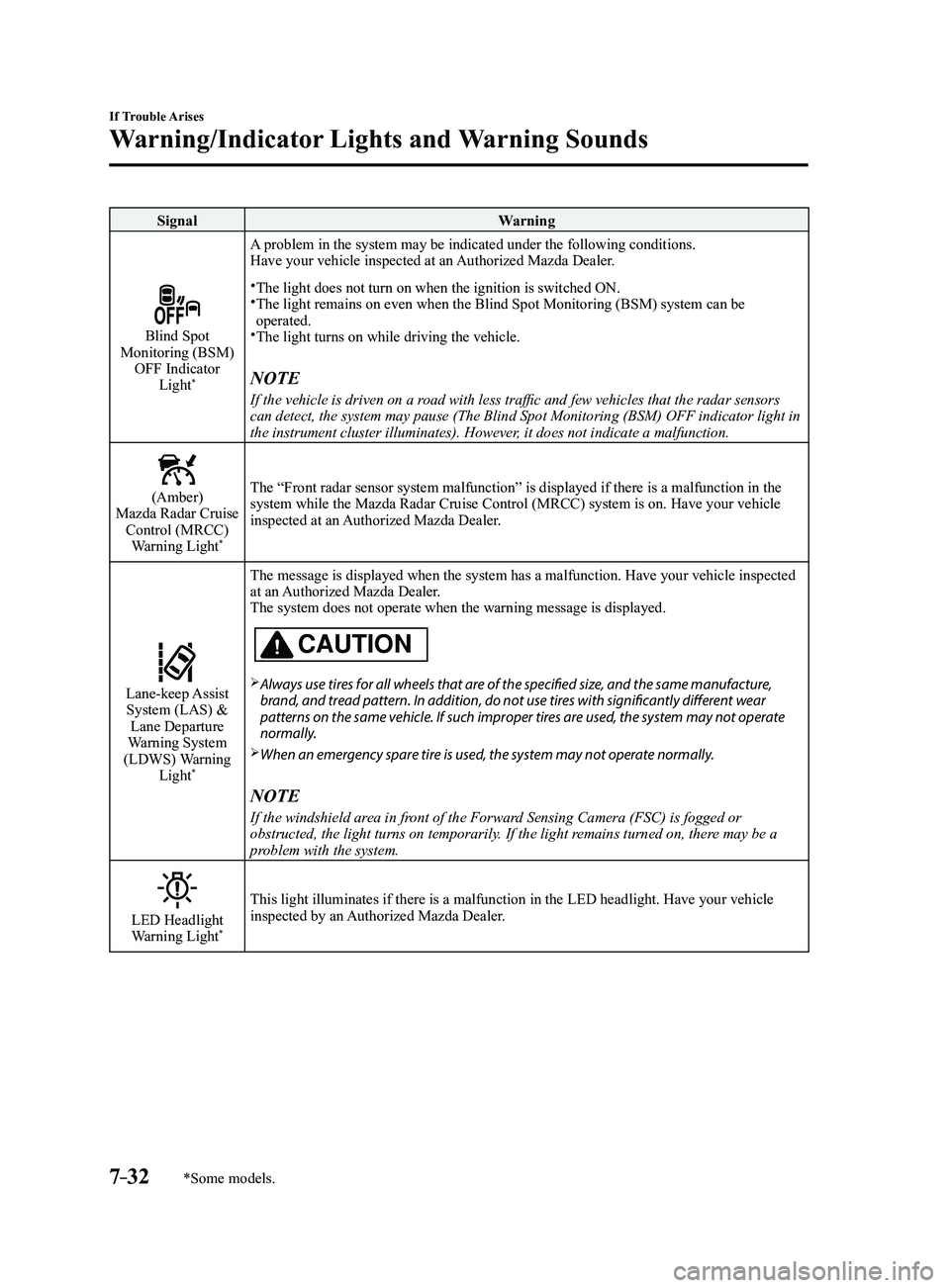
SignalWarning
Blind Spot Monitoring (BSM)
OFF Indicator Light
*
A problem in the system may be indicated under the following conditions.
Have your vehicle inspected at an Authorized Mazda Dealer.
The light does not turn on when the ignition is switched ON. The light remains on even when the Blind Spot Monitoring (BSM) system can be operated.The light turns on while driving the vehicle.
NOTE
If the vehicle is driven on a road with less traffic and few vehicles that the radar sensors
can detect, the system may pause (The Blind Spot Monitoring (BSM) OFF\
indicator light in
the instrument cluster illuminates). However, it does not indicate a malfunction.
(Amber)Mazda Radar Cruise Control (MRCC) Warning Light
*
The “Front radar sensor system malfunction” is displayed if there is a malfunction in the
system while the Mazda Radar Cruise Control (MRCC) system is on. Have your vehicle
inspected at an Authorized Mazda Dealer.
Lane-keep Assist System (LAS) & Lane Departure
Warning System
(LDWS) Warning Light
*
The message is displayed when the system has a malfunction. Have your ve\
hicle inspected
at an Authorized Mazda Dealer.
The system does not operate when the warning message is displayed.
CAUTION
Always use tires for all wheels that are of the specified size, and the same manufacture,
brand, and tread pattern. In addition, do not use tires with significantly different wear
patterns on the same vehicle. If such improper tires are used, the system may not operate
normally.
When an emergency spare tire is used, the system may not operate normally.
NOTE
If the windshield area in front of the Forward Sensing Camera (FSC) is fogged or
obstructed, the light turns on temporarily. If the light remains turned on, there may be a
problem with the system.
LED Headlight Warning Light*
This light illuminates if there is a malfunction in the LED headlight. Have your vehicle
inspected by an Authorized Mazda Dealer.
Mazda3_8FL6-EA-16F_Edition2.indb 322016/08/10 17:39:29
Page 593 of 612
9–9
Specifications
Specifications
*Some models.
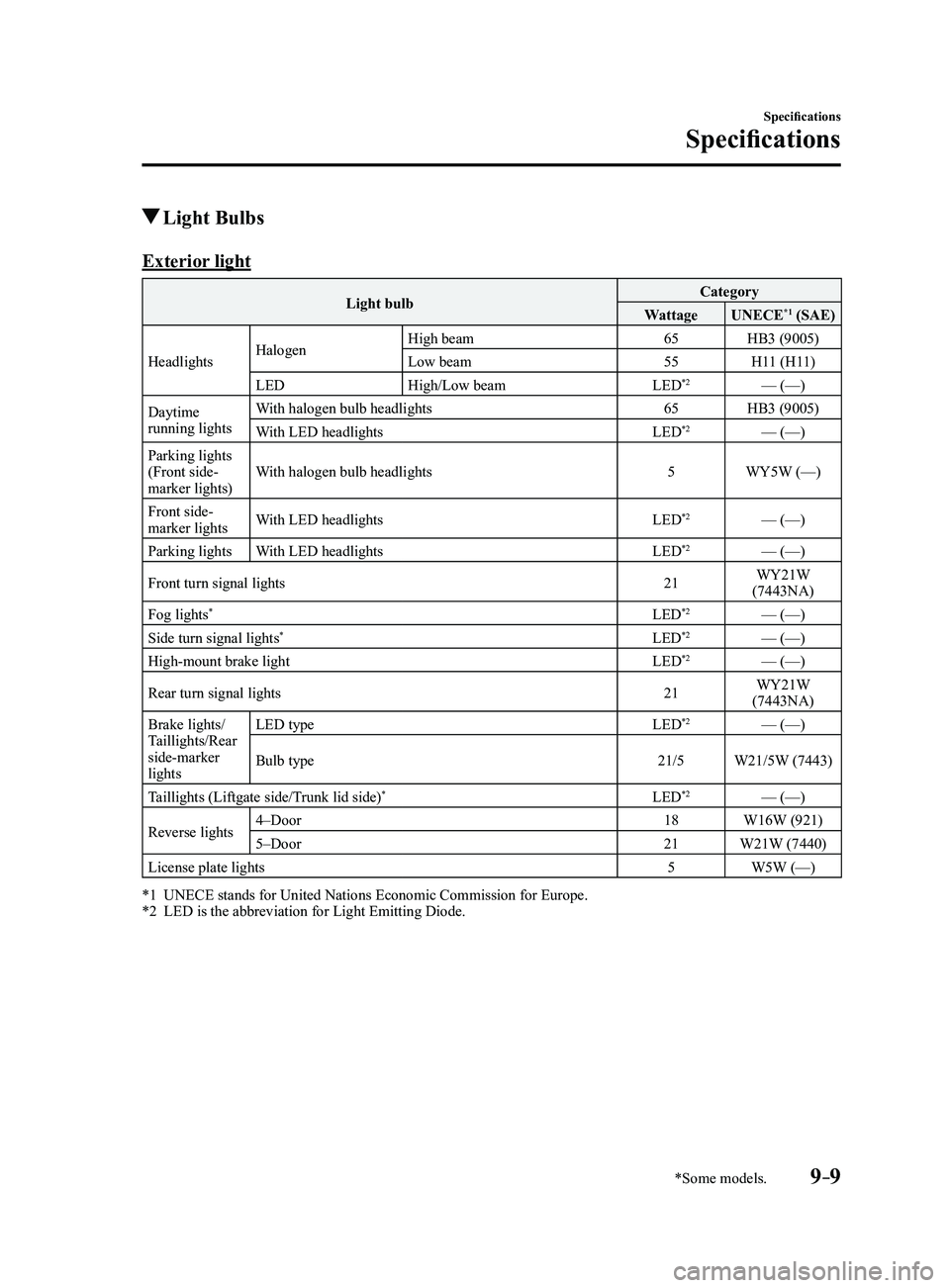
Light Bulbs
Exterior light
Light bulbCategory
Wattage UNECE*1 (SAE)
Headlights Halogen High beam
65HB3 (9005)
Low beam 55H11 (H11)
LED High/Low beam LED
*2— (—)
Daytime
running lights With halogen bulb headlights
65HB3 (9005)
With LED headlights LED
*2— (—)
Parking lights
(Front side-
marker lights) With halogen bulb headlights
5WY5W (—)
Front side-
marker lights With LED headlights
LED
*2— (—)
Parking lights With LED headlights LED
*2— (—)
Front turn signal lights 21WY21W
(7443NA)
Fog lights
*LED*2— (—)
Side turn signal lights*LED*2— (—)
High-mount brake light LED*2— (—)
Rear turn signal lights 21WY21W
(7443NA)
Brake lights/
Taillights/Rear
side-marker
lights LED type
LED
*2— (—)
Bulb type 21/5W21/5W (7443)
Taillights (Liftgate side/Trunk lid side)
*LED*2— (—)
Reverse lights 4–Door
18W16W (921)
5–Door 21W21W (7440)
License plate lights 5W5W (—)
*1 UNECE stands for United Nations Economic Commission for Europe.*2 LED is the abbreviation for Light Emitting Diode.
Mazda3_8FL6-EA-16F_Edition2.indb 92016/08/10 17:39:54
Page 600 of 612
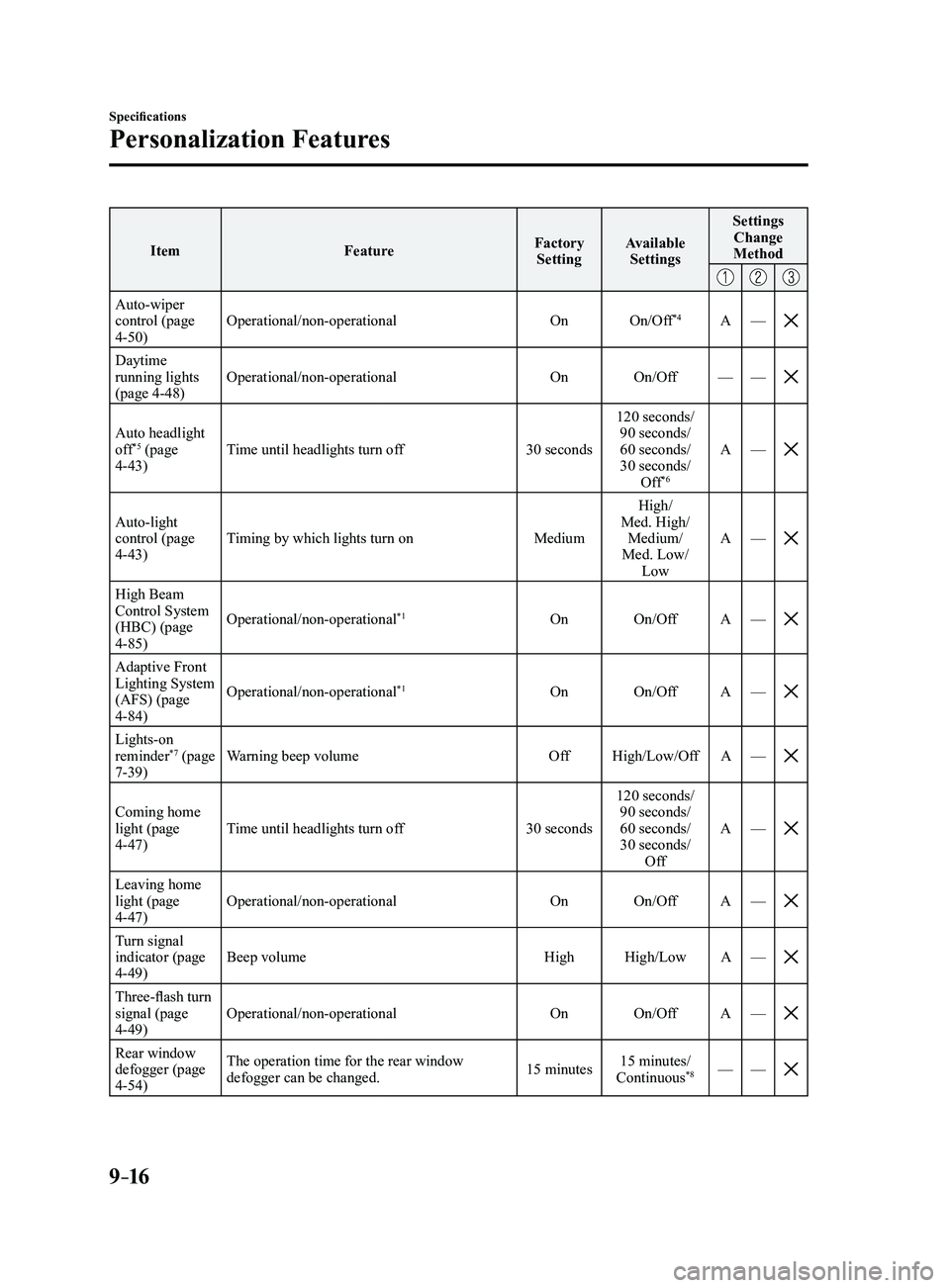
9–16
Specifications
Personalization Features
ItemFeatureFactory
Setting Available
Settings Settings
Change
Method
Auto-wiper control (page 4-50) Operational/non-operational
OnOn/Off
*4A—
Daytime running lights
(page 4-48) Operational/non-operational
OnOn/Off ——
Auto headlight off*5 (page 4-43) Time until headlights turn off
30 seconds120 seconds/
90 seconds/
60 seconds/
30 seconds/ Off*6
A —
Auto-light control (page 4-43) Timing by which lights turn on
MediumHigh/
Med. High/ Medium/
Med. Low/ Low A
—
High Beam Control System
(HBC) (page
4-85) Operational/non-operational
*1On
On/Off A—
Adaptive Front Lighting System
(AFS) (page
4-84) Operational/non-operational
*1On
On/Off A—
Lights-on reminder*7 (page 7-39) Warning beep volume
OffHigh/Low/Off A—
Coming home light (page 4-47) Time until headlights turn off
30 seconds120 seconds/
90 seconds/
60 seconds/
30 seconds/ Off A
—
Leaving home light (page 4-47) Operational/non-operational
OnOn/Off A—
Turn signal indicator (page 4-49) Beep volume
HighHigh/Low A—
Three-flash turn signal (page 4-49) Operational/non-operational
OnOn/Off A—
Rear window defogger (page 4-54) The operation time for the rear window
defogger can be changed.
15 minutes15 minutes/
Continuous*8— —
Mazda3_8FL6-EA-16F_Edition2.indb 162016/08/10 17:39:56
Page 602 of 612
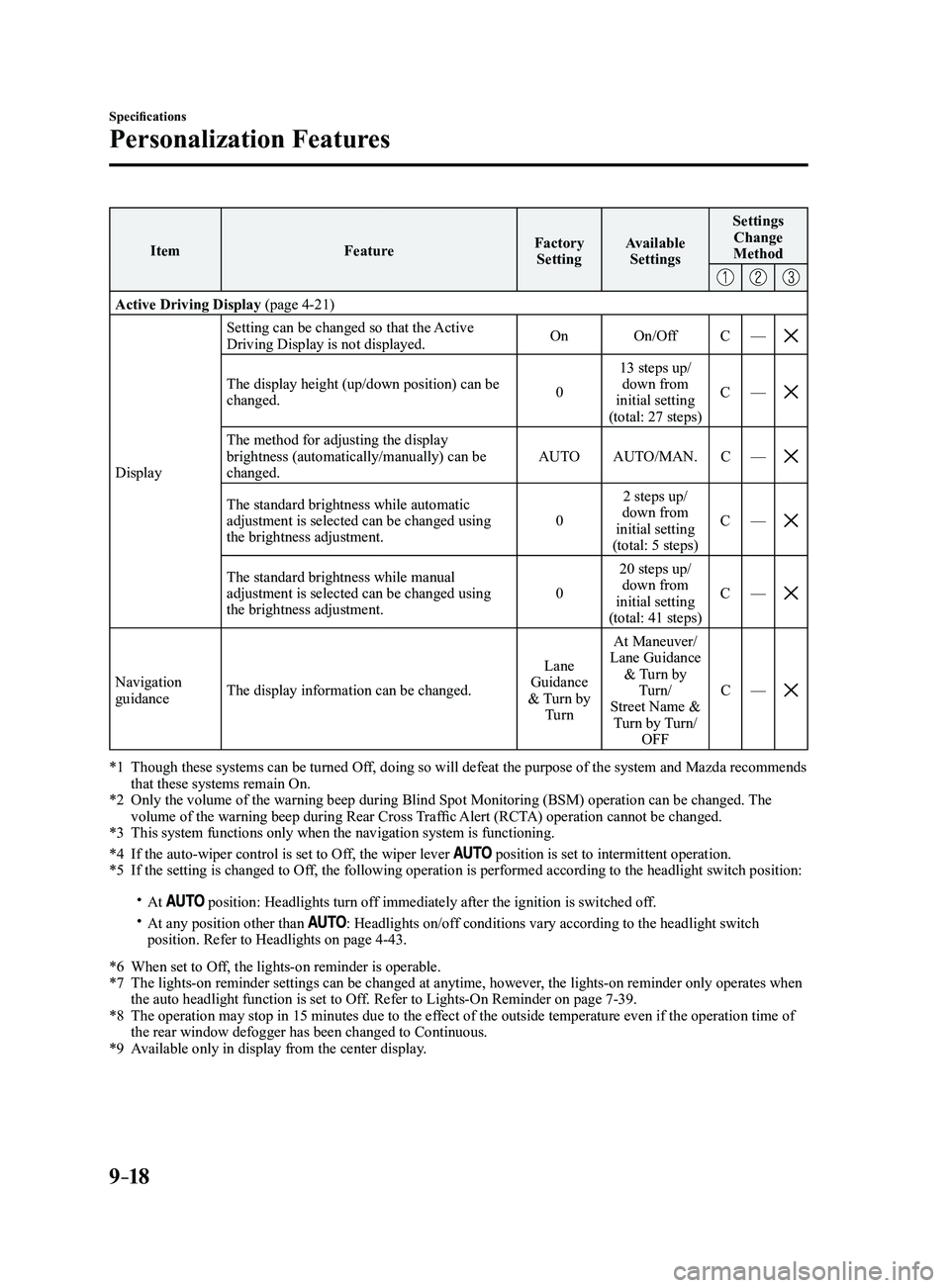
9–18
Specifications
Personalization Features
ItemFeatureFactory
Setting Available
Settings Settings
Change
Method
Active Driving Display (page 4-21)
Display Setting can be changed so that the Active
Driving Display is not displayed.
On
On/Off C—
The display height (up/down position) can be changed. 013 steps up/
down from
initial setting
(total: 27 steps) C
—
The method for adjusting the display brightness (automatically/manually) can be
changed. AUTO
AUTO/MAN. C—
The standard brightness while automatic adjustment is selected can be changed using
the brightness adjustment. 02 steps up/
down from
initial setting
(total: 5 steps) C
—
The standard brightness while manual adjustment is selected can be changed using
the brightness adjustment. 020 steps up/
down from
initial setting
(total: 41 steps) C
—
Navigation guidance The display information can be changed. Lane
Guidance
& Turn by Turn At Maneuver/
Lane Guidance & Turn by Turn/
Street Name & Turn by Turn/ OFF C
—
*1 Though these systems can be turned Of f, doing so will defeat the purpose of the system and Mazda recommends that these systems remain On.*2 Only the volume of the warning beep during Blind Spot Monitorin g (BSM) operation can be changed. The volume of the warning beep during Rear Cross Traffic Alert (RCTA) operation cannot be changed.*3 This system functions only when the navigation system is functioning.
*4 If the auto-wiper control is set to Off, the wiper lever position is set to intermittent operation.*5 If the setting is changed to Off, the following operation is performed according to the headlight switc\
h position:
At position: Headlights turn off immediately after the ignition is switched off. At any position other than : Headlights on/off conditions vary according to the headlight switch
position. Refer to Headlights on page 4-43.
*6 When set to Of f, the lights-on reminder is operable.*7 The lights-on reminder settings can be changed at anytime, however , the lights-on reminder only operates when the auto headlight function is set to Off. Refer to Lights-On Reminder on page 7-39.*8 The operation may stop in 15 minutes due to the effect of the outside temperature even if the operation time of the rear window defogger has been changed to Continuous.*9 Available only in display from the center display.
Mazda3_8FL6-EA-16F_Edition2.indb 182016/08/10 17:39:57