fog light MAZDA MODEL 3 5-DOOR 2017 User Guide
[x] Cancel search | Manufacturer: MAZDA, Model Year: 2017, Model line: MODEL 3 5-DOOR, Model: MAZDA MODEL 3 5-DOOR 2017Pages: 612
Page 267 of 612
4–137
When Driving
i-ACTIVSENSE
Heed the following cautions to assure the correct operation of the Forward Sensing Camera
(FSC).
Be careful not to scratch the Forward Sensing Camera (FSC) lens or allow it to get dirty. Do not remove the Forward Sensing Camera (FSC) cover. Do not place objects on the dashboard which reflect light. Always keep the windshield glass around the camera clean by removing dirt or fogging.
Use the windshield defroster to remove fogging on the windshield. Consult an Authorized Mazda Dealer regarding cleaning the interior side of the
windshield around the Forward Sensing Camera (FSC). Consult an Authorized Mazda Dealer before performing repairs around the Forward
Sensing Camera (FSC). The Forward Sensing Camera (FSC) is installed to the windshield. Consult an Authorized
Mazda Dealer for windshield repair and replacement. When cleaning the windshield, do not allow glass cleaners or similar cleaning fluids to
get on the Forward Sensing Camera (FSC) lens. In addition, do not touch the Forward
Sensing Camera (FSC) lens.
When performing repairs around the rearview mirror, consult an Authorized Mazda Dealer. Consult an Authorized Mazda Dealer regarding cleaning of the camera lens. Do not hit or apply strong force to the Forward Sensing Camera (FSC) or the area around
it. If the Forward Sensing Camera (FSC) is severely hit or if there are cracks or damage
caused by flying gravel or debris in the area around it, stop using the following systems
and consult an Authorized Mazda Dealer.
High Beam Control System (HBC) Lane-keep Assist System (LAS) & Lane Departure Warning System (LDWS) Traffic Sign Recognition System (TSR) Smart City Brake Support (SCBS) Smart Brake Support (SBS)
The direction in which the Forward Sensing Camera (FSC) is pointed has been finely
adjusted. Do not change the installation position of the Forward Sensing Camera (FSC)
or remove it. Otherwise, it could result in damage or malfunction.
Always use tires for all wheels that are of the specified size, and the same manufacturer,
brand, and tread pattern. In addition, do not use tires with significantly different wear
patterns on the same vehicle as the system may not operate normally.
The Forward Sensing Camera (FSC) includes a function for detecting a soiled windshield
and informing the driver, however, depending on the conditions, it may not detect plastic
shopping bags, ice or snow on the windshield. In such cases, the system cannot accurately
determine a vehicle ahead and may not be able to operate normally. Always drive carefully
and pay attention to the road ahead.
Mazda3_8FL6-EA-16F_Edition2.indb 1372016/08/10 17:36:59
Page 269 of 612
4–139
When Driving
i-ACTIVSENSE
In the following cases, the Forward Sensing Camera (FSC) may not be able to detect
target objects correctly.
Under bad weather condition, such as rain, fog and snow . The window washer is being used or the windshield wipers ar e not used when it's
raining. Ice, fog, snow, frost, rainfall, dirt, or foreign matter such as a plastic bag is stuck on
the windshield. Trucks with low loading platforms and vehicles with an extremely low or high profile. When driving next to walls with no patterning (including fences and lon\
gitudinally
striped walls). The taillights of the vehicle ahead ar e turned off. A vehicle is outside the illumination range of the headlights. The vehicle is making a sharp turn, or ascending or descending a steep s\
lope. Entering or exiting a tunnel. Heavy luggage is loaded causing the vehicle to tilt. Strong light is shone at the front of the vehicle (back light or high-beam light from on-
coming vehicles). There are many light emitters on the vehicle ahead. When the vehicle ahead is not equipped with taillights or the taillights\
ar e turned off at
nighttime. Elongated luggage or cargo is loaded onto installed roof rails and covers the Forward
Sensing Camera (FSC). Exhaust gas from the vehicle in front, sand, snow, and water vapor rising from
manholes and grating, and water splashed into the air. When towing a malfunctioning vehicle. The vehicle is driven with tir es having significantly different wear. The vehicle is driven on down slopes or bumpy r oads. There are water puddles on the road. The surroundings are dark such as during the night, early evening, or early morning,
or in a tunnel or indoor parking lot. The illumination brightness of the headlights is r educed or the headlight illumination
is weakened due to dirt or a deviated optical axis. The target object enters the blind spot of the Forward Sensing Camera (FSC). A person or object bursts onto the road from the shoulder or cuts right in front of you. You change lanes and approach a vehicle ahead. When driving extremely close to the target object. Tire chains or a temporary spare tire is installed. The vehicle ahead has a special shape. For example, a vehicle towing a t\
railer house
or a boat, or a vehicle carrier carrying a vehicle with its front pointed rearward.
Mazda3_8FL6-EA-16F_Edition2.indb 1392016/08/10 17:36:59
Page 270 of 612
 cannot operate normally due to backlight or fog\
,
the system functions related to the Forward Sensing Camera (FSC) are temp")
4–14 0
When Driving
i-ACTIVSENSE
If the Forward Sensing Camera (FSC) cannot operate normally due to backlight or fog\
,
the system functions related to the Forward Sensing Camera (FSC) are temporarily
stopped and the following warning lights turn on. However, this does not indicate a
malfunction.
High Beam Contr ol System (HBC) warning light (amber)
Lane-keep Assist System (LAS) & Lane Departure Warning System (LDWS) warning
light Smart Brake Support/Smart City Brake Support (SBS/SCBS) warning light \
(amber)
If the Forward Sensing Camera (FSC) cannot operate normally due to high temperatures,
the system functions related to the Forward Sensing Camera (FSC) are temporarily
stopped and the following warning lights turn on. However, this does not indicate a
malfunction. Cool down the area around the Forward Sensing Camera (FSC) such as by
turning on the air conditioner.
High Beam Contr ol System (HBC) warning light (amber)
Lane-keep Assist System (LAS) & Lane Departure Warning System (LDWS) warning
light
Smart Brake Support/Smart City Brake Support (SBS/SCBS) warning light \
(amber)
If the Forward Sensing Camera (FSC) detects that the windshield is dirty or foggy,
the system functions related to the Forward Sensing Camera (FSC) are temporarily
stopped and the following warning lights turn on. However, this does not indicate a
problem. Remove the dirt from the windshield or press the defroster switch and defog the
windshield.
High Beam Contr ol System (HBC) warning light (amber)
Lane-keep Assist System (LAS) & Lane Departure Warning System (LDWS) warning
light
Smart Brake Support/Smart City Brake Support (SBS/SCBS) warning light \
(amber)
Mazda3_8FL6-EA-16F_Edition2.indb 1402016/08/10 17:36:59
Page 294 of 612
5–2
Interior Features
Climate Control System
Operating Tips
Operate the climate control system with
the engine running. To prevent the battery from being
discharged, do not leave the fan control
dial/switch on for a long period of time
with the ignition switched ON when the
engine is not running.
Clear all obstructions such as leaves,
snow and ice from the hood and the air
inlet in the cowl grille to improve the
system efficiency.
Use the climate control system to defog
the windows and dehumidify the air. The recirculate mode should be used
when driving through tunnels or while in
a traffic jam, or when you would like to
shut off outside air for quick cooling of
the interior.
Use the outside air position for
ventilation or windshield defrosting. If the vehicle has been parked in direct
sunlight during hot weather, open the
windows to let warm air escape, then
run the climate control system.
(With A/C switch)
Run the air conditioner about 10 minutes
at least once a month to keep internal
parts lubricated.
Have the air conditioner checked before
the weather gets hot. Lack of refrigerant
may make the air conditioner less
efficient.
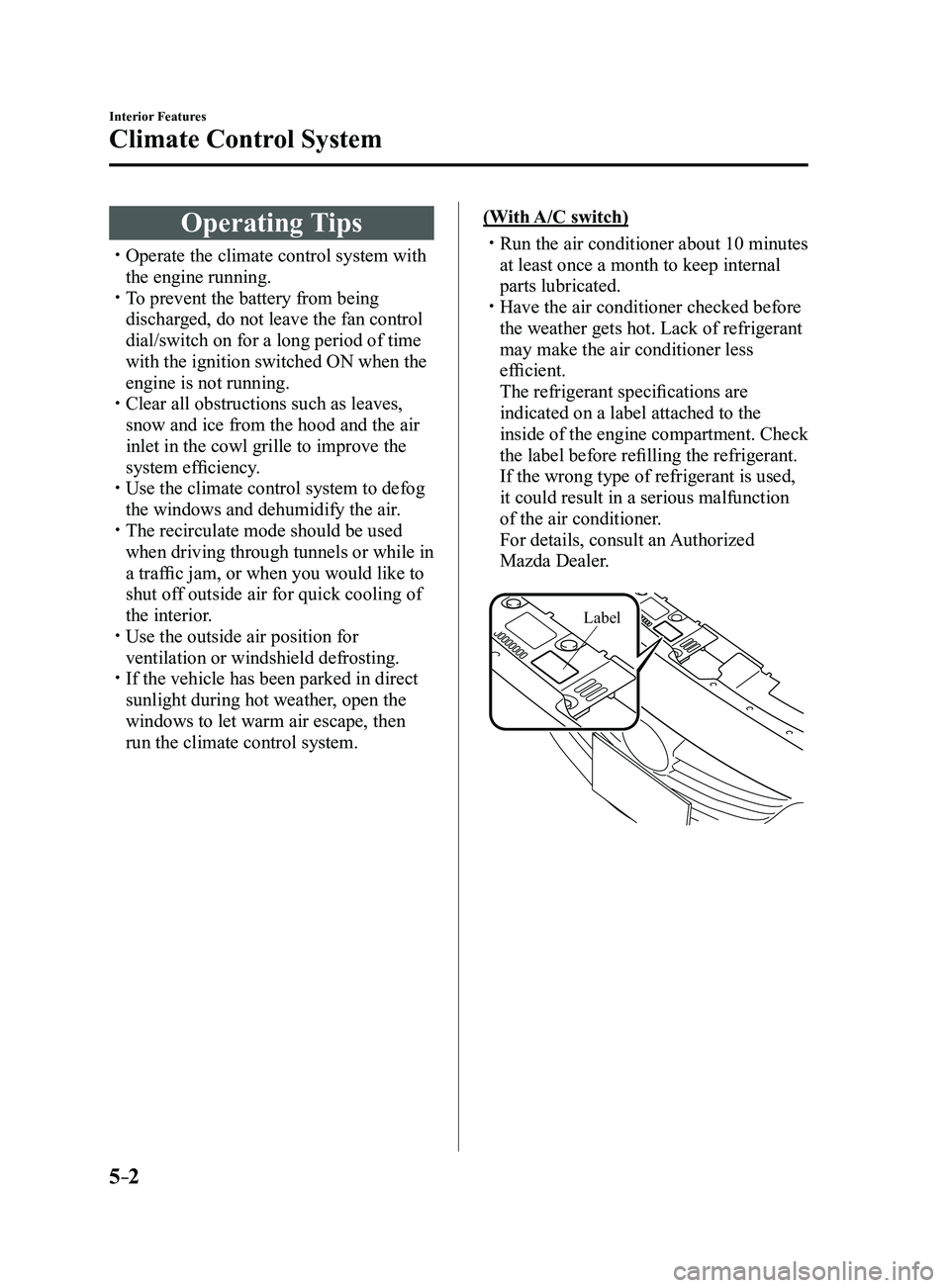
The refrigerant specifications are
indicated on a label attached to the
inside of the engine compartment. Check
the label before refilling the refrigerant.
If the wrong type of refrigerant is used,
it could result in a serious malfunction
of the air conditioner.
For details, consult an Authorized
Mazda Dealer.
Label
Mazda3_8FL6-EA-16F_Edition2.indb 22016/08/10 17:37:10
Page 297 of 612
5–5
Interior Features
Climate Control System
*Some models.
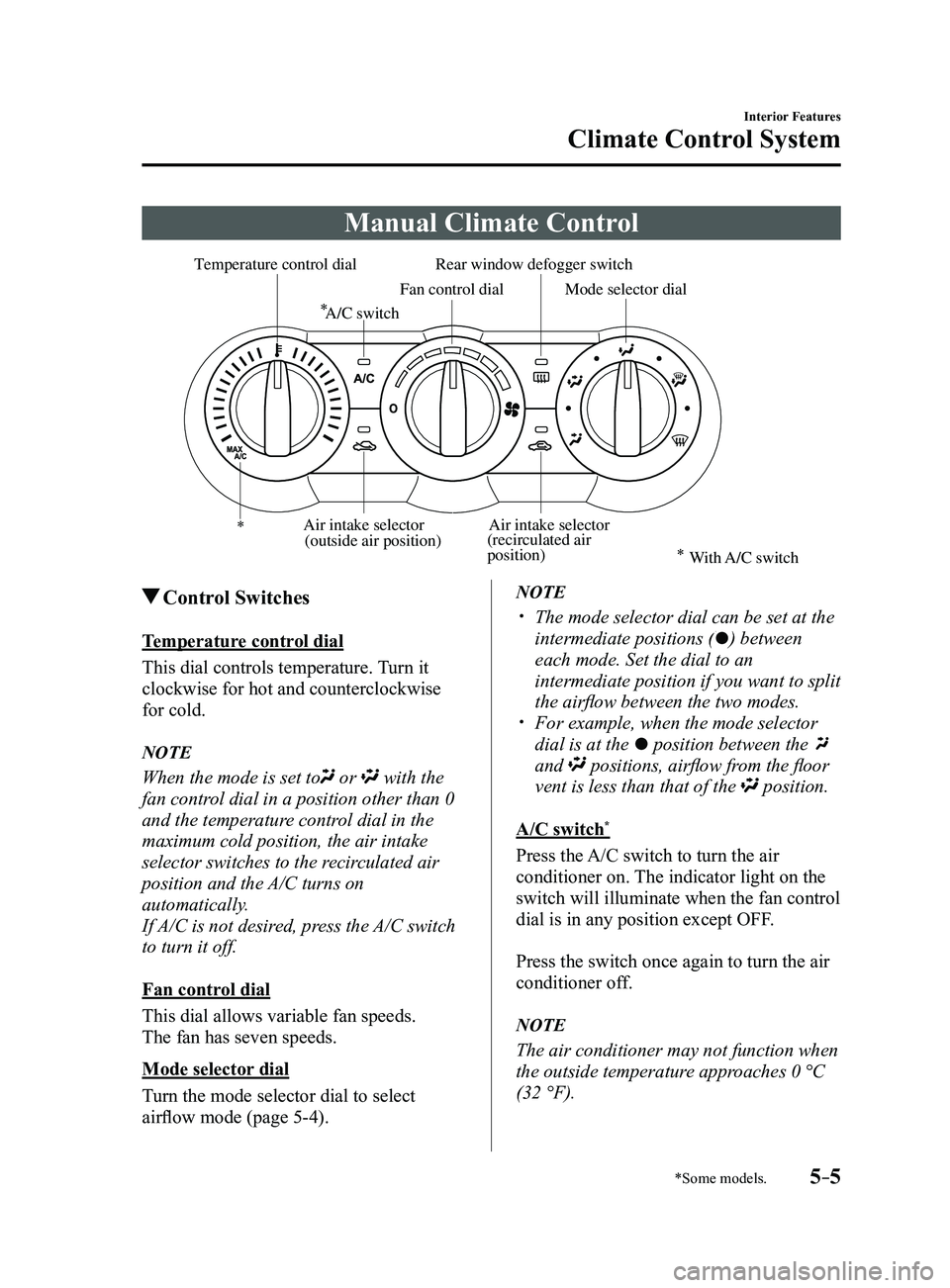
Manual Climate Control
Rear window defogger switch
Temperature control dial
Fan control dialMode selector dial
A/C switch
Air intake selector
(recirculated air
position)Air intake selector
(outside air position)
With A/C switch
Control Switches
Temperature control dial
This dial controls temperature. Turn it
clockwise for hot and counterclockwise
for cold.
NOTE
When the mode is set to or with the
fan control dial in a position other than 0
and the temperature control dial in the
maximum cold position, the air intake
selector switches to the recirculated air
position and the A/C turns on
automatically.
If A/C is not desired, press the A/C switch
to turn it off.
Fan control dial
This dial allows variable fan speeds.
The fan has seven speeds.
Mode selector dial
Turn the mode selector dial to select
airflow mode (page
5-4).
NOTE
The mode selector dial can be set at the
intermediate positions () between
each mode. Set the dial to an
intermediate position if you want to split
the airflow between the two modes.
For example, when the mode selector
dial is at the position between the
and positions, airflow from the floor
vent is less than that of the position.
A/C switch*
Press the A/C switch to turn the air
conditioner on. The indicator light on the
switch will illuminate when the fan control
dial is in any position except OFF.
Press the switch once again to turn the air
conditioner off.
NOTE
The air conditioner may not function when
the outside temperature approaches 0 °C
(32 °F).
Mazda3_8FL6-EA-16F_Edition2.indb 52016/08/10 17:37:12
Page 299 of 612
5–7
Interior Features
Climate Control System
CAUTION
If the air conditioner is used while
driving up long hills or in heavy
traffic, monitor the engine coolant
temperature warning light to see if it is
illuminated or flashing (page
4-23).
The air conditioner may cause engine
overheating. If the warning light is
illuminated or flashing, turn the air-
conditioning off (page
7-20).
NOTE
When maximum cooling is desir ed,
set the temperature control dial to the
extreme cold position and set the air
intake selector to the recirculated air
position, then turn the fan control dial
fully clockwise.
If warmer air is desired at floor level,
set the mode selector dial at the
position and adjust the temperature
control dial to maintain maximum
comfort.
The air to the floor is warmer than air
to the face (except when the temperature
control dial is set at the extreme hot or
cold position).
Ventilation
1. Set the mode selector dial to the
position.
2. Set the air intake selector to the outside
air position.
3. Set the temperature control dial to the
desired position.
4. Set the fan control dial to the desired
speed.
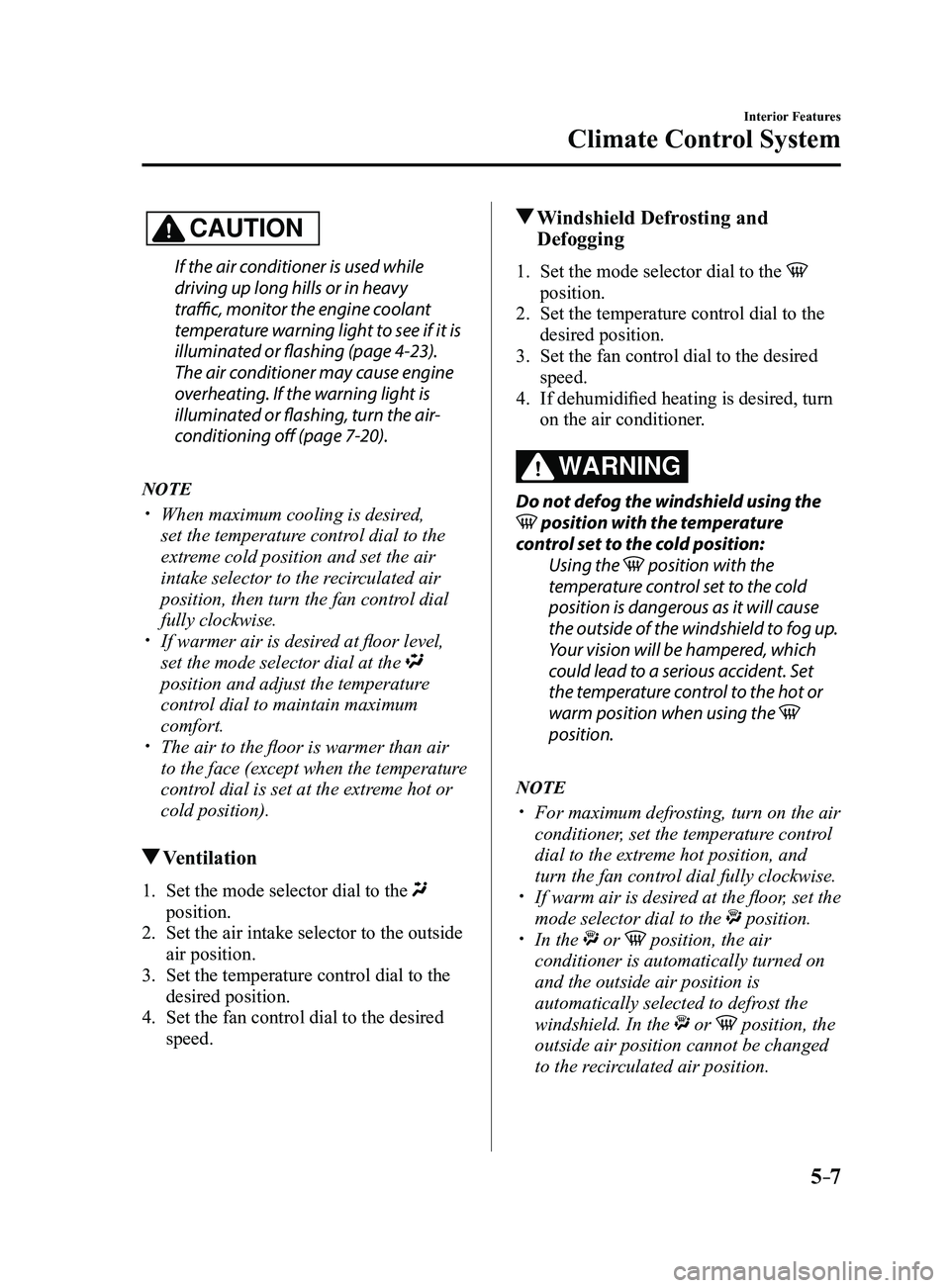
Windshield Defrosting and
Defogging
1. Set the mode selector dial to the
position.
2. Set the temperature control dial to the
desired position.
3. Set the fan control dial to the desired
speed.
4. If dehumidified heating is desired, turn
on the air conditioner.
WARNING
Do not defog the windshield using the
position with the temperature
control set to the cold position:
Using the
position with the
temperature control set to the cold
position is dangerous as it will cause
the outside of the windshield to fog up.
Your vision will be hampered, which
could lead to a serious accident. Set
the temperature control to the hot or
warm position when using the
position.
NOTE
For maximum defr osting, turn on the air
conditioner, set the temperature control
dial to the extreme hot position, and
turn the fan control dial fully clockwise.
If warm air is desired at the floor, set the
mode selector dial to the position. In the or position, the air
conditioner is automatically turned on
and the outside air position is
automatically selected to defrost the
windshield. In the
or position, the
outside air position cannot be changed
to the recirculated air position.
Mazda3_8FL6-EA-16F_Edition2.indb 72016/08/10 17:37:14
Page 302 of 612
5–10
Interior Features
Climate Control System
A/C switch
The air-conditioning (cooling/
dehumidifying functions) can be turned on
or off by pressing the switch while the fan
control dial is at a position other than 0.
The indicator light turns on while the air-
conditioning is operating.
NOTE
The air conditioner may not function when
the outside temperature approaches 0 °C
(32 °F).
Air intake selector
Outside or recirculated air positions can be
selected. Press the switch to select outside/
recirculated air positions.
Recirculated air position (indicator light
illuminated)
Outside air is shut off. Use this position
when going through tunnels, driving in
congested traffic (high engine exhaust
areas) or when quick cooling is desired.
Outside air position (indicator light
turned off)
Outside air is allowed to enter the
cabin. Use this mode for ventilation or
windshield defrosting.
WARNING
Do not use the position in cold or
rainy weather:Using the
position in cold or rainy
weather is dangerous as it will cause
the windows to fog up. Your vision will
be hampered, which could lead to a
serious accident.
Rear window defogger switch
Press the rear window defogger switch to
defrost the rear window.
Refer to Rear Window Defogger on page
4-54.
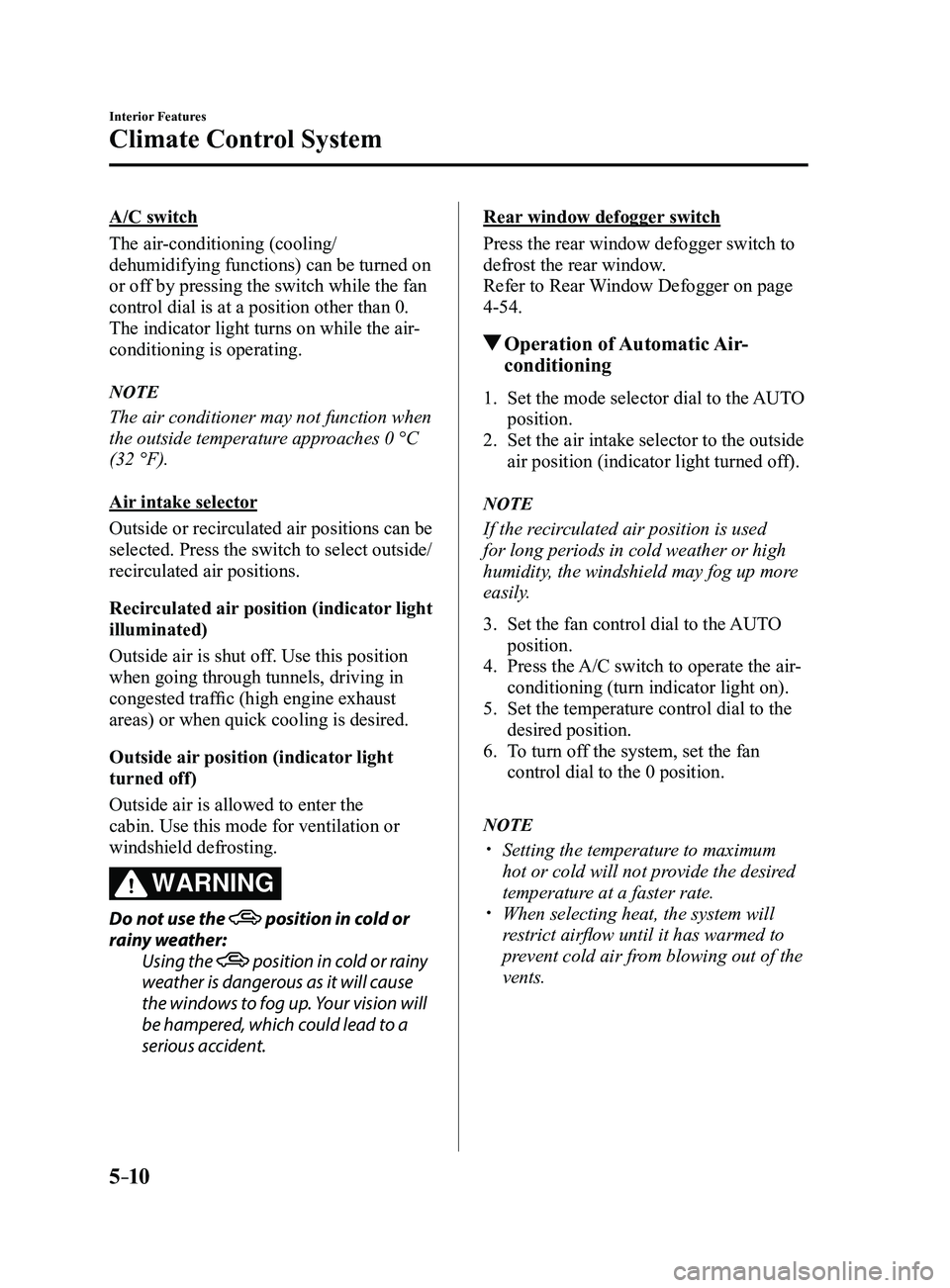
Operation of Automatic Air-
conditioning
1. Set the mode selector dial to the AUTO
position.
2. Set the air intake selector to the outside
air position (indicator light turned off).
NOTE
If the recirculated air position is used
for long periods in cold weather or high
humidity, the windshield may fog up more
easily.
3. Set the fan control dial to the AUTO
position.
4. Press the A/C switch to operate the air-
conditioning (turn indicator light on).
5. Set the temperature control dial to the
desired position.
6. To turn off the system, set the fan
control dial to the 0 position.
NOTE
Setting the temperatur e to maximum
hot or cold will not provide the desired
temperature at a faster rate.
When selecting heat, the system will
restrict airflow until it has warmed to
prevent cold air from blowing out of the
vents.
Mazda3_8FL6-EA-16F_Edition2.indb 102016/08/10 17:37:15
Page 303 of 612
5–11
Interior Features
Climate Control System
Windshield Defrosting and
Defogging
Set the mode selector dial to the
position and turn the fan control dial to the
desired speed.
In this position, the outside air position
is automatically selected, and when the
fan control dial is ON, the air conditioner
automatically turns on. The air conditioner
will directly dehumidify the air to the
front windshield and side windows (page
5-4). Airflow amount will be increased.
WARNING
Set the temperature control to the hot
or warm position when defogging (
position):Using the
position with the
temperature control set to the cold
position is dangerous as it will cause
the outside of the windshield to fog up.
Your vision will be hampered, which
could lead to a serious accident.
NOTE
Use the temperature control dial to
increase the air flow temperature and
defog the windshield more quickly.
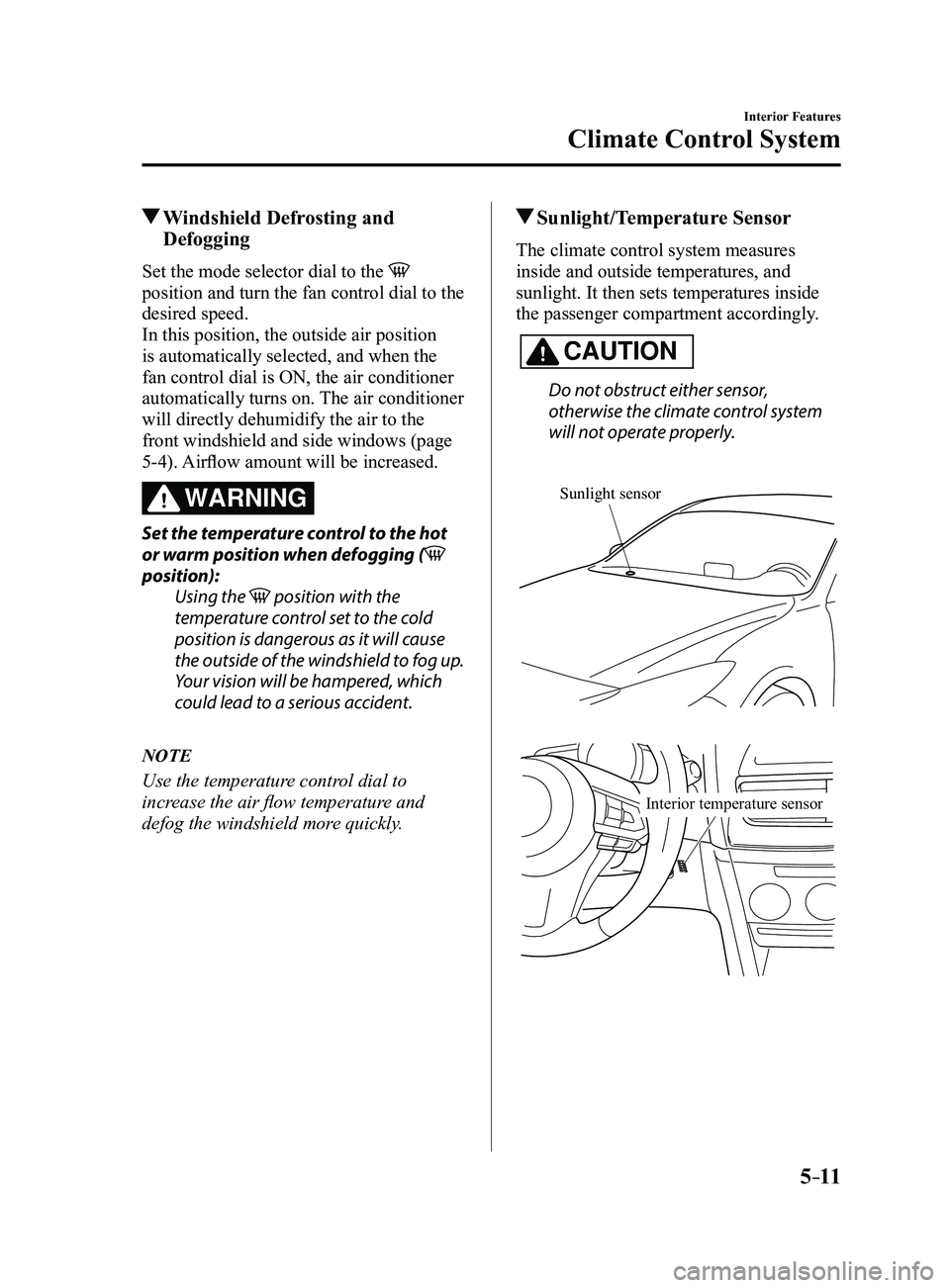
Sunlight/Temperature Sensor
The climate control system measures
inside and outside temperatures, and
sunlight. It then sets temperatures inside
the passenger compartment accordingly.
CAUTION
Do not obstruct either sensor,
otherwise the climate control system
will not operate properly.
Sunlight sensor
Interior temperature sensor
Mazda3_8FL6-EA-16F_Edition2.indb 112016/08/10 17:37:16
Page 304 of 612
5–12
Interior Features
Climate Control System
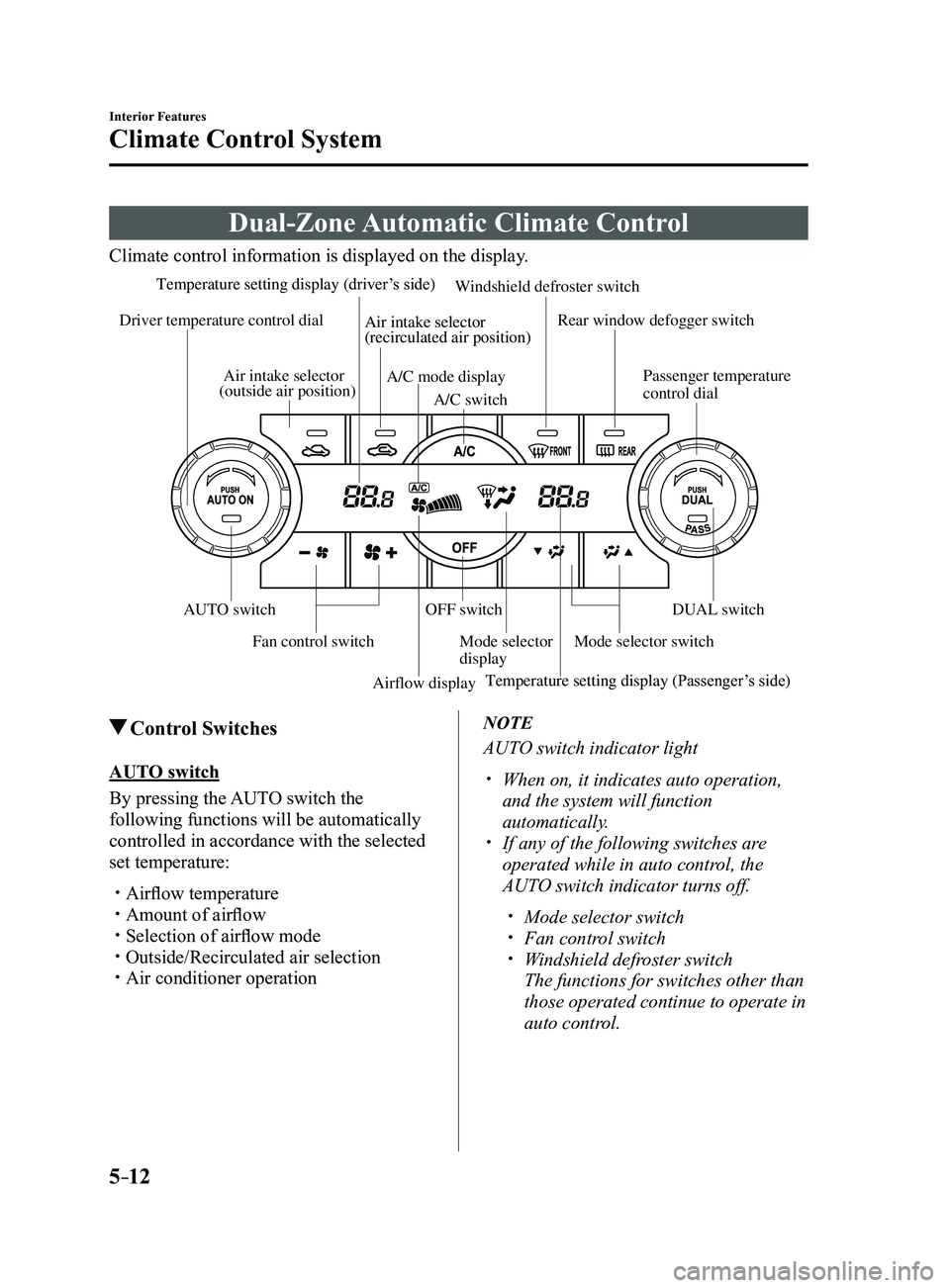
Dual-Zone Automatic Climate Control
Climate control information is displayed on the display.
Airflow displayMode selector
display
A/C mode display
Air intake selector
(outside air position)
Driver temperature control dial
AUTO switch
Mode selector switch
Fan control switch OFF switch
Windshield defroster switch
Rear window defogger switch
Passenger temperature
control dial
DUAL switch
A/C switch
Temperature setting display (driver
’s side)
Temperature setting display (Passenger ’s side)
Air intake selector
(recirculated air position)
Control Switches
AUTO switch
By pressing the AUTO switch the
following functions will be automatically
controlled in accordance with the selected
set temperature:
Airflow temperature Amount of airflow Selection of airflow mode Outside/Recirculated air selection Air conditioner operation
NOTE
AUTO switch indicator light
When on, it indicates auto operation,
and the system will function
automatically.
If any of the following switches ar e
operated while in auto control, the
AUTO switch indicator turns off.
Mode selector switch Fan control switch Windshield defroster switch
The functions for switches other than
those operated continue to operate in
auto control.
Mazda3_8FL6-EA-16F_Edition2.indb 122016/08/10 17:37:17
Page 306 of 612
5–14
Interior Features
Climate Control System
Air intake selector
Outside or recirculated air positions can be
selected. Press the switch to select outside/
recirculated air positions.
Recirculated air position (
)
Outside air is shut off. Use this position
when going through tunnels, driving in
congested traffic (high engine exhaust
areas) or when quick cooling is desired.
Outside air position (
)
Outside air is allowed to enter the
cabin. Use this mode for ventilation or
windshield defrosting.
WARNING
Do not use the position in cold or
rainy weather:Using the
position in cold or rainy
weather is dangerous as it will cause
the windows to fog up. Your vision will
be hampered, which could lead to a
serious accident.
DUAL switch
Use the DUAL switch to change the
mode between the individual operation
(driver and passenger) and interconnection
(simultaneous) modes.
Individual operation mode (indicator
light illuminated)
The set temperature can be controlled
individually for the driver and front
passenger.
Interconnection mode (indicator light
turned off)
The set temperature for the driver
and front passenger is controlled
simultaneously.
Windshield defroster switch
Press the switch to defrost the windshield
and front door windows.
Refer to Windshield Defrosting and
Defogging on page
5-15.
Rear window defogger switch
Press the rear window defogger switch to
defrost the rear window.
Refer to Rear Window Defogger on page
4-54.
Operation of Automatic Air-
conditioning
1. Press the AUTO switch. Selection
of the airflow mode, air intake
selector and amount of airflow will be
automatically controlled.
2. Use the temperature control dial to
select a desired temperature.
Press the DUAL switch or turn the
front passenger temperature control
dial to control the set temperature
individually for the driver and front
passenger.
To turn off the system, press the OFF
switch.
NOTE
Setting the temperatur e to maximum
hot or cold will not provide the desired
temperature at a faster rate.
When selecting heat, the system will
restrict airflow until it has warmed to
prevent cold air from blowing out of the
vents.
Mazda3_8FL6-EA-16F_Edition2.indb 142016/08/10 17:37:17