stop start MAZDA MODEL 3 5-DOOR 2017 Owner's Manual
[x] Cancel search | Manufacturer: MAZDA, Model Year: 2017, Model line: MODEL 3 5-DOOR, Model: MAZDA MODEL 3 5-DOOR 2017Pages: 612
Page 238 of 612
4–10 8
When Driving
i-ACTIVSENSE
CAUTION
If the vehicle is towed or you are towing something, switch the Mazda Radar Cruise
Control (MRCC) system off to prevent an incorrect operation.
NOTE
The Mazda Radar Cruise Control (MRCC) system operates when all of the following
conditions are met.
The vehicle speed is about 30 km/h (19 mph) to 145 km/h (90 mph). The Mazda Radar Cruise Control (MRCC) system is turned on. The parking brake is not applied. The Smart Brake Support (SBS) is not malfunctioning. The Dynamic Stability Control (DSC) is operating normally. All doors are closed. The driver's seat belt is fastened.
(Manual transaxle)
The shift lever is in a position other than r everse (R) or neutral (N). The clutch pedal is not depressed.
(Automatic transaxle)
The selector lever is in the drive (D) position or manual (M) positi\
on (manual mode).
In the following cases, the warnings may not activate even if your vehic\
le starts closing in
on the vehicle ahead.
You are driving at the same speed as the vehicle ahead. Directly after the Mazda Radar Cruise Control (MRCC) system has been set. When the accelerator pedal is depr essed or directly after the accelerator pedal is
released. Another vehicle cuts into the driving lane.
The following are not detected as physical objects.
Vehicles approaching in the opposite direction Pedestrians Stationary objects (stopped vehicles, obstructions)
If a vehicle ahead is traveling at an extr emely low speed, the system may not detect it
correctly. During headway control travel, do not set the system on two-wheeled vehicles such as
motorcycles and bicycles. Do not use the Mazda Radar Cruise Contr ol (MRCC) system under conditions in which
the close proximity warnings are frequently activated.
Mazda3_8FL6-EA-16F_Edition2.indb 1082016/08/10 17:36:46
Page 261 of 612
4–131
When Driving
i-ACTIVSENSE
Smart City Brake Support (SCBS)
Indicator Light (Red)
If the Smart City Brake Support (SCBS) is
operating, the indicator light (red) flashes.
Collision Warning
If there is the possibility of a collision
with a vehicle ahead, the beep sounds
continuously and a warning is indicated in
the active driving display.
NOTE
(Without SCBS OFF switch)
The operation distance and volume of
the collision warning can be changed.
Refer to Personalization Features on
page 9-12. (With SCBS OFF switch)
The operation distance and volume of
the collision warning can be changed.
Consult an Authorized Mazda Dealer.
Automatic Brake Operation
Display
“Smart City Brake Support activated” is
indicated in the active driving display after
the SCBS brakes or the brake assist (SCBS
brake assist) is operated.
NOTE
The collision warning beep sounds
intermittently while the SCBS brake
or brake assist (SCBS brake assist) is
operating.
If the vehicle is stopped by the SCBS
operation and the brake pedal is not
depressed, the warning beep sounds
one time after about 2 seconds and the
SCBS brake is automatically released.
Stopping the Smart City Brake
Support (SCBS) System Operation
The Smart City Brake Support (SCBS)
system can be temporarily deactivated.
When the Smart City Brake Support
(SCBS) system is turned off, the Smart
City Brake Support (SCBS) OFF indicator
light turns on.
When the engine is restarted, the system
becomes operational.
Mazda3_8FL6-EA-16F_Edition2.indb 1312016/08/10 17:36:57
Page 265 of 612
4–135
When Driving
i-ACTIVSENSE
Smart Brake Support (SBS)
Indicator Light (Red)
If the Smart Brake Support (SBS) is
operating, the indicator light (red) flashes.
Collision Warning
If there is the possibility of a collision
with a vehicle ahead, the beep sounds
continuously and a warning is indicated in
the active driving display.
Stopping The Smart Brake
Support (SBS) System Operation
The Smart Brake Support (SBS) system
can be temporarily deactivated.
Refer to Personalization Features on page
9-12.
When the Smart Brake Support (SBS)
system is turned off, the Smart Brake
Support (SBS) OFF indicator light turns
on.
When the engine is restarted, the system
becomes operational.
NOTE
If the Smart Brake Support (SBS) system
operation is turned off, the Smart City
Brake Support (SCBS) system operation is
turned off simultaneously.
Mazda3_8FL6-EA-16F_Edition2.indb 1352016/08/10 17:36:58
Page 282 of 612
4–152
When Driving
Tire Pressure Monitoring System
CAUTION
Each tire, including the spare (if provided), should be checked monthly when cold and
inflated to the inflation pressure recommended by the vehicle manufacturer on the vehicle
placard or tire inflation pressure label. (If your vehicle has tires of a different size than the
size indicated on the vehicle placard or tire inflation pressure label, you should determine
the proper tire inflation pressure for those tires.)
As an added safety feature, your vehicle has been equipped with a tire pressure monitoring
system (TPMS) that illuminates a low tire pressure telltale when one or more of your tires
is significantly under-inflated. Accordingly, when the low tire pressure telltale illuminates,
you should stop and check your tires as soon as possible, and inflate them to the proper
pressure. Driving on a significantly under-inflated tire causes the tire to overheat and can
lead to tire failure. Under-inflation also reduces fuel efficiency and tire tread life, and may
affect the vehicle's handling and stopping ability.
Please note that the TPMS is not a substitute for proper tire maintenance, and it is the
driver's responsibility to maintain correct tire pressure, even if under-inflation has not
reached the level to trigger illumination of the TPMS low tire pressure telltale.
Your vehicle has also been equipped with a TPMS malfunction indicator to indicate when
the system is not operating properly.
The TPMS malfunction indicator is combined with the low tire pressure telltale. When the
system detects a malfunction, the telltale will flash for approximately one minute and then
remain continuously illuminated. This sequence will continue upon subsequent vehicle
start-ups as long as the malfunction exists. When the malfunction indicator is illuminated,
the system may not be able to detect or signal low tire pressure as intended. TPMS
malfunctions may occur for a variety of reasons, including the installation of replacement
or alternate tires or wheels on the vehicle that prevent the TPMS from functioning properly.
Always check the TPMS malfunction telltale after replacing one or more tires or wheels on
your vehicle to ensure that the replacement or alternate tires and wheels allow the TPMS to
continue to function properly.
To avoid false readings, the system samples for a little while before indicating a problem. As
a result it will not instantaneously register a rapid tire deflation or blow out.
Mazda3_8FL6-EA-16F_Edition2.indb 1522016/08/10 17:37:04
Page 324 of 612
5–32
Interior Features
Audio System
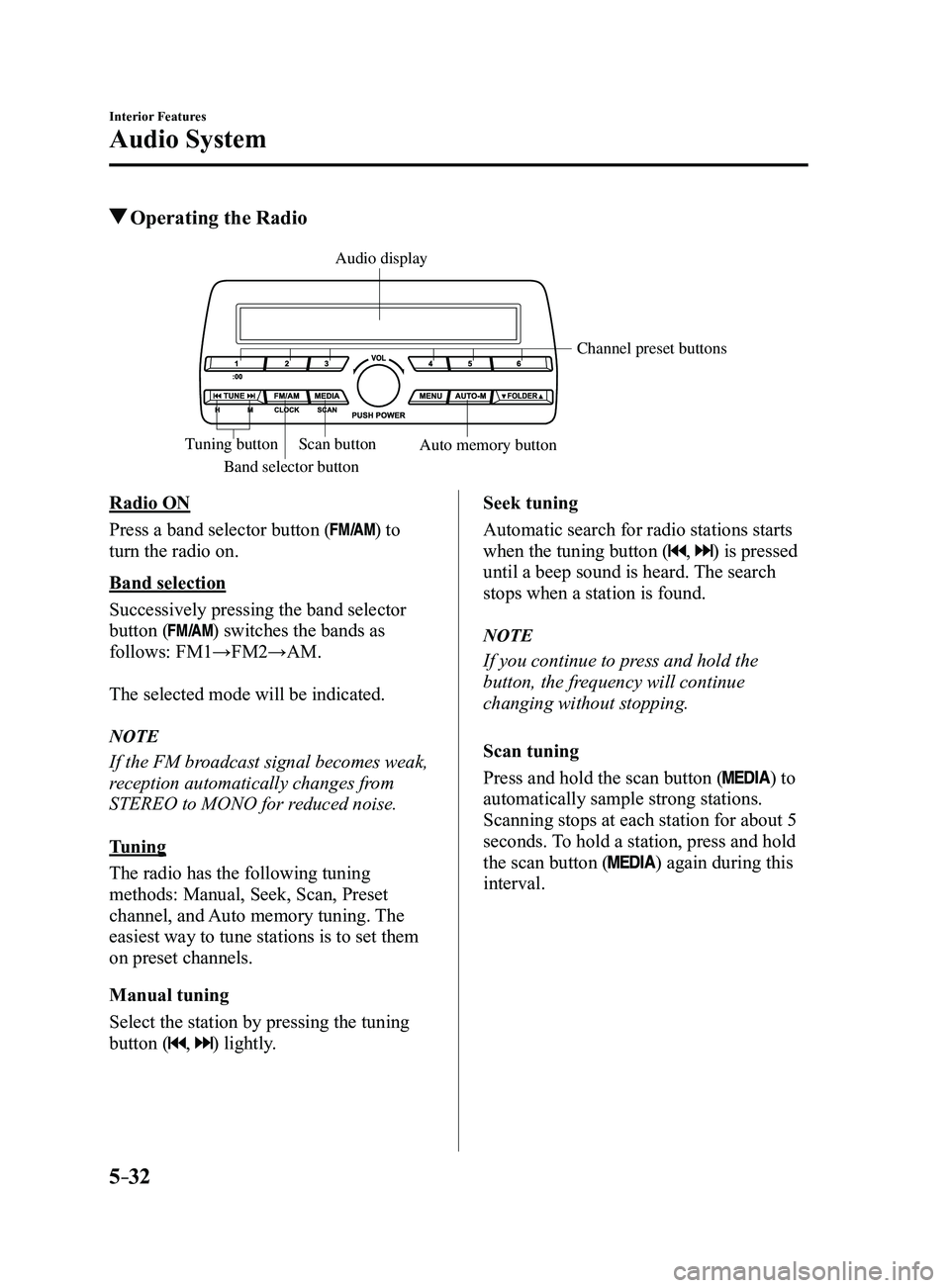
Operating the Radio
Band selector button
Channel preset buttons
Scan button Auto memory button
Tuning button
Audio display
Radio ON
Press a band selector button (
) to
turn the radio on.
Band selection
Successively pressing the band selector
button (
) switches the bands as
follows: FM1→FM2→AM.
The selected mode will be indicated.
NOTE
If the FM broadcast signal becomes weak,
reception automatically changes from
STEREO to MONO for reduced noise.
Tuning
The radio has the following tuning
methods: Manual, Seek, Scan, Preset
channel, and Auto memory tuning. The
easiest way to tune stations is to set them
on preset channels.
Manual tuning
Select the station by pressing the tuning
button (
, ) lightly. Seek tuning
Automatic search for radio stations starts
when the tuning button (
, ) is pressed
until a beep sound is heard. The search
stops when a station is found.
NOTE
If you continue to press and hold the
button, the frequency will continue
changing without stopping.
Scan tuning
Press and hold the scan button (
) to
automatically sample strong stations.
Scanning stops at each station for about 5
seconds. To hold a station, press and hold
the scan button (
) again during this
interval.
Mazda3_8FL6-EA-16F_Edition2.indb 322016/08/10 17:37:28
Page 343 of 612
5–51
Interior Features
Audio System
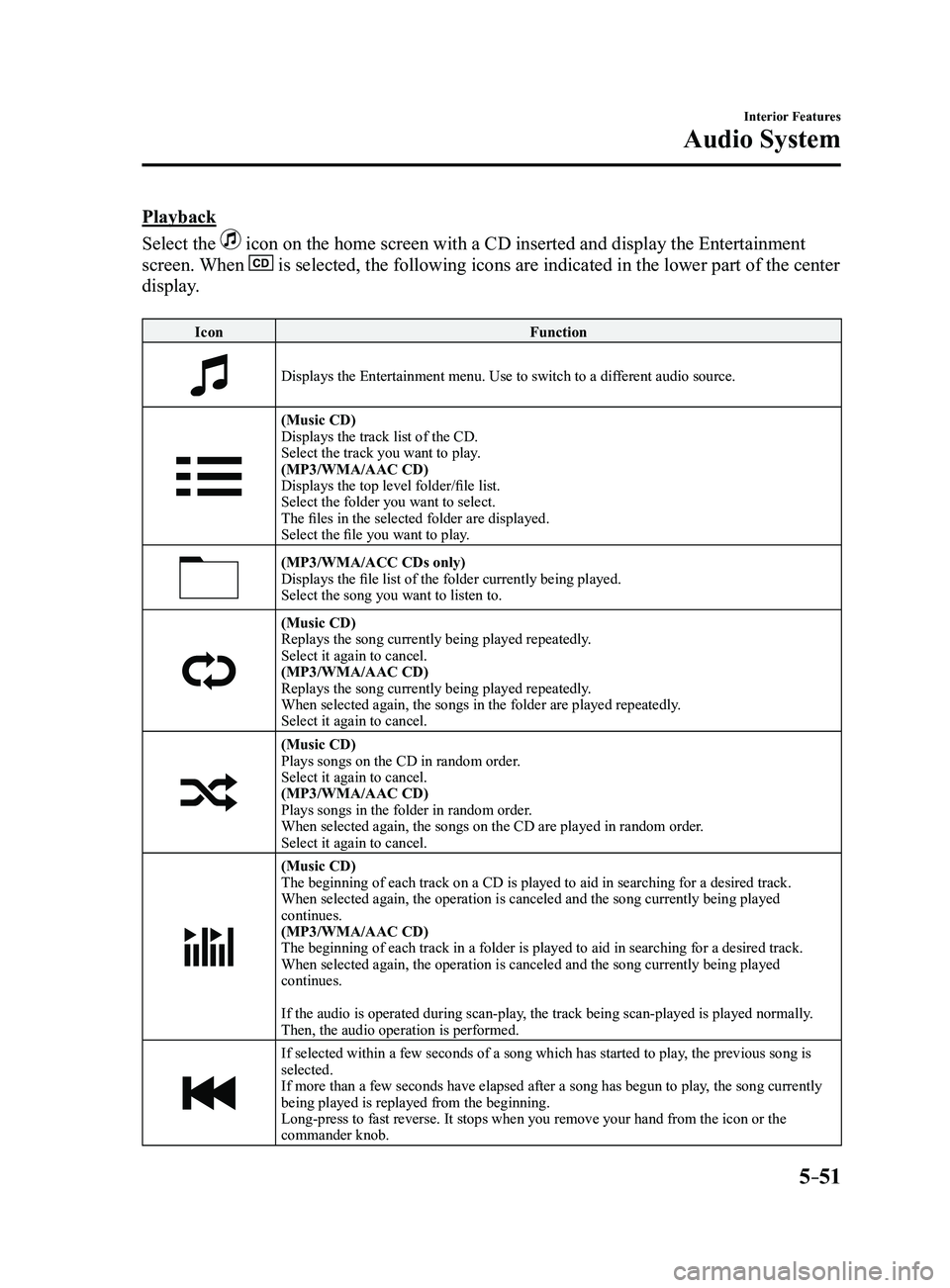
Playback
Select the
icon on the home screen with a CD inserted and display the Entertainment
screen. When is selected, the following icons are indicated in the lower part of the\
center
display.
IconFunction
Displays the Entertainment menu. Use to switch to a different audio source.
(Music CD)
Displays the track list of the CD.
Select the track you want to play.
(MP3/WMA/AAC CD)
Displays the top level folder/file list.
Select the folder you want to select.
The files in the selected folder are displayed.
Select the file you want to play.
(MP3/WMA/ACC CDs only)Displays the file list of the folder currently being played.
Select the song you want to listen to.
(Music CD)Replays the song currently being played repeatedly.
Select it again to cancel.
(MP3/WMA/AAC CD)
Replays the song currently being played repeatedly.
When selected again, the songs in the folder are played repeatedly.
Select it again to cancel.
(Music CD)Plays songs on the CD in random order.
Select it again to cancel.
(MP3/WMA/AAC CD)
Plays songs in the folder in random order.
When selected again, the songs on the CD are played in random order.
Select it again to cancel.
(Music CD)
The beginning of each track on a CD is played to aid in searching for a \
desired track.
When selected again, the operation is canceled and the song currently be\
ing played
continues.
(MP3/WMA/AAC CD)
The beginning of each track in a folder is played to aid in searching fo\
r a desired track.
When selected again, the operation is canceled and the song currently be\
ing played
continues.
If the audio is operated during scan-play, the track being scan-played is played normally.
Then, the audio operation is performed.
If selected within a few seconds of a song which has started to play, the previous song is
selected.
If more than a few seconds have elapsed after a song has begun to play, the song currently
being played is replayed from the beginning.
Long-press to fast reverse. It stops when you remove your hand from the \
icon or the
commander knob.
Mazda3_8FL6-EA-16F_Edition2.indb 512016/08/10 17:37:45
Page 354 of 612
5–62
Interior Features
Audio System
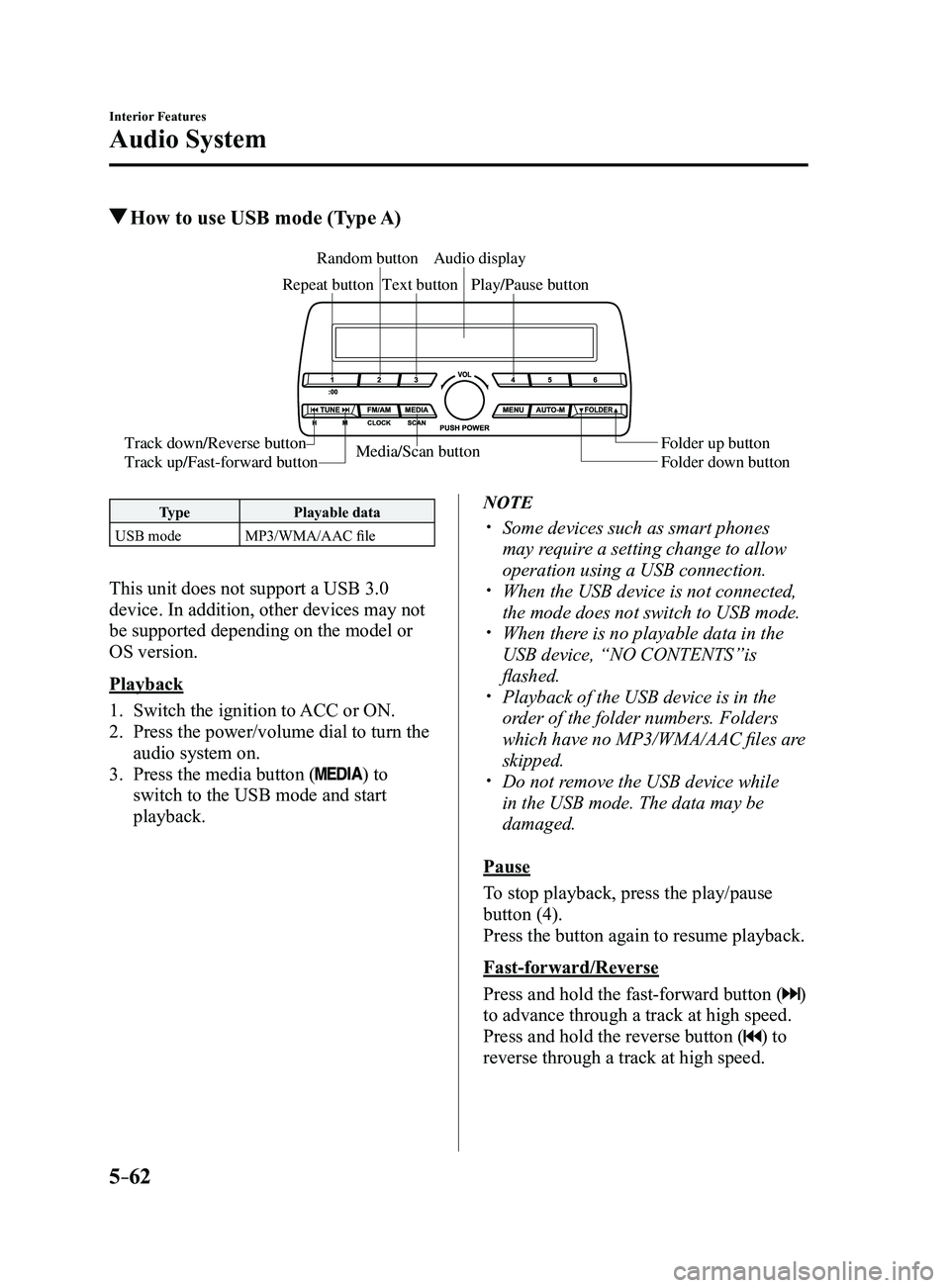
How to use USB mode (Type A)
Media/Scan button
Folder down button Folder up button
Play/Pause button
Random button
Repeat button
Audio display
Text button
Track down/Reverse button
Track up/Fast-forward button
Type
Playable data
USB mode MP3/WMA/AAC file
This unit does not support a USB 3.0
device. In addition, other devices may not
be supported depending on the model or
OS version.
Playback
1. Switch the ignition to ACC or ON.
2. Press the power/volume dial to turn the
audio system on.
3. Press the media button () to
switch to the USB mode and start
playback.
NOTE
Some devices such as smart phones
may require a setting change to allow
operation using a USB connection.
When the USB device is not connected,
the mode does not switch to USB mode. When there is no playable data in the
USB device, “NO CONTENTS”is
flashed.
Playback of the USB device is in the
order of the folder numbers. Folders
which have no MP3/WMA/AAC files are
skipped.
Do not remove the USB device while
in the USB mode. The data may be
damaged.
Pause
To stop playback, press the play/pause
button (4).
Press the button again to resume playback.
Fast-forward/Reverse
Press and hold the fast-forward button (
)
to advance through a track at high speed.
Press and hold the reverse button (
) to
reverse through a track at high speed.
Mazda3_8FL6-EA-16F_Edition2.indb 622016/08/10 17:37:51
Page 358 of 612
5–66
Interior Features
Audio System
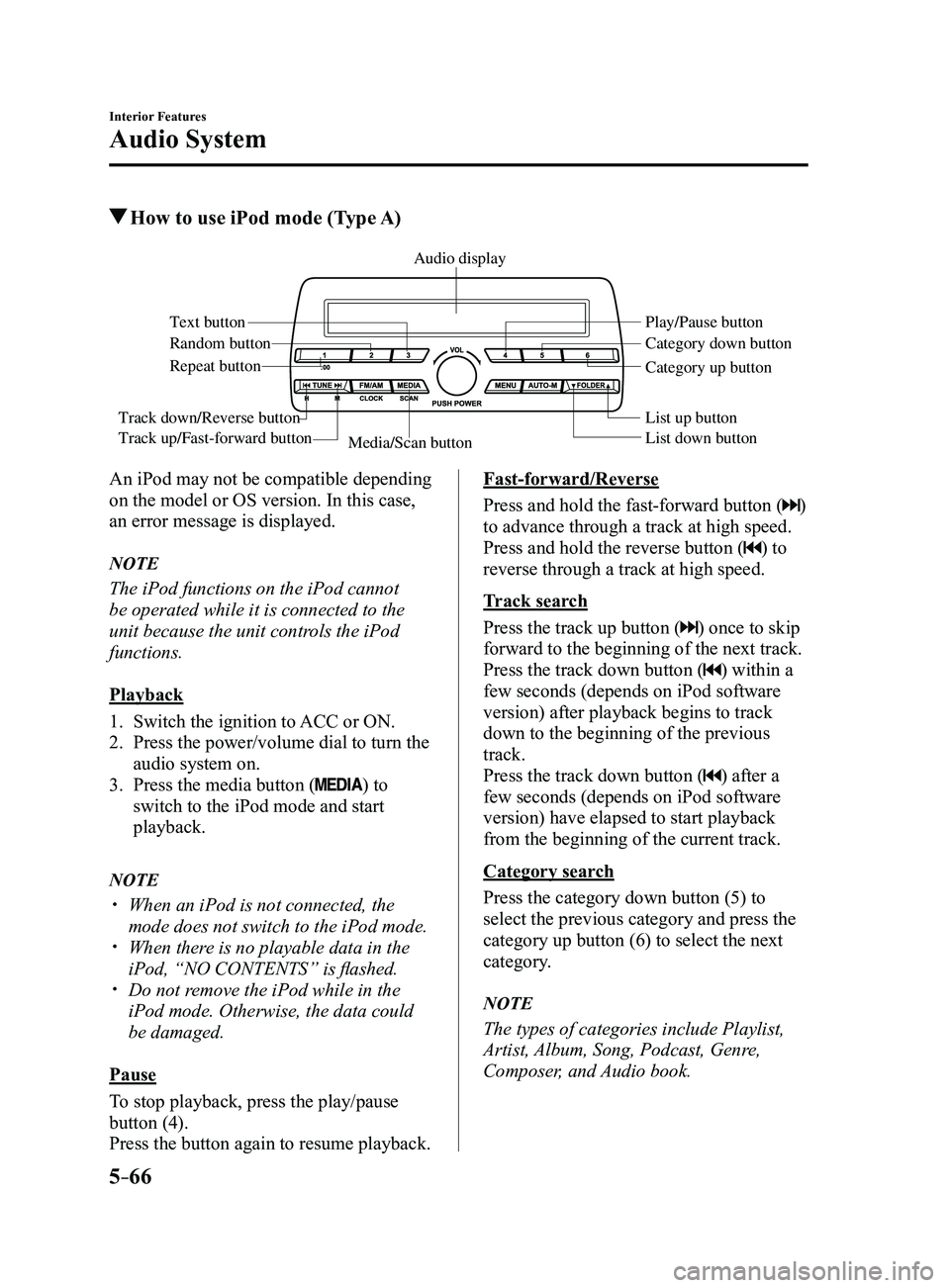
How to use iPod mode (Type A)
Media/Scan button List down button List up button Play/Pause button
Random button
Repeat button
Audio display
Text button
Track down/Reverse button
Track up/Fast-forward button
Category down button
Category up button
An iPod may not be compatible depending
on the model or OS version. In this case,
an error message is displayed.
NOTE
The iPod functions on the iPod cannot
be operated while it is connected to the
unit because the unit controls the iPod
functions.
Playback
1. Switch the ignition to ACC or ON.
2. Press the power/volume dial to turn the
audio system on.
3. Press the media button () to
switch to the iPod mode and start
playback.
NOTE
When an iPod is not connected, the
mode does not switch to the iPod mode. When there is no playable data in the
iPod, “NO CONTENTS” is flashed. Do not remove the iPod while in the
iPod mode. Otherwise, the data could
be damaged.
Pause
To stop playback, press the play/pause
button (4).
Press the button again to resume playback.
Fast-forward/Reverse
Press and hold the fast-forward button (
)
to advance through a track at high speed.
Press and hold the reverse button (
) to
reverse through a track at high speed.
Track search
Press the track up button (
) once to skip
forward to the beginning of the next track.
Press the track down button (
) within a
few seconds (depends on iPod software
version) after playback begins to track
down to the beginning of the previous
track.
Press the track down button (
) after a
few seconds (depends on iPod software
version) have elapsed to start playback
from the beginning of the current track.
Category search
Press the category down button (5) to
select the previous category and press the
category up button (6) to select the next
category.
NOTE
The types of categories include Playlist,
Artist, Album, Song, Podcast, Genre,
Composer, and Audio book.
Mazda3_8FL6-EA-16F_Edition2.indb 662016/08/10 17:37:53
Page 362 of 612
5–70
Interior Features
Audio System
Playback
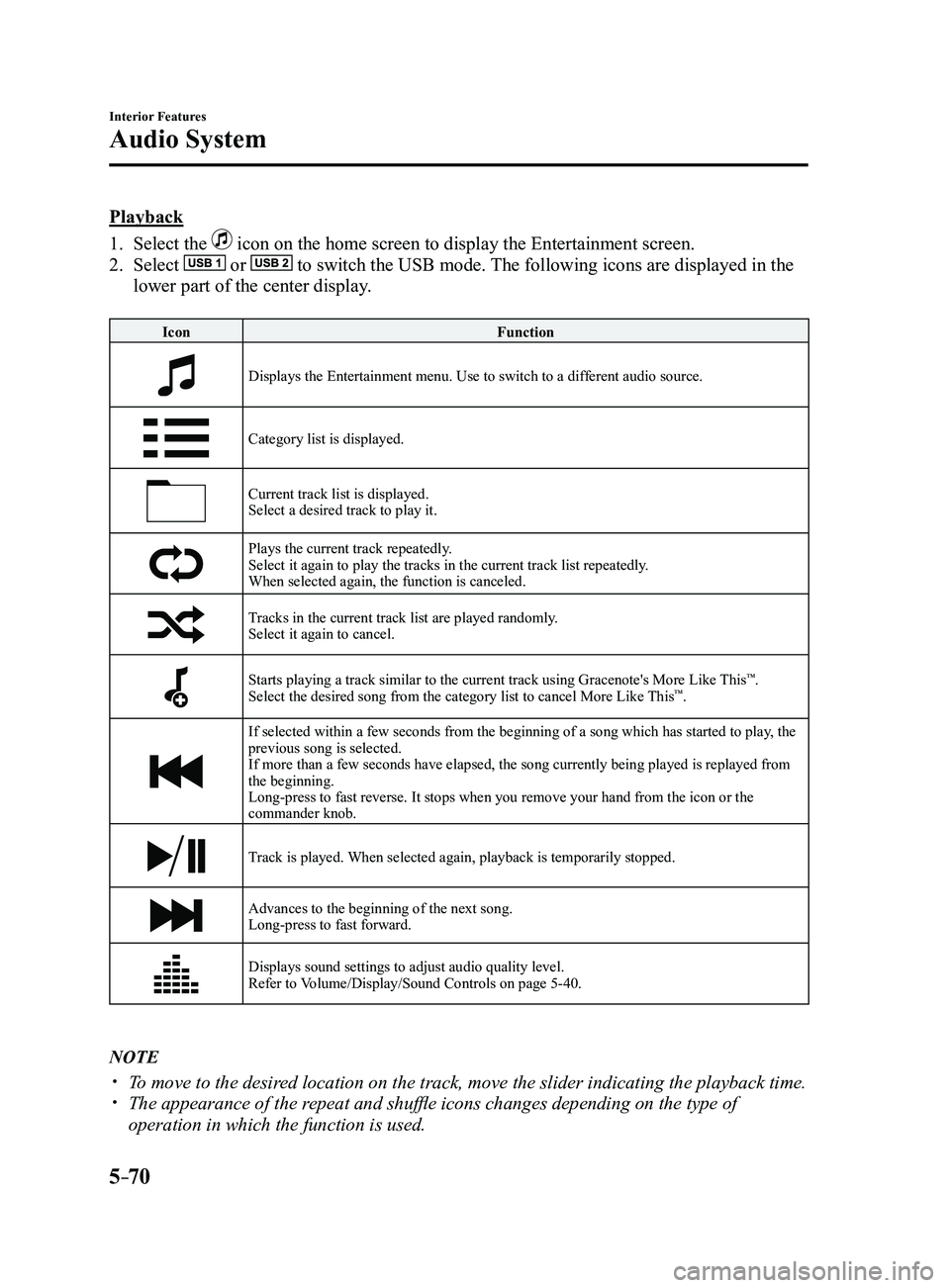
1. Select the icon on the home screen to display the Entertainment screen.
2. Select or to switch the USB mode. The following icons are displayed in the
lower part of the center display.
IconFunction
Displays the Entertainment menu. Use to switch to a different audio source.
Category list is displayed.
Current track list is displayed.Select a desired track to play it.
Plays the current track repeatedly.Select it again to play the tracks in the current track list repeatedly.
When selected again, the function is canceled.
Tracks in the current track list are played randomly.Select it again to cancel.
Starts playing a track similar to the current track using Gracenote's More Like This™.
Select the desired song from the category list to cancel More Like This™.
If selected within a few seconds from the beginning of a song which has \
started to play, the
previous song is selected.
If more than a few seconds have elapsed, the song currently being played\
is replayed from
the beginning.
Long-press to fast reverse. It stops when you remove your hand from the \
icon or the
commander knob.
Track is played. When selected again, playback is temporarily stopped.
Advances to the beginning of the next song.
Long-press to fast forward.
Displays sound settings to adjust audio quality level.
Refer to Volume/Display/Sound Controls on page 5-40.
NOTE
To move to the desired location on the track, move the slider indicating the playback time. The appearance of the r epeat and shuffle icons changes depending on the type of
operation in which the function is used.
Mazda3_8FL6-EA-16F_Edition2.indb 702016/08/10 17:37:55
Page 366 of 612
5–74
Interior Features
Bluetooth®
*Some models.
Bluetooth®*
Bluetooth® Hands-Free outline
When a Bluetooth
® device (mobile phone) is connected to the vehicle's Bluetooth® unit via
radio wave transmission, a call can be made or received by pressing the \
talk button, pick-
up button, or hang-up button on the audio remote control switch, or by o\
perating the center
display. For example, even if a device (mobile phone) is in your coat pocket,\
a call can be
made without taking the device (mobile phone) out and operating it dir\
ectly.
Bluetooth
® audio outline
When a portable audio unit equipped with the Bluetooth
® communication function is paired
to the vehicle, you can listen to music stored on the paired portable au\
dio device from the
vehicle's speakers. It is not necessary to connect the portable audio de\
vice to the vehicle's
external input terminal. After programming, operate the vehicle audio control panel to play/
stop the audio.
NOTE
For your safety , a device can be paired only when the vehicle is parked. If the vehicle
starts to move, the pairing procedure will end. Park the vehicle in a safe place before
pairing.
The communication range of a Bluetooth® equipped device is about 10 meters (32 ft) or
less.
Basic audio operation is available using voice commands even if Bluetoot\
h® is not
connected.
For safety r easons, operation of the center display is disabled while the vehicle is\
being
driven. However, items not displayed in gray can be operated using the commander
switch while the vehicle is being driven.
Mazda3_8FL6-EA-16F_Edition2.indb 742016/08/10 17:37:57