steering MAZDA MODEL 3 5-DOOR 2017 Owner's Guide
[x] Cancel search | Manufacturer: MAZDA, Model Year: 2017, Model line: MODEL 3 5-DOOR, Model: MAZDA MODEL 3 5-DOOR 2017Pages: 612
Page 264 of 612
 system operates when all of the followin\
g conditions are
met:
The ignition is switched ON. The Smart Brake Support (S")
4–134
When Driving
i-ACTIVSENSE
NOTE
The Smart Brake Support (SBS) system operates when all of the followin\
g conditions are
met:
The ignition is switched ON. The Smart Brake Support (SBS) system is on. The vehicle speed is about 15 km/h or faster (10 mph or faster). The relative speed between your vehicle and the vehicle ahead is about 15 km/\
h or
faster (10 mph or faster). The Dynamic Stability Control (DSC) is not operating.
The Smart Brake Support (SBS) system may not operate under the followi\
ng conditions:
If the vehicle is accelerated rapidly and it comes close to a vehicle ah\
ead. The vehicle is driven at the same speed as the vehicle ahead. The accelerator pedal is depr essed. The brake pedal is depressed. The steering wheel is being operated. The selector lever is being operated. The turn signal is being used. When the vehicle ahead is not equipped with taillights or the taillights\
ar e turned off. When warnings and messages, such as a dirty windshield, related to the Forward
Sensing Camera (FSC) are being displayed in the center display.
Although the objects which activate the system are four-wheeled vehicles, the radar
sensor (front) could detect the following objects, determine them to be an obstru\
ction, and
operate the Smart Brake Support (SBS) system.
Objects on the road at the entrance to a curve (including guardrails and snow banks). A vehicle appears in the opposite lane while cornering or rounding a curve. When crossing a narrow bridge. When passing under a low gate or thr ough a tunnel or narrow gate. When entering an underground parking area. Metal objects, bumps, or pr otruding objects on the road. If you suddenly come close to a vehicle ahead. When driving in areas where there is high grass or forage. Two-wheeled vehicles such as motorbikes or bicycles. Pedestrians or non-metallic objects such as standing tr ees.
The Smart Brake Support (SBS) warning indication (amber) turns on wh\
en the system has
a malfunction.
Refer to Warning Lights on page 4-23.
Mazda3_8FL6-EA-16F_Edition2.indb 1342016/08/10 17:36:58
Page 283 of 612
4–153
When Driving
Tire Pressure Monitoring System
NOTE
Because this system detects slight changes in tire conditions, the timing of the warning may
be faster or slower in the following cases:
The size, manufacturer, or the type of tires is different from the specification. The size, manufacturer, or the type of a tire is different from the others, or the level of tire
wear is excessively different between them. A run-flat tire, studless tire, snow tire, or tire chains are used. An emergency tire is used (The tire pressure monitoring system warning light may flash
and then continue illuminating). A tire is repaired using the emergency flat tire repair kit. The tire pressure is excessively higher than the specified pressure, or the tire pressure is
suddenly lowered for some reason such as a tire burst during driving. The vehicle speed is lower than about 15 km/h (9.3 mph) (including wh\
en the vehicle is
stopped), or the drive period is shorter than 5 minutes. The vehicle is driven on an extr emely rough road or a slippery, icy road. Hard steering and rapid acceleration/deceleration are repeated such as during aggressive
driving on a winding road. Load on the vehicle is applied to a tir e such as by loading heavy luggage to one side of
the vehicle. System initialization has not been implemented with the specifie d tire pressure.
Mazda3_8FL6-EA-16F_Edition2.indb 1532016/08/10 17:37:04
Page 288 of 612
4–158
When Driving
Rear View Monitor
Viewing the Display
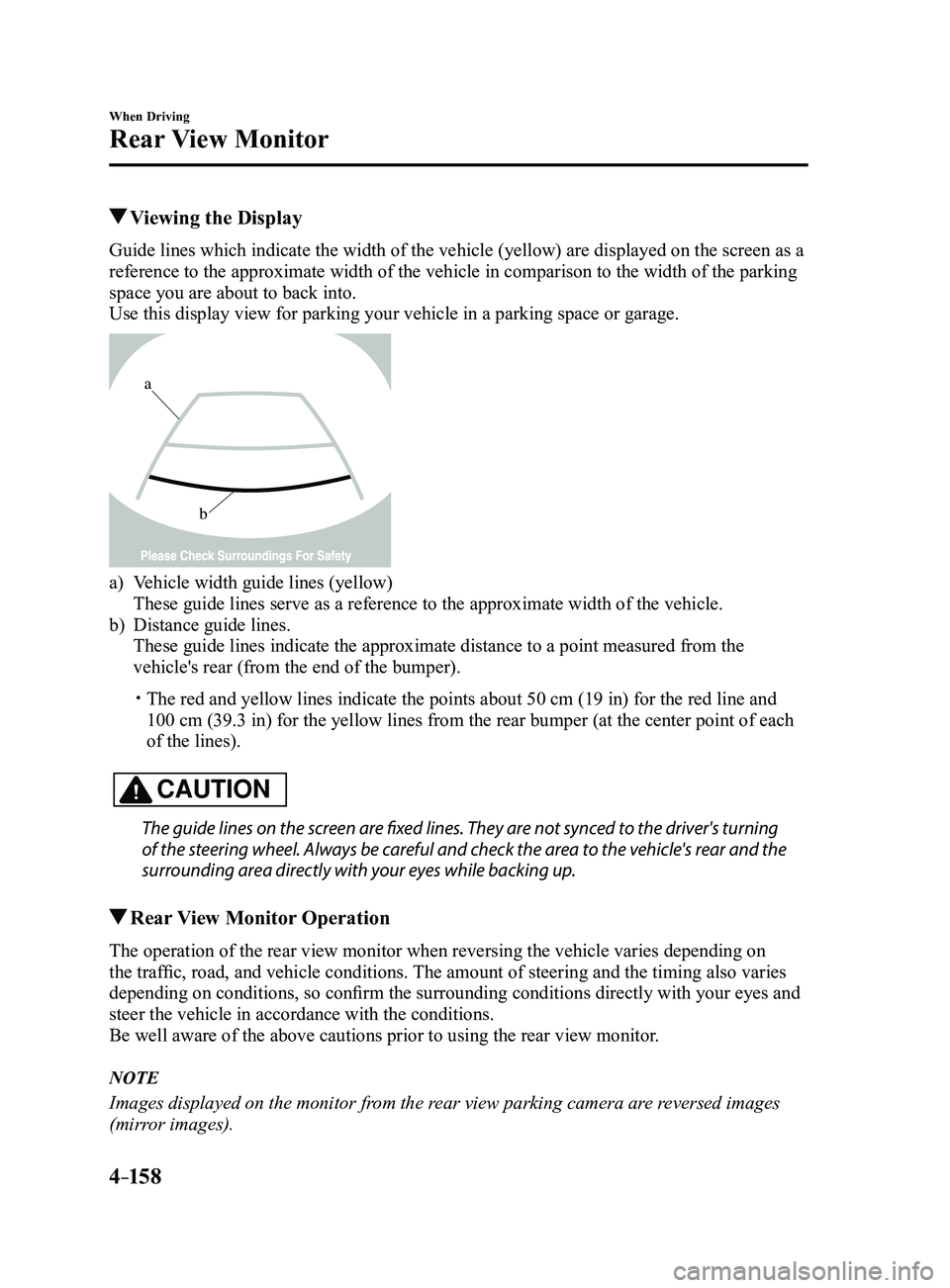
Guide lines which indicate the width of the vehicle (yellow) are displayed on the screen as a
reference to the approximate width of the vehicle in comparison to the w\
idth of the parking
space you are about to back into.
Use this display view for parking your vehicle in a parking space or gar\
age.
b
a
a) Vehicle width guide lines (yellow)
These guide lines serve as a reference to the approximate width of the v\
ehicle.
b) Distance guide lines.
These guide lines indicate the approximate distance to a point measured \
from the
vehicle's rear (from the end of the bumper).
The red and yellow lines indicate the points about 50 cm (19 in) for t\
he red line and
100 cm (39.3 in) for the yellow lines from the rear bumper (at the ce\
nter point of each
of the lines).
CAUTION
The guide lines on the screen are fixed lines. They are not synced to the driver's turning
of the steering wheel. Always be careful and check the area to the vehicle's rear and the
surrounding area directly with your eyes while backing up.
Rear View Monitor Operation
The operation of the rear view monitor when reversing the vehicle varies\
depending on
the traffic, road, and vehicle conditions. The amount of steering and the timing also varies
depending on conditions, so confirm the surrounding conditions directly with your eyes and
steer the vehicle in accordance with the conditions.
Be well aware of the above cautions prior to using the rear view monitor.
NOTE
Images displayed on the monitor from the rear view parking camera are reversed images
(mirror images).
Mazda3_8FL6-EA-16F_Edition2.indb 1582016/08/10 17:37:06
Page 289 of 612
4–159
When Driving
Rear View Monitor
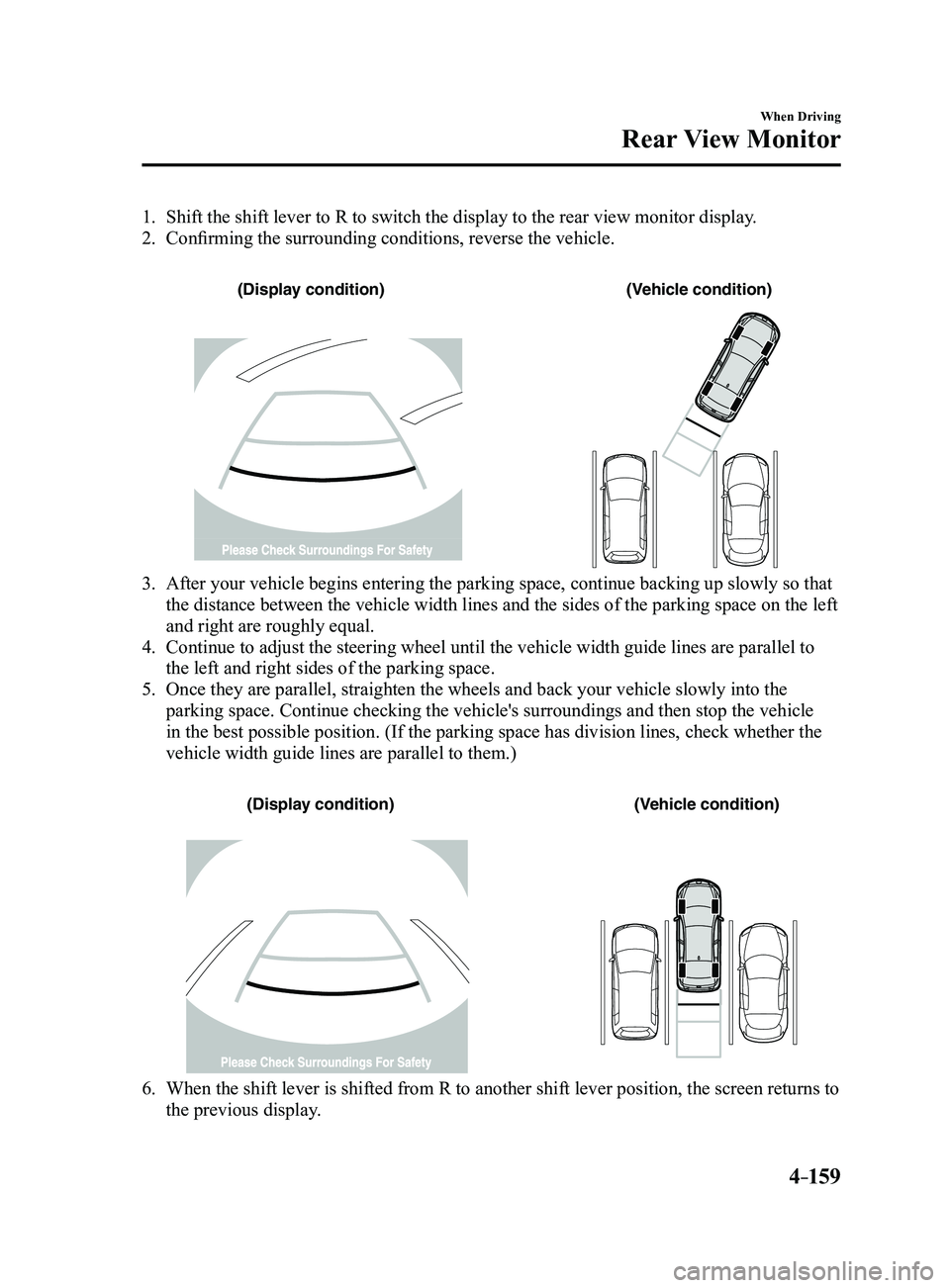
1. Shift the shift lever to R to switch the display to the rear view monitor display.
2. Confirming the surrounding conditions, reverse the vehicle.
(Display condition)(Vehicle condition)
3. After your vehicle begins entering the parking space, continue backing u\
p slowly so that
the distance between the vehicle width lines and the sides of the parkin\
g space on the left
and right are roughly equal.
4. Continue to adjust the steering wheel until the vehicle width guide line\
s are parallel to
the left and right sides of the parking space.
5. Once they are parallel, straighten the wheels and back your vehicle slow\
ly into the
parking space. Continue checking the vehicle's surroundings and then sto\
p the vehicle
in the best possible position. (If the parking space has division lines\
, check whether the
vehicle width guide lines are parallel to them.)
(Display condition)(Vehicle condition)
6. When the shift lever is shifted from R to another shift lever p osition, the screen returns to
the previous display.
Mazda3_8FL6-EA-16F_Edition2.indb 1592016/08/10 17:37:07
Page 309 of 612
5–17
Interior Features
Audio System
*Some models.
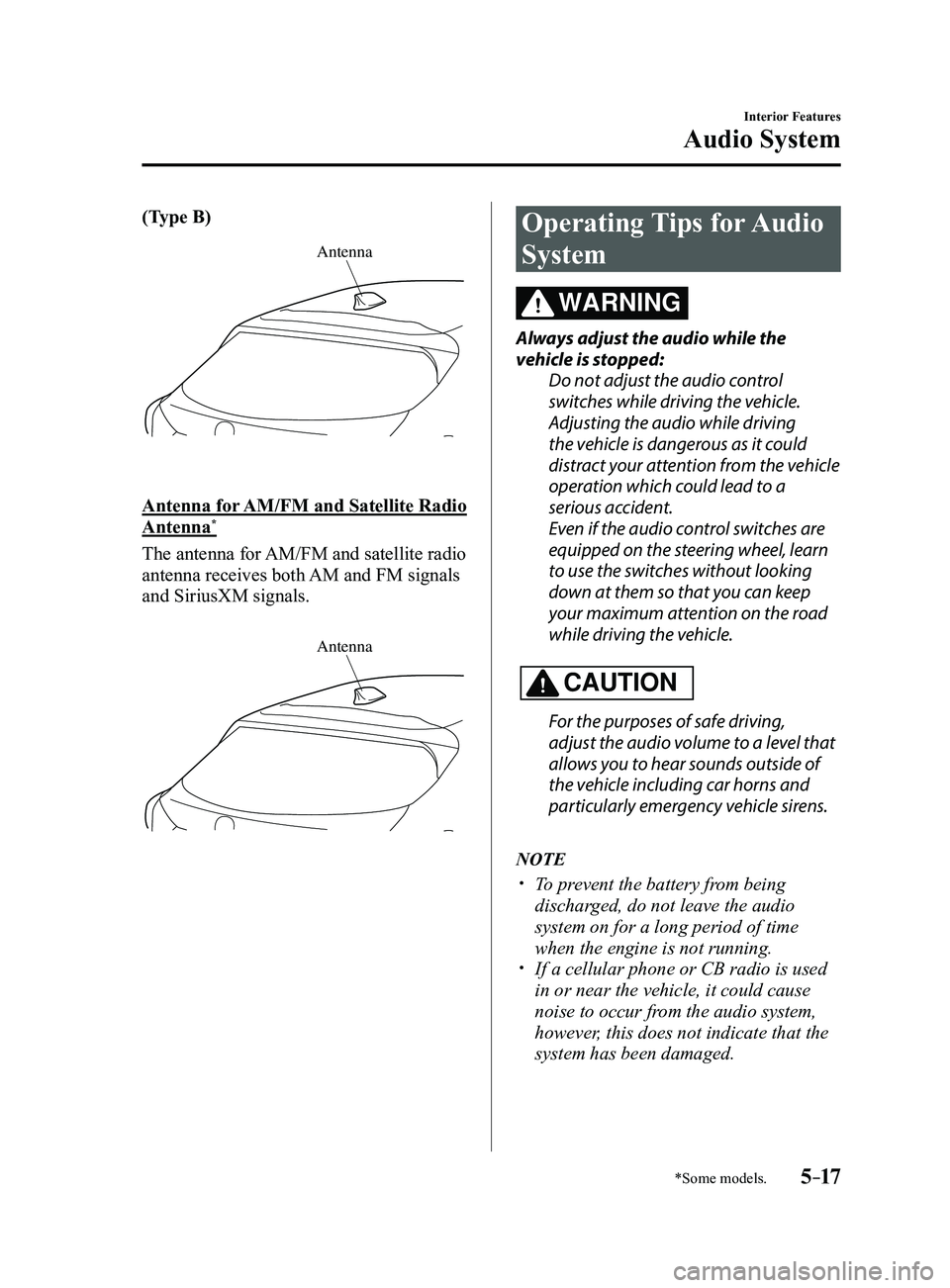
(Type B)
Antenna
Antenna for AM/FM and Satellite Radio
Antenna*
The antenna for AM/FM and satellite radio
antenna receives both AM and FM signals
and SiriusXM signals.
Antenna
Operating Tips for Audio
System
WARNING
Always adjust the audio while the
vehicle is stopped:Do not adjust the audio control
switches while driving the vehicle.
Adjusting the audio while driving
the vehicle is dangerous as it could
distract your attention from the vehicle
operation which could lead to a
serious accident.
Even if the audio control switches are
equipped on the steering wheel, learn
to use the switches without looking
down at them so that you can keep
your maximum attention on the road
while driving the vehicle.
CAUTION
For the purposes of safe driving,
adjust the audio volume to a level that
allows you to hear sounds outside of
the vehicle including car horns and
particularly emergency vehicle sirens.
NOTE
To prevent the battery from being
discharged, do not leave the audio
system on for a long period of time
when the engine is not running.
If a cellular phone or CB radio is used
in or near the vehicle, it could cause
noise to occur from the audio system,
however, this does not indicate that the
system has been damaged.
Mazda3_8FL6-EA-16F_Edition2.indb 172016/08/10 17:37:19
Page 326 of 612
![MAZDA MODEL 3 5-DOOR 2017 Owners Guide 5–34
Interior Features
Audio System
Audio set [Type B (touchscreen)]
NOTE
The explanation of functions described in this manual may differ from the actual
operation, and the shapes of screens and b](/img/28/40993/w960_40993-325.png "MAZDA MODEL 3 5-DOOR 2017 Owners Guide 5–34
Interior Features
Audio System
Audio set [Type B (touchscreen)]
NOTE
The explanation of functions described in this manual may differ from the actual
operation, and the shapes of screens and b")
5–34
Interior Features
Audio System
Audio set [Type B (touchscreen)]
NOTE
The explanation of functions described in this manual may differ from the actual
operation, and the shapes of screens and buttons and the letters and cha\
racters displayed
may also differ from the actual appearance.
Additionally, depending on future software updates, the content may successively cha\
nge
without notice.
Audio Set (Type B) has three different human interfaces.
Commander switch Touch panel Voice recognition with steering switch and microphone
Commander switch operation
NOTE
For safety reasons, some operations are disabled while the vehicle is being driven.
Volume dial operation
Volume dial
Press the volume dial to switch the audio MUTE on and off.
Turn the volume dial to adjust the volume. The volume increases by turning the dial
clockwise, and decreases by turning it counterclockwise.
Mazda3_8FL6-EA-16F_Edition2.indb 342016/08/10 17:37:29
Page 332 of 612
5–40
Interior Features
Audio System
Volume/Display/Sound Controls
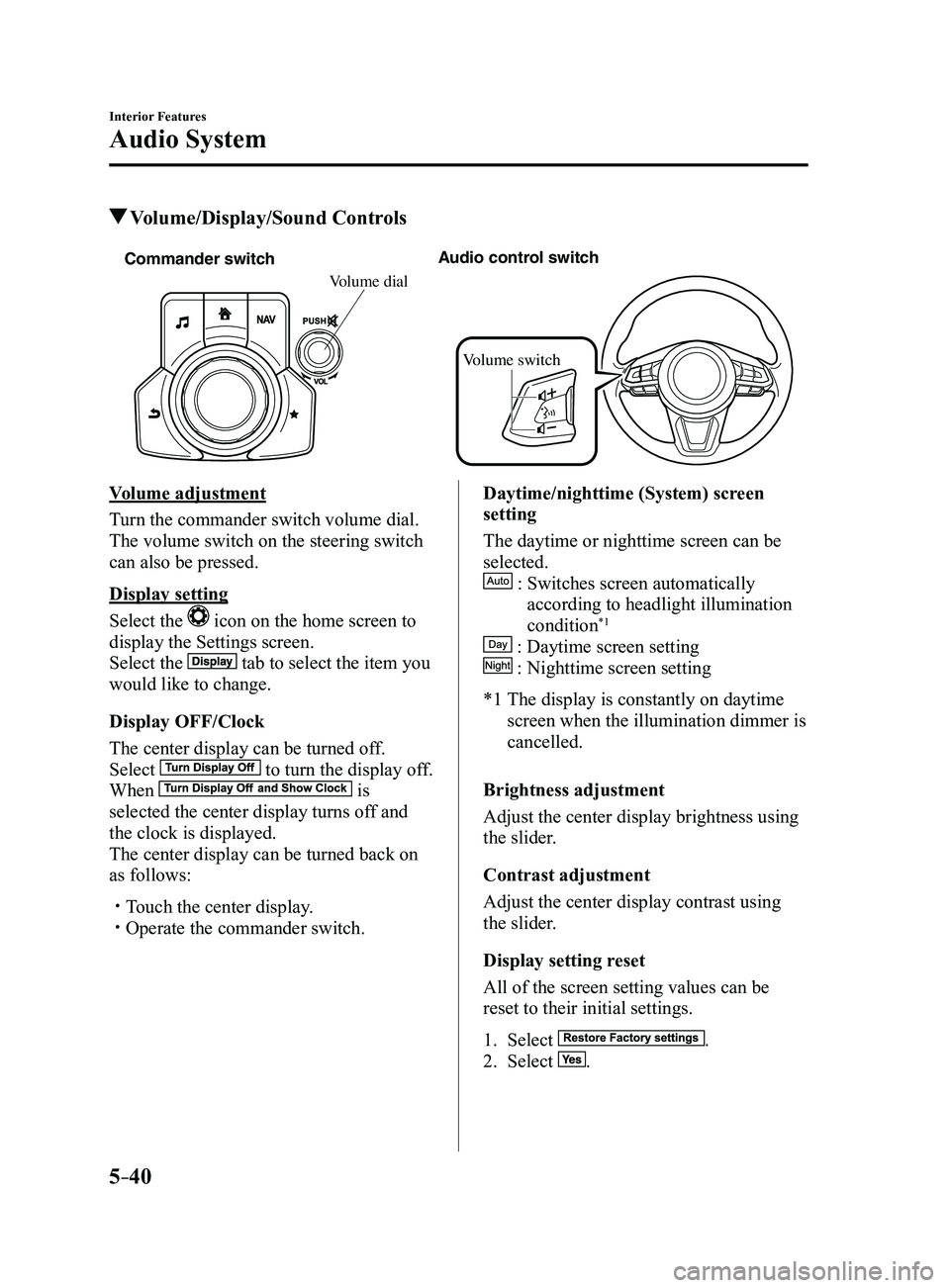
Commander switchAudio control switch
Volume switch
Volume dial
Volume adjustment
Turn the commander switch volume dial.
The volume switch on the steering switch
can also be pressed.
Display setting
Select the
icon on the home screen to
display the Settings screen.
Select the
tab to select the item you
would like to change.
Display OFF/Clock
The center display can be turned off.
Select
to turn the display off.
When is
selected the center display turns off and
the clock is displayed.
The center display can be turned back on
as follows:
Touch the center display. Operate the commander switch.
Daytime/nighttime (System) screen
setting
The daytime or nighttime screen can be
selected.
: Switches screen automatically
according to headlight illumination
condition*1
: Daytime screen setting
: Nighttime screen setting
*1 The display is constantly on daytime
screen when the illumination dimmer is
cancelled.
Brightness adjustment
Adjust the center display brightness using
the slider.
Contrast adjustment
Adjust the center display contrast using
the slider.
Display setting reset
All of the screen setting values can be
reset to their initial settings.
1. Select .
2. Select .
Mazda3_8FL6-EA-16F_Edition2.indb 402016/08/10 17:37:35
Page 368 of 612
5–76
Interior Features
Bluetooth®
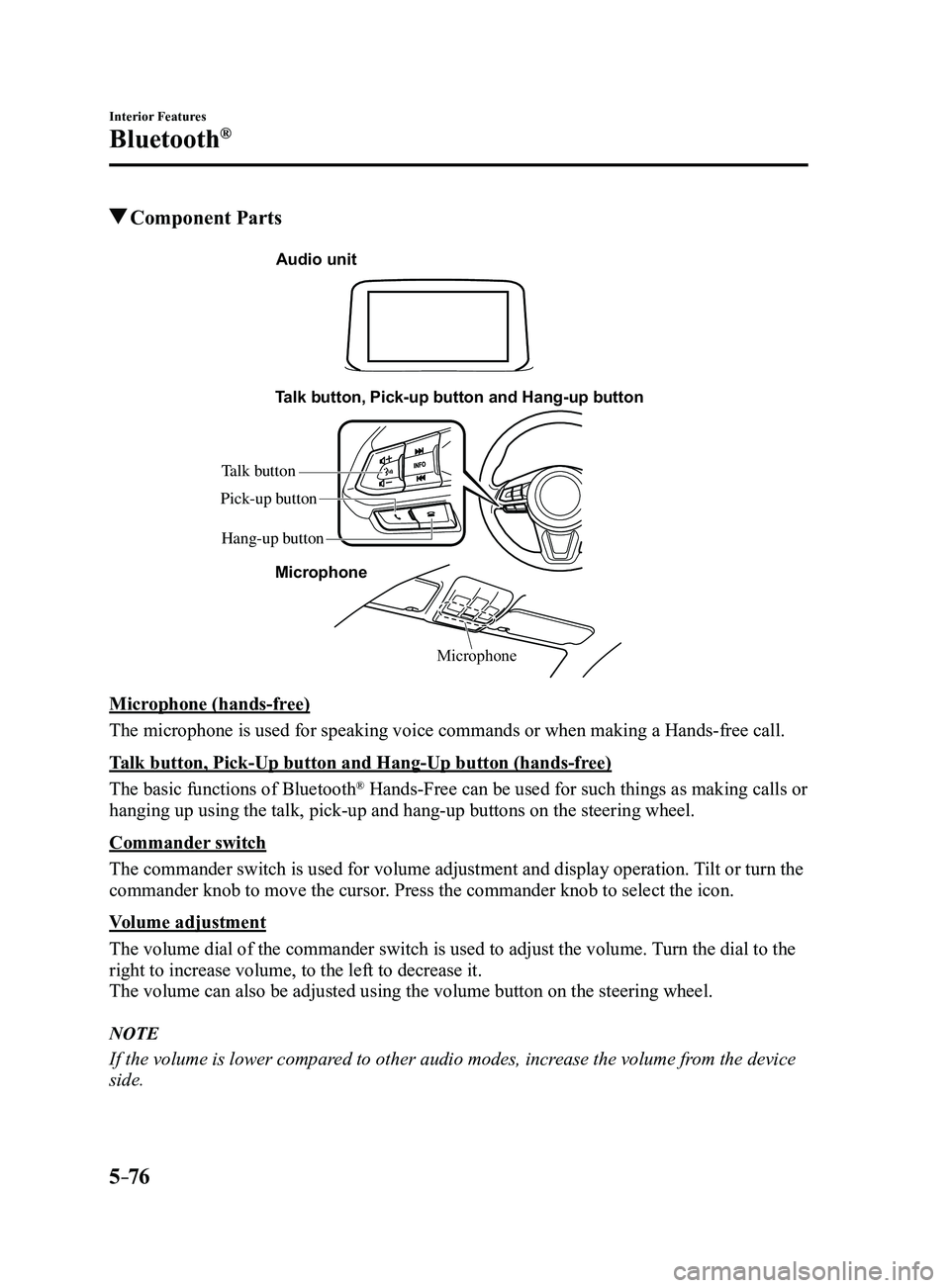
Component Parts
Microphone
Talk button, Pick-up button and Hang-up button
Microphone
Audio unit
Talk button
Hang-up button
Pick-up button
Microphone (hands-free)
The microphone is used for speaking voice commands or when making a Hand\
s-free call.
Talk button, Pick-Up button and Hang-Up button (hands-free)
The basic functions of Bluetooth
® Hands-Free can be used for such things as making calls or
hanging up using the talk, pick-up and hang-up buttons on the steering w\
heel.
Commander switch
The commander switch is used for volume adjustment and display operation\
. Tilt or turn the
commander knob to move the cursor. Press the commander knob to select the icon.
Volume adjustment
The volume dial of the commander switch is used to adjust the volume. Turn the dial to the
right to increase volume, to the left to decrease it.
The volume can also be adjusted using the volume button on the steering \
wheel.
NOTE
If the volume is lower compared to other audio modes, increase the volume from the device
side.
Mazda3_8FL6-EA-16F_Edition2.indb 762016/08/10 17:37:58
Page 379 of 612
5–87
Interior Features
Bluetooth®
NOTE
If the ignition is switched off during a
hands-free call, the line is transferred
to the device (Mobile phone)
automatically.
If the DTMF code has two or more
digits or symbols, each one must be
transmitted individually.
Call Interrupt
A call can be interrupted to receive an
incoming call from a third party.
When
is selected or the pick-
up button on the steering wheel is pressed,
the current call is held and the system
switches to the new incoming call.
When
is selected, the current
call is ended and the system switches to
the new incoming call (GSM network
only).
When
is selected or the hang-up
button on the steering wheel is pressed, an
incoming call is refused.
NOTE
The function may not be available
depending on the contractual content of
the mobile device.
The function may not be operable
depending on the type of the telephone
network and the mobile device.
Receiving and Replying to
Messages (available only with
E-mail/SMS compatible phones)
SMS (Short Message Service) messages,
and E-mail received by connected devices
can be downloaded, displayed, and played
(read by the system).
Additionally, replies can also be made
to calls and messages in the received
messages.
Downloading messages
Up to 20 new messages can be
downloaded and displayed from a
connected device.
NOTE
For E-mail, 20 messages for each account
can be downloaded.
(Automatic downloading)
The “Auto Download Email” (E-mail)
or “Auto Download Text Message”
(SMS) setting must be on. A message
is downloaded automatically when the
Bluetooth
® unit is connected to the device.
Refer to Communication Settings on page
5-91.
(Manually downloading)
When the “Auto Download Email”
(E-mail) or “Auto Download Text
Message” (SMS) setting is off, the
message is downloaded using the
following procedure.
1. Select the icon on the home screen
to display the Communication screen.
2. Select or to display
the Inbox.
3. Select .
4. Download will be started from the
mobile phone.
Mazda3_8FL6-EA-16F_Edition2.indb 872016/08/10 17:38:09
Page 417 of 612
6–5
Maintenance and Care
Scheduled Maintenance
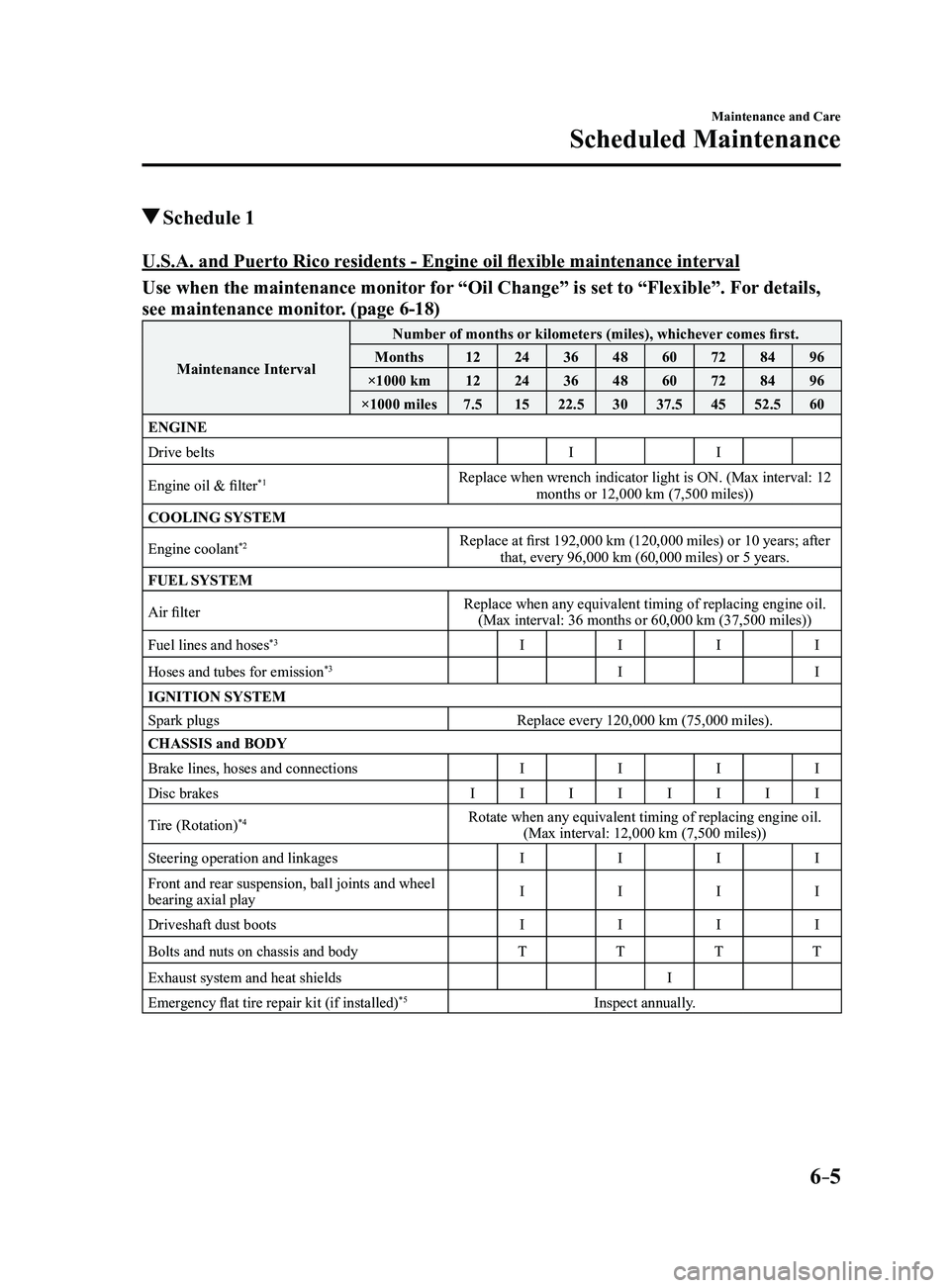
Schedule 1
U.S.A. and Puerto Rico residents - Engine oil flexible maintenance interval
Use when the maintenance monitor for “Oil Change” is set to “Flexible”. For details,
see maintenance monitor. (page
6-18)
Maintenance IntervalNumber of months or kilometers (miles), whichever comes first.
Months 1224364860728496
×1000 km 1224364860728496
×1000 miles 7.51522.5 3037.5 4552.5 60
ENGINE
Drive belts II
Engine oil & filter
*1Replace when wrench indicator light is ON. (Max interval: 12 months or 12,000 km (7,500 miles))
COOLING SYSTEM
Engine coolant
*2Replace at first 192,000 km (120,000 miles) or 10 years; after that, every 96,000 km (60,000 miles) or 5 years.
FUEL SYSTEM
Air filter Replace when any equivalent timing of replacing engine oil.
(Max interval: 36 months or 60,000 km (37,500 miles))
Fuel lines and hoses
*3I III
Hoses and tubes for emission
*3I I
IGNITION SYSTEM
Spark plugs Replace every 120,000 km (75,000 miles).
CHASSIS and BODY
Brake lines, hoses and connections IIII
Disc brakes IIIIIIII
Tire (Rotation)
*4Rotate when any equivalent timing of replacing engine oil. (Max interval: 12,000 km (7,500 miles))
Steering operation and linkages IIII
Front and rear suspension, ball joints and wheel
bearing axial play I
III
Driveshaft dust boots IIII
Bolts and nuts on chassis and body TTTT
Exhaust system and heat shields I
Emergency flat tire repair kit (if installed)
*5Inspect annually.
Mazda3_8FL6-EA-16F_Edition2.indb 52016/08/10 17:38:30