audio MAZDA MODEL 3 5-DOOR 2017 Service Manual
[x] Cancel search | Manufacturer: MAZDA, Model Year: 2017, Model line: MODEL 3 5-DOOR, Model: MAZDA MODEL 3 5-DOOR 2017Pages: 612
Page 342 of 612
5–50
Interior Features
Audio System
*Some models.
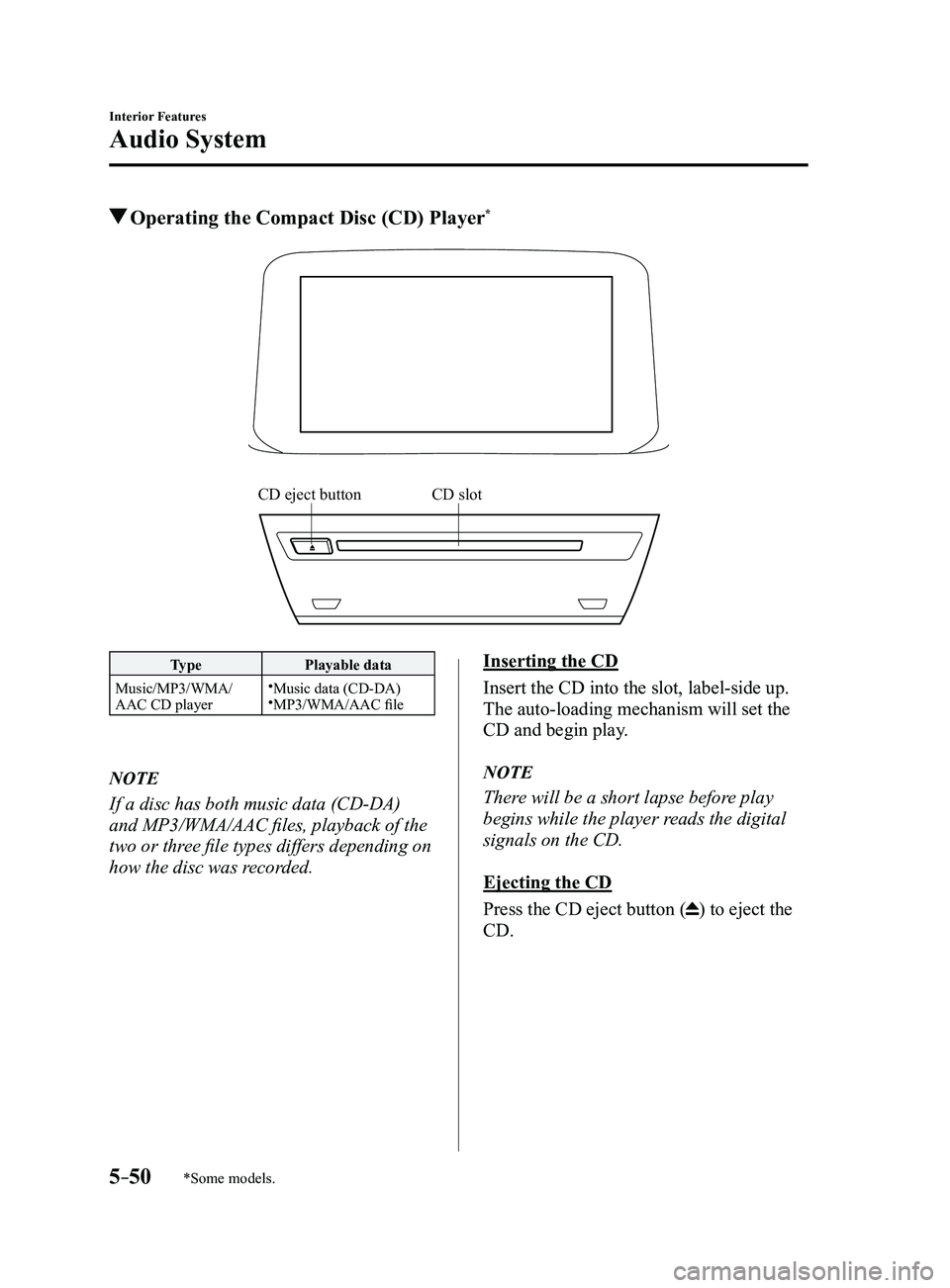
Operating the Compact Disc (CD) Player*
CD slotCD eject button
TypePlayable data
Music/MP3/WMA/
AAC CD player
Music data (CD-DA)MP3/WMA/AAC file
NOTE
If a disc has both music data (CD-DA)
and MP3/WMA/AAC files, playback of the
two or three file types differs depending on
how the disc was recorded.
Inserting the CD
Insert the CD into the slot, label-side up.
The auto-loading mechanism will set the
CD and begin play.
NOTE
There will be a short lapse before play
begins while the player reads the digital
signals on the CD.
Ejecting the CD
Press the CD eject button (
) to eject the
CD.
Mazda3_8FL6-EA-16F_Edition2.indb 502016/08/10 17:37:44
Page 343 of 612
5–51
Interior Features
Audio System
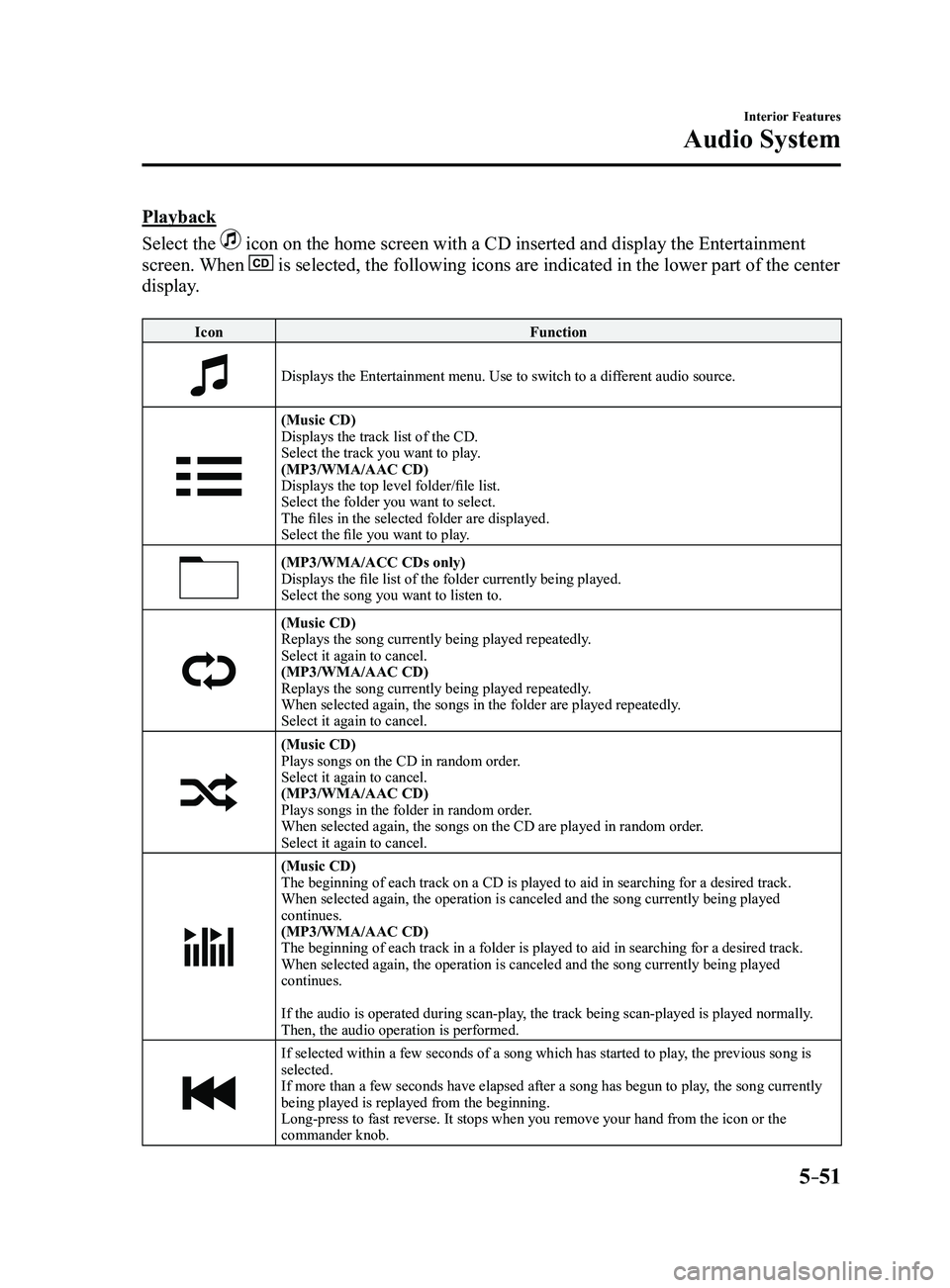
Playback
Select the
icon on the home screen with a CD inserted and display the Entertainment
screen. When is selected, the following icons are indicated in the lower part of the\
center
display.
IconFunction
Displays the Entertainment menu. Use to switch to a different audio source.
(Music CD)
Displays the track list of the CD.
Select the track you want to play.
(MP3/WMA/AAC CD)
Displays the top level folder/file list.
Select the folder you want to select.
The files in the selected folder are displayed.
Select the file you want to play.
(MP3/WMA/ACC CDs only)Displays the file list of the folder currently being played.
Select the song you want to listen to.
(Music CD)Replays the song currently being played repeatedly.
Select it again to cancel.
(MP3/WMA/AAC CD)
Replays the song currently being played repeatedly.
When selected again, the songs in the folder are played repeatedly.
Select it again to cancel.
(Music CD)Plays songs on the CD in random order.
Select it again to cancel.
(MP3/WMA/AAC CD)
Plays songs in the folder in random order.
When selected again, the songs on the CD are played in random order.
Select it again to cancel.
(Music CD)
The beginning of each track on a CD is played to aid in searching for a \
desired track.
When selected again, the operation is canceled and the song currently be\
ing played
continues.
(MP3/WMA/AAC CD)
The beginning of each track in a folder is played to aid in searching fo\
r a desired track.
When selected again, the operation is canceled and the song currently be\
ing played
continues.
If the audio is operated during scan-play, the track being scan-played is played normally.
Then, the audio operation is performed.
If selected within a few seconds of a song which has started to play, the previous song is
selected.
If more than a few seconds have elapsed after a song has begun to play, the song currently
being played is replayed from the beginning.
Long-press to fast reverse. It stops when you remove your hand from the \
icon or the
commander knob.
Mazda3_8FL6-EA-16F_Edition2.indb 512016/08/10 17:37:45
Page 344 of 612
5–52
Interior Features
Audio System
IconFunction
Plays a CD. When selected again, playback is temporarily stopped.
Advances to the beginning of the next song.
Long-press to fast forward. It stops when you remove your hand from the \
icon or the
commander knob.
Displays sound settings to adjust audio quality level.
Refer to Volume/Display/Sound Controls on page 5-40.
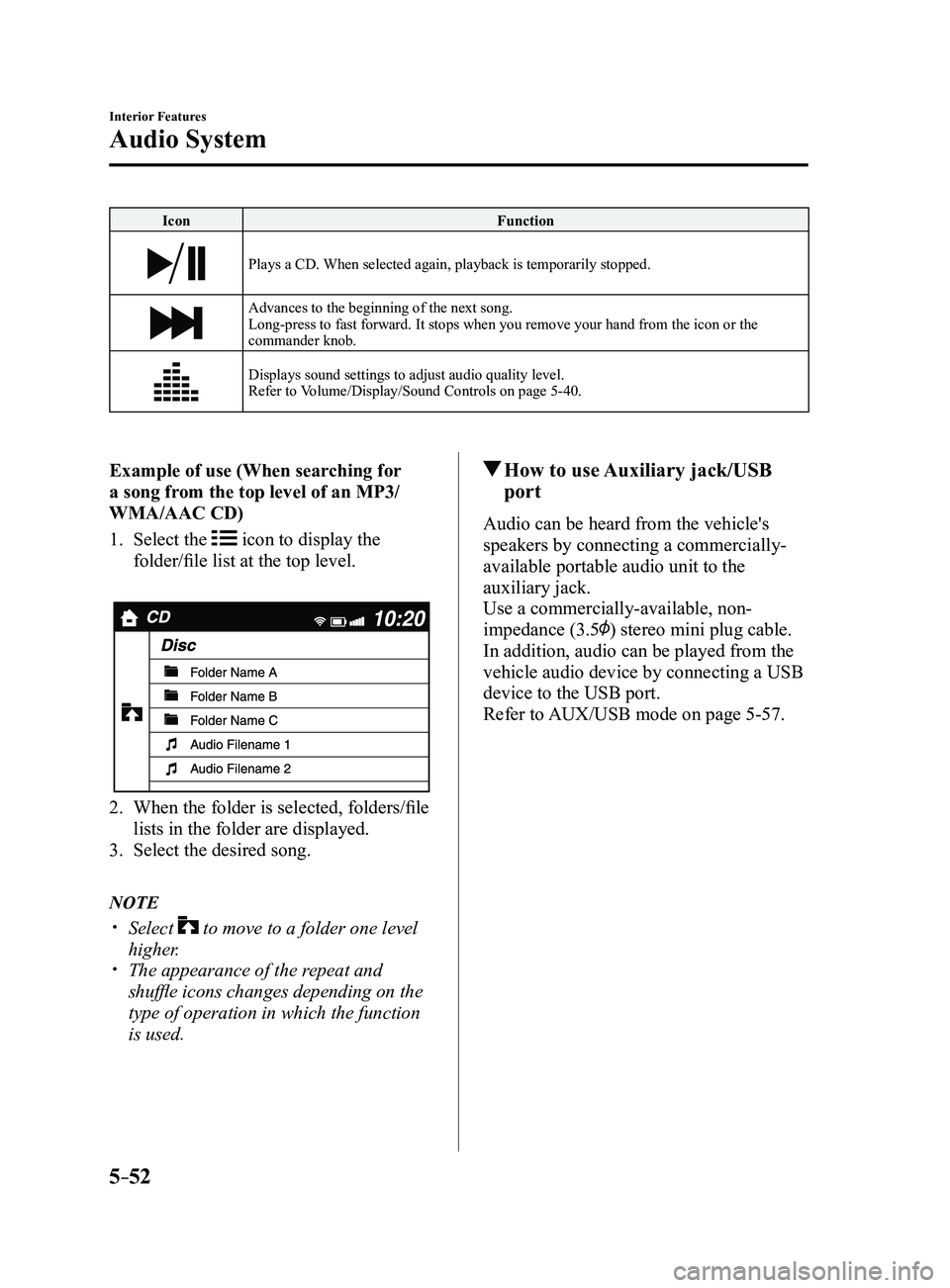
Example of use (When searching for
a song from the top level of an MP3/
WMA/AAC CD)
1. Select the icon to display the
folder/file list at the top level.
2. When the folder is selected, folders/file
lists in the folder are displayed.
3. Select the desired song.
NOTE
Select to move to a folder one level
higher. The appearance of the r epeat and
shuffle icons changes depending on the
type of operation in which the function
is used.
How to use Auxiliary jack/USB
port
Audio can be heard from the vehicle's
speakers by connecting a commercially-
available portable audio unit to the
auxiliary jack.
Use a commercially-available, non-
impedance (3.5
) stereo mini plug cable.
In addition, audio can be played from the
vehicle audio device by connecting a USB
device to the USB port.
Refer to AUX/USB mode on page
5-57.
Mazda3_8FL6-EA-16F_Edition2.indb 522016/08/10 17:37:45
Page 345 of 612
5–53
Interior Features
Audio System
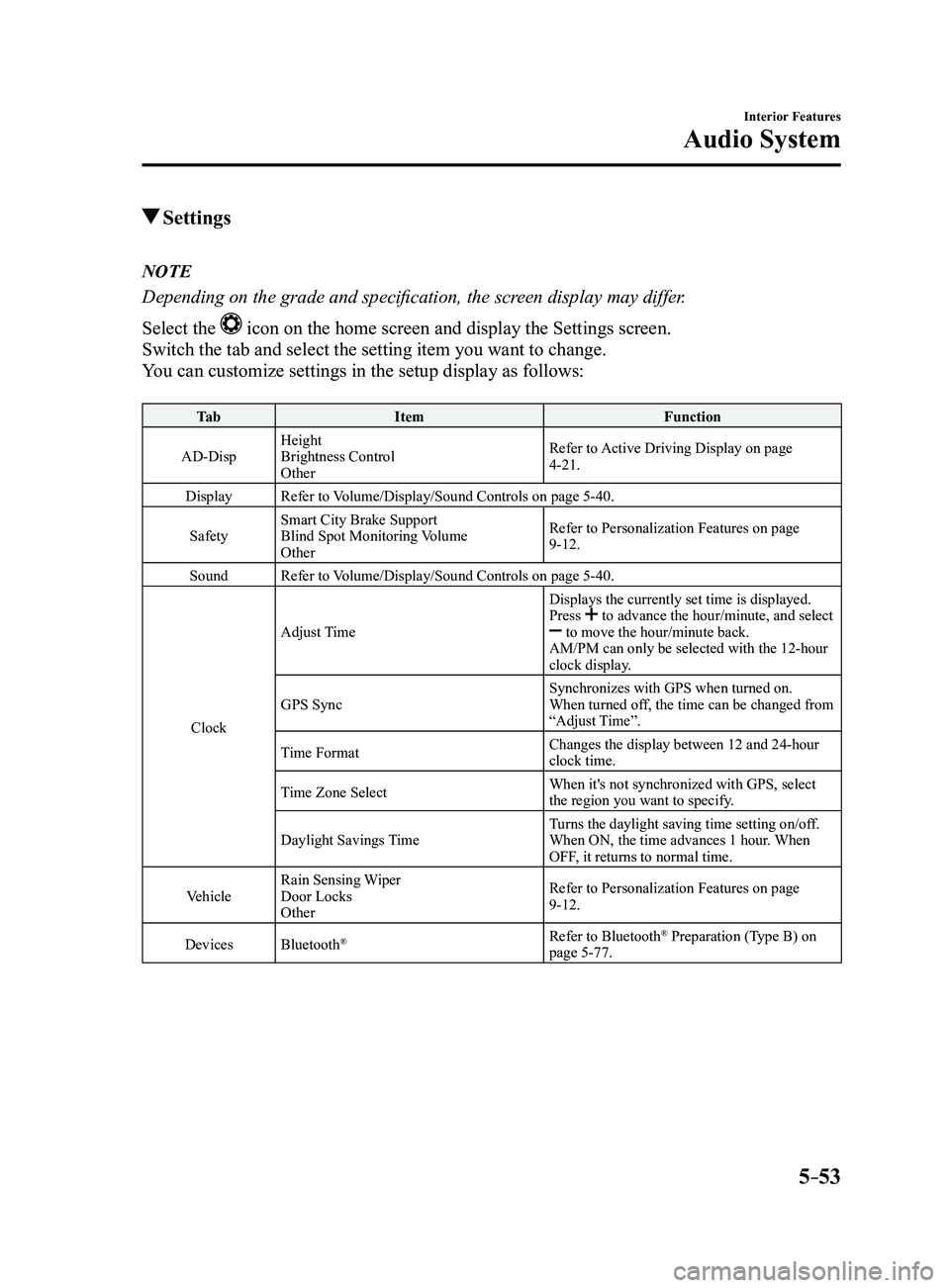
Settings
NOTE
Depending on the grade and specification, the screen display may differ.
Select the
icon on the home screen and display the Settings screen.
Switch the tab and select the setting item you want to change.
You can customize settings in the setup display as follows:
Ta bItem Function
AD-Disp Height
Brightness Control
Other Refer to Active Driving Display on page
4-21.
Display Refer to Volume/Display/Sound Controls on page
5-40.
Safety Smart City Brake Support
Blind Spot Monitoring Volume
Other Refer to Personalization Features on page
9-12.
Sound Refer to Volume/Display/Sound Controls on page
5-40.
Clock Adjust Time
Displays the currently set time is displayed.
Press
to advance the hour/minute, and select to move the hour/minute back.
AM/PM can only be selected with the 12-hour
clock display.
GPS Sync Synchronizes with GPS when turned on.
When turned off, the time can be changed from
“Adjust Time”.
Time Format Changes the display between 12 and 24-hour
clock time.
Time Zone Select When it's not synchronized with GPS, select
the region you want to specify.
Daylight Savings Time Turns the daylight saving time setting on/off.
When ON, the time advances 1 hour. When
OFF, it returns to normal time.
Vehicle Rain Sensing Wiper
Door Locks
Other Refer to Personalization Features on page
9-12.
Devices Bluetooth
®Refer to Bluetooth® Preparation (Type B) on
page 5-77.
Mazda3_8FL6-EA-16F_Edition2.indb 532016/08/10 17:37:46
Page 346 of 612
5–54
Interior Features
Audio System
Ta bItem Function
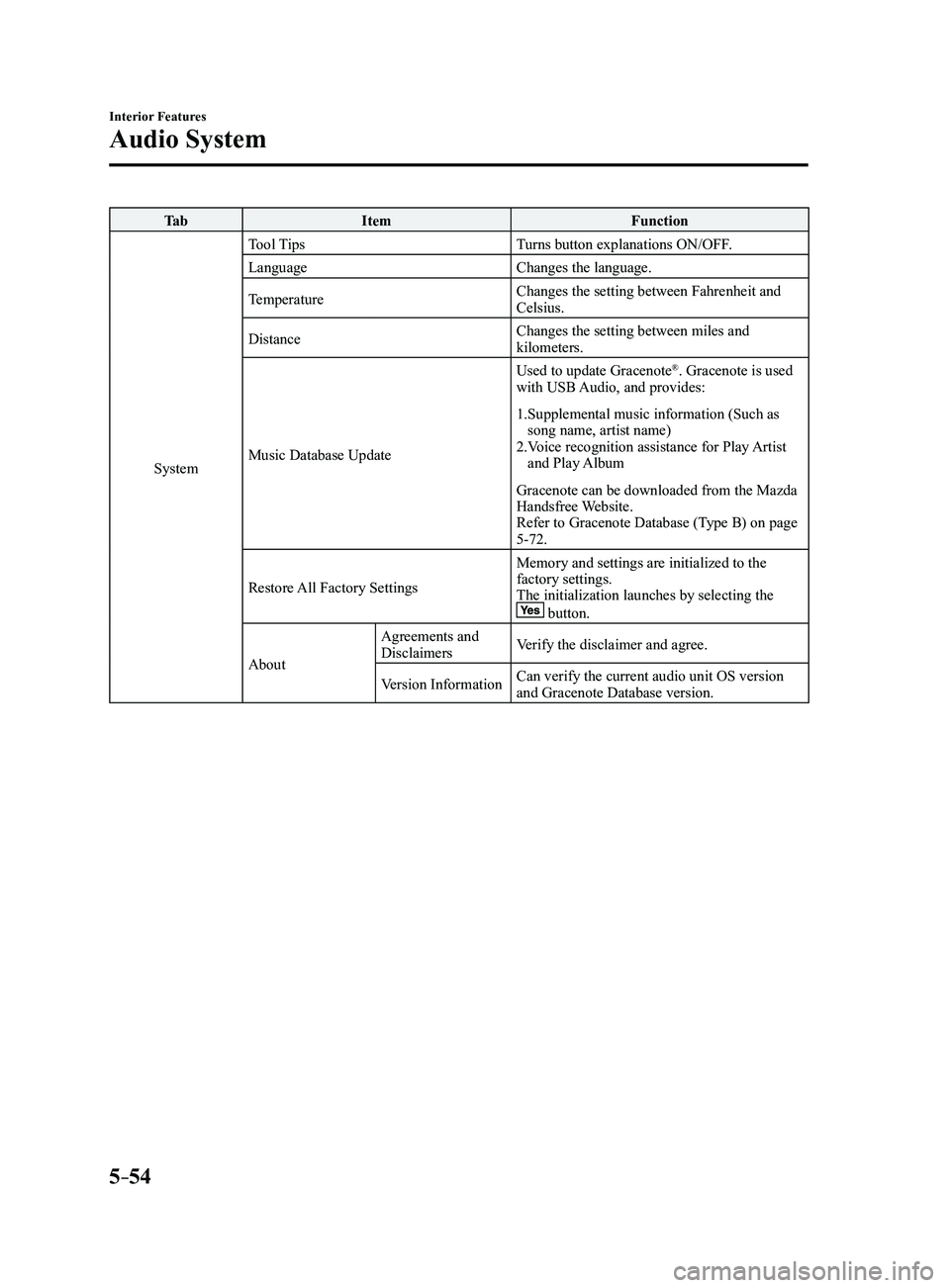
System Tool Tips
Turns button explanations ON/OFF.
Language Changes the language.
Temperature Changes the setting between Fahrenheit and
Celsius.
Distance Changes the setting between miles and
kilometers.
Music Database Update Used to update Gracenote
®. Gracenote is used
with USB Audio, and provides:
1. Supplemental music information (Such as song name, artist name)2. Voice recognition assistance for Play Artist and Play Album
Gracenote can be downloaded from the Mazda
Handsfree Website.
Refer to Gracenote Database (Type B) on page
5-72.
Restore All Factory Settings Memory and settings are initialized to the
factory settings.
The initialization launches by selecting the
button.
AboutAgreements and
Disclaimers
Verify the disclaimer and agree.
Version Information Can verify the current audio unit OS version
and Gracenote Database version.
Mazda3_8FL6-EA-16F_Edition2.indb 542016/08/10 17:37:46
Page 347 of 612
5–55
Interior Features
Audio System
*Some models.
Applications
NOTE
Depending on the grade and specification,
the screen display may differ.
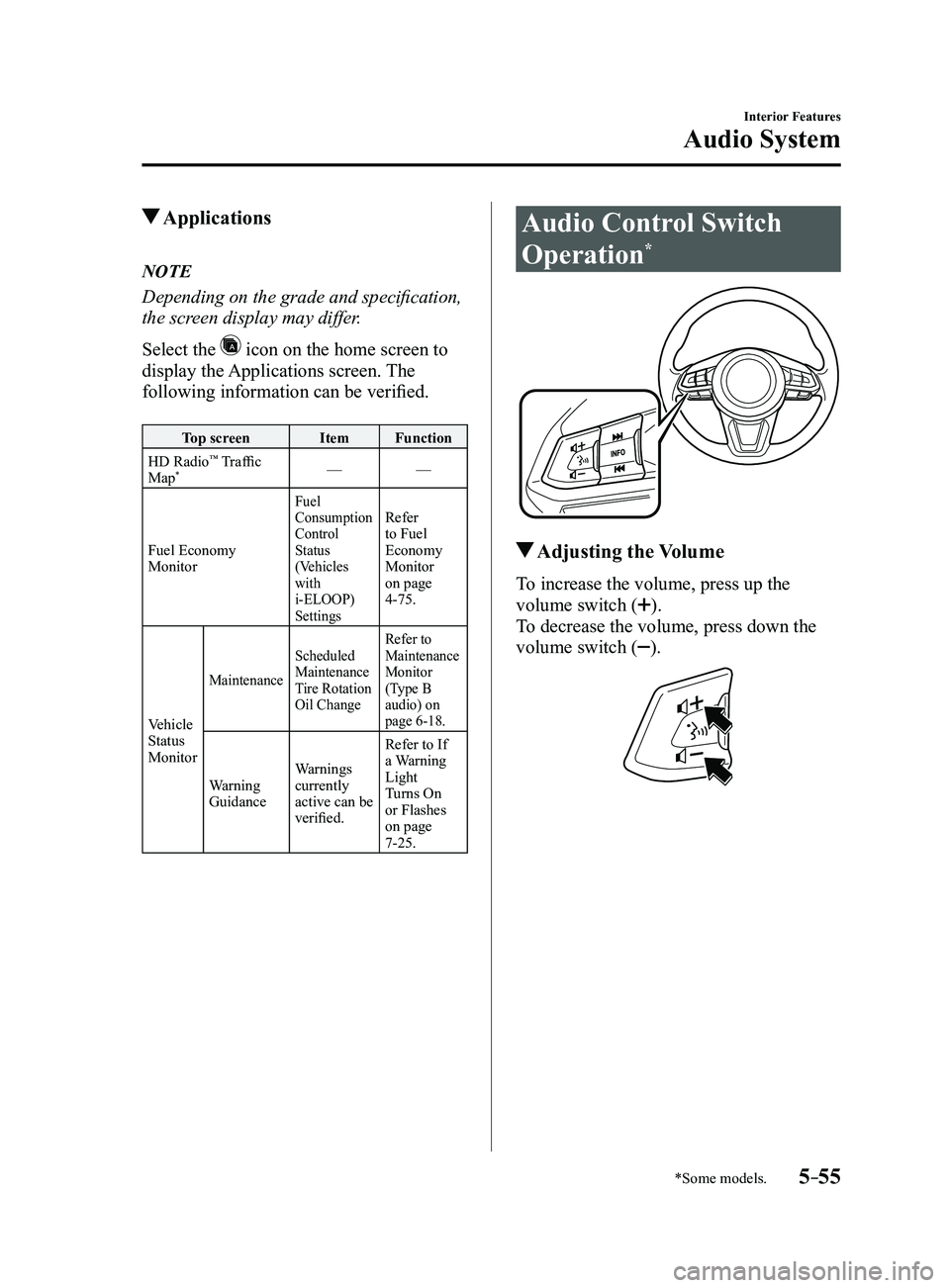
Select the
icon on the home screen to
display the Applications screen. The
following information can be verified.
Top screenItemFunction
HD Radio™ Traffic
Map*— —
Fuel Economy
Monitor
Fuel
Consumption
Control
Status
(Vehicles
with
i-ELOOP)
SettingsRefer
to Fuel
Economy
Monitor
on page
4-75.
Vehicle
Status
Monitor
Maintenance Scheduled
Maintenance
Tire Rotation
Oil Change Refer to
Maintenance
Monitor
(Type B
audio) on
page
6-18.
Warning
Guidance
Warnings
currently
active can be
verified. Refer to If
a Warning
Light
Turns On
or Flashes
on page
7-25.
Audio Control Switch
Operation*
Adjusting the Volume
To increase the volume, press up the
volume switch (
).
To decrease the volume, press down the
volume switch (
).
Mazda3_8FL6-EA-16F_Edition2.indb 552016/08/10 17:37:47
Page 348 of 612
5–56
Interior Features
Audio System
*Some models.
Seek Switch
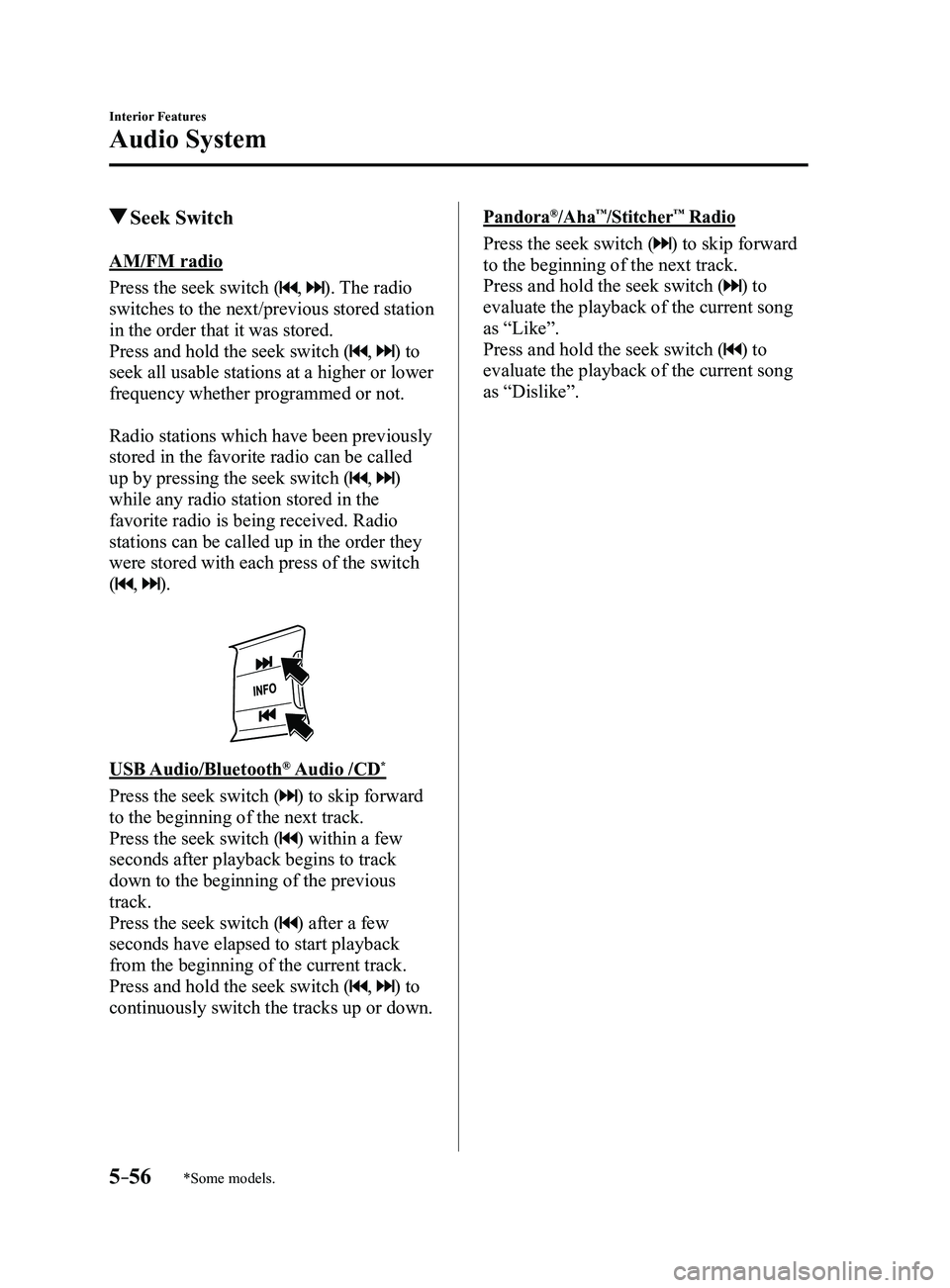
AM/FM radio
Press the seek switch (
, ). The radio
switches to the next/previous stored station
in the order that it was stored.
Press and hold the seek switch (
, ) to
seek all usable stations at a higher or lower
frequency whether programmed or not.
Radio stations which have been previously
stored in the favorite radio can be called
up by pressing the seek switch (
, )
while any radio station stored in the
favorite radio is being received. Radio
stations can be called up in the order they
were stored with each press of the switch
(
, ).
USB Audio/Bluetooth® Audio /CD*
Press the seek switch () to skip forward
to the beginning of the next track.
Press the seek switch (
) within a few
seconds after playback begins to track
down to the beginning of the previous
track.
Press the seek switch (
) after a few
seconds have elapsed to start playback
from the beginning of the current track.
Press and hold the seek switch (
, ) to
continuously switch the tracks up or down.
Pandora®/Aha™/Stitcher™ Radio
Press the seek switch () to skip forward
to the beginning of the next track.
Press and hold the seek switch (
) to
evaluate the playback of the current song
as “Like”.
Press and hold the seek switch (
) to
evaluate the playback of the current song
as “Dislike”.
Mazda3_8FL6-EA-16F_Edition2.indb 562016/08/10 17:37:47
Page 349 of 612
5–57
Interior Features
Audio System
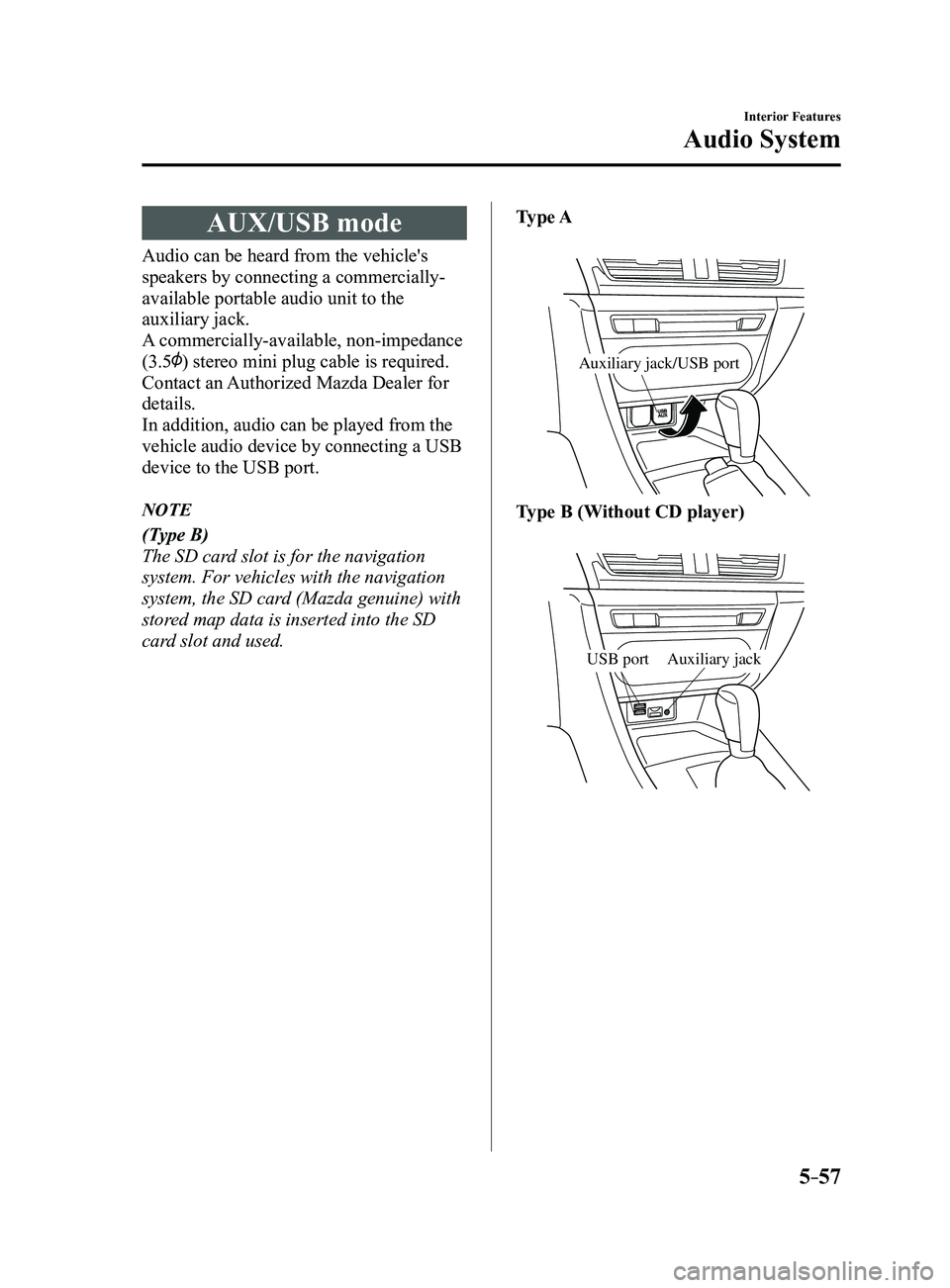
AUX/USB mode
Audio can be heard from the vehicle's
speakers by connecting a commercially-
available portable audio unit to the
auxiliary jack.
A commercially-available, non-impedance
(3.5
) stereo mini plug cable is required.
Contact an Authorized Mazda Dealer for
details.
In addition, audio can be played from the
vehicle audio device by connecting a USB
device to the USB port.
NOTE
(Type B)
The SD card slot is for the navigation
system. For vehicles with the navigation
system, the SD card (Mazda genuine) with
stored map data is inserted into the SD
card slot and used.Type A
Auxiliary jack/USB port
Type B (Without CD player)
Auxiliary jackUSB port
Mazda3_8FL6-EA-16F_Edition2.indb 572016/08/10 17:37:48
Page 350 of 612
5–58
Interior Features
Audio System
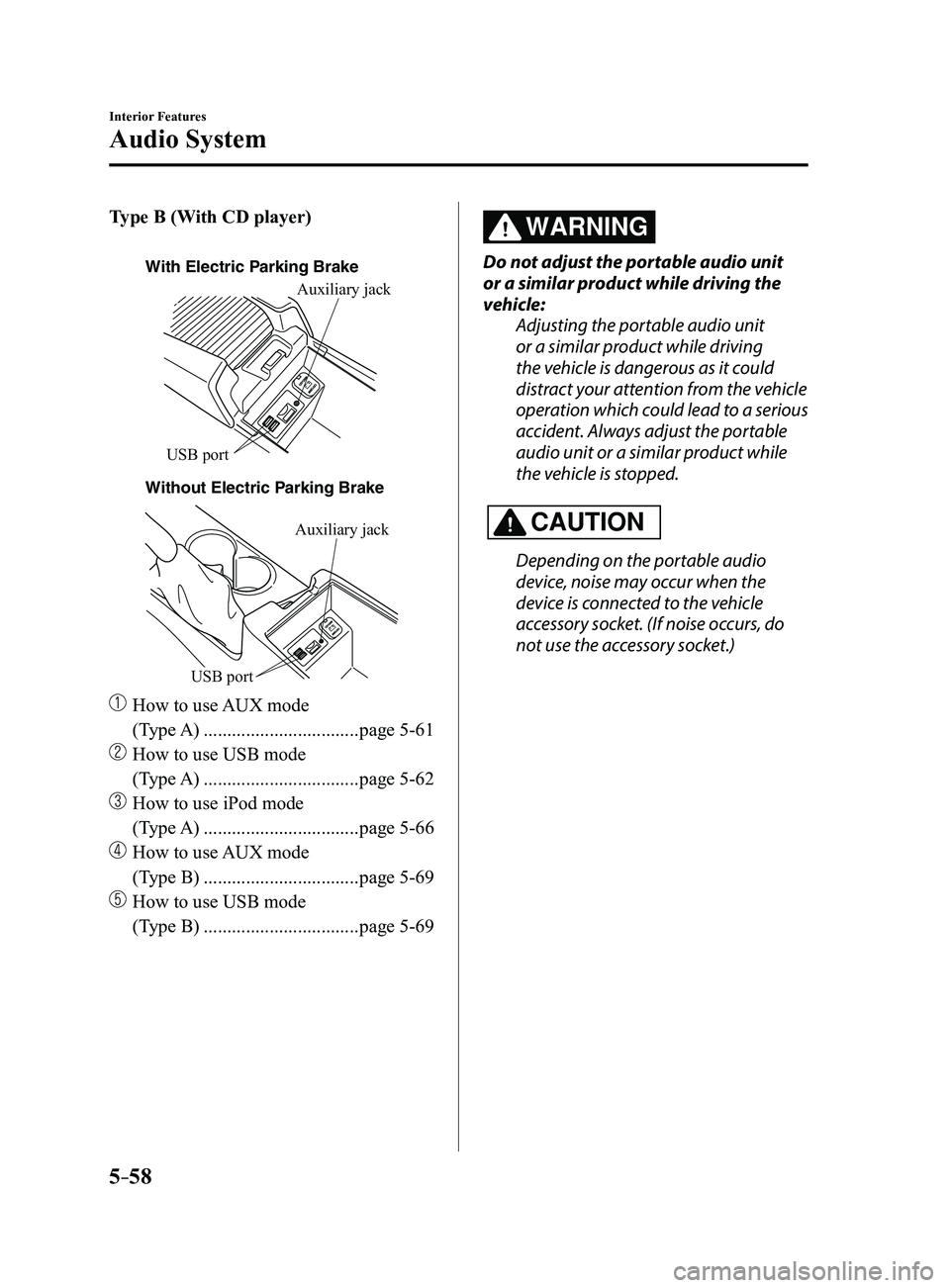
Type B (With CD player)
With Electric Parking Brake
Without Electric P
arking BrakeAuxiliary jack
USB port
Auxiliary jack
USB port
How to use
AUX mode
(Type A)
.................................page 5-61
How to use USB mode
(Type A)
.................................page 5-62
How to use iPod mode
(Type A)
.................................page 5-66
How to use AUX mode
(Type B)
.................................page 5-69
How to use USB mode
(Type B)
.................................page 5-69
WARNING
Do not adjust the portable audio unit
or a similar product while driving the
vehicle: Adjusting the portable audio unit
or a similar product while driving
the vehicle is dangerous as it could
distract your attention from the vehicle
operation which could lead to a serious
accident. Always adjust the portable
audio unit or a similar product while
the vehicle is stopped.
CAUTION
Depending on the portable audio
device, noise may occur when the
device is connected to the vehicle
accessory socket. (If noise occurs, do
not use the accessory socket.)
Mazda3_8FL6-EA-16F_Edition2.indb 582016/08/10 17:37:49
Page 351 of 612
5–59
Interior Features
Audio System
NOTE
This mode may not be usable depending
on the portable audio device to be
connected.
Before using the auxiliary jack/USB
port, refer to the instruction manual for
the portable audio device.
Use a commercially-available, non-
impedance (3.5) stereo mini plug for
connecting the portable audio unit to
the auxiliary jack. Before using the
auxiliary jack, read the manufacturer's
instructions for connecting a portable
audio unit to the auxiliary jack.
To prevent discharging of the battery,
do not use the auxiliary input for long
periods with the engine off or idling.
When connecting a device to the
auxiliary jack or USB port, noise may
occur depending on the connected
device. If the device is connected to the
vehicle's accessory socket, the noise can
be reduced by unplugging it from the
accessory socket.
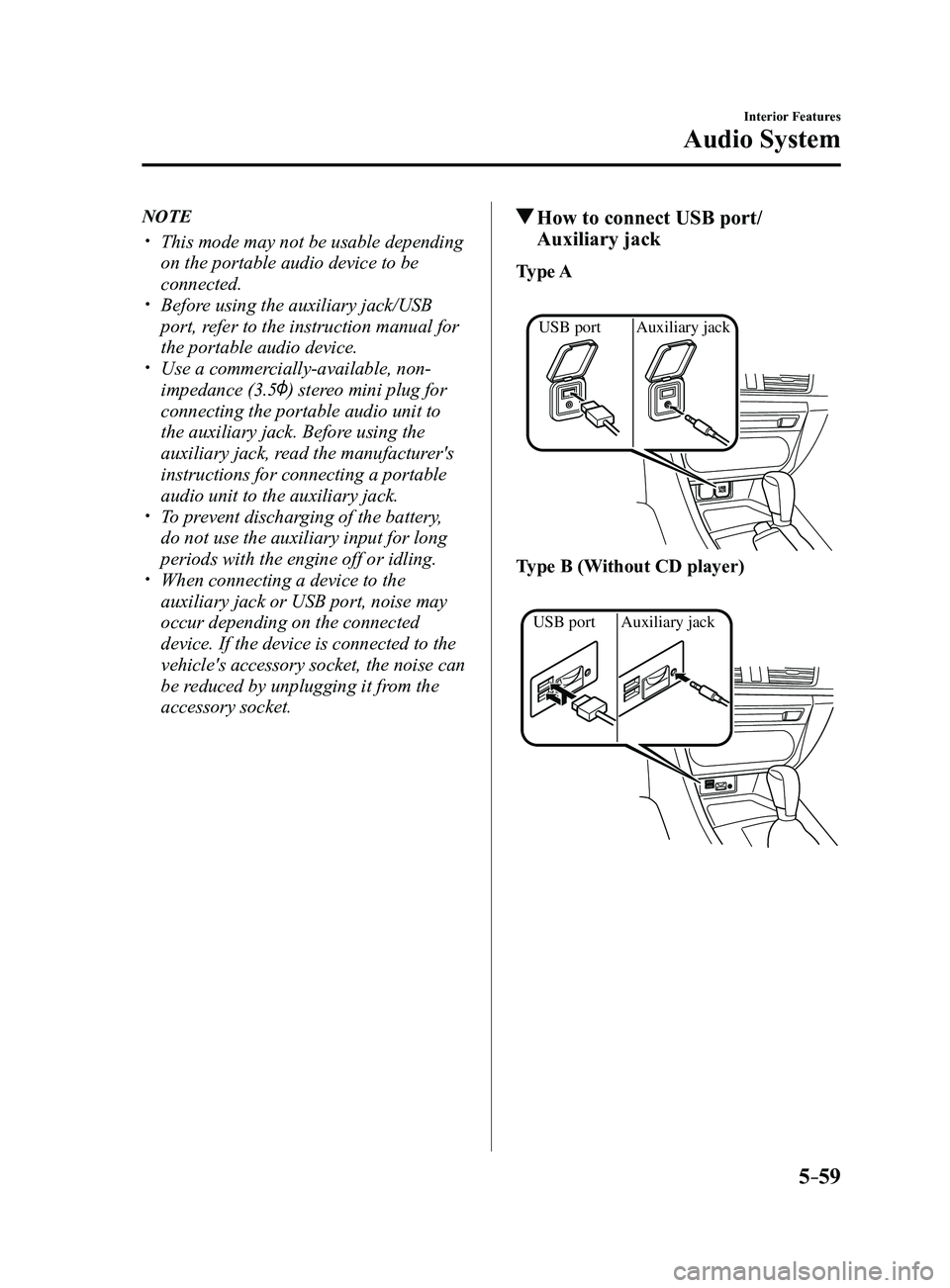
How to connect USB port/
Auxiliary jack
Type A
Auxiliary jack
USB port
Type B (Without CD player)
Auxiliary jack
USB port
Mazda3_8FL6-EA-16F_Edition2.indb 592016/08/10 17:37:50