lock MAZDA MODEL 3 5-DOOR 2017 Manual Online
[x] Cancel search | Manufacturer: MAZDA, Model Year: 2017, Model line: MODEL 3 5-DOOR, Model: MAZDA MODEL 3 5-DOOR 2017Pages: 612
Page 321 of 612
5–29
Interior Features
Audio System
NOTE
If not operated for several seconds, the
display returns to the previous display. To
reset bass, treble, fade, and balance, press
the menu button (
) for 2 seconds.
The unit will beep and “CLEAR” will be
displayed.
ALC (Automatic volume adjustment)
The automatic level control (ALC)
changes the audio volume automatically
according to the vehicle speed. The faster
the vehicle speed, the higher the volume
increases. ALC has ALC OFF and ALC
LEVEL 1 to 7 modes. At ALC LEVEL 7,
the amount that the volume can increase
is at the maximum. Select the mode
according to the driving conditions.
BEEP (Audio operation sound)
The setting for the operation sound when
pressing and holding a button can be
changed. The initial setting is ON. Set to
OFF to mute the operation sound.
12Hr
24Hr (12 Hr/24 Hr time
adjustment)
Rotating the audio control dial switches
the display between 12 and 24-hour clock
time (page
5-30).
Mazda3_8FL6-EA-16F_Edition2.indb 292016/08/10 17:37:26
Page 322 of 612
5–30
Interior Features
Audio System
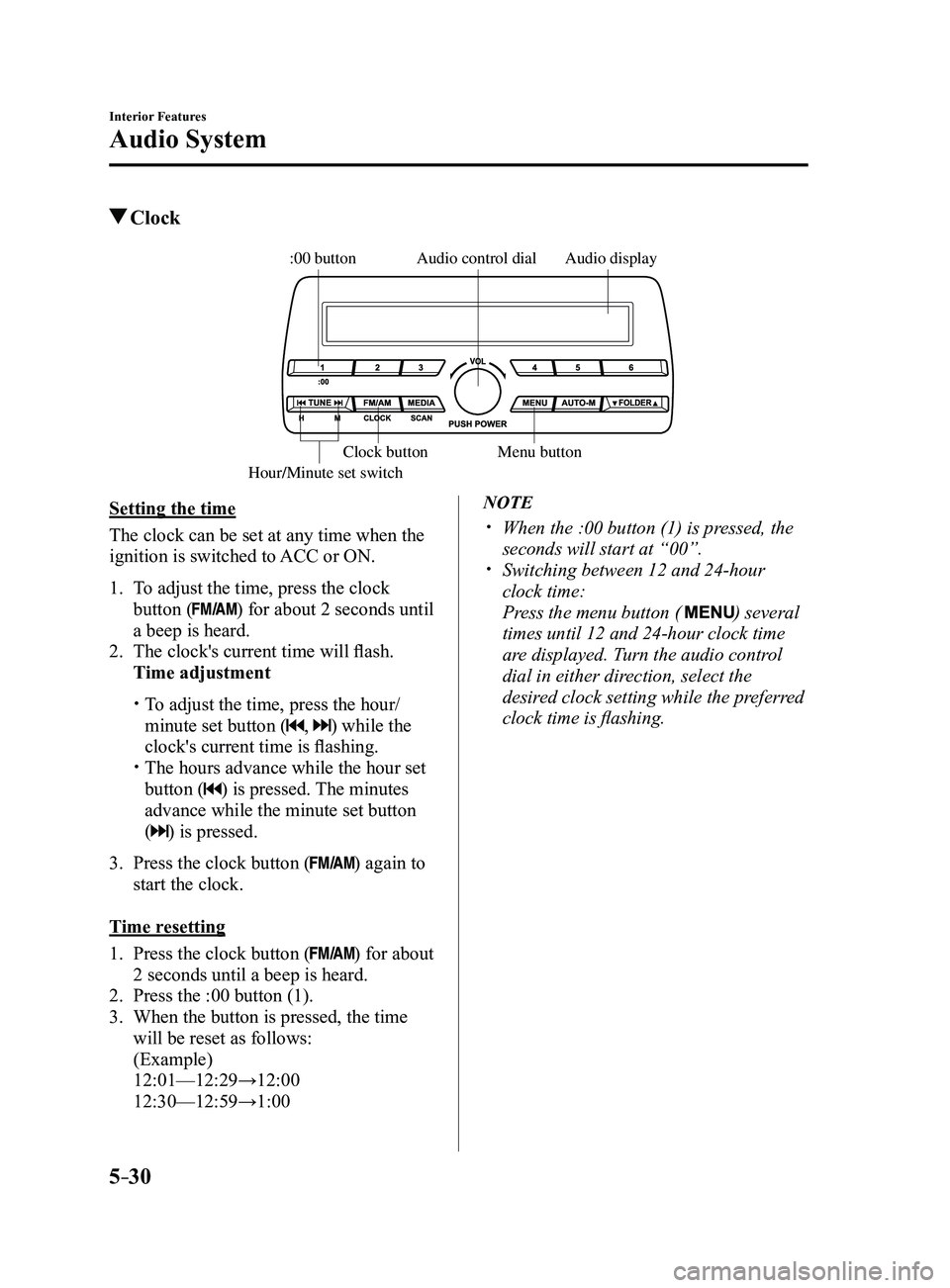
Clock
Audio display
Audio control dial
Hour/Minute set switch:00 button
Menu button
Clock button
Setting the time
The clock can be set at any time when the
ignition is switched to ACC or ON.
1. To adjust the time, press the clock
button () for about 2 seconds until
a beep is heard.
2. The clock's current time will flash.
Time adjustment
To adjust the time, press the hour/
minute set button (, ) while the
clock's current time is flashing.
The hours advance while the hour set
button () is pressed. The minutes
advance while the minute set button
(
) is pressed.
3. Press the clock button () again to
start the clock.
Time resetting
1. Press the clock button () for about
2 seconds until a beep is heard.
2. Press the :00 button (1).
3. When the button is pressed, the time
will be reset as follows:
(Example)
12:01—12:29→12:00
12:30—12:59→1:00
NOTE
When the :00 button (1) is pr essed, the
seconds will start at “00”. Switching between 12 and 24-hour
clock time:
Press the menu button ( ) several
times until 12 and 24-hour clock time
are displayed. Turn the audio control
dial in either direction, select the
desired clock setting while the preferred
clock time is flashing.
Mazda3_8FL6-EA-16F_Edition2.indb 302016/08/10 17:37:27
Page 326 of 612
![MAZDA MODEL 3 5-DOOR 2017 Manual Online 5–34
Interior Features
Audio System
Audio set [Type B (touchscreen)]
NOTE
The explanation of functions described in this manual may differ from the actual
operation, and the shapes of screens and b](/img/28/40993/w960_40993-325.png "MAZDA MODEL 3 5-DOOR 2017 Manual Online 5–34
Interior Features
Audio System
Audio set [Type B (touchscreen)]
NOTE
The explanation of functions described in this manual may differ from the actual
operation, and the shapes of screens and b")
5–34
Interior Features
Audio System
Audio set [Type B (touchscreen)]
NOTE
The explanation of functions described in this manual may differ from the actual
operation, and the shapes of screens and buttons and the letters and cha\
racters displayed
may also differ from the actual appearance.
Additionally, depending on future software updates, the content may successively cha\
nge
without notice.
Audio Set (Type B) has three different human interfaces.
Commander switch Touch panel Voice recognition with steering switch and microphone
Commander switch operation
NOTE
For safety reasons, some operations are disabled while the vehicle is being driven.
Volume dial operation
Volume dial
Press the volume dial to switch the audio MUTE on and off.
Turn the volume dial to adjust the volume. The volume increases by turning the dial
clockwise, and decreases by turning it counterclockwise.
Mazda3_8FL6-EA-16F_Edition2.indb 342016/08/10 17:37:29
Page 332 of 612
5–40
Interior Features
Audio System
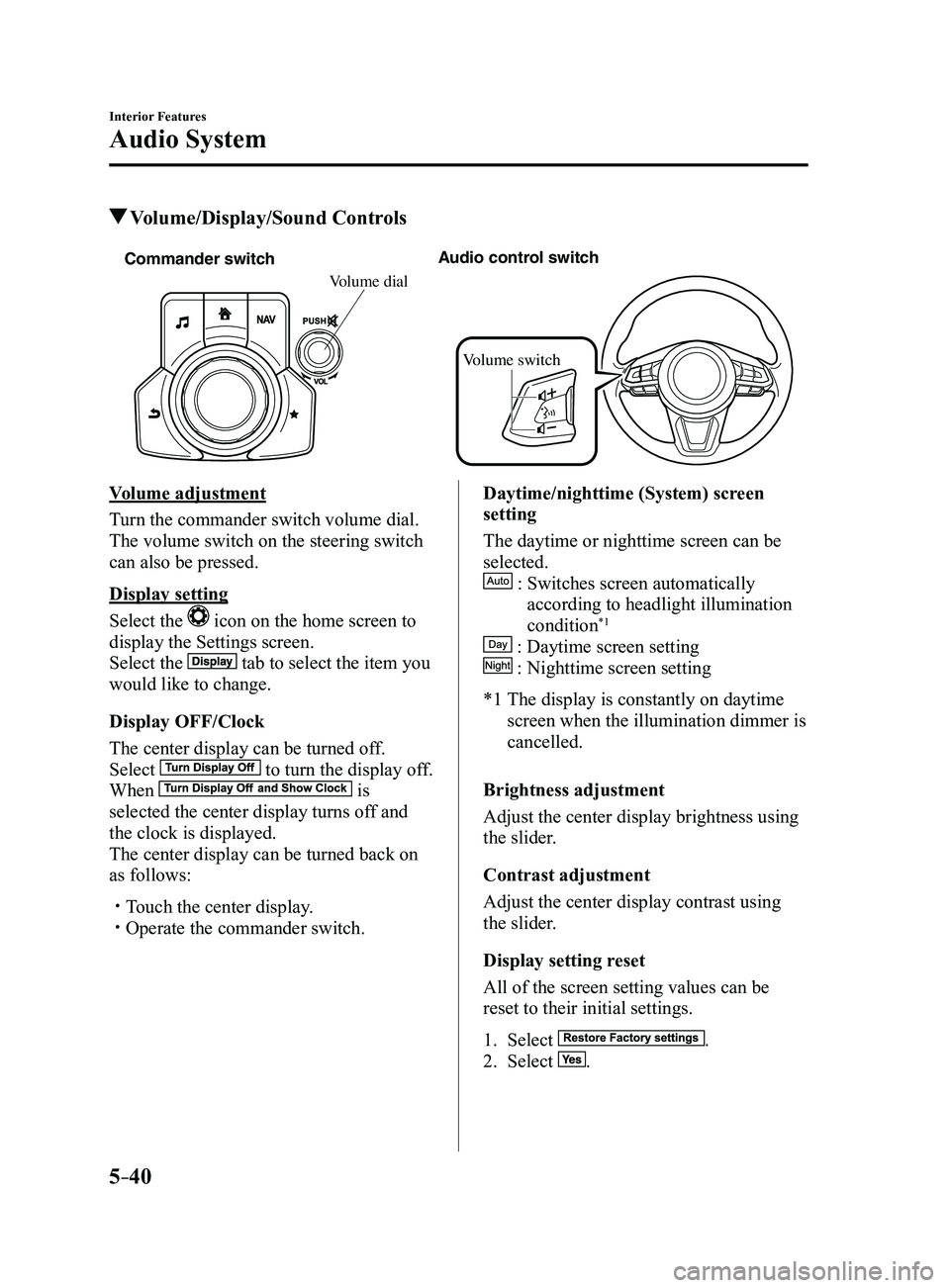
Volume/Display/Sound Controls
Commander switchAudio control switch
Volume switch
Volume dial
Volume adjustment
Turn the commander switch volume dial.
The volume switch on the steering switch
can also be pressed.
Display setting
Select the
icon on the home screen to
display the Settings screen.
Select the
tab to select the item you
would like to change.
Display OFF/Clock
The center display can be turned off.
Select
to turn the display off.
When is
selected the center display turns off and
the clock is displayed.
The center display can be turned back on
as follows:
Touch the center display. Operate the commander switch.
Daytime/nighttime (System) screen
setting
The daytime or nighttime screen can be
selected.
: Switches screen automatically
according to headlight illumination
condition*1
: Daytime screen setting
: Nighttime screen setting
*1 The display is constantly on daytime
screen when the illumination dimmer is
cancelled.
Brightness adjustment
Adjust the center display brightness using
the slider.
Contrast adjustment
Adjust the center display contrast using
the slider.
Display setting reset
All of the screen setting values can be
reset to their initial settings.
1. Select .
2. Select .
Mazda3_8FL6-EA-16F_Edition2.indb 402016/08/10 17:37:35
Page 339 of 612
5–47
Interior Features
Audio System
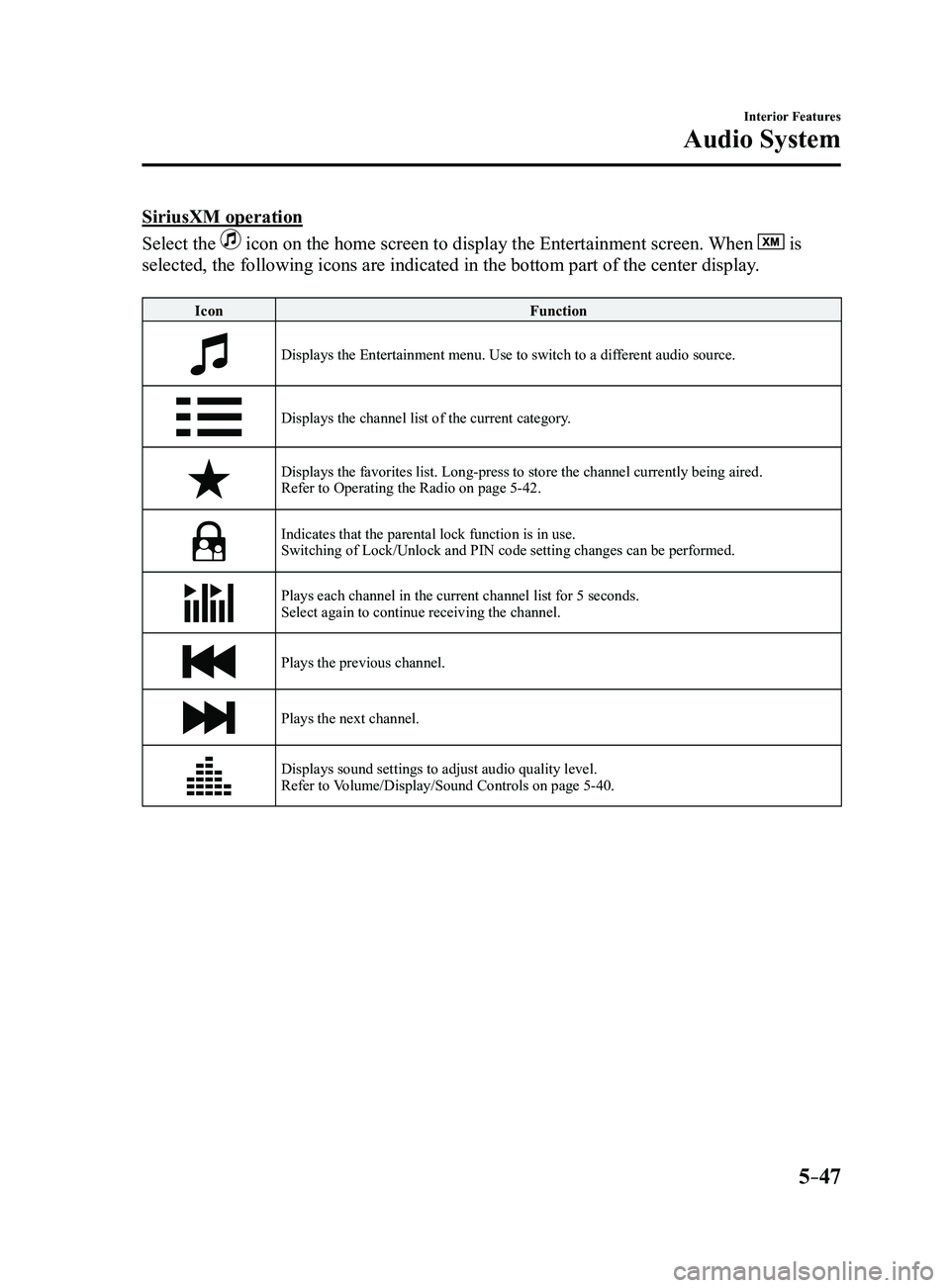
SiriusXM operation
Select the
icon on the home screen to display the Entertainment screen. When is
selected, the following icons are indicated in the bottom part of the ce\
nter display.
Icon Function
Displays the Entertainment menu. Use to switch to a different audio source.
Displays the channel list of the current category.
Displays the favorites list. Long-press to store the channel currently b\
eing aired.
Refer to Operating the Radio on page 5-42.
Indicates that the parental lock function is in use.Switching of Lock/Unlock and PIN code setting changes can be performed.
Plays each channel in the current channel list for 5 seconds.
Select again to continue receiving the channel.
Plays the previous channel.
Plays the next channel.
Displays sound settings to adjust audio quality level.
Refer to Volume/Display/Sound Controls on page 5-40.
Mazda3_8FL6-EA-16F_Edition2.indb 472016/08/10 17:37:42
Page 340 of 612
5–48
Interior Features
Audio System
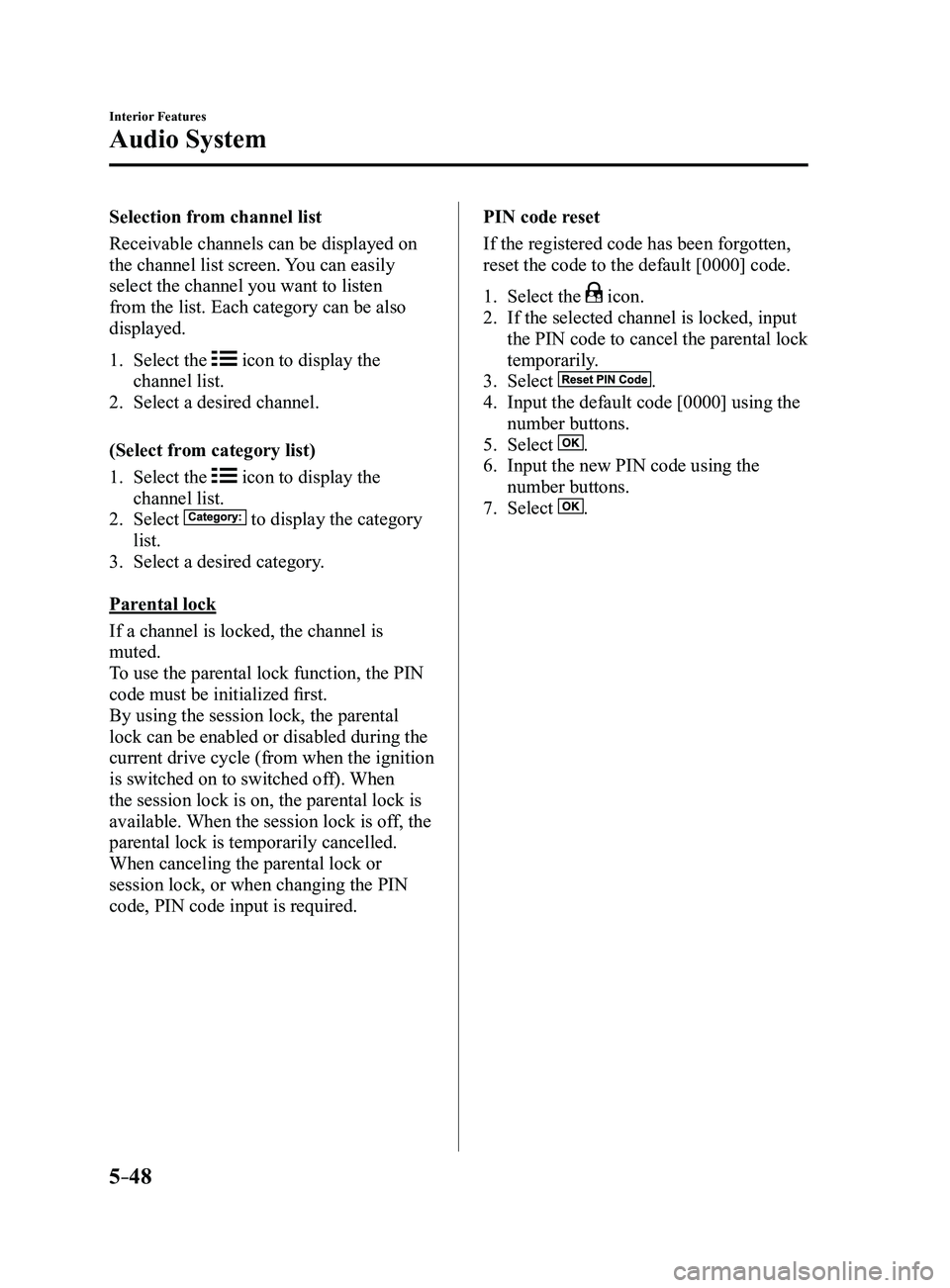
Selection from channel list
Receivable channels can be displayed on
the channel list screen. You can easily
select the channel you want to listen
from the list. Each category can be also
displayed.
1. Select the icon to display the
channel list.
2. Select a desired channel.
(Select from category list)
1. Select the icon to display the
channel list.
2. Select to display the category
list.
3. Select a desired category .
Parental lock
If a channel is locked, the channel is
muted.
To use the parental lock function, the PIN
code must be initialized first.
By using the session lock, the parental
lock can be enabled or disabled during the
current drive cycle (from when the ignition
is switched on to switched off). When
the session lock is on, the parental lock is
available. When the session lock is off, the
parental lock is temporarily cancelled.
When canceling the parental lock or
session lock, or when changing the PIN
code, PIN code input is required. PIN code reset
If the registered code has been forgotten,
reset the code to the default [0000] code.
1. Select the icon.
2. If the selected channel is locked, input
the PIN code to cancel the parental lock
temporarily.
3. Select .
4. Input the default code [0000] using the
number buttons.
5. Select .
6. Input the new PIN code using the
number buttons.
7. Select .
Mazda3_8FL6-EA-16F_Edition2.indb 482016/08/10 17:37:43
Page 345 of 612
5–53
Interior Features
Audio System
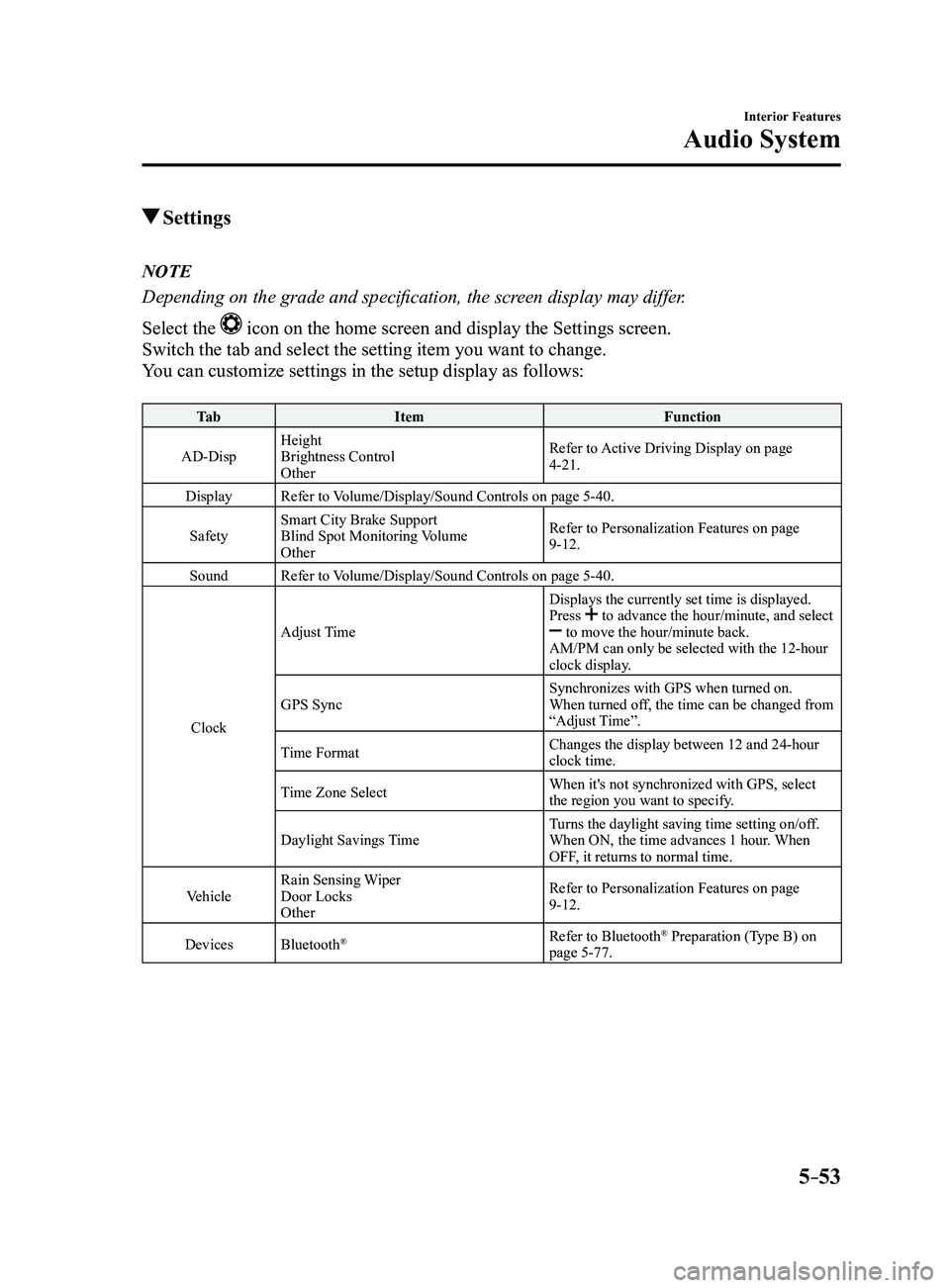
Settings
NOTE
Depending on the grade and specification, the screen display may differ.
Select the
icon on the home screen and display the Settings screen.
Switch the tab and select the setting item you want to change.
You can customize settings in the setup display as follows:
Ta bItem Function
AD-Disp Height
Brightness Control
Other Refer to Active Driving Display on page
4-21.
Display Refer to Volume/Display/Sound Controls on page
5-40.
Safety Smart City Brake Support
Blind Spot Monitoring Volume
Other Refer to Personalization Features on page
9-12.
Sound Refer to Volume/Display/Sound Controls on page
5-40.
Clock Adjust Time
Displays the currently set time is displayed.
Press
to advance the hour/minute, and select to move the hour/minute back.
AM/PM can only be selected with the 12-hour
clock display.
GPS Sync Synchronizes with GPS when turned on.
When turned off, the time can be changed from
“Adjust Time”.
Time Format Changes the display between 12 and 24-hour
clock time.
Time Zone Select When it's not synchronized with GPS, select
the region you want to specify.
Daylight Savings Time Turns the daylight saving time setting on/off.
When ON, the time advances 1 hour. When
OFF, it returns to normal time.
Vehicle Rain Sensing Wiper
Door Locks
Other Refer to Personalization Features on page
9-12.
Devices Bluetooth
®Refer to Bluetooth® Preparation (Type B) on
page 5-77.
Mazda3_8FL6-EA-16F_Edition2.indb 532016/08/10 17:37:46
Page 404 of 612
5–112
Interior Features
Interior Equipment
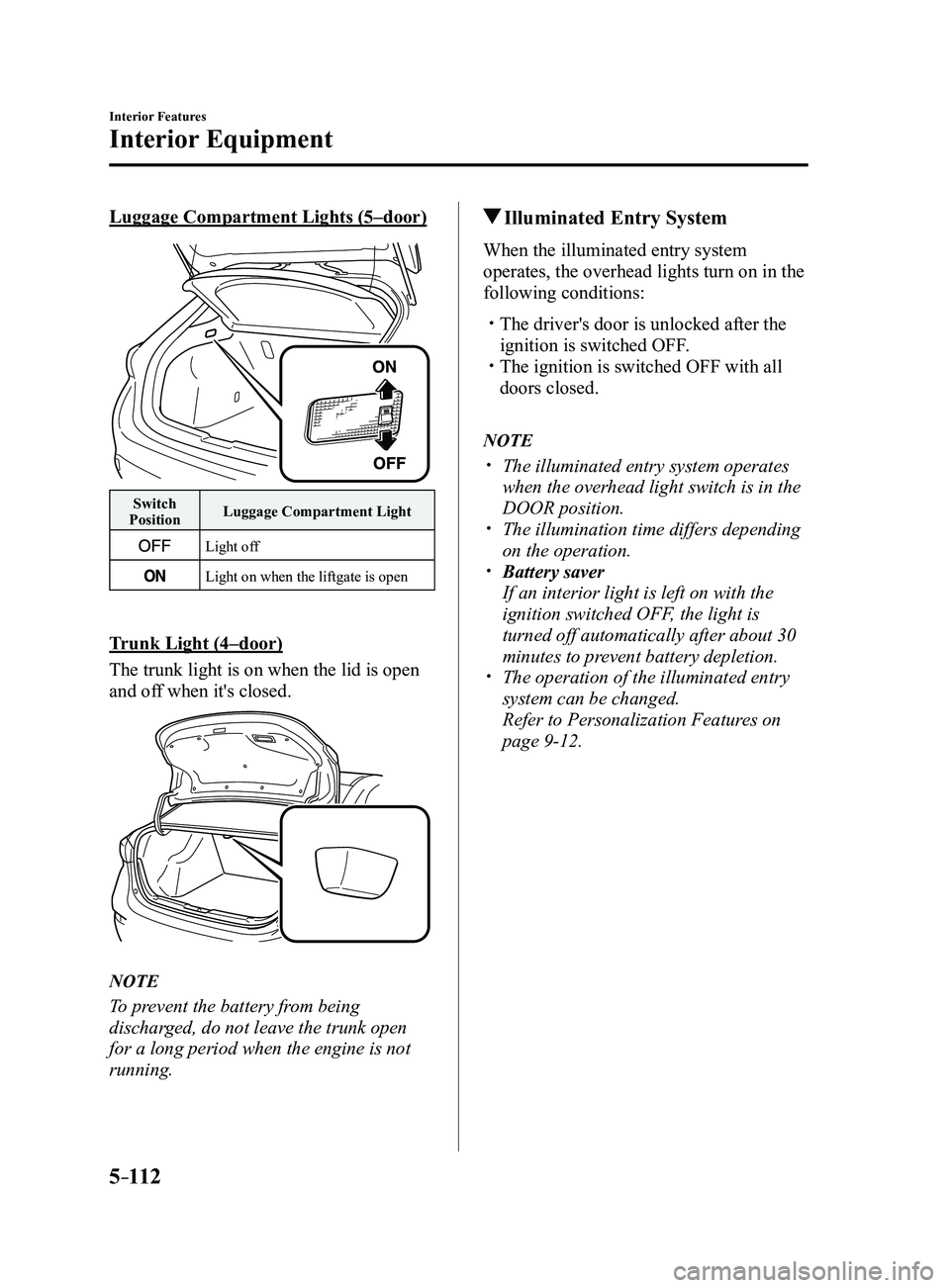
Luggage Compartment Lights (5–door)
Switch
Position Luggage Compartment Light
Light off
Light on when the liftgate is open
Trunk Light (4–door)
The trunk light is on when the lid is open
and off when it's closed.
NOTE
To prevent the battery from being
discharged, do not leave the trunk open
for a long period when the engine is not
running.
Illuminated Entry System
When the illuminated entry system
operates, the overhead lights turn on in the
following conditions:
The driver's door is unlocked after the
ignition is switched OFF. The ignition is switched OFF with all
doors closed.
NOTE
The illuminated entry system operates
when the overhead light switch is in the
DOOR position.
The illumination time differs depending
on the operation. Battery saver
If an interior light is left on with the
ignition switched OFF, the light is
turned off automatically after about 30
minutes to prevent battery depletion.
The operation of the illuminated entry
system can be changed.
Refer to Personalization Featur
es on
page 9-12.
Mazda3_8FL6-EA-16F_Edition2.indb 1122016/08/10 17:38:23
Page 419 of 612
6–7
Maintenance and Care
Scheduled Maintenance
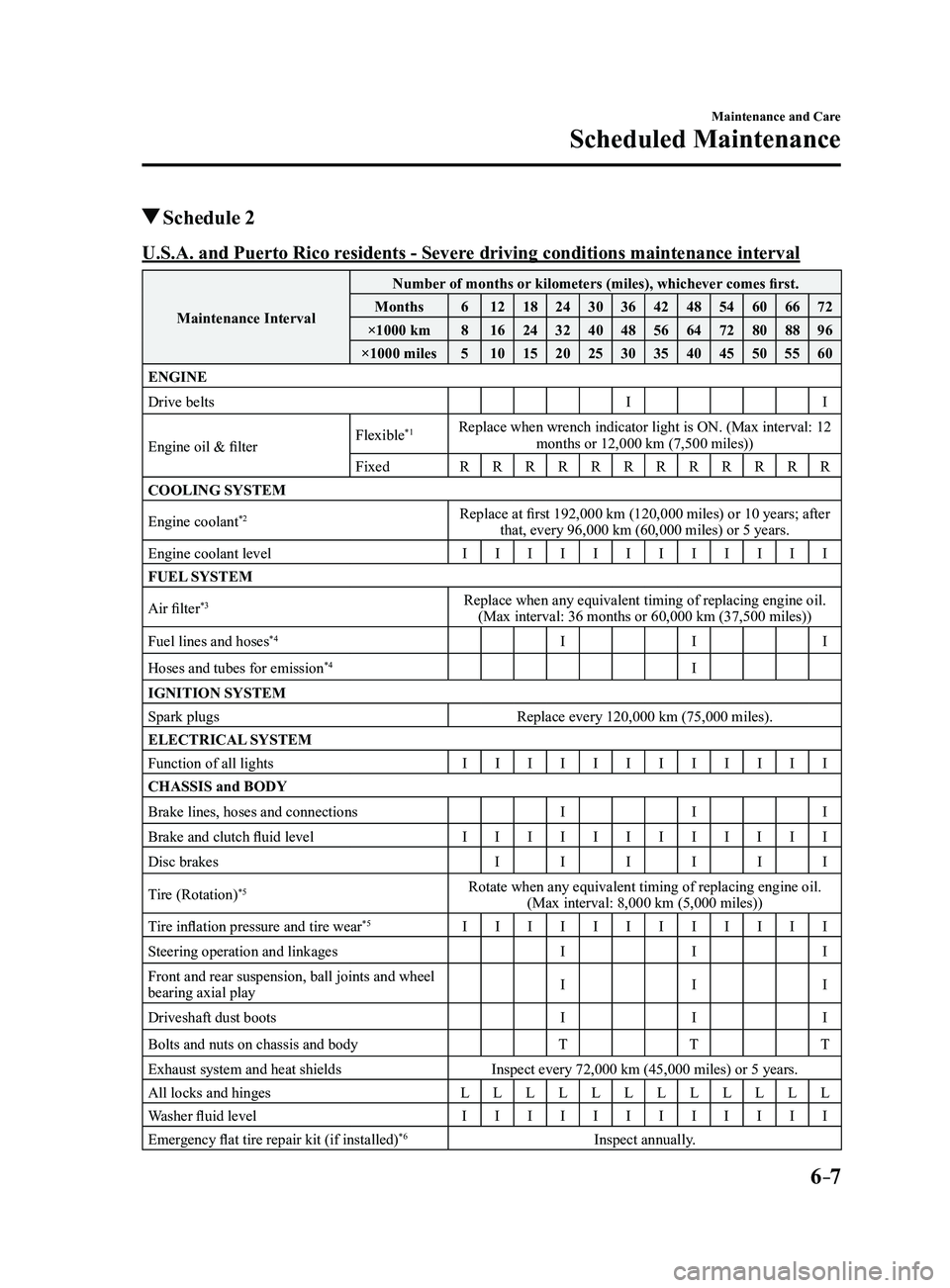
Schedule 2
U.S.A. and Puerto Rico residents - Severe driving conditions maintenance interval
Maintenance IntervalNumber of months or kilometers (miles), whichever comes first.
Months 612 18243036424854606672
×1000 km 816 24324048566472808896
×1000 miles 510 15202530354045505560
ENGINE
Drive belts II
Engine oil & filter Flexible
*1Replace when wrench indicator light is ON. (Max interval: 12
months or 12,000 km (7,500 miles))
Fixed RRRRRRRRRRRR
COOLING SYSTEM
Engine coolant
*2Replace at first 192,000 km (120,000 miles) or 10 years; after that, every 96,000 km (60,000 miles) or 5 years.
Engine coolant level IIIIIIIIIIII
FUEL SYSTEM
Air filter
*3Replace when any equivalent timing of replacing engine oil. (Max interval: 36 months or 60,000 km (37,500 miles))
Fuel lines and hoses
*4I II
Hoses and tubes for emission
*4I
IGNITION SYSTEM
Spark plugs Replace every 120,000 km (75,000 miles).
ELECTRICAL SYSTEM
Function of all lights IIIIIIIIIIII
CHASSIS and BODY
Brake lines, hoses and connections III
Brake and clutch fluid level IIIIIIIIIIII
Disc brakes IIII
II
Tire (Rotation)
*5Rotate when any equivalent timing of replacing engine oil. (Max interval: 8,000 km (5,000 miles))
Tire inflation pressure and tire wear
*5I IIIIIIIIIII
Steering operation and linkages III
Front and rear suspension, ball joints and wheel
bearing axial play I
II
Driveshaft dust boots III
Bolts and nuts on chassis and body TTT
Exhaust system and heat shields Inspect every 72,000 km (45,000 miles) or 5 years.
All locks and hinges LLLLLLLLLLLL
Washer fluid level IIIIIIIIIIII
Emergency flat tire repair kit (if installed)
*6Inspect annually.
Mazda3_8FL6-EA-16F_Edition2.indb 72016/08/10 17:38:30
Page 421 of 612
6–9
Maintenance and Care
Scheduled Maintenance
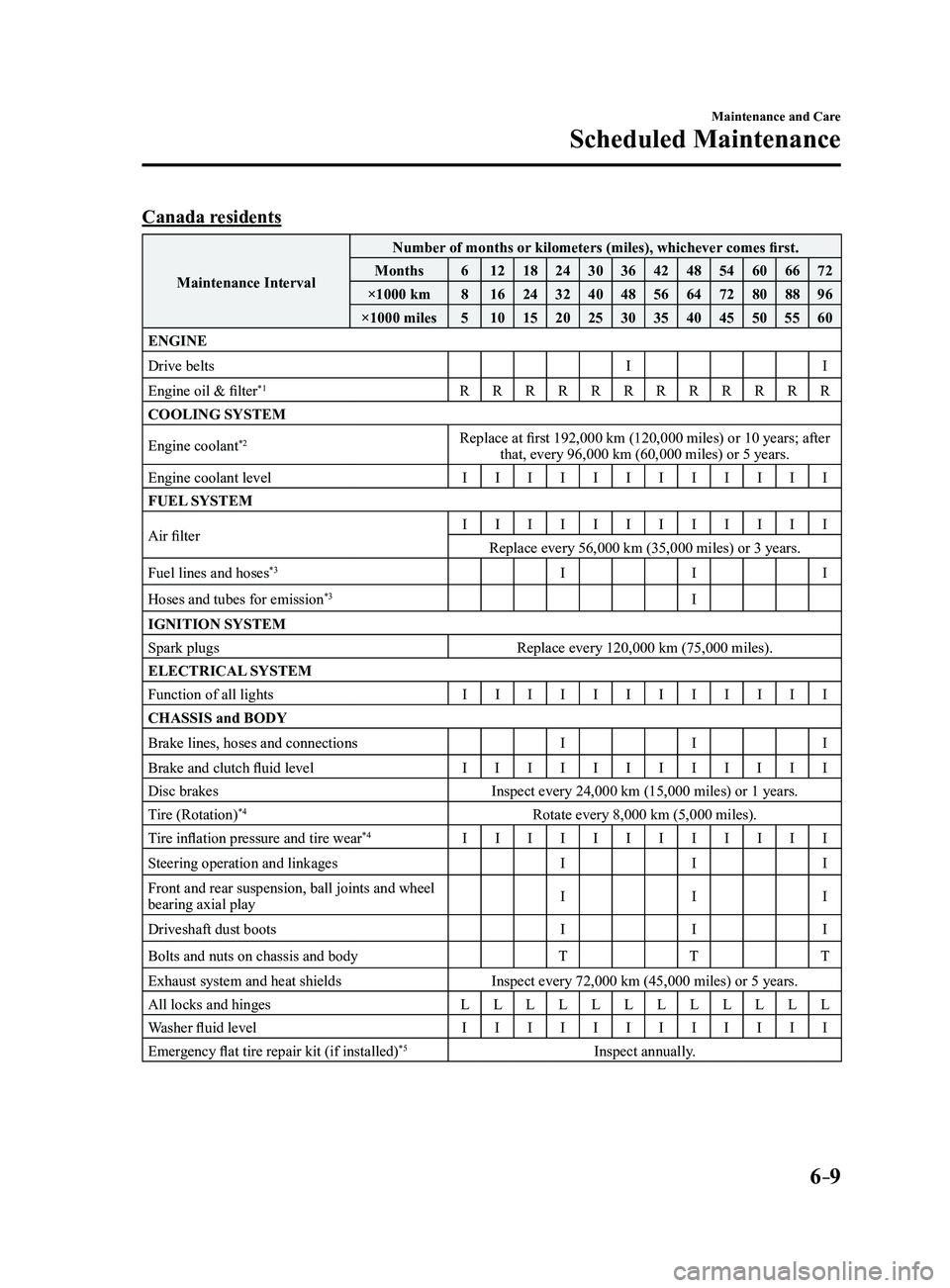
Canada residents
Maintenance IntervalNumber of months or kilometers (miles), whichever comes first.
Months 612 18243036424854606672
×1000 km 816 24324048566472808896
×1000 miles 510 15202530354045505560
ENGINE
Drive belts II
Engine oil & filter
*1R RRRRRRRRRRR
COOLING SYSTEM
Engine coolant
*2Replace at first 192,000 km (120,000 miles) or 10 years; after that, every 96,000 km (60,000 miles) or 5 years.
Engine coolant level IIIIIIIIIIII
FUEL SYSTEM
Air filter I
IIIIIIIIIII
Replace every 56,000 km (35,000 miles) or 3 years.
Fuel lines and hoses
*3I II
Hoses and tubes for emission
*3I
IGNITION SYSTEM
Spark plugs Replace every 120,000 km (75,000 miles).
ELECTRICAL SYSTEM
Function of all lights IIIIIIIIIIII
CHASSIS and BODY
Brake lines, hoses and connections III
Brake and clutch fluid level IIIIIIIIIII
I
Disc brakes Inspect every 24,000 km (15,000 miles) or 1 years.
Tire (Rotation)
*4Rotate every 8,000 km (5,000 miles).
Tire inflation pressure and tire wear*4I IIIIIIIIIII
Steering operation and linkages III
Front and rear suspension, ball joints and wheel
bearing axial play I
II
Driveshaft dust boots III
Bolts and nuts on chassis and body TTT
Exhaust system and heat shields Inspect every 72,000 km (45,000 miles) or 5 years.
All locks and hinges LLLLLLLLLLLL
Washer fluid level IIIIIIIIIIII
Emergency flat tire repair kit (if installed)
*5Inspect annually.
Mazda3_8FL6-EA-16F_Edition2.indb 92016/08/10 17:38:31