fuel type MAZDA MODEL 3 5-DOOR 2017 Owners Manual
[x] Cancel search | Manufacturer: MAZDA, Model Year: 2017, Model line: MODEL 3 5-DOOR, Model: MAZDA MODEL 3 5-DOOR 2017Pages: 612
Page 145 of 612
4–15
When Driving
Instrument Cluster and Display
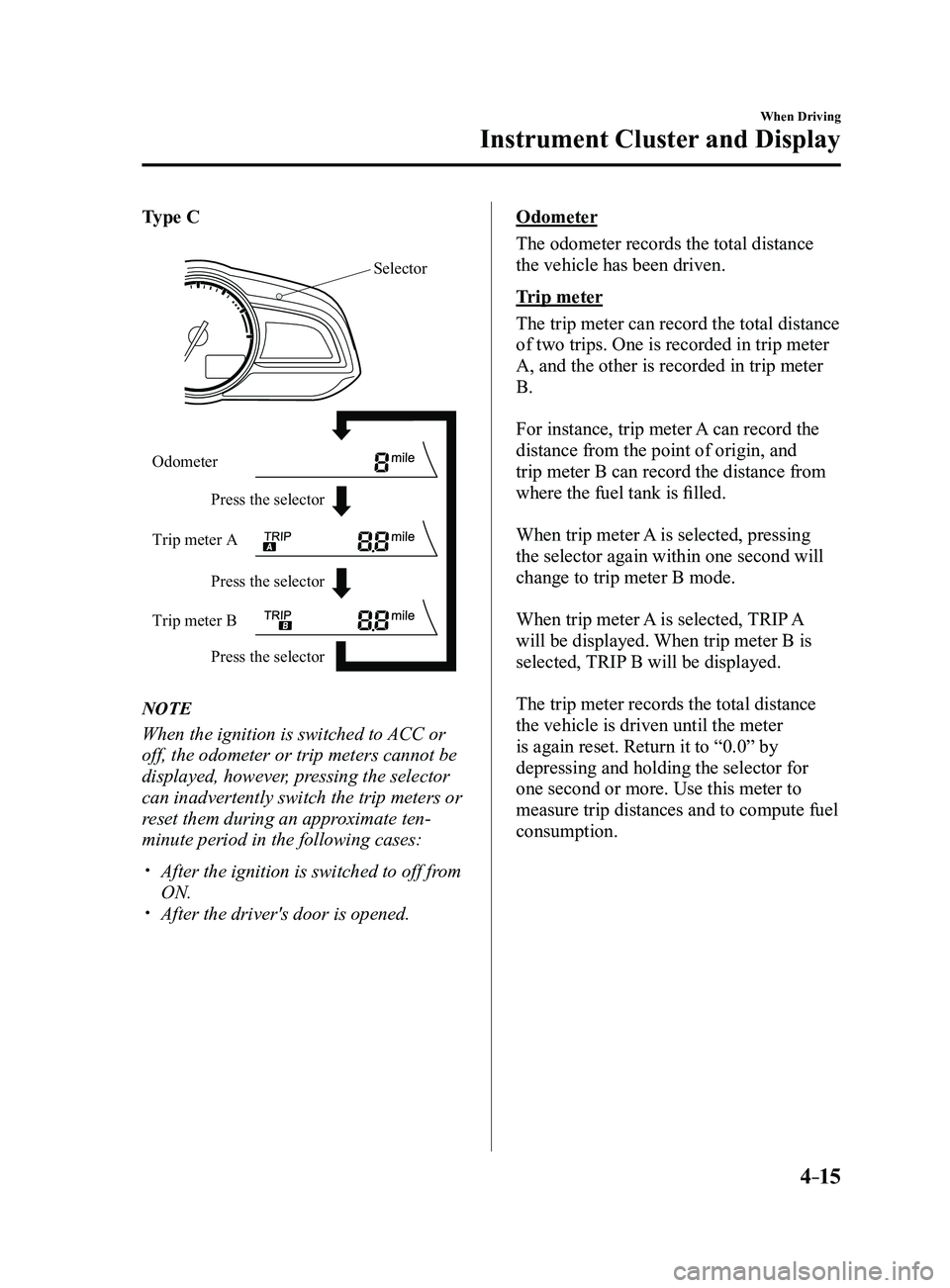
Type C
Press the selector Press the selector
Press the selector
Odometer
Trip meter A
Trip meter B
Selector
NOTE
When the ignition is switched to ACC or
off, the odometer or trip meters cannot be
displayed, however, pressing the selector
can inadvertently switch the trip meters or
reset them during an approximate ten-
minute period in the following cases:
After the ignition is switched to off fr
om
ON. After the driver's door is opened.
Odometer
The odometer records the total distance
the vehicle has been driven.
Trip meter
The trip meter can record the total distance
of two trips. One is recorded in trip meter
A, and the other is recorded in trip meter
B.
For instance, trip meter A can record the
distance from the point of origin, and
trip meter B can record the distance from
where the fuel tank is filled.
When trip meter A is selected, pressing
the selector again within one second will
change to trip meter B mode.
When trip meter A is selected, TRIP A
will be displayed. When trip meter B is
selected, TRIP B will be displayed.
The trip meter records the total distance
the vehicle is driven until the meter
is again reset. Return it to “0.0” by
depressing and holding the selector for
one second or more. Use this meter to
measure trip distances and to compute fuel
consumption.
Mazda3_8FL6-EA-16F_Edition2.indb 152016/08/10 17:35:47
Page 146 of 612
4–16
When Driving
Instrument Cluster and Display
*Some models.
NOTE
(Vehicles with type B audio)
If the fuel economy data is reset using
the fuel economy monitor, or trip A
is reset using the trip meter when the
function which synchronizes the fuel
economy monitor and the trip meter is
on, the fuel economy data and trip A are
reset simultaneously.
Refer to Fuel Economy Monitor on page
4-75. Only the trip meters record tenths of
kilometers (miles). The trip record will be erased when:
The power supply is interrupted
(blown fuse or the battery is
disconnected).
The vehicle is driven over 9999.9 km
(mile).
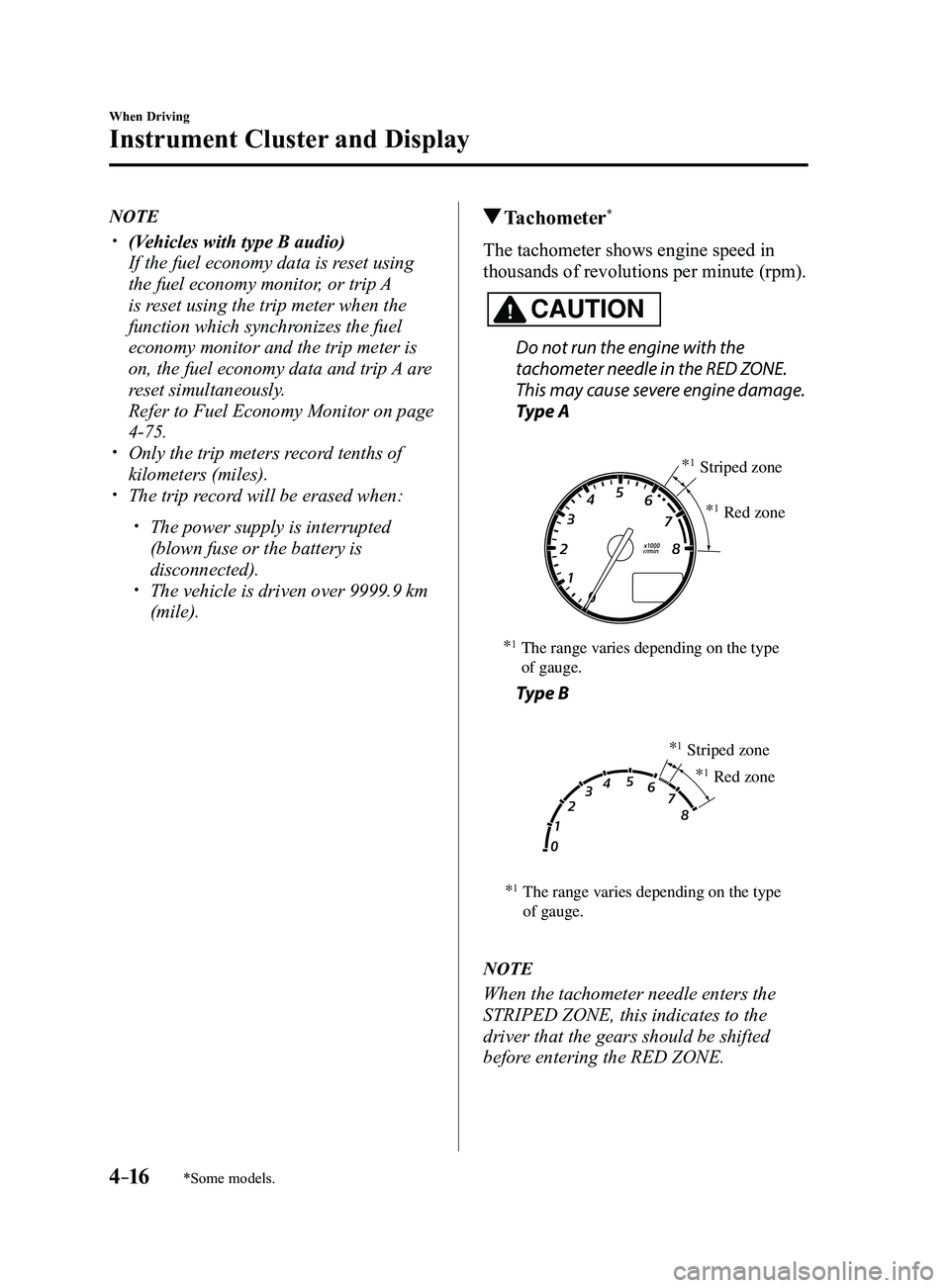
Tachometer*
The tachometer shows engine speed in
thousands of revolutions per minute (rpm).
CAUTION
Do not run the engine with the
tachometer needle in the RED ZONE.
This may cause severe engine damage.
Type A
*1The range varies depending on the type
of gauge. *
1Striped zone
*
1Red zone
Type B
*1The range varies depending on the type
of gauge. *
1Striped zone
*
1Red zone
NOTE
When the tachometer needle enters the
STRIPED ZONE, this indicates to the
driver that the gears should be shifted
before entering the RED ZONE.
Mazda3_8FL6-EA-16F_Edition2.indb 162016/08/10 17:35:48
Page 147 of 612
4–17
When Driving
Instrument Cluster and Display
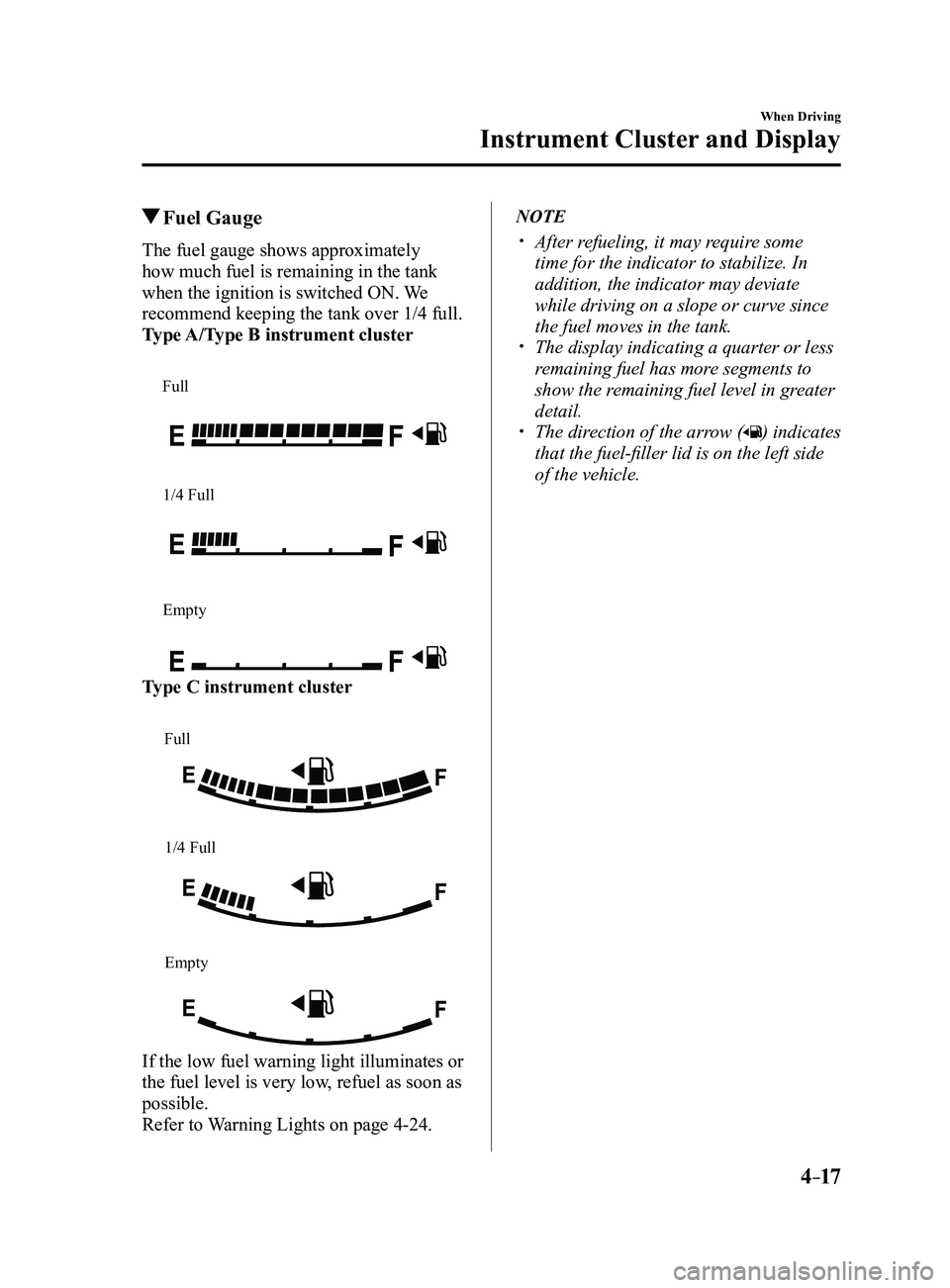
Fuel Gauge
The fuel gauge shows approximately
how much fuel is remaining in the tank
when the ignition is switched ON. We
recommend keeping the tank over 1/4 full.
Type A/Type B instrument cluster
Full
1/4 Full
Empty
Type C instrument cluster
Full
1/4 Full
Empty
If the low fuel warning light illuminates or
the fuel level is very low, refuel as soon as
possible.
Refer to Warning Lights on page
4-24.
NOTE
After refueling, it may require some
time for the indicator to stabilize. In
addition, the indicator may deviate
while driving on a slope or curve since
the fuel moves in the tank.
The display indicating a quarter or less
remaining fuel has more segments to
show the remaining fuel level in greater
detail.
The direction of the arrow () indicates
that the fuel-filler lid is on the left side
of the vehicle.
Mazda3_8FL6-EA-16F_Edition2.indb 172016/08/10 17:35:49
Page 160 of 612
4–30
When Driving
Manual Transaxle Operation
*Some models.
NOTE
(For vehicles with type C instrument
cluster*1)
If the engine speed is about to exceed
the permissible engine speed, the buzzer
sounds.
Refer to Over Rev. Buzzer on page
7-43.
*1 To determine which instrument
cluster is equipped on your Mazda,
Refer to Meters and Gauges on page
4-12.
If shifting to R is difficult, shift back into
neutral, release the clutch pedal, and try
again.
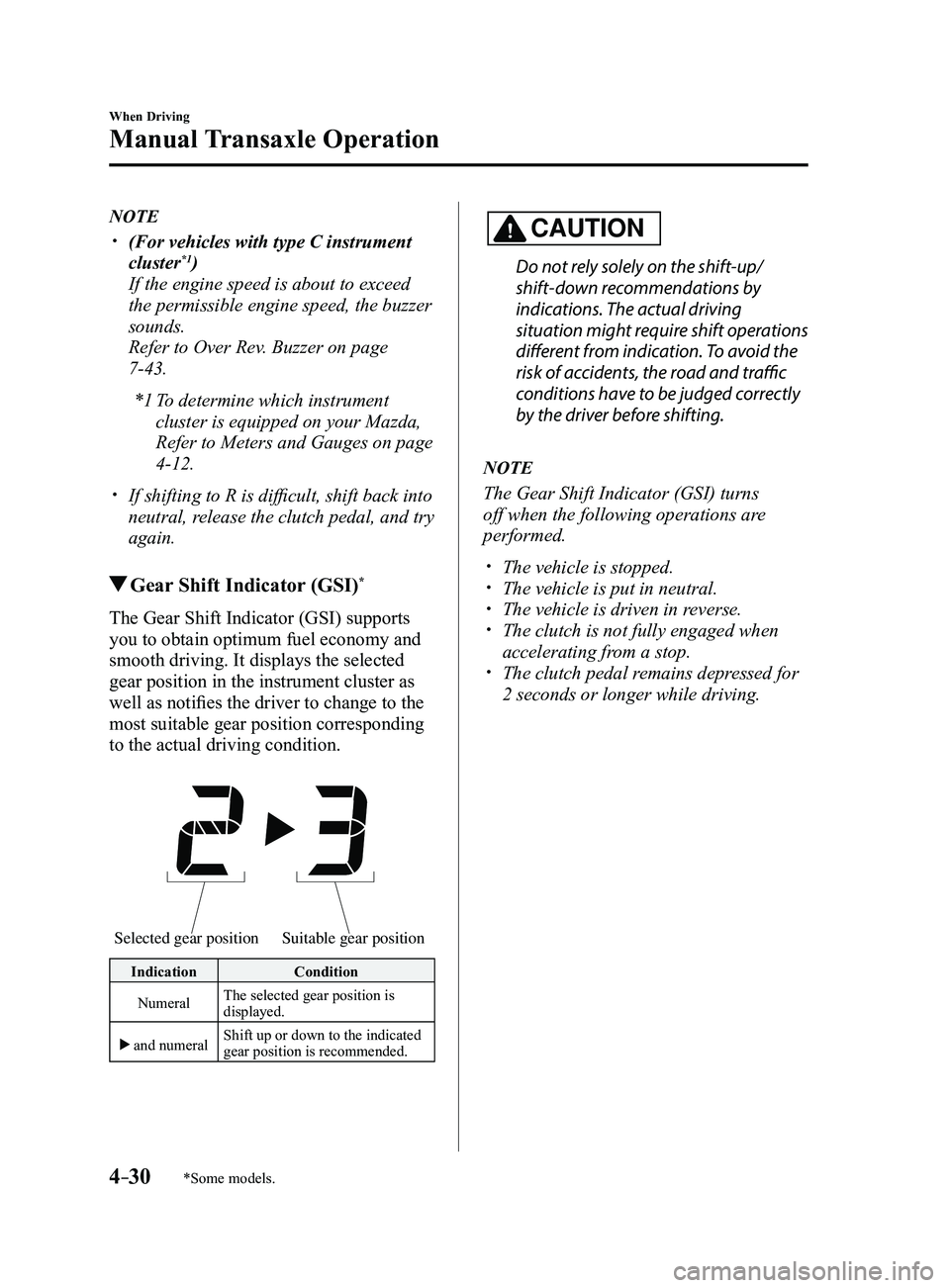
Gear Shift Indicator (GSI)*
The Gear Shift Indicator (GSI) supports
you to obtain optimum fuel economy and
smooth driving. It displays the selected
gear position in the instrument cluster as
well as notifies the driver to change to the
most suitable gear position corresponding
to the actual driving condition.
Selected gear positionSuitable gear position
Indication Condition
Numeral The selected gear position is
displayed.
and numeral Shift up or down to the indicated
gear position is recommended.
CAUTION
Do not rely solely on the shift-up/
shift-down recommendations by
indications. The actual driving
situation might require shift operations
different from indication. To avoid the
risk of accidents, the road and traffic
conditions have to be judged correctly
by the driver before shifting.
NOTE
The Gear Shift Indicator (GSI) turns
off when the following operations are
performed.
The vehicle is stopped. The vehicle is put in neutral. The vehicle is driven in r
everse. The clutch is not fully engaged when
accelerating from a stop. The clutch pedal remains depressed for
2 seconds or longer while driving.
Mazda3_8FL6-EA-16F_Edition2.indb 302016/08/10 17:36:07
Page 205 of 612
4–75
When Driving
Fuel Economy Monitor
*Some models.
Fuel Economy Monitor*
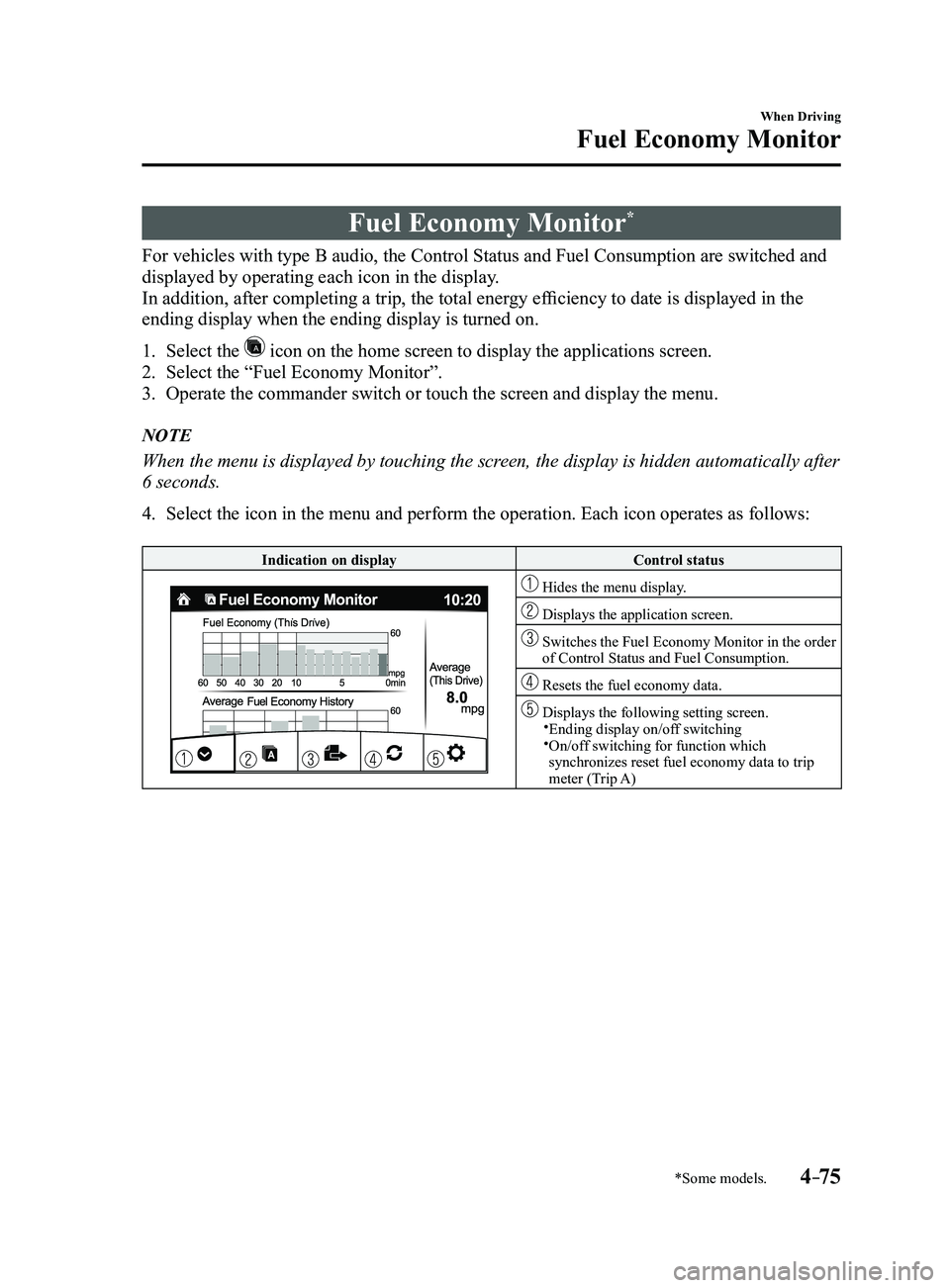
For vehicles with type B audio, the Control Status and Fuel Consumption are switched and
displayed by operating each icon in the display.
In addition, after completing a trip, the total energy efficiency to date is displayed in the
ending display when the ending display is turned on.
1. Select the icon on the home screen to display the applications screen.
2. Select the “Fuel Economy Monitor”.
3. Operate the commander switch or touch the screen and display the menu.
NOTE
When the menu is displayed by touching the screen, the display is hidden automatically after
6 seconds.
4. Select the icon in the menu and perform the operation. Each icon operates as follows:
Indication on displayControl status
Hides the menu display.
Displays the application screen.
Switches the Fuel Economy Monitor in the order of Control Status and Fuel Consumption.
Resets the fuel economy data.
Displays the following setting screen.Ending display on/off switching On/off switching for function which synchronizes reset fuel economy data to trip
meter (Trip A)
Mazda3_8FL6-EA-16F_Edition2.indb 752016/08/10 17:36:32
Page 347 of 612
5–55
Interior Features
Audio System
*Some models.
Applications
NOTE
Depending on the grade and specification,
the screen display may differ.
Select the
icon on the home screen to
display the Applications screen. The
following information can be verified.
Top screenItemFunction
HD Radio™ Traffic
Map*— —
Fuel Economy
Monitor
Fuel
Consumption
Control
Status
(Vehicles
with
i-ELOOP)
SettingsRefer
to Fuel
Economy
Monitor
on page
4-75.
Vehicle
Status
Monitor
Maintenance Scheduled
Maintenance
Tire Rotation
Oil Change Refer to
Maintenance
Monitor
(Type B
audio) on
page
6-18.
Warning
Guidance
Warnings
currently
active can be
verified. Refer to If
a Warning
Light
Turns On
or Flashes
on page
7-25.
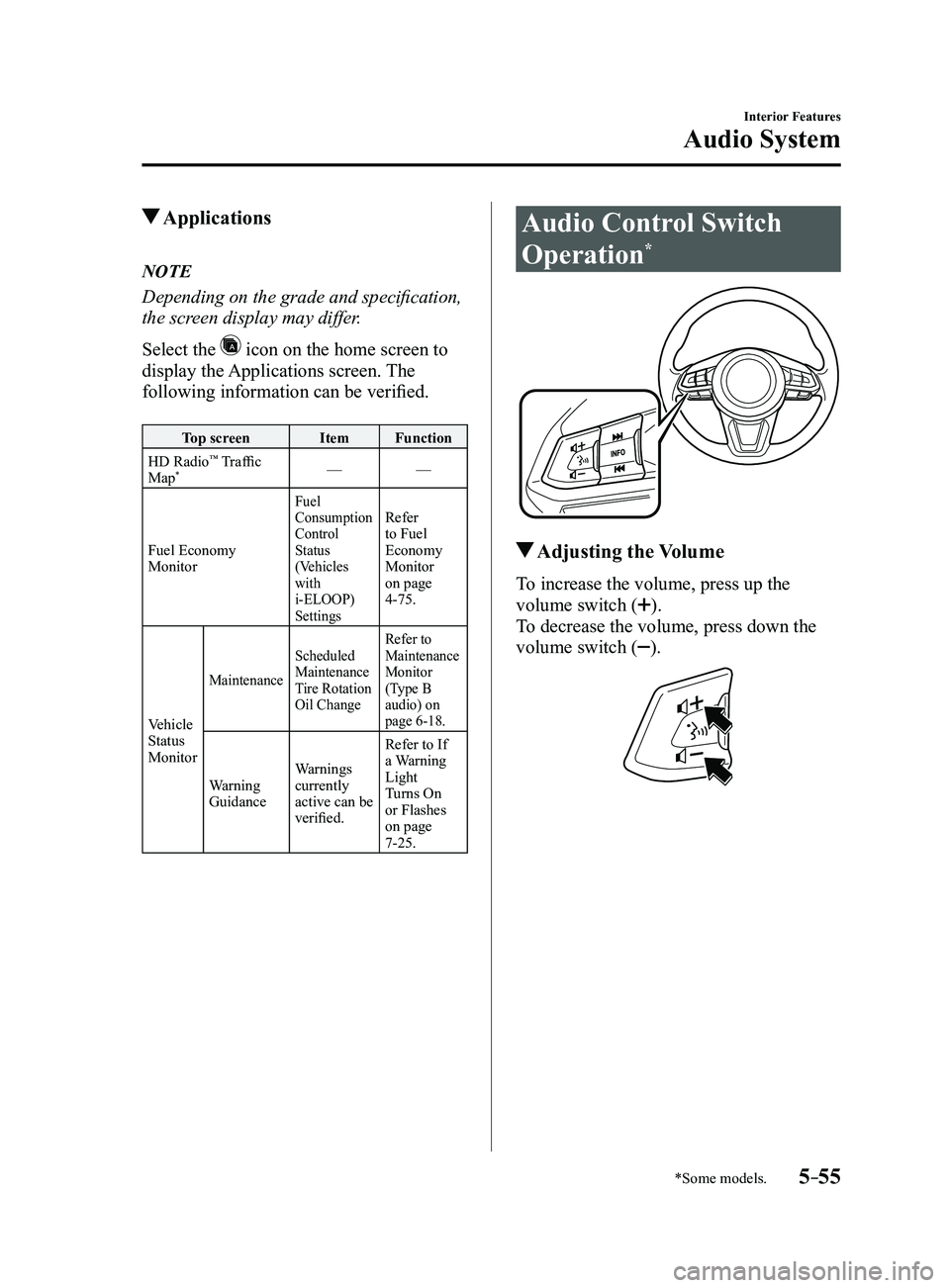
Audio Control Switch
Operation*
Adjusting the Volume
To increase the volume, press up the
volume switch (
).
To decrease the volume, press down the
volume switch (
).
Mazda3_8FL6-EA-16F_Edition2.indb 552016/08/10 17:37:47
Page 438 of 612
6–26
Maintenance and Care
Owner Maintenance
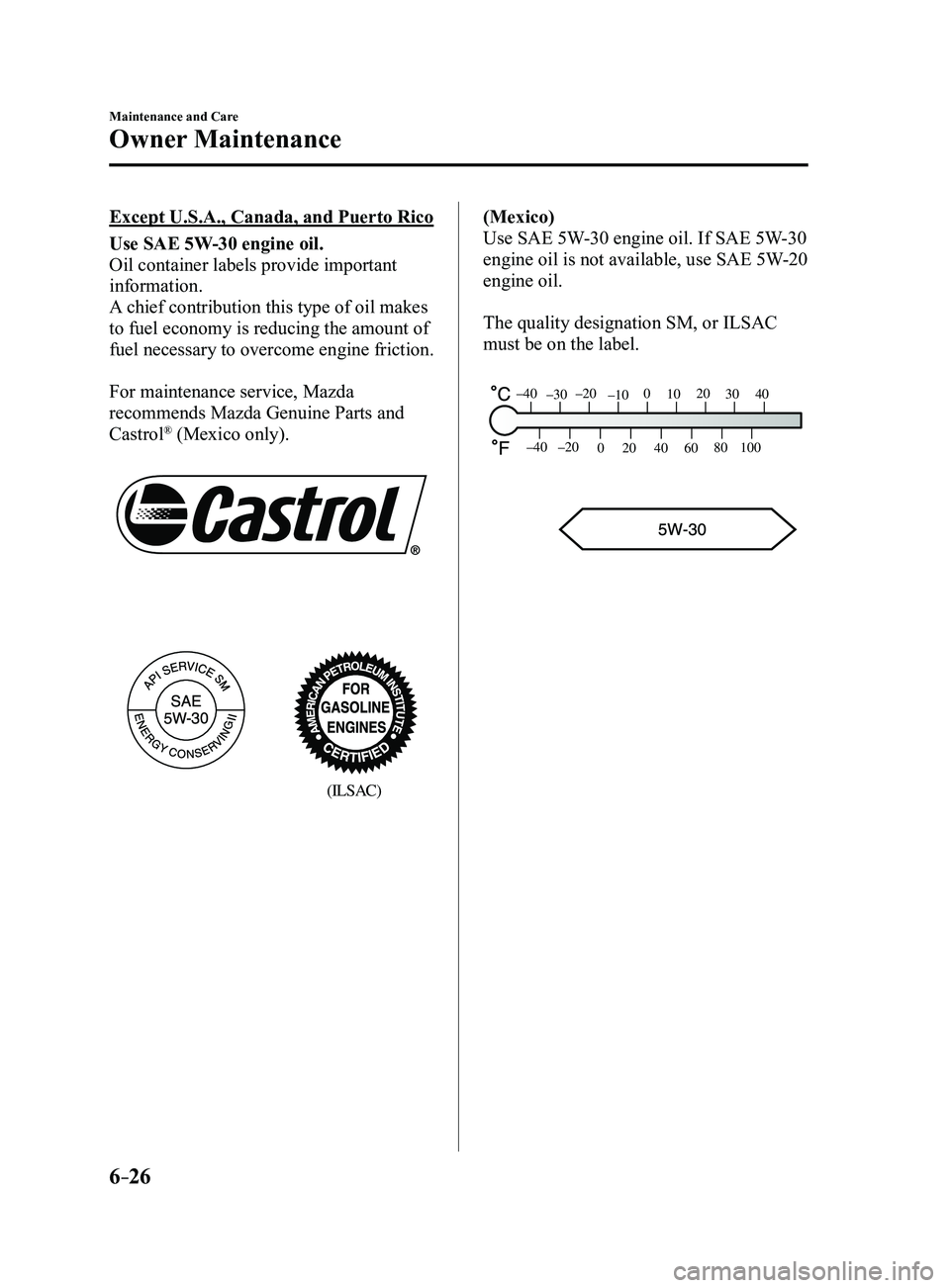
Except U.S.A., Canada, and Puerto Rico
Use SAE 5W-30 engine oil.
Oil container labels provide important
information.
A chief contribution this type of oil makes
to fuel economy is reducing the amount of
fuel necessary to overcome engine friction.
For maintenance service, Mazda
recommends Mazda Genuine Parts and
Castrol
® (Mexico only).
(ILSAC)
(Mexico)
Use SAE 5W-30 engine oil. If SAE 5W-30
engine oil is not available, use SAE 5W-20
engine oil.
The quality designation SM, or ILSAC
must be on the label.
80
60
40
20
0
–40 –20
30
100
40
20
10
0
–10
–20
–30
–40
Mazda3_8FL6-EA-16F_Edition2.indb 262016/08/10 17:38:38
Page 453 of 612
6–41
Maintenance and Care
Owner Maintenance
Tires
For reasons of proper performance, safety,
and better fuel economy, always maintain
recommended tire inflation pressures and
stay within the recommended load limits
and weight distribution.
WARNING
Using Different Tire Types:
Driving your vehicle with different
types of tires is dangerous. It could
cause poor handling and poor braking;
leading to loss of control.
Except for the limited use of the
temporary spare tire, use only the
same type tires (radial, bias-belted,
bias-type) on all four wheels.
Using Wrong-Sized Tires: Using any other tire size than what is
specified for the vehicle (page
9-10)
is dangerous. It could seriously affect
ride, handling, ground clearance,
tire clearance, and speedometer
calibration. This could cause you to
have an accident. Use only tires that
are the correct size specified for the
vehicle.
Tire Inflation Pressure
WARNING
Always inflate the tires to the correct
pressure: Overinflation or underinflation of tires
is dangerous. Adverse handling or
unexpected tire failure could result in a
serious accident.
Refer to Tires on page
9-10.
Use only a Mazda-genuine tire valve
cap: Use of a non-genuine part is
dangerous as the correct tire air
pressure cannot be maintained if the
tire valve becomes damaged. If the
vehicle is driven under this condition,
the tire air pressure will decrease which
could result in a serious accident. Do
not use any part for the tire valve cap
that is not a Mazda-genuine part.
Inspect all tire pressures monthly
(including the spare) when the tires are
cold. Maintain recommended pressures for
the best ride, handling, and minimum tire
wear.
Refer to the specification charts (page
9-10).
(With tire pressure monitoring system)
After adjusting the tire pressure,
initialization of the tire pressure
monitoring system is necessary to make
the system operate normally.
Refer to Tire Pressure Monitoring System
Initialization on page
4-154.
Mazda3_8FL6-EA-16F_Edition2.indb 412016/08/10 17:38:47
Page 609 of 612
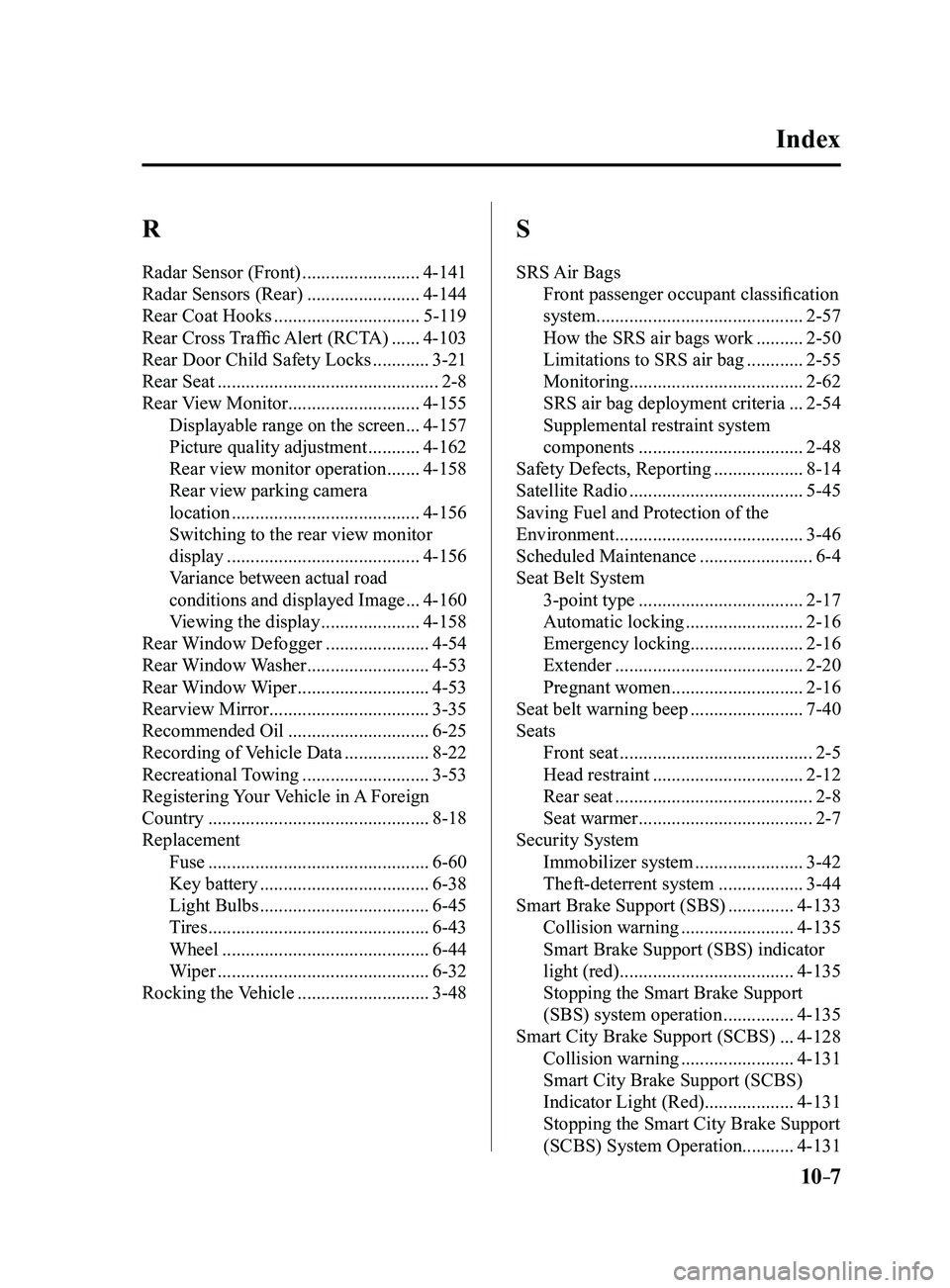
10–7
R
Radar Sensor (Front) .........................4-141
Radar Sensors (Rear)
........................4-144
Rear Coat Hooks
...............................5-119
Rear Cross Traffic Alert (RCTA)
......4-103
Rear Door Child Safety Locks
............3-21
Rear Seat
...............................................2-8
Rear View Monitor ............................4-155
Displayable range on the screen ...4-157
Picture quality adjustment
...........4-162
Rear view monitor operation
.......4-158
Rear view parking camera
location
........................................4-156
Switching to the rear view monitor
display
.........................................4-156
Variance between actual road
conditions and displayed Image
...4-160
Viewing the display
.....................4-158
Rear Window Defogger
......................4-54
Rear Window Washer
..........................4-53
Rear Window Wiper
............................4-53
Rearview Mirror
..................................3-35
Recommended Oil
..............................6-25
Recording of Vehicle Data
..................8-22
Recreational Towing
...........................3-53
Registering Your Vehicle in A Foreign
Country
...............................................8-18
Replacement Fuse
...............................................6-60
Key battery
....................................6-38
Light Bulbs
....................................6-45
Tires
...............................................6-43
Wheel
............................................6-44
Wiper
.............................................6-32
Rocking the Vehicle
............................3-48
S
SRS Air Bags Front passenger occupant classification
system
............................................2-57
How the SRS air bags work
..........2-50
Limitations to SRS air bag
............2-55
Monitoring ..................................... 2-62
SRS air bag deployment criteria
...2-54
Supplemental restraint system
components
...................................2-48
Safety Defects, Reporting
...................8-14
Satellite Radio
.....................................5-45
Saving Fuel and Protection of the
Environment
........................................3-46
Scheduled Maintenance
........................6-4
Seat Belt System 3-point type
...................................2-17
Automatic locking
.........................2-16
Emergency locking
........................2-16
Extender
........................................2-20
Pregnant women
............................2-16
Seat belt warning beep
........................7-40
Seats Front seat
.........................................2-5
Head restraint
................................2-12
Rear seat
..........................................2-8
Seat warmer
.....................................2-7
Security System Immobilizer system
.......................3-42
Theft-deterrent system
..................3-44
Smart Brake Support (SBS)
..............4-133
Collision warning
........................4-135
Smart Brake Support (SBS) indicator
light (red)
.....................................4-135
Stopping the Smart Brake Support
(SBS) system operation
...............4-135
Smart City Brake Support (SCBS)
...4-128
Collision warning
........................4-131
Smart City Brake Support (SCBS)
Indicator Light (Red) ...................4-131
Stopping the Smart City Brake Support
(SCBS) System Operation ...........4-131
Index
Mazda3_8FL6-EA-16F_Edition2.indb 72016/08/10 17:39:58