height adjustment MAZDA MODEL 3 5-DOOR 2017 Owners Manual
[x] Cancel search | Manufacturer: MAZDA, Model Year: 2017, Model line: MODEL 3 5-DOOR, Model: MAZDA MODEL 3 5-DOOR 2017Pages: 612
Page 19 of 612
2–5
Essential Safety Equipment
Seats
Front Seat
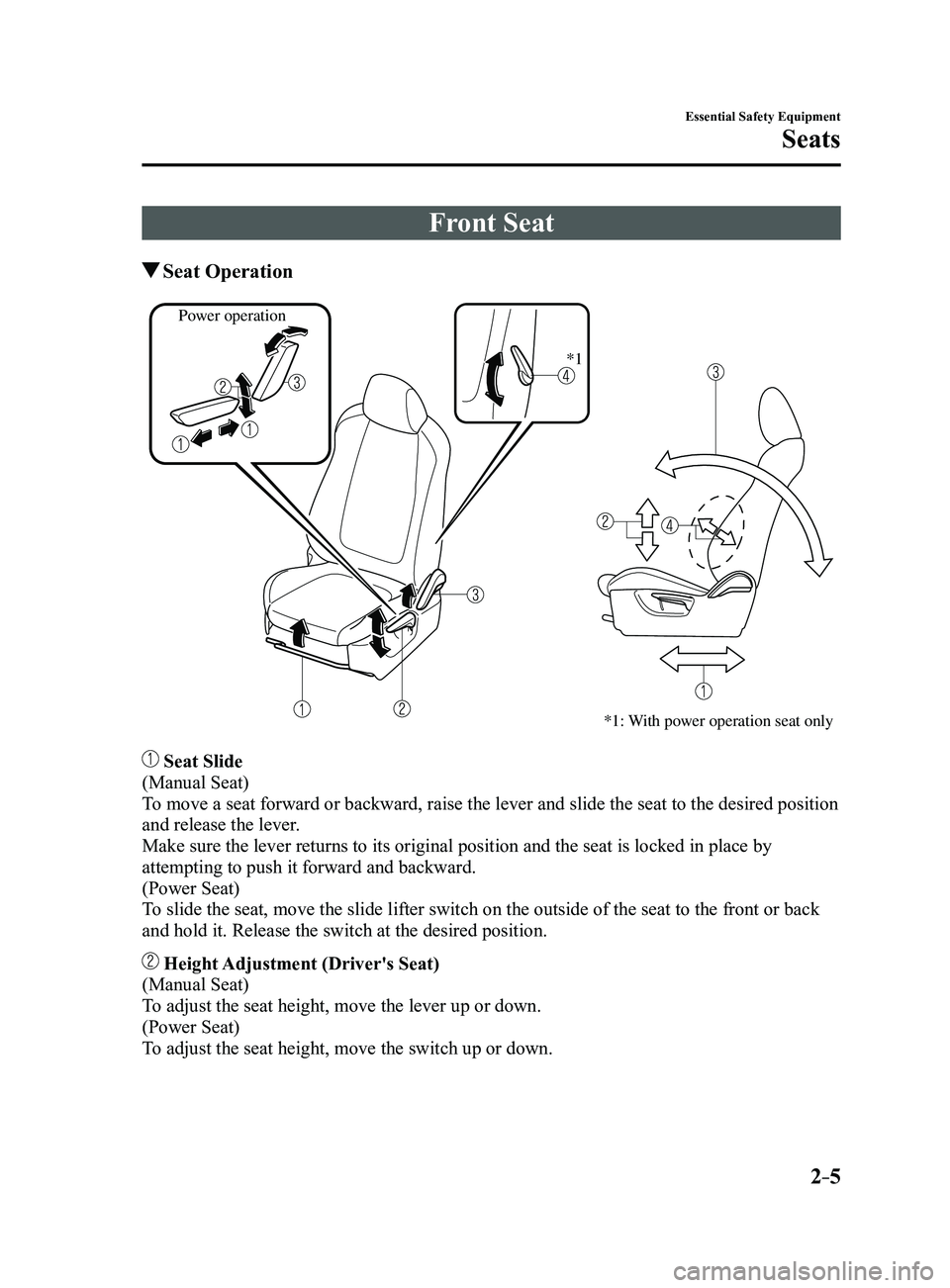
Seat Operation
*1: With power operation seat only
Power operation*1
Seat Slide
(Manual Seat)
To move a seat forward or backward, raise the lever and slide the seat to\
the desired position
and release the lever.
Make sure the lever returns to its original position and the seat is loc\
ked in place by
attempting to push it forward and backward.
(Power Seat)
To slide the seat, move the slide lifter switch on the outside of the sea\
t to the front or back
and hold it. Release the switch at the desired position.
Height Adjustment (Driver's Seat)
(Manual Seat)
To adjust the seat height, move the lever up or down.
(Power Seat)
To adjust the seat height, move the switch up or down.
Mazda3_8FL6-EA-16F_Edition2.indb 52016/08/10 17:34:51
Page 26 of 612
2–12
Essential Safety Equipment
Seats
Head Restraints
Your vehicle is equipped with head
restraints on all outboard seats and the
rear center seat. The head restraints are
intended to help protect you and the
passengers from neck injury.
WARNING
Always drive with the head restraints
installed when seats are being used and
make sure they are properly adjusted:Driving with the head restraints
adjusted too low or removed is
dangerous. With no support behind
your head, your neck could be seriously
injured in a collision.
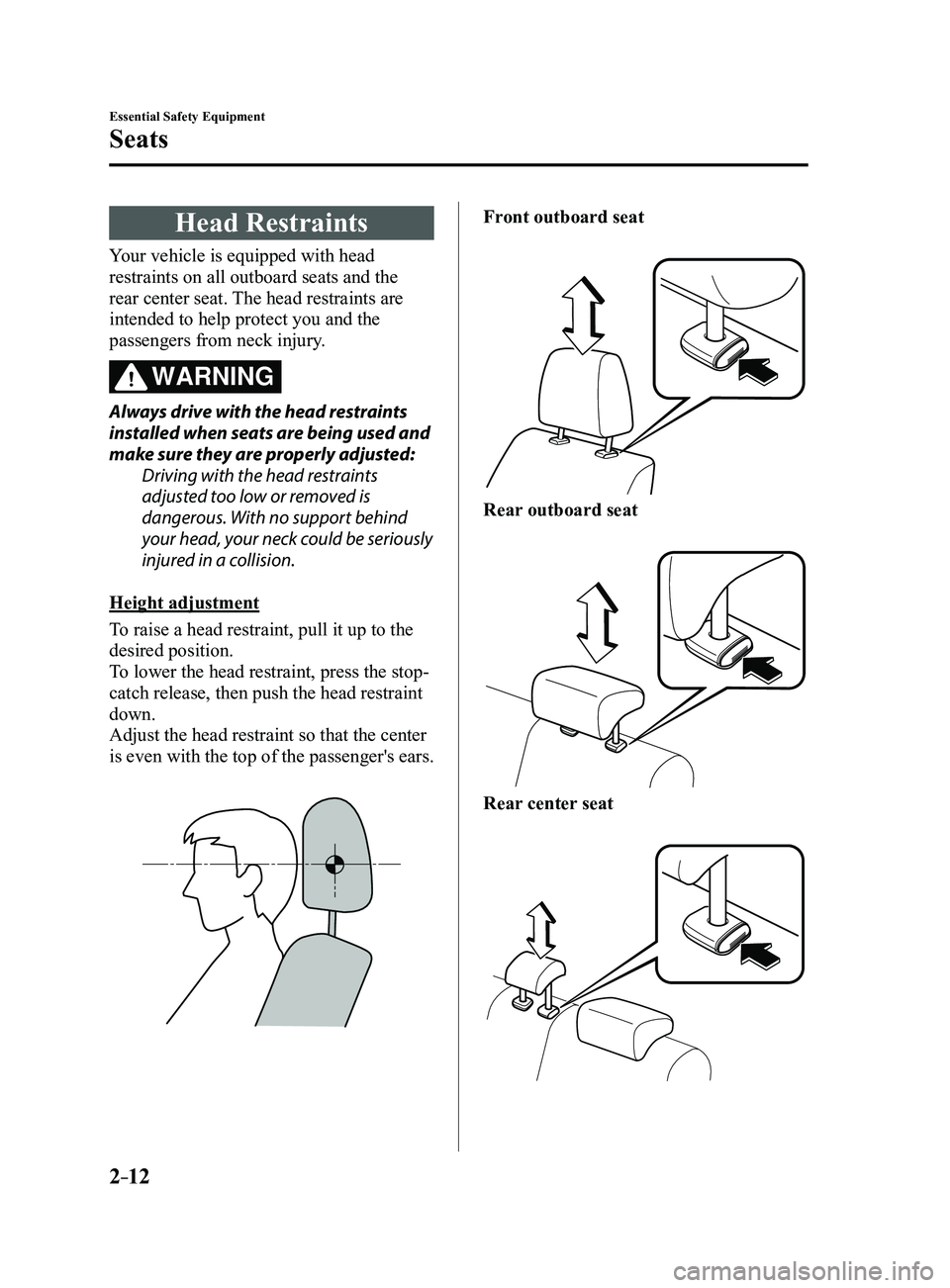
Height adjustment
To raise a head restraint, pull it up to the
desired position.
To lower the head restraint, press the stop-
catch release, then push the head restraint
down.
Adjust the head restraint so that the center
is even with the top of the passenger's ears.
Front outboard seat
Rear outboard seat
Rear center seat
Mazda3_8FL6-EA-16F_Edition2.indb 122016/08/10 17:34:55
Page 152 of 612
4–22
When Driving
Instrument Cluster and Display
The active driving display indicates the following information:
Blind Spot Monitoring (BSM) Operation Conditions and Warnings
Refer to Blind Spot Monitoring (BSM) on page 4-88.
Distance Recognition Support System (DRSS) Warnings
Refer to Distance Recognition Support System (DRSS) on page 4-101.
Traffic Sign Recognition System (TSR) traffic signs and Warnings
Refer to Traffic Sign Recognition System (TSR) on page 4-94.
Mazda Radar Cruise Control (MRCC) Operation Conditions and Warnings
Refer to Mazda Radar Cruise Control (MRCC) on page 4-107.
Lane-keep Assist System (LAS) & Lane Departure Warning System (LDWS) Operation
Conditions and Warnings
Refer to Lane-keep Assist System (LAS) & Lane Departure Warning System (LDWS) on
page 4-117.
Smart City Brake Support (SCBS) Warnings
Refer to Smart City Brake Support (SCBS) on page 4-128.
Smart Brake Support (SBS) Warnings
Refer to Smart Brake Support (SBS) on page 4-133.
Cruise Control Operation Conditions
Refer to Cruise Control on page 4-146.
Navigation Guidance (vehicles with navigation system)
Speed limit indicator (vehicles with navigation system)
Vehicle Speed
Each setting/adjustment for the active driving display can be performed on the center display.
1. Select the icon on the home screen and display the Settings screen.
2. Select the AD-Disp tab.
3. Select the desired item and perform the setting/adjustment.
Method for adjusting screen brightness (automatically/manually) Screen brightness initial settings (automatic adjustment is selected) Screen brightness adjustment (manual adjustment is selected) Display position of active driving display (display height) Active driving display angle adjustment (display angle correction) The combination of street name display , lane guidance, and turn by turn (TBT) can be
changed. (navigation guidance) Active driving display ON/OFF (indication) Reset settings (reset)
Mazda3_8FL6-EA-16F_Edition2.indb 222016/08/10 17:35:52
Page 602 of 612
9–18
Specifications
Personalization Features
ItemFeatureFactory
Setting Available
Settings Settings
Change
Method
Active Driving Display (page 4-21)
Display Setting can be changed so that the Active
Driving Display is not displayed.
On
On/Off C—
The display height (up/down position) can be changed. 013 steps up/
down from
initial setting
(total: 27 steps) C
—
The method for adjusting the display brightness (automatically/manually) can be
changed. AUTO
AUTO/MAN. C—
The standard brightness while automatic adjustment is selected can be changed using
the brightness adjustment. 02 steps up/
down from
initial setting
(total: 5 steps) C
—
The standard brightness while manual adjustment is selected can be changed using
the brightness adjustment. 020 steps up/
down from
initial setting
(total: 41 steps) C
—
Navigation guidance The display information can be changed. Lane
Guidance
& Turn by Turn At Maneuver/
Lane Guidance & Turn by Turn/
Street Name & Turn by Turn/ OFF C
—
*1 Though these systems can be turned Of f, doing so will defeat the purpose of the system and Mazda recommends that these systems remain On.*2 Only the volume of the warning beep during Blind Spot Monitorin g (BSM) operation can be changed. The volume of the warning beep during Rear Cross Traffic Alert (RCTA) operation cannot be changed.*3 This system functions only when the navigation system is functioning.
*4 If the auto-wiper control is set to Off, the wiper lever position is set to intermittent operation.*5 If the setting is changed to Off, the following operation is performed according to the headlight switc\
h position:
At position: Headlights turn off immediately after the ignition is switched off. At any position other than : Headlights on/off conditions vary according to the headlight switch
position. Refer to Headlights on page 4-43.
*6 When set to Of f, the lights-on reminder is operable.*7 The lights-on reminder settings can be changed at anytime, however , the lights-on reminder only operates when the auto headlight function is set to Off. Refer to Lights-On Reminder on page 7-39.*8 The operation may stop in 15 minutes due to the effect of the outside temperature even if the operation time of the rear window defogger has been changed to Continuous.*9 Available only in display from the center display.
Mazda3_8FL6-EA-16F_Edition2.indb 182016/08/10 17:39:57