headlights MAZDA MODEL 3 5-DOOR 2017 Owners Manual
[x] Cancel search | Manufacturer: MAZDA, Model Year: 2017, Model line: MODEL 3 5-DOOR, Model: MAZDA MODEL 3 5-DOOR 2017Pages: 612
Page 111 of 612
3–35
Before Driving
Mirrors
Rearview Mirror
WARNING
Do not stack cargo or objects higher
than the seatbacks: Cargo stacked higher than the
seatbacks is dangerous. It can block
your view in the rearview mirror, which
might cause you to hit another car
when changing lanes.
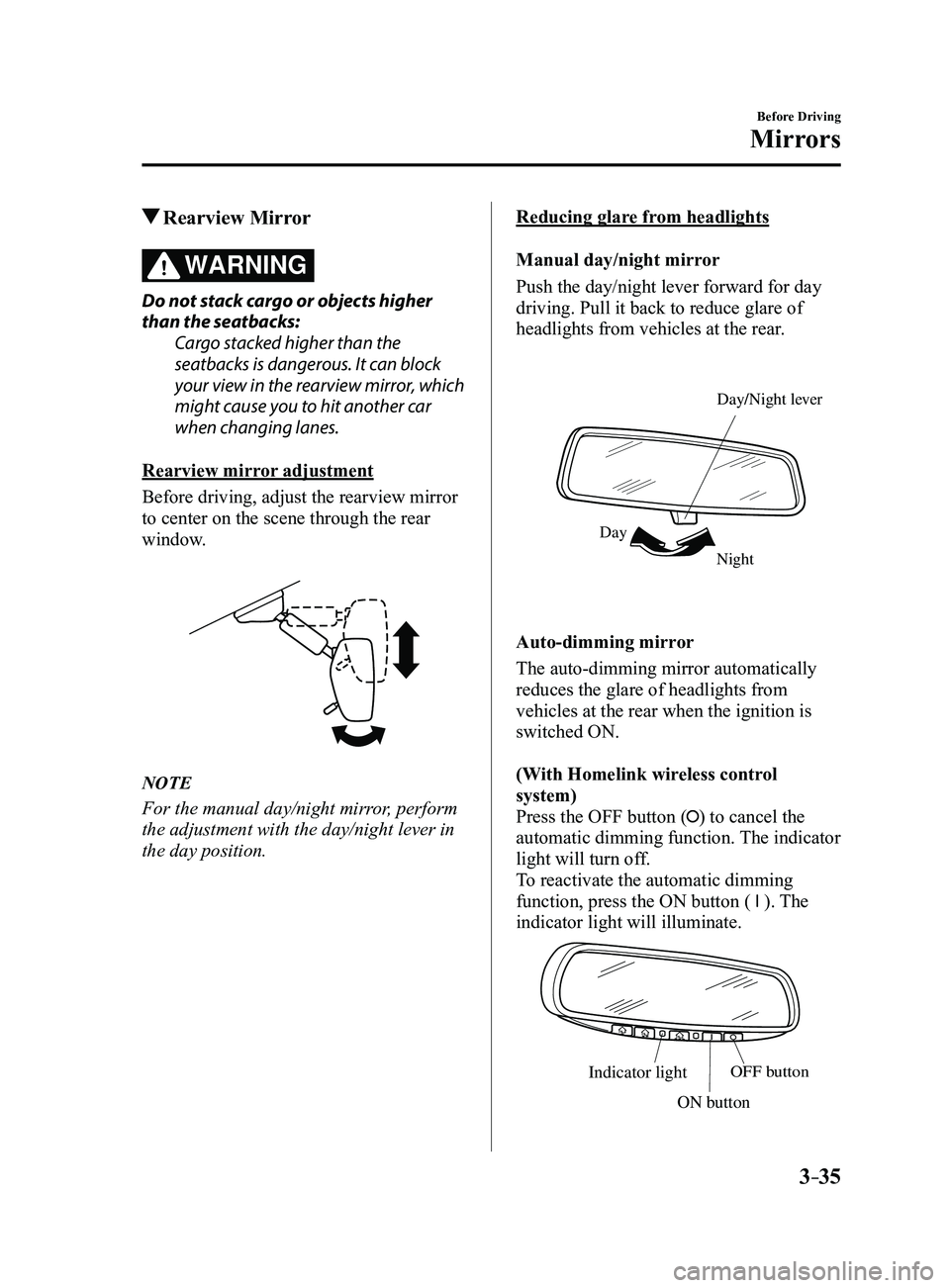
Rearview mirror adjustment
Before driving, adjust the rearview mirror
to center on the scene through the rear
window.
NOTE
For the manual day/night mirror, perform
the adjustment with the day/night lever in
the day position.
Reducing glare from headlights
Manual day/night mirror
Push the day/night lever forward for day
driving. Pull it back to reduce glare of
headlights from vehicles at the rear.
Night
Day Day/Night le
ver
Auto-dimming mirror
The auto-dimming mirror automatically
reduces the glare of headlights from
vehicles at the rear when the ignition is
switched ON.
(With Homelink wireless control
system)
Press the OFF button (
) to cancel the
automatic dimming function. The indicator
light will turn off.
To reactivate the automatic dimming
function, press the ON button (
). The
indicator light will illuminate.
Indicator lightOFF button
ON button
Mazda3_8FL6-EA-16F_Edition2.indb 352016/08/10 17:35:32
Page 148 of 612
4–18
When Driving
Instrument Cluster and Display
Dashboard Illumination
When the position lights are turned
on with the ignition switched ON,
the brightness of the instrument panel
illumination is dimmed.
NOTE
When the position lights are turned on,
the position lights indicator light in the
instrument cluster turns on.
Refer to Headlights on page
4-43.
The brightness of the instrument cluster
and dashboard illuminations can be
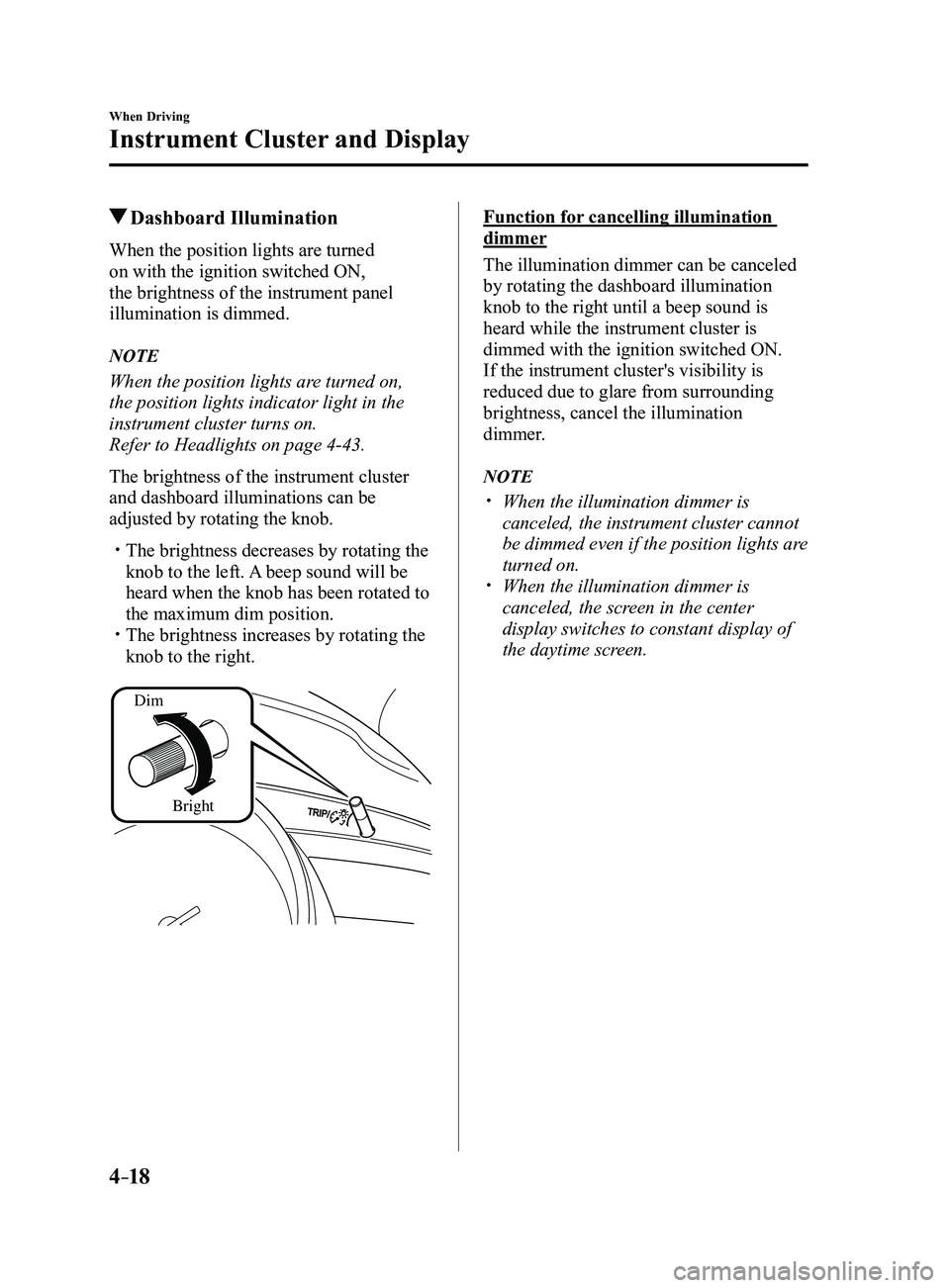
adjusted by rotating the knob.
The brightness decreases by rotating the
knob to the left. A beep sound will be
heard when the knob has been rotated to
the maximum dim position.
The brightness increases by rotating the
knob to the right.
Dim
Bright
Function for cancelling illumination
dimmer
The illumination dimmer can be canceled
by rotating the dashboard illumination
knob to the right until a beep sound is
heard while the instrument cluster is
dimmed with the ignition switched ON.
If the instrument cluster's visibility is
reduced due to glare from surrounding
brightness, cancel the illumination
dimmer.
NOTE
When the illumination dimmer is
canceled, the instrument cluster cannot
be dimmed even if the position lights are
turned on.
When the illumination dimmer is
canceled, the screen in the center
display switches to constant display of
the daytime screen.
Mazda3_8FL6-EA-16F_Edition2.indb 182016/08/10 17:35:49
Page 156 of 612
4–26
When Driving
Instrument Cluster and Display
*Some models.
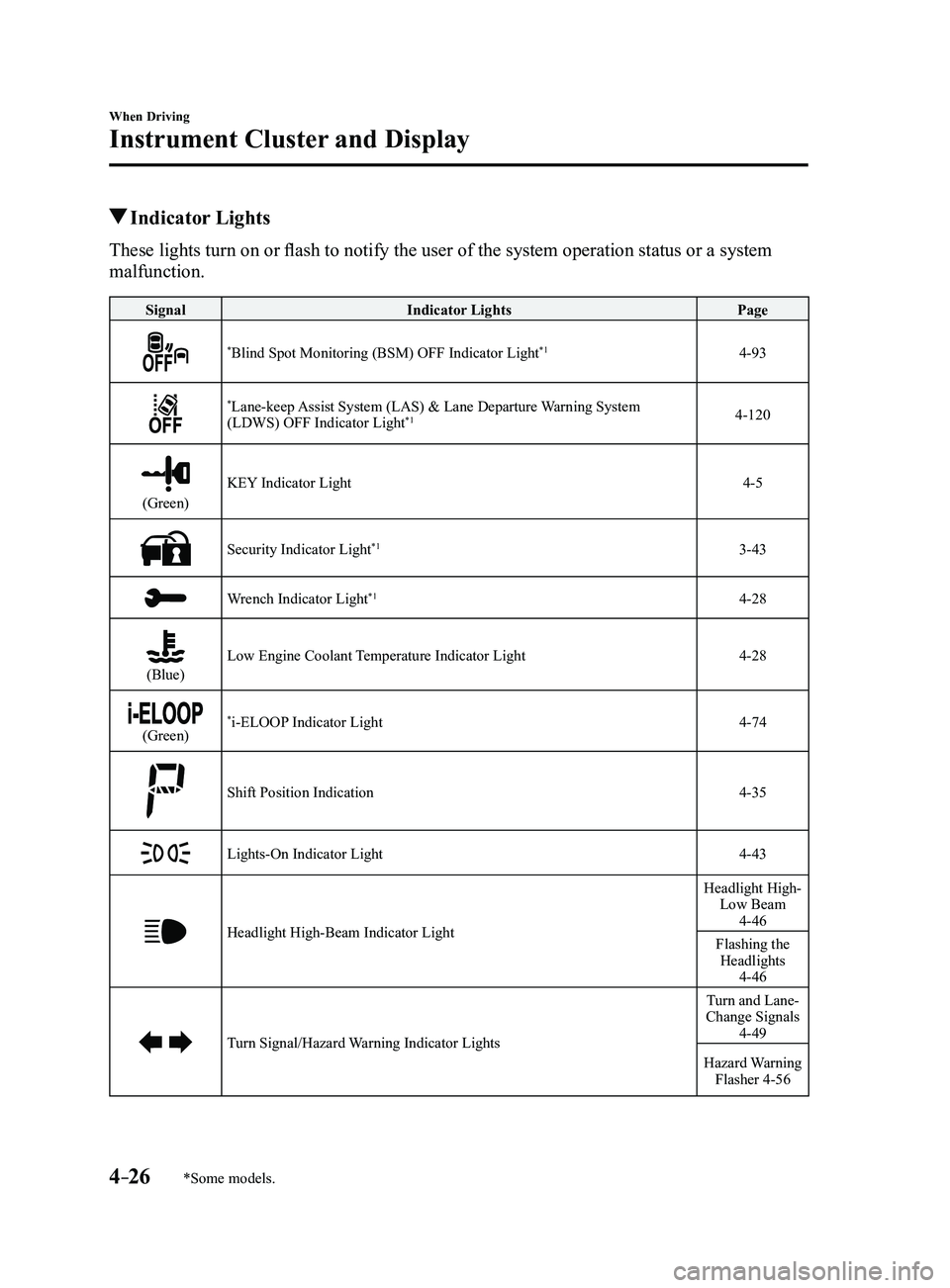
Indicator Lights
These lights turn on or flash to notify the user of the system operation status or a system
malfunction.
SignalIndicator Lights Page
*Blind Spot Monitoring (BSM) OFF Indicator Light*14-93
*Lane-keep Assist System (LAS) & Lane Departure Warning System
(LDWS) OFF Indicator Light*14-120
(Green)
KEY Indicator Light4-5
Security Indicator Light*13-43
Wrench Indicator Light*14-28
(Blue)Low Engine Coolant Temperature Indicator Light4-28
(Green)*i-ELOOP Indicator Light4-74
Shift Position Indication4-35
Lights-On Indicator Light4-43
Headlight High-Beam Indicator Light
Headlight High- Low Beam
4-46
Flashing the Headlights
4-46
Turn Signal/Hazard Warning Indicator Lights
Turn and Lane-
Change Signals
4-49
Hazard Warning Flasher 4-56
Mazda3_8FL6-EA-16F_Edition2.indb 262016/08/10 17:36:01
Page 173 of 612

4–43
When Driving
Switches and Controls
Lighting Control
Headlights
Turn the headlight switch to turn the headlights and other exterior light\
s on or off.
When the lights are turned on, the lights-on indicator light in the inst\
rument cluster turns on.
NOTE
If the light switch is left on, the lights will automatically switch off\
approximately 30
seconds after switching the ignition off.
The time setting can be changed.
Refer to Personalization Features on page 9-12. To prevent discharging the battery, do not leave the lights on while the engine is off unless
safety requires them.
Without auto-light control
Switch Position
Ignition PositionON ACC or
OFF ONACC or
OFF ONACC or
OFF
Headlights OffOffOffOff OnOn
*2
Daytime running lights On*1OffOn*1Off OffOff
Taillights
Parking lights
License lights
Side-marker lights Off
Off OnOn
*2OnOn*2
*1 The lights are turned on while the vehicle is driven.*2 The lights are turned on for the specified period by the auto he adlight off function.
Mazda3_8FL6-EA-16F_Edition2.indb 432016/08/10 17:36:14
Page 174 of 612
4–44
When Driving
Switches and Controls
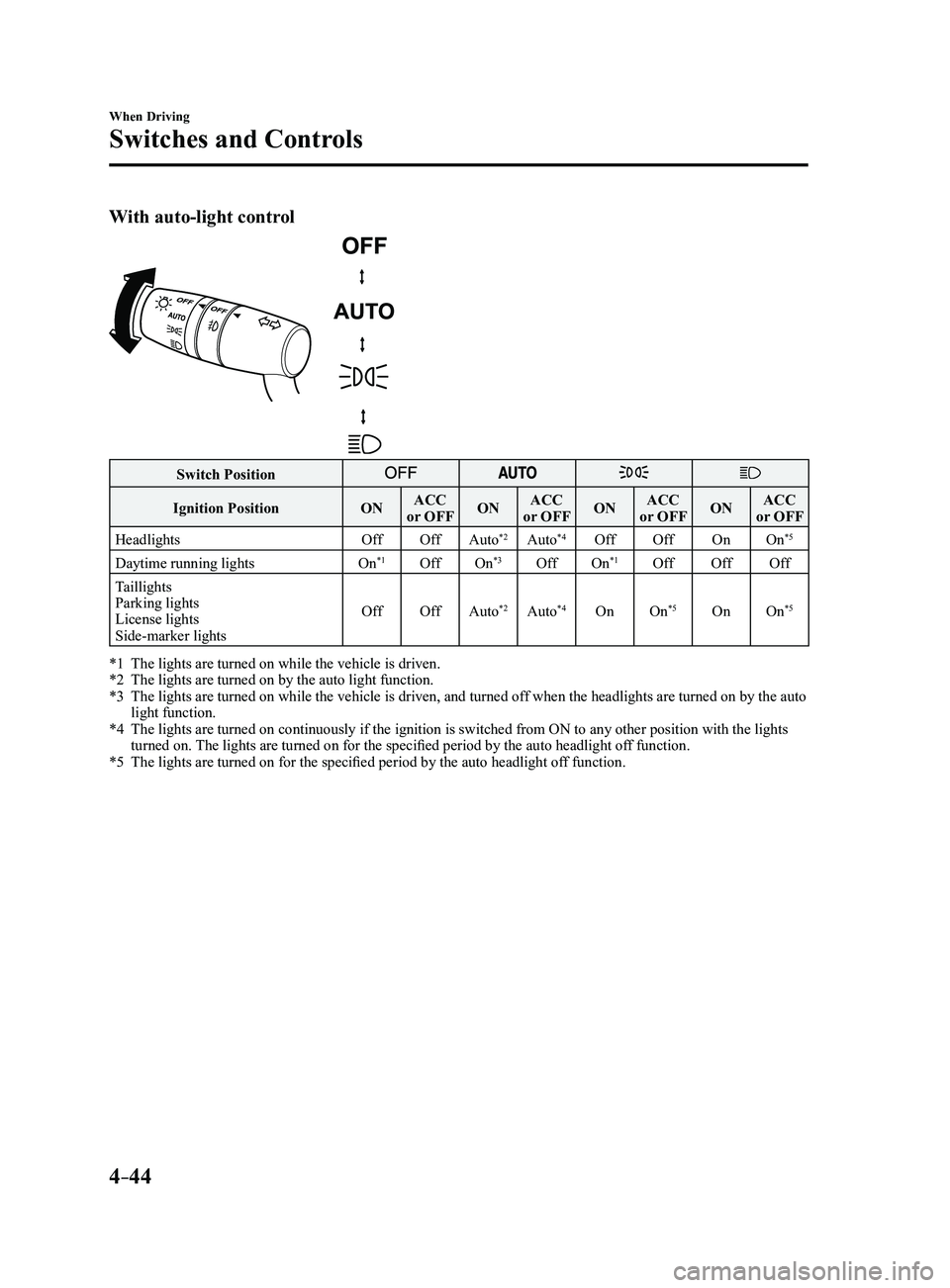
With auto-light control
Switch Position
Ignition PositionONACC
or OFF ONACC
or OFF ONACC
or OFF ONACC
or OFF
Headlights OffOffAuto
*2Auto*4Off Off OnOn*5
Daytime running lights On*1OffOn*3OffOn*1Off OffOff
Taillights
Parking lights
License lights
Side-marker lights Off
OffAuto
*2Auto*4On On*5OnOn*5
*1 The lights are turned on while the vehicle is driven.*2 The lights are turned on by the auto light function.*3 The lights are turned on while the vehicle is driven, and turned of f when the headlights are turned on by the auto light function.*4 The lights are turned on continuously if the ignition is switched from ON to any other position with the lights turned on. The lights are turned on for the specified period by the auto headlight off function.*5 The lights are turned on for the specified period by the auto he adlight off function.
Mazda3_8FL6-EA-16F_Edition2.indb 442016/08/10 17:36:15
Page 175 of 612
4–45
When Driving
Switches and Controls
*Some models.
Auto-light control*
When the headlight switch is in the position and the ignition is switched ON, the light
sensor senses the surrounding lightness or darkness and automatically tu\
rns the headlights
and other exterior lights on or off.
CAUTION
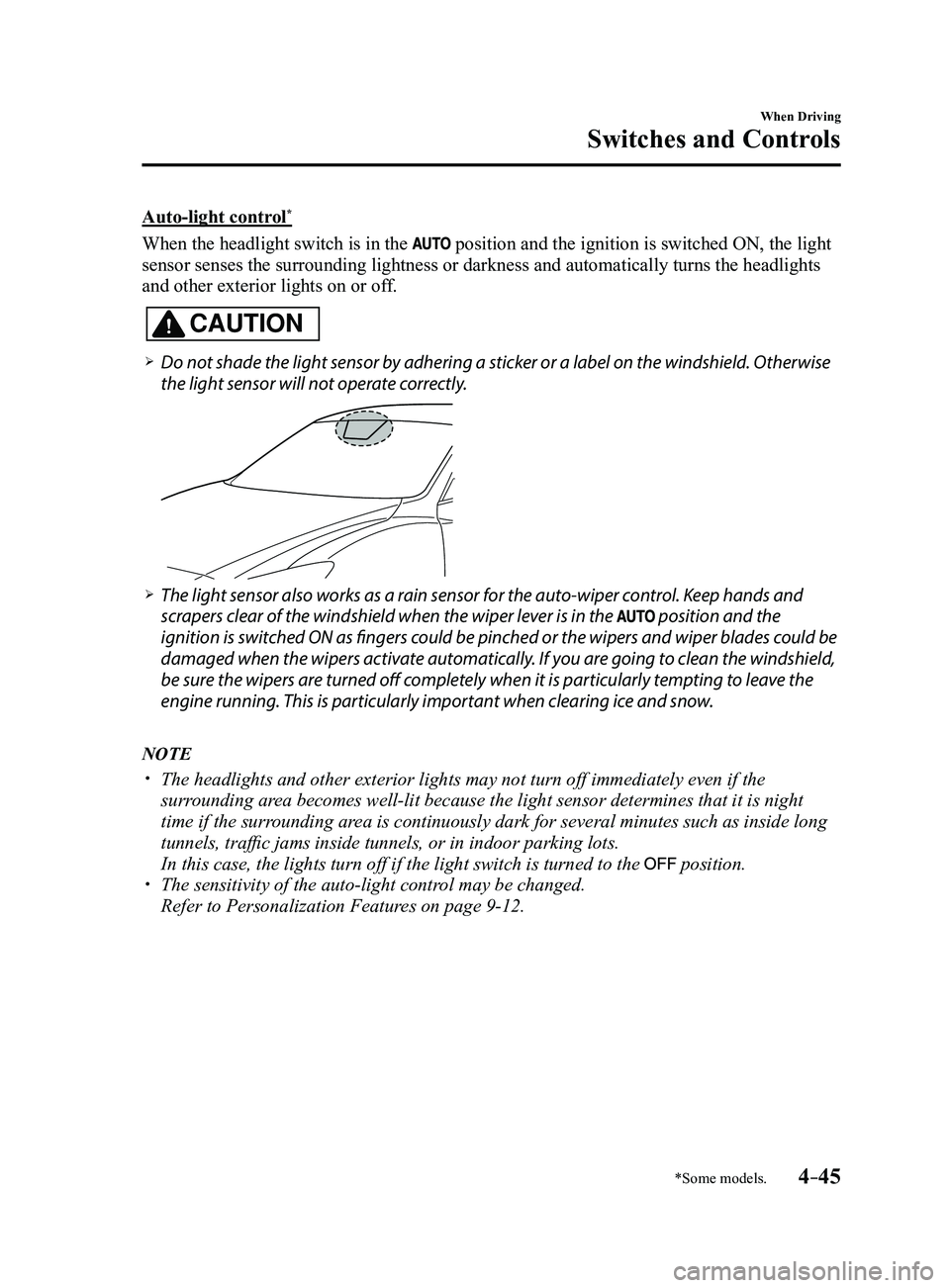
Do not shade the light sensor by adhering a sticker or a label on the windshield. Otherwise
the light sensor will not operate correctly.
The light sensor also works as a rain sensor for the auto-wiper control. Keep hands and
scrapers clear of the windshield when the wiper lever is in the position and the
ignition is switched ON as fingers could be pinched or the wipers and wiper blades could be
damaged when the wipers activate automatically. If you are going to clean the windshield,
be sure the wipers are turned off completely when it is particularly tempting to leave the
engine running. This is particularly important when clearing ice and snow.
NOTE
The headlights and other exterior lights may not turn off immediately ev\
en if the
surrounding area becomes well-lit because the light sensor determines that it is night\
time if the surrounding area is continuously dark for several minutes such as inside long
tunnels, traffic jams inside tunnels, or in indoor parking lots.
In this case, the lights turn off if the light switch is turned to the position. The sensitivity of the auto-light control may be changed.
Refer to Personalization Features on page 9-12.
Mazda3_8FL6-EA-16F_Edition2.indb 452016/08/10 17:36:15
Page 176 of 612
4–46
When Driving
Switches and Controls
Headlight High-Low Beam
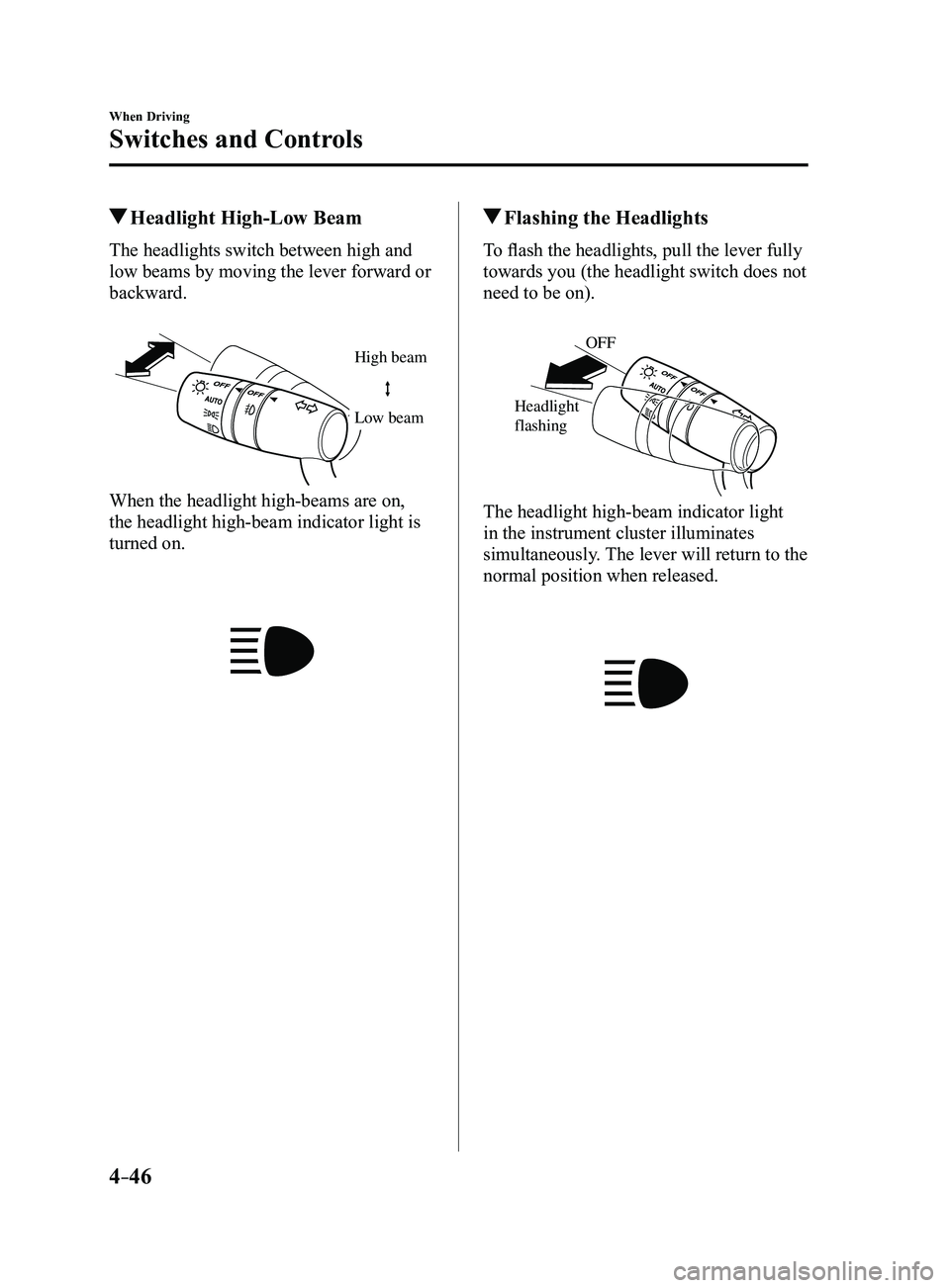
The headlights switch between high and
low beams by moving the lever forward or
backward.
High beam
Low beam
When the headlight high-beams are on,
the headlight high-beam indicator light is
turned on.
Flashing the Headlights
To flash the headlights, pull the lever fully
towards you (the headlight switch does not
need to be on).
OFF
Headlight
flashing
The headlight high-beam indicator light
in the instrument cluster illuminates
simultaneously. The lever will return to the
normal position when released.
Mazda3_8FL6-EA-16F_Edition2.indb 462016/08/10 17:36:16
Page 177 of 612
4–47
When Driving
Switches and Controls
Coming Home Light
The coming home light turns on the
headlights (low beams) when the lever is
operated.
To turn on the lights
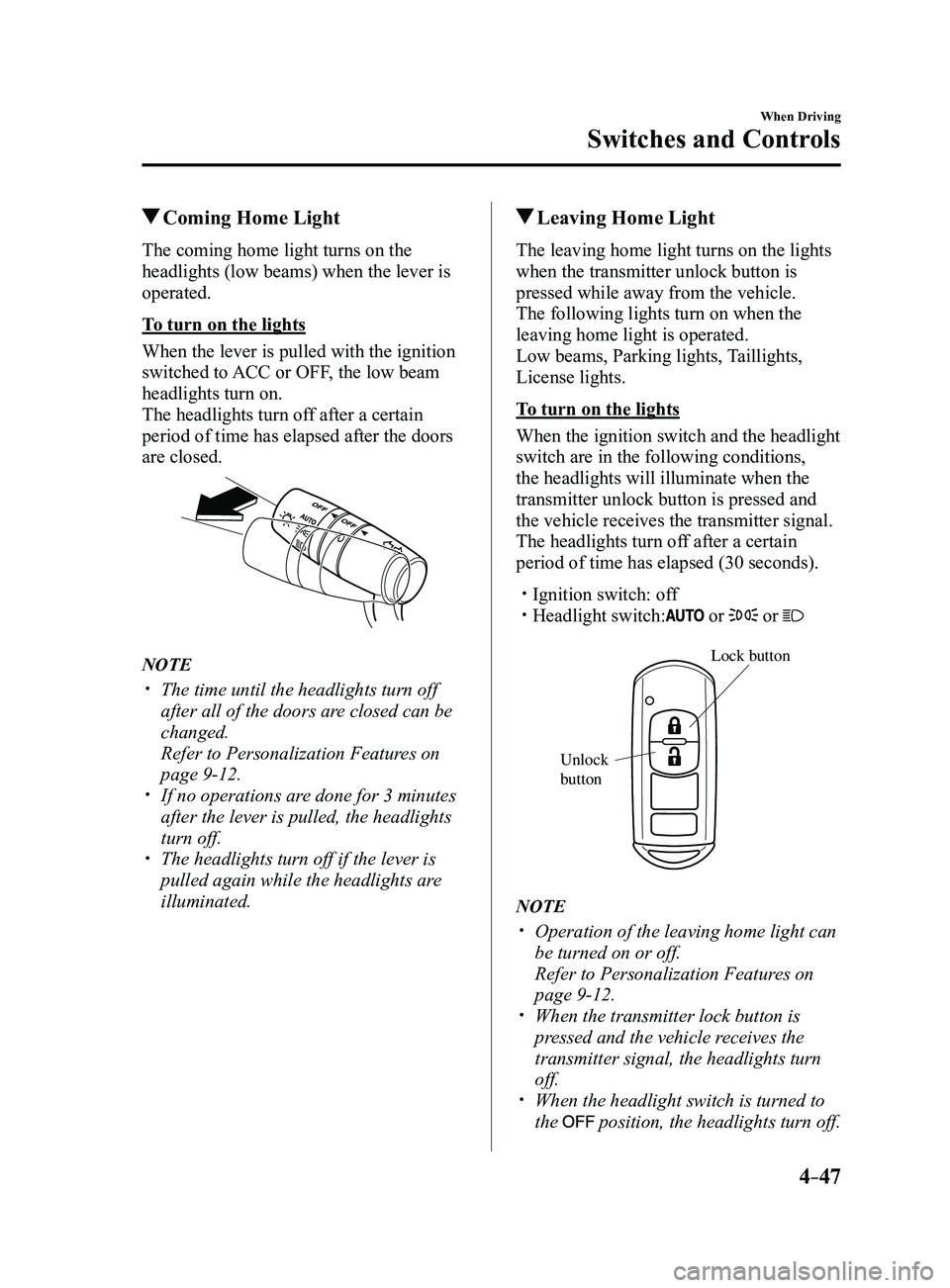
When the lever is pulled with the ignition
switched to ACC or OFF, the low beam
headlights turn on.
The headlights turn off after a certain
period of time has elapsed after the doors
are closed.
NOTE
The time until the headlights turn off
after all of the doors are closed can be
changed.
Refer to Personalization Features on
page 9-12. If no operations are done for 3 minutes
after the lever is pulled, the headlights
turn off.
The headlights turn off if the lever is
pulled again while the headlights are
illuminated.
Leaving Home Light
The leaving home light turns on the lights
when the transmitter unlock button is
pressed while away from the vehicle.
The following lights turn on when the
leaving home light is operated.
Low beams, Parking lights, Taillights,
License lights.
To turn on the lights
When the ignition switch and the headlight
switch are in the following conditions,
the headlights will illuminate when the
transmitter unlock button is pressed and
the vehicle receives the transmitter signal.
The headlights turn off after a certain
period of time has elapsed (30 seconds).
Ignition switch: off Headlight switch: or or
Lock button
Unlock
b
utton
NOTE
Operation of the leaving home light can
be turned on or off.
Refer to Personalization Featur es on
page 9-12. When the transmitter lock button is
pressed and the vehicle receives the
transmitter signal, the headlights turn
off.
When the headlight switch is turned to
the position, the headlights turn off.
Mazda3_8FL6-EA-16F_Edition2.indb 472016/08/10 17:36:17
Page 178 of 612
4–48
When Driving
Switches and Controls
*Some models.
Headlight Leveling*
The number of passengers and weight of
cargo in the luggage compartment change
the angle of the headlights.
The angle of the headlights will be
automatically adjusted when turning on
the headlights.
Daytime Running Lights
Some countries require moving vehicles
to have their lights on (daytime running
lights) during the daytime.
The daytime running lights turn on
automatically when the vehicle starts
moving.
They turn off when the parking brake is
operated or the shift lever is shifted to the
P position (automatic transaxle vehicle).
NOTE
(Except Canada)
The daytime running lights can be
deactivated.
Refer to Personalization Features on page
9-12.
Fog Lights*
The fog lights can be used when the
ignition is switched ON.
Use this switch to turn on the fog lights.
The fog lights will improve visibility at
night and during foggy conditions.
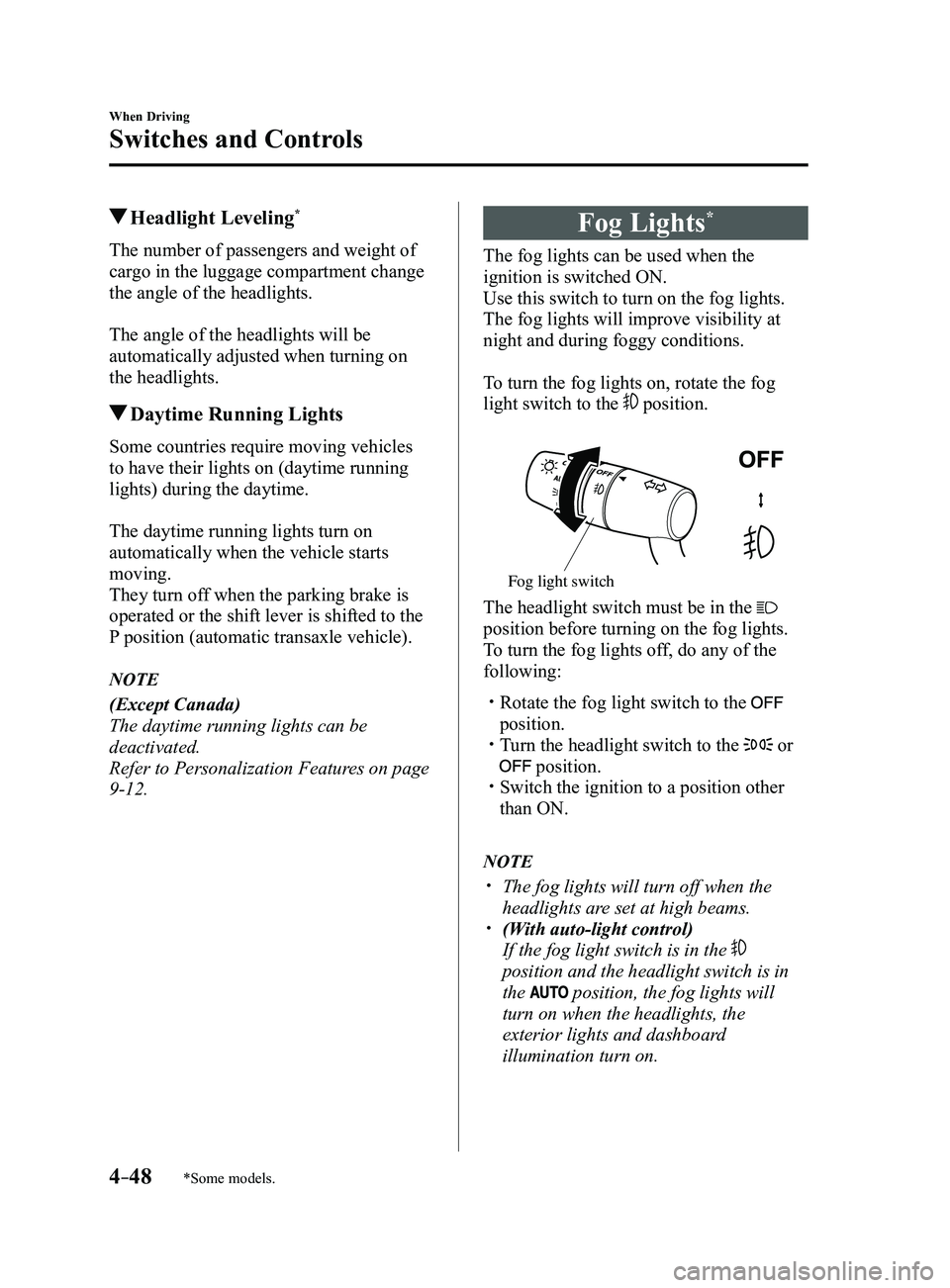
To turn the fog lights on, rotate the fog
light switch to the
position.
Fog light switch
The headlight switch must be in the
position before turning on the fog lights.
To turn the fog lights off, do any of the
following:
Rotate the fog light switch to the
position. Turn the headlight switch to the or
position. Switch the ignition to a position other
than ON.
NOTE
The fog lights will turn off when the
headlights are set at high beams. (With auto-light control)
If the fog light switch is in the
position and the headlight switch is in
the
position, the fog lights will
turn on when the headlights, the
exterior lights and dashboard
illumination turn on.
Mazda3_8FL6-EA-16F_Edition2.indb 482016/08/10 17:36:18
Page 212 of 612

4–82
When Driving
i-ACTIVSENSE
Pre-Crash Safety Technology
Pre-crash safety technology is designed to assist the driver in averting\
collisions or reduce
their severity in situations where they cannot be avoided.
Collision damage reduction in low vehicle speed range
Forward driving
Smart City Brake Support (SCBS)
........................................................................\
...........4-128
Collision damage reduction in medium/high speed range
Smart Brake Support (SBS)
........................................................................\
......................4-133
Camera and Sensors
Forward Sensing Camera (FSC)
The Forward Sensing Camera (FSC) detects lane indications and recogniz\
es headlights,
taillights and city lights during nighttime driving. In addition, it als\
o detects the vehicle
ahead, pedestrians, or obstructions. The following systems also use the Forward Sensing
Camera (FSC).
High Beam Control system (HBC) Lane-keep Assist System (LAS) & Lane Departure Warning System (LDWS) Traffic Sign Recognition System (TSR) Smart City Brake Support (SCBS) Smart Brake Support (SBS)
The Forward Sensing Camera (FSC) is installed at the top of the windsh\
ield near the
rearview mirror.
Refer to Forward Sensing Camera (FSC) on page
4-136.
Radar sensor (front)
The radar sensor (front) functions by detecting the radio waves reflected off a vehicle ahead
sent from the radar sensor. The following systems also use the radar sensor (front).
Mazda Radar Cruise Control (MRCC) Distance Recognition Support System (DRSS) Smart Brake Support (SBS)
The radar sensor (front) is mounted behind the radiator grille.
Refer to Radar Sensor (Front) on page
4-141.
Mazda3_8FL6-EA-16F_Edition2.indb 822016/08/10 17:36:36