set clock MAZDA MODEL 3 5-DOOR 2017 Owners Manual
[x] Cancel search | Manufacturer: MAZDA, Model Year: 2017, Model line: MODEL 3 5-DOOR, Model: MAZDA MODEL 3 5-DOOR 2017Pages: 612
Page 297 of 612
5–5
Interior Features
Climate Control System
*Some models.
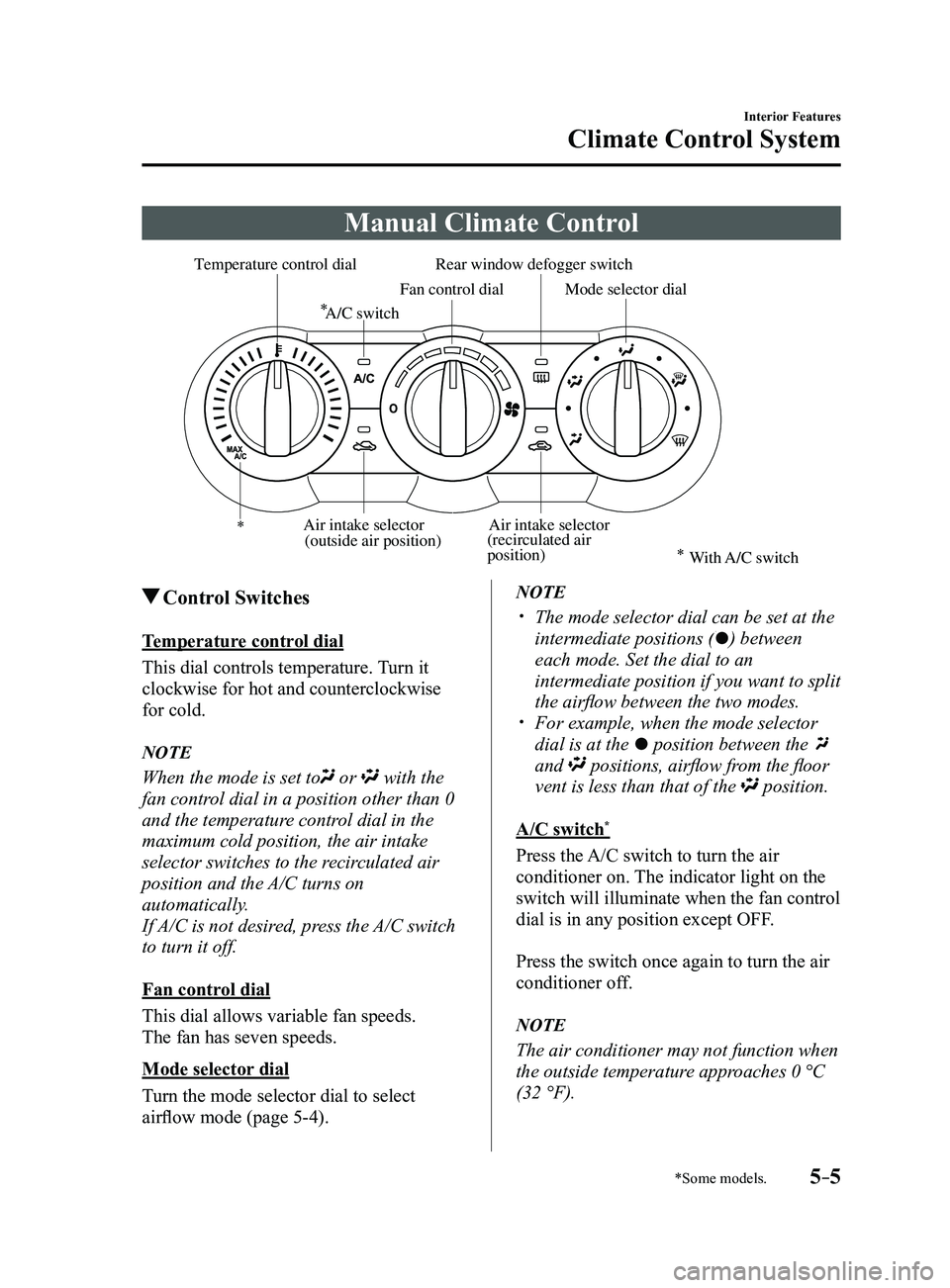
Manual Climate Control
Rear window defogger switch
Temperature control dial
Fan control dialMode selector dial
A/C switch
Air intake selector
(recirculated air
position)Air intake selector
(outside air position)
With A/C switch
Control Switches
Temperature control dial
This dial controls temperature. Turn it
clockwise for hot and counterclockwise
for cold.
NOTE
When the mode is set to or with the
fan control dial in a position other than 0
and the temperature control dial in the
maximum cold position, the air intake
selector switches to the recirculated air
position and the A/C turns on
automatically.
If A/C is not desired, press the A/C switch
to turn it off.
Fan control dial
This dial allows variable fan speeds.
The fan has seven speeds.
Mode selector dial
Turn the mode selector dial to select
airflow mode (page
5-4).
NOTE
The mode selector dial can be set at the
intermediate positions () between
each mode. Set the dial to an
intermediate position if you want to split
the airflow between the two modes.
For example, when the mode selector
dial is at the position between the
and positions, airflow from the floor
vent is less than that of the position.
A/C switch*
Press the A/C switch to turn the air
conditioner on. The indicator light on the
switch will illuminate when the fan control
dial is in any position except OFF.
Press the switch once again to turn the air
conditioner off.
NOTE
The air conditioner may not function when
the outside temperature approaches 0 °C
(32 °F).
Mazda3_8FL6-EA-16F_Edition2.indb 52016/08/10 17:37:12
Page 299 of 612
5–7
Interior Features
Climate Control System
CAUTION
If the air conditioner is used while
driving up long hills or in heavy
traffic, monitor the engine coolant
temperature warning light to see if it is
illuminated or flashing (page
4-23).
The air conditioner may cause engine
overheating. If the warning light is
illuminated or flashing, turn the air-
conditioning off (page
7-20).
NOTE
When maximum cooling is desir ed,
set the temperature control dial to the
extreme cold position and set the air
intake selector to the recirculated air
position, then turn the fan control dial
fully clockwise.
If warmer air is desired at floor level,
set the mode selector dial at the
position and adjust the temperature
control dial to maintain maximum
comfort.
The air to the floor is warmer than air
to the face (except when the temperature
control dial is set at the extreme hot or
cold position).
Ventilation
1. Set the mode selector dial to the
position.
2. Set the air intake selector to the outside
air position.
3. Set the temperature control dial to the
desired position.
4. Set the fan control dial to the desired
speed.
Windshield Defrosting and
Defogging
1. Set the mode selector dial to the
position.
2. Set the temperature control dial to the
desired position.
3. Set the fan control dial to the desired
speed.
4. If dehumidified heating is desired, turn
on the air conditioner.
WARNING
Do not defog the windshield using the
position with the temperature
control set to the cold position:
Using the
position with the
temperature control set to the cold
position is dangerous as it will cause
the outside of the windshield to fog up.
Your vision will be hampered, which
could lead to a serious accident. Set
the temperature control to the hot or
warm position when using the
position.
NOTE
For maximum defr osting, turn on the air
conditioner, set the temperature control
dial to the extreme hot position, and
turn the fan control dial fully clockwise.
If warm air is desired at the floor, set the
mode selector dial to the position. In the or position, the air
conditioner is automatically turned on
and the outside air position is
automatically selected to defrost the
windshield. In the
or position, the
outside air position cannot be changed
to the recirculated air position.
Mazda3_8FL6-EA-16F_Edition2.indb 72016/08/10 17:37:14
Page 301 of 612
5–9
Interior Features
Climate Control System
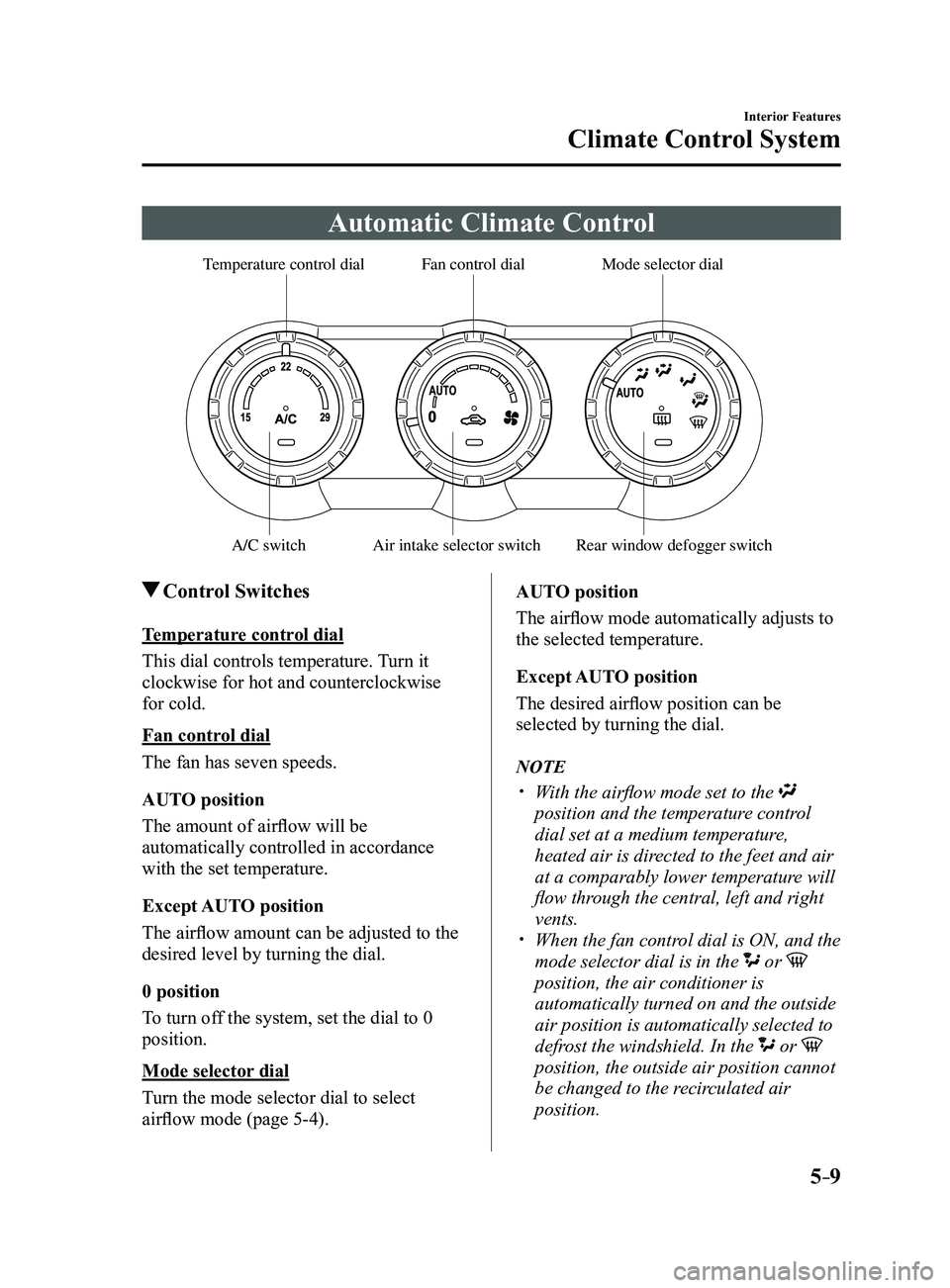
Automatic Climate Control
Rear window defogger switch
Temperature control dialFan control dialMode selector dial
A/C switchAir intake selector switch
Control Switches
Temperature control dial
This dial controls temperature. Turn it
clockwise for hot and counterclockwise
for cold.
Fan control dial
The fan has seven speeds.
AUTO position
The amount of airflow will be
automatically controlled in accordance
with the set temperature.
Except AUTO position
The airflow amount can be adjusted to the
desired level by turning the dial.
0 position
To turn off the system, set the dial to 0
position.
Mode selector dial
Turn the mode selector dial to select
airflow mode (page
5-4).AUTO position
The airflow mode automatically adjusts to
the selected temperature.
Except AUTO position
The desired airflow position can be
selected by turning the dial.
NOTE
With the airflow mode set to the
position and the temperature control
dial set at a medium temperature,
heated air is directed to the feet and air
at a comparably lower temperature will
flow through the central, left and right
vents.
When the fan contr
ol dial is ON, and the
mode selector dial is in the or
position, the air conditioner is
automatically turned on and the outside
air position is automatically selected to
defrost the windshield. In the
or
position, the outside air position cannot
be changed to the recirculated air
position.
Mazda3_8FL6-EA-16F_Edition2.indb 92016/08/10 17:37:15
Page 305 of 612
5–13
Interior Features
Climate Control System
OFF switch
Pressing the OFF switch shuts off the
climate control system.
Temperature control dial
This dial controls temperature. Turn it
clockwise for hot and counterclockwise
for cold.
When the DUAL switch is off:
Turn the driver temperature control dial
to control the temperature throughout
the entire cabin.
When the DUAL switch is on:
Turn the driver or front passenger
temperature control dial to
independently control the temperature
on each side of the cabin.
NOTE
The climate contr ol system changes to
the individual operation mode (DUAL
switch indicator light illuminated) by
turning the front passenger temperature
control dial even when the DUAL switch
is off, which allows individual control
of the set temperature for the driver and
front passenger.
The temperature units for the
temperature setting display can be
changed in conjunction with the
temperature units for the outside
temperature display. Refer to Outside
Temperature Display on page
4-19.
Fan control switch
The fan has seven speeds. The selected
speed will be displayed.
Mode selector switch
The desired airflow mode can be selected
(page
5-4).
NOTE
With the airflow mode set to the
position and the temperature control
dial set at a medium temperature,
heated air is directed to the feet and air
at a comparably lower temperature will
flow through the central, left and right
vents.
To set the air vent to , press the
windshield defroster switch. In the or position, the air
conditioner is automatically turned on
and the outside air position is
automatically selected to defrost the
windshield. In the
or position, the
outside air position cannot be changed
to the recirculated air position.
A/C switch
Pressing the A/C switch while the AUTO
switch is turned on will turn off the air-
conditioning (cooling/dehumidifying
functions).
The air-conditioning can be turned on and
off by pressing the A/C switch while the
fan control switch is on.
NOTE
The air-conditioning operates when the
A/C switch is pressed even if the fan is
off.
The air conditioner may not function
when the outside temperature
approaches 0 °C (32 °F).
Mazda3_8FL6-EA-16F_Edition2.indb 132016/08/10 17:37:17
Page 318 of 612
![MAZDA MODEL 3 5-DOOR 2017 Owners Manual 5–26
Interior Features
Audio System
Audio set [Type A (non-touchscreen)]
Power/Volume/Sound Controls ........................................................................\
.....page 5-28
Clock](/img/28/40993/w960_40993-317.png "MAZDA MODEL 3 5-DOOR 2017 Owners Manual 5–26
Interior Features
Audio System
Audio set [Type A (non-touchscreen)]
Power/Volume/Sound Controls ........................................................................\
.....page 5-28
Clock")
5–26
Interior Features
Audio System
Audio set [Type A (non-touchscreen)]
Power/Volume/Sound Controls ........................................................................\
.....page 5-28
Clock ........................................................................\
.............................................page 5-30
Operating the Radio ........................................................................\
......................page 5-32
How to use Auxiliary jack/USB port ....................................................................page 5-33
Mazda3_8FL6-EA-16F_Edition2.indb 262016/08/10 17:37:25
Page 320 of 612
5–28
Interior Features
Audio System
Power/Volume/Sound Controls
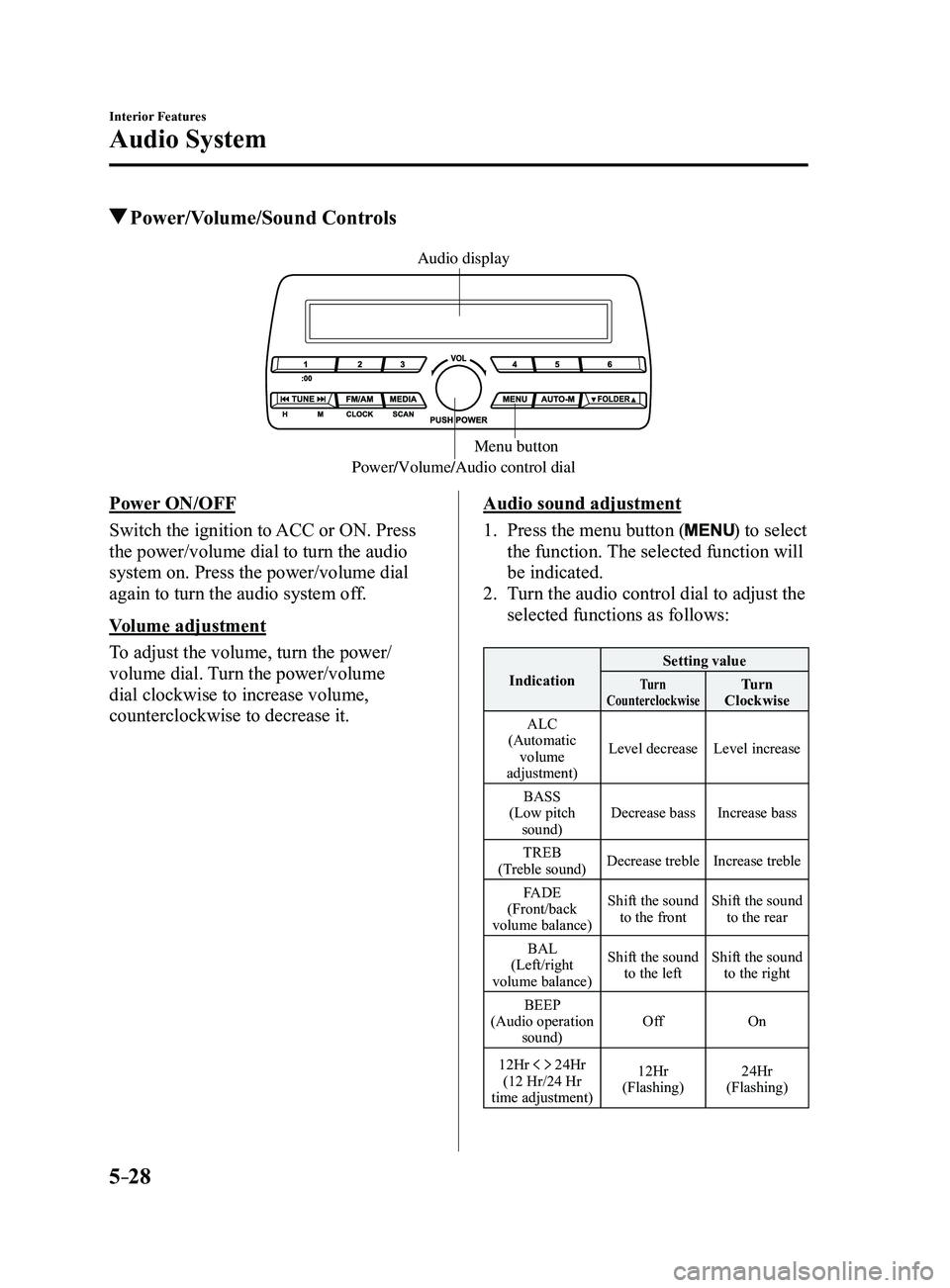
Power/Volume/Audio control dialMenu button
Audio display
Power ON/OFF
Switch the ignition to ACC or ON. Press
the power/volume dial to turn the audio
system on. Press the power/volume dial
again to turn the audio system off.
Volume adjustment
To adjust the volume, turn the power/
volume dial. Turn the power/volume
dial clockwise to increase volume,
counterclockwise to decrease it.Audio sound adjustment
1. Press the menu button () to select
the function. The selected function will
be indicated.
2. Turn the audio control dial to adjust the
selected functions as follows:
Indication Setting valueTurn
CounterclockwiseTurn
Clockwise
ALC
(Automatic volume
adjustment) Level decrease
Level increase
BASS
(Low pitch sound) Decrease bass
Increase bass
TREB
(Treble sound) Decrease treble
Increase treble
FADE
(Front/back
volume balance) Shift the sound
to the front Shift the sound
to the rear
BAL
(Left/right
volume balance) Shift the sound
to the left Shift the sound
to the right
BEEP
(Audio operation sound) Off
On
12Hr
24Hr
(12 Hr/24 Hr
time adjustment) 12Hr
(Flashing) 24Hr
(Flashing)
Mazda3_8FL6-EA-16F_Edition2.indb 282016/08/10 17:37:26
Page 321 of 612
5–29
Interior Features
Audio System
NOTE
If not operated for several seconds, the
display returns to the previous display. To
reset bass, treble, fade, and balance, press
the menu button (
) for 2 seconds.
The unit will beep and “CLEAR” will be
displayed.
ALC (Automatic volume adjustment)
The automatic level control (ALC)
changes the audio volume automatically
according to the vehicle speed. The faster
the vehicle speed, the higher the volume
increases. ALC has ALC OFF and ALC
LEVEL 1 to 7 modes. At ALC LEVEL 7,
the amount that the volume can increase
is at the maximum. Select the mode
according to the driving conditions.
BEEP (Audio operation sound)
The setting for the operation sound when
pressing and holding a button can be
changed. The initial setting is ON. Set to
OFF to mute the operation sound.
12Hr
24Hr (12 Hr/24 Hr time
adjustment)
Rotating the audio control dial switches
the display between 12 and 24-hour clock
time (page
5-30).
Mazda3_8FL6-EA-16F_Edition2.indb 292016/08/10 17:37:26
Page 322 of 612
5–30
Interior Features
Audio System
Clock
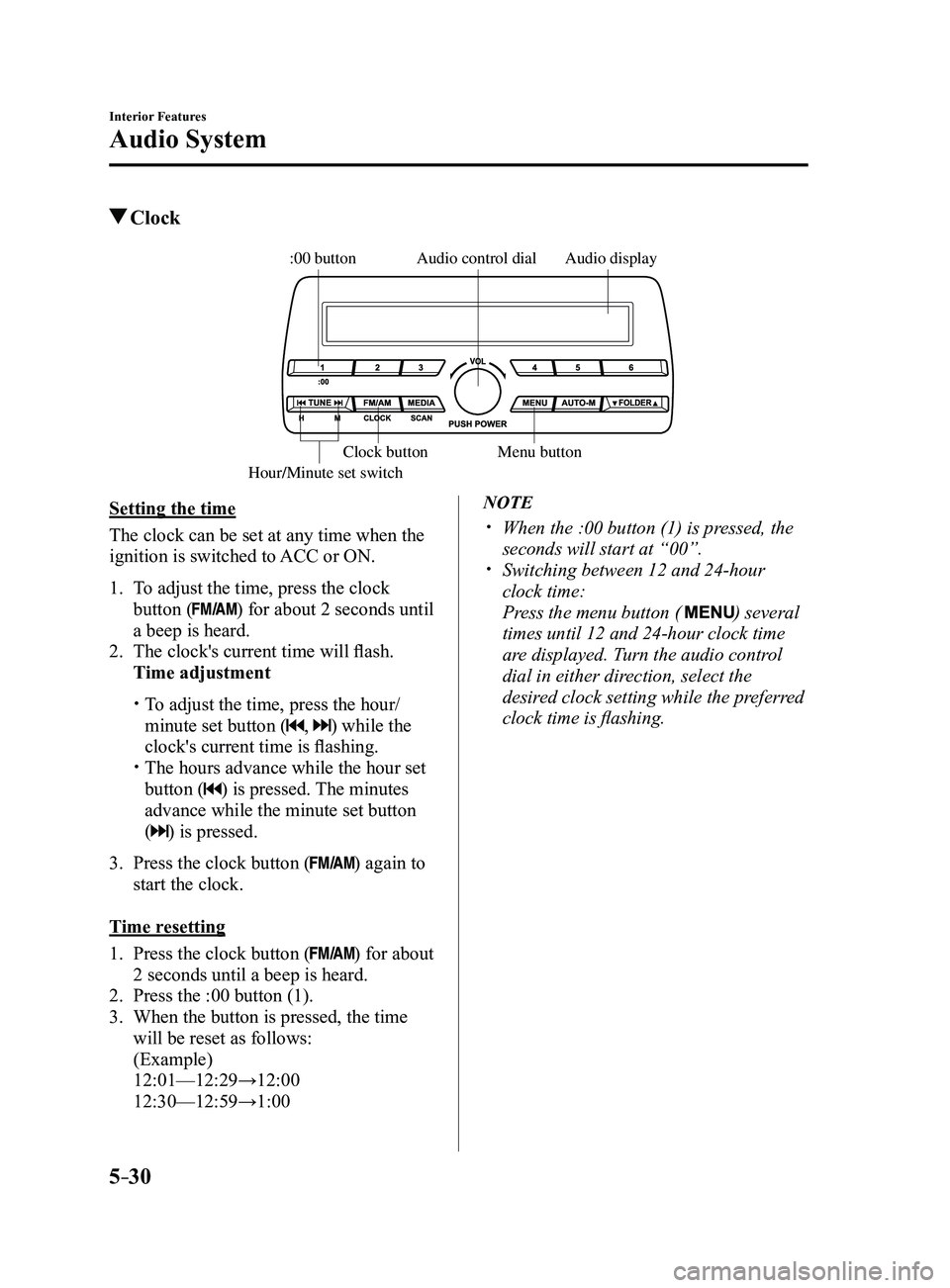
Audio display
Audio control dial
Hour/Minute set switch:00 button
Menu button
Clock button
Setting the time
The clock can be set at any time when the
ignition is switched to ACC or ON.
1. To adjust the time, press the clock
button () for about 2 seconds until
a beep is heard.
2. The clock's current time will flash.
Time adjustment
To adjust the time, press the hour/
minute set button (, ) while the
clock's current time is flashing.
The hours advance while the hour set
button () is pressed. The minutes
advance while the minute set button
(
) is pressed.
3. Press the clock button () again to
start the clock.
Time resetting
1. Press the clock button () for about
2 seconds until a beep is heard.
2. Press the :00 button (1).
3. When the button is pressed, the time
will be reset as follows:
(Example)
12:01—12:29→12:00
12:30—12:59→1:00
NOTE
When the :00 button (1) is pr essed, the
seconds will start at “00”. Switching between 12 and 24-hour
clock time:
Press the menu button ( ) several
times until 12 and 24-hour clock time
are displayed. Turn the audio control
dial in either direction, select the
desired clock setting while the preferred
clock time is flashing.
Mazda3_8FL6-EA-16F_Edition2.indb 302016/08/10 17:37:27
Page 326 of 612
![MAZDA MODEL 3 5-DOOR 2017 Owners Manual 5–34
Interior Features
Audio System
Audio set [Type B (touchscreen)]
NOTE
The explanation of functions described in this manual may differ from the actual
operation, and the shapes of screens and b](/img/28/40993/w960_40993-325.png "MAZDA MODEL 3 5-DOOR 2017 Owners Manual 5–34
Interior Features
Audio System
Audio set [Type B (touchscreen)]
NOTE
The explanation of functions described in this manual may differ from the actual
operation, and the shapes of screens and b")
5–34
Interior Features
Audio System
Audio set [Type B (touchscreen)]
NOTE
The explanation of functions described in this manual may differ from the actual
operation, and the shapes of screens and buttons and the letters and cha\
racters displayed
may also differ from the actual appearance.
Additionally, depending on future software updates, the content may successively cha\
nge
without notice.
Audio Set (Type B) has three different human interfaces.
Commander switch Touch panel Voice recognition with steering switch and microphone
Commander switch operation
NOTE
For safety reasons, some operations are disabled while the vehicle is being driven.
Volume dial operation
Volume dial
Press the volume dial to switch the audio MUTE on and off.
Turn the volume dial to adjust the volume. The volume increases by turning the dial
clockwise, and decreases by turning it counterclockwise.
Mazda3_8FL6-EA-16F_Edition2.indb 342016/08/10 17:37:29
Page 332 of 612
5–40
Interior Features
Audio System
Volume/Display/Sound Controls
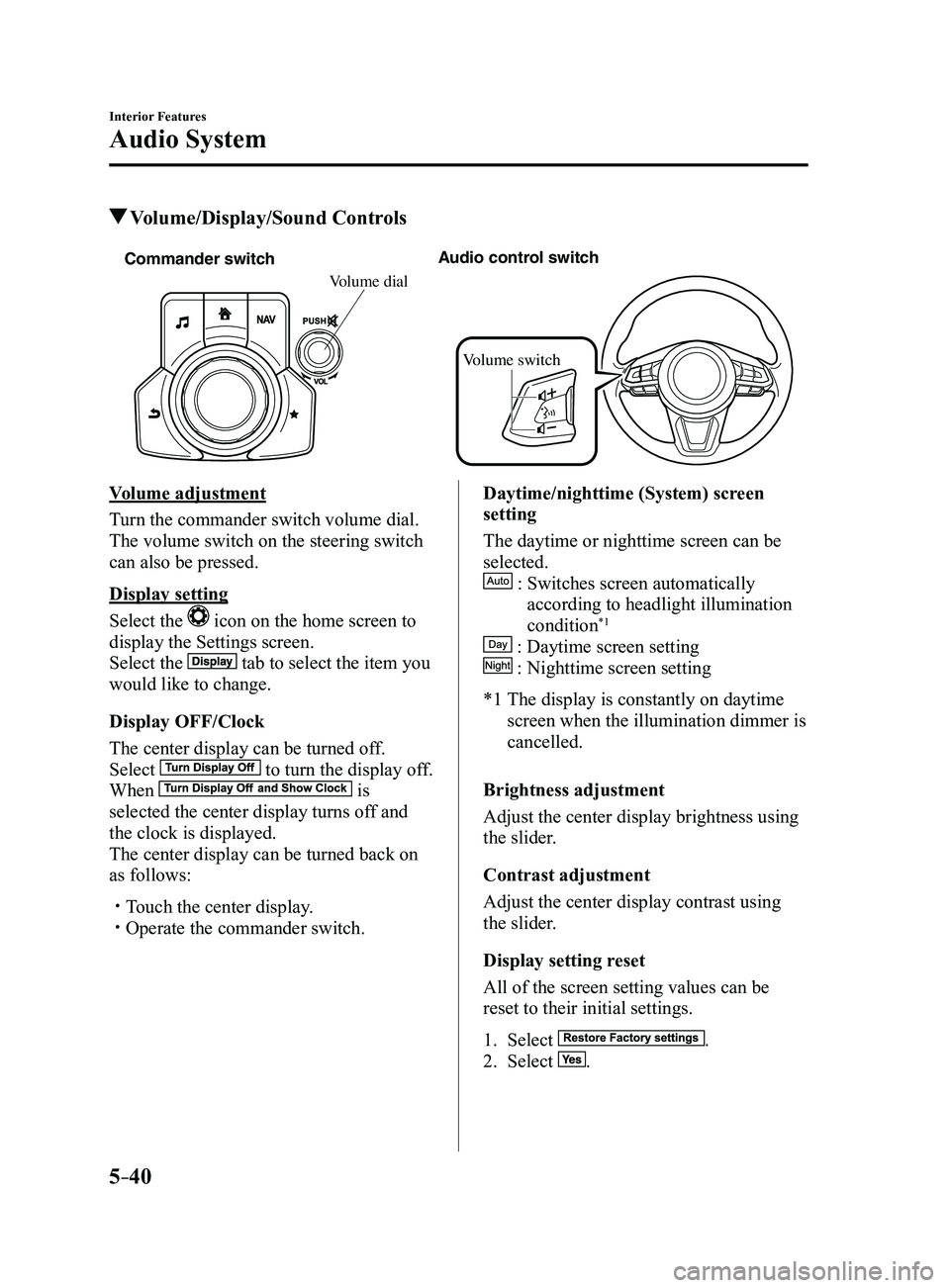
Commander switchAudio control switch
Volume switch
Volume dial
Volume adjustment
Turn the commander switch volume dial.
The volume switch on the steering switch
can also be pressed.
Display setting
Select the
icon on the home screen to
display the Settings screen.
Select the
tab to select the item you
would like to change.
Display OFF/Clock
The center display can be turned off.
Select
to turn the display off.
When is
selected the center display turns off and
the clock is displayed.
The center display can be turned back on
as follows:
Touch the center display. Operate the commander switch.
Daytime/nighttime (System) screen
setting
The daytime or nighttime screen can be
selected.
: Switches screen automatically
according to headlight illumination
condition*1
: Daytime screen setting
: Nighttime screen setting
*1 The display is constantly on daytime
screen when the illumination dimmer is
cancelled.
Brightness adjustment
Adjust the center display brightness using
the slider.
Contrast adjustment
Adjust the center display contrast using
the slider.
Display setting reset
All of the screen setting values can be
reset to their initial settings.
1. Select .
2. Select .
Mazda3_8FL6-EA-16F_Edition2.indb 402016/08/10 17:37:35