battery MAZDA MODEL 3 5-DOOR 2018 Owner's Manual
[x] Cancel search | Manufacturer: MAZDA, Model Year: 2018, Model line: MODEL 3 5-DOOR, Model: MAZDA MODEL 3 5-DOOR 2018Pages: 624, PDF Size: 59.23 MB
Page 151 of 624

When you've slowed to about 5 km/h (3
mph), - - - L/100 km (- - - mpg) will be
displayed.
Average vehicle speed mode
This mode displays the average vehicle
speed by calculating the distance and the
time traveled since connecting the battery
or resetting the data.
Average vehicle speed will be calculated
and displayed every 10 seconds.
To clear the data being displayed, press the
INFO switch for more than 1.5 seconds.
After pressing the INFO switch, - - - km/h
(- - - mph) will be d isplayed for about 1
minute before the vehicle speed is
recalculated and displayed.
When Driving
Instrument Cluster and Display
4-19
Mazda3_8GE4-EA-17F_Edition1 2017-4-7 11:59:21
Page 153 of 624

NOTE
Wearing polarized sunglasses will reduce the visibility of the active driving display due to
the characteristics of the display.
If the battery has been removed and re-installed or the battery voltage is low, the adjusted
position may deviate.
The display may be difficult to view or temporarily affected by weather conditions such as
rain, snow, light, and temperature.
If the audio system is removed, the active driving display cannot be operated.
The active driving display indicates the following information:
Blind Spot Monitoring (BSM) Ope ration Conditions and Warnings
Refer to Blind Spot Monitoring (BSM) on page 4-84.
Distance Recognition Support System (DRSS) Warnings
Refer to Distance Recognition Support System (DRSS) on page 4-9 6.
Traffic Sign Recognition System (TSR) traffic signs and Warnings
Refer to Traffic Sign Recognition System (TSR) on page 4-90.
Mazda Radar Cruise Control (MRCC) Operation Conditions and Warn ings
Refer to Mazda Radar Cruise Control (MRCC) on page 4-102.
Lane-keep Assist System (LAS) & Lane Departure Warning System ( LDWS) Operation
Conditions and Warnings
Refer to Lane-keep Assist System (LAS) & Lane Departure Warning System (LDWS) on
page 4-113.
Smart City Brake Support (SCBS) Warnings
Refer to Smart City Brake Support (SCBS) on page 4-124.
Smart Brake Support (SBS) Warnings
Refer to Smart Brake Support (SBS) on page 4-128.
Cruise Control Operation Conditions
Refer to Cruise Control on page 4-141.
Navigation Guidance (vehicles with navigation system)
Speed limit indicator (vehic les with navigation system)
Vehicle Speed
When Driving
Instrument Cluster and Display
4-21
Mazda3_8GE4-EA-17F_Edition1 2017-4-7 11:59:21
Page 175 of 624
Lighting Control
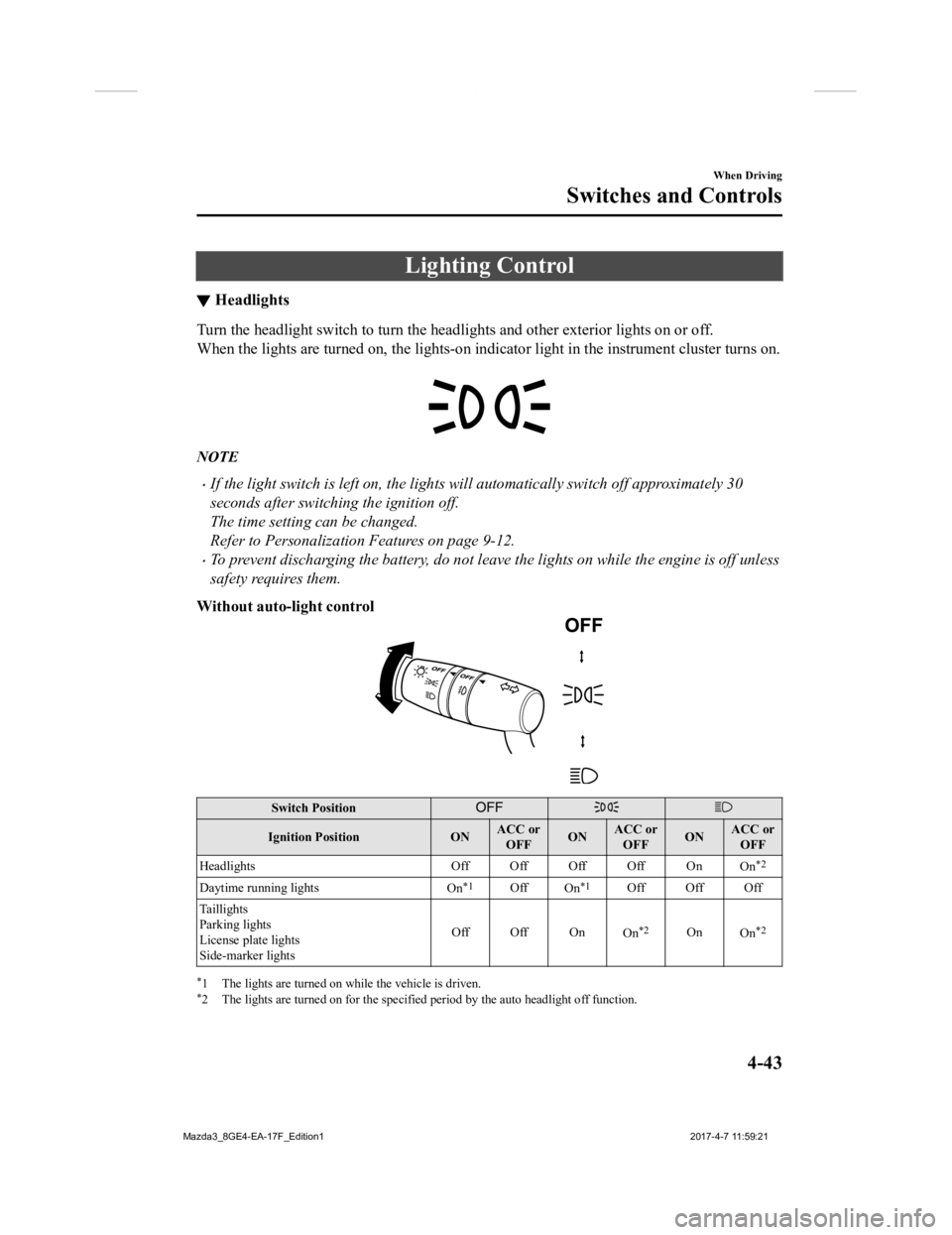
▼Headlights
Turn the headlight switch to turn
the headlights and other exterior lights on or off.
When the lights are turned on, the lights-on indicator light in the instrument cluster turns on.
NOTE
If the light switch is left on, the lights will automatically switch off approximately 30
seconds after switching the ignition off.
The time setting can be changed.
Refer to Personalization Features on page 9-12.
To prevent discharging the battery, do not leave the lights on while the engine is off unless
safety requires them.
Without auto-light control
Switch Position
Ignition Position ONACC or
OFF ONACC or
OFF ONACC or
OFF
Headlights Off Off Off Off On
On
*2
Daytime running lightsOn*1OffOn*1Off Off Off
Taillights
Parking lights
License plate lights
Side-marker lights Off Off On
On
*2OnOn*2
*1 The lights are turned on wh ile the vehicle is driven.*2 The lights are turned on for the specified period by the auto headlight off function.
When Driving
Switches and Controls
4-43
Mazda3_8GE4-EA-17F_Edition1 2017-4-7 11:59:21
Page 189 of 624
WA R N I N G
Do not use the HomeLink system with any
garage door opener that lacks the safety
stop and reverse feature:
Using the HomeLink system with any
garage door opener that lacks the safety
stop and reverse feature as required by
federal safety standards is dangerous. ( This
includes garage doors manufactured
before April 1, 1982.)
Using these garage door openers can
increase the risk of serious injury or death.
For further information, contact HomeLink
at 1-800-355-3515 or www.homelink.com
or an Authorized Mazda Dealer.
Always check the areas surrounding
garage doors and gates for people or
obstructions before programming or
during operation of the HomeLink system:
Programming or operating the HomeLink
system without verifying the safety of areas
surrounding garage doors and gates is
dangerous and could result in an
unexpected accident and serious injury if
someone were to be hit.
NOTE
The programming will not be erased even
if the battery is disconnected.
▼ Pre-programming the HomeLink
System
NOTE
It is recommended that a new battery be
placed in the hand-held transmitter of the
device being programmed to HomeLink
for quicker training and accurate
transmission of the radio-frequency signal.
Verify that there is a remote control
transmitter available for the device you
would like to program.
Disconnect the power to the device.
▼Programming the HomeLink
System
CAUTION
When programming a garage door opener
or a gate, disconnect the power to these
devices before performing programming.
Continuous operation of the devices could
damage the motor.
The HomeLink system provides 3 buttons
which can be individually selected and
programmed using the transmitters for
current, on-market devices as follows:
1. Disconnect the power to the garage
door opener or gate programmed to the
hand-held transmitter.
2. Position the end of your hand-held transmitter 2.5―7.5 cm (1―3 inches)
away from the HomeLink button you
wish to program while keeping the
indicator light in view.
When Driving
Switches and Controls
4-57
Mazda3_8GE4-EA-17F_Edition1 2017-4-7 11:59:21
Page 194 of 624
WA R N I N G
Do not drive the vehicle with the EPB
applied:
If the vehicle is driven with the parking
brake applied, the brake parts may
generate heat and the brake system may
not operate, leading to an accident.
Before driving, release the EPB and verify
that the brake system warning light is
turned off.
NOTE
The EPB cannot be applied or released
while the vehicle battery is dead.
An operation sound occurs when
applying or releasing the EPB, however,
this does not indicate a malfunction.
If the EPB is not used for long periods,
an automatic inspection of the system is
performed while the vehicle is parked.
An operation sound can be heard,
however, this does not indicate a
problem.
When the EPB is applied and the
ignition is switched OFF, an operation
sound can be heard, however, this does
not indicate a problem.
The brake pedal may move while the
EPB is being applied or released,
however, this does not indicate a
problem.
If the EPB switch is continually pulled
while driving the vehicle, the EPB will
be applied and the EPB warning beep
will be activated. When the switch is
released, the EPB is released and the
beep stops.
If the EPB is applied with the ignition
switched off or in ACC, the brake system
warning light in the instrument cluster
and the indicator light in the switch may
turn on for 15 seconds.
When running the vehicle through an
automatic car wash, it may be necessary
to switch the ignition off with the
parking brake released depending on
the type of automatic car wash.
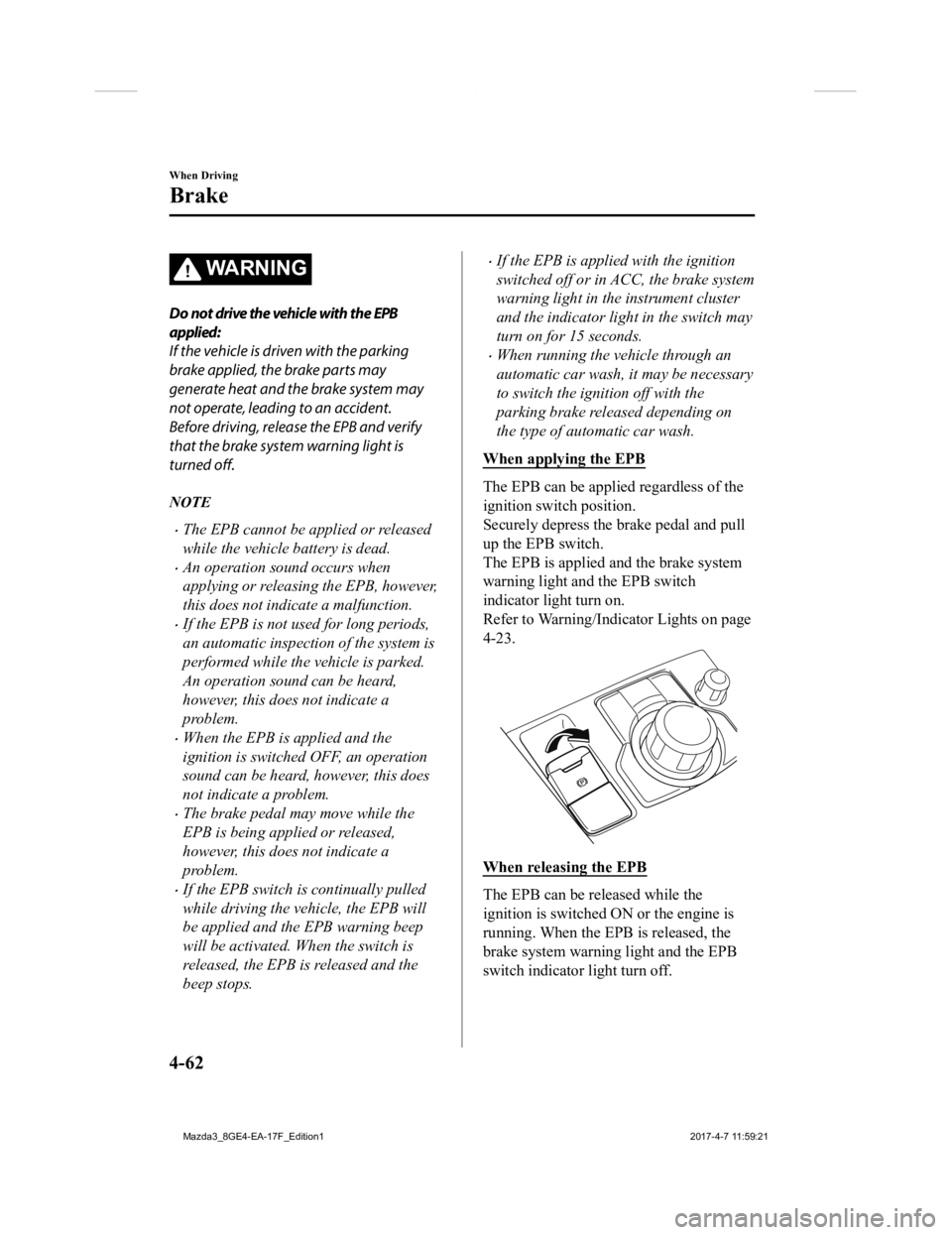
When applying the EPB
The EPB can be applied regardless of the
ignition switch position.
Securely depress the brake pedal and pull
up the EPB switch.
The EPB is applied and the brake system
warning light and the EPB switch
indicator light turn on.
Refer to Warning/Indicator Lights on page
4-23.
When releasing the EPB
The EPB can be released while the
ignition is switched ON or the engine is
running. When the EPB is released, the
brake system warning light and the EPB
switch indicator light turn off.
When Driving
Brake
4-62
Mazda3_8GE4-EA-17F_Edition1 2017-4-7 11:59:21
Page 217 of 624

NOTE
The BSM will operate when all of the following conditions are met:
The ignition is switched ON.
The BSM OFF indicator light in the instrument cluster is turned off.
The vehicle speed is about 10 km/h (6.3 mph) or faster.
The BSM will not operate under the following circumstances.
The vehicle speed falls below about 10 km/h (6.3 mph) even though the BSM OFF
switch indicator light is turned off.
The shift lever (manual transa xle)/selector lever (automatic transaxle) is shifted to
reverse (R) and the vehicle is reversing.
The turning radius is small (making a sharp turn, turning at intersections).
In the following cases, the BSM warning indication/warning light turns on and operation
of the system is stopped. If the BSM warning indication/warning light remains
illuminated, have the vehicle inspected at an Authorized Mazda Dealer as soon as
possible.
Some problem with the system including the BSM warning indicator lights is detected.
A large deviation in the installation position of a radar sensor (rear) on the vehicle has
occurred.
There is a large accumulation of snow or ice on the rear bumper near a radar sensor
(rear). Remove any snow, ice or mud on the rear bumper.
Driving on snow-covered roads for long periods.
The temperature near the radar sensors (rear) becomes extremely hot due to driving for
long periods on slopes during the summer.
The battery voltage has decreased.
Under the following conditions, the radar sensors (rear) cannot detect target objects or it
may be difficult to detect them.
A vehicle is in the detection area at the rear in an adjacent driving lane but it does not
approach. The BSM determines the condition based on radar detection data.
A vehicle is traveling alongside your vehicle at nearly the same speed for an extended
period of time.
Vehicles approaching in the opposite direction.
A vehicle in an adjacent driving lane is attempting to pass your vehicle.
A vehicle is in an adjacent lane on a road with extremely wide driving lanes. The
detection area of the radar sensors (rear) is set at the road width of expressways.
When Driving
i-ACTIVSENSE
4-85
Mazda3_8GE4-EA-17F_Edition1 2017-4-7 11:59:21
Page 232 of 624

The temperature near the radar sensors becomes extremely hot due to driving for long
periods on slopes during the summer.
The battery voltage has decreased.
Under the following conditions, the radar sensors (rear) cannot detect target objects or it
may be difficult to detect them.
The vehicle speed when reversing is about 15 km/h (9 mph) or faster.
The radar sensor (rear) detection area is obstructed by a nearby wall or parked vehicle.
(Reverse the vehicle to a position where the radar sensor detection area is no longer
obstructed.)
Your vehicle
A vehicle is approaching directly from the rear of your vehicle.
Your vehicle
The vehicle is parked on a slant.
Your vehicle
Directly after the Blind Spot Monitoring (BSM) system becomes operable using the
personalization feature.
Radio wave interference from a radar sensor equipped on a nearby parked vehicle.
When Driving
i-ACTIVSENSE
4-100
Mazda3_8GE4-EA-17F_Edition12017-4-7 11:59:21
Page 269 of 624

Do not use the front bumper to push other vehicles or obstructions such as when pulling
out of a parking space. Otherwise, the radar sensor (front) could be hit and its position
deviated.
Do not remove, disassemble, or modify the radar sensor (front).
For repairs, replacement or paint work around the radar sensor (front), consult an
Authorized Mazda Dealer.
Do not modify the suspension. If the suspension are modified, the vehicle's posture could
change and the radar sensor (front) may not be able to correctly detect a vehicle ahead or
an obstruction.
NOTE
Under the following conditions, the radar sensor (front) may not be able to detect vehicles
ahead or obstructions correctly and each system may not operate normally.
The rear surface of a vehicle ahead does not reflect radio waves effectively, such as an
unloaded trailer or an automobile with a loading platform covered by a soft top,
vehicles with a hard plastic tailgate, and round-shaped vehicles.
Vehicles ahead with low vehicle height and thus less area for reflecting radio waves.
Visibility is reduced due to a vehicle ahead casting off water, snow, or sand from its tires
and onto your windshield.
The trunk/luggage compartment is loaded with heavy objects or the rear passenger
seats are occupied.
Ice, snow, or soiling is on the front surface of the front emblem.
During inclement weather such as rain, snow, or sand storms.
When driving near facilities or objects emitting strong radio waves.
Under the following conditions, the radar sensor (front) may not be able to detect vehicles
ahead or obstructions.
The beginning and end of a curve.
Roads with continuous curves.
Narrow lane roads due to road construction or lane closures.
The vehicle ahead enters the radar sensor's blind spot.
The vehicle ahead is running abnormally due to accident or vehicle damage.
Roads with repeated up and down slopes
Driving on poor roads or unpaved roads.
The distance between your vehicle and the vehicle ahead is extremely short.
A vehicle suddenly comes close such as by cutting into the lane.
To prevent incorrect operation of the system, use tires of the same specified size,
manufacturer, brand, and tread pattern on all four wheels. In addition, do not use tires
with significantly different wear patterns or tire pressures on the same vehicle (Including
the temporary spare tire).
If the battery power is weak, the system may not operate correctly.
When Driving
i-ACTIVSENSE
4-137
Mazda3_8GE4-EA-17F_Edition1 2017-4-7 11:59:21
Page 280 of 624
An emergency tire is used (The tire pressure monitoring system warning light may flash
and then continue illuminating).
A tire is repaired using the emergency flat tire repair kit.
The tire pressure is excessively higher than the specified pressure, or the tire pressure is
suddenly lowered for some reason such as a tire burst during driving.
The vehicle speed is lower than about 15 km/h (9.3 mph) (including when the vehicle is
stopped), or the drive period is shorter than 5 minutes.
The vehicle is driven on an extremely rough road or a slippery, icy road.
Hard steering and rapid acceleration/decelera tion are repeated such as during aggressive
driving on a winding road.
Load on the vehicle is applied to a tire such as by loading heavy luggage to one side of
the vehicle.
System initialization has not been implem ented with the specified tire pressure.
▼Tire Pressure Monitoring System
Initialization
In the following cases, system
initialization must be
performed so that the
system operates normally.
A tire pressure is adjusted.
Tire rotation is performed.
A tire or wheel is replaced.
The battery is repl aced or completely
drained.
The tire pressure monitoring system
warning light is illuminated.
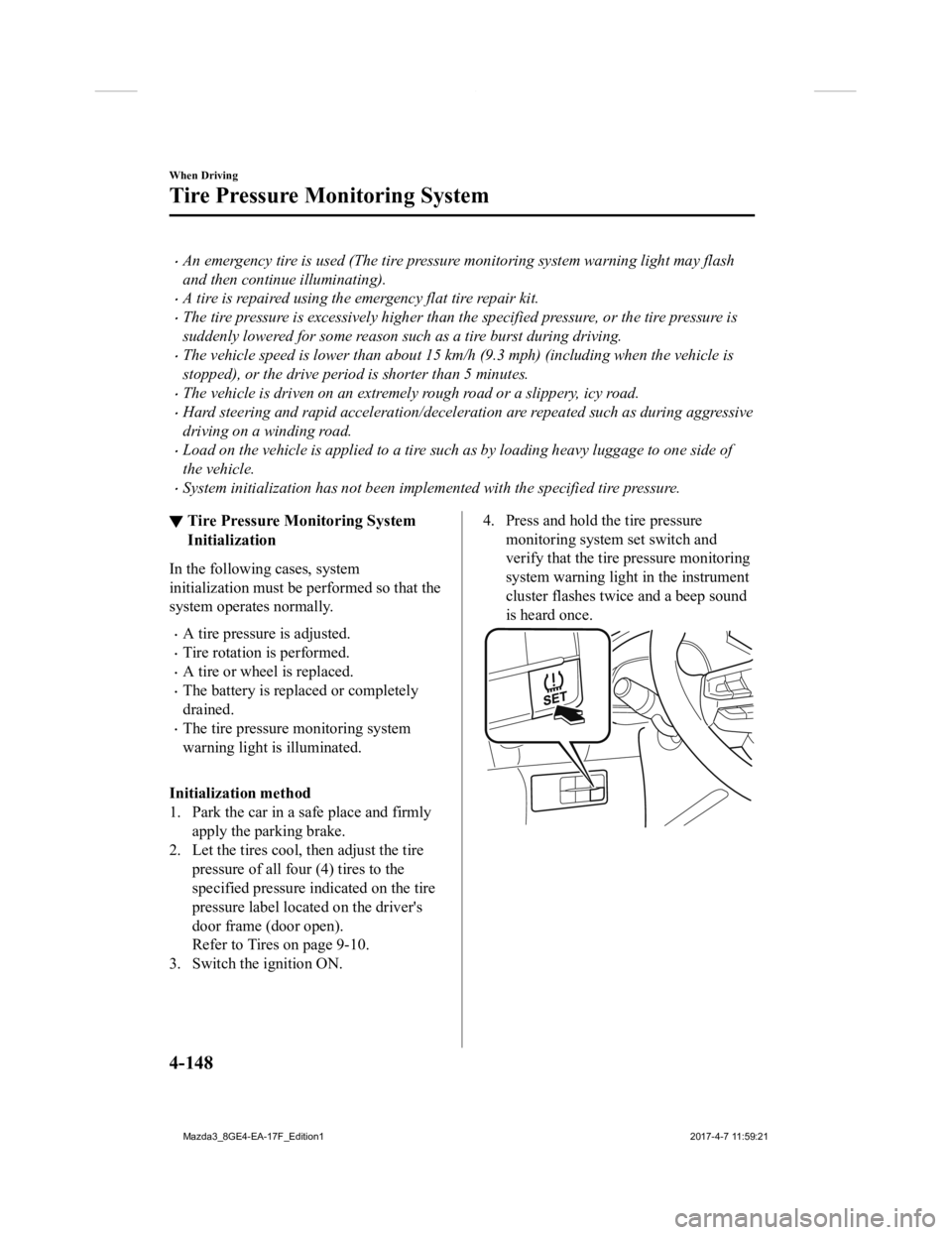
Initialization method
1. Park the car in a sa fe place and firmly
apply the parking brake.
2. Let the tires cool, then adjust the tire pressure of all four (4) tires to the
specified pressure indicated on the tire
pressure label located on the driver's
door frame (door open).
Refer to Tires on page 9-10.
3. Switch the ignition ON.
4. Press and hold the tire pressure monitoring system set switch and
verify that the tire pressure monitoring
system warning light in the instrument
cluster flashes twice and a beep sound
is heard once.
When Driving
Tire Pressure Monitoring System
4-148
Mazda3_8GE4-EA-17F_Edition1 2017-4-7 11:59:21
Page 292 of 624
Operating Tips
Operate the climate control system with
the engine running.
To prevent the battery from being
discharged, do not leave the fan control
dial/switch on for a long period of time
with the ignition switched ON when the
engine is not running.
Clear all obstructions such as leaves,
snow and ice from the hood and the air
inlet in the cowl grille to improve the
system efficiency.
Use the climate control system to defog
the windows and dehumidify the air.
The recirculate mode should be used
when driving through tunnels or while
in a traffic jam, or when you would like
to shut off outside air for quick cooling
of the interior.
Use the outside air position for
ventilation or windshield defrosting.
If the vehicle has been parked in direct
sunlight during hot weather, open the
windows to let warm air escape, then
run the climate control system.
(With A/C switch)
Run the air conditioner about 10
minutes at least once a month to keep
internal parts lubricated.
Have the air conditioner checked before
the weather gets hot. Lack of refrigerant
may make the air conditioner less
efficient.
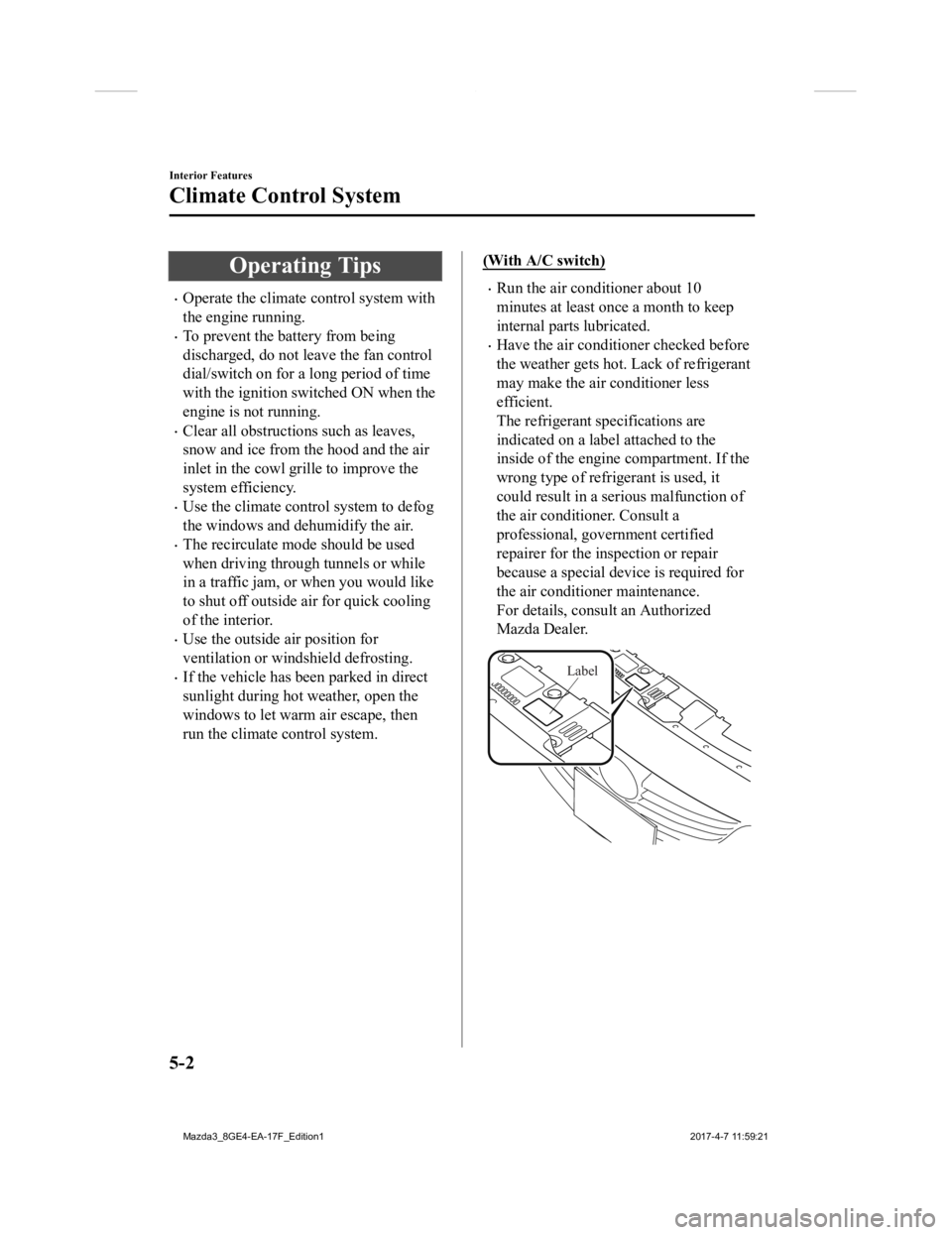
The refrigerant specifications are
indicated on a label attached to the
inside of the engine compartment. If the
wrong type of refrigerant is used, it
could result in a ser ious malfunction of
the air conditioner. Consult a
professional, government certified
repairer for the inspection or repair
because a special device is required for
the air conditi oner maintenance.
For details, consult an Authorized
Mazda Dealer.
Label
Interior Features
Climate Control System
5-2
Mazda3_8GE4-EA-17F_Edition1 2017-4-7 11:59:21