battery MAZDA MODEL 3 5-DOOR 2018 Owner's Guide
[x] Cancel search | Manufacturer: MAZDA, Model Year: 2018, Model line: MODEL 3 5-DOOR, Model: MAZDA MODEL 3 5-DOOR 2018Pages: 624, PDF Size: 59.23 MB
Page 307 of 624
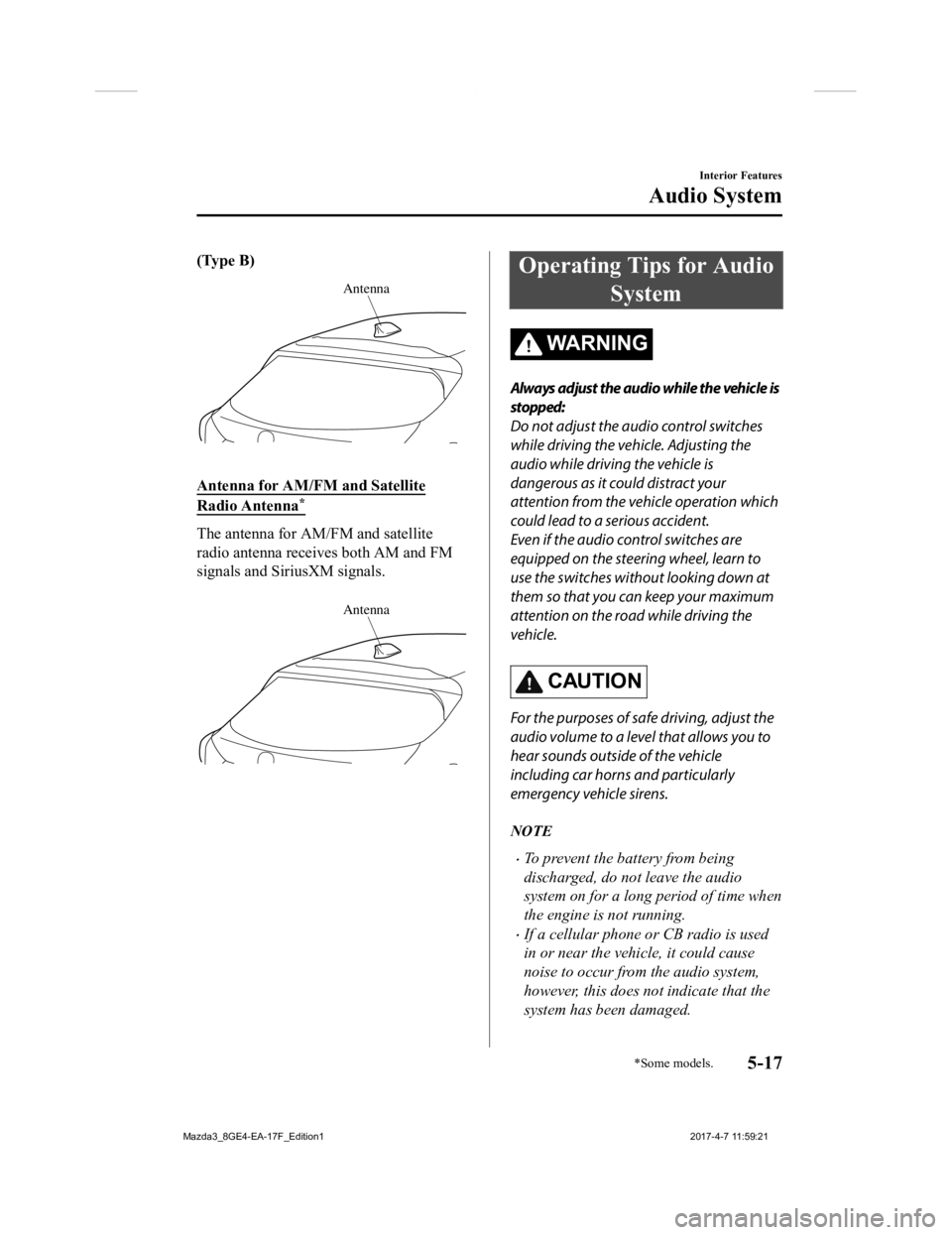
(Type B)
Antenna
Antenna for AM/FM and Satellite
Radio Antenna*
The antenna for AM/FM and satellite
radio antenna receives both AM and FM
signals and SiriusXM signals.
Antenna
Operating Tips for Audio
System
WA R N I N G
Always adjust the audio while the vehicle is
stopped:
Do not adjust the audio control switches
while driving the vehicle. Adjusting the
audio while driving the vehicle is
dangerous as it could distract your
attention from the vehicle operation which
could lead to a serious accident.
Even if the audio control switches are
equipped on the steering wheel, learn to
use the switches without looking down at
them so that you can keep your maximum
attention on the road while driving the
vehicle.
CAUTION
For the purposes of safe driving, adjust the
audio volume to a level that allows you to
hear sounds outside of the vehicle
including car horns and particularly
emergency vehicle sirens.
NOTE
To prevent the battery from being
discharged, do not leave the audio
system on for a long period of time when
the engine is not running.
If a cellular phone or CB radio is used
in or near the vehicle, it could cause
noise to occur from the audio system,
however, this does not indicate that the
system has been damaged.
Interior Features
Audio System
*Some models.5-17
Mazda3_8GE4-EA-17F_Edition1 2017-4-7 11:59:21
Page 314 of 624
▼Operating Tips for USB device
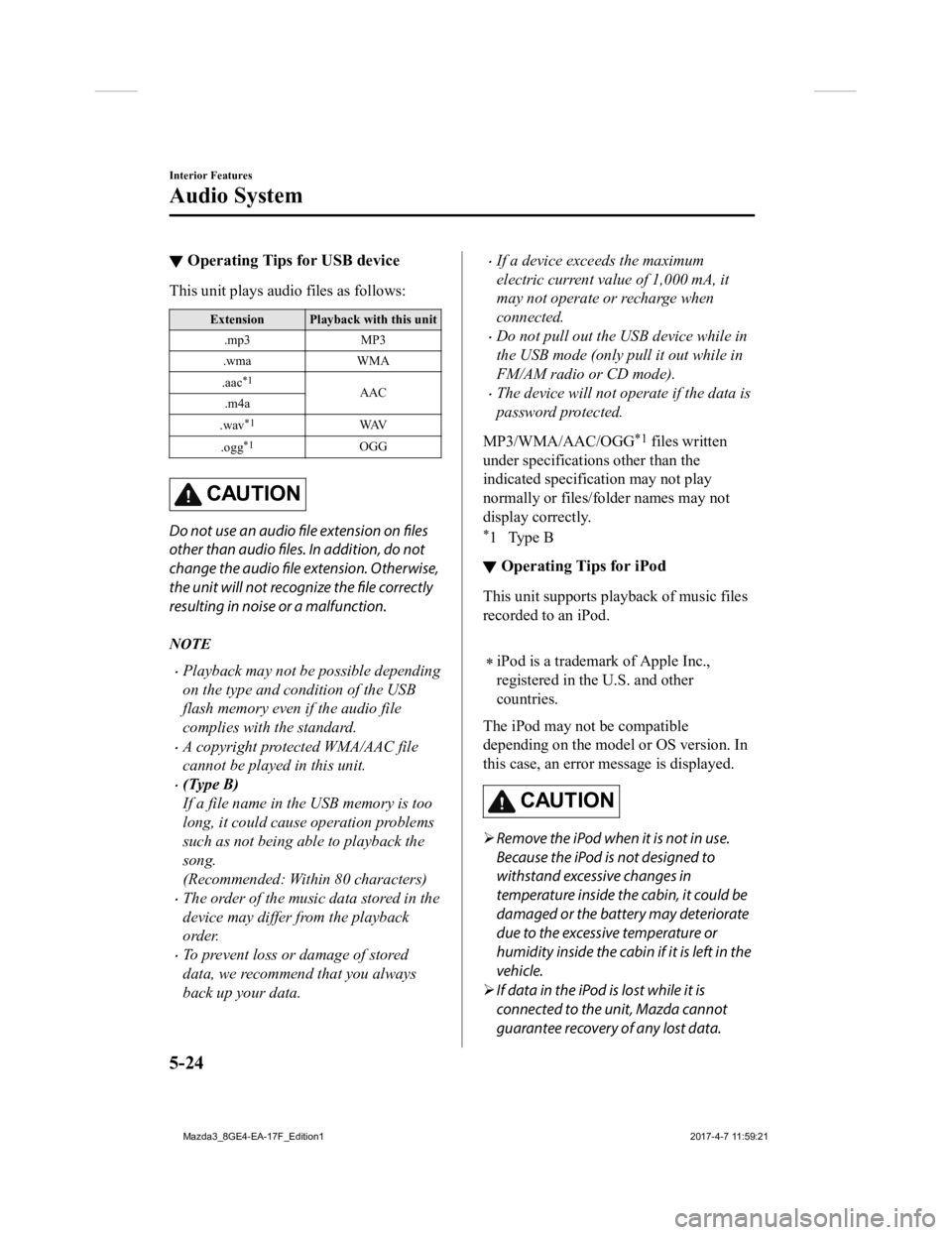
This unit plays audi
o files as follows:
Extension Playback with this unit
.mp3 MP3
.wma WMA
.aac
*1AAC
.m4a
.wav
*1WAV
.ogg
*1OGG
CAUTION
Do not use an audio file extension on files
other than audio files. In addition, do not
change the audio file extension. Otherwise,
the unit will not recognize the file correctly
resulting in noise or a malfunction.
NOTE
Playback may not be possible depending
on the type and condition of the USB
flash memory even if the audio file
complies with the standard.
A copyright protected WMA/AAC file
cannot be played in this unit.
(Type B)
If a file name in th e USB memory is too
long, it could cause operation problems
such as not being able to playback the
song.
(Recommended: Within 80 characters)
The order of the music data stored in the
device may differ from the playback
order.
To prevent loss or damage of stored
data, we recommend that you always
back up your data.
If a device exceeds the maximum
electric current value of 1,000 mA, it
may not operate or recharge when
connected.
Do not pull out the USB device while in
the USB mode (only pull it out while in
FM/AM radio or CD mode).
The device will not operate if the data is
password protected.
MP3/WMA/AAC/OGG
*1 files written
under specifications other than the
indicated specification may not play
normally or files/folder names may not
display correctly.
*1Type B
▼ Operating Tips for iPod
This unit supports pla
yback of music files
recorded to an iPod.
iPod is a trademark of Apple Inc.,
registered in the U.S. and other
countries.
The iPod may not be compatible
depending on the model or OS version. In
this case, an error message is displayed.
CAUTION
Remove the iPod when it is not in use.
Because the iPod is not designed to
withstand excessive changes in
temperature inside the cabin, it could be
damaged or the battery may deteriorate
due to the excessive temperature or
humidity inside the cabin if it is left in the
vehicle.
If data in the iPod is lost while it is
connected to the unit, Mazda cannot
guarantee recovery of any lost data.
Interior Features
Audio System
5-24
Mazda3_8GE4-EA-17F_Edition1 2017-4-7 11:59:21
Page 315 of 624

If the iPod battery is deteriorated, the
iPod may not recharge and playback
may not be possible when it is connected
to the unit.
Be careful not to pinch the iPod
connecting cable when opening/closing
the center console.
For details on using the iPod, refer to the
iPod instruction manual.
When connecting the iPod to a USB port,
all commands are made from the audio
unit. iPod control is not possible.
NOTE
The audio unit cannot display images or
videos stored in an iPod.
Interior Features
Audio System
5-25
Mazda3_8GE4-EA-17F_Edition1 2017-4-7 11:59:21
Page 331 of 624

Favorites Radio
Selected stations can be registered for
convenient operation. Up to 50 stations
can be registered. The Favorites list is
common to AM, FM, and satellite radio.
Registering to Favorites
Long-press the
icon to reg ister the
current radio station . The registration can
also be performed using the following
procedure.
1. Select the
icon to display the
Favorites list.
2. Select
.
3. Select
.
4. The station is added to the bottom of the Favorites list.
NOTE
If the battery is disconnected, your
Favorites list will not be deleted.
Selecting radio station from Favorites
1. Select the
icon to display the
Favorites list.
2. Select the radio frequency to tune in the radio station.
Deleting from Favorites
1. Select the
icon to display the
Favorites list.
2. Select
.
3. Select
.
4. Select the radio frequency you want to delete.
5. Select
.
Changing Favorites list order
1. Select the
icon to display the
Favorites list.
2. Select .
3. Select
.
4. Select a radio frequency. The selected radio station can be moved.
5. Slide the radio sta tion or move it using
the commander switch, then select
.
Radio Broadcast Da ta System (RBDS)
*
Radio text information display
Radio text information sent from a
broadcasting station is displayed in the
center display.
NOTE
Radio text information is a function of FM
radio only. There is no text function on AM
radio. Text information is not displayed in
the following:
During reception
Not an RBDS broadcast
RBDS broadcast, but radio text is not
transmitted from the radio station
Genre Seek
Some FM stations transmit Genre codes
(Program type like a Rock, News, and so
on). This code enables alternative stations
transmitting the same Genre code to be
found quickly.
(To scan for Genre Seek:)
1. Select the
icon while in the FM
mode.
2. Select
to open the genre list.
3. Select the genre type you want to
select.
4. Select the
, icon.
Interior Features
Audio System
*Some models.5-41
Mazda3_8GE4-EA-17F_Edition1 2017-4-7 11:59:21
Page 346 of 624
To prevent discharging of the battery, do
not use the auxiliary input for long
periods with the engine off or idling.
When connecting a device to the
auxiliary jack or USB port, noise may
occur depending on the connected
device. If the device is connected to the
vehicle's accessory socket, the noise can
be reduced by unplugging it from the
accessory socket.
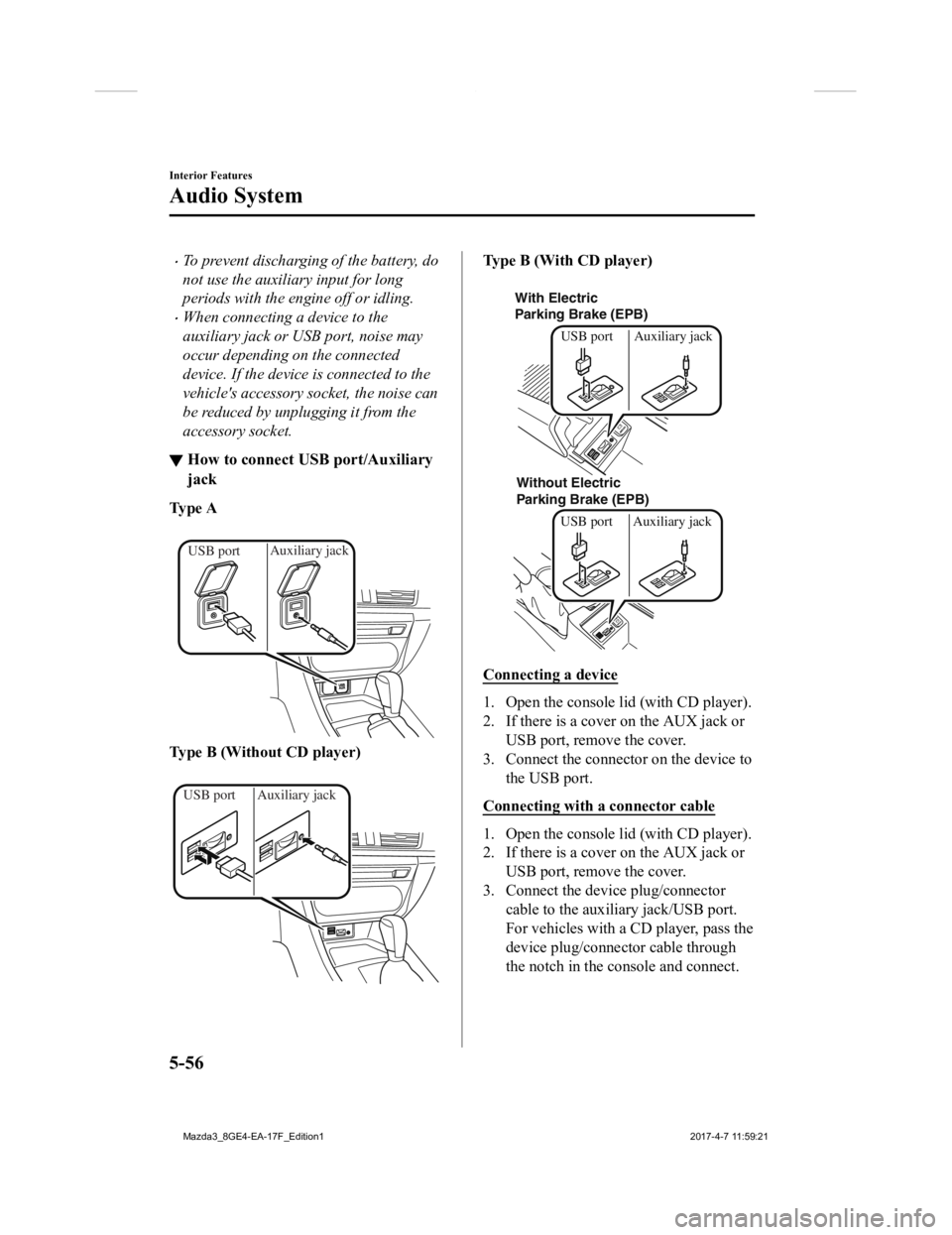
▼How to connect USB port/Auxiliary
jack
Ty p e A
Auxiliary jack
USB port
Type B (Without CD player)
Auxiliary jack
USB port
Type B (With CD player)
With Electric
Parking Brake (EPB)
Without Electric
Parking Brake (EPB) USB port Auxiliary jackUSB port Auxiliary jack
Connecting a device
1. Open the console lid (with CD player).
2. If there is a cover on the AUX jack or
USB port, remove the cover.
3. Connect the connector on the device to the USB port.
Connecting with a connector cable
1. Open the console lid (with CD player).
2. If there is a cover on the AUX jack or USB port, remove the cover.
3. Connect the device plug/connector cable to the auxiliary jack/USB port.
For vehicles with a CD player, pass the
device plug/connector cable through
the notch in the console and connect.
Interior Features
Audio System
5-56
Mazda3_8GE4-EA-17F_Edition1 2017-4-7 11:59:21
Page 401 of 624
Bluetooth® Audio (Type
A)
*
Applicable Bluetooth® specification
(Recommended)
Ve r . 2 . 0
Response profile
A2DP (Advanced Audio Distribution
Profile) Ver. 1.0
AVRCP (Audio/Video Remote Control
Profile) Ver. 1.0/1.3
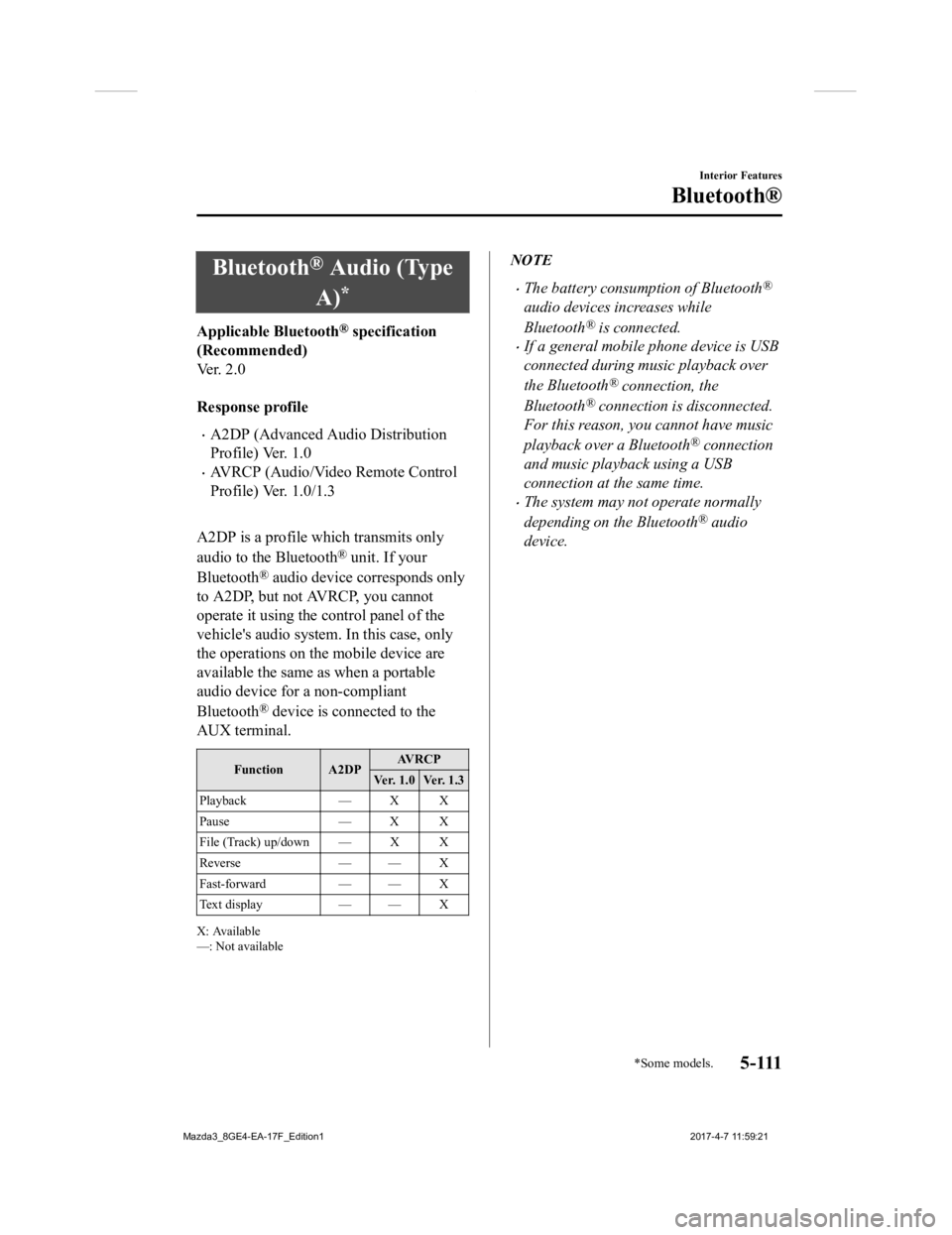
A2DP is a profile which transmits only
audio to the Bluetooth
® unit. If your
Bluetooth
® audio device corresponds only
to A2DP, but not AVRCP, you cannot
operate it using the control panel of the
vehicle's audio system. In this case, only
the operations on the mobile device are
available the same as when a portable
audio device for a non-compliant
Bluetooth
® device is connected to the
AUX terminal.
Function A2DP AV R C P
Ver. 1.0 Ver. 1.3
Playback — X X
Pause — X X
File (Track) up/down — X X
Reverse — — X
Fast-forward — — X
Te x t d i s p l a y — — X
X: Available
—: Not available
NOTE
The battery consumption of Bluetooth®
audio devices increases while
Bluetooth
® is connected.
If a general mobile phone device is USB
connected during music playback over
the Bluetooth
® connection, the
Bluetooth
® connection is disconnected.
For this reason, you cannot have music
playback over a Bluetooth
® connection
and music playback using a USB
connection at the same time.
The system may not operate normally
depending on the Bluetooth
® audio
device.
Interior Features
Bluetooth®
*Some models.5 - 111
Mazda3_8GE4-EA-17F_Edition1 2017-4-7 11:59:21
Page 404 of 624
Bluetooth® Audio (Type
B)
*
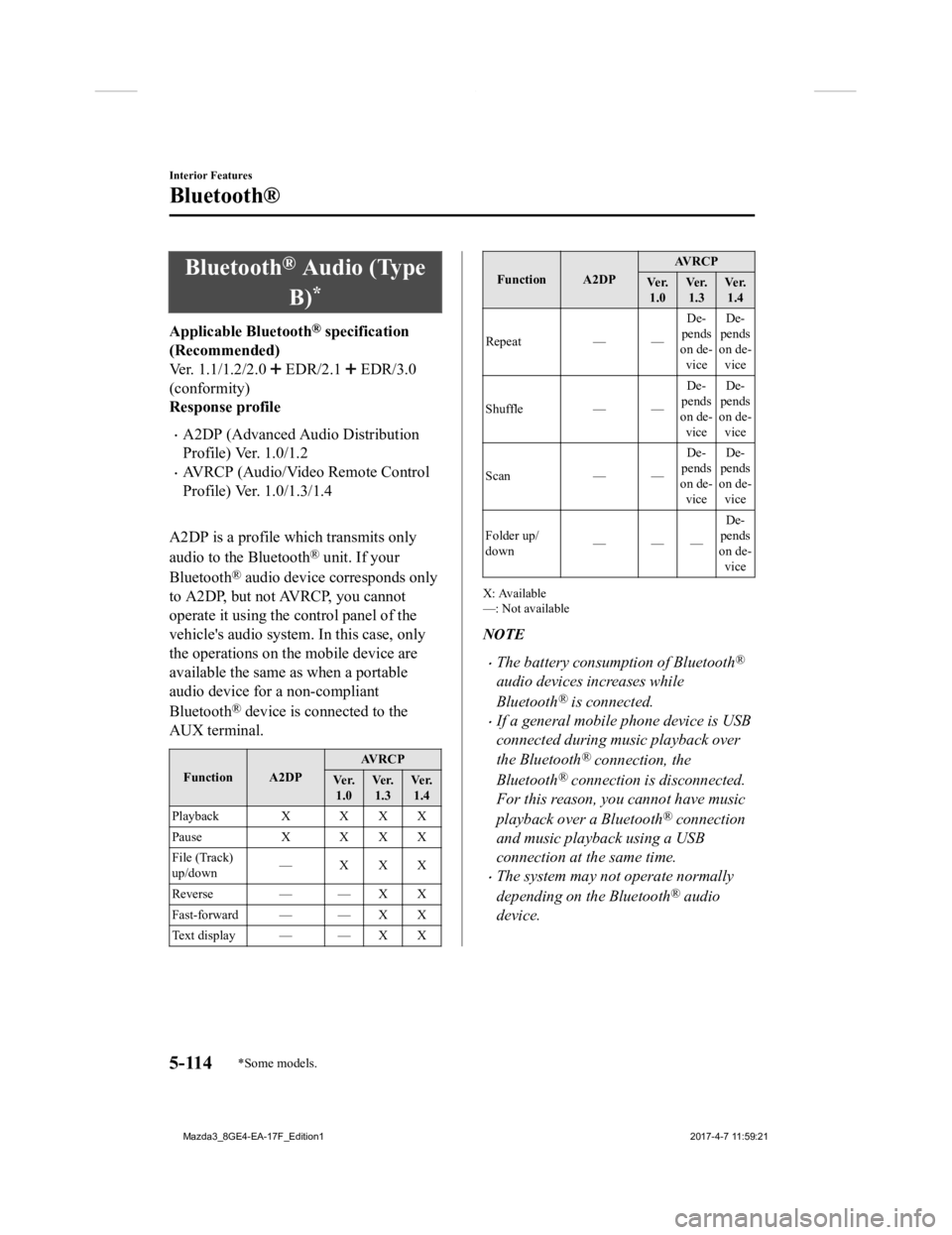
Applicable Bluetooth® specification
(Recommended)
Ver. 1.1/1.2/2.0
EDR/2.1 EDR/3.0
(conformity)
Response profile
A2DP (Advanced Audio Distribution
Profile) Ver. 1.0/1.2
AVRCP (Audio/Video Remote Control
Profile) Ver. 1.0/1.3/1.4
A2DP is a profile which transmits only
audio to the Bluetooth
® unit. If your
Bluetooth
® audio device corresponds only
to A2DP, but not AVRCP, you cannot
operate it using the control panel of the
vehicle's audio system. In this case, only
the operations on the mobile device are
available the same as when a portable
audio device for a non-compliant
Bluetooth
® device is connected to the
AUX terminal.
Function A2DP AV R C P
Ve r. 1.0 Ve r.
1.3 Ve r.
1.4
Playback X X X X
Pause X X X X
File (Track)
up/down —XXX
Reverse — — X X
Fast-forward — — X X
Te x t d i s p l a y — — X X
Function A2DP AV R C P
Ve r. 1.0 Ve r.
1.3 Ve r.
1.4
Repeat — — De-
pends
on de- vice De-
pends
on de- vice
Shuffle — —De-
pends
on de- vice De-
pends
on de- vice
Scan — —De-
pends
on de-
vice De-
pends
on de-
vice
Folder up/
down ——— De-
pends
on de- vice
X: Available
—: Not available
NOTE
The battery consumption of Bluetooth®
audio devices increases while
Bluetooth
® is connected.
If a general mobile phone device is USB
connected during music playback over
the Bluetooth
® connection, the
Bluetooth
® connection is disconnected.
For this reason, you cannot have music
playback over a Bluetooth
® connection
and music playback using a USB
connection at the same time.
The system may not operate normally
depending on the Bluetooth
® audio
device.
Interior Features
Bluetooth®
5-114*Some models.
Mazda3_8GE4-EA-17F_Edition1 2017-4-7 11:59:21
Page 406 of 624
IconFunction
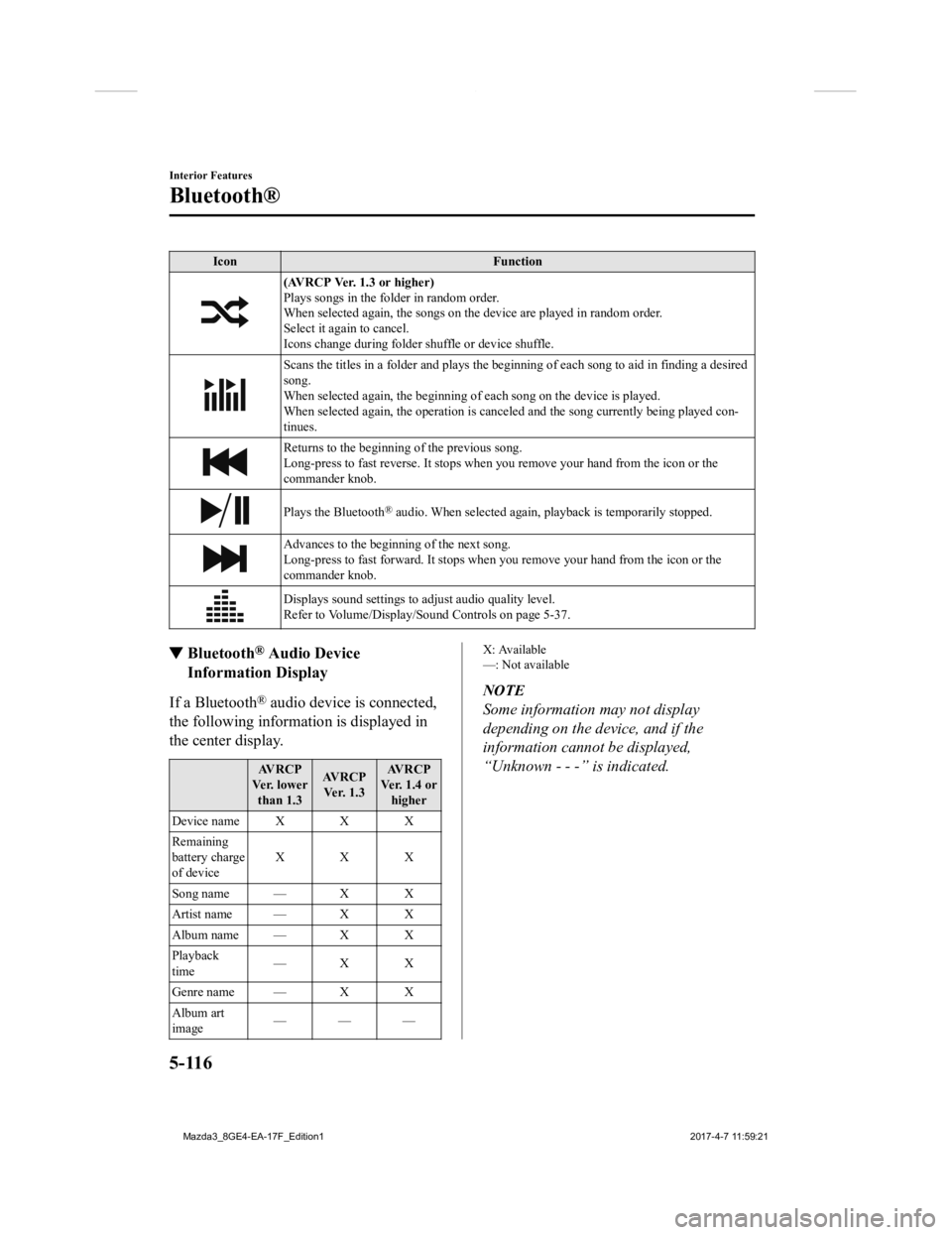
(AVRCP Ver. 1.3 or higher)
Plays songs in the folder in random order.
When selected again, the songs on the device are played in rand om order.
Select it again to cancel.
Icons change during folder shuffle or device shuffle.
Scans the titles in a folder and plays the beginning of each so ng to aid in finding a desired
song.
When selected again, the beginning of each song on the device is played.
When selected again, the operati on is canceled and the song currently being played con-
tinues.
Returns to the beginning of the previous song.
Long-press to fast reverse. It st ops when you remove your hand from the icon or the
commander knob.
Plays the Bluetooth® audio. When selected again, pl ayback is temporarily stopped.
Advances to the beginning of the next song.
Long-press to fast forward. It stops when you remove your hand from the icon or the
commander knob.
Displays sound settings to adjust audio quality level.
Refer to Volume/Display/Sound Controls on page 5-37.
▼ Bluetooth® Audio Device
Information Display
If a Bluetooth® audio device is connected,
the following information is displayed in
the center display.
AV R C P
Ve r. l o w e r than 1.3 AV R C P
Ve r. 1 . 3 AV R C P
Ver. 1.4 or higher
Device name X X X
Remaining
battery charge
of device XXX
Song name — X X
Artist name — X X
Album name — X X
Playback
time —X X
Genre name — X X
Album art
image ———
X: Available
—: Not available
NOTE
Some information may not display
depending on the device, and if the
information cannot be displayed,
“Unknown - - -” is indicated.
Interior Features
Bluetooth®
5-116
Mazda3_8GE4-EA-17F_Edition1
2017-4-7 11:59:21
Page 418 of 624
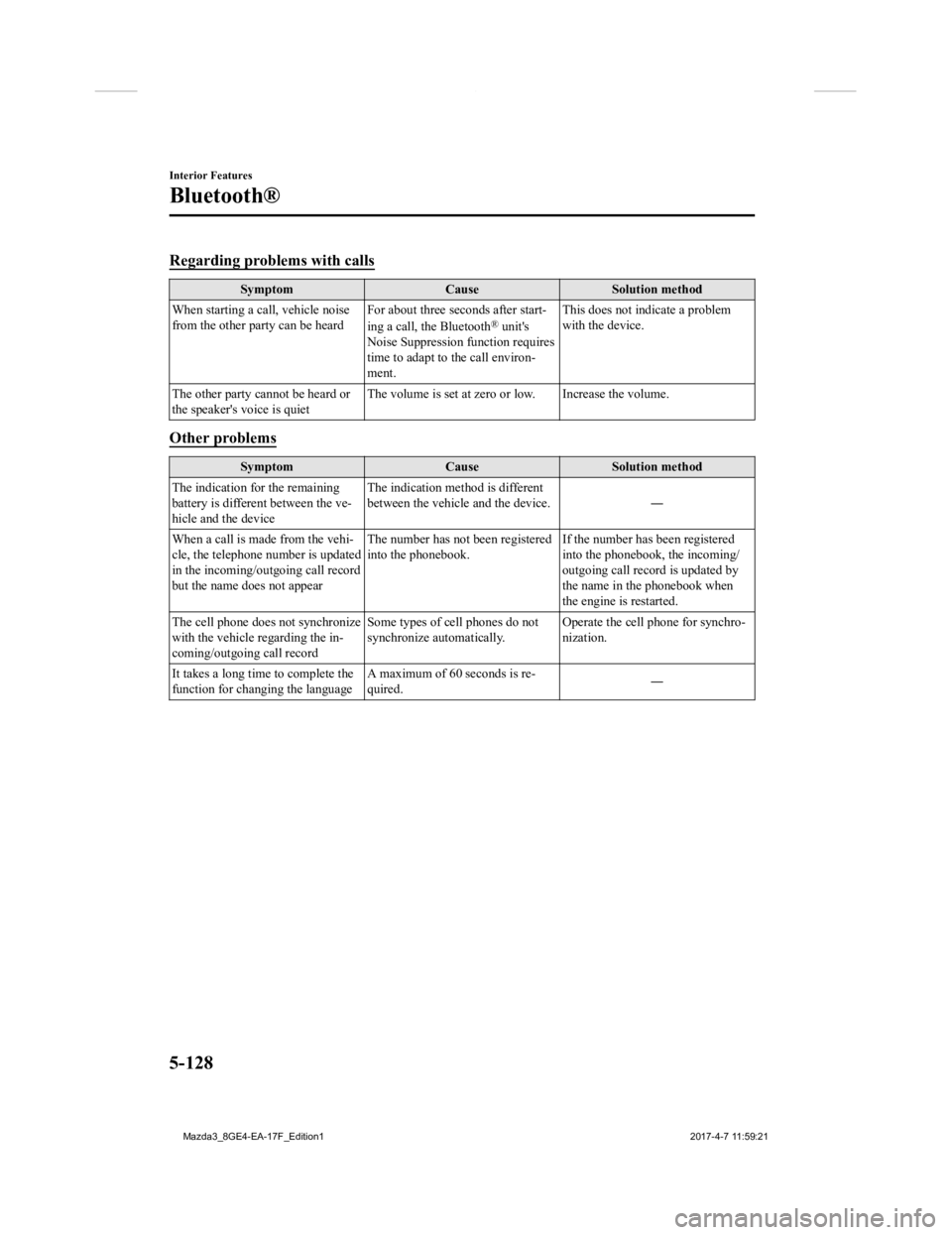
Regarding problems with calls
SymptomCauseSolution method
When starting a call, vehicle noise
from the other party can be heard For about three seconds after start-
ing a call, the Bluetooth
® unit's
Noise Suppression function requires
time to adapt to the call environ-
ment. This does not indicate a problem
with the device.
The other party cannot be heard or
the speaker's voice is quiet The volume is set at zero or low. Increase the volume.
Other problems
Symptom
CauseSolution method
The indication for the remaining
battery is different between the ve-
hicle and the device The indication method is different
between the vehicle and the device.
―
When a call is made from the vehi-
cle, the telephone number is updated
in the incoming/outgoing call record
but the name does not appear The number has not
been registered
into the phonebook. If the number has been registered
into the phonebook, the incoming/
outgoing call record is updated by
the name in the phonebook when
the engine is restarted.
The cell phone does not synchronize
with the vehicle regarding the in-
coming/outgoing call record Some types of cell phones do not
synchronize automatically.
Operate the cell p
hone for synchro-
nization.
It takes a long time to complete the
function for changing the language A maximum of 60 seconds is re-
quired.
―
Interior Features
Bluetooth®
5-128
Mazda3_8GE4-EA-17F_Edition1
2017-4-7 11:59:21
Page 419 of 624
Sunvisors
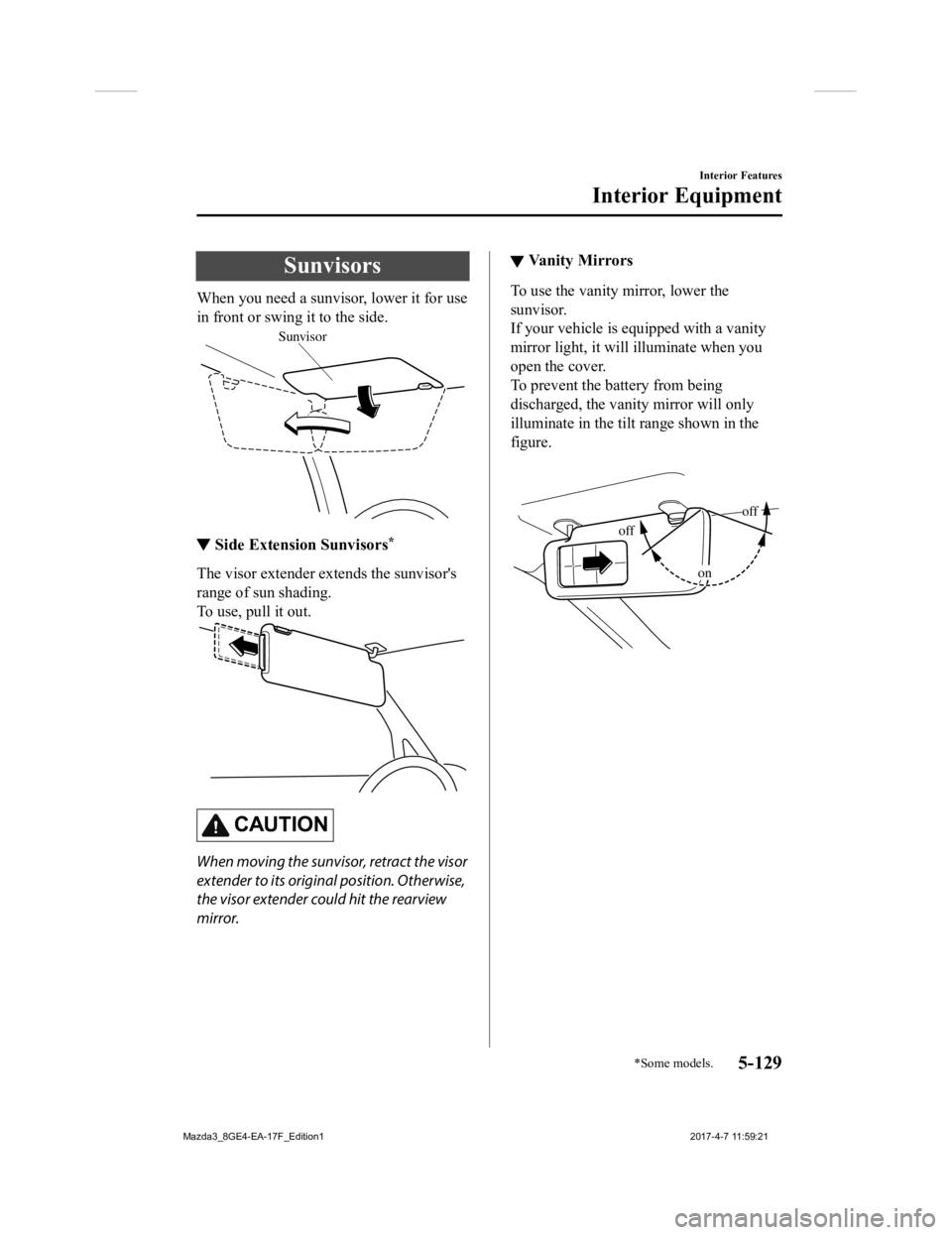
When you need a sunvisor, lower it for use
in front or swing it to the side.
Sunvisor
▼Side Extension Sunvisors*
The visor extender extends the sunvisor's
range of sun shading.
To use, pull it out.
CAUTION
When moving the sunvisor, retract the visor
extender to its original position. Otherwise,
the visor extender could hit the rearview
mirror.
▼Va n i t y M i r r o r s
To use the vanity mirror, lower the
sunvisor.
If your vehicle is equipped with a vanity
mirror light, it will illuminate when you
open the cover.
To prevent the battery from being
discharged, the vanity mirror will only
illuminate in the tilt range shown in the
figure.
off
off
on
Interior Features
Interior Equipment
*Some models.5-129
Mazda3_8GE4-EA-17F_Edition1
2017-4-7 11:59:21