brake MAZDA MODEL 3 5-DOOR 2018 Owner's Guide
[x] Cancel search | Manufacturer: MAZDA, Model Year: 2018, Model line: MODEL 3 5-DOOR, Model: MAZDA MODEL 3 5-DOOR 2018Pages: 624, PDF Size: 59.23 MB
Page 196 of 624

WA R N I N G
Do not drive with worn disc pads:
Driving with worn disc pads is dangerous.
The brakes could fail and cause a serious
accident. As soon as you hear a screeching
noise consult an Authorized Mazda Dealer.
▼Brake Assist
During emergency braking situations
when it is necessary to depress the brake
pedal with greater force, the brake assist
system provides braking assistance, thus
enhancing braking performance.
When the brake pedal is depressed hard or
depressed more quickly, the brakes apply
more firmly.
NOTE
When the brake pedal is depressed hard
or depressed more quickly, the pedal
will feel softer but the brakes will apply
more firmly. This is a normal effect of
the brake assist operation and does not
indicate a malfunction.
When the brake pedal is depressed hard
or depressed more quickly, a motor/
pump operation noise may be heard.
This is a normal effect of the brake
assist and does not indicate a
malfunction.
The brake assist equipment does not
supersede the functionality of the
vehicle's main braking system.
Hill Launch Assist (HLA)
HLA is a function which assists the driver
in accelerating from a stop while on a
slope. When the driver releases the brake
pedal and depresses the accelerator pedal
while on a slope, the f
unction prevents the
vehicle from rolling. The braking force is
maintained automatically after the brake
pedal is released on a steep grade.
For vehicles with a manual transaxle,
HLA operates on a downward slope when
the shift lever is in the reverse (R)
position, and on an upward slope when the
shift lever is in a po sition other than the
reverse (R) position.
For vehicles with an automatic transaxle,
HLA operates on a downward slope when
the selector lever i s in the reverse (R)
position, and on an upward slope when the
selector lever is in a forward gear.
WA R N I N G
Do not rely completely on HLA:
HLA is an auxiliary device for accelerating
from a stop on a slope. The system only
operates for about two seconds and
therefore, relying only on the system, when
accelerating from a stop is dangerous
because the vehicle may move (roll)
unexpectedly and cause an accident.
The vehicle could roll depending on the
vehicle's load or if it is towing something. In
addition, for vehicles with a manual
transaxle, the vehicle could still roll
depending on how the clutch pedal or the
accelerator pedal is operated.
Always confirm the safety around the
vehicle before starting to drive the vehicle.
When Driving
Brake
4-64
Mazda3_8GE4-EA-17F_Edition1 2017-4-7 11:59:21
Page 197 of 624

NOTE
HLA does not operate on a gentle slope.
In addition, the gradient of the slope on
which the system will operate changes
depending on the vehicle's load.
HLA does not operate if the parking
brake is applied, the vehicle has not
stopped completely, or the clutch pedal
is released.
While HLA is operating, the brake pedal
may feel stiff and vibrate, however, this
does not indicate a malfunction.
HLA does not operate while the
TCS/DSC indicator light is illuminated.
Refer to Warning/Indicator Lights on
page 4-23.
HLA does not turn off even if the DSC
OFF switch is pressed to turn off the
TCS/DSC.
When Driving
Brake
4-65
Mazda3_8GE4-EA-17F_Edition1 2017-4-7 11:59:21
Page 198 of 624
Antilock Brake System(ABS)
The ABS control unit continuously
monitors the speed o f each wheel. If one
wheel is about to lock up, the ABS
responds by automatically releasing and
reapplying that wheel's brake.
The driver will feel a slight vibration in
the brake pedal and may hear a chattering
noise from the brake system. This is
normal ABS system operation. Continue
to depress the brak e pedal without
pumping the brakes.
The warning light turns on when the
system has a malfunction.
Refer to Warning Lights on page 4-24.
WA R N I N G
Do not rely on ABS as a substitute for safe
driving:
The ABS cannot compensate for unsafe
and reckless driving, excessive speed,
tailgating (following another vehicle too
closely), driving on ice and snow, and
hydroplaning (reduced tire friction and
road contact because of water on the road
surface). You can still have an accident.
NOTE
Braking distances may be longer on
loose surfaces (snow or gravel, for
example) which usually have a hard
foundation. A vehicle with a normal
braking system may require less
distance to stop under these conditions
because the tires wi ll build up a wedge
of surface layer when the wheels skid.
The sound of the ABS operating may be
heard when starting the engine or
immediately after starting the vehicle,
however, it does not indicate a
malfunction.
When Driving
ABS/TCS/DSC
4-66
Mazda3_8GE4-EA-17F_Edition1 2017-4-7 11:59:21
Page 199 of 624
Traction Control System(TCS)
The Traction Control System (TCS)
enhances traction and safety by controlling
engine torque and braking. When the TCS
detects driving wheel slippage, it lowers
engine torque and operates the brakes to
prevent loss of traction.
This means that on a slick surface, the
engine adjusts automatically to provide
optimum power to the drive wheels,
limiting wheel spin and loss of traction.
The warning light turns on when the
system has a malfunction.
Refer to Warning Lights on page 4-24.
WA R N I N G
Do not rely on the Traction Control System
(TCS) as a substitute for safe driving:
The Traction Control System ( TCS) cannot
compensate for unsafe and reckless
driving, excessive speed, tailgating
(following another vehicle too closely), and
hydroplaning (reduced tire friction and
road contact because of water on the road
surface). You can still have an accident.
Use snow tires or tire chains and drive at
reduced speeds when roads are covered
with ice and/or snow:
Driving without proper traction devices on
snow and/or ice-covered roads is
dangerous. The Traction Control System
(TCS) alone cannot provide adequate
traction and you could still have an
accident.
NOTE
To turn off the TCS, press the DSC OFF
switch (page 4-69).
▼ TCS/DSC Indicator Light
This indicator light stays on for a few
seconds when the ignition is switched ON.
If the TCS or DSC
is operating, the
indicator light flashes.
If the light stays on, the TCS, DSC or the
brake assist system may have a
malfunction and they may not operate
correctly. Take your vehicle to an
Authorized Mazda Dealer.
NOTE
In addition to the indicator light
flashing, a slight lugging sound will
come from the engine. This indicates
that the TCS/DSC is operating properly.
On slippery surfaces, such as fresh
snow, it will be impossible to achieve
high rpm when the TCS is on.
When Driving
ABS/TCS/DSC
4-67
Mazda3_8GE4-EA-17F_Edition1 2017-4-7 11:59:21
Page 200 of 624
Dynamic Stability Control(DSC)
The Dynamic Stability Control (DSC)
automatically controls braking and engine
torque in conjunction with systems such as
ABS and TCS to help control side slip
when driving on slippery surfaces, or
during sudden or evasive maneuvering,
enhancing vehicle safety.
Refer to ABS (page 4-66) and TCS (page
4-67).
DSC operation is possible at speeds
greater than 20 km/h (12 mph).
The warning light turns on when the
system has a malfunction.
Refer to Warning Lights on page 4-24.
WA R N I N G
Do not rely on the Dynamic Stability
Control as a substitute for safe driving:
The Dynamic Stability Control (DSC)
cannot compensate for unsafe and reckless
driving, excessive speed, tailgating
(following another vehicle too closely), and
hydroplaning (reduced tire friction and
road contact because of water on the road
surface). You can still have an accident.
CAUTION
The DSC may not operate correctly
unless the following are observed:
Use tires of the correct size specified for
your Mazda on all four wheels.
Use tires of the same manufacturer,
brand and tread pattern on all four
wheels.
Do not mix worn tires.
The DSC may not operate correctly when
tire chains are used or a temporary spare
tire is installed because the tire diameter
changes.
▼ TCS/DSC Indicator Light
This indicator light stays on for a few
seconds when the ignition is switched ON.
If the TCS or DSC is operating, the
indicator light flashes.
If the light stays on, the TCS, DSC or the
brake assist system may have a
malfunction and they may not operate
correctly. Take your vehicle to an
Authorized Mazda Dealer.
When Driving
ABS/TCS/DSC
4-68
Mazda3_8GE4-EA-17F_Edition1
2017-4-7 11:59:21
Page 201 of 624
▼DSC OFF Indicator Light
This indicator light
stays on for a few
seconds when the ignition is switched ON.
It also illuminates when the DSC OFF
switch is pressed and TCS/DSC is
switched off.
Refer to DSC OFF Switch on page 4-69.
If the light remains i lluminated and the
TCS/DSC is not switched off, take your
vehicle to an Authorized Mazda Dealer.
The DSC may have a malfunction.
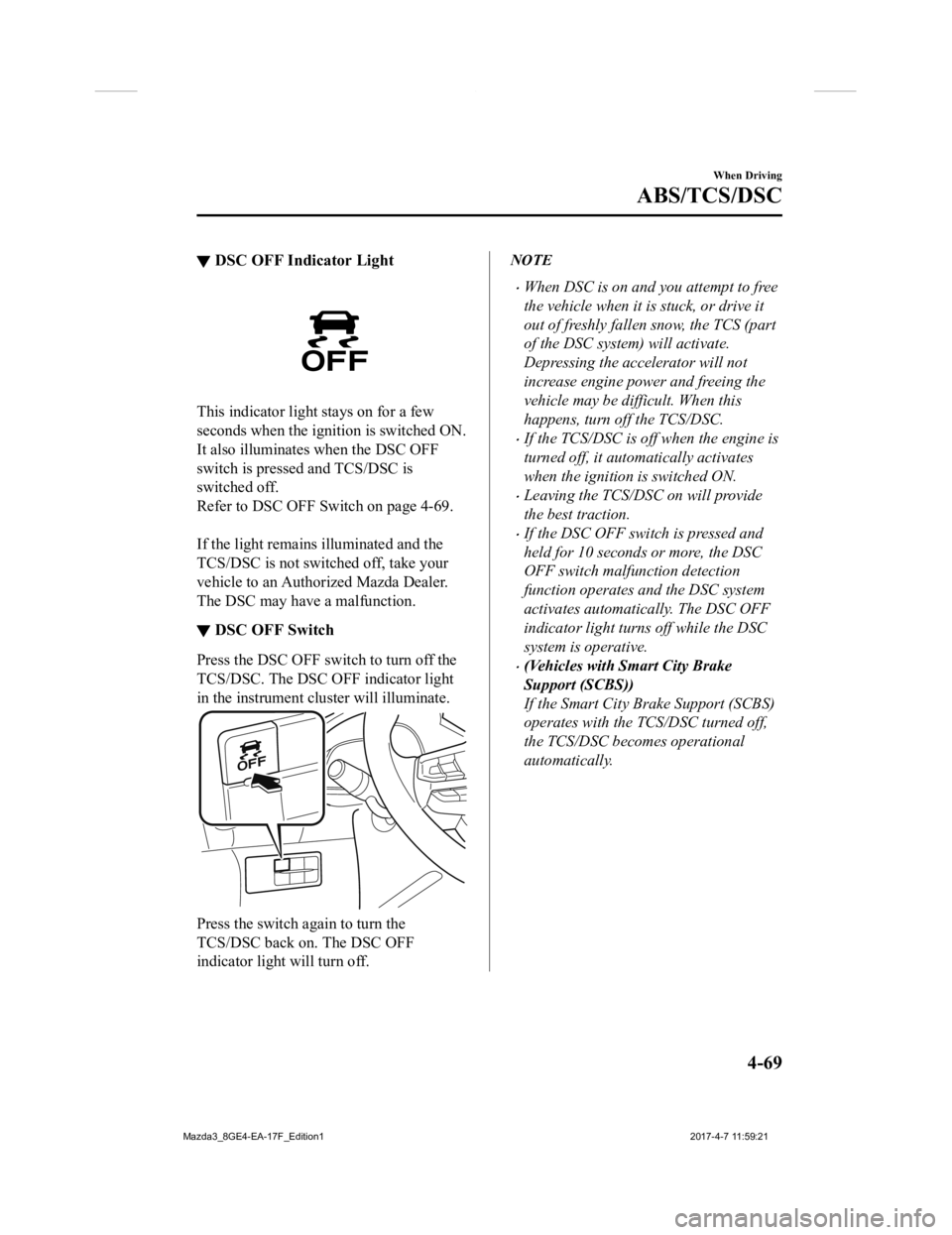
▼ DSC OFF Switch
Press the DSC OFF sw
itch to turn off the
TCS/DSC. The DSC OFF indicator light
in the instrument cluster will illuminate.
Press the switch a gain to turn the
TCS/DSC back on. The DSC OFF
indicator light will turn off.
NOTE
When DSC is on and you attempt to free
the vehicle when it is stuck, or drive it
out of freshly fallen snow, the TCS (part
of the DSC system) will activate.
Depressing the accelerator will not
increase engine power and freeing the
vehicle may be difficult. When this
happens, turn off the TCS/DSC.
If the TCS/DSC is off when the engine is
turned off, it automatically activates
when the ignition is switched ON.
Leaving the TCS/DSC on will provide
the best traction.
If the DSC OFF switch is pressed and
held for 10 seconds or more, the DSC
OFF switch malfunction detection
function operates and the DSC system
activates automatically. The DSC OFF
indicator light turn s off while the DSC
system is operative.
(Vehicles with Smart City Brake
Support (SCBS))
If the Smart City Brake Support (SCBS)
operates with the TCS/DSC turned off,
the TCS/DSC becomes operational
automatically.
When Driving
ABS/TCS/DSC
4-69
Mazda3_8GE4-EA-17F_Edition1 2017-4-7 11:59:21
Page 202 of 624
i-ELOOP*
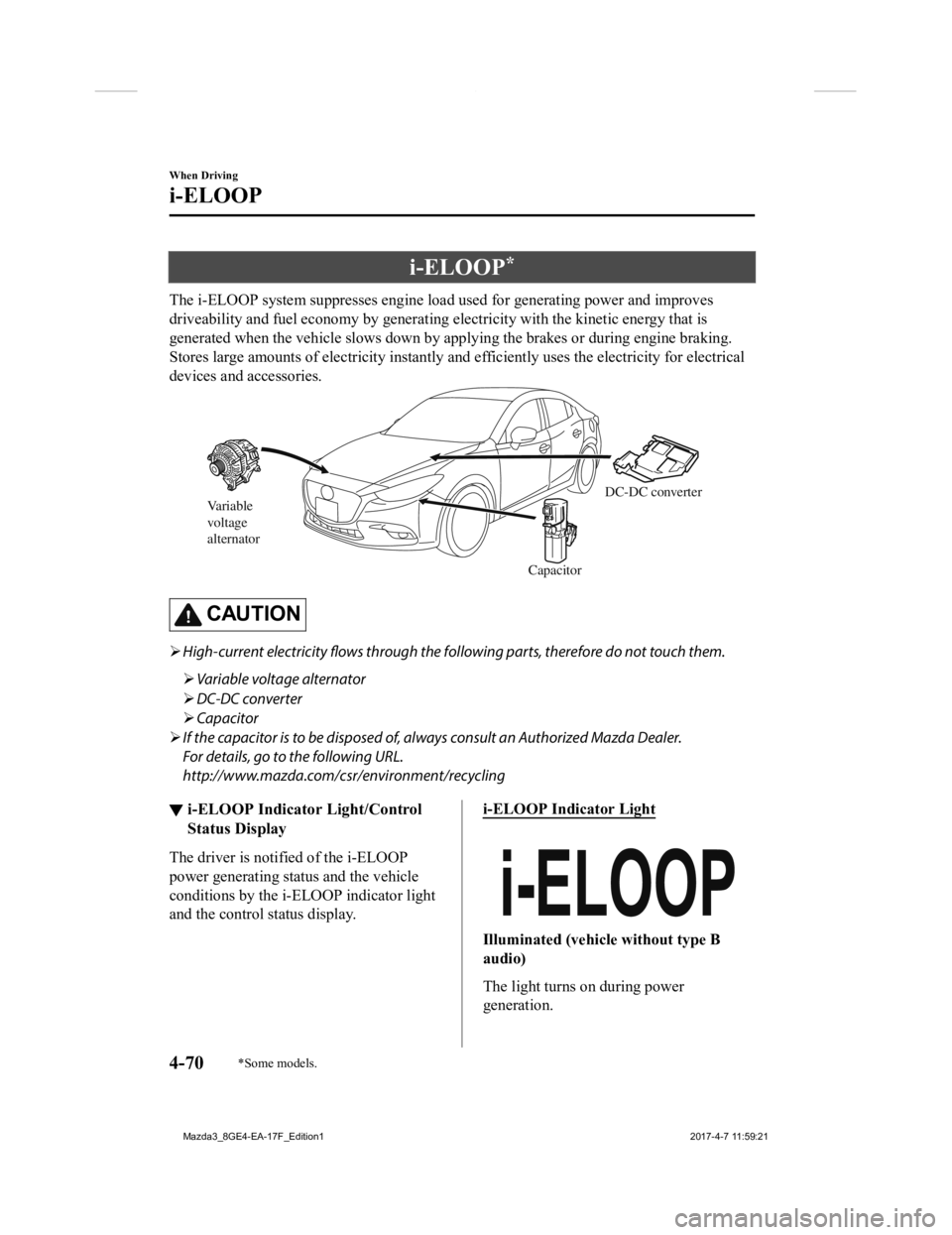
The i-ELOOP system suppresses engine load used for generating power and improves
driveability and fuel economy by generating electricity with th e kinetic energy that is
generated when the vehicle slows down by applying the brakes or during engine braking.
Stores large amounts of electricity instantly and efficiently u ses the electricity for electrical
devices and accessories.
Variable
voltage
alternator
CapacitorDC-DC converter
CAUTION
High-current electricity
flows through the following parts, therefore do not touch them.
Variable voltage alternator
DC-DC converter
Capacitor
If the capacitor is to be disposed of, al ways consult an Authorized Mazda Dealer.
For details, go to the following URL.
http://www.mazda.com/csr /environment/recycling
▼i-ELOOP Indicator Light/Control
Status Display
The driver is noti
fied of the i-ELOOP
power generating status and the vehicle
conditions by the i-ELOOP indicator light
and the control status display.
i-ELOOP Indicator Light
Illuminated (vehicle without type B
audio)
The light turns on during power
generation.
When Driving
i-ELOOP
4-70*Some models.
Mazda3_8GE4-EA-17F_Edition1 2017-4-7 11:59:21
Page 206 of 624
Drive Selection*
Drive selection is a system to switch the vehicle's drive mode. When the sport mode is
selected, vehicle's response against accelerator operation is e nhanced. This provides
additional quick acceleration which may be needed to safely mak e maneuvers such as lane
changes, merging onto freeways, or passing other vehicles.
CAUTION
Do not use the sport mode when driving on sli ppery roads such as wet or snow-covered roads.
It may cause tire slipping.
NOTE
When the sport mode is selected, driving at higher engine speeds increases and it may
increase fuel consumption. Mazda recommends that you cancel the sport mode on normal
driving.
Drive mode cannot be switched in the following conditions:
ABS/TCS/DSC is operating
The Mazda Radar Cruise Control (MRCC) system/cruise control is operating.
Steering wheel is being operated abruptly
▼ Drive Selection Switch
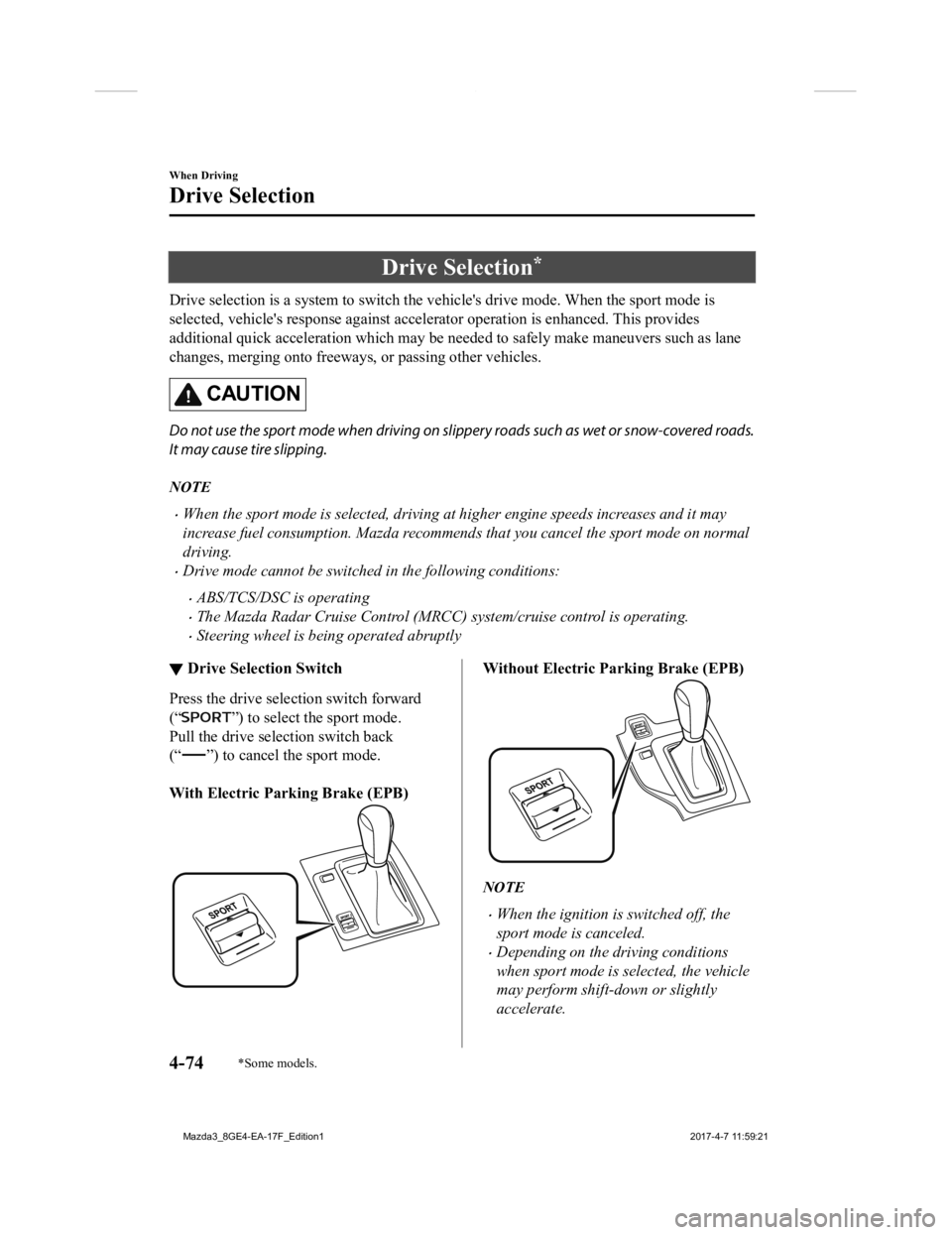
Press the drive sele
ction switch forward
(“
”) to select the sport mode.
Pull the drive selection switch back
(“
”) to cancel the sport mode.
With Electric Parking Brake (EPB)
Without Electric Parking Brake (EPB)
NOTE
When the ignition is switched off, the
sport mode is canceled.
Depending on the driving conditions
when sport mode is selected, the vehicle
may perform shift-down or slightly
accelerate.
When Driving
Drive Selection
4-74*Some models.
Mazda3_8GE4-EA-17F_Edition1 2017-4-7 11:59:21
Page 210 of 624

▼Pre-Crash Safety Technology
Pre-crash safety technology is designed to assist the driver in
averting collisions or reduce
their severity in situations where they cannot be avoided.
Collision damage reduction in low vehicle speed range
Forward driving
Smart City Brake Support (SCBS).......................................................................... page 4-124
Collision damage reduction in medium/high speed range
Smart Brake Support (SBS)..................................................................................... page 4-128
▼Camera and Sensors
Forward Sensing Camera (FSC)
The Forward Sensing Camera (FSC) detects lane indications and r
ecognizes headlights,
taillights and city lights during nighttime driving. In addition, it also detects the vehicle
ahead, pedestrians, or obstructions. The following systems also use the Forward Sensing
Camera (FSC).
High Beam Control system (HBC)
Lane-keep Assist System (LAS) & Lane Departure Warning System ( LDWS)
Traffic Sign Recognition System (TSR)
Smart City Brake Support (SCBS)
Smart Brake Support (SBS)
The Forward Sensing Camera (FSC) is installed at the top of the windshield near the
rearview mirror.
Refer to Forward Sensing Camera (FSC) on page 4-131.
Radar sensor (front)
The radar sensor (front) function s by detecting the radio waves reflected off a vehicle ahead
sent from the radar sensor. The following systems also use the radar sensor (front).
Mazda Radar Cruise Control (MRCC)
Distance Recognition Support System (DRSS)
Smart Brake Support (SBS)
The radar sensor (front) is moun ted behind the radiator grille.
Refer to Radar S ensor (Front) on page 4-136.
When Driving
i-ACTIVSENSE
4-78
Mazda3_8GE4-EA-17F_Edition1 2017-4-7 11:59:21
Page 226 of 624
Stop sign
A stop sign is displayed when all of the following conditions are met:
The vehicle speed is about 30 km/h (19 mph) or slower.
The Forward Sensing Camera (FSC) recognizes a stop sign as a sign targeted for your
vehicle.
When a certain period of time has elapsed since the stop sign was displayed, display of
the stop sign stops.
▼Excessive Speed Warning
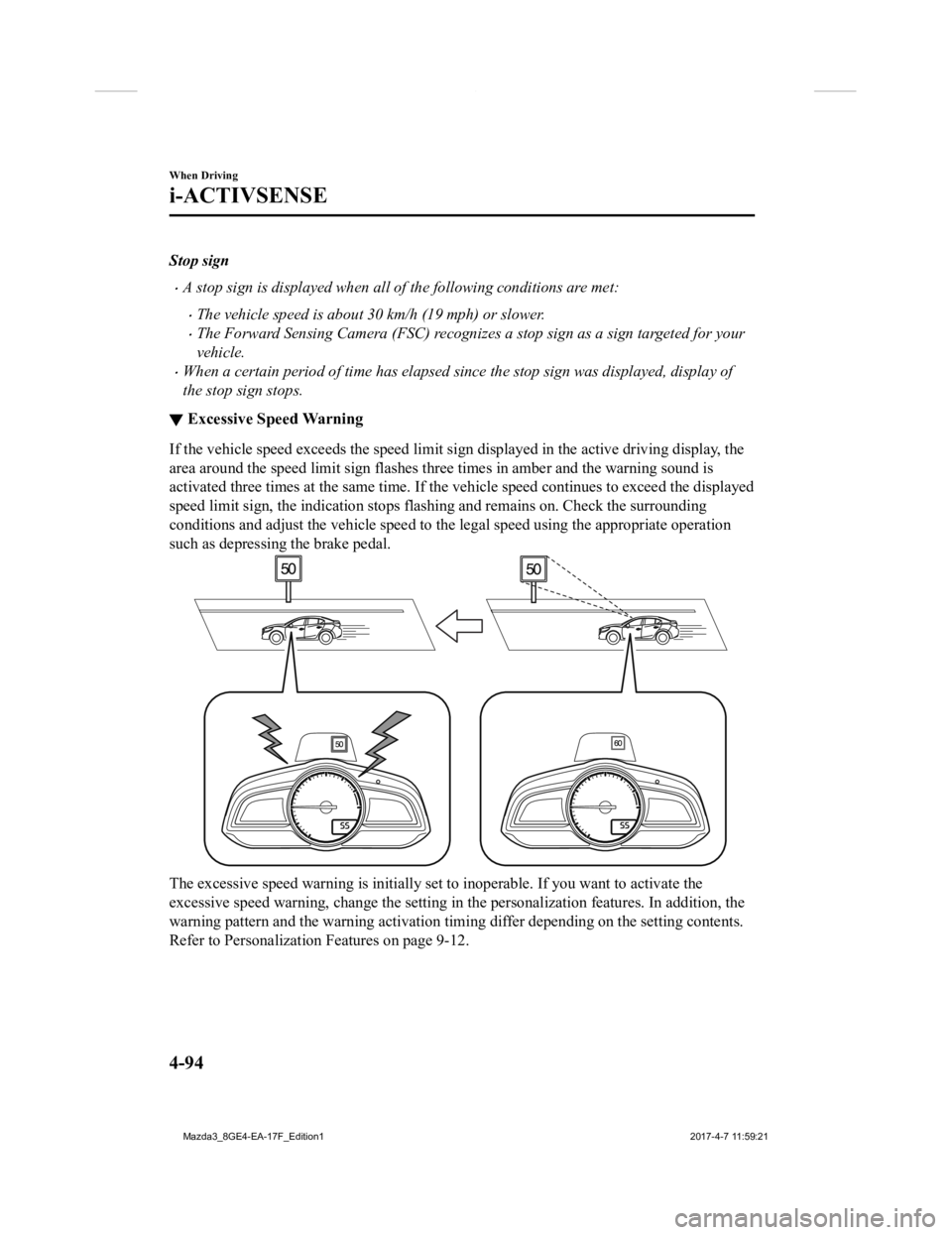
If the vehicle speed exceeds the speed limit sign displayed in the active driving display, the
area around the speed limit sign flashes three times in amber a nd the warning sound is
activated three times at the same time. If the vehicle speed co ntinues to exceed the displayed
speed limit sign, the indication stops flashing and remains on. Check the surrounding
conditions and adjust the vehicle speed to the legal speed using the appropriate operation
such as depressing the brake pedal.
The excessive speed warning is initially set to inoperable. If you want to activate the
excessive speed warning, change the setting in the personalizat ion features. In addition, the
warning pattern and the warning activation timing differ depend ing on the setting contents.
Refer to Personalization Features on page 9-12.
When Driving
i-ACTIVSENSE
4-94
Mazda3_8GE4-EA-17F_Edition1 2017-4-7 11:59:21