phone MAZDA MODEL 3 5-DOOR 2018 Service Manual
[x] Cancel search | Manufacturer: MAZDA, Model Year: 2018, Model line: MODEL 3 5-DOOR, Model: MAZDA MODEL 3 5-DOOR 2018Pages: 624, PDF Size: 59.23 MB
Page 400 of 624

▼Communication Settings
Select the icon on the home screen to display the Communication screen.
Select
to change the setting.
Item Setting Function
Bluetooth
®— Go to Bluetooth® setting menu.
Refer to Bluetooth® Preparation (Type B) on page 5-87.
Incoming Call Notifi-
cations On/Off Notifies when an incoming call is received.
Auto Download Text
Message On/Off
Downloads SMS automatically when the Bluetooth
® unit is connected
to the device.
Text Notifications On/Off Notifies when a new SMS is received.
Auto Download
Email
*1On/Off Downloads E-mail automatically when the Bluetooth® unit is connect-
ed to the device.
Email Notifications On/Off Notifies when a new Email is received.
Auto Download Call
History On/Off
Downloads Call History automa
tically when the Bluetooth
® unit is
connected to the device.
Auto Download Con-
tacts
*1On/Off Downloads the phonebook automatically when the Bluetooth® unit is
connected to the device.
Ringtone Car/Phone/Off Changes the ringtone setting.
Phone Volume Adjusts using
the slider. Adjusts the conversation volume.
VR and Ringtone Adjusts using
the slider. Adjusts the voice guidance and ringtone volume.
Contacts Display Or-
der First Name, Last
Name Displays the contact information
in alphabetical order of the first
name.
Last Name, First Name Displays the contact information
in alphabetical order of the last
name.
Edit Preset Messages — Edits the preset message.
Refer to Receiving and Replying t
o Messages (available only with
E-mail/SMS compatible pho nes) on page 5-106.
Emergency Assistance
Call On/Off Mobile Utilizes the Mobile 911 function.
Restore Factory set-
tings — Initializes all Communication Settings.
*1 Depending on the device, it may b
e necessary to acquire download permission on the device side.
Interior Features
Bluetooth®
5-110
Mazda3_8GE4-EA-17F_Edition1 2017-4-7 11:59:21
Page 401 of 624
Bluetooth® Audio (Type
A)
*
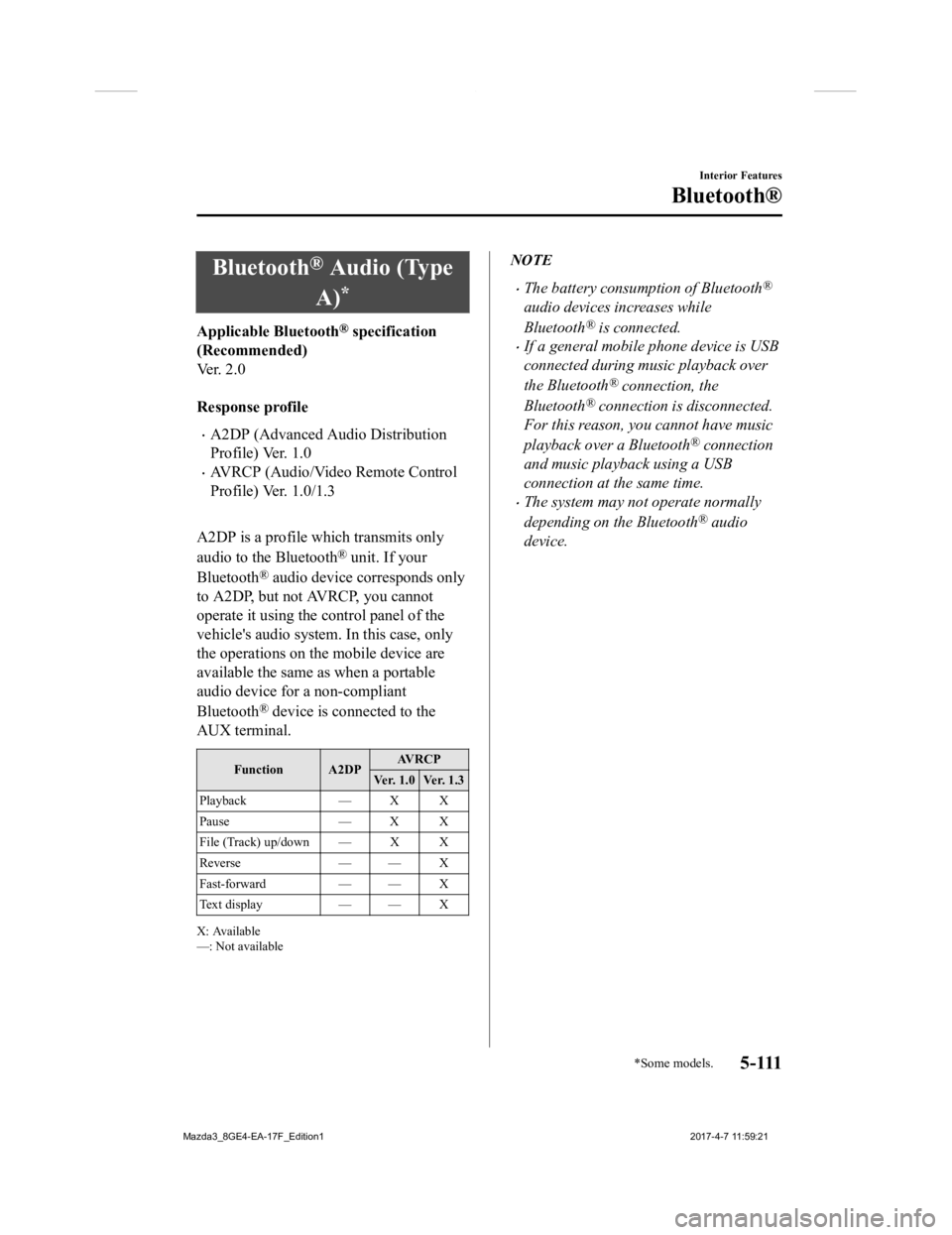
Applicable Bluetooth® specification
(Recommended)
Ve r . 2 . 0
Response profile
A2DP (Advanced Audio Distribution
Profile) Ver. 1.0
AVRCP (Audio/Video Remote Control
Profile) Ver. 1.0/1.3
A2DP is a profile which transmits only
audio to the Bluetooth
® unit. If your
Bluetooth
® audio device corresponds only
to A2DP, but not AVRCP, you cannot
operate it using the control panel of the
vehicle's audio system. In this case, only
the operations on the mobile device are
available the same as when a portable
audio device for a non-compliant
Bluetooth
® device is connected to the
AUX terminal.
Function A2DP AV R C P
Ver. 1.0 Ver. 1.3
Playback — X X
Pause — X X
File (Track) up/down — X X
Reverse — — X
Fast-forward — — X
Te x t d i s p l a y — — X
X: Available
—: Not available
NOTE
The battery consumption of Bluetooth®
audio devices increases while
Bluetooth
® is connected.
If a general mobile phone device is USB
connected during music playback over
the Bluetooth
® connection, the
Bluetooth
® connection is disconnected.
For this reason, you cannot have music
playback over a Bluetooth
® connection
and music playback using a USB
connection at the same time.
The system may not operate normally
depending on the Bluetooth
® audio
device.
Interior Features
Bluetooth®
*Some models.5 - 111
Mazda3_8GE4-EA-17F_Edition1 2017-4-7 11:59:21
Page 402 of 624

▼How to Use the Bluetooth® Audio
System
Switching to Bluetooth® audio mode
To listen to music or voice audio recorded
to a Bluetooth
® audio device, switch to the
Bluetooth
® audio mode to operate the
audio device using the audio system
control panel. Any Bluetooth
® audio
device must be paired to the vehicle's
Bluetooth
® unit before it can be used.
Refer to Bluetooth
® Preparation (Type A)
on page 5-72.
1. Turn on the Bluetooth
® audio device's
power.
2. Switch the ignition to ACC or ON.
Make sure that the “
” symbol is
displayed in the audio display. The
symbol is not displayed if an un-paired
Bluetooth
® audio device is being used
or the vehicle's Bluetooth
® unit has a
malfunction.
NOTE
Some Bluetooth® audio devices need a
certain amount of time before the “
”
symbol is displayed.
3. Press the media button (
) to
switch to the Bluetooth
® audio mode
and start playback.
If the current device version is lower
than AVRCP Ver. 1.3: “BT Audio” is
displayed.
If the current device is AVRCP Ver. 1.3:
The playback time is displayed.
NOTE
If the Bluetooth® audio device does not
begin playback, press the Play/Pause
button (4).
If a call is received on a hands-free
mobile phone during playback from the
Bluetooth
® audio device, the playback is
stopped. Playback from the Bluetooth
®
audio device resumes after the call ends.
Playback
1. To listen to a Bluetooth® audio device
over the vehicle's speaker system,
switch the mode to Bluetooth
® audio
mode. (Refer to “Switching to
Bluetooth
® audio mode”)
2. To stop playback, press the Play/Pause button (4).
3. Press the button again to resume playback.
Selecting a file (track)
Selects the next file (track)
Short-press the track up button (
).
Selects the beginning of the current file
(track)
Short-press the track down button (
).
Fast-forward/Reverse (AVRCP Ver. 1.3)
Fast-forward
Press and hold the fast-forward button
(
).
Reverse
Press and hold the reverse down button
(
).
Interior Features
Bluetooth®
5-112
Mazda3_8GE4-EA-17F_Edition1 2017-4-7 11:59:21
Page 404 of 624
Bluetooth® Audio (Type
B)
*
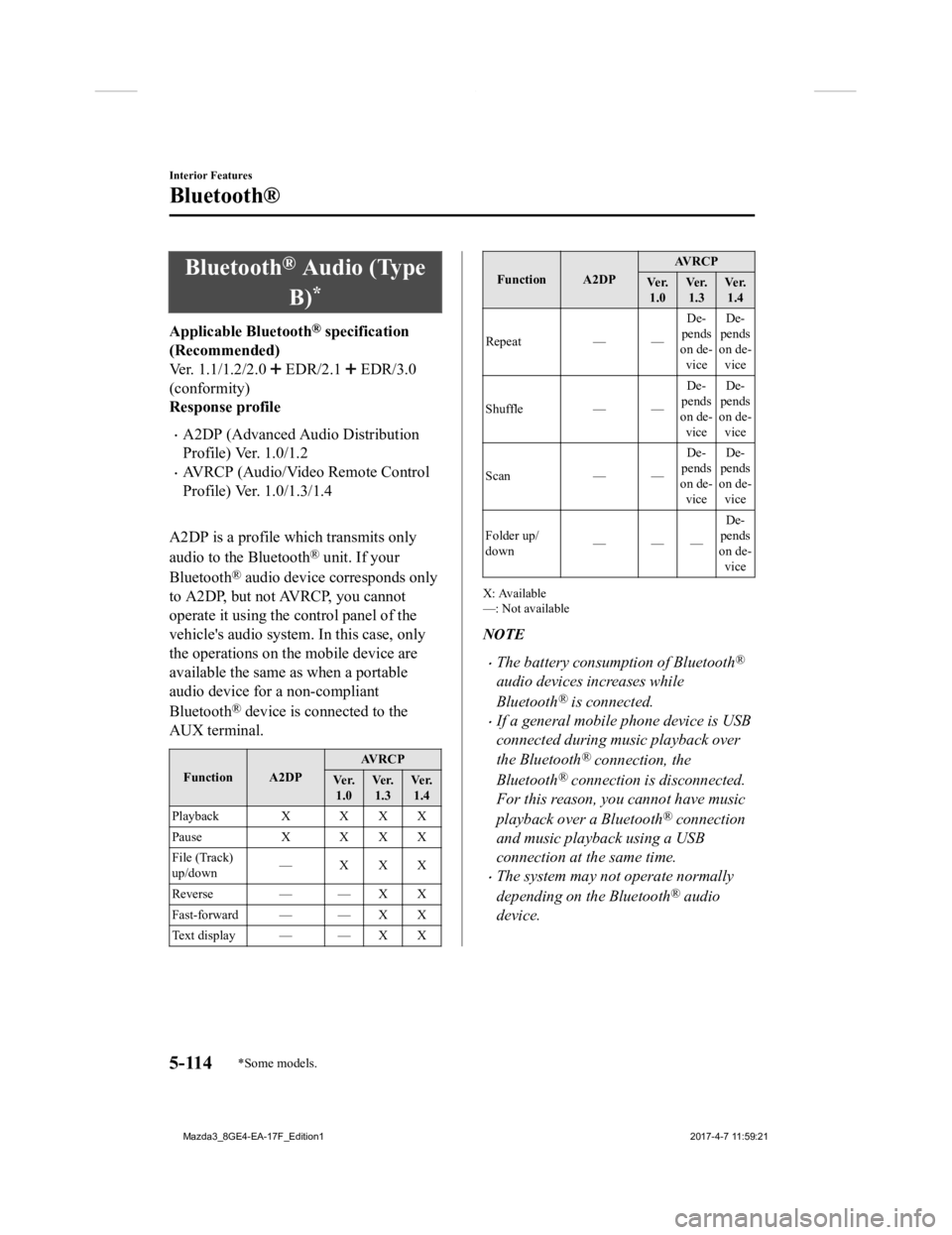
Applicable Bluetooth® specification
(Recommended)
Ver. 1.1/1.2/2.0
EDR/2.1 EDR/3.0
(conformity)
Response profile
A2DP (Advanced Audio Distribution
Profile) Ver. 1.0/1.2
AVRCP (Audio/Video Remote Control
Profile) Ver. 1.0/1.3/1.4
A2DP is a profile which transmits only
audio to the Bluetooth
® unit. If your
Bluetooth
® audio device corresponds only
to A2DP, but not AVRCP, you cannot
operate it using the control panel of the
vehicle's audio system. In this case, only
the operations on the mobile device are
available the same as when a portable
audio device for a non-compliant
Bluetooth
® device is connected to the
AUX terminal.
Function A2DP AV R C P
Ve r. 1.0 Ve r.
1.3 Ve r.
1.4
Playback X X X X
Pause X X X X
File (Track)
up/down —XXX
Reverse — — X X
Fast-forward — — X X
Te x t d i s p l a y — — X X
Function A2DP AV R C P
Ve r. 1.0 Ve r.
1.3 Ve r.
1.4
Repeat — — De-
pends
on de- vice De-
pends
on de- vice
Shuffle — —De-
pends
on de- vice De-
pends
on de- vice
Scan — —De-
pends
on de-
vice De-
pends
on de-
vice
Folder up/
down ——— De-
pends
on de- vice
X: Available
—: Not available
NOTE
The battery consumption of Bluetooth®
audio devices increases while
Bluetooth
® is connected.
If a general mobile phone device is USB
connected during music playback over
the Bluetooth
® connection, the
Bluetooth
® connection is disconnected.
For this reason, you cannot have music
playback over a Bluetooth
® connection
and music playback using a USB
connection at the same time.
The system may not operate normally
depending on the Bluetooth
® audio
device.
Interior Features
Bluetooth®
5-114*Some models.
Mazda3_8GE4-EA-17F_Edition1 2017-4-7 11:59:21
Page 411 of 624
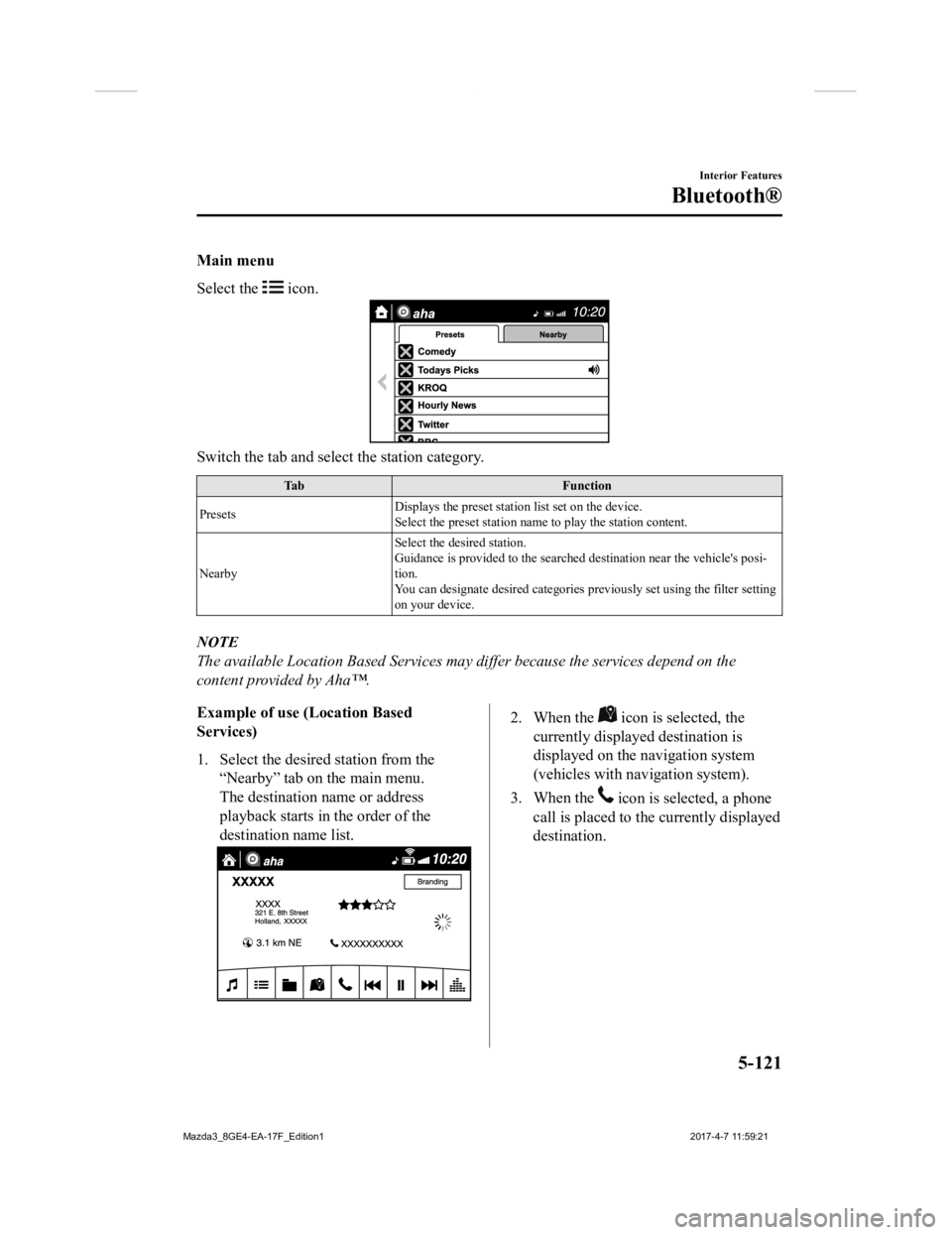
Main menu
Select the
icon.
Switch the tab and select the station category.
TabFunction
Presets Displays the preset station list set on the device.
Select the preset station name
to play the station content.
Nearby Select the desired station.
Guidance is provided to the searched destination near the vehic
le's posi-
tion.
You can designate desired categor ies previously set using the filter setting
on your device.
NOTE
The available Location Based Services may differ because the services depend on the
content provided by Aha™.
Example of use (Location Based
Services)
1. Select the desired station from the
“Nearby” tab on the main menu.
The destination name or address
playback starts in the order of the
destination name list.
2. When the icon is selected, the
currently displayed destination is
displayed on the navigation system
(vehicles with navigation system).
3. When the
icon is selected, a phone
call is placed to the currently displayed
destination.
Interior Features
Bluetooth®
5-121
Mazda3_8GE4-EA-17F_Edition1 2017-4-7 11:59:21
Page 415 of 624
Troubleshooting*
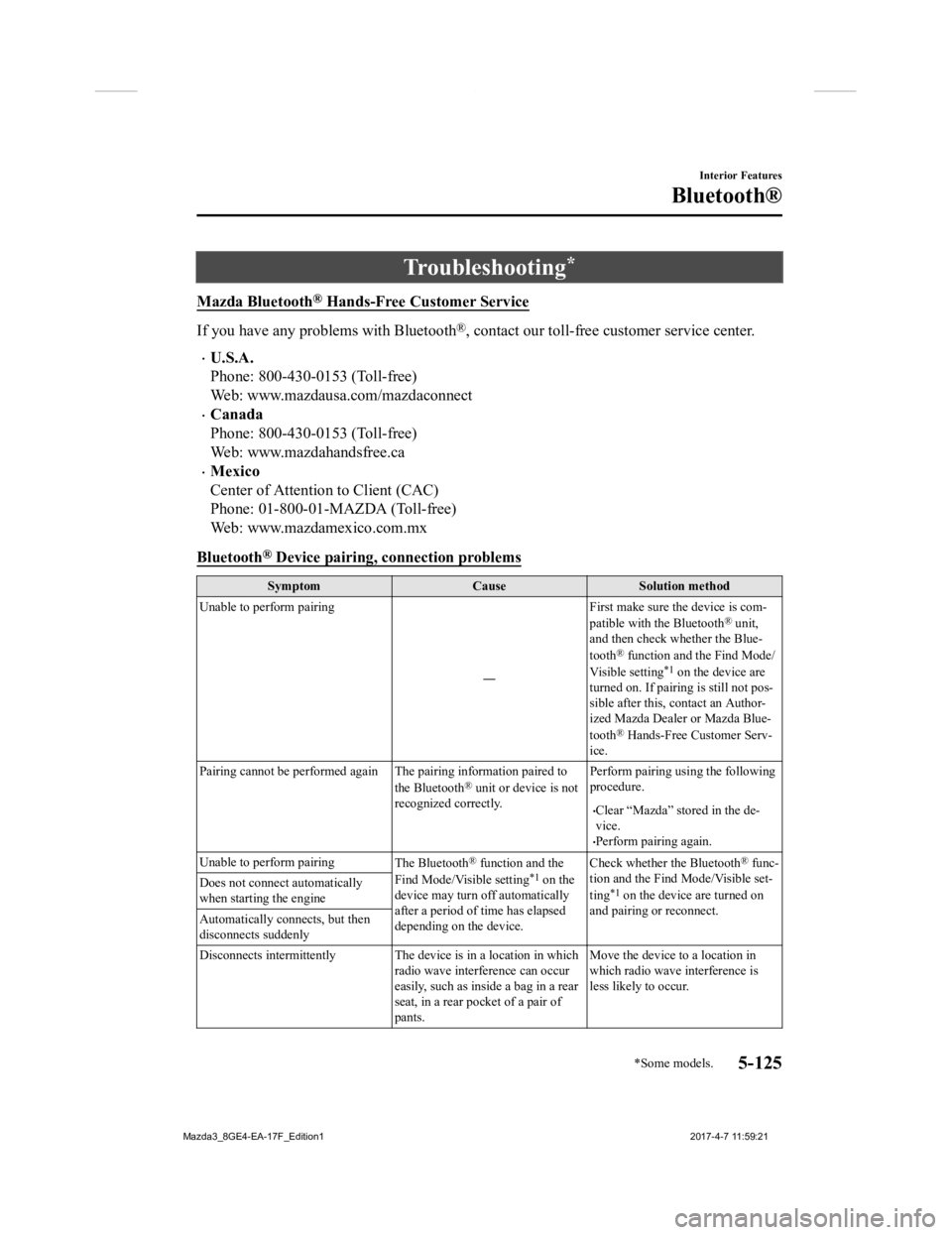
Mazda Bluetooth® Hands-Free Customer Service
If you have any problems with Bluetooth®, contact our toll-free customer service center.
U.S.A.
Phone: 800-430-0153 (Toll-free)
Web: www.mazdausa.com/mazdaconnect
Canada
Phone: 800-430-0153 (Toll-free)
Web: www.mazdahandsfree.ca
Mexico
Center of Attention to Client (CAC)
Phone: 01-800-01-MAZDA (Toll-free)
Web: www.mazdamexico.com.mx
Bluetooth
® Device pairing, connection problems
Symptom CauseSolution method
Unable to perform pairing
―First make sure the device is com-
patible with the Bluetooth
® unit,
and then check whether the Blue-
tooth
® function and the Find Mode/
Visible setting*1 on the device are
turned on. If pairin g is still not pos-
sible after this, contact an Author-
ized Mazda Dealer or Mazda Blue-
tooth
® Hands-Free Customer Serv-
ice.
Pairing cannot be performed again The pairing information paired to
the Bluetooth
® unit or device is not
recognized correctly. Perform pairing using the following
procedure.
Clear “Mazda” stored in the de-
vice.
Perform pairing again.
Unable to perform pairing The Bluetooth
® function and the
Find Mode/Visible setting*1 on the
device may turn off automatically
after a period of time has elapsed
depending on the device. Check whether the Bluetooth
® func-
tion and the Find Mode/Visible set-
ting
*1 on the device are turned on
and pairing or reconnect.
Does not connect automatically
when starting the engine
Automatically connects, but then
disconnects suddenly
Disconnects intermittently The de
vice is in a location in which
radio wave interference can occur
easily, such as inside a bag in a rear
seat, in a rear pocket of a pair of
pants. Move the device to a location in
which radio wave interference is
less likely to occur.
Interior Features
Bluetooth®
*Some models.5-125
Mazda3_8GE4-EA-17F_Edition1
2017-4-7 11:59:21
Page 416 of 624

SymptomCauseSolution method
Does not connect automatically
when starting the engine The pairing information is updated
when the device OS is updated.Perform pairing again.
*1 Setting which detects the existe
nce of a device external to the Bluetooth® unit
NOTE
When the OS of the device is updated, the pairing information may be deleted. If this
happens, reprogram the pairing information to the Bluetooth
® unit.
If you pair your phone which has already been paired to your vehicle more than once in
the past, you need to delete “Mazda” on your mobile device. Then, execute the
Bluetooth
® search on your mobile device once again, and pair to a newly detected
“Mazda”.
Before you pair your device, make sure that Bluetooth® is “ON”, both on your phone and
on the vehicle.
If Bluetooth®-enabled devices are used in the following locations or conditions,
connection via Bluetooth
® may not be possible.
The device is in a location hidden from the center display such as behind or under a
seat, or inside the glove compartment.
The device contacts or is covered by a metal object or body.
The device is set to power-saving mode.
Different Bluetooth®-enabled devices can be used for Bluetooth® Hands-Free and
Bluetooth
® audio. For example, device A can be connected as a Bluetooth® Hands-Free
device and device B can be connected as a Bluetooth
® audio device. However, the
following may occur when they are used at the same time.
The Bluetooth® connection of the device is disconnected.
Noise occurs in the Hands-Free audio.
Hands-Free operates slowly.
Interior Features
Bluetooth®
5-126
Mazda3_8GE4-EA-17F_Edition1 2017-4-7 11:59:21
Page 417 of 624
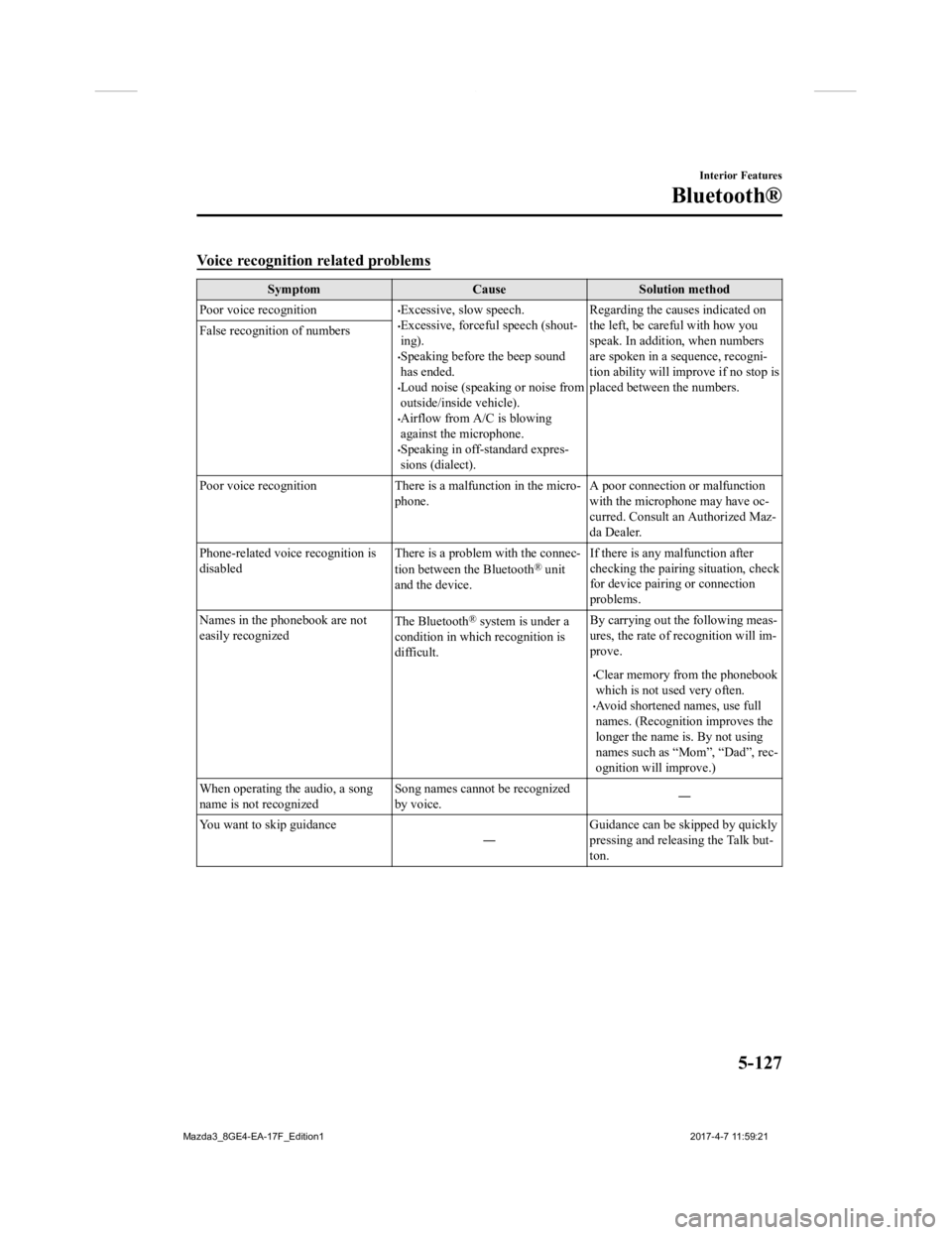
Voice recognition related problems
SymptomCauseSolution method
Poor voice recognition
Excessive, slow speech.Excessive, forceful speech (shout-
ing).
Speaking before the beep sound
has ended.
Loud noise (speaking or noise from
outside/inside vehicle).
Airflow from A/C is blowing
against the microphone.
Speaking in off-standard expres-
sions (dialect). Regarding the causes indicated on
the left, be careful with how you
speak. In addition,
when numbers
are spoken in a sequence, recogni-
tion ability will improve if no stop is
placed between the numbers.
False recognition of numbers
Poor voice recognition There is
a malfunction in the micro-
phone. A poor connection or malfunction
with the microphone may have oc-
curred. Consult an Authorized Maz-
da Dealer.
Phone-related voice recognition is
disabled There is a problem with the connec-
tion between the Bluetooth
® unit
and the device. If there is any malfunction after
checking the pairin
g situation, check
for device pairing or connection
problems.
Names in the phonebook are not
easily recognized The Bluetooth
® system is under a
condition in which recognition is
difficult. By carrying out the following meas-
ures, the rate of recognition will im-
prove.
Clear memory from the phonebook
which is not used very often.
Avoid shortened names, use full
names. (Recognitio
n improves the
longer the name is. By not using
names such as “Mom”, “Dad”, rec-
ognition will improve.)
When operating the audio, a song
name is not recognized Song names cannot be recognized
by voice.
―
You want to skip guidance ―Guidance can be skipped by quickly
pressing and releasing the Talk but-
ton.
Interior Features
Bluetooth®
5-127
Mazda3_8GE4-EA-17F_Edition1
2017-4-7 11:59:21
Page 418 of 624
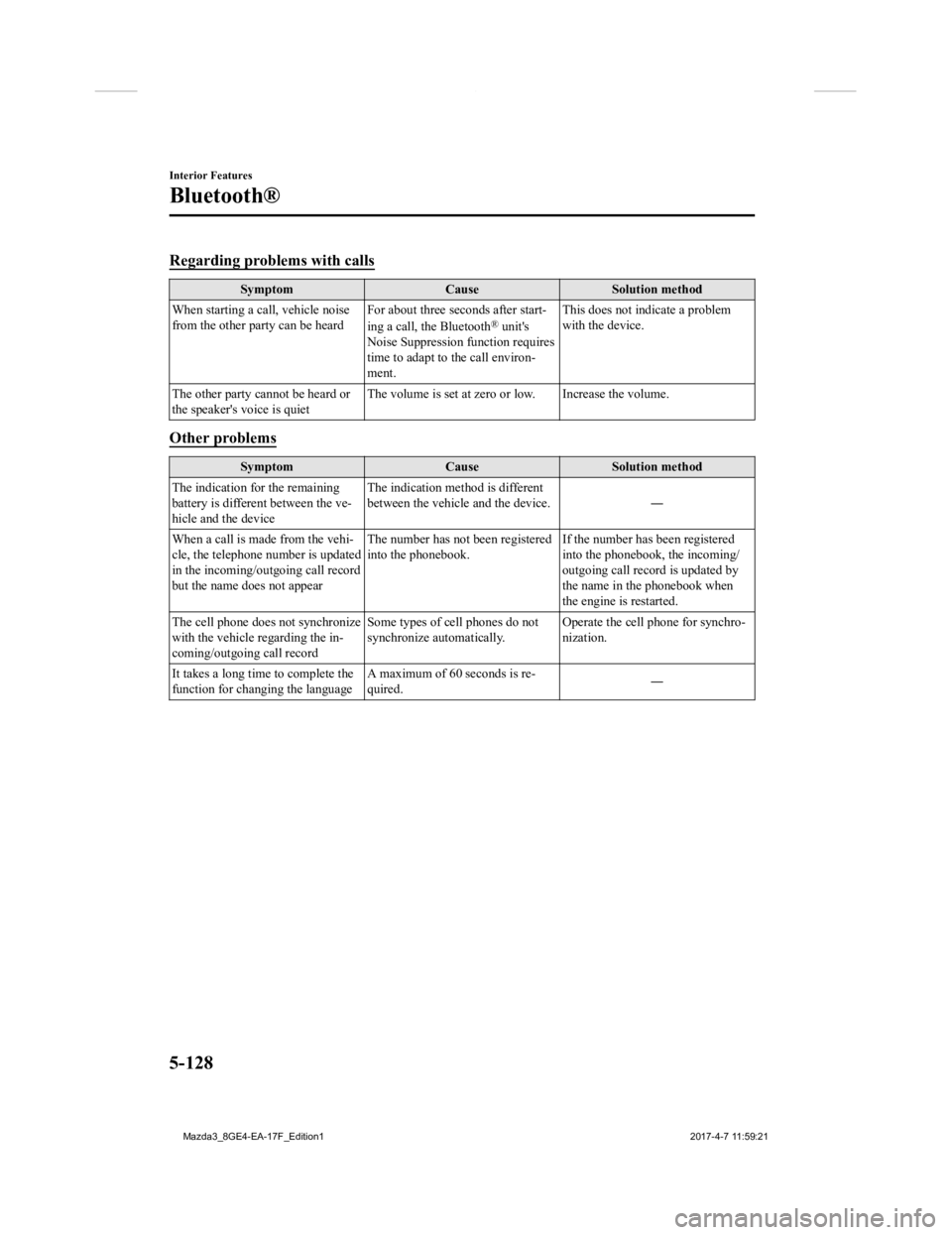
Regarding problems with calls
SymptomCauseSolution method
When starting a call, vehicle noise
from the other party can be heard For about three seconds after start-
ing a call, the Bluetooth
® unit's
Noise Suppression function requires
time to adapt to the call environ-
ment. This does not indicate a problem
with the device.
The other party cannot be heard or
the speaker's voice is quiet The volume is set at zero or low. Increase the volume.
Other problems
Symptom
CauseSolution method
The indication for the remaining
battery is different between the ve-
hicle and the device The indication method is different
between the vehicle and the device.
―
When a call is made from the vehi-
cle, the telephone number is updated
in the incoming/outgoing call record
but the name does not appear The number has not
been registered
into the phonebook. If the number has been registered
into the phonebook, the incoming/
outgoing call record is updated by
the name in the phonebook when
the engine is restarted.
The cell phone does not synchronize
with the vehicle regarding the in-
coming/outgoing call record Some types of cell phones do not
synchronize automatically.
Operate the cell p
hone for synchro-
nization.
It takes a long time to complete the
function for changing the language A maximum of 60 seconds is re-
quired.
―
Interior Features
Bluetooth®
5-128
Mazda3_8GE4-EA-17F_Edition1
2017-4-7 11:59:21
Page 547 of 624

8
Customer Information and Reporting
Safety Defects
Important consumer information including warranties and add-on
equipment.
Customer Assistance......................... 8-2 Customer Assistance
(U.S.A.)........................................ 8-2
Customer Assistance
(Canada)....................................... 8-7
Customer Assistance (Puerto
Rico)........................................... 8-10
Customer Assistance
(Mexico)..................................... 8-11
Mazda Importer/Distributors........ 8-13 Importer/Distributor................... 8-13
Reporting Safety Def ects................ 8-14
Reporting Safety Defects
(U.S.A.)...................................... 8-14
Reporting Safety Defects
(Canada)..................................... 8-15
Warranty.......................................... 8-16 Warranties for Your Mazda.........8-16
Outside the United States/
Canada........................................ 8-17
Registering Your Vehicle in A
Foreign Country (Except United
States and Canada)..................... 8-18
Add-On Non-Genuine Parts and
Accessories................................. 8-19
Cell Phones....................................... 8-20
Cell Phones Warning.................. 8-20
Event Data Recorder. ......................8-21
Event Data Recorder (U.S.A. and
Canada)....................................... 8-21
Recording of Vehicle Data.............. 8-22 Recording of Vehicle Data..........8-22
Uniform Tire Quality Grading System
(UTQGS).......................................... 8-23 Uniform Tire Quality Grading
System (UTQGS)....................... 8-23
Tire Information (U.S.A.)............... 8-25 Tire Labeling.............................. 8-25
Location of the Tire Label
(Placard)..................................... 8-30
Tire Maintenance........................ 8-33
Vehicle Loading.......................... 8-36
Steps for Determining the Correct
Load Limit.................................. 8-42
Declaration of Confo rmity..............8-43
Declaration of Conformity......... 8-43
8-1
Mazda3_8GE4-EA-17F_Edition1 2017-4-7 11:59:21