phone MAZDA MODEL 3 5-DOOR 2018 Owner's Guide
[x] Cancel search | Manufacturer: MAZDA, Model Year: 2018, Model line: MODEL 3 5-DOOR, Model: MAZDA MODEL 3 5-DOOR 2018Pages: 624, PDF Size: 59.23 MB
Page 387 of 624
![MAZDA MODEL 3 5-DOOR 2018 Owners Guide 7.Prompt: “Deleting XXXXX... (Ex.
“John's phone”) (Registered voice tag)
Home (Registered l ocation). Is this
correct?”
8. Say: [Beep] “Yes”
9. Prompt: “XXXXX... (Ex. “John'](/img/28/40990/w960_40990-386.png "MAZDA MODEL 3 5-DOOR 2018 Owners Guide 7.Prompt: “Deleting XXXXX... (Ex.
“John's phone”) (Registered voice tag)
Home (Registered l ocation). Is this
correct?”
8. Say: [Beep] “Yes”
9. Prompt: “XXXXX... (Ex. “John'")
7.Prompt: “Deleting XXXXX... (Ex.
“John's phone”) (Registered voice tag)
Home (Registered l ocation). Is this
correct?”
8. Say: [Beep] “Yes”
9. Prompt: “XXXXX... (Ex. “John's
phone”) (Registered voice tag) Home
(Registered locat ion) deleted.”
(Complete deletion of the phonebook
data)
All data registere d to the Bluetooth
®
Hands-Free phonebook can be erased.
NOTE
Do this function only when parked. It is
too distracting to attempt while driving
and you may make too many errors to be
effective.
1. Press the pick-up button or talk button
with a short press.
2. Say: [Beep] “Phonebook”
3. Prompt: “Select one of the following:
New entry, edit, l ist names, delete,
erase all or import contact.”
4. Say: [Beep] “Erase all”
5. Prompt: “Are you sure you want to
erase everything from your Hands Free
system phonebook?”
6. Say: [Beep] “Yes”
7. Prompt: “You are about to delete
everything from your Hands Free
system phonebook. Do you want to
continue?”
8. Say: [Beep] “Yes”
9. Prompt: “Please wait, erasing the
Hands Free system phonebook.”
10. Prompt: “Hands-Free system
phonebook erased.”
Read-out of names registered to the
Bluetooth
® Hands-Free phonebook
Bluetooth
® Hands-Free can read out the
list of names registered to its phonebook.
1. Press the pick-up button or talk button with a short press.
2. Say: [Beep] “Phonebook”
3. Prompt: “Select one of the following:
New entry, edit, list names, delete,
erase all or import contact.”
4. Say: [Beep] “List names”
5. Prompt: “XXXXX..., XXXXX...,
XXXXX... (Ex. “John's phone”,
Mary's phone, Bill's phone)” (Voice
guidance reads out the voice tags
registered to the phonebook.)
Press the talk butto n with a short press
during the read-out at the desired
name, and then say one of the
following voice commands to execute
it.
“Continue”: Continues the list
readout.
“Call”: Calls the registered
phonebook data when the talk button
is short-pressed.
“Edit”: Edits the registered
phonebook data when the talk button
is short-pressed.
“Delete”: Deletes the registered
phonebook data when the talk button
is short-pressed.
“Previous”: Returns to the previous
phonebook data in read-out when the
talk button is short-pressed.
6. Prompt: “End of list, would you like
to start from the beginning?”
7. Say: [Beep] “No”
8. The procedure returns to Step 3.
Interior Features
Bluetooth®
5-97
Mazda3_8GE4-EA-17F_Edition1 2017-4-7 11:59:21
Page 388 of 624
![MAZDA MODEL 3 5-DOOR 2018 Owners Guide Redial Function
Redialing the number of the person
previously dialed using the phone is
possible.
1. Press the pick-up button or talk button
with a short press.
2. Say: [Beep] “Redial”
3. Prompt:](/img/28/40990/w960_40990-387.png "MAZDA MODEL 3 5-DOOR 2018 Owners Guide Redial Function
Redialing the number of the person
previously dialed using the phone is
possible.
1. Press the pick-up button or talk button
with a short press.
2. Say: [Beep] “Redial”
3. Prompt:")
Redial Function
Redialing the number of the person
previously dialed using the phone is
possible.
1. Press the pick-up button or talk button
with a short press.
2. Say: [Beep] “Redial”
3. Prompt: “Dialing”
Telephone Number Input
NOTE
Practice this while parked until you are
confident you can do it while driving in a
non-taxing road situation. If you are not
completely comfortable, make all calls
from a safe parking position, and only
start driving when you can devote your
full attention to driving.
1. Press the pick-up button or talk button
with a short press.
2. Say: [Beep] “Dial”
3. Prompt: “Number, please”
4. Say: [Beep] “XXXXXXXXXXX
(Telephone number)”
5. Prompt: “XXXXXXXXXXX.
(Telephone number) After the beep,
continue to add numbers, or say
Go-Back to re-enter the last entered
numbers, or press the Pick-Up button
to execute dialing.”
6. (Dialing)
Press the pick-up button or say “Dial”,
then go to Step 7.
(Adding/inputting telephone
number)
Say, “XXXX” (desired telephone
number), then go to Step 5.
(Telephone number correction)
Say, “Go Back”. The prompt replies,
“Go Back. The last entered numbers
have been removed.”. Then go back to
Step 3.
7. Prompt: “Dialing”
NOTE
The “Dial” command and a telephone
number can be combined.
Ex. In Step 2, say, “Dial 123-4567” then,
Steps 3 and 4 can be skipped.
Emergency calls
A call can be made to the emergency
phone number (911: U.S.A./Canada, 066:
Mexico) using the voice input command.
It may not function properly in some areas
in Mexico.
1. Press the pick-up button or talk button
with a short press.
2. Say: [Beep] “Emergency”
3. - U.S.A./Canada vehicles - Prompt:
“Dialing “911”, is this correct?”
- Mexico vehicles - Prompt: “Dialing
“066”, is this correct?”
4. Say: [Beep] “Yes”
5. Prompt: “Dialing”
Interior Features
Bluetooth®
5-98
Mazda3_8GE4-EA-17F_Edition1 2017-4-7 11:59:21
Page 389 of 624

▼Receiving an Incoming Call
1.
Prompt: “Incoming call, press the
pick-up button to answer”
2. To accept the call, press the pick-up button.
To reject the call, press the hang-up
button.
▼Hanging Up a Call
Press the hang-up button during the call. A
beep sound will confirm that call is ended.
▼Mute
The microphone can be muted during a
call.
1. Press the talk butto
n with a short press.
2. Say: [Beep] “Mute”
3. Prompt: “Microphone muted”
Canceling mute
1. Press the talk butto n with a short press.
2. Say: [Beep] “Mute off”
3. Prompt: “Microphone unmuted”
▼Transferring a Call from
Hands-Free to a Device (Mobile
Phone)
Communication between the hands-free
unit and a device (Mobile phone) is
canceled, and the line can be switched to a
standard call using a device (Mobile
phone).
1. Press the talk butto
n with a short press.
2. Say: [Beep] “Transfer call”
3. Prompt: “Transferred call to phone”
▼Transferring a Call from a Device
(Mobile Phone)
to Hands-Free
Communication between devices (Mobile
phone) can be switched to Bluetooth
®
Hands-Free.
1. Press the talk butto n with a short press.
2. Say: [Beep] “Transfer call”
3. Prompt: “Transferred call to Hands
Free system”
▼ Call interrupt
A call can be interr
upted to receive an
incoming call from a third party.
Switch to a new incoming call using the
following methods.
Method 1
1. Press the pick-up button.
2. Prompt: “Swapping calls.”
Method 2
1. Press the talk butto n with a short press.
2. Say: [Beep] “Swap calls”
3. Prompt: “Swapping calls.”
NOTE
To refuse an incoming call, press the
hang-up button.
After receiving a new incoming call, the
previous call is placed on hold.
Switching calls
Switching back to the previous call can
also be done.
Method 1
1. Press the pick-up button.
2. Prompt: “Swapping calls.”
Method 2
1. Press the talk butto n with a short press.
2. Say: [Beep] “Swap calls”
3. Prompt: “Swapping calls.”
Three-way call function
1. Press the talk butto n with a short press.
2. Say: [Beep] “Join calls”
Interior Features
Bluetooth®
5-99
Mazda3_8GE4-EA-17F_Edition1 2017-4-7 11:59:21
Page 390 of 624
![MAZDA MODEL 3 5-DOOR 2018 Owners Guide 3.Prompt: “Joining calls”
Making a call using a telephone number
1. Press the talk butt on with a short press.
2. Say: [Beep] “Dial”
3. Prompt: “Number, please”
4. Say: [Beep] “XXXXX](/img/28/40990/w960_40990-389.png "MAZDA MODEL 3 5-DOOR 2018 Owners Guide 3.Prompt: “Joining calls”
Making a call using a telephone number
1. Press the talk butt on with a short press.
2. Say: [Beep] “Dial”
3. Prompt: “Number, please”
4. Say: [Beep] “XXXXX")
3.Prompt: “Joining calls”
Making a call using a telephone number
1. Press the talk butt on with a short press.
2. Say: [Beep] “Dial”
3. Prompt: “Number, please”
4. Say: [Beep] “XXXXXXXXXXX
(Telephone number)”
5. Prompt: “XXXXXXXXXXX.
(Telephone number) After the beep,
continue to add numbers, or say
Go-Back to re-enter the last entered
numbers, or press the Pick-Up button
to execute dialing.”
6. (Dialing)
Press the pick-up button or say “Dial”,
then go to Step 7.
(Adding/inputting telephone
number)
Say, “XXXX” (desired telephone
number), then go to Step 5.
(Telephone number correction)
Say, “Go Back”. The prompt replies,
“Go Back. The last entered numbers
have been removed.”. Then go back to
Step 3.
7. Prompt: “Dialing”
Making calls using the phonebook
1. Press the talk butt on with a short press.
2. Say: [Beep] “Call”
3. Prompt: “Name please.”
4. Say: [Beep] “XXXXX... (Ex. “John's
phone”)” (Say a voice tag registered in
the phonebook.)
5. Prompt: “Calling XXXXX... (Ex.
“John's phone”) XXXX (Ex. “at
home”). Is this correct?” (Voice tag
and phone number location registered
in phonebook).
6. Say: [Beep] “Yes”
7. Prompt: “Dialing”
Redialing function
1. Press the talk button with a short press.
2.Say: [Beep] “Redial”
3. Prompt: “Dialing”
Ending the current call
Press the hang-up button during the call.
▼ DTMF (Dual Tone Multi-Frequency
Signal) Transmission
This function is used
when transmitting
DTMF via the user's voice. The receiver of
a DTMF transmission is generally a home
telephone answering machine or a
company's automated guidance call center
(When you send tone signals back
according to the voice guidance
recording).
1. Press the talk button with a short press.
2. Say: [Beep] “XXXX... send” (Say
DTMF code)
3. Prompt: “Sending XXXX... (DTMF
code)”
Interior Features
Bluetooth®
5-100
Mazda3_8GE4-EA-17F_Edition1 2017-4-7 11:59:21
Page 391 of 624
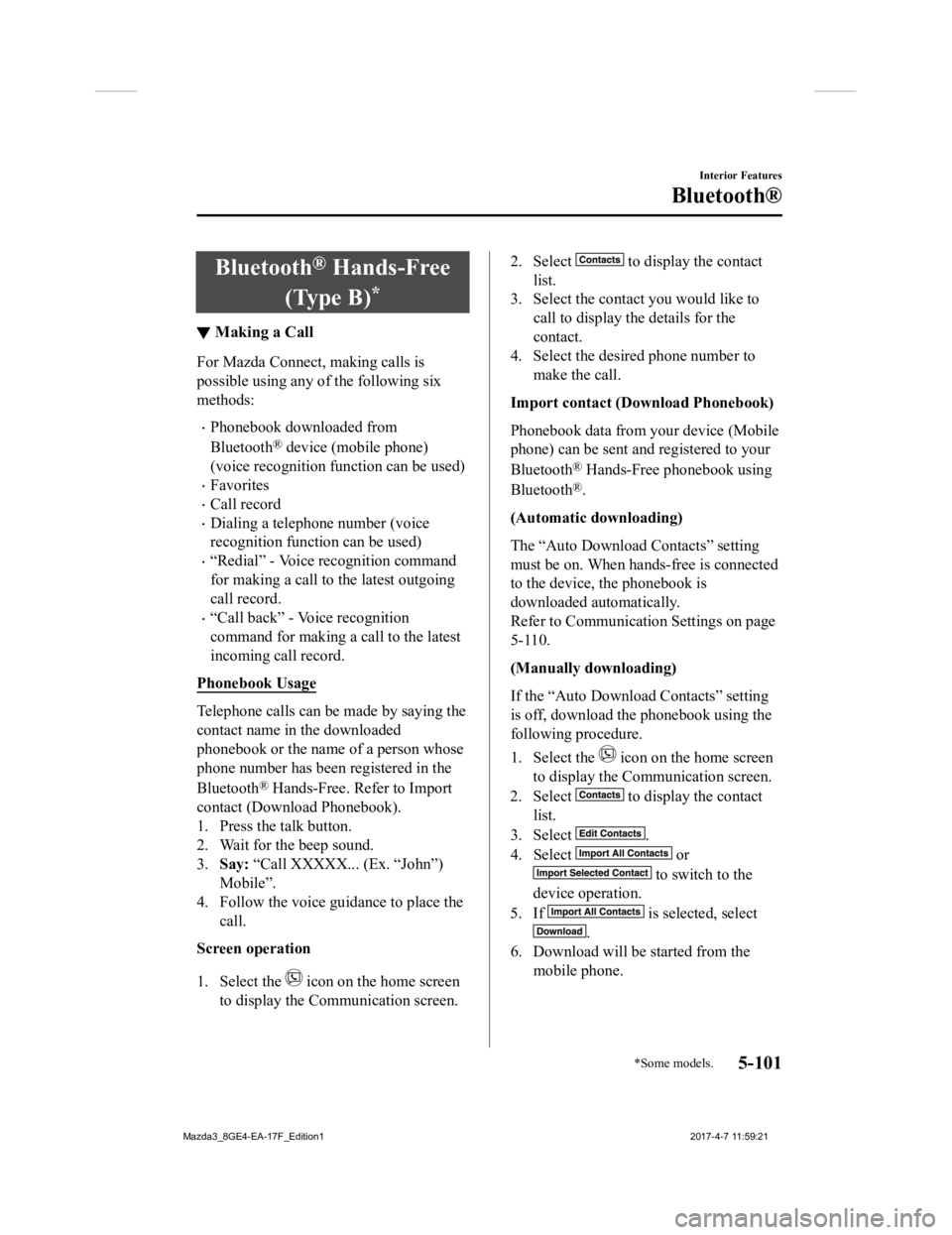
Bluetooth® Hands-Free
(Type B)
*
▼ Making a Call
For Mazda Connect, making calls is
possible using any of the following six
methods:
Phonebook downloaded from
Bluetooth
® device (mobile phone)
(voice recognition function can be used)
Favorites
Call record
Dialing a telephone number (voice
recognition function can be used)
“Redial” - Voice recognition command
for making a call to the latest outgoing
call record.
“Call back” - Voice recognition
command for making a call to the latest
incoming call record.
Phonebook Usage
Telephone calls can be made by saying the
contact name in the downloaded
phonebook or the name of a person whose
phone number has been registered in the
Bluetooth
® Hands-Free. Refer to Import
contact (Download Phonebook).
1. Press the talk button.
2. Wait for the beep sound.
3. Say: “Call XXXXX... (Ex. “John”)
Mobile”.
4. Follow the voice guidance to place the call.
Screen operation
1. Select the
icon on the home screen
to display the Communication screen.
2. Select to display the contact
list.
3. Select the contact you would like to call to display the details for the
contact.
4. Select the desired phone number to make the call.
Import contact (Download Phonebook)
Phonebook data from your device (Mobile
phone) can be sent and registered to your
Bluetooth
® Hands-Free phonebook using
Bluetooth
®.
(Automatic downloading)
The “Auto Download Contacts” setting
must be on. When hands-free is connected
to the device, the phonebook is
downloaded automatically.
Refer to Communication Settings on page
5-110.
(Manually downloading)
If the “Auto Download Contacts” setting
is off, download the phonebook using the
following procedure.
1. Select the
icon on the home screen
to display the Communication screen.
2. Select
to display the contact
list.
3. Select
.
4. Select
or
to switch to the
device operation.
5. If
is selected, select
.
6. Download will be started from the mobile phone.
Interior Features
Bluetooth®
*Some models.5-101
Mazda3_8GE4-EA-17F_Edition1 2017-4-7 11:59:21
Page 392 of 624

NOTE
If “Import All Contacts” is performed
after saving the phonebook to the
Bluetooth
® unit, the phonebook will be
overwritten.
A maximum of 1,000 contacts can be
registered to the phonebook.
Phonebook, incoming/outgoing call
record, and favorite memories are
exclusive to each mobile phone to
protect privacy.
Favorites Contacts
A maximum of 50 contacts can be
registered. It will take less time to make a
call after registering the telephone number.
In addition, you do not have to look for the
person you want to call in the phonebook.
Registering your favorites
1. Select the
icon on the home screen
to display the Communication screen.
2. Select
to display the favorites
list.
3. Select
.
4. Select
or
.
5. Select from the displayed list.
NOTE
When “Add New Contact” is selected,
information such as the selected person’s
name is also registered. In addition, when
“Add New Contact Details” is selected,
only the telephone number of the selected
person is registered.
Calling a favorite
1. Select the
icon on the home screen
to display the Communication screen.
2. Select to display the favorites
list.
3. (If only one phone number is
registered to contact)
Select the contact information you
would like to call. Go to Step 5.
(If multiple phone numbers are
registered to contact)
Select the contact you would like to
call to display the screen indicating the
details for the contact. Go to Step 4.
4. Select the phone number you would
like to call.
5. Select
.
Deleting a favorite
1. Select the
icon on the home screen
to display the Communication screen.
2. Select
to display the favorites
list.
3. Select
.
4. Select
.
5. Select the contact information which you would like to delete.
6. Select
.
Changing the display order of your
favorites list
1. Select the
icon on the home screen
to display the Communication screen.
2. Select
to display the favorites
list.
3. Select
.
4. Select
.
5. The contact can be moved after it is selected.
6. Slide the contact o r move it using the
commander switch, then select
.
Interior Features
Bluetooth®
5-102
Mazda3_8GE4-EA-17F_Edition1 2017-4-7 11:59:21
Page 393 of 624

Changing contact name of your
favorites
1. Select the
icon on the home screen
to display the Communication screen.
2. Select
to display the favorites
list.
3. Select
.
4. Select
.
5. Select the contact to display the keyboard screen.
6. If a new name is input and
is
selected, the contact name is stored.
NOTE
If the contact is long-pressed when the
favorites list is displayed, the contact
information can be edited (deleted,
moved).
Telephone Number Input
NOTE
Practice this while parked until you are
confident you can do it while driving in a
non-taxing road situation. If you are not
completely comfortable, make all calls
from a safe parking position, and only
start driving when you can devote your
full attention to driving.
1. Select the
icon on the home screen
to display the Communication screen.
2. When
is pressed, the dial pad
is displayed.
3. Input the telephone number using the
dial pad.
4. Select
to make the call.
Numeral or symbol entry
Use the dial pad.
Long-press the
to input +.
Select
to delete the currently input
value.
Long-press
to delete all input values.
Redial Function
Makes a call to the last person called
(latest person on outgoing call record)
from the mobile phone/vehicle.
1. Press the talk button.
2. Wait for the beep sound.
3. Say: “Redial”
Call back Function
Makes a call to the last person who called
your (latest person on incoming call
record) mobile phone/vehicle.
1. Press the talk button.
2. Wait for the beep sound.
3. Say: “Call back”
Mobile 911 (U.S.A./Canada only)
If the vehicle is involved in a moderate to
severe collision, a call is made
automatically to 911 from the connected
device. The “Emergency Assistance Call”
setting must be on.
Refer to Communication Settings on page
5-110.
CAUTION
Though the system can be set to not call
911, doing so will defeat the purpose of the
system. Mazda recommends that the
Mobile 911 system remain activated.
Interior Features
Bluetooth®
5-103
Mazda3_8GE4-EA-17F_Edition1 2017-4-7 11:59:21
Page 395 of 624
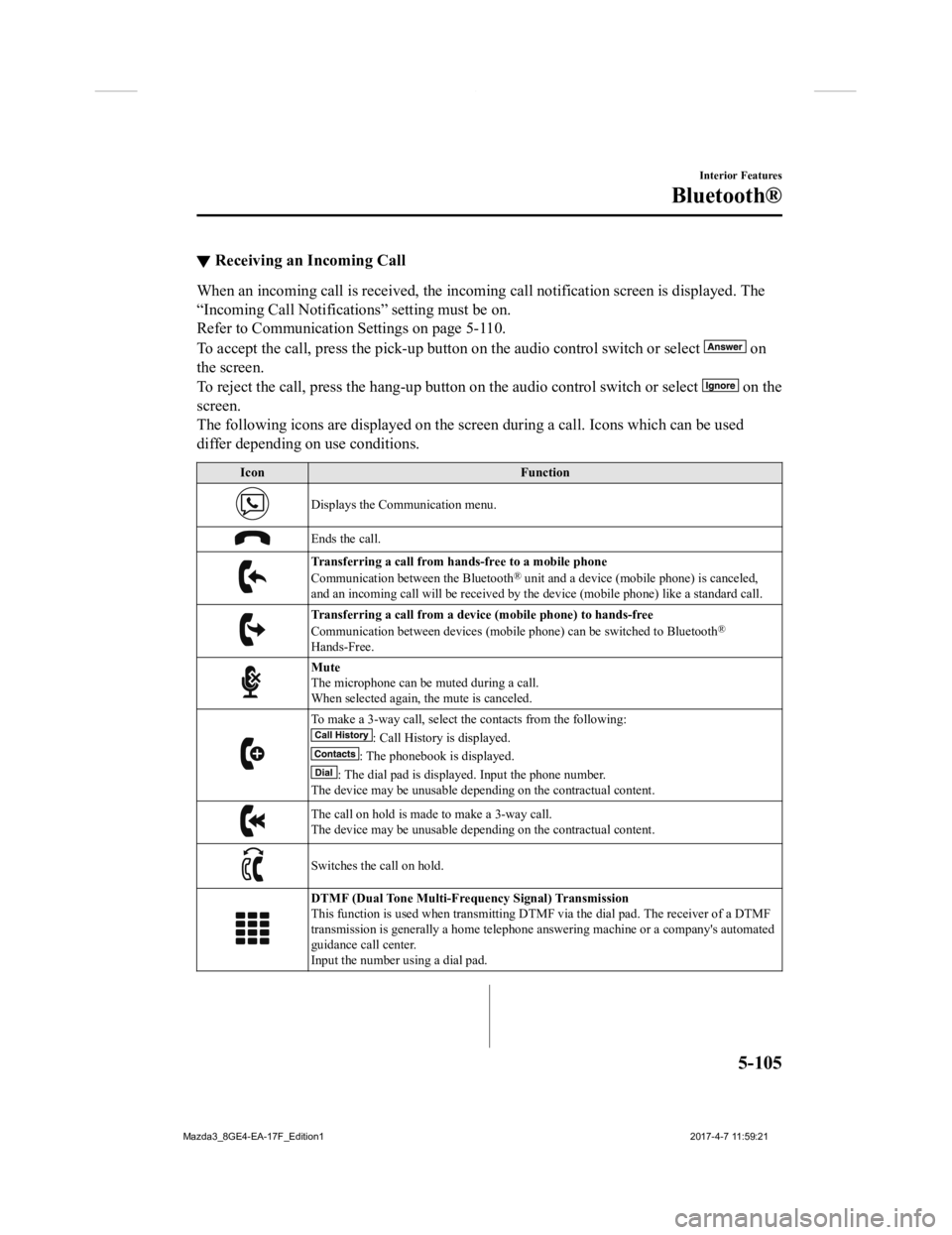
▼Receiving an Incoming Call
When an incoming call is received, the incoming call notificati
on screen is displayed. The
“Incoming Call Notificati ons” setting must be on.
Refer to Communication S ettings on page 5-110.
To accept the call, press the pick-up button on the audio contr ol switch or select
on
the screen.
To reject the call, press the hang-up button on the audio control switch or select
on the
screen.
The following icons are displayed on the screen during a call. Icons which can be used
differ depending on use conditions.
Icon Function
Displays the Communication menu.
Ends the call.
Transferring a call from hands-free to a mobile phone
Communication between the Bluetooth® unit and a device (mobile phone) is canceled,
and an incoming call will be r eceived by the device (mobile pho ne) like a standard call.
Transferring a call from a device (mobile phone) to hands-free
Communication between devices (mo bile phone) can be switched to Bluetooth®
Hands-Free.
Mute
The microphone can be muted during a call.
When selected again, the mute is canceled.
To make a 3-way call, select the contacts from the following:
: Call History is displayed.
: The phonebook is displayed.
: The dial pad is displayed. Input the phone number.
The device may be unusable depending on the contractual content .
The call on hold is made to make a 3-way call.
The device may be unusable depending on the contractual content .
Switches the call on hold.
DTMF (Dual Tone Multi-Frequency Signal) Transmission
This function is used when transmitting DTMF via the dial pad. The receiver of a DTMF
transmission is generally a home telephone answering machine or a company's automated
guidance call center.
Input the number using a dial pad.
Interior Features
Bluetooth®
5-105
Mazda3_8GE4-EA-17F_Edition1 2017-4-7 11:59:21
Page 396 of 624

NOTE
If the ignition is switched off during a
hands-free call, the line is transferred to
the device (Mobile phone)
automatically.
If the DTMF code has two or more
digits or symbols, each one must be
transmitted individually.
▼Call Interrupt
A call can be interrupted to receive an
incoming call from a third party.
When
is selected or the
pick-up button on the steering wheel is
pressed, the current call is held and the
system switches to t he new incoming call.
When
is selected, the current
call is ended and the system switches to
the new incoming call (GSM network
only).
When
is selected or the hang-up
button on the steering wheel is pressed, an
incoming call is refused.
NOTE
The function may not be available
depending on the contractual content of
the mobile device.
The function may not be operable
depending on the type of the telephone
network and the mobile device.
▼ Receiving and Replying to Messages
(available only with E-mail/SMS
compatible phones)
SMS (Short Message Service) messages,
and E-mail received by connected devices
can be downloaded, displayed, and played
(read by the system).
Additionally, replies can also be made to
calls and messages in the received
messages.
Downloading messages
Up to 20 new messages can be
downloaded and displayed from a
connected device.
NOTE
For E-mail, 20 messages for each account
can be downloaded.
(Automatic downloading)
The “Auto Download Email” (E-mail) or
“Auto Download Text Message” (SMS)
setting must be on. A message is
downloaded automatically when the
Bluetooth
® unit is connected to the device.
Refer to Communication Settings on page
5-110.
(Manually downloading)
When the “Auto Download Email”
(E-mail) or “Aut o Download Text
Message” (SMS) set ting is off, the
message is downloaded using the
following procedure.
1. Select the
icon on the home screen
to display the Communication screen.
2. Select
or to display
the Inbox.
3. Select
.
Interior Features
Bluetooth®
5-106
Mazda3_8GE4-EA-17F_Edition1 2017-4-7 11:59:21
Page 397 of 624

4. Download will be started from the
mobile phone.
NOTE
Attached data is not downloaded.
Messages up to 1 kilobyte (E-mail)/
140-bytes (SMS) can be downloaded.
A message list is created for each
device.
If the connected device does not
correspond to MAP 1.0, the AT
command is used to download. The
downloaded message indicates that it is
already read.
Downloading using the AT command
may not function depending on the
connected device.
If an iPhone is connected, the following
functions cannot be used.
Downloading past messages
Replying to messages
iPhone is a trademark of Apple Inc.,
registered in the U.S. and other
countries.
Receiving messages
(Method 1)
When a device receives a message, a
message received notification is displayed.
The “Email Notifica tions” (E-mail) or
“Text Notifications” (SMS) setting must
be on.
Refer to Communication Settings on page
5-110.
Select
and display the message.
(Method 2)
1. Select the
icon on the home screen
to display the Communication screen.
2. Select
and display the new
message list for E-mail and SMS.
3. Select the message you would like to display.
Interior Features
Bluetooth®
5-107
Mazda3_8GE4-EA-17F_Edition1 2017-4-7 11:59:21