radio MAZDA MODEL 3 5-DOOR 2018 Service Manual
[x] Cancel search | Manufacturer: MAZDA, Model Year: 2018, Model line: MODEL 3 5-DOOR, Model: MAZDA MODEL 3 5-DOOR 2018Pages: 624, PDF Size: 59.23 MB
Page 359 of 624

Bluetooth®*
Bluetooth® Hands-Free outline
When a Bluetooth® device (mobile phone) is connected to the vehicle's Bluetooth® unit via
radio wave transmission, a call c an be made or received by pressing the talk button, pick-up
button, or hang-up button on th e audio remote control switch, o r by operating the center
display. For example, even if a device (mobile phone) is in you r coat pocket, a call can be
made without taking the device (mobile phone) out and operating it directly.
Bluetooth
® audio outline
When a portable audio unit equipped with the Bluetooth® communication function is paired
to the vehicle, you can listen to music stored on the paired portable audio device from the
vehicle's speakers. It is not necessary to connect the portable audio device to the vehicle's
external input terminal. After programming, operate the vehicle audio control panel to play/
stop the audio.
NOTE
For your safety, a device can be paired only when the vehicle is parked. If the vehicle
starts to move, the pairing procedure will en d. Park the vehicle in a safe place before
pairing.
The communication range of a Bluetooth® equipped device is about 10 meters (32 ft) or
less.
Basic audio operation is available us ing voice commands even if Bluetooth® is not
connected.
For safety reasons, operation of the center di splay is disabled while the vehicle is being
driven. However, items not displayed in gray can be operated using the commander
switch while the vehicle is being driven.
CAUTION
Some Bluetooth® mobile devices are not compatible wi th the vehicle. Consult an Authorized
Mazda Dealer, Mazda's call center or Web support center for information regarding
Bluetooth
® mobile device compatibility:
Interior Features
Bluetooth®
*Some models.5-69
Mazda3_8GE4-EA-17F_Edition1 2017-4-7 11:59:21
Page 379 of 624

IMPORTANT note about pairing and
automatic reconnection:
If pairing is redone on the same
mobile phone device, first clear
“Mazda” displayed on the Bluetooth
®
setting screen of the mobile device.
When the OS of the device is updated,
the pairing information may be deleted.
If this happens, reprogram the pairing
information to the Bluetooth
® unit.
Before you pair your device, make sure
that Bluetooth
® is “ON”, both on your
phone and on the vehicle.
Device selection
If several devices have been paired, the
Bluetooth
® unit links the device last
paired. If you would like to link a different
paired device, it is n ecessary to change the
link. The order of device priority after the
link has been changed is maintained even
when the ignition is switched off.
Connecting other devices
1. Select the
icon on the home screen
to display the Settings screen.
2. Select the
tab.
3. Select
.
4. Turn the Bluetooth
® setting on.
5. Select the name of the device you
would like to connect.
6.
selection
Connects both devices as hands-free
and Bluetooth
® audio.
selection
Connects as a hands-free device.
selection
Connects as Bluetooth
® audio.
NOTE
The following functions can be used for
the Hands-free or audio.
Hands-free: Phone calls and
E-mail/SMS
Audio: Bluetooth® audio, Pandora®,
Aha™, Stitcher™ radio
Disconnecting a device
1. Select the
icon on the home screen
to display the Settings screen.
2. Select the
tab.
3. Select
.
4. Turn the Bluetooth
® setting on.
5. Select the device name which is currently connected.
6. Select
.
Deleting a device
Selecting and deleting devices
1. Select the
icon on the home screen
to display the Settings screen.
2. Select the
tab.
3. Select
.
4. Turn the Bluetooth
® setting on.
5. Select the device name which you would like to delete.
6. Select
.
7. Select
.
Deleting all devices
1. Select the
icon on the home screen
to display the Settings screen.
2. Select the
tab.
3. Select
.
4. Select
.
5. Select
.
6. Select
.
Interior Features
Bluetooth®
5-89
Mazda3_8GE4-EA-17F_Edition1 2017-4-7 11:59:21
Page 382 of 624
▼Audio Operation Using Voice Recognition (Type B)
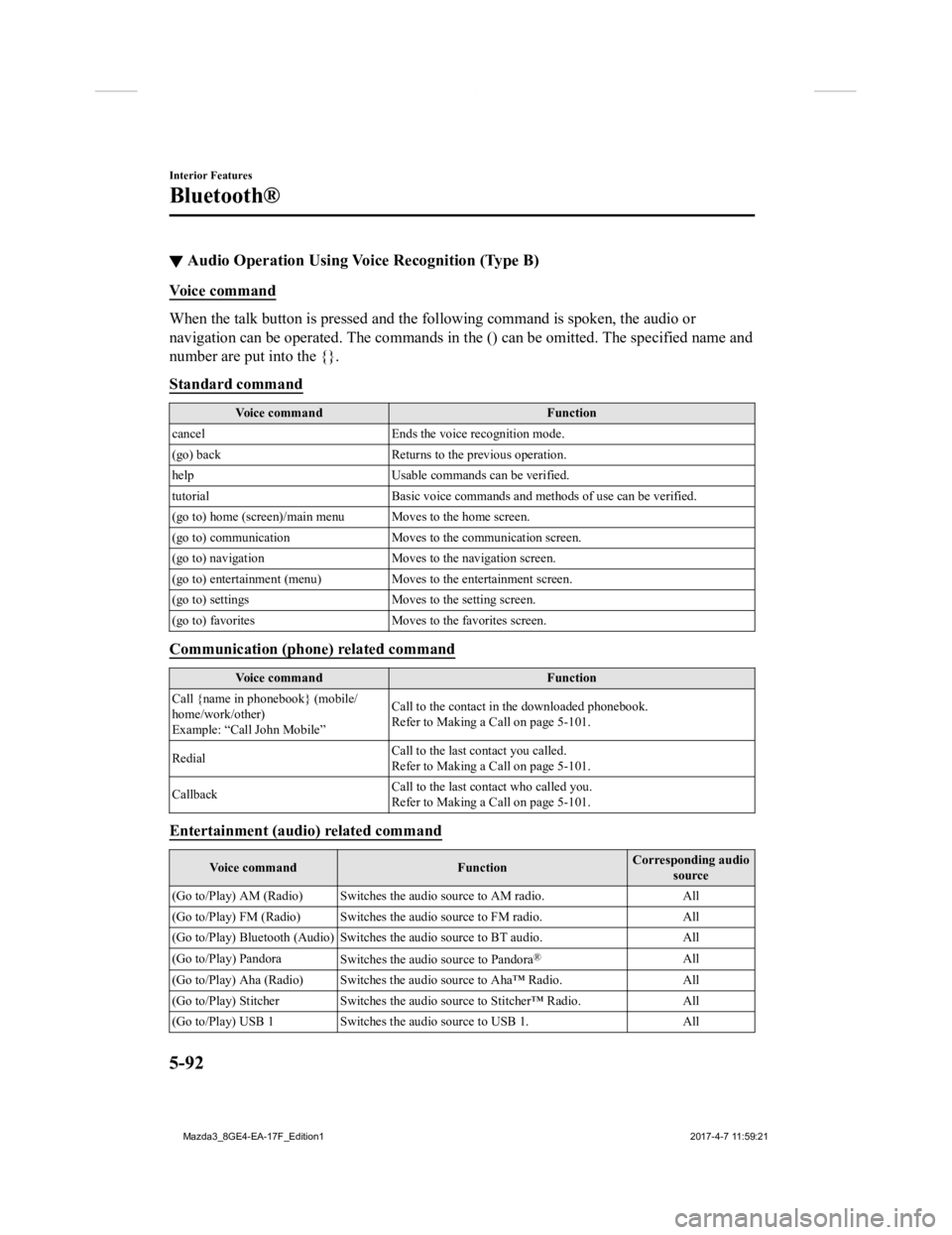
Voice command
When the talk button is pressed and the following command is sp
oken, the audio or
navigation can be operated. The commands in the () can be omitt ed. The specified name and
number are put into the {}.
Standard command
Voice command Function
cancel Ends the voice recognition mode.
(go) back Returns to the previous operation.
help Usable commands can be verified.
tutorial Basic voice commands and methods of use can be verified .
(go to) home (screen)/main men u Moves to the home screen.
(go to) communication Moves to the communication screen.
(go to) navigation Moves to the navigation screen.
(go to) entertainment (menu) Moves to the entertainment screen.
(go to) settings Moves to the setting screen.
(go to) favorites Moves to the favorites screen.
Communication (phone) related command
Voice command Function
Call {name in phonebook} (mobile/
home/work/other)
Example: “Call John Mobile” Call to the contact in th
e downloaded phonebook.
Refer to Making a Call on page 5-101.
Redial Call to the last contact you called.
Refer to Making a Call on page 5-101.
Callback Call to the last contact who called you.
Refer to Making a Call on page 5-101.
Entertainment (audio) related command
Voice command
FunctionCorresponding audio
source
(Go to/Play) AM (Radio ) Switches the audio source to AM radio. All
(Go to/Play) FM (Radio ) Switches the audio source to FM radio. All
(Go to/Play) Bluetooth (Audio) Switches the audio source to BT a udio.All
(Go to/Play) Pandora Switches the audio source to Pandora
®All
(Go to/Play) Aha (Radio) Switches the audio source to Aha™ Radio.A ll
(Go to/Play) Stitcher Switches th e audio source to Stitcher™ Radio.All
(Go to/Play) USB 1 Switches the audio source to USB 1. All
Interior Features
Bluetooth®
5-92
Mazda3_8GE4-EA-17F_Edition1 2017-4-7 11:59:21
Page 405 of 624
▼How to Use the Bluetooth® Audio System
Switching to Bluetooth® audio mode
To listen to music or voice audio recorded to a Bluetooth® audio device, switch to the
Bluetooth
® audio mode to operate the audio device using the audio system control panel.
Any Bluetooth
® audio device must be paired to the vehicle's Bluetooth® unit before it can
be used.
Refer to Bluetooth
® Preparation (Type B) on page 5-87.
1. Turn on the Bluetooth
® audio device's power.
2. Switch the ignition to ACC or ON.
3. Select the
icon on the home screen to display the Entertainment screen.
4. When
is selected, switches to the Bluetooth® audio mode to begin playback.
NOTE
If Bluetooth® audio is used after using Pandora®, Aha™ or Stitcher™ radio, the
application on the mobile device has to be closed first.
If the Bluetooth® audio device does not begin playback, select the icon.
If the mode is switched from Bluetooth® audio mode to another mode (radio mode), audio
playback from the Bluetooth
® audio device stops.
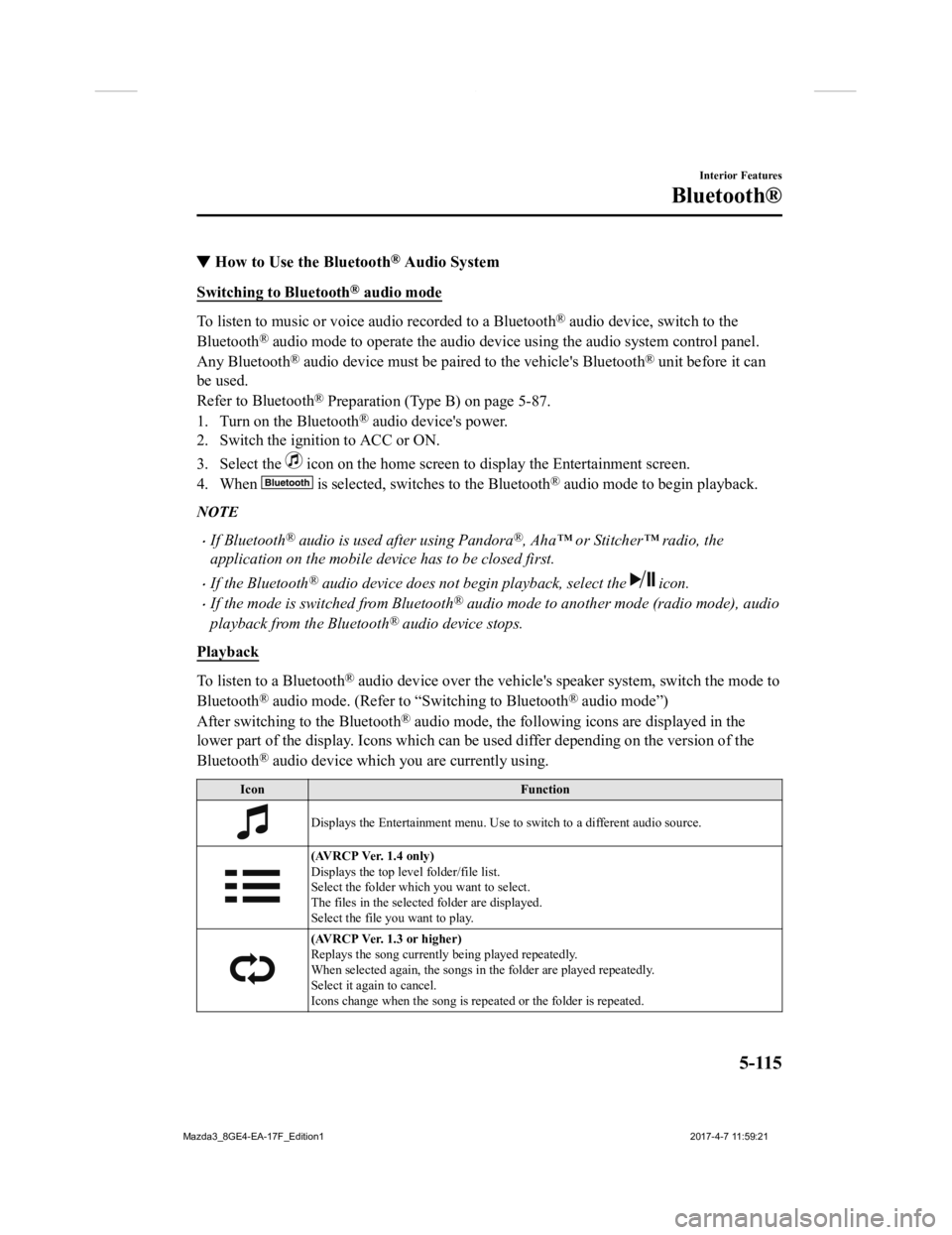
Playback
To listen to a Bluetooth® audio device over the vehicle's speaker system, switch the mod e to
Bluetooth
® audio mode. (Refer to “Switching to Bluetooth® audio mode”)
After switching to the Bluetooth
® audio mode, the following icons are displayed in the
lower part of the display. Icons which can be used differ depen ding on the version of the
Bluetooth
® audio device which you are currently using.
Icon Function
Displays the Entertainment menu. Use to switch to a different a udio source.
(AVRCP Ver. 1.4 only)
Displays the top level folder/file list.
Select the folder which you want to select.
The files in the selected folder are displayed.
Select the file you want to play.
(AVRCP Ver. 1.3 or higher)
Replays the song currently being played repeatedly.
When selected again, the songs in the folder are played repeatedly.
Select it again to cancel.
Icons change when the song is repeated or the folder is repeate d.
Interior Features
Bluetooth®
5-115
Mazda3_8GE4-EA-17F_Edition1 2017-4-7 11:59:21
Page 407 of 624
▼How to Use Pandora®*
What is Pandora®?
Pandora®*1 is free personalized Internet radio. Simply enter a favorite a
rtist, track, genre,
and Pandora
® will create a personalized stati on that plays their music and more like it. Rate
songs by giving thumbs-up and thumbs-down feedback to further r efine your station,
discover new music and help Pandora
® play only music you like.
*1 Pandora®, the Pandora® logo, and the Pandora® trade dress are trademarks or registered
trademarks of Pandora Media, Inc., used with permission.
NOTE
To operate Pandora® from your Bluetooth® device, perform the following in advance:
Create Pandora® account on the Web.
Create Pandora® station using Pandora® application.
Install Pandora® application on your device.
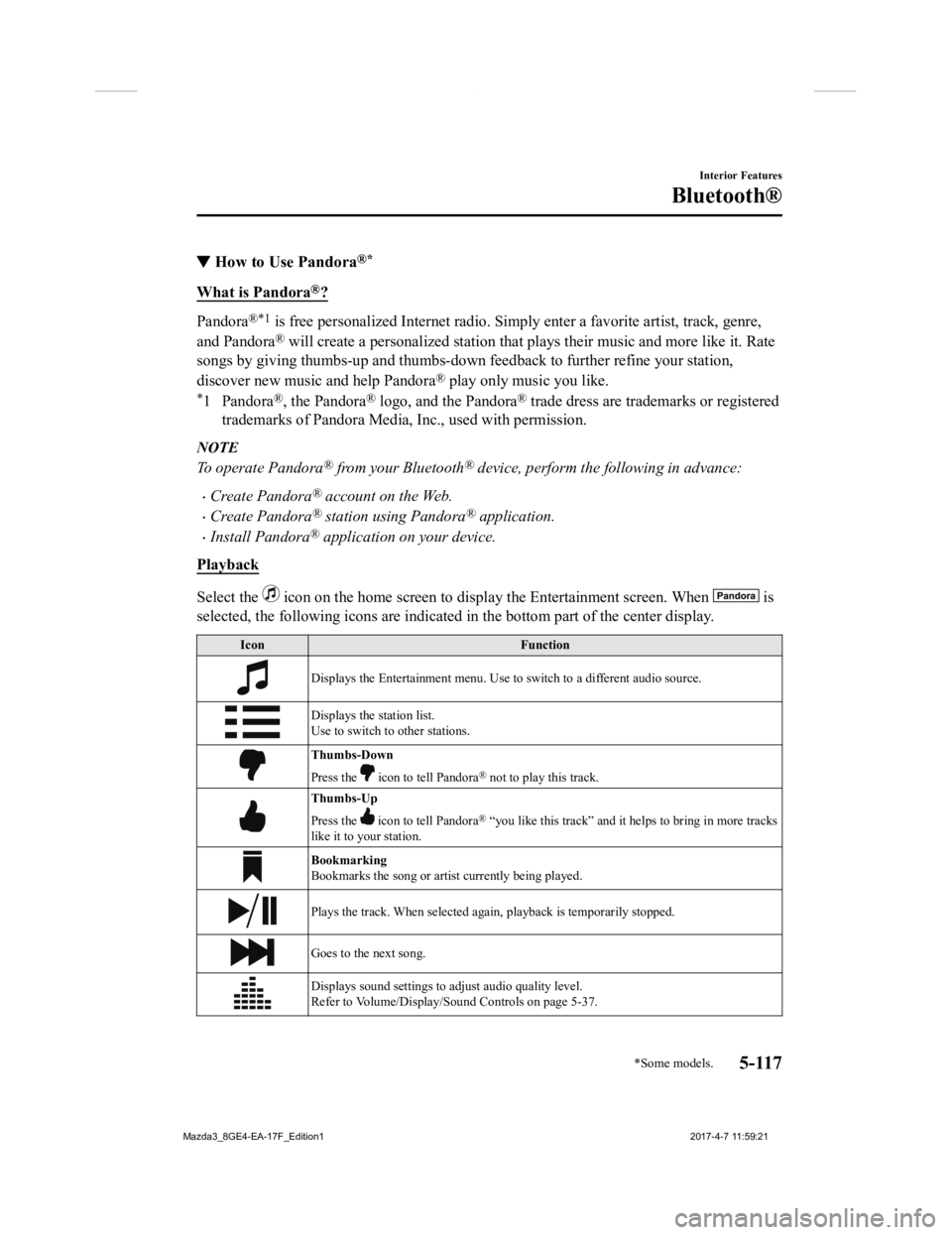
Playback
Select the icon on the home screen to disp lay the Entertainment screen. When is
selected, the following icons are indicated in the bottom part of the center display.
Icon Function
Displays the Entertainment menu. Use to switch to a different a udio source.
Displays the station list.
Use to switch to other stations.
Thumbs-Down
Press the
icon to tell Pandora® not to play this track.
Thumbs-Up
Press the
icon to tell Pandora® “you like this track” and it helps to bring in more tracks
like it to your station.
Bookmarking
Bookmarks the song or artist currently being played.
Plays the track. When selected again, playback is temporarily s topped.
Goes to the next song.
Displays sound settings to adjust audio quality level.
Refer to Volume/Display/Sound Controls on page 5-37.
Interior Features
Bluetooth®
*Some models.5-117
Mazda3_8GE4-EA-17F_Edition1 2017-4-7 11:59:21
Page 408 of 624

NOTE
The skip function may not be available depending on the device.
The number of skips is limited by Pandora®.
If the icon is selected when the skip song function is running, the next song is skipped.
Selection from station list
Selection can be made from a programmed
radio station list.
1. Select the
icon.
2. Select the desired radio station.
NOTE
When is selected, songs randomly
selected from the radio station list are
played.
Selecting the sort method
The displayed order of the station list can
be changed.
1. Select the
icon.
2. Select
.
3. Select
to display in the order
starting from the newly created station.
4. Select
to display in alphabetical
order.
NOTE
The displayed order of cannot be
changed.
Bookmarking
You can bookmark song or artist to check
out later on the Web.
1. Select the
icon.
2. Select
to bookmark the
song.
3. Select
to bookmark the
artist.
Interior Features
Bluetooth®
5-118
Mazda3_8GE4-EA-17F_Edition1 2017-4-7 11:59:21
Page 409 of 624
▼How to Use Aha™
What is Aha™?
Aha*1 is an application which can be used to enjoy various Internet
content such as Internet
radio and podcasts.
Stay connected to your friends act ivities by getting updates from Facebook and Twitter.
Using the location-based service, nearby services and destinati ons can be searched or
real-time local information can be obtained.
For details on Aha, refer to “http://www.aharadio.com/”.
*1 Aha, the Aha logo, and the Aha trade dress are trademarks or registered trademarks of
Harman International Industrie s, Inc., used with permission.
NOTE
The service content provided by Aha varies depending on the country in which the user
resides. In addition, the service is not available in some countries.
To operate Aha from your Bluetooth® device, perform the following in advance:
Install the Aha application to your device.
Create an Aha account for your device.
Log onto Aha using your device.
Select the preset station on your device.
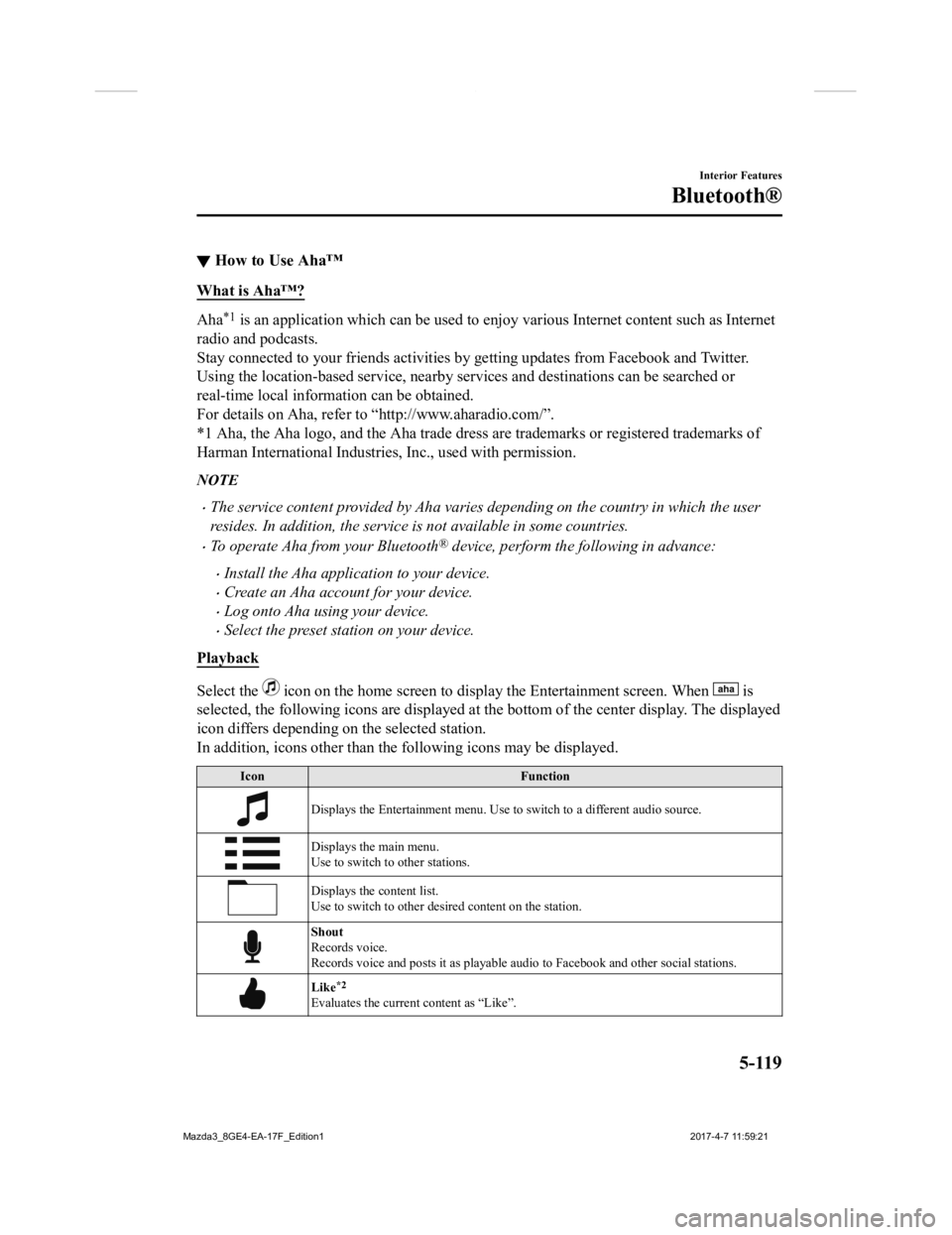
Playback
Select the icon on the home screen to disp lay the Entertainment screen. When is
selected, the following icons are displayed at the bottom of the center display. The displayed
icon differs depending on the selected station.
In addition, icons other than the following icons may be displa yed.
IconFunction
Displays the Entertainment menu. Use to switch to a different a udio source.
Displays the main menu.
Use to switch to other stations.
Displays the content list.
Use to switch to other desired content on the station.
Shout
Records voice.
Records voice and posts it as p layable audio to Facebook and other social stations.
Like*2
Evaluates the current content as “Like”.
Interior Features
Bluetooth®
5-119
Mazda3_8GE4-EA-17F_Edition1 2017-4-7 11:59:21
Page 413 of 624
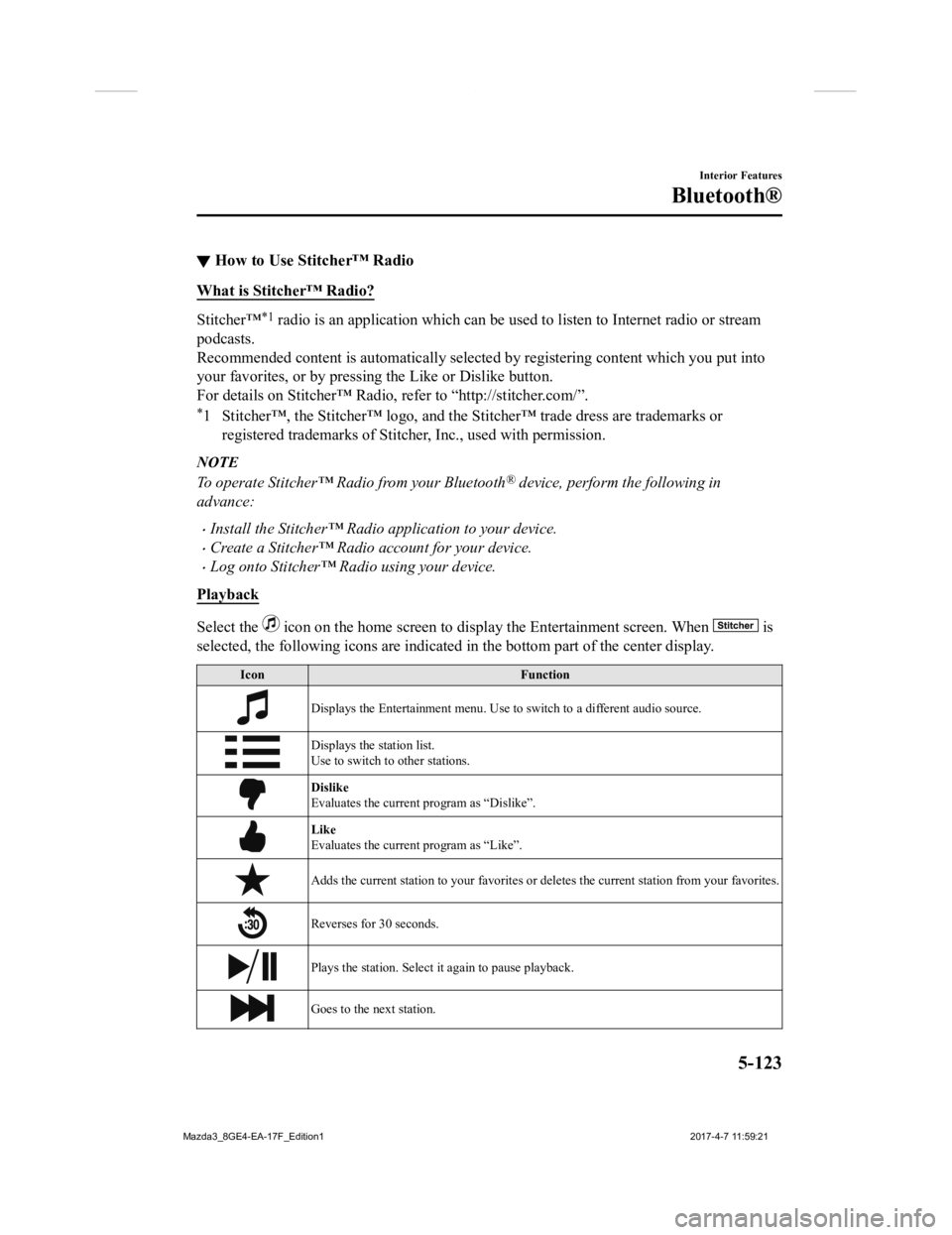
▼How to Use Stitcher™ Radio
What is Stitcher™ Radio?
Stitcher™*1 radio is an application which ca
n be used to listen to Internet radio or stream
podcasts.
Recommended content is automatically selected by registering co ntent which you put into
your favorites, or by pressing the Like or Dislike button.
For details on Stitche r™ Radio, refer to “h ttp://stitcher.com/”.
*1 Stitcher™, the Stitcher™ logo, and the Stitcher™ trade dress a re trademarks or
registered trademarks of Stitche r, Inc., used with permission.
NOTE
To operate Stitcher™ Radio from your Bluetooth® device, perform the following in
advance:
Install the Stitcher™ Radio application to your device.
Create a Stitcher™ Radio account for your device.
Log onto Stitcher™ Radio using your device.
Playback
Select the icon on the home screen to disp lay the Entertainment screen. When is
selected, the following icons are indicated in the bottom part of the center display.
Icon Function
Displays the Entertainment menu. Use to switch to a different a udio source.
Displays the station list.
Use to switch to other stations.
Dislike
Evaluates the current program as “Dislike”.
Like
Evaluates the current program as “Like”.
Adds the current station to you r favorites or deletes the current station from your favorites.
Reverses for 30 seconds.
Plays the station. Select it again to pause playback.
Goes to the next station.
Interior Features
Bluetooth®
5-123
Mazda3_8GE4-EA-17F_Edition1 2017-4-7 11:59:21
Page 415 of 624
Troubleshooting*
Mazda Bluetooth® Hands-Free Customer Service
If you have any problems with Bluetooth®, contact our toll-free customer service center.
U.S.A.
Phone: 800-430-0153 (Toll-free)
Web: www.mazdausa.com/mazdaconnect
Canada
Phone: 800-430-0153 (Toll-free)
Web: www.mazdahandsfree.ca
Mexico
Center of Attention to Client (CAC)
Phone: 01-800-01-MAZDA (Toll-free)
Web: www.mazdamexico.com.mx
Bluetooth
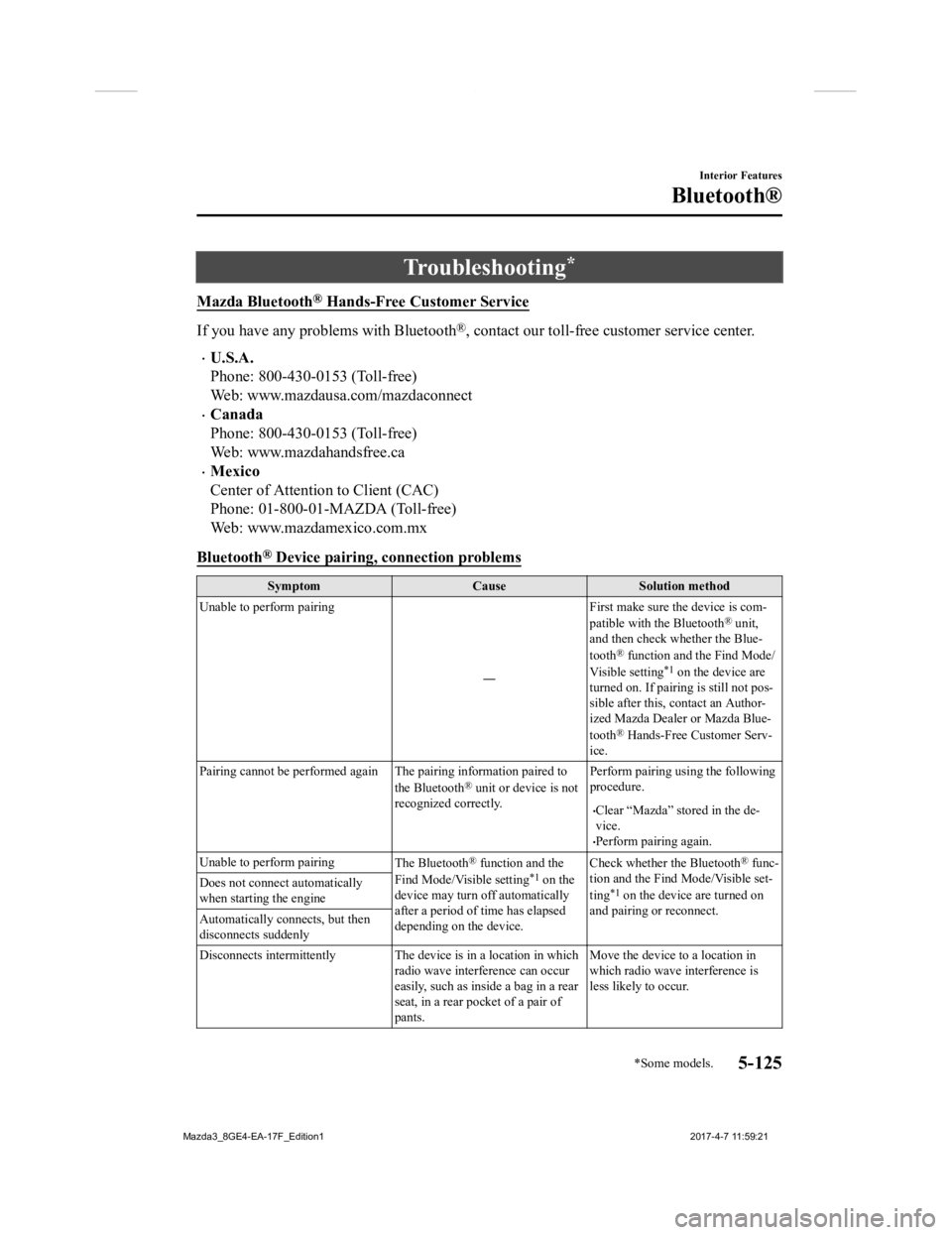
® Device pairing, connection problems
Symptom CauseSolution method
Unable to perform pairing
―First make sure the device is com-
patible with the Bluetooth
® unit,
and then check whether the Blue-
tooth
® function and the Find Mode/
Visible setting*1 on the device are
turned on. If pairin g is still not pos-
sible after this, contact an Author-
ized Mazda Dealer or Mazda Blue-
tooth
® Hands-Free Customer Serv-
ice.
Pairing cannot be performed again The pairing information paired to
the Bluetooth
® unit or device is not
recognized correctly. Perform pairing using the following
procedure.
Clear “Mazda” stored in the de-
vice.
Perform pairing again.
Unable to perform pairing The Bluetooth
® function and the
Find Mode/Visible setting*1 on the
device may turn off automatically
after a period of time has elapsed
depending on the device. Check whether the Bluetooth
® func-
tion and the Find Mode/Visible set-
ting
*1 on the device are turned on
and pairing or reconnect.
Does not connect automatically
when starting the engine
Automatically connects, but then
disconnects suddenly
Disconnects intermittently The de
vice is in a location in which
radio wave interference can occur
easily, such as inside a bag in a rear
seat, in a rear pocket of a pair of
pants. Move the device to a location in
which radio wave interference is
less likely to occur.
Interior Features
Bluetooth®
*Some models.5-125
Mazda3_8GE4-EA-17F_Edition1
2017-4-7 11:59:21
Page 539 of 624

NOTE
To allow the front passenger occupant
classification sensor to function
properly, do not place and sit on an
additional seat cushion on the front
passenger seat. The sensor may not
function properly because the additional
seat cushion could cause sensor
interference.
When a small child sits on the front
passenger seat, it is possible that the
warning beep will not operate.
▼Ignition Not Switched Off (STOP)
Warning Beep
If the driver's door is opened with the
ignition switched to
ACC, a beep will be
heard continuously in the cabin to notify
the driver that the ignition has not been
switched OFF (STOP). Under this
condition, the keyless entry system will
not operate, the vehicle cannot be locked,
and the battery voltage will be depleted.
▼ Key Removed from Vehicle Warning
Beep
Vehicles with advanc
ed keyless function
If the key is taken out of the vehicle while
the ignition is not switched OFF and all
the doors are closed, the beep which
sounds outside of the vehicle will be heard
6 times, the beep which sounds inside the
vehicle will be heard 6 times, and the
KEY warning light (red) in the instrument
cluster flashes continuously to notify the
driver that the ignition has not been
switched OFF.
Vehicles without advanced keyless
function
If the key is taken out of the vehicle while
the ignition is not switched OFF and all
the doors are closed, a beep will be heard
in the cabin 6 times and the KEY warning
light (red) in the ins trument cluster turns
on continuously to notify the driver that
the ignition has not been switched OFF.
NOTE
Because the key utilizes low-intensity
radio waves, the Key Removed From
Vehicle Warning may activate if the key is
carried together with a metal object or it
is placed in a poor si gnal reception area.
▼Request Switch Inoperable Warning
Beep (With the advanced keyless
function)
If the request switch is pressed with the
door open or ajar, or the ignition is not
switched OFF with a key being carried, a
beep will be heard outside for about 2
seconds to notify the driver that the door
or liftgate/trunk lid cannot be locked.
If Trouble Arises
Warning/Indicator Lights and Warning Sounds
7-39
Mazda3_8GE4-EA-17F_Edition1
2017-4-7 11:59:21