Trans MAZDA MODEL 3 HATCHBACK 2020 (in English) User Guide
[x] Cancel search | Manufacturer: MAZDA, Model Year: 2020, Model line: MODEL 3 HATCHBACK, Model: MAZDA MODEL 3 HATCHBACK 2020Pages: 598, PDF Size: 89.37 MB
Page 107 of 598

A beep sound is heard for confirmation
when the doors, fuel-filler lid, and
liftgate are locked/unlocked using the
touch sensor. If you prefer, the beep
sound can be turned off.
The volume of the beep sound can also
be changed. Refer to the Settings section
in the Mazda Connect Owner's Manual.
(With theft-deterrent system)
The hazard warning lights flash when
the theft-deterrent system is armed or
turned off.
Refer to Theft-Deterrent System on page
3-42.
The setting can be changed so that the
doors, fuel-filler lid, and liftgate are
locked automatically without touching
the sensing area of the touch sensor.
Refer to the Settings section in the
Mazda Connect Owner's Manual.
(Walk-away auto lock function)
A beep sound is heard when all doors
and the liftgate/trunk lid are closed
while the transmitter is being carried.
All the doors, fuel-filler lid, and liftgate
are locked automatically when the
transmitter is out of the operational
range. Also, the hazard warning lights
flash once. (Even if the driver is in the
operational range, all the doors,
fuel-filler lid, and liftgate are locked
automatically after about 30 seconds.) If
you are out of the operational range
before the doors and the liftgate/trunk
lid are completely closed or another
transmitter is left in the vehicle, the
walk-away auto lock function will not
work. Always make sure that all doors
and the liftgate/trunk lid are closed and
locked before leaving the vehicle. The
walk-away auto lock function does not
close the power windows.
(Auto re-lock function)
After unlocking with the touch sensor,
all the doors , fuel-filler lid, and liftgate
will automatically lock if any of the
following operations are not performed
within about 60 seconds.
Opening a door or the liftgate/trunk
lid.
Switching the igniti on to any position
other than off.
If your vehicle has a theft-deterrent
system, the hazard warning lights will
flash for confirmation.
The time required for the doors to lock
automatically can be changed.
Refer to the Settings section in the
Mazda Connect Owner's Manual.
▼ Locking, Unlocking with
Transmitter
The following locations can be locked/
unlocked by operating the keyless entry
system transmitter.
Refer to Keyless Entry
System (page 3-4).
All doors
Fuel-filler lid
Liftgate
▼ Locking, Unlocking with Door-Lock
Switch
Door-lock switch on driver’s and front
passenger's door
The following locations are locked/
unlocked by pressing the door-lock switch.
All doors
Fuel-filler lid
Liftgate
Before Driving
Doors and Locks
3-15
Mazda3_8HZ1-EA-19G_Edition1_old
2019-5-17 13:49:03
Page 108 of 598

Driver's door
1. Unlock
2. Lock
Front passenger's door
1. Unlock
2. Lock
Locking from the outside using the
door-lock switch
When locking from the outside using the
door-lock switch, press the lock side of the
door-lock switch with all of the following
conditions met and then close all the
doors.
The ignition is switched OFF.
Any door is open.
NOTE
To prevent the transmitter from being
left in the vehicle, make sure that you
carry the transmitter before locking.
After locking by pressing the door-lock
switch and when all the doors are closed
with the transmitter left in the vehicle,
all the doors, liftgate, and fuel-filler lid
are unlocked.
After locking by pressing the door-lock
switch and when the liftgate/trunk lid is
closed last with th e transmitter left in
the vehicle, only the liftgate/trunk lid is
unlocked.
Door-lock switch on liftgate (With the
advanced keyless function)
All doors, fuel-filler lid, and the liftgate
can be locked by pressing the door-lock
switch.
When locking using the door-lock switch,
press the door-lock switch with all of the
following conditions met and then close
the liftgate.
You are carrying the transmitter.
The ignition is switched OFF.
All the doors are closed.
When locking, the hazard warning lights
and a beep sound operate 1 time.
Before Driving
Doors and Locks
3-16
Mazda3_8HZ1-EA-19G_Edition1_old 2019-5-17 13:49:03
Page 109 of 598

NOTE
To prevent the transmitter from being
left in the vehicle, make sure that you
carry the transmitte r before locking.
After locking by pressing the door-lock
switch and when the liftgate is closed
with the transmitter left in the vehicle,
the liftgate is unlocked.
▼Auto Lock/Unlock Function
WA R N I N G
Do not pull the inner handle on a front
door:
Pulling the inner handle on a front door
while the vehicle is moving is dangerous.
Passengers can fall out of the vehicle if the
door opens accidentally , which could
result in death or serious injury.
When the vehicle speed exceeds 20
km/h (12 mph), all the doors, fuel-filler
lid, and liftgate lock automatically.
When the ignition is sw
itched off, all the
doors, fuel-filler lid, and liftgate unlock
automatically.
The auto lock/unlock function settings can
be changed.
Refer to the Settings section in the Mazda
Connect Owner's Manual.
▼ Locking, Unlocking with Door-Lock
Knob
Operation from inside
To lock any door from the inside, press the
door-lock knob.
To unlock, pull it outward.
This does not operate t
he other door locks.
1. Unlocked: Red indicator
2. Lock
3. Unlock
Before Driving
Doors and Locks
3-17
Mazda3_8HZ1-EA-19G_Edition1_old 2019-5-17 13:49:03
Page 120 of 598
CAUTION
Always use only a genuine Mazda
fuel-filler cap or an approved equivalent,
available at an Authorized Mazda
Dealer. The wrong cap can result in a
serious malfunction of the fuel and
emission control systems.
(U.S.A. and Canada)
It may also cause the check engine light
in the instrument cluster to illuminate.
When using an automatic car wash or a
high water pressure car wash, lock the
driver's door. Otherwise, the fuel-filler lid
may open unexpectedly and could be
damaged.
▼ Refueling
Before refueling, close all the doors,
windows, and liftgate/trunk lid, and switch
the ignition OFF.
1. Using the following, unlock the
driver’s door.
Transmitter (page 3-15)
Touch sensor (page 3-13)
Door-lock switch (page 3-15)
Auto lock/unlock function (page
3-17)
NOTE
When unlocking the driver's door,
the fuel lid is also unlocked at the
same time.
When locking the driver's door, the
fuel lid is locked after 90 seconds.
The time until the fuel lid is locked
after locking the driver's door can be
changed.
Refer to the Settings section in the
Mazda Connect Owner's Manual.
However, when the driver's door is
locked using the following functions,
the fuel lid is also locked at the same
time.
Auto lock/unlock function (page
3-17)
Auto re-lock function (page 3-5,
3-13)
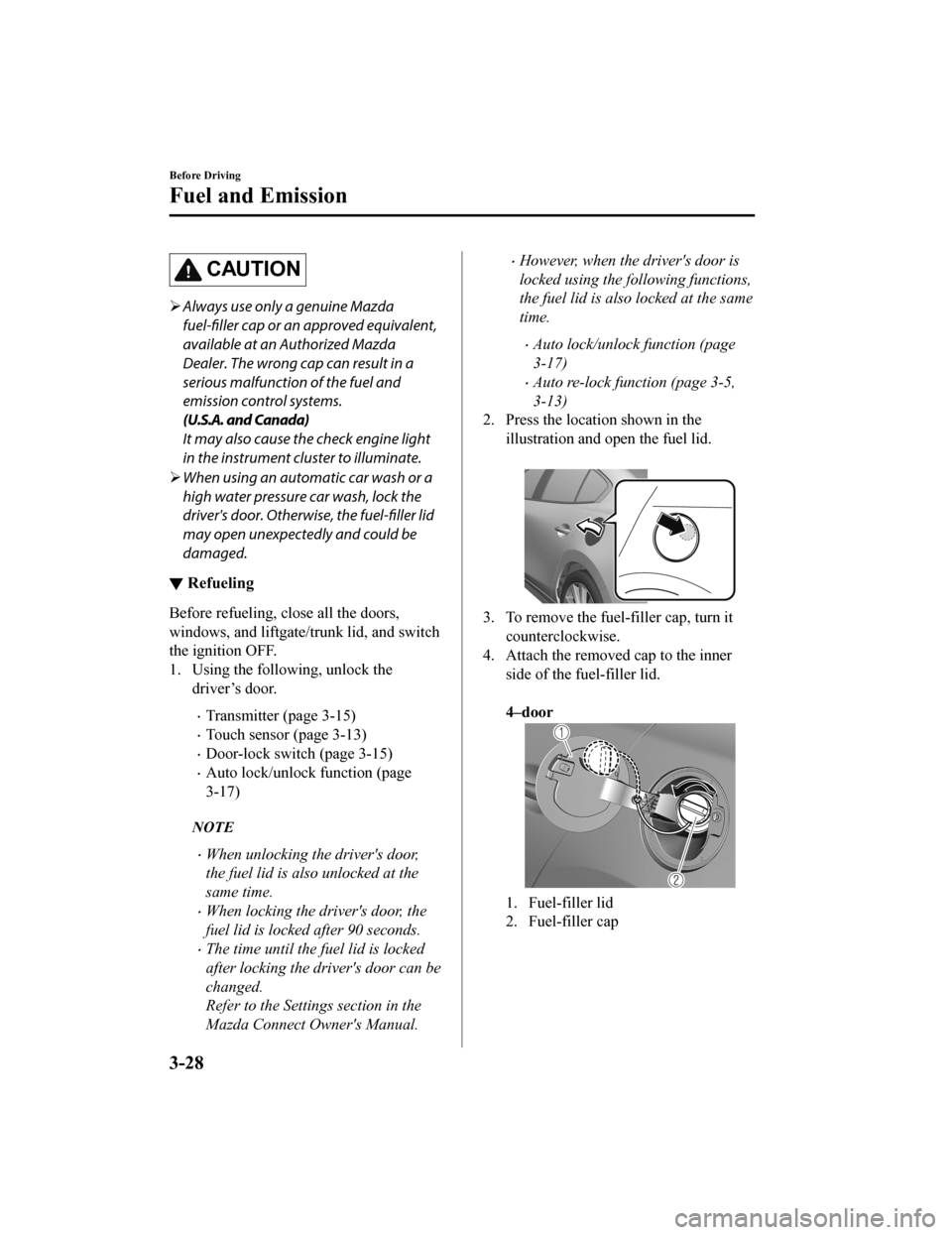
2. Press the locat ion shown in the
illustration and open the fuel lid.
3. To remove the fuel-filler cap, turn it counterclockwise.
4. Attach the removed cap to the inner
side of the fu el-filler lid.
4–door
1. Fuel-filler lid
2. Fuel-filler cap
Before Driving
Fuel and Emission
3-28
Mazda3_8HZ1-EA-19G_Edition1_old 2019-5-17 13:49:03
Page 133 of 598
NOTE
The keys carry a unique electronic code.
For this reason, and to assure your
safety, obtaining a replacement key
requires some waiting time. They are
only available through an Authorized
Mazda Dealer.
Always keep a spare key in case one is
lost. If a key is lost, consult an
Authorized Mazda Dealer as soon as
possible.
If you lose a key, an Authorized Mazda
Dealer will reset the electronic codes of
your remaining keys and immobilizer
system. Bring all the remaining keys to
an Authorized Mazda Dealer to reset.
Starting the vehicle with a key that has
not been reset is not possible.
▼ Operation
NOTE
The engine may not start and security
indicator light may illuminate or flash if
the key is placed in an area where it is
difficult for the system to detect the
signal, such as on the dashboard or in
the glove compartment. Move the key to
a location within the signal range,
switch the ignition off, and then restart
the engine.
Signals from a TV or radio station, or
from a transceiver or mobile telephone
could interfere with your immobilizer
system. If you are using the proper key
and the engine fails to start, check the
security indicator light.
Arming
The system is armed when the ignition is
switched from ON to off.
The security indica
tor light in the
instrument cluster flashes every 2 seconds
until the system is disarmed.
Disarming
The system is disarmed when the ignition
is switched ON with the correct
programmed key. The security indicator
light illuminates for about 3 seconds and
then turns off.
If the engine does not start with the correct
key, and the security indicator light
remains illuminated o r flashing, try the
following:
Make sure the key is within the
operational range for signal transmission.
Switch the ignition off, and then restart the
engine. If the engine does not start after 3
or more tries, contact an Authorized
Mazda Dealer.
Before Driving
Security System
3-41
Mazda3_8HZ1-EA-19G_Edition1_old 2019-5-17 13:49:03
Page 134 of 598
Theft-Deterrent System*
▼Theft-Deterrent System
If the theft-deterrent system detects an
inappropriate entry int
o the vehicle, which
could result in the vehicle or its contents
being stolen, the alarm alerts the
surrounding area of an abnormality by
sounding the horn and flashing the hazard
warning lights.
The system will not function unless it's
properly armed. So when you leave the
vehicle, follow the arming procedure
correctly.
▼ Operation
System triggering conditions
The horn sounds intermittently and the
hazard warning lights flash for about 30
seconds when the sys
tem is triggered by
any one of the following:
Unlocking a door with the auxiliary key,
door lock switch, or an inside door-lock
knob.
Forcing open a door, the hood or the
liftgate/trunk lid.
Opening the hood by operating the hood
release handle.
Switching the ignition ON without using
the push button start.
If the system is triggered again, the lights
and horn will activate until the driver's
door or the liftgate/trunk lid is unlocked
with the transmitter.
(With the advanced keyless function)
The lights and horn can also be
deactivated by touching the sensing area
of the door release touch sensor.
NOTE
If the battery goes dead while the
theft-deterrent system is armed, the horn
will activate and the hazard warning
lights will flash wh en the battery is
charged or replaced.
▼ How to Arm the System
1. Close the windows and the moonroof*
securely.
2. Switch the ignition OFF.
3. Make sure the hood, the doors, and the liftgate/trunk lid are closed.
4. Press the lock button on the
transmitter.
The hazard warning lights will flash
once.
The following method will also arm
the theft-deterrent system:
Press the door-lock switch “
” while
any door is open and then close all of
the doors.
(With the advanced keyless function)
Touch the sensing area of the door lock
touch sensor.
The security indicator light in the
instrument cluster flashes twice per
second for 20 seconds.
5. After 20 seconds, the system is fully armed.
Before Driving
Security System
3-42*Some models.
Mazda3_8HZ1-EA-19G_Edition1_old 2019-5-17 13:49:03
Page 135 of 598

NOTE
The theft-deterrent system can also be
armed by activating the auto relock
function with all the doors, the liftgate/
trunk lid and the hood closed.
Refer to Transmitter on page 3-5.
The system will disarm if one of the
following operations takes place within
20 seconds after pressing the lock
button:
Unlocking any door.
Opening any door.
Opening the hood.
Switching the ignition ON.
To rearm the system, do the arming
procedure again.
When the doors are locked by pressing
the lock button on the transmitter while
the theft-deterrent system is armed, the
hazard warning lights will flash once to
indicate that the system is armed.
▼ To Turn Off an Armed System
An armed system can be turned off using
any one of the following methods:
Pressing the unlock button on the
transmitter.
Starting the engine with the push button
start.
(With the advanced keyless function)
Touching the sensing area of the door
release touch sensor.
The hazard warning lights will flash twice.
NOTE
When the doors are unlocked by pressing
the unlock button on the transmitter while
the theft-deterrent system is turned off, the
hazard warning lights will flash twice to
indicate that the system is turned off.
▼ To S t o p t h e A l a r m
A triggered alarm can be turned off using
any one of the following methods:
Pressing the unlock button or the trunk
button (4–door) on the transmitter.
Starting the engine with the push button
start.
(With the advanced keyless function)
Touching the sensing area of the door
release touch sensor.
Pressing the electric liftgate/trunk lid
opener while the key is being carried.
The hazard warning lights will flash twice.
Before Driving
Security System
3-43
Mazda3_8HZ1-EA-19G_Edition1_old 2019-5-17 13:49:03
Page 138 of 598
Floor Mat
▼Floor Mat
We recommend the use of Genuine
Mazda floor mats.
WA R N I N G
Make sure the
floor mats are hooked on the
retention pins to prevent them from
bunching up under the foot pedals:
Using a floor mat that is not secured is
dangerous as it will interfere with the
accelerator and brake pedal operation,
which could result in an accident.
Do not install two floor mats, one on top of
the other, on the driver's side:
Installing two floor mats, one on top of the
other, on the driver's side is dangerous as
the retention pins can only keep one floor
mat from sliding forward.
Loose floor mat(s) will interfere with the
foot pedals and could result in an accident.
If using an all-weather mat for winter use
always remove the original floor mat.
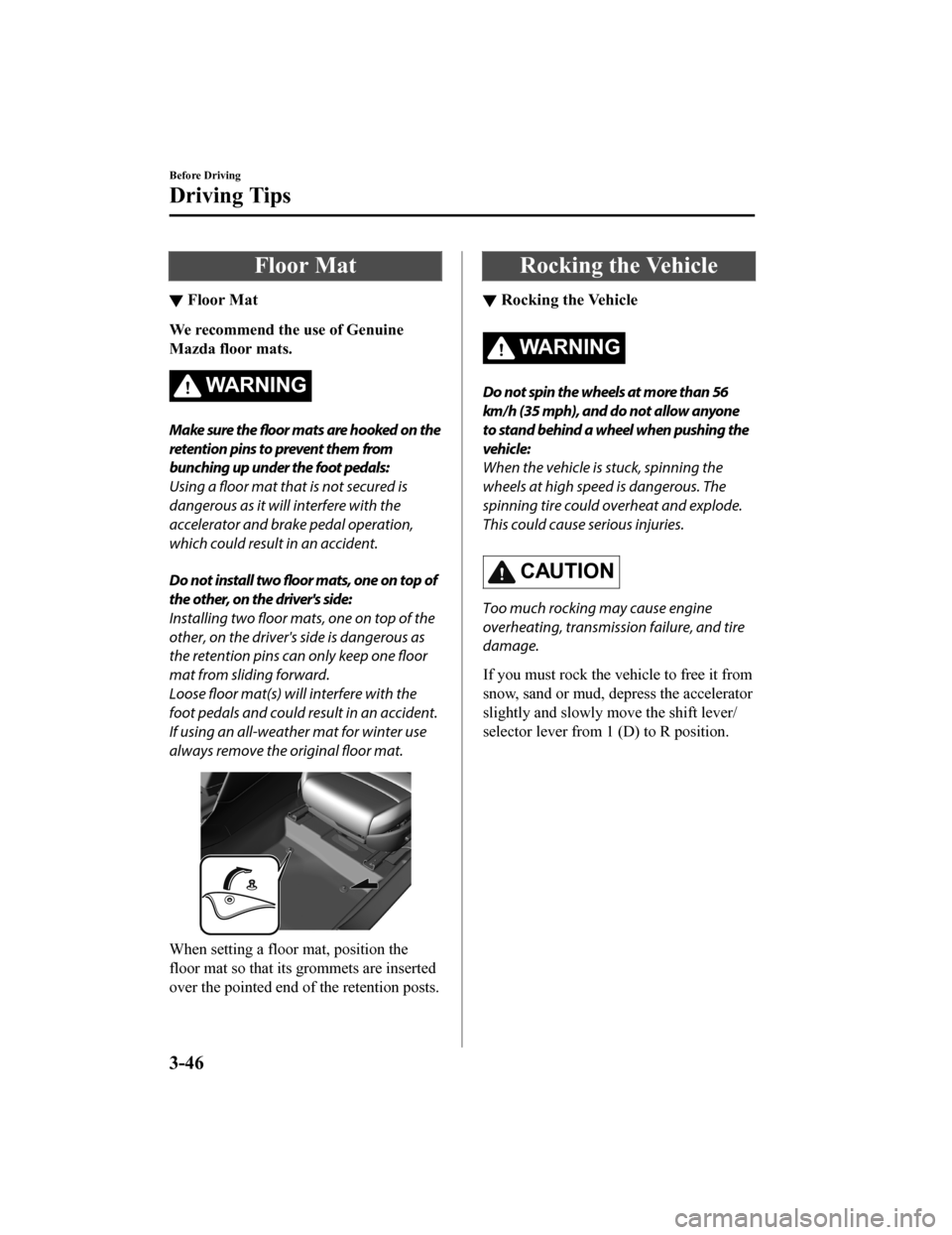
When setting a floor mat, position the
floor mat so that its grommets are inserted
over the pointed end of the retention posts.
Rocking the Vehicle
▼Rocking the Vehicle
WA R N I N G
Do not spin the wheels at more than 56
km/h (35 mph), and do not allow anyone
to stand behind a wheel when pushing the
vehicle:
When the vehicle is stuck, spinning the
wheels at high speed is dangerous. The
spinning tire could
overheat and explode.
This could cause serious injuries.
CAUTION
Too much rocking may cause engine
overheating, transmission failure, and tire
damage.
If you must rock the vehicle to free it from
snow, sand or mud, depress the accelerator
slightly and slowly mo ve the shift lever/
selector lever from 1 (D) to R position.
Before Driving
Driving Tips
3-46
Mazda3_8HZ1-EA-19G_Edition1_old 2019-5-17 13:49:03
Page 142 of 598
Driving on Uneven Road
▼Driving on Uneven Road
Your vehicle's suspension and underbody
can be damaged if driven on rough/uneven
roads or over speed bumps at excessive
speeds. Use care and reduce speed when
traveling on rough/uneven roads or over
speed bumps.
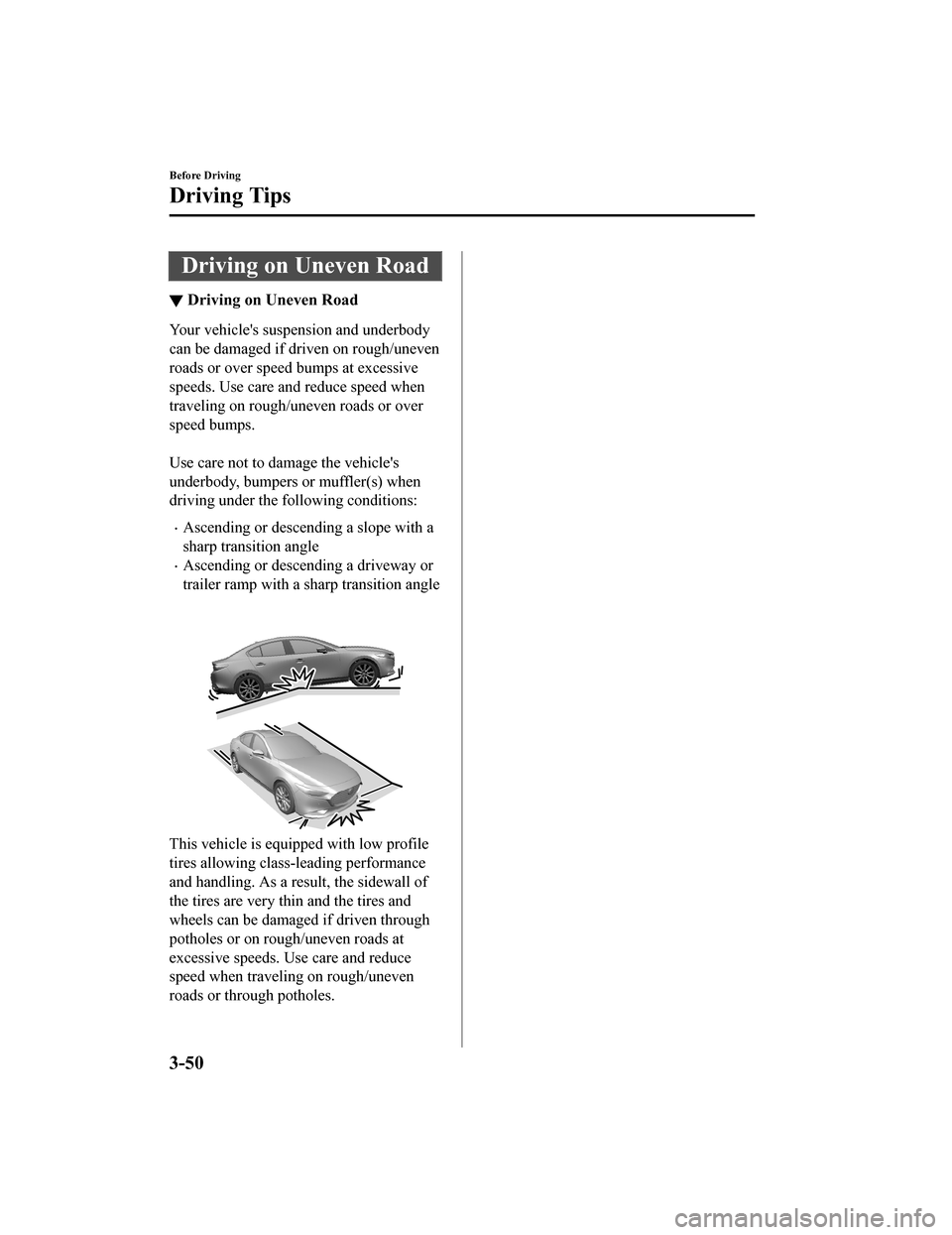
Use care not to damage the vehicle's
underbody, bumpers or muffler(s) when
driving under the following conditions:
Ascending or descending a slope with a
sharp transition angle
Ascending or descending a driveway or
trailer ramp with a
sharp transition angle
This vehicle is equi pped with low profile
tires allowing class-leading performance
and handling. As a result, the sidewall of
the tires are very th in and the tires and
wheels can be damaged if driven through
potholes or on rough/uneven roads at
excessive speeds. Use care and reduce
speed when traveling on rough/uneven
roads or through potholes.
Before Driving
Driving Tips
3-50
Mazda3_8HZ1-EA-19G_Edition1_old 2019-5-17 13:49:03
Page 143 of 598

Trailer Towing
▼Trailer Towing
Your Mazda is not designed for towing.
Never tow a trailer
with your Mazda.
Recreational Towing
▼Recreational Towing
An example of "recreational towing" is
towing your vehicle behind a motorhome.
The transmission is not designed for
towing this vehicle on all 4 wheels.
When doing recreational towing refer to
"Towing Description
" (page 7-23) and
"Tiedown Hooks" (page 7-24) and
carefully follow the instructions.
Before Driving
To w i n g
3-51
Mazda3_8HZ1-EA-19G_Edition1_old 2019-5-17 13:49:03