Trans MAZDA MODEL 3 HATCHBACK 2020 Owners Manual (in English)
[x] Cancel search | Manufacturer: MAZDA, Model Year: 2020, Model line: MODEL 3 HATCHBACK, Model: MAZDA MODEL 3 HATCHBACK 2020Pages: 598, PDF Size: 89.37 MB
Page 27 of 598
Driver’s seat position (seat slide, height
adjustment, front edge of seat bottom,
seat recline)
Refer to Adjusting the Driver's Seat on
page 2-5.
Active driving display (display position,
brightness level, display information)
Refer to Active Driving Display on page
4-29.
Outside mirror angle
Refer to Outside Mirrors on page 3-30.
A driving position can be programmed to
the following parts.
Position memory button
Transmitter used for vehicle
NOTE
Lumbar support adjustment cannot be
programmed.
Programming
1. Make sure the parking brake is on.
2. (Automatic transmission)
Make sure the selector lever is in the P
position.
3. Switch the ignition ON.
4. Adjust the follo wing parts to the
desired conditions.
Driver's seat
Active driving display
Outside mirrors
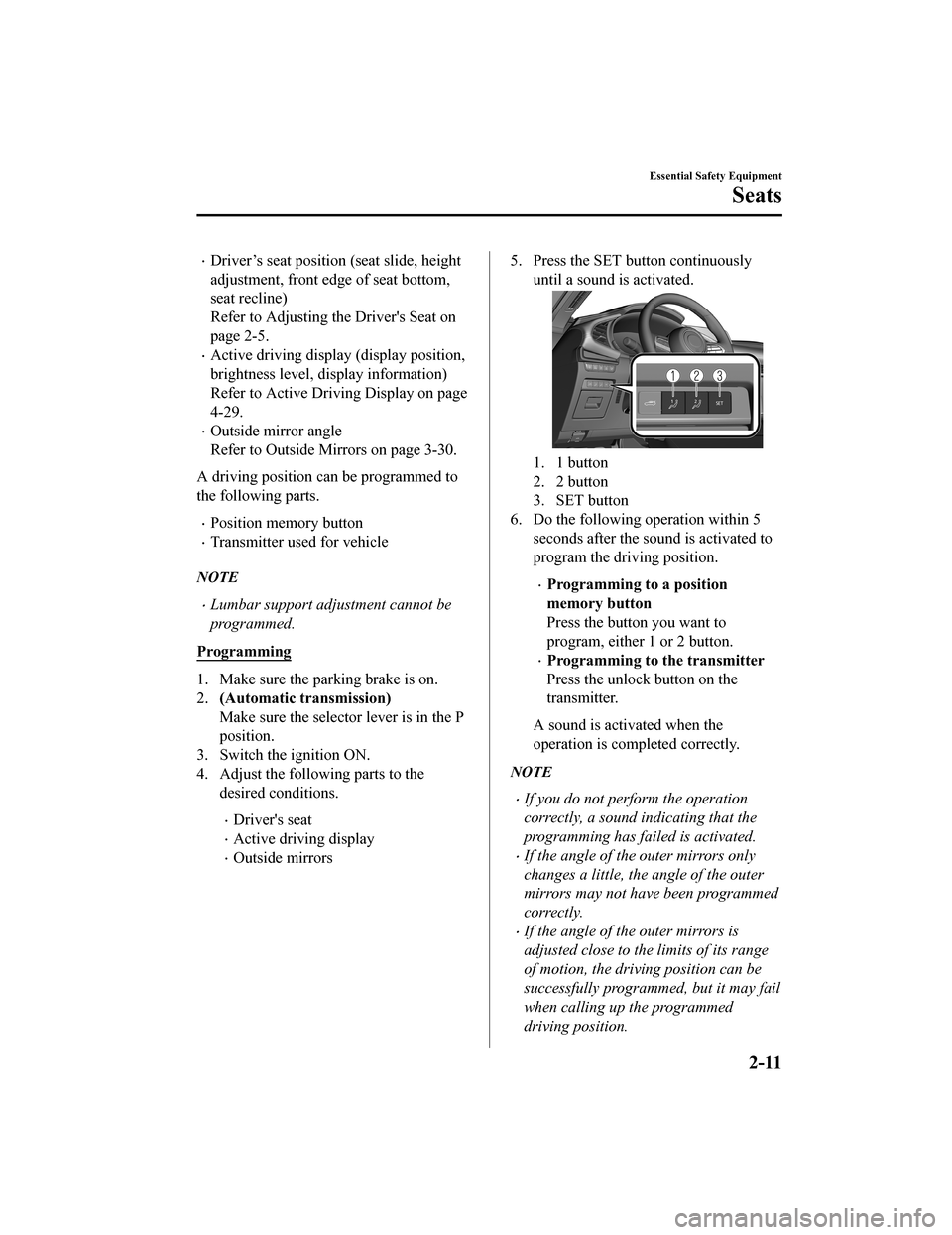
5. Press the SET button continuously until a sound is activated.
1. 1 button
2. 2 button
3. SET button
6. Do the following operation within 5 seconds after the sound is activated to
program the driving position.
Programming to a position
memory button
Press the button you want to
program, either 1 or 2 button.
Programming to the transmitter
Press the unlock button on the
transmitter.
A sound is activated when the
operation is completed correctly.
NOTE
If you do not perform the operation
correctly, a sound indicating that the
programming has failed is activated.
If the angle of the outer mirrors only
changes a little, the angle of the outer
mirrors may not have been programmed
correctly.
If the angle of the outer mirrors is
adjusted close to the limits of its range
of motion, the driving position can be
successfully programmed, but it may fail
when calling up the programmed
driving position.
Essential Safety Equipment
Seats
2-11
Mazda3_8HZ1-EA-19G_Edition1_old 2019-5-17 13:49:03
Page 28 of 598
Calling up the programmed driving
position
CAUTION
Do not place fingers or hands around the
bottom of the seat while the seat memory
function is operating. The seat moves
automatically while the seat memory
function is operating and fingers or hands
could get pinched and injured.
Using the position memory button
1. Make sure the parking brake is on.
2. (Automatic transmission)
Make sure the selector lever is in the P
position.
3. Switch the ignition ON.
4. Press the programming button for the driving position you want to call up
(button 1 or 2).
5. A sound is activated when the adjustment to the programmed driving
position is completed.
NOTE
When adjustment of the driving position
is not necessary, a sound is not
activated.
The driving position adjustment is
canceled in the following cases:
The seat adjustment switch on the
driver's seat is operated.
The angle of the outer mirrors is
adjusted.
The SET button is pressed.
Programming button 1 or 2 is pressed.
The lock button or unlock button on
the transmitter is pressed.
The vehicle starts moving.
The active driving display is adjusted.
(Manual transmission)
The parking brake is released.
(Automatic transmission)
The selector lever is shifted to a
position other than P.
Using the transmitter
1. Unlock the driver's door using one of the following methods.
Touch the sensing area of the door
release touch sensor.
Press the unlock button on the
transmitter.
2. When you open the driver's door within 90 seconds after unlocking the
doors, the adjustment of the following
parts starts.
Driver's seat
Active driving display (When the
ignition is switched ON, the adjusted
active driving display is activated.)
Outside mirrors
A sound is activated when the
adjustment is completed.
Essential Safety Equipment
Seats
2-12
Mazda3_8HZ1-EA-19G_Edition1_old 2019-5-17 13:49:03
Page 29 of 598
NOTE
When adjustment of the driving position
is not necessary, a sound is not
activated.
The driving position adjustment is
canceled in the following cases:
The seat adjustment switch on the
driver's seat is operated.
The angle of the outer mirrors is
adjusted.
The SET button is pressed.
Programming button 1 or 2 is pressed.
The lock button or unlock button on
the transmitter is pressed.
The vehicle starts moving.
The active driving display is adjusted.
(Manual transmission)
The parking brake is released.
(Automatic transmission)
The selector lever is shifted to a
position other than P.
Erasing programmed driving positions
Erasing the dr iving positions
programmed to the key
1. Switch the ignition OFF.
2. Press the SET button continuously
until a sound is activated.
3. Press the lock button on the transmitter
within 5 seconds after the sound is
activated.
NOTE
If you do not perform the operation
correctly, a sound indicating that the
programming has failed is activated.
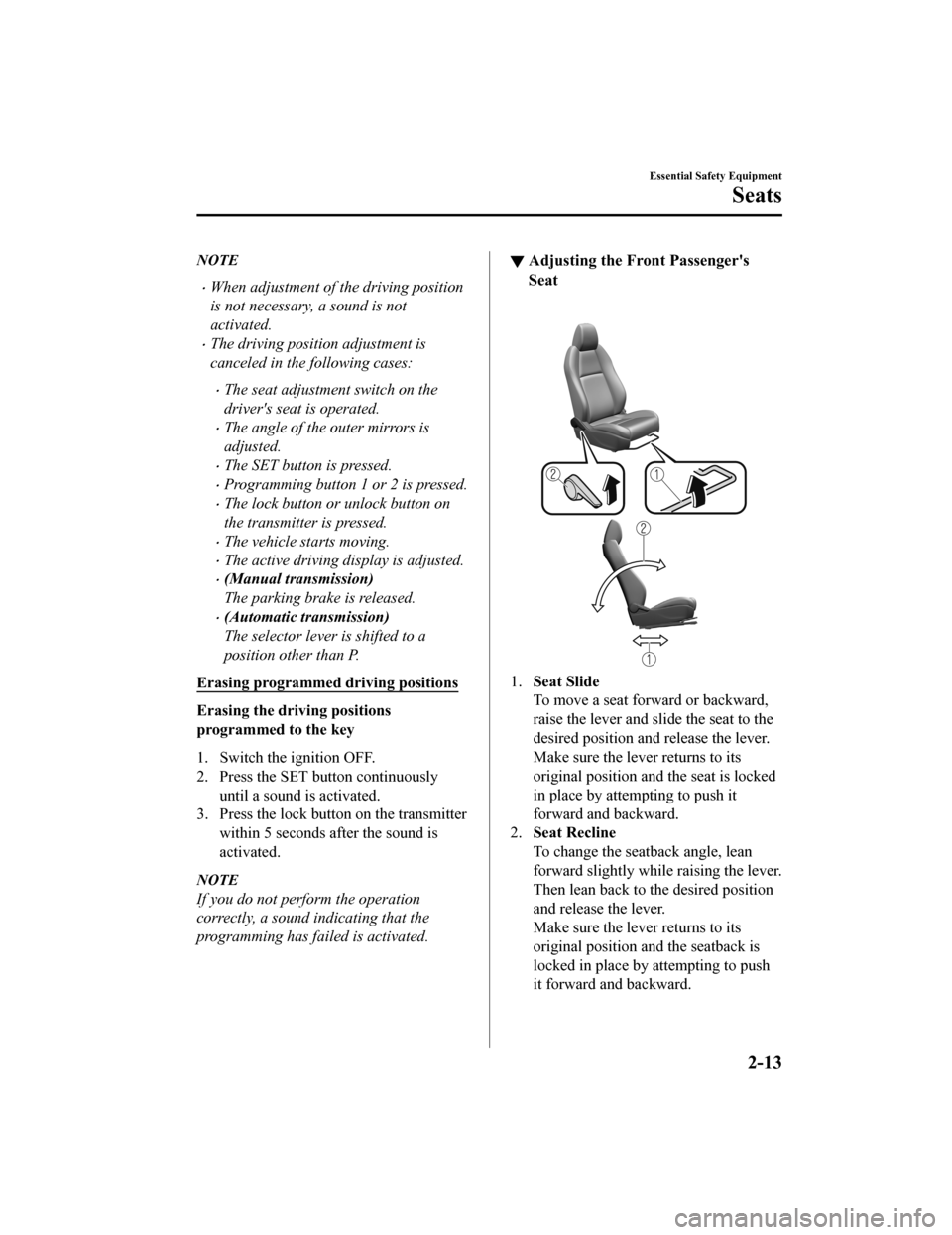
▼Adjusting the Front Passenger's
Seat
1.
Seat Slide
To move a seat forwa rd or backward,
raise the lever and slide the seat to the
desired position and release the lever.
Make sure the lever returns to its
original position a nd the seat is locked
in place by attempting to push it
forward and backward.
2. Seat Recline
To change the seatback angle, lean
forward slightly while raising the lever.
Then lean back to the desired position
and release the lever.
Make sure the lever returns to its
original position a nd the seatback is
locked in place by attempting to push
it forward and backward.
Essential Safety Equipment
Seats
2-13
Mazda3_8HZ1-EA-19G_Edition1_old 2019-5-17 13:49:03
Page 30 of 598
Rear Seat
▼Split Folding the Seatbacks
By lowering the rear seatbacks the luggage
compartment space can be expanded.
WA R N I N G
Do not drive the vehicle with occupants on
folded down seatbacks or in the luggage
compartment.
Putting occupants in the luggage
compartment is dangerous because seat
belts cannot be fastened which could lead
to serious injury or death during sudden
braking or a collision.
Do not allow children to play inside the
vehicle with the seatbacks lowered.
Allowing children to play in the vehicle
with the seatbacks folded down is
dangerous. If a child enters the luggage
compartment and the seatbacks were
raised back up, the child may become
trapped in the luggage compartment
which could lead to an accident.
Tightly secure cargo in the luggage
compartment when it is transported with
the seatbacks folded down.
Driving without tightly securing cargo and
luggage is dangerous as it could move and
become an obstruction to driving during
emergency braking or
a collision resulting
in an unexpected accident.
When transporting cargo, do not allow the
cargo to exceed the height of the
seatbacks.
Transporting cargo stacked higher than
the seatbacks is dangerous as visibility to
the rear and sides of the vehicle is reduced
which could interfere with driving
operations and lead to an accident.
Lowering the seatbacks
CAUTION
(5–Door)
When folding the seatback forward,
always support the seatback with your
hand. If it is not supported by a hand,
fingers or the hand pressing the push
knob could be injured.
Check the position of a front seat before
folding a rear seatback.
Depending on the position of a front
seat, it may not be possible to fold a rear
seatback all the way down because it
may hit the seatback of the front seat
which could scratch or damage the front
seat or its pocket. Lower or remove the
head restraint on the rear outboard seat
if necessary.
Essential Safety Equipment
Seats
2-14
Mazda3_8HZ1-EA-19G_Edition1_old 2019-5-17 13:49:03
Page 94 of 598
Keys
▼Keys
WA R N I N G
Do not leave the key in your vehicle with
children and keep them in a place where
your children will not
find or play with
them:
Leaving children in a vehicle with the key is
dangerous. This could result in someone
being badly injured or even killed. Children
may find these keys to be an interesting toy
to play with and could cause the power
windows or other controls to operate, or
even make the vehicle move.
CAUTION
Because the key (transmitter) uses
low-intensity radio waves, it may not
function correctly under the following
conditions:
The key (transmitter) is carried with
communication devices such as
cellular phones.
The key (transmitter) contacts or is
covered by a metal object.
The key (transmitter) is near electronic
devices such as personal computers.
Non-Mazda genuine electronic
equipment is installed in the vehicle.
There is equipment which discharges
radio waves near the vehicle.
The key (transmitter) may consume
battery power excessively if it receives
high-intensity radio waves. Do not place
the key (transmitter) near electronic
devices such as tele visions or personal
computers.
To avoid damage to the key
(transmitter), DO NOT:
Drop the key (transmitter).
Get the key (transmitter) wet.
Disassemble the key (transmitter).
Expose the key (transmitter) to high
temperatures on places such as the
dashboard or hood, under direct
sunlight.
Expose the key (transmitter) to any
kind of magnetic field.
Place heavy objects on the key
(transmitter).
Put the key (transmitter) in an
ultrasonic cleaner.
Put any magnetized objects close to
the key (transmitter).
NOTE
The driver must carry the key (transmitter)
to ensure the system functions properly.
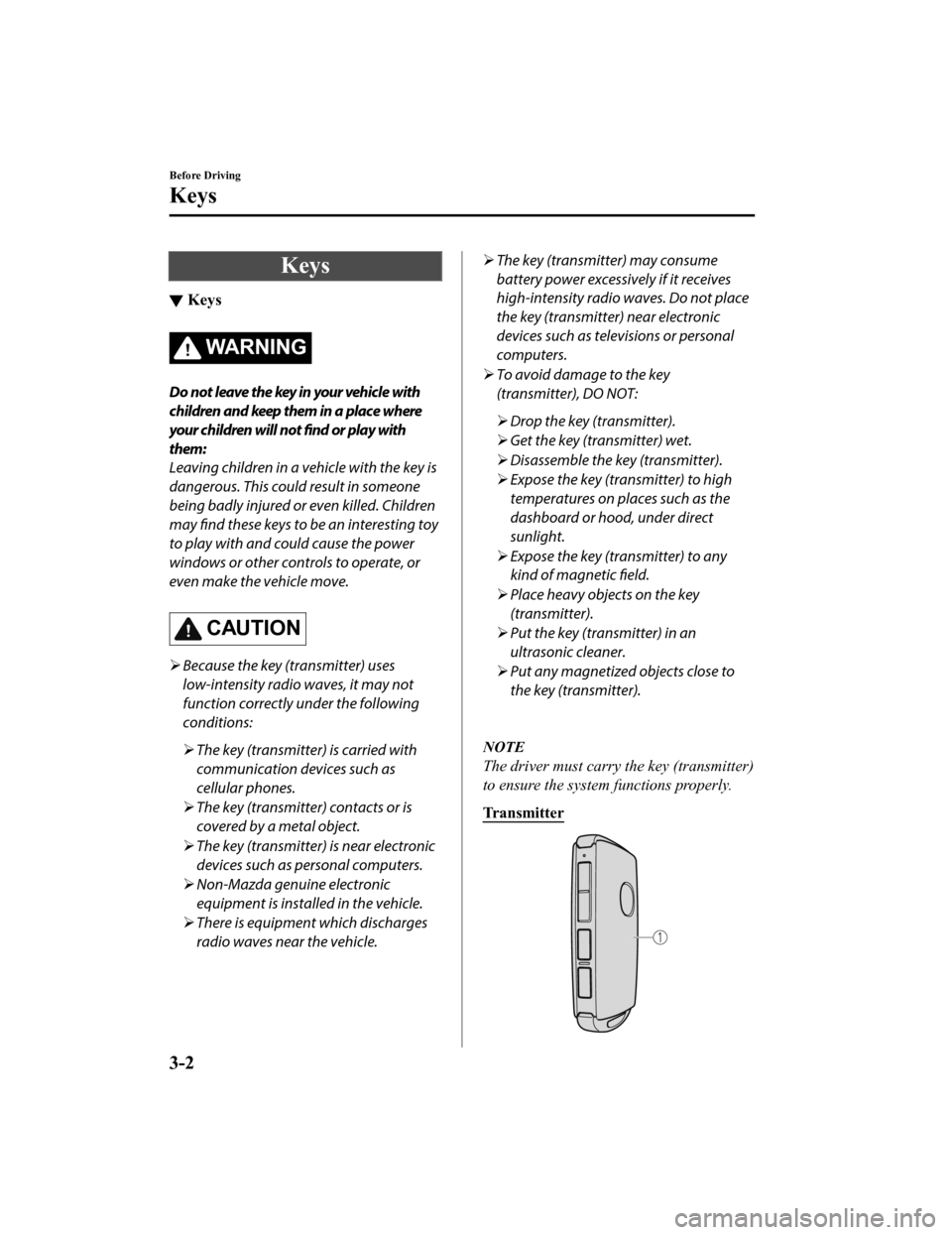
Transmitter
Before Driving
Keys
3-2
Mazda3_8HZ1-EA-19G_Edition1_old 2019-5-17 13:49:03
Page 95 of 598

1. Transmitter (page 3-5)
Auxiliary key
There is a removable auxiliary key inside
the transmitter.
Removing the auxiliary key
1. Remove the lower cover whilepressing the knob in the direction of
the arrow.
2. Remove the auxiliary key.
Installing the auxiliary key
1. Install the auxiliary key as theillustration.
2. Insert the tabs of t he lower cover into
the slots of the transmitter and install
the lower cover.
Key code number plate
A code number is stamped on the plate
attached to the key set; detach this plate
and store it in a safe place (not in the
vehicle) for use if you need to make a
replacement key (auxiliary key).
Also write down the code number and
keep it in a separate safe and convenient
place, but not in the vehicle.
If your key (auxiliary key) is lost, consult
an Authorized Mazda Dealer and have
your code number ready.
1. Key code number plate
Before Driving
Keys
3-3
Mazda3_8HZ1-EA-19G_Edition1_old 2019-5-17 13:49:03
Page 97 of 598
Additional keys can be obtained at an
Authorized Mazda Dealer. Up to 6 keys
can be used with the keyless functions
per vehicle. Bring all keys to an
Authorized Mazda Dealer when
additional keys are required.
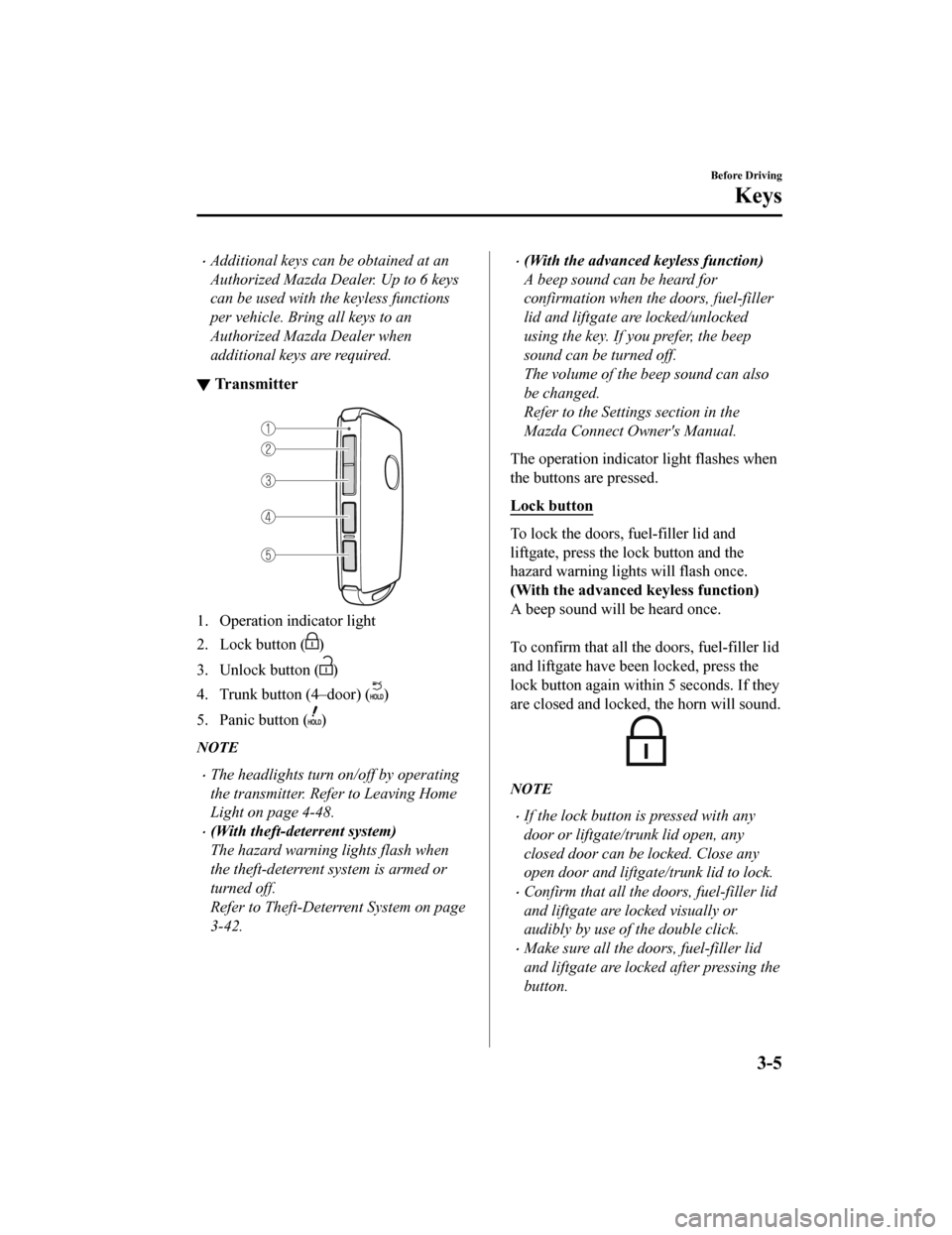
▼Tr a n s m i t t e r
1. Operation indicator light
2. Lock button (
)
3. Unlock button (
)
4. Trunk button (4–door) (
)
5. Panic button (
)
NOTE
The headlights turn on/off by operating
the transmitter. Refer to Leaving Home
Light on page 4-48.
(With theft-deterrent system)
The hazard warning lights flash when
the theft-deterrent system is armed or
turned off.
Refer to Theft-Deterrent System on page
3-42.
(With the advanced keyless function)
A beep sound can be heard for
confirmation when the doors, fuel-filler
lid and liftgate are locked/unlocked
using the key. If you prefer, the beep
sound can be turned off.
The volume of the beep sound can also
be changed.
Refer to the Settings section in the
Mazda Connect Owner's Manual.
The operation indicator light flashes when
the buttons are pressed.
Lock button
To lock the doors, fuel-filler lid and
liftgate, press the lock button and the
hazard warning lights will flash once.
(With the advanced k eyless function)
A beep sound will be heard once.
To confirm that all the doors, fuel-filler lid
and liftgate have been locked, press the
lock button again within 5 seconds. If they
are closed and locked, the horn will sound.
NOTE
If the lock button is pressed with any
door or liftgate/trunk lid open, any
closed door can be locked. Close any
open door and liftgate/trunk lid to lock.
Confirm that all the doors, fuel-filler lid
and liftgate are locked visually or
audibly by use of the double click.
Make sure all the doors, fuel-filler lid
and liftgate are locked after pressing the
button.
Before Driving
Keys
3-5
Mazda3_8HZ1-EA-19G_Edition1_old 2019-5-17 13:49:03
Page 99 of 598
(Turning on the alarm)
Pressing the panic button for 1 second or
more will trigger the alarm for about 2
minutes and 30 seconds, and the following
will occur:
The horn sounds intermittently.
The hazard warning lights flash.
(Turning off the alarm)
The alarm stops by pressing any button on
the key.
Power saving function
By turning on the transmitter power saving
function, the advan ced keyless entry
*1 and
push button start system functions turn off
and the battery power consumption of the
transmitter is restricted.
The remote control function is operational
by operating the transmitter switch even
while the power saving function is turned
on. However, the operation indicator light
of the transmitter does not turn on/flash.
Turning on the power saving function
After you have turned on the power saving
function according to the following
procedure, the hazard warning lights and
sound operate
*1 one time.
1. Press the lock button on the transmitter 4 times within 3 seconds to turn on the
operation indicator light.
2. Press the lock button continuously for 1.5 seconds or longer while the
operation indicator light turns on (for 5
seconds).
3. Press any of the buttons on the
transmitter to make sure that the
operation indicator light does not turn
on/flash.
Turning off the power saving function
After you have turned off the power
saving function according to the following
procedure, the hazard warning lights and
sound operate
*1 one time.
1. Press any of the buttons on the
transmitter to make sure that the
operation indicator light does not turn
on/flash.
2. Press the lock button on the transmitter 4 times within 3 seconds to turn on the
operation indicator light.
3. Press the lock button continuously for 1.5 seconds or longer while the
operation indicator light turns on (for 5
seconds).
*1 With the advanced keyless function
▼Operational Range
The system operates only when the driver
is in the vehicle or
within operational
range while the key is being carried.
Starting the Engine
NOTE
Starting the engine may be possible even
if the key is outside of the vehicle and
extremely close to a door and window,
however, always start the engine from
the driver's seat.
If the vehicle is started and the key is not
in the vehicle, the vehicle will not restart
after it is shut off and the ignition is
switched to off.
The luggage compartment/trunk is out of
the assured operational range, however,
if the key (transmitter) is operable the
engine will start.
Before Driving
Keys
3-7
Mazda3_8HZ1-EA-19G_Edition1_old 2019-5-17 13:49:03
Page 105 of 598

▼Unlocking with Auxiliary Key
Only the driver's door can be unlocked
using the auxiliary key.
Refer to Keys on page 3-2.
Insert the auxiliary key while the driver's
door handle is pulled and turn the key to
the unlock side. Turn the auxiliary key
back to its original position before
removing it.
NOTE
If you attempt to open the driver’s door
using an unauthorized auxiliary key, the
key cylinder will spin around but the door
will not unlock.
▼Locking, Unlocking with Touch
Sensor, Door Handle (With the
advanced keyless function)
By touching the sensing area of the touch
sensor, various locking/unlocking
operations can be done without taking the
key out of a bag or pocket.
There are two types of touch sensors used
for locking and unlocking, and each sensor
is built into the outer door handle on the
driver and front passenger's doors.
1. Sensing area of door lock touch sensor
(Depression on outer side of door
handle)
2. Sensing area of door release touch sensor (Inner side of door handle)
NOTE
When locking/unlocking with the
transmitter carried, securely touch the
sensing area of the touch sensor as
follows.
Locking
Unlocking
The system may not operate normally
under the following conditions.
You touch the sensing area of the door
lock touch sensor and the sensing
area of the door release touch sensor
at the same time.
Before Driving
Doors and Locks
3-13
Mazda3_8HZ1-EA-19G_Edition1_old 2019-5-17 13:49:03
Page 106 of 598
You touch the sensing area of the
touch sensor while wearing gloves.
Foreign matter such as snow or dirt is
stuck on the sensing area of the touch
sensor.
You pull the door handle just after
touching the sensing area of the touch
sensor.
The system may operate if the outer side
door handle of a front door is splashed
with water by a car wash or rain while
the transmitter is in the operation range.
If the system does not operate even
though you touch the sensing area of the
touch sensor correctly, release the touch
sensor once, and then touch the sensing
area of the touch sensor again after
waiting about 3 seconds.
Locking
When locking, touch the sensing area of
the door lock touch sensor with all of the
following conditions met.
The ignition is switched OFF.
All the doors are closed.
You are carrying the transmitter.
The following locations are locked by
touching the sensing area of the door lock
touch sensor.
All doors
Fuel-filler lid
Liftgate
When locking, the hazard warning lights
and sound operate one time.
Unlocking
When unlocking, touch the sensing area of
the door release touch sensor with all of
the following conditions met.
The ignition is switched OFF.
The driver’s door is locked.
Three seconds or longer have passed
since the doors were locked.
You are carrying the transmitter.
(Unlocking from the driver's door)
The following locations are unlocked by
touching the sensing area of the door
release touch sensor of the driver's door.
Driver’s door
Fuel-filler lid
NOTE
The location to be unlocked can be
changed.
Refer to the Settings section in the
Mazda Connect Owner's Manual.
When unlocking, the hazard warning
lights and sound operate two times.
(Unlocking from the front passenger’s
door)
The following locations are unlocked by
touching the sensing area of the door
release touch sensor of the front
passenger's door.
All doors
Fuel-filler lid
Liftgate
When unlocking, the hazard warning
lights and sound operate two times.
NOTE
Confirm that all the doors and liftgate/
trunk lid are securely locked.
For the liftgate/trunk lid, move it
without pressing the electric liftgate/
trunk lid opener to verify that the
liftgate/trunk lid has not been left ajar.
Before Driving
Doors and Locks
3-14
Mazda3_8HZ1-EA-19G_Edition1_old 2019-5-17 13:49:03