park assist MAZDA MODEL 3 HATCHBACK 2021 User Guide
[x] Cancel search | Manufacturer: MAZDA, Model Year: 2021, Model line: MODEL 3 HATCHBACK, Model: MAZDA MODEL 3 HATCHBACK 2021Pages: 612, PDF Size: 89.06 MB
Page 295 of 612

NOTE
If the set speed is not indicated on the display, the system does not operate even if
the RES switch is pressed.
After the operation, the steering assist operation may not operate for a period of 5
seconds at the most until the lane lines are detected or a vehicle ahead is
recognized.
Tu r n i n g o ff
When the TJA switch is pressed while the TJA is operating, the TJA turns o ff.
▼ Shift-up/Shift-down Request
Display (Manual Transmission)
The shift-up or shift-down request
display might be displayed while the
TJA is operating. When this occurs, shift
gears because the gear position is not
appropriate.
Request Indication on display
Shift up Shift Up to a Higher Gear
Shift down Shift Down to a Lower Gear
NOTE
If the gears are not shifted up even
though the shift-up request
indication is displayed, load will be
applied to the engine and the TJA
might be automatically canceled or
engine damage could occur.
If the gears are not shifted down
even though the shift-down request
indication is displayed, the TJA might
be automatically canceled or engine
stalling could occur.
▼ Stop Hold Control (Automatic
Transmission)
While in headway control using the
TJA, your vehicle will stop when a
vehicle ahead stops. When the vehicle
is stopped and the stop hold control
operates, the TJA indicator light turns
on.
NOTE
Even if the TJA is temporarily
canceled during stop hold control,
the vehicle is held in its stopped
position.
The parking brake is automatically
applied and the vehicle is held in its
stopped position when 10 minutes
or longer have passed since the stop
hold control operated. When this
occurs, the TJA is temporarily
canceled.
The brake lights turn on during stop
hold control.
When Driving
i-ACTIVSENSE
4-153
Mazda3_8JM2-EA -20H_Edition1_new 2020-7-10 17:21:34
Page 306 of 612
![MAZDA MODEL 3 HATCHBACK 2021 User Guide Smart Brake Support
[Rear Crossing] (SBS -RC)
*
▼ Smart Brake Support [Rear
Crossing]
(SBS-RC)
The SBS -RC is a system designed to
assist the driver in avoiding collisions
and to reduce damage in t](/img/28/40974/w960_40974-305.png "MAZDA MODEL 3 HATCHBACK 2021 User Guide Smart Brake Support
[Rear Crossing] (SBS -RC)
*
▼ Smart Brake Support [Rear
Crossing]
(SBS-RC)
The SBS -RC is a system designed to
assist the driver in avoiding collisions
and to reduce damage in t")
Smart Brake Support
[Rear Crossing] (SBS -RC)
*
▼ Smart Brake Support [Rear
Crossing]
(SBS-RC)
The SBS -RC is a system designed to
assist the driver in avoiding collisions
and to reduce damage in the event of
a collision by applying the brakes if
there is the possibility of collision with
a vehicle approaching from the rear
while you are reversing out of parking
space.
The SBS -RC system detects vehicles
approaching from the rear left and
right sides of the vehicle, and the rear
of the vehicle while the vehicle is being
reversed out of a parking space, the
system reduces damage in the event of
a collision by operating the brake
control when the system determines
that a collision is unavoidable.
SBS -RC operation
1. The
SBS-RC system operates when
the shift lever (manual
transmission) or the selector lever
(automatic transmission) is shifted
to the reverse (R) position.
2. If there is the possibility of a
collision with an approaching
vehicle, the SBS-RC system applies
brake and displays “BRAKE!” on the
active driving display and the
multi-information display.
WARNING
Always check the surrounding area
visually before actually putting the
vehicle in reverse:
The system is only designed to assist
you in backing out of the lot when
putting the vehicle in reverse. Due to
certain limitations with the operation
of this system, the SBS -RC system may
not operate brake or it might be
delayed even though a vehicle is
behind your vehicle. Always make it
your responsibility as a driver to check
the rear.
Do not rely completely on the SBS -RC
system:
The
SBS-RC system is only designed
to reduce damage in the event of a
collision. Over reliance on the system
leading to the accelerator pedal or
brake pedal being mistakenly
operated could result in an accident.
The
SBS-RC system operates in
response to a vehicle. The system
does not operate in response to
obstructions such as a wall,
pedestrians, or animals.
When Driving
i-ACTIVSENSE
4-164*Some models.
Mazda3_8JM2-EA -20H_Edition1_new 2020-7-10 17:21:34
Page 310 of 612
![MAZDA MODEL 3 HATCHBACK 2021 User Guide ▼Stopping the Smart Brake Support
[Rear Crossing] (SBS
-RC) System
Operation
The SBS -RC can be changed to
inoperable.
Refer to the Settings section in the
Mazda Connect Owners Manual.
When the SB](/img/28/40974/w960_40974-309.png "MAZDA MODEL 3 HATCHBACK 2021 User Guide ▼Stopping the Smart Brake Support
[Rear Crossing] (SBS
-RC) System
Operation
The SBS -RC can be changed to
inoperable.
Refer to the Settings section in the
Mazda Connect Owners Manual.
When the SB")
▼Stopping the Smart Brake Support
[Rear Crossing] (SBS
-RC) System
Operation
The SBS -RC can be changed to
inoperable.
Refer to the Settings section in the
Mazda Connect Owner's Manual.
When the SBS-RC is canceled, the SBS
OFF indicator light turns on.
NOTE
When the SBS-RC is canceled, the
Smart Brake Support [Rear] (SBS -R) is
also canceled.
360° View Monitor*
▼ 360° View Monitor
The 360°View Monitor consists of the
following functions which assist the
driver in checking the area surrounding
the vehicle using various indications in
the center display and a warning sound
while the vehicle is being driven at low
speeds or while parking.
To p v i e w
The top view displays an image of
the vehicle from directly above on
the center display by combining the
images taken from the 4 cameras set
on all sides of the vehicle. The top
view displays on the right side of the
screen when the front view or rear
view screen is being displayed. The
top view assists the driver in
checking the area surrounding the
vehicle when the vehicle is moving
forward or in reverse.
Front view/front wide view
The image from the front of the
vehicle is displayed on the center
display.
The view from the front assists the
driver in checking the front of the
vehicle by displaying guide lines on
the displayed image taken from the
front of the vehicle.
Side view
The images taken from the front left
and right sides of the vehicle are
displayed on the center display.
The side view assists the driver in
checking the front sides of the
vehicle by displaying guide lines on
the displayed image taken from the
front left and right sides of the
vehicle.
When Driving
i-ACTIVSENSE
4-168*Some models.
Mazda3_8JM2-EA
-20H_Edition1_new 2020-7-10 17:21:34
Page 311 of 612
Rear view/rear wide view
The image from the rear of the
vehicle is displayed on the center
display.
The image from the rear assists the
driver in checking the rear of the
vehicle by displaying guide lines on
the displayed image taken from the
rear of the vehicle.
Parking sensor
If there are any obstructions near the
vehicle while the top view/side view
is displayed, an obstruction
detection indication turns on around
the bumper in the center display.
The parking sensors use ultrasonic
sensors to detect obstructions
around the vehicle when the vehicle
is driven at low speeds, such as
during garage or parallel parking,
and notifies the driver of the
approximate distance from the
vehicle to the surrounding
obstruction using sound and an
obstruction detection indication.
Refer to Parking Sensor System on
page 4-238.
Front Cross Tra ffic Alert (FCTA)
If there is the possibility of a collision
with an approaching vehicle while
the front view/front wide view/side
view is displayed, a warning is
displayed on the center display.
The Front Cross Traffi c Alert (FCTA) is
designed to assist the driver in
checking both sides of the vehicle
when the vehicle starts to drive at an
intersection.
Refer to Front Cross Tra ffic Alert
(FCTA) on page 4-113.
Rear Cross Tra ffic Alert (RCTA)
If there is the possibility of a collision
with an approaching vehicle while
the rear view/rear wide view is
displayed, a warning is displayed on
the center display.
The Rear Cross Tra ffic Alert (RCTA)
uses rear side radar sensor to detect
vehicles approaching from the rear
left and right sides of the vehicle,
and it assists the driver in checking
the rear of the vehicle while reversing
by flashing the Blind Spot Monitoring
(BSM) warning lights and activating
the warning sound.
Refer to Rear Cross Tra ffic Alert
(RCTA) on page 4-116.
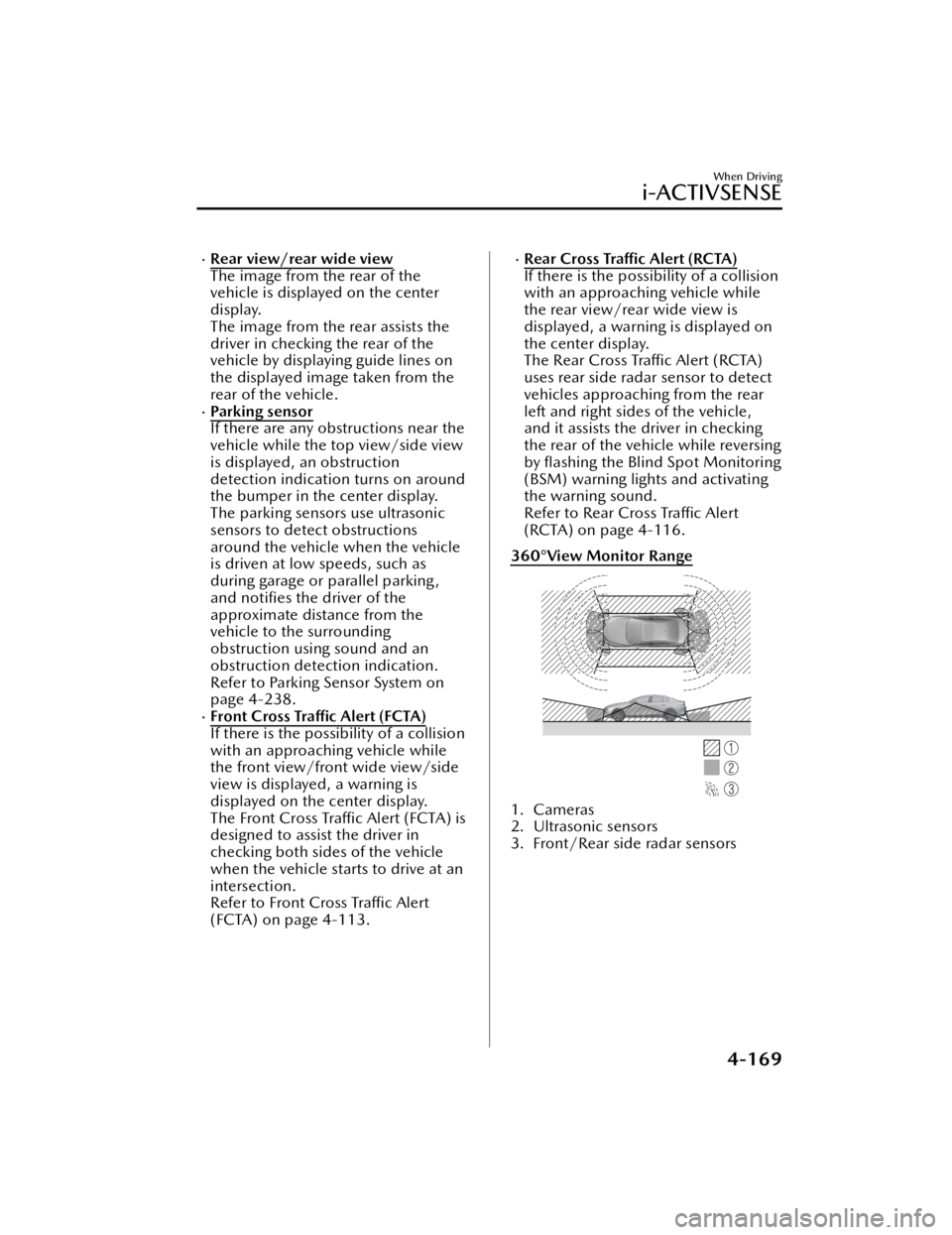
360°View Monitor Range
1. Cameras
2. Ultrasonic sensors
3. Front/Rear side radar sensors
When Driving
i-ACTIVSENSE
4-169
Mazda3_8JM2-EA -20H_Edition1_new 2020-7-10 17:21:34
Page 324 of 612
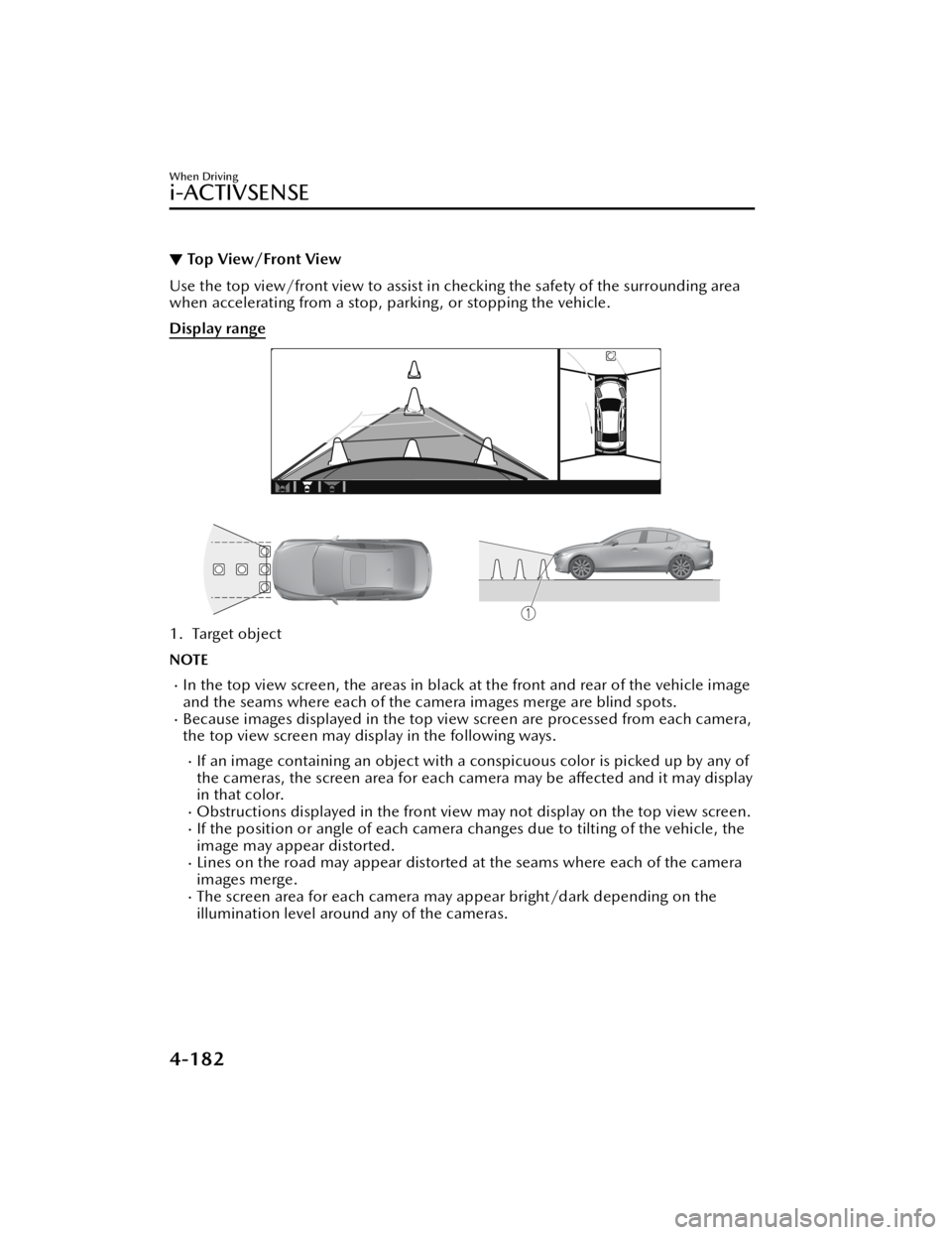
▼Top View/Front View
Use the top view/front view to assist in checking the safety of the surrounding area
when accelerating from a stop, parking, or stopping the vehicle.
Display range
1. Target object
NOTE
In the top view screen, the areas in black at the front and rear of the vehicle image
and the seams where each of the camera images merge are blind spots.
Because images displayed in the top view screen are processed from each camera,
the top view screen may display in the following ways.
If an image containing an object with a conspicuous color is picked up by any of
the cameras, the screen area for each camera may be
aff ected and it may display
in that color.
Obstructions displayed in the front view may not display on the top view screen.If the position or angle of each camera changes due to tilting of the vehicle, the
image may appear distorted.
Lines on the road may appear distorted at the seams where each of the camera
images merge.
The screen area for each camera may appear bright/dark depending on the
illumination level around any of the cameras.
When Driving
i-ACTIVSENSE
4-182
Mazda3_8JM2-EA-20H_Edition1_new 2020-7-10 17:21:34
Page 329 of 612
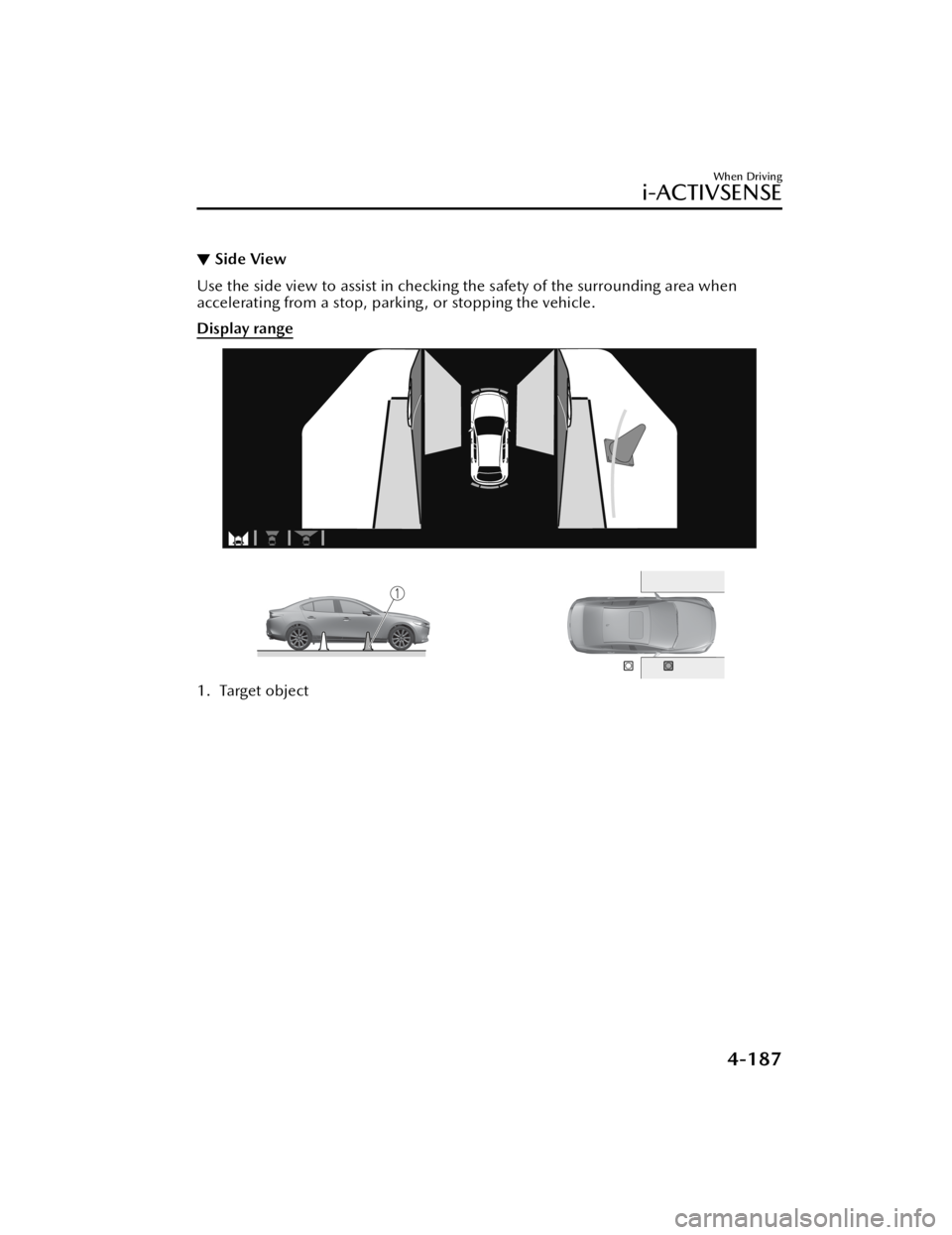
▼Side View
Use the side view to assist in checking the safety of the surrounding area when
accelerating from a stop, parking , or stopping the vehicle.
Display range
1. Target object
When Driving
i-ACTIVSENSE
4-187
Mazda3_8JM2-EA
-20H_Edition1_new 2020-7-10 17:21:34
Page 332 of 612

NOTE
Because there might be a difference between the image displayed on the screen
and the actual conditions, always check th e safety of the surrounding area using
the mirrors and directly with your eyes when driving.
Even though the object displayed on the screen, such as a road curb or a division
line of a parking space, and the vehicle parallel guide lines appear parallel, they
may not actually be parallel.
▼ Top View/Rear View
Use the top view/rear view to assist in checking the safety of the surrounding area
when accelerating from a stop, parking, or stopping the vehicle.
Range of displayed screen image
1. Target object
NOTE
In the top view screen, the areas in black at the front and rear of the vehicle image
and the seams where each of the camera images merge are blind spots.
Because images displayed in the top view screen are processed from each camera,
the top view screen may display in the following ways.
If an image containing an object with a conspicuous color is picked up by any of
the cameras, the screen area for each camera may be aff
ected and it may display
in that color.
Obstructions displayed in the rear view may not display on the top view screen.If the position or angle of each camera changes due to tilting of the vehicle, the
image may appear distorted.
When Driving
i-ACTIVSENSE
4-190
Mazda3_8JM2-EA -20H_Edition1_new 2020-7-10 17:21:34
Page 337 of 612
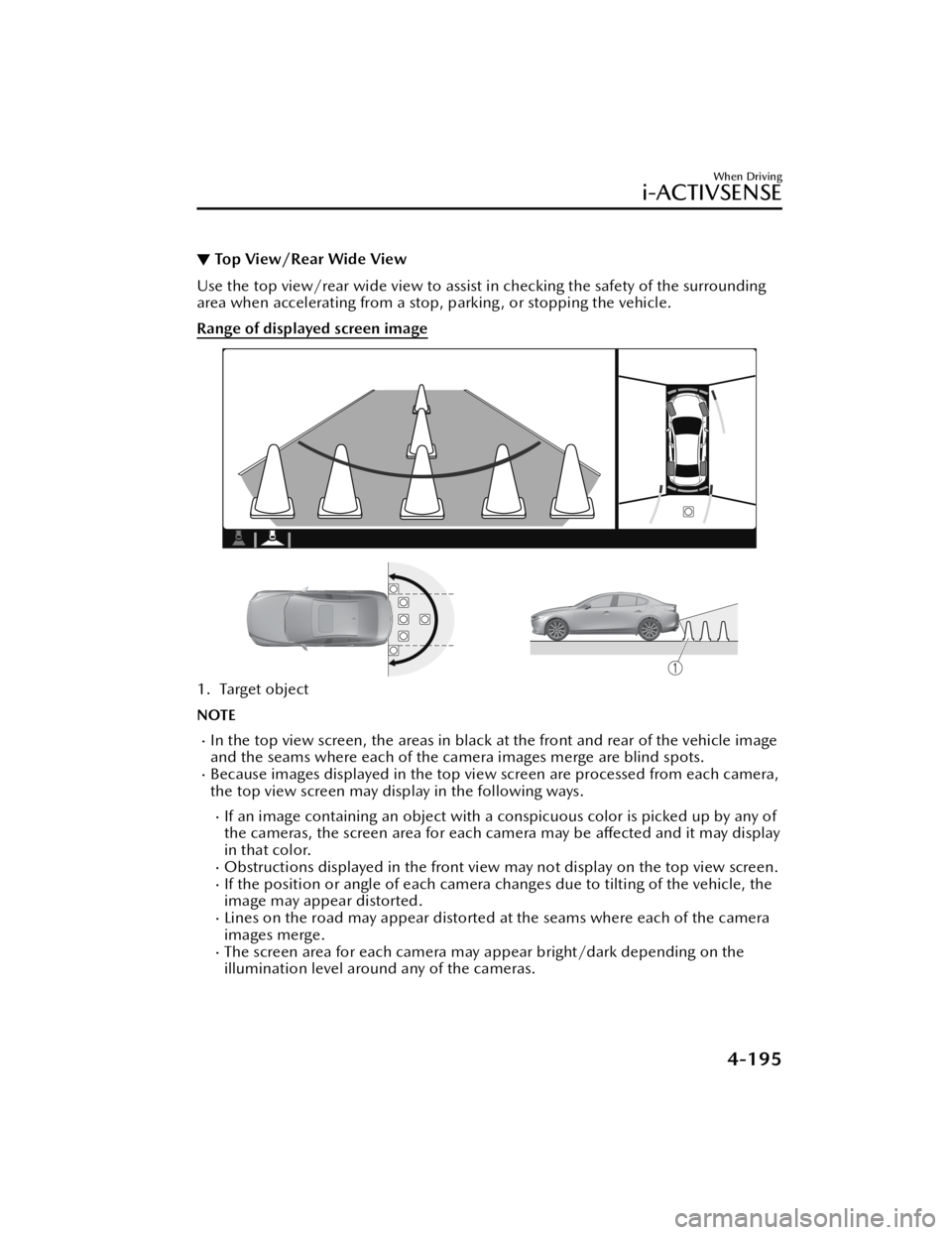
▼Top View/Rear Wide View
Use the top view/rear wide view to assist in checking the safety of the surrounding
area when accelerating from a stop, parking , or stopping the vehicle.
Range of displayed screen image
1. Target object
NOTE
In the top view screen, the areas in black
at the front and rear of the vehicle image
and the seams where each of the camera images merge are blind spots.
Because images displayed in the top view screen are processed from each camera,
the top view screen may display in the following ways.
If an image containing an object with a conspicuous color is picked up by any of
the cameras, the screen area for each camera may be a ffected and it may display
in that color.
Obstructions displayed in the front view may not display on the top view screen.If the position or angle of each camera changes due to tilting of the vehicle, the
image may appear distorted.
Lines on the road may appear distorted at the seams where each of the camera
images merge.
The screen area for each camera may appear bright/dark depending on the
illumination level around any of the cameras.
When Driving
i-ACTIVSENSE
4-195
Mazda3_8JM2-EA -20H_Edition1_new 2020-7-10 17:21:34
Page 365 of 612

Rear View Monitor*
▼Rear View Monitor
The rear view monitor provides visual
images of the rear of the vehicle when
reversing.
WARNING
Always drive carefully con
firming the
safety of the rear and the surrounding
conditions by looking directly with
your eyes:
Reversing the vehicle by only looking at
the screen is dangerous as it may cause
an accident or a collision with an
object. The rear view monitor is only a
visual assist device when reversing the
vehicle. The images on the screen may
be different from the actual conditions.
CAUTION
Do not use the rear view monitor
under the following conditions:
Using the rear view monitor under
the following conditions is
dangerous and could result in injury
or vehicle damage or both.
Icy or snow-covered roads.
Tire chains or a temporary spare
tire is installed.
The vehicle is on a road incline.
When the display is cold, images
may course across the monitor or the
screen and may be dimmer than
usual, which could cause di fficulty in
con firming the surrounding
conditions of the vehicle. Always
drive carefully confirming the safety
of the rear and the surrounding
conditions by looking directly with
your eyes.
Do not apply excessive force to the
camera. The camera position and
angle may deviate.
Do not disassemble, modify, or
remove it as it may no longer be
waterproof.
The camera cover is made of plastic.
Do not apply degreasing agents,
organic solvents, wax, or glass
coating agents to the camera cover.
If any are spilled on the cover, wipe
o ff with a soft cloth immediately.
Do not rub the camera cover
forcefully with an abrasive or hard
brush. The camera cover or lens may
be scratched which might aff ect the
images.
NOTE
If water, snow, or mud is stuck on
the camera lens, wipe it off using a
soft cloth. If it cannot be wiped o ff,
use a mild detergent.
If the camera temperature changes
rapidly (Hot to cold, cold to hot), the
rear view monitor may not operate
correctly.
When replacing the tires, consult an
Authorized Mazda Dealer. Replacing
the tires could result in deviation of
the guide lines which appear on the
display.
If the vehicle's front, side, or rear has
been involved in a collision, the
alignment of the rear view parking
camera (location, installation angle)
may have deviated. Always consult
an Authorized Mazda Dealer to have
the vehicle inspected.
If “No camera signal.” is indicated in
the display, there could be a
problem with the camera. Have your
vehicle inspected at an Authorized
Mazda Dealer.
When Driving
Rear View Monitor
*Some models.4-223
Mazda3_8JM2-EA -20H_Edition1_new 2020-7-10 17:21:34
Page 366 of 612
(Predicted vehicle path assist lines
display type)
If force is applied to the steering
wheel, the guide lines may not
display. Loosen your grip on the
steering wheel to allow the guide
lines to display.
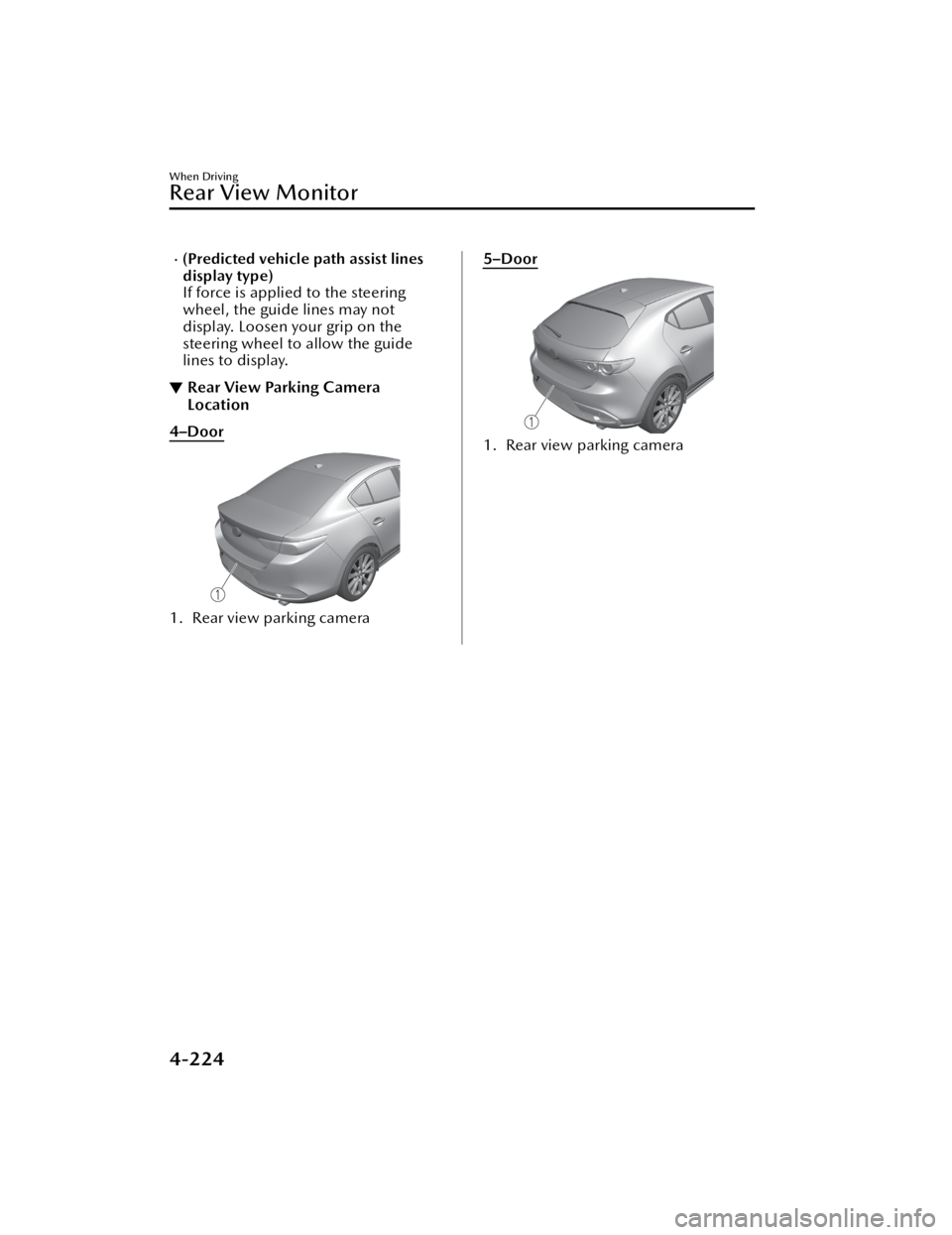
▼Rear View Parking Camera
Location
4–Door
1. Rear view parking camera
5–Door
1. Rear view parking camera
When Driving
Rear View Monitor
4-224
Mazda3_8JM2-EA
-20H_Edition1_new 2020-7-10 17:21:34