park assist MAZDA MODEL 3 HATCHBACK 2021 Owner's Manual
[x] Cancel search | Manufacturer: MAZDA, Model Year: 2021, Model line: MODEL 3 HATCHBACK, Model: MAZDA MODEL 3 HATCHBACK 2021Pages: 612, PDF Size: 89.06 MB
Page 368 of 612
The distance appearing in the displayed image is different from the actual distance
because the rear view parking camera is equipped with a speci fic lens.
Images displayed on the monitor from the rear view parking camera are reversed
images (mirror images).
Some optionally installed vehicle accessories may be picked up by the camera. Do
not install any optional parts that can interfere with the camera view, such as
illuminating parts or parts made of re flective material.
It may be di fficult to see the display under the following conditions, however, it
does not indicate a malfunction.
In darkened areas.When the temperature around the lens is high/low.When the camera is wet such as on a rainy day or during periods of high
humidity.
When foreign material such as mud is stuck around the camera.When the camera lens refl ects sunlight or headlight beams.The surroundings are illuminated by vehicle lights, fluorescent lights, or LED
lights (display may flicker).
Extremely small dark or white dots appear on the screen (dots may
flicker).Image display may be delayed if the temperature around the camera is low.
▼ Viewing the Display
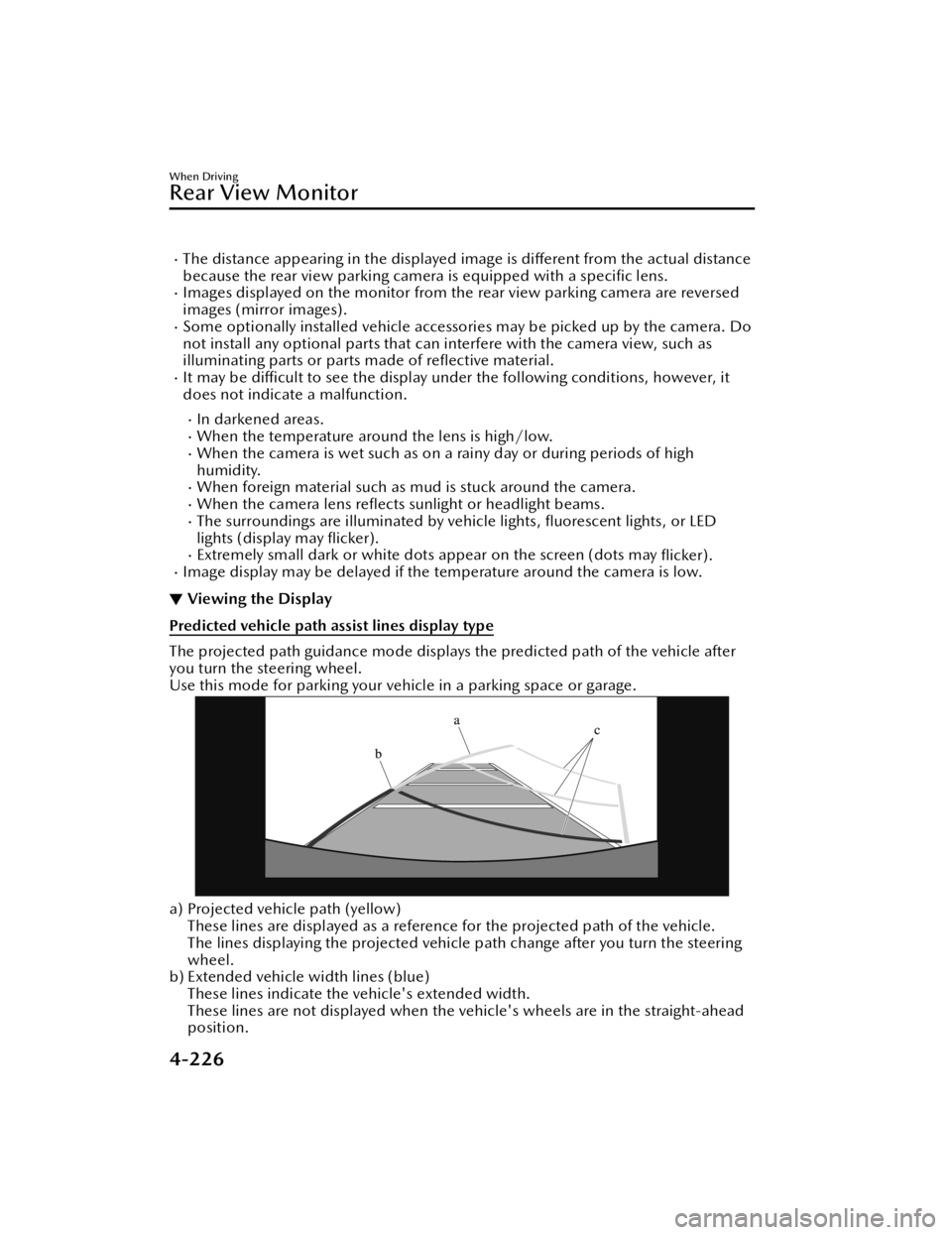
Predicted vehicle path assist lines display type
The projected path guidance mode displays the predicted path of the vehicle after
you turn the steering wheel.
Use this mode for parking your vehi
cle in a parking space or garage.
a) Projected vehicle path (yellow)
These lines are displayed as a reference for the projected path of the vehicle.
The lines displaying the projected vehicle path change after you turn the steering
wheel.
b) Extended vehicle width lines (blue)
These lines indicate the vehicle's extended width.
These lines are not displayed when the vehicle's wheels are in the straight-ahead
position.
When Driving
Rear View Monitor
4-226
Mazda3_8JM2-EA -20H_Edition1_new 2020-7-10 17:21:34
Page 369 of 612
c) Distance guide lines (red)These lines indicate the approximate distance to a point measured from the
vehicle's rear (from the end of the bumper).
The blue line indicates the point about 0.5 m (19 in) from the rear bumper.
The red and yellow lines, wh ich change position after you turn the steering wheel,
indicate the points about 0.5 m (19 in) for the red line and 1.0 m (39 in) and 2.0
m (78 in) for the yellow lines from the rear bumper (at the center point of each of
the lines).
A degree of error occurs when the wheels are not in the straight-ahead position.
In the above illustration, the right side of the vehicle is in a position closer to the
actual distance displayed by the distance guide lines (red: about 0.5 m (19 in)
point, yellow: about 1.0 m (39 in), and yellow: about 2.0 m (78 in) point behind
the rear bumper), whereas the left side is in a position farther away.
CAUTION
The indicated position of the guide lines on the display changes depending on the
vehicle conditions (such as the number of occupants/cargo load) and the road
conditions (such as a steep gradient to the rear of the vehicle).
Always check the area to the vehicle's re ar and the surrounding area directly with
your eyes while backing up.
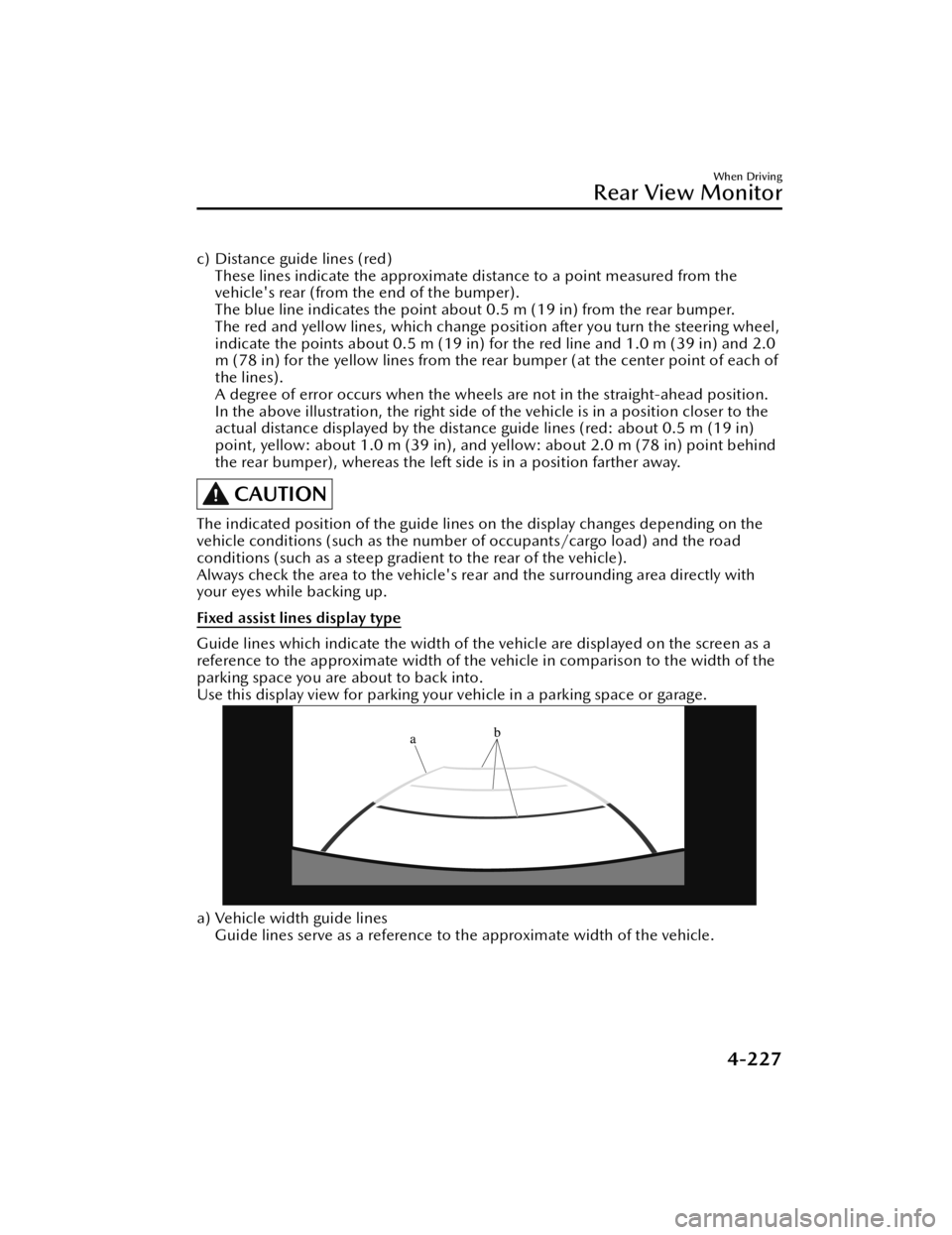
Fixed assist lines display type
Guide lines which indicate the width of the vehicle are displayed on the screen as a
reference to the approximate width of the vehicle in comparison to the width of the
parking space you are about to back into.
Use this display view for parking your vehicle in a parking space or garage.
a) Vehicle width guide lines
Guide lines serve as a reference to the approximate width of the vehicle.
When Driving
Rear View Monitor
4-227
Mazda3_8JM2-EA -20H_Edition1_new 2020-7-10 17:21:34
Page 370 of 612

b) Distance guide linesThese guide lines indicate the approximate distance to a point measured from the
vehicle's rear (from the end of the bumper).
The red line indicates the point about 0.5 m (19 in) from the rear bumper.
The yellow lines indicate the points about 1.0 m (39 in) and 2.0 m (78 in) from
the rear bumper.
CAUTION
The guide lines on the screen are fixed lines. They are not synced to the driver's
turning of the steering wheel. Always be careful and check the area to the vehicle's
rear and the surrounding area directly with your eyes while backing up.
▼ Rear View Monitor Operation
The operation of the rear view monitor when reversing the vehicle varies depending
on the tra
ffic, road, and vehicle conditions. The amount of steering and the timing
also varies depending on conditions, so con firm the surrounding conditions directly
with your eyes and steer the vehicle in accordance with the conditions.
Be well aware of the above cautions prior to using the rear view monitor.
Predicted vehicle path assist lines display type
NOTE
The following shows an example of vehicle parking in which the steering wheel is
turned to the right when backing up the vehicle. The operation is reversed when
backing up the vehicle from the opposite direction.
1. Shift the shift lever (manual transmission) or the selector lever (automatic
transmission) to reverse (R) position to switch the display to the rear view
monitor display.
When Driving
Rear View Monitor
4-228
Mazda3_8JM2-EA -20H_Edition1_new 2020-7-10 17:21:34
Page 374 of 612

When parking in a space with a division line on only one side of the parking space,
the division line and the vehicle width guide line appear aligned in the monitor,
but they may not actually be aligned on the ground.
Fixed assist lines display type
NOTE
Images displayed on the monitor from the rear view parking camera are reversed
images (mirror images).
1. Shift the shift lever (manual transmission) or the selector lever (automatic transmission) to reverse (R) position to switch the display to the rear view
monitor display.
2. Con firming the surrounding conditions, reverse the vehicle.
When Driving
Rear View Monitor
4-232
Mazda3_8JM2-EA -20H_Edition1_new 2020-7-10 17:21:34
Page 380 of 612

Parking Sensor System*
▼Pa r k i n g S e n s o r Sys t e m
The parking sensors use ultrasonic sensor
s which detect obstructions around the
vehicle when the vehicle is driven at low speeds, such as during garage or parallel
parking , and a buzzer sound and detection indicator notify the driver of the
approximate distance from the vehicle to the surrounding obstruction.
1. Front ultrasonic sensor*
2. Front corner ultrasonic sensor*
3. Rear ultrasonic sensor
4. Rear corner ultrasonic sensor
5. Rear side ultrasonic sensor
*
WARNING
Do not rely completely on the parking sensor system and be sure to con firm the
safety around your vehicl e visually when driving:
This system can assist the driver in operating the vehicle in the forward and
backward directions while parking. The detection ranges of the sensors are limited,
therefore, driving the vehicle while relying only on the system may cause an
accident. Always con firm the safety around your vehicle visually when driving.
When Driving
Pa r k i n g S e n s o r Sys te m
4-238*Some models.
Mazda3_8JM2-EA-20H_Edition1_new 2020-7-10 17:21:34
Page 435 of 612

Rear Coat Hooks
▼Rear Coat Hooks
WARNING
Never hang heavy or sharp objects on
the assist grips and coat hooks:
Hanging heavy or sharp-ended objects
such as a coat hanger from the assist
grips or coat hooks is dangerous as
they can
fly o ff and hit an occupant in
the cabin if a curtain air bag was to
deploy, which could result in serious
injury or death.
Always hang clothes on the coat hooks
and the assist grips without hangers.
Storage Compartments
▼ Storage Compartments
WARNING
Keep storage boxes closed when
driving:
Driving with the storage boxes open is
dangerous. To reduce the possibility of
injury in an accident or a sudden stop,
keep the storage boxes closed when
driving.
When loading cargo, make sure that it
is completely secured:
If the cargo is not completely secured,
it may move or collapse while driving
or during sudden braking , resulting in
injury or an accident.
Do not put articles in storage spaces
with no lid:
Putting articles in storage spaces with
no lid is dangerous as they could be
thrown around the cabin during
sudden braking , maneuvering, or
acceleration and cause an accident
depending on how the article is stored.
CAUTION
Do not leave lighters or eyeglasses in
the storage boxes while parked under
the sun. A lighter could explode or the
plastic material in eyeglasses could
deform and crack from high
temperature.
Interior Features
Interior Equipment
5-45
Mazda3_8JM2-EA
-20H_Edition1_new 2020-7-10 17:21:34
Page 524 of 612

▼ABS Warning Indicat ion/Warning
Light
If the ABS warning light stays on while
you're driving , the ABS control unit has
detected a system malfunction. If this
occurs, your brakes will function
normally as if the
vehicle had no ABS.
Should this happen, consult an
Authorized Mazda Dealer as soon as
possible.
NOTE
When the engine is jump-started to
charge the battery, uneven rpm
occurs and the ABS warning light
may illuminate. If this occurs, it is the
result of the weak battery and does
not indicate an ABS malfunction.
Recharge the battery.
The brake assist system does not
operate while the ABS warning light
is illuminated.
▼ Master Warning Indication
The indication displays if the system
has a malfunction.
Check the reason for the indication
displaying on the center display or
multi-information display.
Refer to If a Warning Light Turns On or
Flashes on page 7-27.
▼
Brake Control System Warning
Indication/Warning Light
The warning light illuminates when the
system has a malfunction. Have your
vehicle inspected at an Authorized
Mazda Dealer.
▼Electric Parking Brake (EPB)
Indication/Indicator Light
This warning has the following
functions:
Parking brake warning/Indicator light
inspection
The light illuminates when the parking
brake is applied with the ignition
switched to START or ON. It turns
off
when the parking brake is released.
When the light is flashing
The light flashes if the Electric Parking
Brake (EPB) has a malfunction. If the
light remains flashing even if the
Electric Parking Brake (EPB) switch is
operated, consult an Authorized
Mazda Dealer as soon as possible.
If Trouble Arises
Warning/Indicator Lights and Warning Sounds
7-30
Mazda3_8JM2-EA -20H_Edition1_new 2020-7-10 17:21:34
Page 526 of 612
When there is a malfunction in the
AWD system.
“Excessive AWD System Load. Drive
Slowly Until Warning Light Turns Off .
Vehicle Now in Front Wheel Drive” is
displayed/When the light is flashing
The indication is displayed/the light
flashes under the following conditions.
Park the vehicle in a safe place and
check that the warning indication light
turns off / the warning light stops
fl ashing, and then drive the vehicle.
Contact an Authorized Mazda Dealer
if the indication is continuously
displayed.
When the differential oil temperature
is excessively high.
When there is a large difference
between the front and rear wheel
rotation, such as when trying to
remove the vehicle from mud.
“Mismatched Tire Diameters. Vehicle
Now in Front Wheel Drive” is
displayed/When the light is turned on
The indication is displayed/the light
turns on under the following
conditions. Inspect the tire sizes or tire
pressures on all 4 wheels. Contact an
Authorized Mazda Dealer if the
indication remains on or the warning
light remains illuminated.
When any of the tire diameter is di fferent.
When any of the tire pressure is
incorrect.
▼ TCS/DSC Indication/Indicator
Light (Turns on)
If the light stays on, the TCS, DSC or
the brake assist system may have a
malfunction and they
may not operate
correctly. Take your vehicle to an
Authorized Mazda Dealer.
▼ Air Bag/Front Seat Belt
Pretensioner System Warning
Indication/Warning Light
A system malfunction is indicated if the
warning light constantly
flashes,
constantly illuminates or does not
illuminate at all when the ignition is
switched ON. If any of these occur,
consult an Authorized Mazda Dealer
as soon as possible. The system may
not operate in an accident.
WARNING
Never tamper with the air bag/
pretensioner systems and always have
an Authorized Mazda Dealer perform
all servicing and repairs:
Self-servicing or tampering with the
systems is dangerous. An air bag/
pretensioner could accidentally
activate or become disabled causing
serious injury or death.
If Trouble Arises
Warning/Indicator Lights and Warning Sounds
7-32
Mazda3_8JM2-EA -20H_Edition1_new 2020-7-10 17:21:34
Page 604 of 612

Index
A
Accessory Socket....................... 5-41
Active Driving Display................4-30
Adaptive Front Lighting System
(AFS)........................................ 4-90
Add-On Non-Genuine Parts and
Accessories............................... 8-17
Advanced KeyAdvanced keyless entry
system................................... 3-9
Operational range................ 3-10
Advanced Keyless Entry System..... 3-9
Antilock Brake System (ABS).......4-77
Assist Grips............................... 5-44
AUTOHOLD.............................. 4-71
AUTOHOLD Warning Beep........ 7-45
Automatic Transmission Active Adaptive Shift (AAS)... 4-38
Automatic transmission
controls................................4-35
Direct mode.........................4-44
Driving tips.......................... 4-45
Manual shift mode............... 4-38
Shift-lock system...................4-36
Transmission ranges.............. 4-37
B
Battery...................................... 6-29Maintenance........................ 6-30
Replacement........................ 6-30
Speci fications......................... 9-4
Battery Runs Out....................... 7-17
Jump-starting....................... 7-17
Blind Spot Monitoring (BSM)..... 4-96 Canceling operation of Blind Spot
Monitoring (BSM)...............4-100
Blind Spot Monitoring (BSM) Warning
Beep.........................................7-46
Body Lubrication....................... 6-23
Bottle Holder............................ 5-44
Brakes Brake assist.......................... 4-69
Brake override system........... 4-70
Electric Parking Brake (EPB)....4-66
Foot brake............................4-65
Pad wear indicator................4-69
Parking brake....................... 4-66
Warning light........................4-69
Brake Override System............... 4-70
Brake Override Warning Beep.....7-45
Break-In Period......................... 3-44
C
Capacities...................................9-5
Cell Phones.............................. 8-18
Center Console......................... 5-46
Child Restraint Categories of child-restraint
systems................................ 2-37
Child-restraint precautions.... 2-32
Child-restraint system
installation........................... 2-37
Child-restraint system suitability
for various seat positions
table.................................... 2-39
Installing child-restraint
systems................................ 2-42
ISOFIX child-restraint systems
(Mexico).............................. 2-50
LATCH child-restraint systems
(Except Mexico)................... 2-50
Climate Control System Fully automatic type..............5-10
Manual type...........................5-5
Operating tips........................ 5-2
Vent operation....................... 5-3
Collision warning...................... 7-47
Coming Home Light.................. 4-50
Cruise Control........................ 4-215
10-2
Mazda3_8JM2-EA -20H_Edition1_new 2020-7-10 17:21:34
Page 605 of 612

Index
Cruise control switch.......... 4-215
Cruise standby indication (white)/
cruise set indication (green) ..........
......................................... 4-215
Cup Holder.............................. 5-42
Customer Assistance (Canada)..... 8-6
Customer Assistance (Mexico)... 8-10
Customer Assistance (Puerto
Rico).......................................... 8-9
Customer Assistance (U.S.A.)....... 8-2
Cylinder Deactivation................ 4-11
D
Daytime Running Lights............. 4-51
Defogger.................................. 4-58 Mirror.................................. 4-59
Rear window........................ 4-58
Dimensions.................................9-6
Display..................................... 4-12
Distance & Speed Alert (DSA).. 4-108 Indication on display...........4-109
Door Locks............................... 3-11
Door-ajar Warning Beep............ 7-47
Driver Attention Alert (DAA).... 4-109
Driver Monitoring Camera....... 4-214
Driver Monitoring (DM)...........4-111
Drive Selection..........................4-81
Driving In Flooded Area............. 3-49
Driving on Uneven Road............ 3-50
Driving Position Memory........... 2-11
Driving Tips...............................3-44 Automatic transmission......... 4-45
Break-in period.................... 3-44
Driving in flooded area......... 3-49
Driving on uneven road.........3-50
Floor mat............................. 3-46
Hazardous driving.................3-45
Overloading......................... 3-49
Rocking the vehicle...............3-46
Saving fuel and protection of the
environment.........................3-44
Turbocharged vehicles (SKYACTIV -
G 2.5T)................................ 3-50
Winter driving...................... 3-47
Dynamic Stability Control
(DSC)....................................... 4-79 DSC OFF indicator light........ 4-80
DSC OFF switch................... 4-80
TCS/DSC indicator light........4-79
E
Electric Parking Brake (EPB)........ 4-66
Electric Parking Brake (EPB) Warning
Beep.........................................7-45
Emergency StartingPush-starting........................ 7-20
Starting a flooded engine...... 7-20
Emergency Towing Tiedown hooks..................... 7-24
Towing description............... 7-23
Emission Control System............ 3-26
Engine Coolant............................... 6-20
Engine compartment
overview.............................. 6-15
Exhaust gas.......................... 3-26
Hood release....................... 6-13
Oil....................................... 6-17
Starting.................................. 4-5
Essential Information................... 6-2
Event Data Recorder.................. 8-19
Excessive Speed Warning........... 7-47
Exterior Care............................. 6-48 Aluminum wheel
maintenance........................ 6-53
Bright-metal maintenance..... 6-52
Maintaining the finish........... 6-49
Plastic part maintenance....... 6-53
10-3
Mazda3_8JM2-EA -20H_Edition1_new 2020-7-10 17:21:34