cruise control MAZDA MODEL 3 HATCHBACK 2021 Owner's Manual
[x] Cancel search | Manufacturer: MAZDA, Model Year: 2021, Model line: MODEL 3 HATCHBACK, Model: MAZDA MODEL 3 HATCHBACK 2021Pages: 612, PDF Size: 89.06 MB
Page 349 of 612

A pedestrian is in a dark location
such as during the night, or blends
into the background by wearing
clothes matching the background
color.Front Radar Sensor*
▼Front Radar Sensor
Your vehicle is equipped with a front
radar sensor.
The following systems also use the
front radar sensor.
Distance & Speed Alert (DSA)Mazda Radar Cruise Control
(MRCC)
Mazda Radar Cruise Control with
Stop & Go function (MRCC with
Stop & Go function)
Tra
ffic Jam Assist (TJA)Smart Brake Support (SBS)
The front radar sensor functions by
detecting the radio waves re flected o ff
a vehicle ahead or an obstruction sent
from the radar sensor.
The front radar sensor is mounted
behind the front emblem.
1. Front radar sensor
If “Safety and Driver Support Systems
Temporarily Disabled. Front Radar
Obscured. Drive Safely” is displayed on
the multi-information display of the
instrument cluster, clean the area
around the front radar sensor.
CAUTION
Heed the following precautions to
assure correct operation of each
system.
When Driving
i-ACTIVSENSE
*Some models.4-207
Mazda3_8JM2-EA -20H_Edition1_new 2020-7-10 17:21:34
Page 357 of 612
Cruise Control*
▼Cruise Control
With cruise control, you can set and
automatically maintain any speed of
more than about 30 km/h (19 mph).
WARNING
Do not use the cruise control under
the following conditions:
Using the cruise control under the
following conditions is dangerous and
could result in loss of vehicle control.
Hilly terrain
Steep inclines
Heavy or unsteady tra ffic
Slippery or winding roads
Similar restrictions that require
inconsistent speed
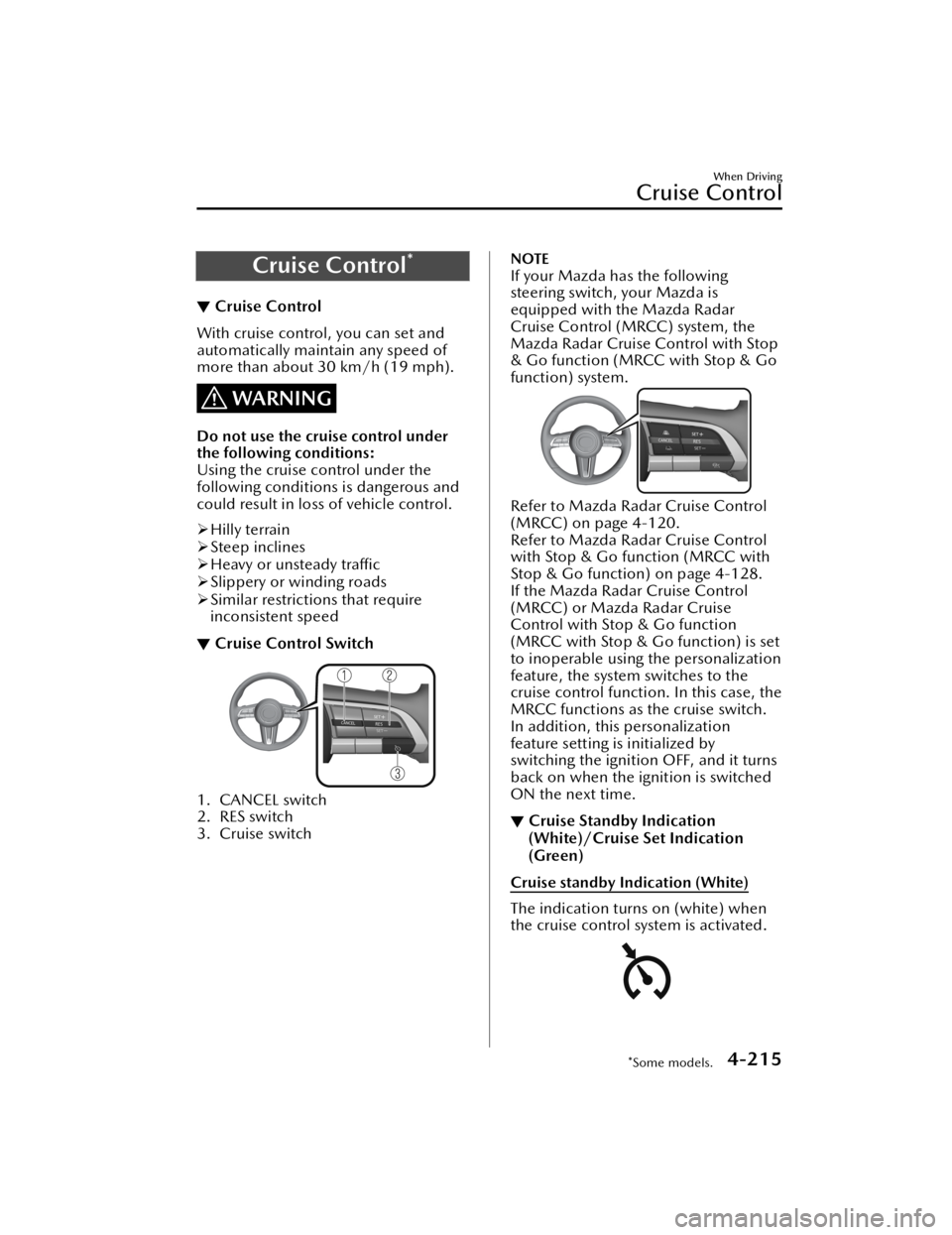
▼ Cruise Control Switch
1. CANCEL switch
2. RES switch
3. Cruise switch
NOTE
If your Mazda has the following
steering switch, your Mazda is
equipped with the Mazda Radar
Cruise Control (MRCC) system, the
Mazda Radar Cruise Control with Stop
& Go function (MRCC with Stop & Go
function) system.
Refer to Mazda Radar Cruise Control
(MRCC) on page 4-120.
Refer to Mazda Radar Cruise Control
with Stop & Go function (MRCC with
Stop & Go function) on page 4-128.
If the Mazda Radar Cruise Control
(MRCC) or Mazda Radar Cruise
Control with Stop & Go function
(MRCC with Stop & Go function) is set
to inoperable using the personalization
feature, the system switches to the
cruise control function. In this case, the
MRCC functions as the cruise switch.
In addition, this personalization
feature setting is initialized by
switching the ignition OFF, and it turns
back on when the ignition is switched
ON the next time.
▼Cruise Standby Indication
(White)/Cruise Set Indication
(Green)
Cruise standby Indication (White)
The indication turns on (white) when
the cruise control system is activated.
When Driving
Cruise Control
*Some models.4-215
Mazda3_8JM2-EA
-20H_Edition1_new 2020-7-10 17:21:34
Page 358 of 612

Cruise Set Indication (Green)
The indication turns on (green) when a
cruising speed has been set.
▼Activation/Deactivation
WARNING
Always turn o
ff the cruise control
system when it is not in use:
Leaving the cruise control system in an
activation-ready state while the cruise
control is not in use is dangerous as the
cruise control could unexpectedly
activate if the activation button is
accidentally pressed, and result in loss
of vehicle control and an accident.
NOTE
When the ignition is switched OFF, the
system status before it was turned o ff is
maintained. For example, if the
ignition is switched OFF with the cruise
control system operable, the system
will be operable when the ignition is
switched ON the next time.
Activation
To activate the system, press the cruise
switch. The cruise standby indication
(white) turns on.
Deactivation
To deactivate the system, press the
cruise switch again.
The cruise standby indication (white)
turns off .
▼To Set Speed
1. Activate the cruise control system
by pressing the cruise switch. The
cruise standby indication (white)
turns on.
2. Accelerate to the desired speed, which must be more than 25 km/h
(16 mph).
3. Adjust the system to the desired vehicle speed using the accelerator
pedal. Press the RES switch up (SET
+) or down (SET -) to start cruise
control. The cruise control
indication (green) in the instrument
cluster turns on at the same time.
Quickly release the switch when the
cruise control indication (green)
turns on.
NOTE
If the RES switch is operated up (SET
+) or down (SET -) while the vehicle
speed is between 25 and 30 km/h
(16 to 19 mph), the set speed is set
to 30 km/h (19 mph).
The cruise control speed setting
cannot be performed under the
following conditions:
Any of the doors is opened.The driver's seat belt is unfastened.The brake pedal is depressed.The parking brake is applied.(Automatic transmission)
The selector lever is in the P, N, or
R position.
(Manual transmission)
The shift lever is in the neutral
position.
On a steep grade, the vehicle may
momentarily slow down while
ascending or speed up while
descending.
When Driving
Cruise Control
4-216
Mazda3_8JM2-EA -20H_Edition1_new 2020-7-10 17:21:34
Page 359 of 612

The cruise control will cancel if the
vehicle speed decreases below 20
km/h (12 mph) when the cruise
control is activated, such as when
climbing a steep grade.
The vehicle speed preset using the
cruise control is displayed in the
instrument cluster and the active
driving display (vehicles with active
driving display).
Instrument cluster (Basic display)
Instrument cluster (i-ACTIVSENSE
display)
Active driving display
▼ Changing the Set Vehicle Speed
Follow either of these procedures.
To increase/decrease speed using
cruise control switch
When the RES switch is pressed up
(SET+), the vehicle accelerates and
when the RES switch is pressed down
(SET
-), it decelerates.
Press and release immediately: 1
km/h (1 mph)
Press and hold: 10 km/h (5 mph)
NOTE
Even after releasing the RES switch, the
cruise control accelerates/decelerates
continuously until the set speed
displayed in the instrument cluster and
on the active driving display is reached.
If you want to stop accelerating/
decelerating , change the set speed or
cancel the system (such as by
depressing the brake pedal).
To increase speed using accelerator
pedal
Depress the accelerator pedal and
press the RES switch up (SET+) or
down (SET
-) at the desired speed. If
the switch is not operated, the system
returns to the set speed after you
release your foot from the accelerator
pedal.
NOTE
Accelerate if you want to speed up
temporarily when the cruise control is
on. Greater speed will not interfere
with or change the set speed. Take
your foot o ff the accelerator to return
to the set speed.
When Driving
Cruise Control
4-217
Mazda3_8JM2-EA -20H_Edition1_new 2020-7-10 17:21:34
Page 360 of 612

▼To Resume Cruisi
ng Speed at More
Than 30 km/h (19 mph)
If the cruise control system is
temporarily canceled (such as by
applying the brake pedal) and the
system is still activated, the most
recent set speed will automatically
resume when the RES switch is
pressed.
If vehicle speed is below 30 km/h (19
mph), increase the vehicle speed up to
30 km/h (19 mph) or more and press
the RES switch.
▼ To Te m p o ra r i l y C a n c e l
To temporarily cancel the system, use
one of these methods:
Slightly depress the brake pedal.Press the CANCEL switch.(Manual transmission)
Depress the clutch pedal.
If the RES switch is pressed when the
vehicle speed is 30 km/h (19 mph) or
higher, the system reverts to the
previously set speed.
NOTE
If any of the following conditions
occur, the cruise control system is
temporarily canceled.
Even when the brake pedal is
slightly depressed.
The DSC is operating.There is a problem in the system.Any of the doors is opened.The driver's seat belt is unfastened.The parking brake is applied.(Automatic transmission)
The selector lever is in the P, N, or
R position.
(Manual transmission)
The shift lever is in the neutral
position.
When the cruise control system is
temporarily canceled by even one of
the applicable cancel conditions, the
speed cannot be re-set.
(Automatic transmission)
The cruise control cannot be
canceled while driving in manual
mode (selector lever shifted from D
to M position). Therefore, engine
braking will not be applied even if
the transmission is shifted down to a
lower gear. If deceleration is
required, lower the set speed or
depress the brake pedal.
▼ To D e a c t i v a t e
Press the cruise switch again.
When Driving
Cruise Control
4-218
Mazda3_8JM2-EA
-20H_Edition1_new 2020-7-10 17:21:34
Page 534 of 612

Display*1*2ContentAction to be taken
Mazda Radar Cruise
Control Canceled. Drive
Safely This message is indicated when the
Mazda Radar Cruise Control
(MRCC), Mazda Radar Cruise Con-
trol with Stop & Go function (MRCC
with Stop & Go function), and the
Tra
ffic Jam Assist (TJA) have been can-
celed other than by the driver. Have your vehicle inspected by an
Authorized Mazda Dealer.
Distance & Speed Alert
Operation Canceled
Drive Safely This message is indicated when the
Distance & Speed Alert (DSA) have
been canceled other than by the driv-
er.
Have your vehicle inspected by an
Authorized Mazda Dealer.
Cruise Control Opera-
tion Canceled. Drive
Safely This message is indicated when the
Cruise Control have been canceled
other than by the driver.
Have your vehicle inspected by an
Authorized Mazda Dealer.
Emergency Braking Acti-
vated. Depress Brake
Pedal to Hold Stop This message is indicated after the
Smart Brake Support (SBS) brakes op-
erate and when the Smart Brake Sup-
port (SBS) is canceled.
Depress the brake pedal.
Touch Key Fob to Push
Button Start Switch This message is indicated when the
key battery is weak (battery dead or
damaged key). Touch the key against push button
start to start the engine.
Refer to Engine Start Function When
Key Battery is Dead on page 4-8.
Depress Brake Pedal to
Start Vehicle This message is indicated when the
push button start is pressed without
depressing the brake pedal. When starting the engine, press the
push button start with the brake ped-
al depressed.
Depress Clutch Pedal to
Start Vehicle This message is indicated when the
push button start is pressed without
depressing the clutch pedal. When starting the engine, press the
push button start with the clutch
pedal depressed.
Check Gear Selector
Lever Position This message is indicated when the
selector lever is shifted to the P or R
position while driving.
Check the selector lever position.
Close Door and Fasten
Seat Belt This message is indicated when AU
-
TOHOLD is about to operate and a
door is opened or a seat belt is unfas-
tened. When the AUTOHOLD is turned on,
close the doors and fasten seat belts.
Wiper Blades Must Be
on Windshield Before
Operating This message is indicated when the
ignition is switched ON with the wip-
er arms at the service positions.
Return the wiper arms to the initial
positions.
If Trouble Arises
Warning/Indicator Lights and Warning Sounds
7-40
Mazda3_8JM2-EA
-20H_Edition1_new 2020-7-10 17:21:34
Page 540 of 612

▼Blind Spot Monitoring (BSM)
System Warning Beep*
The Blind Spot Monitoring (BSM)
warning beep operates when the turn
signal lever is operated to the side
where the Blind Spot Monitoring
(BSM) warning light is illuminated.
▼Front Cross Tra
ffic Alert (FCTA)
Warning Beep*
The Front Cross Tra ffic Alert (FCTA)
warning beep is activated if there is a
possibility of collision with a vehicle
approaching from the front on the left
and right sides of the vehicle.
▼ Rear Cross
Traffic Alert (RCTA)
Warning Beep*
The Rear Cross Tra ffic Alert (RCTA)
warning beep is activated if there is a
possibility of collision with a vehicle
approaching from the rear on the left
and right sides of the vehicle.
▼ Lane Departure Warning Sound*
While the system is operating, if the
system determines that the vehicle may
depart from the lane, it sounds a
warning sound.
NOTE
The volume of the Lane Departure
Warning System (LDWS) warning
sound can be changed.
Refer to the Settings section in the
Mazda Connect Owner's Manual.
▼ Mazda Radar Cruise Control
(MRCC) System Warnings*
The Mazda Radar Cruise Control
(MRCC) system warnings notify the
driver of system malfunctions and
cautions on use when required.
Check based on the beep sound.
Warning beep type Noti
fication content
The beep sounds 1
time while the Mazda
Radar Cruise Control
(MRCC) is operating The vehicle speed is
slower than 25 km/h
(16 mph) and the
Mazda Radar Cruise
Control (MRCC) sys-
tem has been can-
celed.
The beep sounds in-
termittently while the
Mazda Radar Cruse
Control (MRCC) is op-
erating. The distance between
your vehicle and the
vehicle ahead is too
close. Check the safety
of the surrounding
area and reduce vehi-
cle speed.
▼
Mazda Radar Cruise Control with
Stop & Go function (MRCC with
Stop & Go function) System
Warnings
*
The Mazda Radar Cruise Control with
Stop & Go function (MRCC with Stop
& Go function) system warnings notify
the driver of system malfunctions and
cautions on use when required.
Check based on the beep sound.
Warning beep type Noti
fication content
The beep sounds 1
time while the Mazda
Radar Cruise Control
with Stop & Go func-
tion (MRCC with Stop
& Go function) is op-
erating If a malfunction occurs
in the system, make
sure that the Mazda
Radar Cruise Control
with Stop & Go func-
tion (MRCC with Stop
& Go function) has
been canceled.
If Trouble Arises
Warning/Indicator Lights and Warning Sounds
7-46*Some models.
Mazda3_8JM2-EA
-20H_Edition1_new 2020-7-10 17:21:34
Page 541 of 612

Warning beep type Notification content
The beep sounds in-
termittently while the
Mazda Radar Cruise
Control with Stop &
Go function (MRCC
with Stop & Go func-
tion) is operating. The distance between
your vehicle and the
vehicle ahead is too
close. Check the safety
of the surrounding
area and reduce vehi-
cle speed.
▼
Excessive Speed Warning*
If the vehicle speed exceeds the speed
limit sign displayed in the active driving
display/instrument cluster, the area
around the speed limit sign
flashes in
amber and the warning sound is
activated at the same time. If the
vehicle speed continues to exceed the
displayed speed limit sign, the
indication stops flashing and remains
on.
▼ Collision warning*
If there is a possibility of a collision
with a vehicle ahead, a warning sound
is activated at the same time as the
warning indications are displayed in
the instrument cluster or active driving
display.
▼Door-ajar Warning Beep
A warning beep is actived if the vehicle
is driven with any door or liftgate ajar.
Drive the vehicle after closing the
doors and liftgate.
If Trouble Arises
Warning/Indicator Lights and Warning Sounds
*Some models.7-47
Mazda3_8JM2-EA
-20H_Edition1_new 2020-7-10 17:21:34
Page 604 of 612

Index
A
Accessory Socket....................... 5-41
Active Driving Display................4-30
Adaptive Front Lighting System
(AFS)........................................ 4-90
Add-On Non-Genuine Parts and
Accessories............................... 8-17
Advanced KeyAdvanced keyless entry
system................................... 3-9
Operational range................ 3-10
Advanced Keyless Entry System..... 3-9
Antilock Brake System (ABS).......4-77
Assist Grips............................... 5-44
AUTOHOLD.............................. 4-71
AUTOHOLD Warning Beep........ 7-45
Automatic Transmission Active Adaptive Shift (AAS)... 4-38
Automatic transmission
controls................................4-35
Direct mode.........................4-44
Driving tips.......................... 4-45
Manual shift mode............... 4-38
Shift-lock system...................4-36
Transmission ranges.............. 4-37
B
Battery...................................... 6-29Maintenance........................ 6-30
Replacement........................ 6-30
Speci fications......................... 9-4
Battery Runs Out....................... 7-17
Jump-starting....................... 7-17
Blind Spot Monitoring (BSM)..... 4-96 Canceling operation of Blind Spot
Monitoring (BSM)...............4-100
Blind Spot Monitoring (BSM) Warning
Beep.........................................7-46
Body Lubrication....................... 6-23
Bottle Holder............................ 5-44
Brakes Brake assist.......................... 4-69
Brake override system........... 4-70
Electric Parking Brake (EPB)....4-66
Foot brake............................4-65
Pad wear indicator................4-69
Parking brake....................... 4-66
Warning light........................4-69
Brake Override System............... 4-70
Brake Override Warning Beep.....7-45
Break-In Period......................... 3-44
C
Capacities...................................9-5
Cell Phones.............................. 8-18
Center Console......................... 5-46
Child Restraint Categories of child-restraint
systems................................ 2-37
Child-restraint precautions.... 2-32
Child-restraint system
installation........................... 2-37
Child-restraint system suitability
for various seat positions
table.................................... 2-39
Installing child-restraint
systems................................ 2-42
ISOFIX child-restraint systems
(Mexico).............................. 2-50
LATCH child-restraint systems
(Except Mexico)................... 2-50
Climate Control System Fully automatic type..............5-10
Manual type...........................5-5
Operating tips........................ 5-2
Vent operation....................... 5-3
Collision warning...................... 7-47
Coming Home Light.................. 4-50
Cruise Control........................ 4-215
10-2
Mazda3_8JM2-EA -20H_Edition1_new 2020-7-10 17:21:34
Page 605 of 612

Index
Cruise control switch.......... 4-215
Cruise standby indication (white)/
cruise set indication (green) ..........
......................................... 4-215
Cup Holder.............................. 5-42
Customer Assistance (Canada)..... 8-6
Customer Assistance (Mexico)... 8-10
Customer Assistance (Puerto
Rico).......................................... 8-9
Customer Assistance (U.S.A.)....... 8-2
Cylinder Deactivation................ 4-11
D
Daytime Running Lights............. 4-51
Defogger.................................. 4-58 Mirror.................................. 4-59
Rear window........................ 4-58
Dimensions.................................9-6
Display..................................... 4-12
Distance & Speed Alert (DSA).. 4-108 Indication on display...........4-109
Door Locks............................... 3-11
Door-ajar Warning Beep............ 7-47
Driver Attention Alert (DAA).... 4-109
Driver Monitoring Camera....... 4-214
Driver Monitoring (DM)...........4-111
Drive Selection..........................4-81
Driving In Flooded Area............. 3-49
Driving on Uneven Road............ 3-50
Driving Position Memory........... 2-11
Driving Tips...............................3-44 Automatic transmission......... 4-45
Break-in period.................... 3-44
Driving in flooded area......... 3-49
Driving on uneven road.........3-50
Floor mat............................. 3-46
Hazardous driving.................3-45
Overloading......................... 3-49
Rocking the vehicle...............3-46
Saving fuel and protection of the
environment.........................3-44
Turbocharged vehicles (SKYACTIV -
G 2.5T)................................ 3-50
Winter driving...................... 3-47
Dynamic Stability Control
(DSC)....................................... 4-79 DSC OFF indicator light........ 4-80
DSC OFF switch................... 4-80
TCS/DSC indicator light........4-79
E
Electric Parking Brake (EPB)........ 4-66
Electric Parking Brake (EPB) Warning
Beep.........................................7-45
Emergency StartingPush-starting........................ 7-20
Starting a flooded engine...... 7-20
Emergency Towing Tiedown hooks..................... 7-24
Towing description............... 7-23
Emission Control System............ 3-26
Engine Coolant............................... 6-20
Engine compartment
overview.............................. 6-15
Exhaust gas.......................... 3-26
Hood release....................... 6-13
Oil....................................... 6-17
Starting.................................. 4-5
Essential Information................... 6-2
Event Data Recorder.................. 8-19
Excessive Speed Warning........... 7-47
Exterior Care............................. 6-48 Aluminum wheel
maintenance........................ 6-53
Bright-metal maintenance..... 6-52
Maintaining the finish........... 6-49
Plastic part maintenance....... 6-53
10-3
Mazda3_8JM2-EA -20H_Edition1_new 2020-7-10 17:21:34