manual transmission MAZDA MODEL 3 HATCHBACK 2021 Owner's Manual
[x] Cancel search | Manufacturer: MAZDA, Model Year: 2021, Model line: MODEL 3 HATCHBACK, Model: MAZDA MODEL 3 HATCHBACK 2021Pages: 612, PDF Size: 89.06 MB
Page 210 of 612

NOTE
To release the parking brake when the
ignition is switched OFF, it is necessary
to cancel the parking brake auto
operation. For details, refer to
Canceling the parking brake automatic
operation.
Releasing the parking brake
automatically
If the accelerator pedal is depressed
with the parking brake applied and all
of the following conditions met, the
parking brake is released automatically.
When the parking brake is released,
the EPB indicator light in the
instrument cluster and the EPB switch
indicator light turn off.
The engine is running.The driver's door is closed.The driver's seat belt is fastened.(Manual transmission vehicle)
The shift lever is in a position other
than neutral.
The clutch pedal is depressed
halfway.
(Automatic transmission vehicle)
The selector lever is in the D, M, or R
position.
NOTE
If something such as the driver's foot
contacts the accelerator pedal with the
engine running and the parking brake
applied, the parking brake might be
released automatically. If you do not
intend to start driving the vehicle
immediately, shift the shift lever to the
neutral position for a manual
transmission, or shift the selector lever
to the P or N position for an automatic
transmission.
Canceling the parking brake
automatic operation
The parking brake automatic operation
can be canceled by doing any of the
following after switching the ignition
from ON to OFF.
Auto operation cancel method 1
1. Switch the ignition ON.
2. Release the parking brake manually.
3. Turn o ff the AUTOHOLD.
4. Press the EPB switch continuously for 2 seconds or longer (until a
sound is activated).
5. Release the EPB switch and switch the ignition OFF within 5 seconds
after the sound was activated.
After the auto operation is
canceled, a sound is activated one
time, and the EPB switch indicator
light switches from illumination to
flashing, and then turns o ff after 3
seconds.
Auto operation cancel method 2
1. Switch the ignition ON.
2. Release the parking brake manually.
3. Turn off the AUTOHOLD.
4. Switch the ignition OFF with the EPB switch pressed while the brake
pedal is not depressed.
When the auto operation is
canceled, a sound is activated one
time, and the EPB switch indicator
light goes from normal flashing to
faster flashing , and then turns off
after 3 seconds.
When Driving
Brake
4-68
Mazda3_8JM2-EA -20H_Edition1_new 2020-7-10 17:21:34
Page 211 of 612
NOTE
When canceling the parking brake
auto operation and parking the
vehicle, shift the shift lever to the 1st
gear or the R position for a manual
transmission, or shift the selector
lever to the P position for an
automatic transmission, and then
use wheel blocks.
The auto operation may not cancel if
the vehicle is parked on a steep
slope.
When the ignition is switched ON, the
parking brake auto operation is
restored.
▼ Warning Light
The warning light turns on when the
system has a malfunction.
Refer to Brake System Warning
Indication/Warning Light on page
7-27.
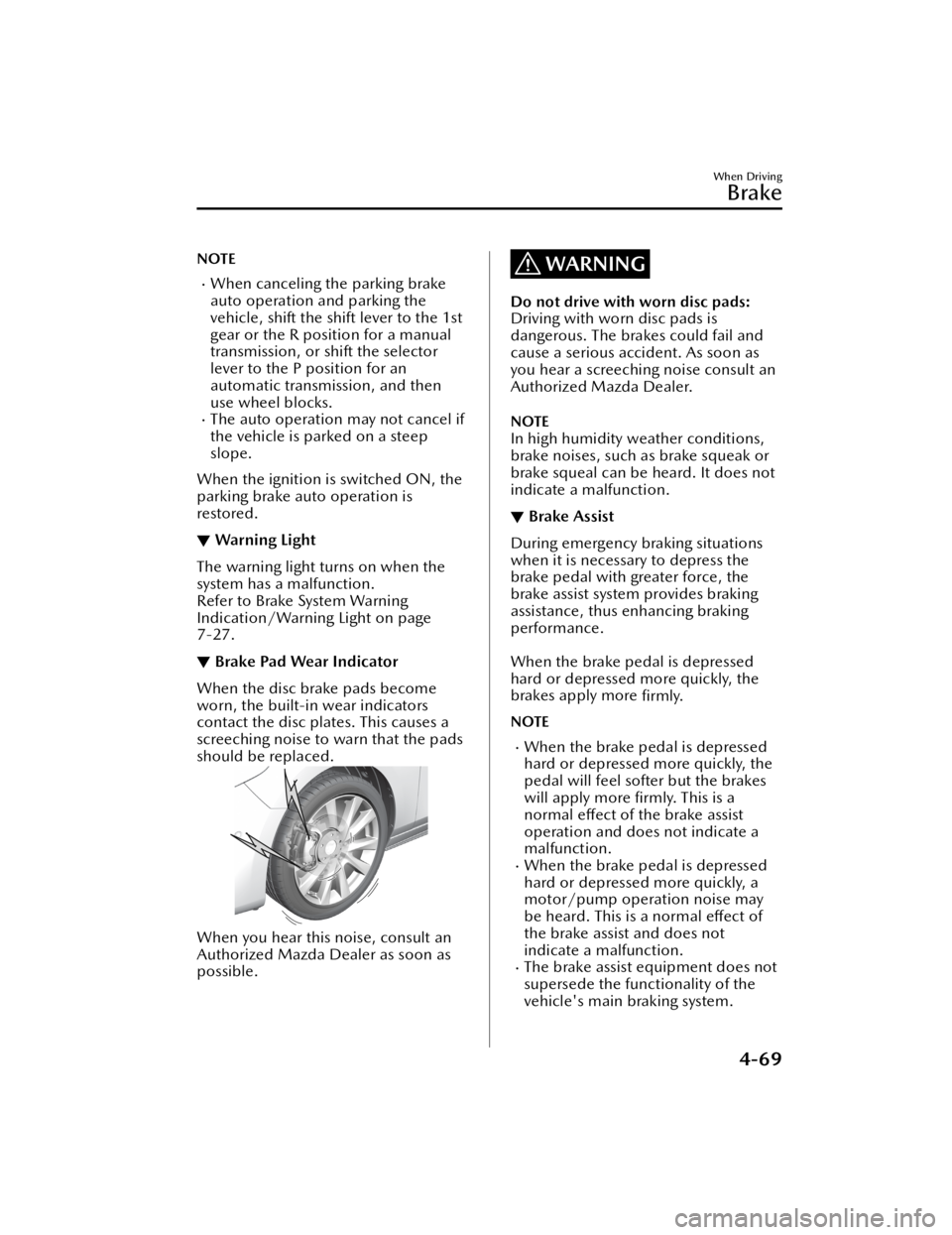
▼Brake Pad Wear Indicator
When the disc brake pads become
worn, the built-in wear indicators
contact the disc plates. This causes a
screeching noise to warn that the pads
should be replaced.
When you hear this noise, consult an
Authorized Mazda Dealer as soon as
possible.
WARNING
Do not drive with worn disc pads:
Driving with worn disc pads is
dangerous. The brakes could fail and
cause a serious accident. As soon as
you hear a screeching noise consult an
Authorized Mazda Dealer.
NOTE
In high humidity weather conditions,
brake noises, such as brake squeak or
brake squeal can be heard. It does not
indicate a malfunction.
▼Brake Assist
During emergency braking situations
when it is necessary to depress the
brake pedal with greater force, the
brake assist system provides braking
assistance, thus
enhancing braking
performance.
When the brake pedal is depressed
hard or depressed more quickly, the
brakes apply more firmly.
NOTE
When the brake pedal is depressed
hard or depressed more quickly, the
pedal will feel softer but the brakes
will apply more firmly. This is a
normal eff ect of the brake assist
operation and does not indicate a
malfunction.
When the brake pedal is depressed
hard or depressed more quickly, a
motor/pump operation noise may
be heard. This is a normal e ffect of
the brake assist and does not
indicate a malfunction.
The brake assist equipment does not
supersede the functionality of the
vehicle's main braking system.
When Driving
Brake
4-69
Mazda3_8JM2-EA -20H_Edition1_new 2020-7-10 17:21:34
Page 216 of 612

NOTE
If the Electric Parking Brake (EPB)
switch is pulled while the
AUTOHOLD is operating, the
parking brake is applied and the
AUTOHOLD is released. In addition,
if the parking brake is released under
this condition, the AUTOHOLD
operates to hold the brakes.
Under the following conditions, the
parking brake is automatically
applied and the AUTOHOLD is
released. The AUTOHOLD is
re-enabled when the conditions
before the AUTOHOLD is released
are restored.
The driver’s seat belt is unfastened.The driver’s door is opened.When about 10 minutes or longer
have passed since the AUTOHOLD
operation started, the parking brake
is automatically applied. Because the
AUTOHOLD is restored when
releasing the parking brake, the hold
on the brakes by AUTOHOLD
function resumes.
(Manual transmission vehicle)
When starting to drive the vehicle
forward or in reverse on a down
slope, depress the clutch pedal and
shift the shift lever to the appropriate
position for driving in the desired
direction, and then depress the
accelerator pedal to release the
AUTOHOLD.
The AUTOHOLD can be canceled
forcibly by fully depressing the
accelerator pedal for 1 second or
longer while the AUTOHOLD is
operating. Forcibly cancel the
AUTOHOLD only when the
AUTOHOLD cannot be canceled due
to a system malfunction or it is
necessary to cancel the AUTOHOLD
in an emergency.
▼To Tu r n O
ff AUTOHOLD System
Depress the brake pedal and press the
AUTOHOLD switch. The AUTOHOLD
is turned o ff and the AUTOHOLD
standby indicator light turns o ff.
1. AUTOHOLD standby indicator light
NOTE
When the brakes are not held such
as while driving the vehicle, the
AUTOHOLD can be turned
off only
by pressing the AUTOHOLD switch.
If the AUTOHOLD switch is pressed
without depressing the brake pedal
while AUTOHOLD is operating
(AUTOHOLD active indicator light in
instrument cluster is turned on), the
message “Depress Brake Pedal and
Operate Switch to Release” is
indicated on the multi-information
display to notify the driver to depress
the brake pedal.
When Driving
Brake
4-74
Mazda3_8JM2-EA -20H_Edition1_new 2020-7-10 17:21:34
Page 217 of 612

If any of the following conditions
occurs while the AUTOHOLD
function is operating (AUTOHOLD
active indicator light is turned on),
the parking brake is applied
automatically and the AUTOHOLD
function turns o ff. For the Electric
Parking Brake (EPB) operation, refer
to the Electric Parking Brake (EPB) on
page 4-66.
The ignition is switched OFF.There is a problem with the
AUTOHOLD function.
Hill Launch Assist (HLA)
▼ Hill Launch Assist (HLA)
The HLA functions to assist in
accelerating the vehicle from a stop on
slopes. When releasing the brake pedal
and depressing the accelerator pedal
to accelerate the vehicle from a stop
while on a slope, the function prevents
the vehicle from rolling. The HLA also
operates when reversing on a slope.
The braking force is maintained
automatically after releasing the brake
pedal on a steep slope.
For manual transmission vehicles, the
HLA operates when the vehicle is tilted
rearward with the shift lever in a
forward gear, and operates when the
vehicle is tilted forward with the shift
lever in the R position.
For automatic transmission vehicles,
the HLA operates when the vehicle is
tilted rearward with the selector lever
in a forward gear, and operates when
the vehicle is tilted forward with the
selector lever in the R position.
WARNING
Do not rely completely on HLA
:
HLA is an auxiliary device for
accelerating from a stop on a slope.
The system only operates for about 2
seconds and therefore, relying only on
the system, when accelerating from a
stop is dangerous because the vehicle
may move (roll) unexpectedly and
cause an accident.
The vehicle could roll depending on
the vehicle's load or if it is towing
something. In addition, for vehicles
with a manual transmission, the
vehicle could still roll depending on
how the clutch pedal or the accelerator
pedal is operated.
When Driving
Brake
4-75
Mazda3_8JM2-EA -20H_Edition1_new 2020-7-10 17:21:34
Page 239 of 612

The BSM will not operate under the
following circumstances.
The vehicle speed falls below
about 10 km/h (6.3 mph) even
though the i-ACTIVSENSE warning
indication/warning light is turned
off.
The shift lever (manual
transmission)/selector lever
(automatic transmission) is shifted
to reverse (R) and the vehicle is
reversing.
The turning radius is small (making
a sharp turn, turning at
intersections).
In the following cases, the
i-ACTIVSENSE warning indication/
warning light turns on and operation
of the system is stopped. If the
i-ACTIVSENSE warning indication/
warning light remains illuminated,
have the vehicle inspected at an
Authorized Mazda Dealer as soon as
possible.
Some problem with the system
including the BSM warning
indicator lights is detected.
A large deviation in the installation
position of a rear side radar sensor
on the vehicle has occurred.
There is a large accumulation of
snow or ice on the rear bumper
near a rear side radar sensor.
Remove any snow, ice or mud on
the rear bumper.
Driving on snow-covered roads for
long periods.
The temperature near the rear side
radar sensor becomes extremely
hot due to driving for long periods
on slopes during the summer.
The battery voltage has decreased.Under the following conditions, the
rear side radar sensor cannot detect
target objects or it may be di fficult to
detect them.
The rear bumper around the rear
side radar sensor is deformed.
Radio wave interference from a
radar sensor equipped on a nearby
vehicle.
The approaching vehicle is any of
the following shapes.
a) The size of the vehicle body is
extremely small.
b) The vehicle height is extremely low or high.
c) A special type of vehicle with a complex shape.
A vehicle is in the detection area at
the rear in an adjacent driving lane
but it does not approach. The BSM
determines the condition based on
radar detection data.
A vehicle is traveling alongside
your vehicle at nearly the same
speed for an extended period of
time.
Vehicles approaching in the
opposite direction.
A vehicle in an adjacent driving
lane is attempting to pass your
vehicle.
A vehicle is in an adjacent lane on
a road with extremely wide driving
lanes. The detection area of the
rear side radar sensor is set at the
road width of expressways.
In the following case, the flashing of
the BSM warning indicator light, and
the activation of the warning sound
and the warning screen indicator
display may not occur or they may be
delayed.
A vehicle makes a lane change
from a driving lane two lanes over
to an adjacent lane.
Driving on steep slopes.Crossing the summit of a hill or
mountain pass.
When Driving
i-ACTIVSENSE
4-97
Mazda3_8JM2-EA -20H_Edition1_new 2020-7-10 17:21:34
Page 241 of 612
The rear side radar sensor of the BSM
may be regulated under the radio
wave related laws of the country
where the vehicle is driven. If this
system is used abroad, it may be
necessary to turn off the system.
Refer to Rear Side Radar Sensor on
page 4-211.
The system switches to the Rear
Cross Tra ffic Alert (RCTA) function
when the shift lever (manual
transmission) or the selector lever
(automatic transmission) is shifted to
the reverse (R) position.
Refer to Rear Cross Tra ffic Alert
(RCTA) on page 4-116.
▼ Blind Spot Monitoring (BSM)
Warning Indicator Lights/Display
Indicator/Blind Spot Monitoring
(BSM) Warning Beep
The BSM system noti
fies the driver of
the presence of vehicles in adjacent
lanes or at the rear of the vehicle using
the BSM warning indicator light, the
warning sound and the display
indicator while the systems are
operational.
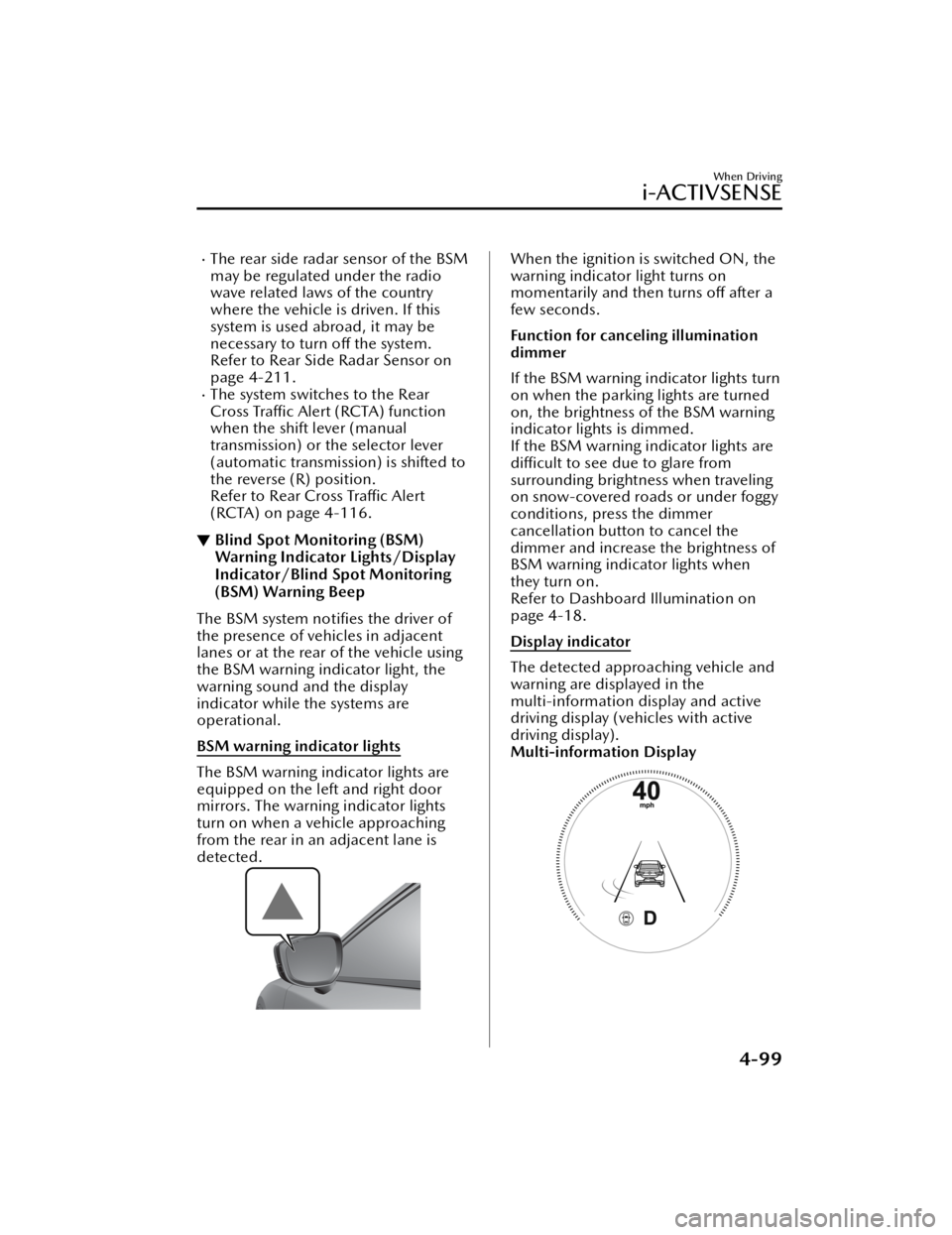
BSM warning indicator lights
The BSM warning indicator lights are
equipped on the left and right door
mirrors. The warning indicator lights
turn on when a vehicle approaching
from the rear in an adjacent lane is
detected.
When the ignition is switched ON, the
warning indicator light turns on
momentarily and then turns o ff after a
few seconds.
Function for canceling illumination
dimmer
If the BSM warning indicator lights turn
on when the parking lights are turned
on, the brightness of the BSM warning
indicator lights is dimmed.
If the BSM warning indicator lights are
di fficult to see due to glare from
surrounding brightness when traveling
on snow-covered roads or under foggy
conditions, press the dimmer
cancellation button to cancel the
dimmer and increase the brightness of
BSM warning indicator lights when
they turn on.
Refer to Dashboard Illumination on
page 4-18.
Display indicator
The detected approaching vehicle and
warning are displayed in the
multi-information display and active
driving display (vehicles with active
driving display).
Multi-information Display
When Driving
i-ACTIVSENSE
4-99
Mazda3_8JM2-EA -20H_Edition1_new 2020-7-10 17:21:34
Page 250 of 612

Distance & Speed Alert(DSA)
*
▼Distance & Speed Alert (DSA)
The DSA is a system which provides
advice for maintaining the appropriate
distance between vehicles and
notifies
the driver of the recommended, safe
distance to maintain with a vehicle
ahead. The system measures the
distance between your vehicle and a
vehicle ahead while the vehicle speed
is about 30 km/h (19 mph) or faster. If
the distance between your vehicle and
a vehicle ahead is close, the system
alerts the driver of a possible collision
using an indication on the display.
WARNING
Do not rely completely on the DSA :
The ability of the system to detect a
vehicle ahead is limited depending on
the type of vehicle ahead, weather
conditions, or tra ffic conditions. In
addition, the system is not for
maintaining the distance between your
vehicle and a vehicle ahead. If you
neglect to operate the accelerator and
brake pedals correctly, it could lead to
an accident. Always check the safety of
the surrounding area and depress the
brake pedal or accelerator pedal while
keeping a safe distance from vehicles
ahead or on-coming vehicles.
Operation conditions
The DSA operates when the following
conditions are all met.
The ignition is switched ON.The DSA is turned on.The shift lever (manual transmission
vehicle) or the selector lever
(automatic transmission vehicle) is in
a position other than R.
The vehicle speed is about 30 km/h
(19 mph) or faster.
i-ACTIVSENSE status symbol
(warning/risk avoidance support
system) (green) is displayed.
NOTE
The objects which activate the
system are four-wheeled vehicles.
The DSA may also operate in the
presence of motorcycles and
bicycles.
The DSA may not operate normally
when the speed of a vehicle ahead is
too slow.
The system does not operate with
the following objects.
Vehicles approaching in the
opposite direction.
Stationary objects (stopped
vehicles, obstructions)
The DSA can be set to inoperable.
(If only the DSA is turned o ff)
Refer to the Settings section in the
Mazda Connect Owner's Manual.
(If the DSA is turned o ff by
operating the i-ACTIVSENSE OFF
switch)
Refer to i-ACTIVSENSE OFF Switch
on page 4-89.
When Driving
i-ACTIVSENSE
4-108*Some models.
Mazda3_8JM2-EA -20H_Edition1_new 2020-7-10 17:21:34
Page 256 of 612

Operation conditions
The system operates when all of the
following conditions are met:
When your vehicle is driven at less
than about 10 km/h (6 mph).
(Automatic transmission)
The selector lever is in the D
position.
(Manual transmission)
The shift lever is in a position other
than N or R.
When a vehicle approaches from the
front side of your vehicle at a vehicle
speed of about 5 km/h (3 mph) or
faster.
FCTA operation
When your vehicle is stopped
When a vehicle is approaching , the
system noti fies the driver that a vehicle
is approaching on the following display
(white arrow).
Multi-information display
Active driving display (vehicles with
active driving display)
360°view monitor (vehicles with
360°view monitor)
When your vehicle is being driven
If there is a possibility of a collision
with an approaching vehicle, a warning
indication is displayed on the following
display (amber arrow) and the warning
sound is activated at the same time.
Multi-information display
Active driving display (vehicles with
active driving display)
360°view monitor (vehicles with
360°view monitor)
NOTE
The system may operate under the
following conditions even if a vehicle
is not approaching.
When Driving
i-ACTIVSENSE
4-114
Mazda3_8JM2-EA -20H_Edition1_new 2020-7-10 17:21:34
Page 259 of 612

WARNING
Always check the surrounding area
visually before actually putting the
vehicle in reverse:
The system is only designed to assist
you in checking for vehicles at the rear
when putting the vehicle in reverse.
Due to certain limitations with the
operation of this system, the Blind Spot
Monitoring (BSM) warning indicator
lights may not flash or it might be
delayed even though a vehicle is
behind your vehicle. Always make it
your responsibility as a driver to check
the rear.
RCTA operation
1. The RCTA system operates when the shift lever (manual
transmission) or the selector lever
(automatic transmi ssion) is shifted
to the reverse (R) position.
2. If there is the possibility of a collision with an approaching
vehicle, the Blind Spot Monitoring
(BSM) warning indicator lights
flashes and the warning beep is
activated simultaneously.
Rear view monitor (vehicles with
Rear view monitor)
The RCTA warning indication in the
rearview monitor also synchronizes
with the Blind Spot Monitoring
(BSM) warning indicator light on
the door mirrors.
360°view monitor (vehicles with
360°view monitor)
The RCTA warning indication in the
360°view monitor also
synchronizes with the Blind Spot
Monitoring (BSM) warning
indicator light on the door mirrors.
Function for canceling illumination
dimmer
If the BSM warning indicator lights turn
on when the parking lights are turned
on, the brightness of the BSM warning
indicator lights is dimmed.
If the BSM warning indicator lights are
di fficult to see due to glare from
surrounding brightness when traveling
on snow-covered roads or under foggy
conditions, press the dimmer
cancellation button to cancel the
dimmer and increase the brightness of
BSM warning indicator lights when
they turn on.
Refer to Dashboard Illumination on
page 4-18.
NOTE
The system may operate under the
following conditions even if a vehicle
is not approaching.
An object that re flects the radio
waves of the radar such as a
parked vehicle, guardrail, or wall is
directly next to your vehicle.
A vehicle approaching from the
rear left and right side of your
vehicle slows down.
When Driving
i-ACTIVSENSE
4-117
Mazda3_8JM2-EA -20H_Edition1_new 2020-7-10 17:21:34
Page 283 of 612

The vehicle is driven on roads with
lane lines other than white (yellow)
lines, such as an expressway.
Do not get out of the vehicle while
the stop hold control is operating.
(Automatic transmission vehicle)
Getting out of the vehicle while the
stop hold control is operating is
dangerous as the vehicle may move
unexpectedly and result in an accident.
Before getting out of the vehicle,
switch the TJA o ff, apply the parking
brake, and then shift the selector lever
to the P position.
CAUTION
Turn the system off when the vehicle is
running on a chassis roller.
Heed the following cautions so that
the TJA can operate normally.
Turn the system o ff when the vehicle
is running on a chassis roller.
Do not modify the vehicle's
suspensions.
Always use wheels of the speci fied
size for the front and rear wheels.
Consult an Authorized Mazda Dealer
for tire replacement.
NOTE
The headway control does not detect
the following as physical objects.
Vehicles approaching in the
opposite direction
Pe d e s t r i a n sStationary objects (stopped
vehicles, obstructions)
If a vehicle ahead is traveling at an
extremely low speed, the system may
not detect it correctly.
If there is a structure on the road or
an object (such as a monorail) at a
low height o ff the ground in front of
the vehicle, the system may operate.
Therefore, do not use the TJA.
Do not use the TJA under conditions
in which close proximity warnings
are frequently activated.
If it is necessary to accelerate for a
lane change or the vehicle ahead
brakes suddenly causing you to close
in on the vehicle rapidly, accelerate
using the accelerator pedal or
decelerate using the brake pedal
depending on the conditions.
While the TJA is in use, any intended
engine braking does not occur even
if you shift the shift lever (manual
transmission) or the selector lever
(automatic transmission). If
deceleration is required, lower the
vehicle speed setting or depress the
brake pedal.
While braking by the TJA control is
operating , you might hear an
operation sound, however, this does
not indicate a problem.
The brake lights turn on while
braking by the TJA control is
operating , however, they may not
turn on while the vehicle is on a
down slope at the set vehicle speed
or traveling at a constant speed and
following a vehicle ahead.
Under the following conditions, the
TJA may not be able to detect white
(yellow) lines or vehicles ahead
correctly and the TJA may not
operate normally.
The forward sensing camera (FSC)
cannot recognize the area in front
of the vehicle due to soiling or fog.
When Driving
i-ACTIVSENSE
4-141
Mazda3_8JM2-EA -20H_Edition1_new 2020-7-10 17:21:34