transmission MAZDA MODEL 3 HATCHBACK 2021 Repair Manual
[x] Cancel search | Manufacturer: MAZDA, Model Year: 2021, Model line: MODEL 3 HATCHBACK, Model: MAZDA MODEL 3 HATCHBACK 2021Pages: 612, PDF Size: 89.06 MB
Page 367 of 612

▼Switching to the Rear View Monitor Display
Shift the shift lever (manual transmissi
on) or the selector lever (automatic
transmission) to reverse (R) position with the ignition switched ON to switch the
display to the rear view monitor display.
NOTE
When the shift lever (manual transmission) or the selector lever (automatic
transmission) is shifted from reverse (R) position to another shift lever (manual
transmission) or the selector lever (aut omatic transmission) position, the screen
returns to the previous display.
▼ Displayable Range on the Screen
The images on the screen may be di
fferent from the actual conditions.
1. (Screen display)
2. (Actual view)
3. Bumper
4. “Check surroundings for sa fety.” message is displayed
5. Object
NOTE
The displayable range varies depending on the vehicle and road conditions.If the camera lens is touched or there is any dirt on it, it could a ffect the screen
image. Wipe the lens using a soft cloth.
The displayable range is limited. Objects under the bumper or around the bumper
ends cannot be displayed.
When Driving
Rear View Monitor
4-225
Mazda3_8JM2-EA -20H_Edition1_new 2020-7-10 17:21:34
Page 370 of 612

b) Distance guide linesThese guide lines indicate the approximate distance to a point measured from the
vehicle's rear (from the end of the bumper).
The red line indicates the point about 0.5 m (19 in) from the rear bumper.
The yellow lines indicate the points about 1.0 m (39 in) and 2.0 m (78 in) from
the rear bumper.
CAUTION
The guide lines on the screen are fixed lines. They are not synced to the driver's
turning of the steering wheel. Always be careful and check the area to the vehicle's
rear and the surrounding area directly with your eyes while backing up.
▼ Rear View Monitor Operation
The operation of the rear view monitor when reversing the vehicle varies depending
on the tra
ffic, road, and vehicle conditions. The amount of steering and the timing
also varies depending on conditions, so con firm the surrounding conditions directly
with your eyes and steer the vehicle in accordance with the conditions.
Be well aware of the above cautions prior to using the rear view monitor.
Predicted vehicle path assist lines display type
NOTE
The following shows an example of vehicle parking in which the steering wheel is
turned to the right when backing up the vehicle. The operation is reversed when
backing up the vehicle from the opposite direction.
1. Shift the shift lever (manual transmission) or the selector lever (automatic
transmission) to reverse (R) position to switch the display to the rear view
monitor display.
When Driving
Rear View Monitor
4-228
Mazda3_8JM2-EA -20H_Edition1_new 2020-7-10 17:21:34
Page 373 of 612
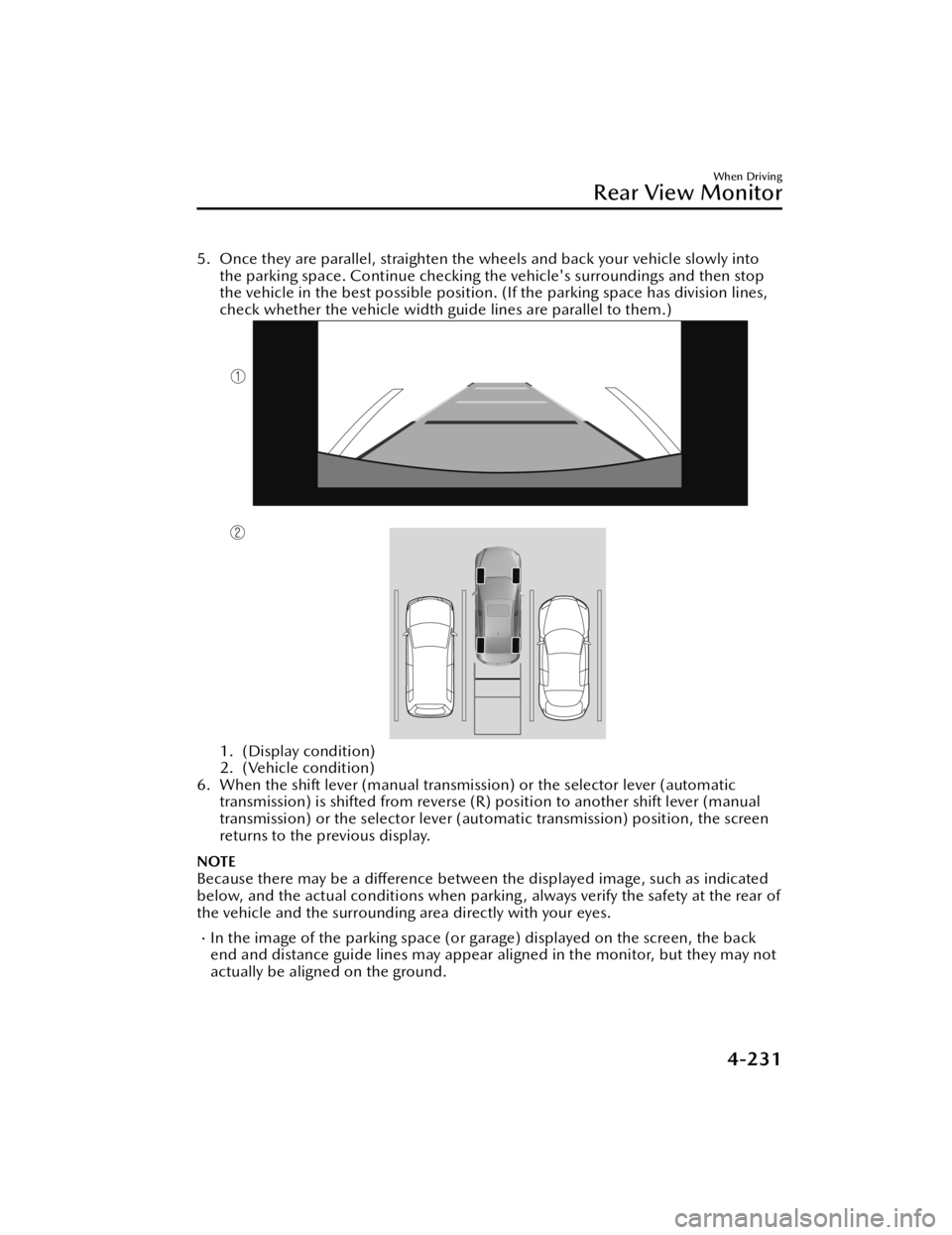
5. Once they are parallel, straighten the wheels and back your vehicle slowly intothe parking space. Continue checking the vehicle's surroundings and then stop
the vehicle in the best possible position. (If the parking space has division lines,
check whether the vehicle width guide lines are parallel to them.)
1. (Display condition)
2. (Vehicle condition)
6. When the shift lever (manual transmission) or the selector lever (automatic transmission) is shifted from reverse (R) position to another shift lever (manual
transmission) or the selector lever (aut omatic transmission) position, the screen
returns to the previous display.
NOTE
Because there may be a diff erence between the displayed image, such as indicated
below, and the actual conditions when parkin g , always verify the safety at the rear of
the vehicle and the surrounding area directly with your eyes.
In the image of the parking space (or garage) displayed on the screen, the back
end and distance guide lines may appear aligned in the monitor, but they may not
actually be aligned on the ground.
When Driving
Rear View Monitor
4-231
Mazda3_8JM2-EA -20H_Edition1_new 2020-7-10 17:21:34
Page 374 of 612

When parking in a space with a division line on only one side of the parking space,
the division line and the vehicle width guide line appear aligned in the monitor,
but they may not actually be aligned on the ground.
Fixed assist lines display type
NOTE
Images displayed on the monitor from the rear view parking camera are reversed
images (mirror images).
1. Shift the shift lever (manual transmission) or the selector lever (automatic transmission) to reverse (R) position to switch the display to the rear view
monitor display.
2. Con firming the surrounding conditions, reverse the vehicle.
When Driving
Rear View Monitor
4-232
Mazda3_8JM2-EA -20H_Edition1_new 2020-7-10 17:21:34
Page 376 of 612
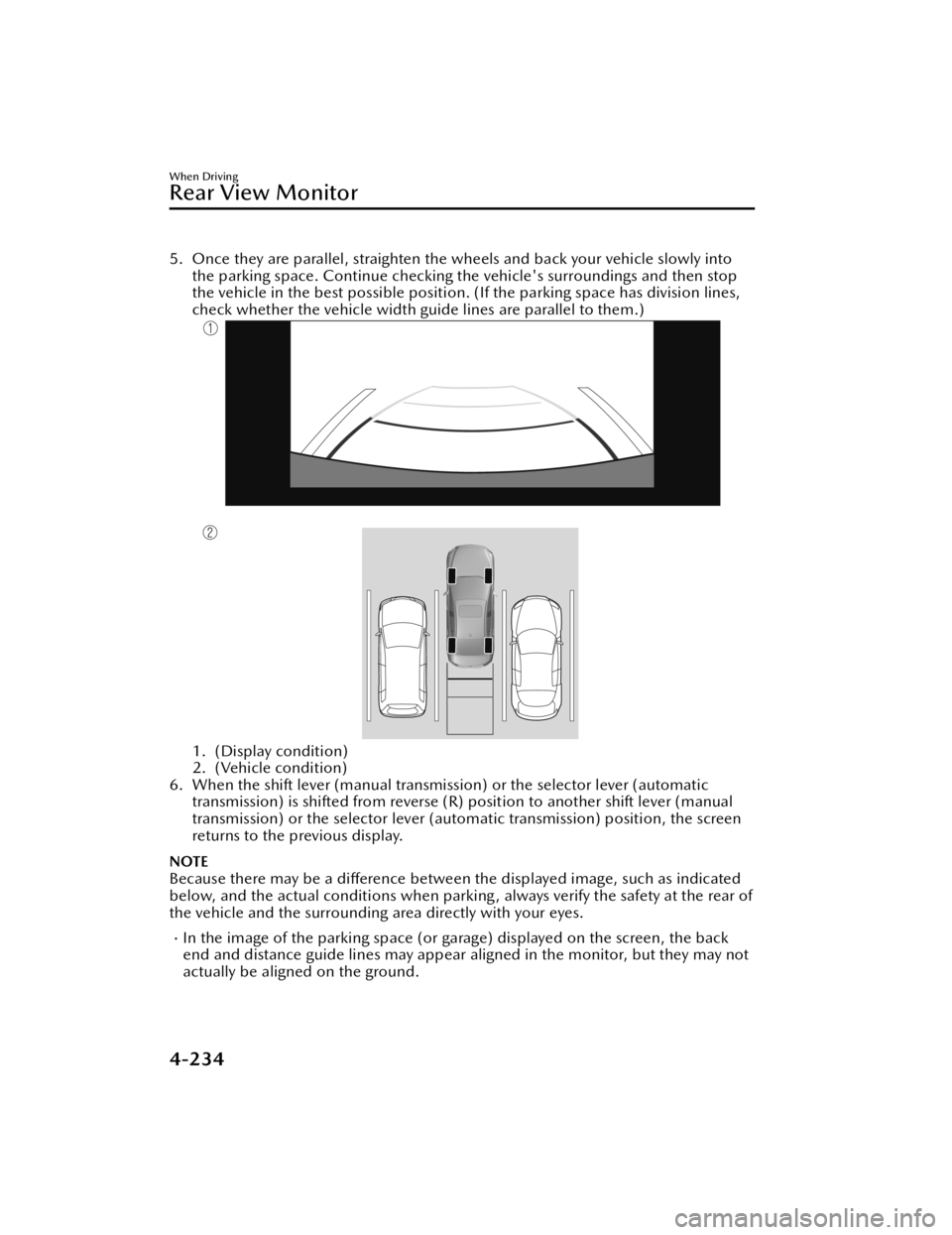
5. Once they are parallel, straighten the wheels and back your vehicle slowly intothe parking space. Continue checking the vehicle's surroundings and then stop
the vehicle in the best possible position. (If the parking space has division lines,
check whether the vehicle width guide lines are parallel to them.)
1. (Display condition)
2. (Vehicle condition)
6. When the shift lever (manual transmission) or the selector lever (automatic transmission) is shifted from reverse (R) position to another shift lever (manual
transmission) or the select or lever (automatic transmission) position, the screen
returns to the previous display.
NOTE
Because there may be a di fference between the displayed image, such as indicated
below, and the actual conditions when parkin g , always verify the safety at the rear of
the vehicle and the surrounding area directly with your eyes.
In the image of the parking space (or garage) displayed on the screen, the back
end and distance guide lines may appear aligned in the monitor, but they may not
actually be aligned on the ground.
When Driving
Rear View Monitor
4-234
Mazda3_8JM2-EA -20H_Edition1_new 2020-7-10 17:21:34
Page 407 of 612
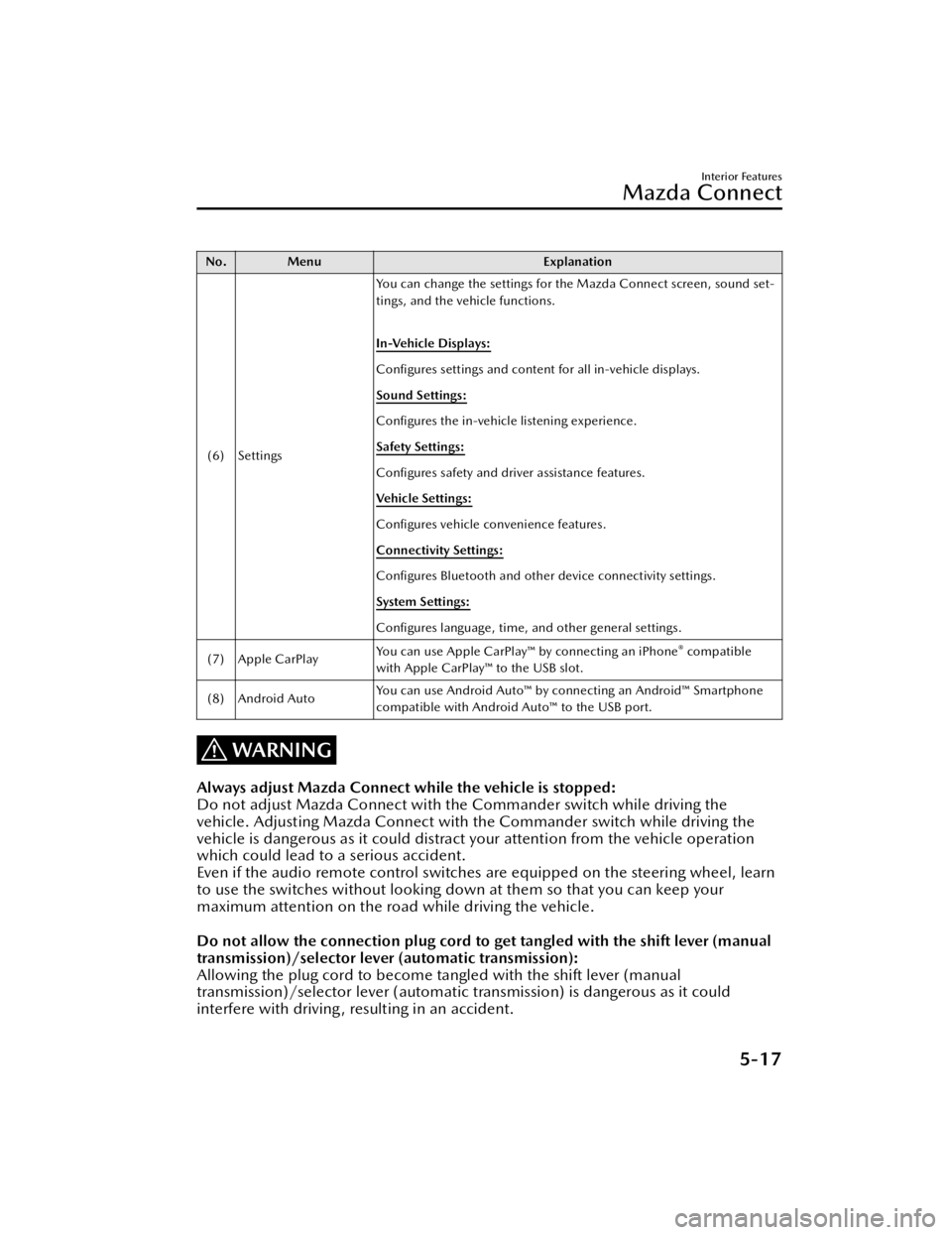
No. MenuExplanation
(6) Settings You can change the settings for the Mazda Connect screen, sound set-
tings, and the vehicle functions.
In-Vehicle Displays:
Con
figures settings and content for all in-vehicle displays.
Sound Settings:
Con figures the in-vehicle listening experience.
Safety Settings:
Con figures safety and driver assistance features.
Ve h i c l e S e t t i n g s :
Con figures vehicle convenience features.
Connectivity Settings:
Con figures Bluetooth and other device connectivity settings.
System Settings:
Con figures language, time, and other general settings.
(7) Apple CarPlay You can use Apple CarPlay™ by connecting an iPhone
® compatible
with Apple CarPlay™ to the USB slot.
(8) Android Auto You can use Android Auto™ by connecting an Android™ Smartphone
compatible with Android Auto™ to the USB port.
WARNING
Always adjust Mazda Connect while the vehicle is stopped:
Do not adjust Mazda Connect with th
e Commander switch while driving the
vehicle. Adjusting Mazda Connect with the Commander switch while driving the
vehicle is dangerous as it could distract your attention from the vehicle operation
which could lead to a serious accident.
Even if the audio remote control switches are equipped on the steering wheel, learn
to use the switches without looking down at them so that you can keep your
maximum attention on the road while driving the vehicle.
Do not allow the connection plug cord to get tangled with the shift lever (manual
transmission)/selector leve r (automatic transmission):
Allowing the plug cord to become tangled with the shift lever (manual
transmission)/selector lever (automatic transmission) is dangerous as it could
interfere with driving, resulting in an accident.
Interior Features
Mazda Connect
5-17
Mazda3_8JM2-EA -20H_Edition1_new 2020-7-10 17:21:34
Page 482 of 612
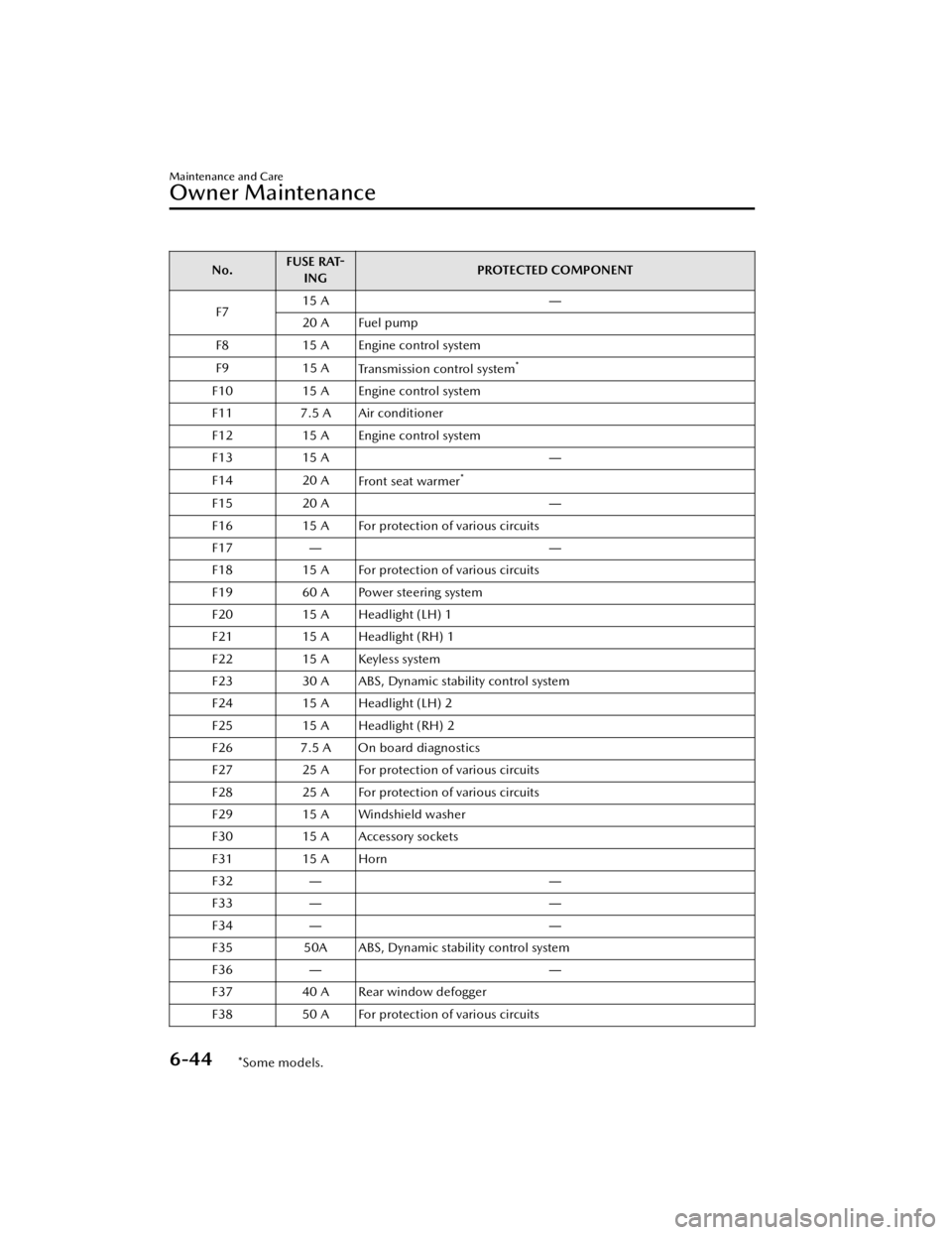
No.FUSE RAT
-
ING PROTECTED COMPONENT
F7 15 A
―
20 A Fuel pump
F8 15 A Engine control system
F9 15 A Transmission control system
*
F1015 A Engine control system
F11 7.5 A Air conditioner
F12 15 A Engine control system
F13 15 A ―
F14 20 A
Front seat warmer
*
F15 20 A ―
F16 15 A For protection of various circuits
F17 ――
F18 15 A For protection of various circuits
F19 60 A Power steering system
F20 15 A Headlight (LH) 1
F21 15 A Headlight (RH) 1
F22 15 A Keyless system
F23 30 A ABS, Dynamic stability control system
F24 15 A Headlight (LH) 2
F25 15 A Headlight (RH) 2
F26 7.5 A On board diagnostics
F27 25 A For protection of various circuits
F28 25 A For protection of various circuits
F29 15 A Windshield washer
F30 15 A Accessory sockets
F31 15 A Horn
F32 ――
F33 ――
F34 ――
F35 50A ABS, Dynamic stability control system
F36 ――
F37 40 A Rear window defogger
F38 50 A For protection of various circuits
Maintenance and Care
Owner Maintenance
6-44*Some models.
Mazda3_8JM2-EA -20H_Edition1_new 2020-7-10 17:21:34
Page 494 of 612

▼Active Driving Display
Maintenance*
The dust-proof sheet has a coating.
When cleaning , do
not use a hard or
rough-surface cloth, or cleaning
detergent. In addition, if a chemical
solvent gets on the active driving
display, wipe it o ff immediately. The
dust-proof sheet could be damaged
and the surface coating could be
scratched. Use a fine, soft cloth such as
those used for cleaning eyeglasses.
NOTE
Use of compressed air when cleaning
the dust-proof sheet is recommended.
▼ Panel Maintenance
If a panel becomes soiled, wipe it o
ff
with a soft cloth soaked in clean water
and thoroughly wrung out.
If some areas require further cleaning ,
use the following procedure:
1. Wipe the soiled area with a soft cloth soaked in a mild detergent
(approx. 5 %) diluted with water.
2. Wipe o ff the remaining detergent
using a cloth soaked in clean water
and wrung out well.
NOTE
Be particularly careful when cleaning
shiny surface panels and metallic parts
such as plating as they can be
scratched easily.
▼ Cleaning the Window Interiors
If the windows become covered with
an oily, greasy, or waxy
film, clean
them with glass cleaner. Follow the
directions on the container.
CAUTION
Do not scrape or scratch the inside
of the window glass. It could
damage the thermal filaments and
the antenna lines.
When washing the inside of the
window glass, use a soft cloth
dampened in lukewarm water, gently
wiping the thermal filaments and the
antenna lines.
Use of glass cleaning products could
damage the thermal filaments and
the antenna lines.
▼ Cleaning the Floor Mats
Rubber
floor mats should be cleaned
with mild soap and water only.
WARNING
Do not use rubber cleaners, such as
tire cleaner or tire shine, when
cleaning rubber floor mats:
Cleaning the rubber floor mats with
rubber cleaning products makes the
fl oor mats slippery.
This may cause an accident when
depressing the accelerator, brake, or
clutch (Manual transmission) pedal or
when getting in or out of the vehicle.
After removing the floor mats for
cleaning, always reinstall them securely
(page 3-46).
Maintenance and Care
Appearance Care
6-56*Some models.
Mazda3_8JM2-EA -20H_Edition1_new 2020-7-10 17:21:34
Page 502 of 612
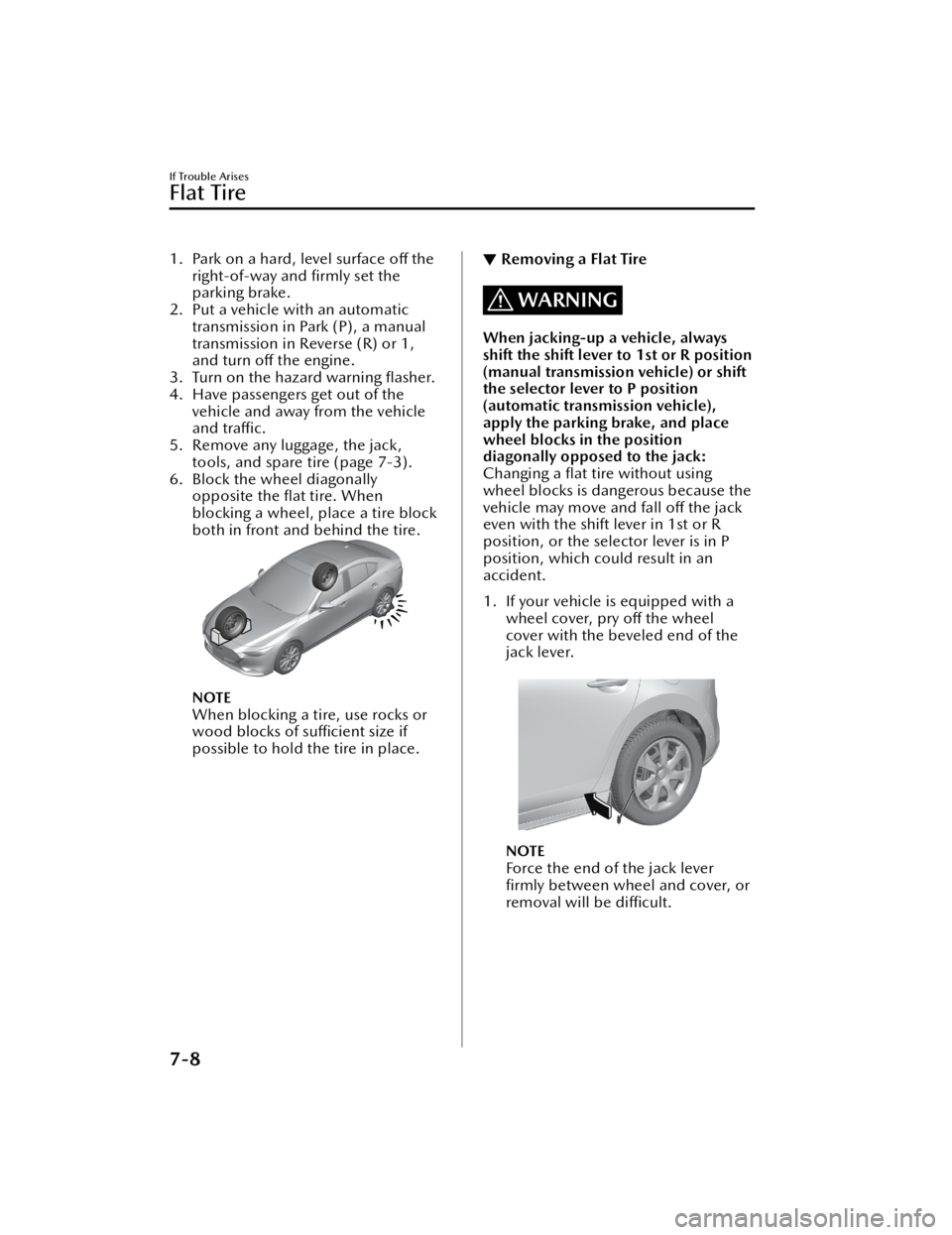
1. Park on a hard, level surface off the
right-of-way and firmly set the
parking brake.
2. Put a vehicle with an automatic transmission in Park (P), a manual
transmission in Reverse (R) or 1,
and turn o ff the engine.
3. Turn on the hazard warning flasher.
4. Have passengers get out of the vehicle and away from the vehicle
and tra ffic.
5. Remove any luggage, the jack, tools, and spare tire (page 7-3).
6. Block the wheel diagonally opposite the flat tire. When
blocking a wheel, place a tire block
both in front and behind the tire.
NOTE
When blocking a tire, use rocks or
wood blocks of su fficient size if
possible to hold the tire in place.
▼ Removing a Flat Tire
WARNING
When jacking-up a vehicle, always
shift the shift lever to 1st or R position
(manual transmission vehicle) or shift
the selector lever to P position
(automatic transmission vehicle),
apply the parking brake, and place
wheel blocks in the position
diagonally opposed to the jack:
Changing a
flat tire without using
wheel blocks is dangerous because the
vehicle may move and fall o ff the jack
even with the shift lever in 1st or R
position, or the selector lever is in P
position, which could result in an
accident.
1. If your vehicle is equipped with a wheel cover, pry off the wheel
cover with the beveled end of the
jack lever.
NOTE
Force the end of the jack lever
firmly between wheel and cover, or
removal will be di fficult.
If Trouble Arises
Flat Tire
7-8
Mazda3_8JM2-EA -20H_Edition1_new 2020-7-10 17:21:34
Page 514 of 612

Starting a Flooded Engine
▼Starting a Flooded Engine
If the engine fails to start, it may be
fl
ooded (excessive fuel in the engine).
Follow this procedure:
1. If the engine does not start within 5 seconds on the first try, wait 10
seconds and try again.
2. Make sure the parking brake is on.
3. Depress the accelerator all the way
and hold it there.
4. Depress the clutch pedal (manual
transmission) or the brake pedal
(automatic transmission), then
press the push button start. If the
engine starts, release the
accelerator immediately because
the engine will suddenly rev up.
5. If the engine fails to start, crank it
without depressing the accelerator.
If the engine still does not start using
the previous procedure, have your
vehicle inspected by an Authorized
Mazda Dealer.
Push-Starting
▼ Push-Starting
Do not push-start your Mazda.
WARNING
Never tow a vehicle to start it:
Towing a vehicle to start it is
dangerous. The vehicle being towed
could surge forward when its engine
starts, causing the 2 vehicles to collide.
The occupants could be injured.
CAUTION
Do not push-start a vehicle that has a
manual transmission. It can damage
the emission control system.
NOTE
You cannot start a vehicle with an
automatic transmissi
on by pushing it.
If Trouble Arises
Emergency Starting
7-20
Mazda3_8JM2-EA-20H_Edition1_new 2020-7-10 17:21:34